【Redis连接池:合理管理客户端连接】
💡 摘要:是否遇到Redis连接数暴增导致服务不可用?是否被连接超时和性能问题困扰?Redis连接池是管理客户端连接的关键技术,它能显著提升性能、降低资源消耗、避免连接风暴。本文将深入探讨Redis连接池的工作原理、配置策略和最佳实践,帮助你构建高效可靠的Redis连接管理体系!
一、连接池的核心价值
1. 为什么需要连接池?
传统连接的痛点:
-
🔄 频繁创建销毁:每次操作创建新连接,TCP握手开销大
-
📈 连接数暴增:高并发时连接数急剧增长
-
⚡ 性能瓶颈:连接建立和销毁消耗大量资源
-
🚫 服务不可用:连接数超过限制导致拒绝服务
连接池的优势:
-
✅ 连接复用:减少TCP握手和SSL握手开销
-
✅ 资源控制:限制最大连接数,避免过度消耗
-
✅ 性能提升:减少连接建立时间,提高吞吐量
-
✅ 健康管理:自动检测和移除无效连接
2. 连接池工作原理
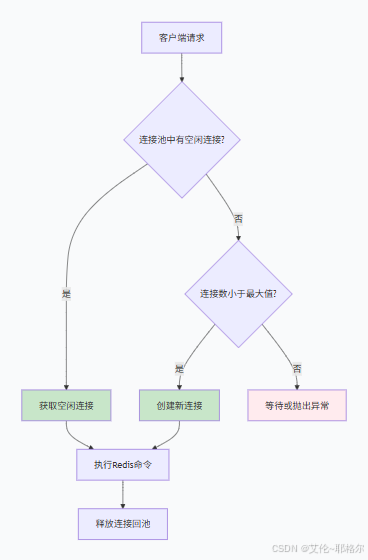
二、连接池配置详解
1. 基础配置参数
Python Redis连接池配置:
python
import redis
from redis.connection import ConnectionPool

# 创建连接池
pool = ConnectionPool(
    host='localhost',
    port=6379,
    password='your_password',
    db=0,

    # 连接池大小配置
    max_connections=50,           # 最大连接数
    timeout=5,                    # 获取连接超时时间(秒)
    socket_timeout=2,             # 操作超时时间(秒)
    socket_connect_timeout=1,     # 连接建立超时时间(秒)

    # 连接健康检查
    health_check_interval=30,     # 健康检查间隔(秒)
    retry_on_timeout=True,        # 超时重试
    decode_responses=True         # 自动解码响应
)

# 使用连接池
redis_client = redis.Redis(connection_pool=pool)
Java Jedis连接池配置:
java
import redis.clients.jedis.JedisPool;
import redis.clients.jedis.JedisPoolConfig;

JedisPoolConfig config = new JedisPoolConfig();
config.setMaxTotal(50);            // 最大连接数
config.setMaxIdle(20);             // 最大空闲连接数
config.setMinIdle(5);              // 最小空闲连接数
config.setMaxWaitMillis(2000);     // 获取连接最大等待时间
config.setTestOnBorrow(true);      // 获取连接时检验
config.setTestOnReturn(true);      // 归还连接时检验
config.setTestWhileIdle(true);     // 空闲时检验连接

JedisPool pool = new JedisPool(config, "localhost", 6379, 2000, "password");
2. 关键参数说明
| 参数 | 默认值 | 建议值 | 说明 |
|---|---|---|---|
| max_connections | 无限制 | 50-100 | 最大连接数,根据业务调整 |
| max_idle | 10 | 20-30 | 最大空闲连接数 |
| min_idle | 0 | 5-10 | 最小空闲连接数 |
| timeout | 无限制 | 2-5秒 | 获取连接超时时间 |
| socket_timeout | 无限制 | 1-3秒 | 操作超时时间 |
| health_check_interval | 0 | 30秒 | 健康检查间隔 |
三、生产环境配置实战
1. 连接池大小计算
基于业务的连接池规划:
python
def calculate_pool_size():
    """
    计算合适的连接池大小
    公式:max_connections = (max_qps * avg_response_time_ms) / 1000
    """
    # 业务指标
    max_qps = 1000                # 最大每秒请求量
    avg_response_time = 5         # 平均响应时间(毫秒)
    peak_multiplier = 1.5         # 峰值倍数

    # 计算理论值
    theoretical_max = (max_qps * avg_response_time) / 1000
    recommended_max = int(theoretical_max * peak_multiplier)

    print(f"理论最大连接数: {theoretical_max:.1f}")
    print(f"推荐连接池大小: {recommended_max}")

    return recommended_max

# 输出:理论最大连接数: 5.0, 推荐连接池大小: 8
2. 多环境配置策略
环境差异化配置:
python
class ConnectionPoolManager:
    def __init__(self, env):
        self.env = env
        self.pools = {}

    def get_pool_config(self, env):
        """根据环境获取配置"""
        configs = {
            'development': {
                'max_connections': 20,
                'timeout': 3,
                'health_check_interval': 60
            },
            'testing': {
                'max_connections': 50,
                'timeout': 2,
                'health_check_interval': 30
            },
            'production': {
                'max_connections': 100,
                'timeout': 1,
                'health_check_interval': 15,
                'retry_on_timeout': True
            }
        }
        return configs.get(env, configs['development'])

    def create_pool(self, name, **overrides):
        """创建连接池"""
        base_config = self.get_pool_config(self.env)
        config = {**base_config, **overrides}

        pool = ConnectionPool(**config)
        self.pools[name] = pool
        return pool

    def get_pool(self, name):
        """获取连接池"""
        return self.pools.get(name)

# 使用示例
pool_manager = ConnectionPoolManager('production')
user_pool = pool_manager.create_pool('users', max_connections=50)
order_pool = pool_manager.create_pool('orders', max_connections=30)
四、高级连接池管理
1. 连接池监控与统计
连接池状态监控:
python
class PoolMonitor:
    def __init__(self, pool):
        self.pool = pool
        self.metrics = {
            'total_connections': 0,
            'idle_connections': 0,
            'in_use_connections': 0,
            'waiting_requests': 0
        }

    def collect_metrics(self):
        """收集连接池指标"""
        # 获取连接池状态(具体实现取决于客户端库)
        self.metrics.update({
            'total_connections': self.pool._created_connections,
            'idle_connections': len(self.pool._available_connections),
            'in_use_connections': self.pool._in_use_connections,
            'waiting_requests': self.pool._waiting_requests
        })
        return self.metrics

    def check_health(self):
        """检查连接池健康状态"""
        metrics = self.collect_metrics()

        # 检查连接泄漏
        if metrics['in_use_connections'] > metrics['total_connections'] * 0.8:
            self.alert('连接使用率过高', metrics)

        # 检查等待队列
        if metrics['waiting_requests'] > 10:
            self.alert('连接获取等待队列过长', metrics)

    def alert(self, message, metrics):
        """发送告警"""
        print(f"🚨 {message}")
        print(f"指标: {metrics}")
        # 这里可以集成邮件、短信等告警方式

# 使用示例
monitor = PoolMonitor(pool)
schedule.every(30).seconds.do(monitor.check_health)
2. 连接泄漏检测
连接泄漏检测工具:
python
import threading
import time
from collections import defaultdict

class ConnectionLeakDetector:
    def __init__(self):
        self.connection_tracker = defaultdict(list)
        self.lock = threading.Lock()

    def track_connection(self, connection_id, stack_info):
        """跟踪连接获取"""
        with self.lock:
            self.connection_tracker[connection_id].append({
                'acquired_at': time.time(),
                'stack': stack_info
            })

    def track_release(self, connection_id):
        """跟踪连接释放"""
        with self.lock:
            if connection_id in self.connection_tracker:
                self.connection_tracker[connection_id].append({
                    'released_at': time.time()
                })

    def detect_leaks(self, timeout=60):
        """检测连接泄漏"""
        leaks = []
        current_time = time.time()

        with self.lock:
            for conn_id, events in self.connection_tracker.items():
                # 检查最后一个事件是否是获取连接
                if events and 'acquired_at' in events[-1]:
                    acquire_time = events[-1]['acquired_at']
                    if current_time - acquire_time > timeout:
                        leaks.append({
                            'connection_id': conn_id,
                            'hold_time': current_time - acquire_time,
                            'stack_trace': events[-1]['stack']
                        })

        return leaks

# 集成到连接池
class MonitoredConnectionPool(ConnectionPool):
    def __init__(self, *args, **kwargs):
        super().__init__(*args, **kwargs)
        self.leak_detector = ConnectionLeakDetector()

    def get_connection(self, *args, **kwargs):
        conn = super().get_connection(*args, **kwargs)
        # 跟踪连接获取
        stack_info = ''.join(traceback.format_stack()[:-1])
        self.leak_detector.track_connection(id(conn), stack_info)
        return conn

    def release(self, connection):
        super().release(connection)
        # 跟踪连接释放
        self.leak_detector.track_release(id(connection))
五、多场景连接池策略
1. 读写分离连接池
主从架构连接管理:
python
class ReadWriteConnectionPool:
    def __init__(self, master_config, replica_configs):
        self.master_pool = ConnectionPool(**master_config)
        self.replica_pools = [ConnectionPool(**config) for config in replica_configs]
        self.replica_index = 0

    def get_master_connection(self):
        """获取主节点连接"""
        return self.master_pool.get_connection()

    def get_replica_connection(self):
        """获取从节点连接(轮询)"""
        pool = self.replica_pools[self.replica_index]
        self.replica_index = (self.replica_index + 1) % len(self.replica_pools)
        return pool.get_connection()

    def release_connection(self, connection):
        """释放连接"""
        # 根据连接类型释放到对应的池
        # 需要根据连接对象判断属于哪个池

    def get_connection(self, command=None):
        """智能获取连接"""
        if command and command.upper() in ['GET', 'HGET', 'SMEMBERS']:
            return self.get_replica_connection()
        else:
            return self.get_master_connection()
2. 集群模式连接池
Redis集群连接管理:
python
from redis.cluster import RedisCluster, ClusterConnectionPool

class CustomClusterConnectionPool(ClusterConnectionPool):
    def __init__(self, startup_nodes, **kwargs):
        # 集群连接池配置
        cluster_config = {
            'max_connections': 100,
            'max_connections_per_node': 10,
            'timeout': 2,
            'socket_timeout': 1,
            'retry_on_timeout': True,
            **kwargs
        }
        super().__init__(startup_nodes=startup_nodes, **cluster_config)

    def get_metrics(self):
        """获取集群连接池指标"""
        metrics = {}
        for node, pool in self._node_connection_pools.items():
            metrics[str(node)] = {
                'total_connections': pool._created_connections,
                'idle_connections': len(pool._available_connections),
                'in_use_connections': pool._in_use_connections
            }
        return metrics

# 使用示例
startup_nodes = [{"host": "127.0.0.1", "port": "7000"}]
cluster_pool = CustomClusterConnectionPool(startup_nodes=startup_nodes)
cluster_client = RedisCluster(connection_pool=cluster_pool)
六、性能优化实践
1. 连接池调优策略
基于压测的优化:
python
import time
import statistics
from concurrent.futures import ThreadPoolExecutor

class ConnectionPoolBenchmark:
    def __init__(self, pool_config):
        self.pool_config = pool_config

    def run_benchmark(self, num_threads=100, requests_per_thread=1000):
        """运行性能基准测试"""
        results = []

        def worker(thread_id):
            pool = ConnectionPool(**self.pool_config)
            client = redis.Redis(connection_pool=pool)

            thread_results = []
            for i in range(requests_per_thread):
                start_time = time.time()
                client.ping()  # 简单操作测试
                end_time = time.time()
                thread_results.append(end_time - start_time)

            pool.disconnect()
            return thread_results

        with ThreadPoolExecutor(max_workers=num_threads) as executor:
            futures = [executor.submit(worker, i) for i in range(num_threads)]
            for future in futures:
                results.extend(future.result())

        return self.analyze_results(results)

    def analyze_results(self, results):
        """分析测试结果"""
        return {
            'total_requests': len(results),
            'avg_latency': statistics.mean(results) * 1000,  # 毫秒
            'p95_latency': statistics.quantiles(results, n=20)[18] * 1000,
            'p99_latency': statistics.quantiles(results, n=100)[98] * 1000,
            'max_latency': max(results) * 1000
        }

# 测试不同配置
configs = [
    {'max_connections': 20, 'timeout': 1},
    {'max_connections': 50, 'timeout': 1},
    {'max_connections': 100, 'timeout': 1}
]

for config in configs:
    benchmark = ConnectionPoolBenchmark(config)
    results = benchmark.run_benchmark()
    print(f"配置 {config}: {results}")
2. 自适应连接池
动态调整连接池大小:
python
class AdaptiveConnectionPool(ConnectionPool):
    def __init__(self, *args, **kwargs):
        super().__init__(*args, **kwargs)
        self.adjustment_interval = 300  # 5分钟调整一次
        self.last_adjustment = time.time()
        self.usage_history = []

    def collect_usage_stats(self):
        """收集使用统计"""
        stats = {
            'timestamp': time.time(),
            'in_use': self._in_use_connections,
            'idle': len(self._available_connections),
            'waiting': self._waiting_requests
        }
        self.usage_history.append(stats)

        # 保留最近1小时数据
        self.usage_history = [s for s in self.usage_history
                            if time.time() - s['timestamp'] < 3600]

    def adjust_pool_size(self):
        """调整连接池大小"""
        if time.time() - self.last_adjustment < self.adjustment_interval:
            return

        # 分析历史数据
        avg_usage = sum(s['in_use'] for s in self.usage_history) / len(self.usage_history)
        max_usage = max(s['in_use'] for s in self.usage_history)
        avg_waiting = sum(s['waiting'] for s in self.usage_history) / len(self.usage_history)

        # 调整策略
        if avg_waiting > 5 and max_usage < self.max_connections * 0.8:
            # 增加最大连接数
            new_max = min(self.max_connections * 1.2, 200)
            self.max_connections = int(new_max)
            print(f"增加最大连接数到: {self.max_connections}")

        elif avg_usage < self.max_connections * 0.3:
            # 减少最大连接数
            new_max = max(self.max_connections * 0.8, 10)
            self.max_connections = int(new_max)
            print(f"减少最大连接数到: {self.max_connections}")

        self.last_adjustment = time.time()
七、故障处理与恢复
1. 连接池健康检查
定期健康检查机制:
python
class HealthCheckManager:
    def __init__(self, pool, check_interval=30):
        self.pool = pool
        self.check_interval = check_interval
        self.health_status = True
        self.failure_count = 0

    def start_health_check(self):
        """启动健康检查"""
        def health_check_loop():
            while True:
                try:
                    self._perform_health_check()
                    time.sleep(self.check_interval)
                except Exception as e:
                    print(f"健康检查异常: {e}")
                    time.sleep(5)

        thread = threading.Thread(target=health_check_loop, daemon=True)
        thread.start()

    def _perform_health_check(self):
        """执行健康检查"""
        try:
            # 测试连接是否有效
            with self.pool.get_connection() as conn:
                conn.send_command('PING')
                response = conn.read_response()
                if response != b'PONG':
                    raise Exception("PING响应异常")

            # 更新健康状态
            self.health_status = True
            self.failure_count = 0

        except Exception as e:
            self.failure_count += 1
            self.health_status = False

            if self.failure_count > 3:
                print(f"连接池健康检查失败: {e}")
                self._handle_pool_failure()

    def _handle_pool_failure(self):
        """处理连接池故障"""
        # 尝试重建连接池
        try:
            self.pool.disconnect()
            # 等待一段时间后重新连接
            time.sleep(1)
            # 重新初始化连接池...
        except Exception as e:
            print(f"连接池重建失败: {e}")
2. 故障转移策略
多节点故障转移:
python
class FailoverConnectionPool:
    def __init__(self, primary_config, backup_configs):
        self.primary_pool = ConnectionPool(**primary_config)
        self.backup_pools = [ConnectionPool(**config) for config in backup_configs]
        self.current_pool = self.primary_pool
        self.primary_healthy = True

    def get_connection(self):
        """获取连接(带故障转移)"""
        try:
            return self.current_pool.get_connection()
        except Exception as e:
            if self.current_pool == self.primary_pool:
                print(f"主连接池故障: {e}, 切换到备用池")
                self._switch_to_backup()
                return self.current_pool.get_connection()
            else:
                raise

    def _switch_to_backup(self):
        """切换到备用连接池"""
        self.primary_healthy = False

        # 选择第一个可用的备用池
        for backup_pool in self.backup_pools:
            try:
                with backup_pool.get_connection() as conn:
                    conn.send_command('PING')
                    if conn.read_response() == b'PONG':
                        self.current_pool = backup_pool
                        print(f"切换到备用连接池: {backup_pool}")
                        return
            except Exception:
                continue

        raise Exception("所有备用连接池都不可用")

    def restore_primary(self):
        """恢复主连接池"""
        try:
            with self.primary_pool.get_connection() as conn:
                conn.send_command('PING')
                if conn.read_response() == b'PONG':
                    self.current_pool = self.primary_pool
                    self.primary_healthy = True
                    print("主连接池恢复成功")
        except Exception as e:
            print(f"主连接池恢复失败: {e}")
八、最佳实践总结
1. 配置 checklist ✅
连接池配置清单:
-
设置合理的max_connections(50-100)
-
配置连接超时timeout(1-5秒)
-
设置操作超时socket_timeout(1-3秒)
-
启用健康检查health_check_interval(30秒)
-
配置空闲连接数(max_idle=20, min_idle=5)
-
启用超时重试retry_on_timeout=True
2. 监控指标 📊
关键监控指标:
| 指标 | 警告阈值 | 危险阈值 | 应对措施 |
|---|---|---|---|
| 连接使用率 | >70% | >90% | 扩容或优化 |
| 获取连接等待时间 | >100ms | >500ms | 调整连接池大小 |
| 空闲连接数 | <min_idle | =0 | 检查连接泄漏 |
| 健康检查失败 | >3次 | >10次 | 检查网络或Redis状态 |
3. 性能优化建议 🚀
-
连接池大小:根据QPS和响应时间动态调整
-
连接复用:避免频繁创建销毁连接
-
健康检查:定期验证连接有效性
-
故障转移:实现多节点自动切换
-
监控告警:建立完善的监控体系
4. 常见问题解决方案 🔧
| 问题 | 现象 | 解决方案 |
|---|---|---|
| 连接泄漏 | 连接数持续增长 | 使用连接泄漏检测工具 |
| 连接超时 | 获取连接耗时过长 | 调整timeout参数 |
| 连接池满 | 无法获取连接 | 增加max_connections |
| 网络分区 | 健康检查失败 | 实现故障转移机制 |
通过本文的详细指南,你现在应该能够有效地管理和优化Redis连接池,构建高性能、高可用的Redis连接体系。记住:合理的连接池配置是Redis性能优化的基础!

北京人形旗下天工造物具身智能开源社区,聚焦具身天工与慧思开物两大平台
更多推荐
 14
14 0
0- 0


 已为社区贡献5条内容

所有评论(0)