Python正则表达式详解:小白从入门到实战
·
Python正则表达式详解:从入门到实战
前言
正则表达式(Regular Expression)是处理字符串的强大工具,在Python中通过re模块实现。它能够帮助我们进行字符串匹配、查找、替换和验证等操作。本文将详细介绍Python正则表达式的核心概念、语法规则和实战应用。
一、正则表达式基础概念
1.1 什么是正则表达式?
正则表达式是一种用于描述字符串模式的表达式,通过特定的符号组合来匹配符合规则的字符串。
核心作用:
- 字符串匹配和验证
- 数据提取和替换
- 文本处理和格式化
1.2 Python正则表达式基本使用
import re

# 基本使用步骤
# 1. 导包
import re

# 2. 正则校验
result = re.match(正则表达式, 字符串, flag=0)

# 3. 获取匹配到的数据
result.group()
二、正则表达式核心函数
2.1 常用函数分类
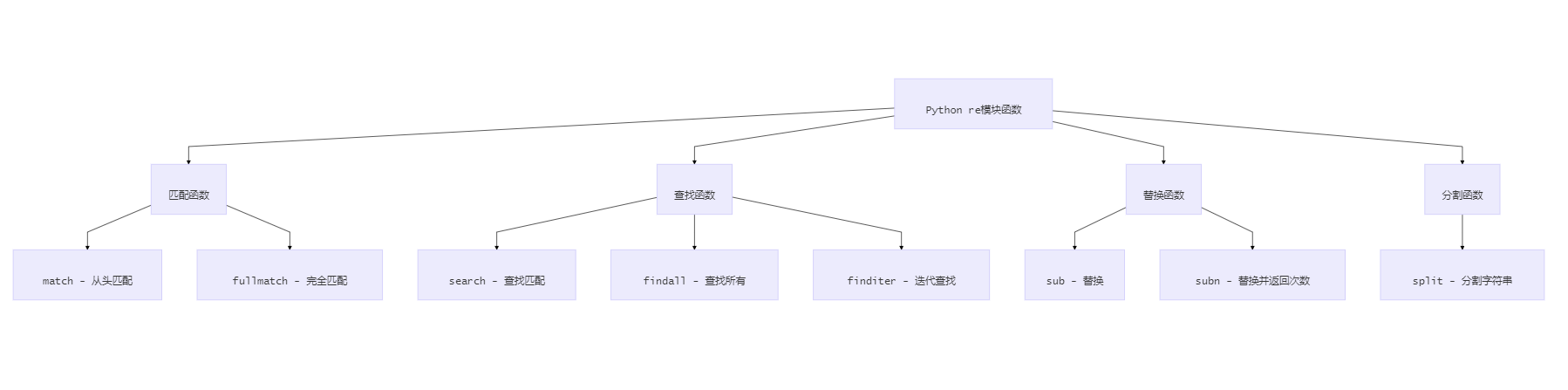
主要函数说明:
match():从左到右逐个字符匹配,全词匹配search():从左到右依次匹配,只要某部分满足条件即可sub():字符串替换findall():查找所有匹配项
2.2 函数使用示例
import re

# match示例 - 必须从开头匹配
result1 = re.match(r'hello', 'hello world')  # 匹配成功
result2 = re.match(r'hello', 'world hello')  # 匹配失败

# search示例 - 在字符串中查找
result3 = re.search(r'hello', 'world hello')  # 匹配成功
result4 = re.search(r'\d+', 'abc123def')     # 匹配到123

# sub示例 - 字符串替换
result5 = re.sub(r'\d+', 'NUM', 'abc123def456')  # abcNUMdefNUM
三、正则表达式语法规则
3.1 单个字符匹配
import re

# 基础字符匹配
result1 = re.match(r'a', 'abc')        # 匹配字母a
result2 = re.match(r'\.', '.abc')      # 匹配点号(转义)

# 字符类匹配
result3 = re.match(r'[abc]', 'a')      # 匹配a、b、c中的任意一个
result4 = re.match(r'[^abc]', 'd')     # 匹配除a、b、c以外的字符
result5 = re.match(r'[a-z]', 'm')      # 匹配小写字母
result6 = re.match(r'[A-Z]', 'M')      # 匹配大写字母
result7 = re.match(r'[0-9]', '5')      # 匹配数字

# 预定义字符类
result8 = re.match(r'\d', '5')         # 匹配数字 [0-9]
result9 = re.match(r'\D', 'a')         # 匹配非数字
result10 = re.match(r'\w', 'a')        # 匹配字母数字下划线 [a-zA-Z0-9_]
result11 = re.match(r'\W', '!')        # 匹配非字母数字下划线
result12 = re.match(r'\s', ' ')        # 匹配空白字符
result13 = re.match(r'\S', 'a')        # 匹配非空白字符
3.2 多个字符匹配(量词)
import re

# 量词规则
# * : 0次或多次
# + : 1次或多次
# ? : 0次或1次
# {n} : 恰好n次
# {n,} : n次或更多次
# {n,m} : n到m次

# 示例
result1 = re.match(r'\d*', '123')      # 匹配0个或多个数字
result2 = re.match(r'\d+', '123')      # 匹配1个或多个数字
result3 = re.match(r'\d?', '1')        # 匹配0个或1个数字
result4 = re.match(r'\d{3}', '123')    # 匹配恰好3个数字
result5 = re.match(r'\d{3,}', '1234')  # 匹配3个或更多数字
result6 = re.match(r'\d{2,4}', '123')  # 匹配2到4个数字
3.3 位置匹配
import re

# 位置锚点
# ^ : 字符串开头
# $ : 字符串结尾
# \b : 单词边界
# \B : 非单词边界

# 示例
result1 = re.match(r'^hello', 'hello world')     # 匹配以hello开头
result2 = re.search(r'world$', 'hello world')    # 匹配以world结尾
result3 = re.search(r'\bword\b', 'this word is') # 匹配单词边界
3.4 分组和引用
import re

# 分组语法
# () : 创建分组
# | : 或者
# \num : 引用第num个分组

# 示例
result1 = re.match(r'(apple|pear)', 'apple')     # 匹配apple或pear
result2 = re.match(r'(\d{3})-(\d{4})', '123-4567')  # 分组匹配

# 分组引用
result3 = re.match(r'(\w+)\s+\1', 'hello hello')  # 引用第一个分组
四、正则表达式实战应用
4.1 字符串替换
import re

# 基础替换
s1 = '车主说:你的刹车片应该更换了啊,嘿嘿'
rg = r'呢|吧|哈|啊|啦|嘿|嘿嘿'
result = re.sub(rg, "1", s1)
print(result)  # 车主说:你的刹车片应该更换了1,1

# 语法糖形式
s2 = '抽过的烟名:荷花,南京,中华,利群,黄鹤楼....'
result2 = re.sub(r"南京|利群", "*", s2)
print(result2)  # 抽过的烟名:荷花,*,中华,*,黄鹤楼....
4.2 数据验证
import re

# 手机号验证
def validate_phone(phone):
    pattern = r'^1[3-9]\d{9}$'
    return re.match(pattern, phone) is not None

# 邮箱验证
def validate_email(email):
    pattern = r'^[0-9a-zA-Z_]{2,16}@(163|126|qq)\.(com|cn)$'
    return re.match(pattern, email) is not None

# 测试
print(validate_phone('13812345678'))  # True
print(validate_phone('23812345678'))  # False
print(validate_email('test@qq.com'))  # True
print(validate_email('test@gmail.com'))  # False
4.3 数据提取
import re

# 提取QQ号
url = 'https://mp.csdn.net/mp_blog/manage/article?qq:10567'
result = re.search(r'qq:([0-9]{4,10})', url)
if result:
    print(f"QQ号: {result.group(1)}")  # QQ号: 10567

# 提取HTML标签内容
html_data = '<html><h1>www.itcast.cn</h1></html>'
result = re.search(r'<html><h1>(.*)</h1></html>', html_data, re.DOTALL)
if result:
    print(f"提取内容: {result.group(1)}")  # 提取内容: www.itcast.cn
五、高级特性
5.1 贪婪与非贪婪匹配
import re

# 贪婪匹配(默认)
result1 = re.search(r'<.*>', '<h1>title</h1>')
print(result1.group())  # <h1>title</h1>

# 非贪婪匹配(加?)
result2 = re.search(r'<.*?>', '<h1>title</h1>')
print(result2.group())  # <h1>
5.2 标志位使用
import re

# re.IGNORECASE (re.I) - 忽略大小写
result1 = re.search(r'hello', 'HELLO world', re.I)

# re.DOTALL (re.S) - 让.匹配换行符
result2 = re.search(r'<html.*</html>', html_content, re.DOTALL)

# re.MULTILINE (re.M) - 多行模式
result3 = re.search(r'^hello', 'world\nhello', re.M)
5.3 编译正则表达式
import re

# 编译正则表达式(提高性能)
pattern = re.compile(r'\d+')
result1 = pattern.match('123')
result2 = pattern.search('abc123def')

# 使用编译后的对象进行替换
text = 'abc123def456'
result3 = pattern.sub('NUM', text)  # abcNUMdefNUM
六、常见应用场景
6.1 水果筛选示例
import re

# 筛选喜欢的水果
fruits = ["apple", "banana", "orange", "pear"]
for fruit in fruits:
    result = re.match(r'(apple|pear)', fruit)
    if result:
        print(f"是我爱吃的水果: {fruit}")
    else:
        print(f"不是我爱吃的水果: {fruit}")
6.2 邮箱格式验证
import re

def validate_email_format(email):
    """
    验证邮箱格式
    规则:
    1. 用户名:2-16位数字字母下划线
    2. 域名:163、126、qq
    3. 后缀:com或cn
    """
    pattern = r'^[0-9a-zA-Z_]{2,16}@(163|126|qq)\.(com|cn)$'
    return re.match(pattern, email) is not None

# 测试
emails = ['test@qq.com', 'user@163.com', 'invalid@gmail.com']
for email in emails:
    print(f"{email}: {validate_email_format(email)}")
6.3 HTML内容提取
import re

def extract_html_content(html_text):
    """提取HTML标签内容"""
    # 匹配完整的HTML文档
    pattern = r'<html[\s\S]*?</html>'
    result = re.search(pattern, html_text, re.DOTALL)
    return result.group() if result else None

# 使用示例
html_content = """
<html>
<head><title>测试页面</title></head>
<body><h1>Hello World</h1></body>
</html>
"""
extracted = extract_html_content(html_content)
print(extracted)
七、性能优化建议
7.1 编译正则表达式
import re

# 不推荐:每次都编译
for i in range(1000):
    re.match(r'\d+', str(i))

# 推荐:预编译
pattern = re.compile(r'\d+')
for i in range(1000):
    pattern.match(str(i))
7.2 使用原始字符串
import re

# 推荐:使用r前缀
pattern1 = r'\d+'

# 不推荐:需要转义
pattern2 = '\\d+'
7.3 避免过度匹配
import re

# 使用非贪婪匹配
result1 = re.search(r'<.*?>', '<h1>title</h1>')  # 推荐

# 避免贪婪匹配
result2 = re.search(r'<.*>', '<h1>title</h1>')   # 可能过度匹配
八、常见错误和调试
8.1 常见错误
import re

# 错误1:忘记转义特殊字符
# result = re.match(r'1+1=2', '1+1=2')  # 错误
result = re.match(r'1\+1=2', '1+1=2')   # 正确

# 错误2:使用match而不是search
# result = re.match(r'world', 'hello world')  # 匹配失败
result = re.search(r'world', 'hello world')   # 匹配成功

# 错误3:忘记处理None返回值
result = re.search(r'\d+', 'abc')
# print(result.group())  # 错误:可能抛出AttributeError
if result:
    print(result.group())  # 正确
8.2 调试技巧
import re

def debug_regex(pattern, text):
    """调试正则表达式"""
    try:
        result = re.search(pattern, text)
        if result:
            print(f"匹配成功: {result.group()}")
            print(f"匹配位置: {result.start()}-{result.end()}")
            print(f"分组内容: {result.groups()}")
        else:
            print("匹配失败")
    except re.error as e:
        print(f"正则表达式错误: {e}")

# 使用示例
debug_regex(r'\d{3,5}', 'abc123def4567')
九、总结
Python正则表达式是字符串处理的强大工具,通过本文的学习,你应该掌握:
📋 核心概念
- 正则表达式的基本语法和规则
- Python re模块的主要函数
- 字符类、量词、位置锚点的使用
🎯 实战技能
- 字符串匹配和验证
- 数据提取和替换
- 常见应用场景的实现
⚡ 性能优化
- 预编译正则表达式
- 使用原始字符串
- 避免过度匹配
🔧 调试技巧
- 常见错误的识别和避免
- 正则表达式的调试方法
- 代码的健壮性处理
正则表达式虽然复杂,但掌握好这些核心概念和技巧,就能在实际项目中高效处理各种字符串操作需求。
关键词: Python正则表达式、字符串匹配、数据验证、文本处理、re模块

北京人形旗下天工造物具身智能开源社区,聚焦具身天工与慧思开物两大平台
更多推荐
 5
5 0
0- 0


 已为社区贡献2条内容

所有评论(0)