Word控件Spire.Doc 【加密解密】教程(四):在 C# 中为 Word 添加数字签名
·
本文演示了如何使用 Spire.Doc 将数字签名添加到 Word 文档。
Spire.Doc for.NET 最新下载 https://www.evget.com/product/3368/download
Spire.Doc 为我们提供了以下方法来为 Word 文档添加数字签名:
- public void SaveToFile(string fileName, FileFormat fileFormat, byte[] certificateData, string securePassword);
- public void SaveToFile(string fileName, FileFormat fileFormat, string certificatePath, string securePassword);
- public void SaveToStream(Stream stream, FileFormat fileFormat, byte[] certificateData, string securePassword);
- public void SaveToStream(Stream stream, FileFormat fileFormat, string certificatePath, string securePassword);
- public static byte[] Sign(Stream sourceStream, byte[] certificateData, string securePassword);
- public static byte[] Sign(Stream sourceStream, string certificatePath, string securePassword);
在下面的示例中,我们将看到如何将数字签名添加到 Word 文档,并使用带有 Document 对象的SaveToFile方法将结果保存到文件中。
//Load the Word document
Document doc = new Document("sample.docx");
//Sign the document with certificate and save to file
doc.SaveToFile("AddDigitalSignature.docx", FileFormat.Docx2013, "gary.pfx", "e-iceblue");
我们还可以将数字签名添加到 Word 文档,并使用带有 Document 对象的SaveToStream方法将结果保存到流中 。
//Load the Word document
Document doc = new Document("sample.docx");
//Create a FileStream
FileStream fs = new FileStream();
//Sign the document with certificate and save to stream
doc.SaveToStream(fs, FileFormat.Docx2013, "gary.pfx", "e-iceblue");
fs.Flush();
下面的示例演示如何使用带有 Document 类的 Sign 方法将数字签名添加到 Word 文档。
//Read the Word document into a FileStream
FileStream fs = File.OpenRead("sample.docx");
//Sign the document using Sign method with Document class
byte[] result = Document.Sign(fs, "gary.pfx", "e-iceblue");
File.WriteAllBytes("AddDigitalSignature.docx", result);
fs.Flush();
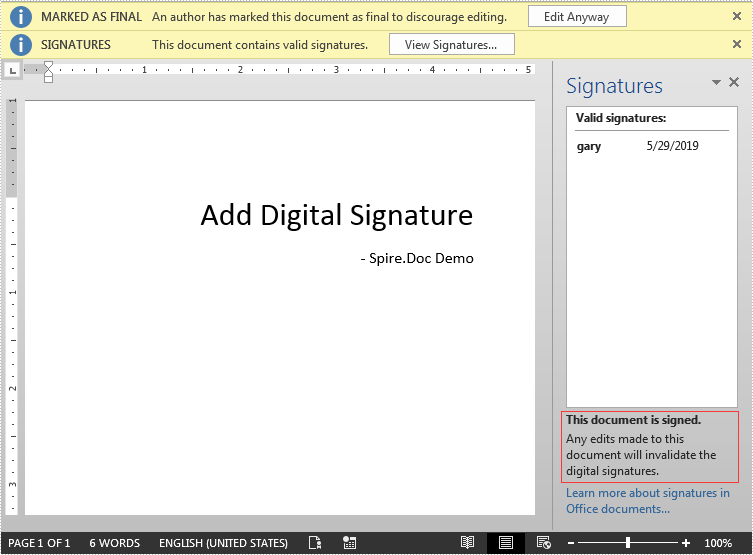
输出文件:

北京人形旗下天工造物具身智能开源社区,聚焦具身天工与慧思开物两大平台
更多推荐
 0
0 0
0- 0


 已为社区贡献11条内容

所有评论(0)