nacos server 源码运行实现
·
下载 nacos 源码
1、只需保留 nacos console 模块,其他模块均可删除
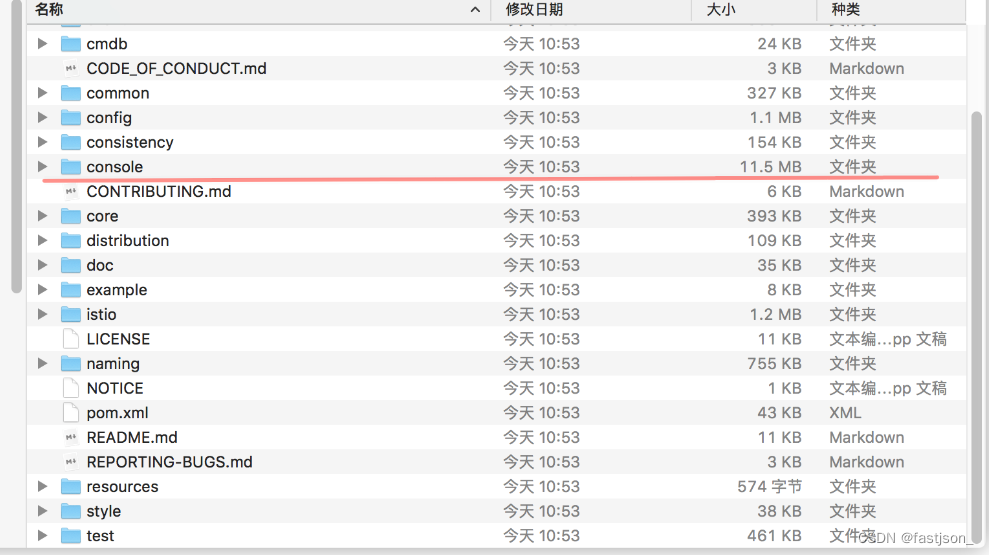 2、console 源码结构说明
├── pom.xml
└── src
    ├── main
    │   ├── java
    │   │   └── com
    │   │       └── alibaba
    │   │           └── nacos
    │   │               ├── Nacos.java  # main 启动类
    │   │               └── console    # 控制台相关源码
    │   └── resources
    │       ├── application.properties  # nacos 配置文件
    │       └── static    # 静态页面目录
    └── test    # 单元测试部分
3、修改application文件
### Default web context path:
server.servlet.contextPath=/nacos

### If use MySQL as datasource:
spring.main.allow-circular-references=true
nacos.naming.empty-service.auto-clean=true
nacos.naming.empty-service.clean.initial-delay-ms=50000
nacos.naming.empty-service.clean.period-time-ms=30000

management.metrics.export.elastic.enabled=false
management.metrics.export.influx.enabled=false

spring.datasource.platform=mysql
db.num=1
db.url.0=jdbc:mysql://ip:3306/ry-config?characterEncoding=utf8&connectTimeout=1000&socketTimeout=3000&autoReconnect=true&useUnicode=true&useSSL=false&serverTimezone=UTC
db.user=root
db.password=root

#*************** Access Control Related Configurations ***************#
### The ignore urls of auth, is deprecated in 1.2.0:
nacos.security.ignore.urls=/,/error,/**/*.css,/**/*.js,/**/*.html,/**/*.map,/**/*.svg,/**/*.png,/**/*.ico,/console-ui/public/**,/v1/auth/**,/v1/console/health/**,/actuator/**,/v1/console/server/**

### The auth system to use, currently only 'nacos' and 'ldap' is supported:
nacos.core.auth.system.type=nacos

### If turn on auth system:
nacos.core.auth.enabled=false

### Turn on/off caching of auth information. By turning on this switch, the update of auth information would have a 15 seconds delay.
nacos.core.auth.caching.enabled=true

### Since 1.4.1, Turn on/off white auth for user-agent: nacos-server, only for upgrade from old version.
nacos.core.auth.enable.userAgentAuthWhite=false
nacos.core.auth.server.identity.key=serverIdentity
nacos.core.auth.server.identity.value=security
nacos.core.auth.plugin.nacos.token.expire.seconds=18000
nacos.core.auth.plugin.nacos.token.secret.key=SecretKey012345678901234567890123456789012345678901234567890123456789

#*************** Istio Related Configurations ***************#
### If turn on the MCP server:
nacos.istio.mcp.server.enabled=false
4、修改 Nacos.java 类
添加类配置类:ConfigConstants
package com.alibaba.nacos.console.config;

public interface ConfigConstants {

	/**
	 * The System property name of Standalone mode
	 */
	String STANDALONE_MODE = "nacos.standalone";

	/**
	 * 是否开启认证
	 */
	String AUTH_ENABLED = "nacos.core.auth.enabled";

	/**
	 * 日志目录
	 */
	String LOG_BASEDIR = "server.tomcat.basedir";

	/**
	 * access_log日志开关
	 */
	String LOG_ENABLED = "server.tomcat.accesslog.enabled";

}
主要在 main 方法中增加 两个参数,是否是单机启动 & 是否关闭权限校验
@SpringBootApplication(scanBasePackages = "com.alibaba.nacos")
@ServletComponentScan
@EnableScheduling
public class Nacos {

    public static void main(String[] args) {
        if (initEnv()) {
            SpringApplication.run(Nacos.class, args);
        }
    }

    /**
     * 初始化运行环境
     */
    private static boolean initEnv() {
        System.setProperty(ConfigConstants.STANDALONE_MODE, "true");
        System.setProperty(ConfigConstants.AUTH_ENABLED, "false");
        System.setProperty(ConfigConstants.LOG_BASEDIR, "logs");
        System.setProperty(ConfigConstants.LOG_ENABLED, "false");
        return true;
    }
}
5、修改 console/pom.xml
- 由于不在使用 nacos bom 管理,需要给所有依赖坐标增加版本号
- 由于 nacos-config /nacos-naming 等包没有上传至中央参考 无法下载到,groupId 变更为
com.pig4cloud.nacos即可下载 - 变更后参考如下
<?xml version="1.0" encoding="UTF-8"?>
<project xmlns="http://maven.apache.org/POM/4.0.0"
    xmlns:xsi="http://www.w3.org/2001/XMLSchema-instance"
    xsi:schemaLocation="http://maven.apache.org/POM/4.0.0 http://maven.apache.org/xsd/maven-4.0.0.xsd">
    <modelVersion>4.0.0</modelVersion>
    <parent>
        <groupId>com.ruoyi</groupId>
        <artifactId>ruoyi</artifactId>
        <version>3.5.0</version>
    </parent>
    <artifactId>nacos-console</artifactId>
    <packaging>jar</packaging>

    <properties>
        <nacos.version>2.1.0</nacos.version>
        <project.build.sourceEncoding>UTF-8</project.build.sourceEncoding>
    </properties>

    <dependencies>
        <dependency>
            <groupId>io.springboot.nacos</groupId>
            <artifactId>nacos-config</artifactId>
            <version>${nacos.version}</version>
        </dependency>
        <dependency>
            <groupId>org.apache.tomcat.embed</groupId>
            <artifactId>tomcat-embed-jasper</artifactId>
        </dependency>
        <dependency>
            <groupId>io.springboot.nacos</groupId>
            <artifactId>nacos-naming</artifactId>
            <version>${nacos.version}</version>
        </dependency>

        <dependency>
            <groupId>io.springboot.nacos</groupId>
            <artifactId>nacos-plugin-default-impl</artifactId>
            <version>${nacos.version}</version>
        </dependency>
        <dependency>
            <groupId>io.springboot.nacos</groupId>
            <artifactId>nacos-istio</artifactId>
            <version>${nacos.version}</version>
        </dependency>

        <!-- log -->
        <!-- log4j通过slf4j来代理 -->
        <dependency>
            <groupId>org.slf4j</groupId>
            <artifactId>log4j-over-slf4j</artifactId>
        </dependency>
        <!-- apache commons logging通过slf4j来代理 -->
        <dependency>
            <groupId>org.slf4j</groupId>
            <artifactId>jcl-over-slf4j</artifactId>
        </dependency>
        <!-- java.util.logging 通过slf4j来代理 -->
        <dependency>
            <groupId>org.slf4j</groupId>
            <artifactId>jul-to-slf4j</artifactId>
        </dependency>
        <dependency>
            <groupId>org.springframework.boot</groupId>
            <artifactId>spring-boot-starter-security</artifactId>
        </dependency>
    </dependencies>

    <build>
        <plugins>
            <plugin>
                <groupId>org.springframework.boot</groupId>
                <artifactId>spring-boot-maven-plugin</artifactId>
            </plugin>
        </plugins>
        <resources>
            <resource>
                <directory>src/main/resources</directory>
                <filtering>true</filtering>
                <excludes>
                    <exclude>**/*.woff</exclude>
                    <exclude>**/*.woff2</exclude>
                    <exclude>**/*.ttf</exclude>
                </excludes>
            </resource>
            <resource>
                <directory>src/main/resources</directory>
                <filtering>false</filtering>
                <includes>
                    <include>**/*.woff</include>
                    <include>**/*.woff2</include>
                    <include>**/*.ttf</include>
                </includes>
            </resource>
        </resources>
    </build>
</project>
总结
- 以上修改后源码参考: https://gitee.com/log4j/pig
- 是否以源码形式运行,此问题仁者见仁智者见智 根据你们实际情况来

北京人形旗下天工造物具身智能开源社区,聚焦具身天工与慧思开物两大平台
更多推荐
 0
0 0
0- 0


 已为社区贡献13条内容

所有评论(0)