微信小程序 vant 日历组件动态定义日历格式
·
应项目要求要做打卡小程序
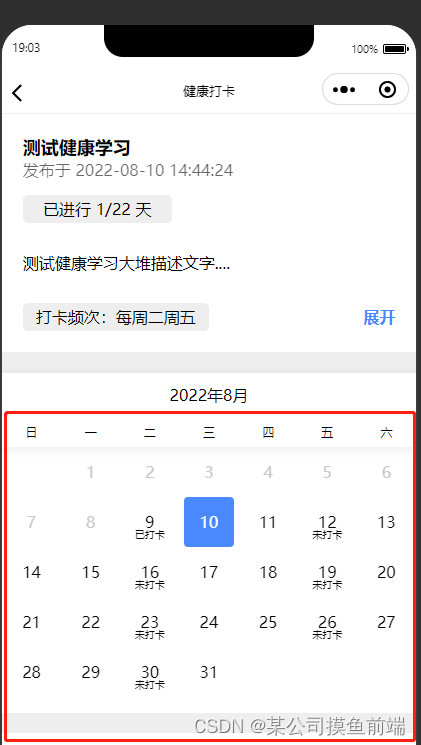
日历日期下方下面要动态显示打卡未打卡
在构建好npm包的情况下
首先在app.json中引入它
"usingComponents": {
      "van-calendar": "@vant/weapp/calendar/index",
},
 <van-calendar
        color="#4988FD"
        show="{{show}}"
        type="single"
        row-height='50'
        formatter="{{formatter}}"
        min-date="{{ minDate }}"
        max-date="{{ maxDate }}"
        poppable="{{false}}"
        show-title="{{false}}"
        show-mark="{{false}}"
        show-confirm="{{false}}"
        bind:confirm="submit"/>
其次在html中写入以上代码
然后再js文件中的data中定义formatter
Page({
  data:{
    minDate: new Date(2022, 7, 1).getTime(),
    maxDate: new Date(2022, 7, 31).getTime(),
    formatter(day){
      const date=day.date.getDate()
      day.text=date
      return day
    },
  },
})
最后在获取打卡数据时用setData方法给它赋值
getMonthListDetail(){
    var month=this.FormatAll(this.data.minDate).split(' ')
    var that=this
    wx.request({
      url: '',
      method:'POST',
      success(res){
        that.setData({
          dkjlList:res.data.PAGE.list,
          formatter:function(e){
            const date=e.date.getDate()
            e.text=date
            console.log(e+'=========');
            var aa=that.FormatAll(e.date).split(' ')
            that.data.dkjlList.forEach(item=>{
              if(aa[0]===item.stDay){
                e.bottomInfo=item.isSign===1?'已打卡':'未打卡'
              }
            })
            return e
          }
        })
      }
    })
  },

北京人形旗下天工造物具身智能开源社区,聚焦具身天工与慧思开物两大平台
更多推荐
 2
2 0
0- 0


 已为社区贡献2条内容

所有评论(0)