用 Three.js + MediaPipe 打造《奇异博士》般的 3D 手势粒子系统
实战教程:用 Three.js + MediaPipe 打造《奇异博士》般的 3D 手势粒子系统
想象一下,挥挥手就能控制成千上万个光点,像《奇异博士》里的魔法一样随意揉捏星云。今天,我们将结合 Three.js 的 3D 渲染能力与 MediaPipe 的 AI 视觉识别,在浏览器中实现这一效果。
效果预览
在这个项目中,我们构建了一个实时交互系统:
- 视觉:20,000 个粒子组成的动态 3D 模型(爱心、土星、佛像等)。
- 交互:通过摄像头捕捉手势。张开手掌,粒子扩散;捏合手指,粒子凝聚。
- 技术栈:Three.js + Google MediaPipe + Lil-GUI。
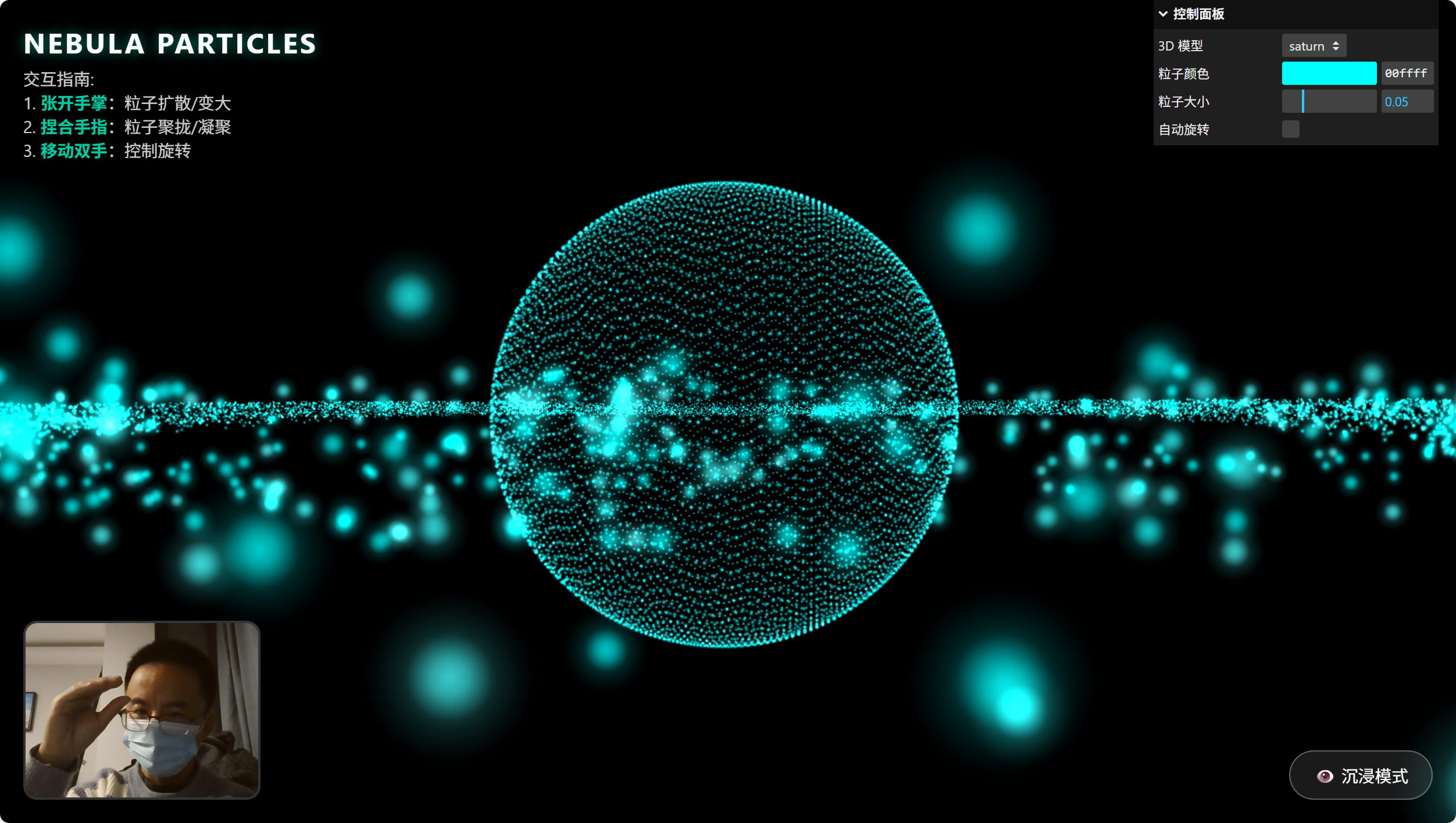
先看效果:
手指捏合:粒子凝聚
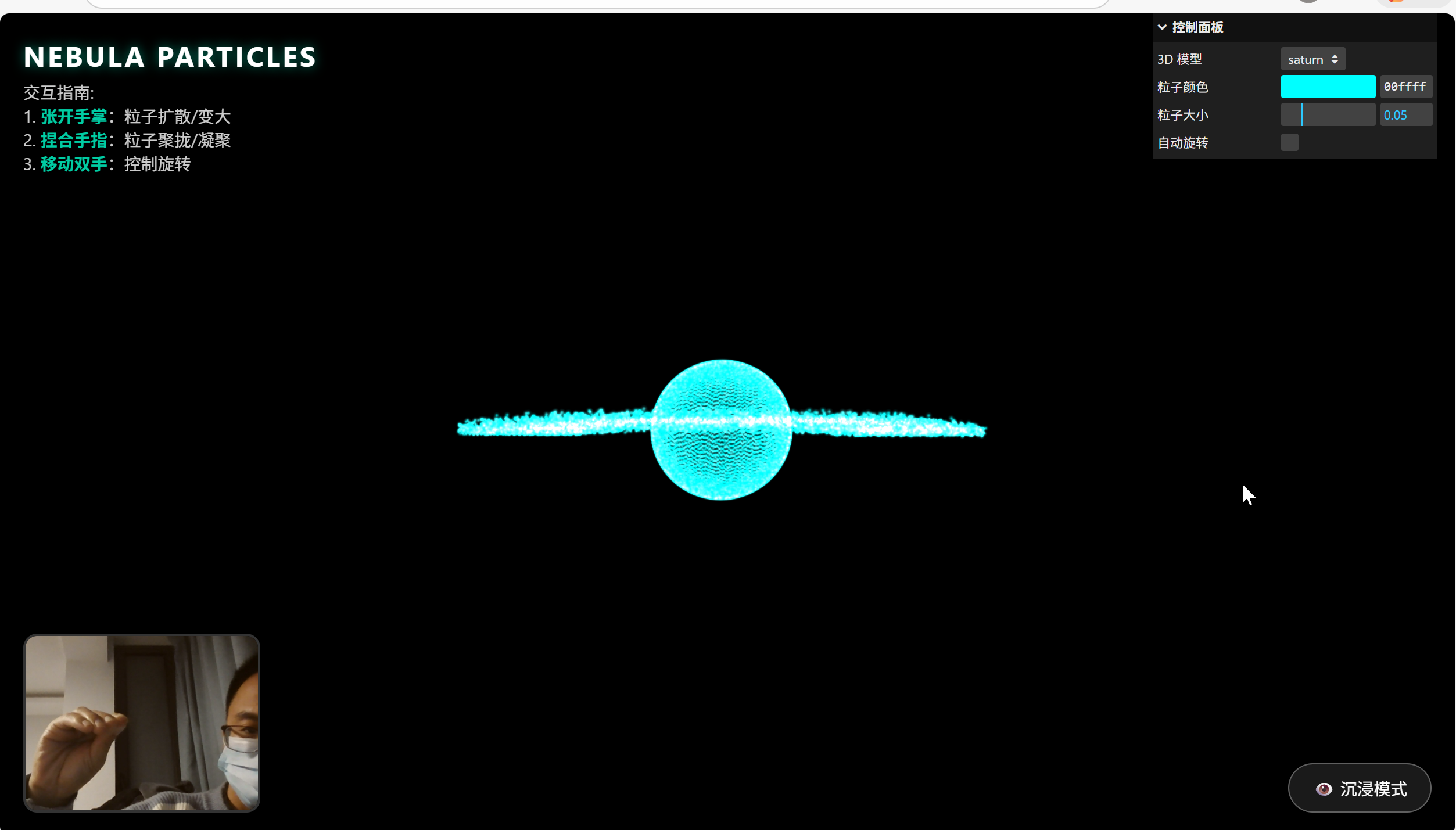
张开手掌:粒子扩散
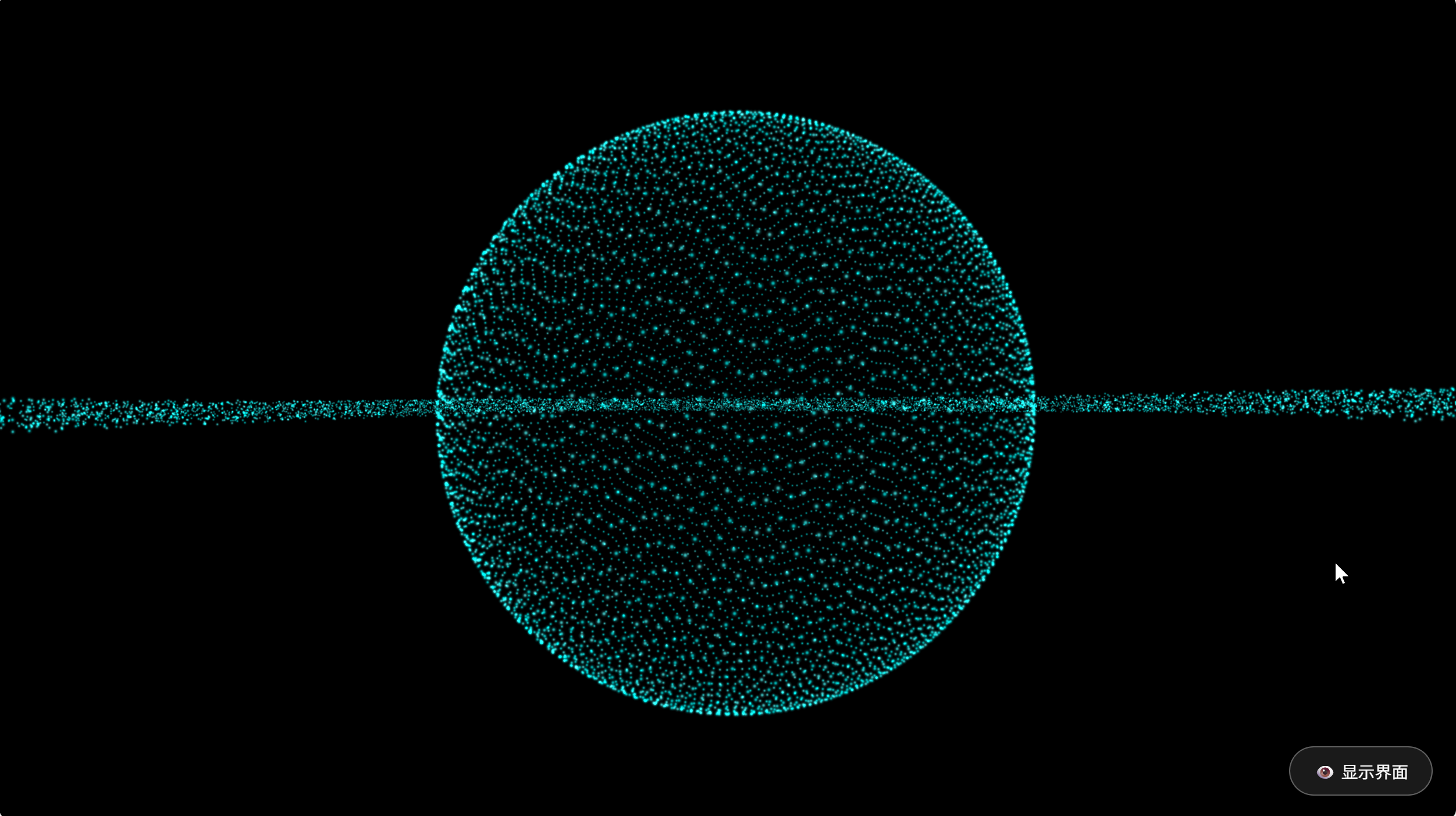
此外勾选沉浸模式隐藏参数,效果如下:
核心技术拆解
1. 粒子系统的构建:数学之美
要渲染两万个粒子,直接创建两万个 Mesh 对象会让浏览器直接崩溃。高效的做法是使用 THREE.Points 和 BufferGeometry。
所有的形状(爱心、花朵、星球)其实都是数学公式。我们不需要加载复杂的 .obj 模型,直接用代码生成坐标:
// 示例:生成 3D 爱心的参数方程
const Shapes = {
heart: (i, count) => {
const t = (i / count) * Math.PI * 2 * 10;
const x = 16 * Math.pow(Math.sin(t), 3);
const y = 13 * Math.cos(t) - 5 * Math.cos(2*t) - 2 * Math.cos(3*t) - Math.cos(4*t);
const z = (Math.random() - 0.5) * 10; // 增加厚度
// 返回缩放后的向量
return new THREE.Vector3(x * 0.1, y * 0.1, z * 0.1);
},
// … 其他形状
};
技巧:为了让粒子看起来不像僵硬的像素点,我使用了一张自制的径向渐变贴图(Canvas 动态生成),并开启了 AdditiveBlending(发光叠加模式),这会让粒子重叠处产生漂亮的高光。
2. AI 视觉之眼:MediaPipe Hand Landmarker
为了让网页“看懂”手势,我们使用了 Google 的 MediaPipe。相比于传统的色彩追踪,它能精准识别手部的 21 个关键点骨架。
关键代码配置:
const handLandmarker = await HandLandmarker.createFromOptions(vision, {
baseOptions: {
modelAssetPath: `…/hand_landmarker.task`,
delegate: “GPU” // 关键!开启 GPU 加速
},
runningMode: “VIDEO”,
numHands: 2
});
避坑指南:在实际开发中,必须严格检查 video.videoWidth > 0,否则在摄像头未完全初始化的那一瞬间,MediaPipe 会抛出 roi->width > 0 的内部错误导致崩溃。
3. 灵魂交互:从手势到物理模拟
如何将“手势”转化为“粒子运动”?
我们需要计算一个交互强度因子(Interaction Strength)。
逻辑如下:
- 获取食指指尖(索引 8)和拇指指尖(索引 4)的坐标。
- 计算欧几里得距离。
- 将距离映射到 0~1 的区间。
// 计算捏合距离
const distance = Math.sqrt(
Math.pow(thumb.x - index.x, 2) + Math.pow(thumb.y - index.y, 2)
);
// 归一化:距离越大(张开),factor 越大;距离越小(捏合),factor 越小
let factor = Math.min(Math.max((distance - 0.02) / 0.15, 0), 1);
// 使用 Lerp (线性插值) 让数值变化平滑,避免粒子瞬间跳变
CONFIG.interactionStrength = THREE.MathUtils.lerp(CONFIG.interactionStrength, factor, 0.1);
4. 渲染循环:粒子呼吸逻辑
在 requestAnimationFrame 中,我们并没有通过物理引擎去计算碰撞(太耗性能),而是采用了一种“目标位置混合”的策略:
- Target Position: 原始的形状坐标(如爱心形状)。
- Current Position: 粒子当前的位置。
- Spread: 扩散系数,由手势控制。
// 渲染循环中
let targetSpread = 0.5; // 默认松散度
if (isHandDetected) {
// 手张得越大,粒子扩散越开 (Spread 变大)
// 手捏得越紧,粒子聚得越拢 (Spread 变小)
targetSpread = 0.2 + (interactionStrength * 2.5);
}
// 逐个粒子更新位置
pos[ix] += ((tx * targetSpread + noise) - pos[ix]) * 0.05; // 0.05 是阻尼系数
这种 (Target - Current) * speed 的算法在动画编程中非常常用,它能通过极小的计算量模拟出且带有“弹性”和“阻尼”的物理手感。
性能优化总结
- 几何体复用:切换模型时,不销毁粒子对象,只更新 position 属性数组,极大减少 GC(垃圾回收)压力。
- GPU 代理:MediaPipe 运行在 GPU 上,不占用 JS 主线程,保证 UI 不卡顿。
- Canvas 贴图:不请求外部图片资源,直接用代码画一个发光圆点作为纹理,加载速度飞快。
结语
不到 400 行代码,我们就实现了一个赛博朋克风格的交互应用。Web 前端不仅仅是 DOM 和 CSS,通过 WebGL 和 Edge AI(端侧 AI),浏览器已经能承载令人惊叹的创意交互。
快去试试,把你的代码变成魔法吧!
此外,可以可以使用gemin3-canvas使用提示词即可实现此效果:
提示词如下:
用Three.js创建一个实时交互的3D粒子系统。要求:
1.通过摄像头检测双手张合控制粒子群的缩放与扩散
2.提供UI面板可选择爱心/花朵/土星/佛像/烟花等模型
3.支持颜色选择器调整粒子颜色
4.粒子需实时响应手势变化
5.界面简洁现代,包含全屏控制按钮
完整的html代码如下:
<!DOCTYPE html>
<html lang="zh-CN">
<head>
<meta charset="UTF-8">
<meta name="viewport" content="width=device-width, initial-scale=1.0">
<title>3D 手势粒子交互系统</title>
<style>
body {
margin: 0;
overflow: hidden;
background-color: #000;
font-family: 'Segoe UI', Tahoma, Geneva, Verdana, sans-serif;
user-select: none;
}
/* Loading Screen */
#loader {
position: absolute;
top: 0;
left: 0;
width: 100%;
height: 100%;
background: #000;
display: flex;
flex-direction: column;
justify-content: center;
align-items: center;
z-index: 999;
color: #00ffcc;
transition: opacity 0.5s;
}
.spinner {
width: 50px;
height: 50px;
border: 3px solid rgba(0, 255, 204, 0.3);
border-radius: 50%;
border-top-color: #00ffcc;
animation: spin 1s ease-in-out infinite;
margin-bottom: 20px;
}
@keyframes spin {
to { transform: rotate(360deg); }
}
/* Webcam Preview (Picture in Picture style) */
#webcam-container {
position: absolute;
bottom: 20px;
left: 20px;
width: 200px;
height: 150px;
border-radius: 12px;
overflow: hidden;
border: 2px solid rgba(255, 255, 255, 0.2);
box-shadow: 0 0 20px rgba(0, 0, 0, 0.5);
z-index: 10;
transform: scaleX(-1); /* Mirror feedback */
transition: opacity 0.3s;
}
video {
width: 100%;
height: 100%;
object-fit: cover;
}
/* UI Overlay */
#ui-layer {
position: absolute;
top: 20px;
left: 20px;
color: white;
z-index: 5;
pointer-events: none;
transition: opacity 0.3s;
}
h1 {
margin: 0;
font-size: 1.5rem;
text-shadow: 0 0 10px rgba(0, 255, 204, 0.5);
letter-spacing: 2px;
}
p {
font-size: 0.9rem;
opacity: 0.8;
margin-top: 5px;
max-width: 300px;
}
.highlight {
color: #00ffcc;
font-weight: bold;
}
/* Toggle UI Button (Replaces Fullscreen) */
#toggle-ui-btn {
position: absolute;
bottom: 20px;
right: 20px;
background: rgba(255, 255, 255, 0.1);
border: 1px solid rgba(255, 255, 255, 0.3);
color: white;
padding: 10px 20px;
border-radius: 30px;
cursor: pointer;
backdrop-filter: blur(5px);
transition: all 0.3s;
z-index: 10;
font-size: 0.9rem;
}
#toggle-ui-btn:hover {
background: rgba(0, 255, 204, 0.3);
border-color: #00ffcc;
}
/* Hand Status Indicator */
#status-indicator {
position: absolute;
top: 10px;
right: 10px;
padding: 5px 10px;
background: rgba(0, 0, 0, 0.6);
border-radius: 4px;
font-size: 0.8rem;
color: #ff4444;
font-weight: bold;
transition: opacity 0.3s;
z-index: 5;
}
#status-indicator.active {
color: #00ffcc;
}
/* Hide UI State */
.ui-hidden #ui-layer,
.ui-hidden #status-indicator,
.ui-hidden #webcam-container,
.ui-hidden .lil-gui {
opacity: 0;
pointer-events: none;
}
</style>
</head>
<body>
<!-- Loading Screen -->
<div id="loader">
<div class="spinner"></div>
<div id="loading-text">正在初始化 AI 视觉引擎...</div>
</div>
<!-- Webcam Preview -->
<div id="webcam-container">
<video id="webcam" autoplay playsinline muted></video>
</div>
<!-- Main UI -->
<div id="ui-layer">
<h1>NEBULA PARTICLES</h1>
<p>交互指南: <br>
1. <span class="highlight">张开手掌</span>:粒子扩散/变大<br>
2. <span class="highlight">捏合手指</span>:粒子聚拢/凝聚<br>
3. <span class="highlight">移动双手</span>:控制旋转</p>
</div>
<div id="status-indicator">未检测到手势</div>
<button id="toggle-ui-btn" onclick="toggleUI()">👁️ 沉浸模式</button>
<!-- Import Maps for Three.js and MediaPipe -->
<script type="importmap">
{
"imports": {
"three": "https://cdn.jsdelivr.net/npm/three@0.160.0/build/three.module.js",
"three/addons/": "https://cdn.jsdelivr.net/npm/three@0.160.0/examples/jsm/",
"@mediapipe/tasks-vision": "https://cdn.jsdelivr.net/npm/@mediapipe/tasks-vision@0.10.9/+esm",
"lil-gui": "https://unpkg.com/lil-gui@0.19.1/dist/lil-gui.esm.min.js"
}
}
</script>
<script type="module">
import * as THREE from 'three';
import { OrbitControls } from 'three/addons/controls/OrbitControls.js';
import { FilesetResolver, HandLandmarker } from '@mediapipe/tasks-vision';
import GUI from 'lil-gui';
// --- Configuration ---
const CONFIG = {
particleCount: 20000,
particleSize: 0.05,
color: '#00ffff',
model: 'heart',
interactionStrength: 0.0, // 0 = relaxed, 1 = tense/pinched
handDetected: false,
rotationSpeed: 0.001
};
// --- Global Variables ---
let scene, camera, renderer, particles, geometry, material;
let handLandmarker, webcam;
let positionsOriginal = []; // Store target positions for shape
let currentPositions = []; // Current animation positions
let animationFrameId;
const clock = new THREE.Clock();
// --- Shape Generators ---
const Shapes = {
heart: (i, count) => {
const t = (i / count) * Math.PI * 2 * 10; // multiple loops
// Variation to fill the volume
const r = Math.random() * 0.2 + 0.8;
const x = 16 * Math.pow(Math.sin(t), 3);
const y = 13 * Math.cos(t) - 5 * Math.cos(2*t) - 2 * Math.cos(3*t) - Math.cos(4*t);
const z = (Math.random() - 0.5) * 10; // depth
return new THREE.Vector3(x * r * 0.1, y * r * 0.1, z * 0.1);
},
sphere: (i, count) => {
const phi = Math.acos(-1 + (2 * i) / count);
const theta = Math.sqrt(count * Math.PI) * phi;
const r = 1.5 + Math.random() * 0.2;
return new THREE.Vector3(
r * Math.cos(theta) * Math.sin(phi),
r * Math.sin(theta) * Math.sin(phi),
r * Math.cos(phi)
);
},
flower: (i, count) => {
const theta = i * 0.1;
const r = Math.sin(5 * theta) + 2; // Rose curve logic
const y = (Math.random() - 0.5) * 1;
const scale = 0.5;
return new THREE.Vector3(
r * Math.cos(theta) * scale,
y,
r * Math.sin(theta) * scale
);
},
saturn: (i, count) => {
// Mix of sphere and ring
const isRing = i > count * 0.4;
if (isRing) {
const angle = Math.random() * Math.PI * 2;
const radius = 2.0 + Math.random() * 1.5;
return new THREE.Vector3(
Math.cos(angle) * radius,
(Math.random() - 0.5) * 0.1, // Flat ring
Math.sin(angle) * radius
);
} else {
// Planet body
const phi = Math.acos(-1 + (2 * i) / (count * 0.4));
const theta = Math.sqrt(count * Math.PI) * phi;
const r = 1.0;
return new THREE.Vector3(
r * Math.cos(theta) * Math.sin(phi),
r * Math.sin(theta) * Math.sin(phi),
r * Math.cos(phi)
);
}
},
buddha: (i, count) => {
// Abstract meditating figure (Stacked Spheres approximation)
const p = i / count;
let center = new THREE.Vector3();
let r = 1;
if (p < 0.2) {
// Head
center.set(0, 1.2, 0);
r = 0.5;
} else if (p < 0.6) {
// Body
center.set(0, 0, 0);
r = 1.0;
} else {
// Base/Legs (Flattened sphere)
center.set(0, -1.0, 0);
r = 1.2;
// Distort later
}
// Random point in sphere
const u = Math.random();
const v = Math.random();
const theta = 2 * Math.PI * u;
const phi = Math.acos(2 * v - 1);
let x = center.x + r * Math.sin(phi) * Math.cos(theta);
let y = center.y + r * Math.sin(phi) * Math.sin(theta);
let z = center.z + r * Math.cos(phi);
// Flatten the legs part
if (p >= 0.6) y *= 0.5;
return new THREE.Vector3(x, y, z);
},
fireworks: (i, count) => {
// Explosion rays
const theta = Math.random() * Math.PI * 2;
const phi = Math.acos(Math.random() * 2 - 1);
const r = Math.random() * 3 + 0.5; // Variation in distance
return new THREE.Vector3(
r * Math.sin(phi) * Math.cos(theta),
r * Math.sin(phi) * Math.sin(theta),
r * Math.cos(phi)
);
}
};
// --- Initialization ---
async function init() {
// 1. Setup Three.js
scene = new THREE.Scene();
// Add subtle fog
scene.fog = new THREE.FogExp2(0x000000, 0.05);
camera = new THREE.PerspectiveCamera(75, window.innerWidth / window.innerHeight, 0.1, 100);
camera.position.z = 4;
renderer = new THREE.WebGLRenderer({ antialias: true, alpha: true });
renderer.setSize(window.innerWidth, window.innerHeight);
renderer.setPixelRatio(window.devicePixelRatio);
document.body.appendChild(renderer.domElement);
const controls = new OrbitControls(camera, renderer.domElement);
controls.enableDamping = true;
controls.autoRotate = true;
controls.autoRotateSpeed = 1.0;
// 2. Setup Particles
createParticles(CONFIG.model);
// 3. Setup UI
setupGUI(controls);
// 4. Setup AI Vision
try {
await setupMediaPipe();
document.getElementById('loader').style.opacity = '0';
setTimeout(() => document.getElementById('loader').style.display = 'none', 500);
} catch (err) {
console.error("AI Init Failed:", err);
document.getElementById('loading-text').innerText = "AI 加载失败,请检查浏览器或网络";
}
// 5. Start Loop
window.addEventListener('resize', onWindowResize);
animate(controls);
}
function createParticles(shapeKey) {
if (particles) {
scene.remove(particles);
geometry.dispose();
material.dispose();
}
geometry = new THREE.BufferGeometry();
positionsOriginal = [];
const positions = [];
const colors = [];
const colorObj = new THREE.Color(CONFIG.color);
const generator = Shapes[shapeKey] || Shapes.heart;
for (let i = 0; i < CONFIG.particleCount; i++) {
const vec = generator(i, CONFIG.particleCount);
positionsOriginal.push(vec.x, vec.y, vec.z);
positions.push((Math.random() - 0.5) * 10, (Math.random() - 0.5) * 10, (Math.random() - 0.5) * 10); // Start scattered
// Add subtle color variation
const mixedColor = colorObj.clone().offsetHSL(0, 0, (Math.random() - 0.5) * 0.1);
colors.push(mixedColor.r, mixedColor.g, mixedColor.b);
}
geometry.setAttribute('position', new THREE.Float32BufferAttribute(positions, 3));
geometry.setAttribute('color', new THREE.Float32BufferAttribute(colors, 3));
// Custom shader-like appearance using standard PointsMaterial
material = new THREE.PointsMaterial({
size: CONFIG.particleSize,
vertexColors: true,
blending: THREE.AdditiveBlending,
depthWrite: false,
transparent: true,
opacity: 0.8,
map: createCircleTexture()
});
particles = new THREE.Points(geometry, material);
scene.add(particles);
// Store current positions reference for animation logic
currentPositions = geometry.attributes.position.array;
}
// Texture helper for softer particles
function createCircleTexture() {
const canvas = document.createElement('canvas');
canvas.width = 32;
canvas.height = 32;
const context = canvas.getContext('2d');
const gradient = context.createRadialGradient(16, 16, 0, 16, 16, 16);
gradient.addColorStop(0, 'rgba(255,255,255,1)');
gradient.addColorStop(0.2, 'rgba(255,255,255,0.8)');
gradient.addColorStop(0.5, 'rgba(255,255,255,0.2)');
gradient.addColorStop(1, 'rgba(0,0,0,0)');
context.fillStyle = gradient;
context.fillRect(0,0,32,32);
const texture = new THREE.Texture(canvas);
texture.needsUpdate = true;
return texture;
}
function setupGUI(controls) {
const gui = new GUI({ title: '控制面板' });
gui.add(CONFIG, 'model', ['heart', 'sphere', 'flower', 'saturn', 'buddha', 'fireworks'])
.name('3D 模型')
.onChange(val => createParticles(val));
gui.addColor(CONFIG, 'color')
.name('粒子颜色')
.onChange(val => {
// Update colors array
const colors = geometry.attributes.color.array;
const c = new THREE.Color(val);
for(let i=0; i<colors.length; i+=3) {
colors[i] = c.r;
colors[i+1] = c.g;
colors[i+2] = c.b;
}
geometry.attributes.color.needsUpdate = true;
});
gui.add(CONFIG, 'particleSize', 0.01, 0.2)
.name('粒子大小')
.onChange(v => material.size = v);
gui.add(controls, 'autoRotate').name('自动旋转');
}
// --- MediaPipe Logic ---
async function setupMediaPipe() {
const vision = await FilesetResolver.forVisionTasks(
"https://cdn.jsdelivr.net/npm/@mediapipe/tasks-vision@0.10.9/wasm"
);
handLandmarker = await HandLandmarker.createFromOptions(vision, {
baseOptions: {
modelAssetPath: `https://storage.googleapis.com/mediapipe-models/hand_landmarker/hand_landmarker/float16/1/hand_landmarker.task`,
delegate: "GPU"
},
runningMode: "VIDEO",
numHands: 2
});
webcam = document.getElementById('webcam');
const stream = await navigator.mediaDevices.getUserMedia({ video: true });
webcam.srcObject = stream;
return new Promise(resolve => {
webcam.addEventListener('loadeddata', () => {
resolve();
});
});
}
let lastVideoTime = -1;
async function predictWebcam() {
// FIX: Added STRICT check for videoWidth/videoHeight to prevent MediaPipe crash
if (handLandmarker && webcam && webcam.videoWidth > 0 && webcam.videoHeight > 0 && webcam.currentTime !== lastVideoTime) {
lastVideoTime = webcam.currentTime;
let results;
try {
const startTimeMs = performance.now();
results = handLandmarker.detectForVideo(webcam, startTimeMs);
} catch (e) {
console.warn("MediaPipe detect error (skipping frame):", e);
requestAnimationFrame(predictWebcam);
return;
}
const statusDiv = document.getElementById('status-indicator');
if (results.landmarks && results.landmarks.length > 0) {
CONFIG.handDetected = true;
statusDiv.innerText = "手势已捕获";
statusDiv.classList.add("active");
// 1. Calculate Pinch Distance (Thumb Tip vs Index Tip)
const hand = results.landmarks[0]; // Primary hand
const thumb = hand[4];
const index = hand[8];
// Simple Euclidean distance in 2D normalized space
const distance = Math.sqrt(
Math.pow(thumb.x - index.x, 2) + Math.pow(thumb.y - index.y, 2)
);
// Normalize distance (0.02 is close/pinched, 0.15 is open)
// We map this to interactionStrength: 1 = pinched (condense), 0 = open (expand)
// Let's invert it for better feel: Open = 1 (Big), Closed = 0 (Small/Tense)
// Logic:
// Open hand (dist > 0.1) -> Particles Expand (Factor > 1)
// Closed pinch (dist < 0.05) -> Particles Contract (Factor < 1)
let factor = Math.min(Math.max((distance - 0.02) / 0.15, 0), 1);
// Smooth lerp for the global interaction variable
// We want: High factor = Big Spread, Low factor = Tight
CONFIG.interactionStrength = THREE.MathUtils.lerp(CONFIG.interactionStrength, factor, 0.1);
} else {
CONFIG.handDetected = false;
statusDiv.innerText = "未检测到手势";
statusDiv.classList.remove("active");
// Return to neutral state
CONFIG.interactionStrength = THREE.MathUtils.lerp(CONFIG.interactionStrength, 0.5, 0.05);
}
}
requestAnimationFrame(predictWebcam);
}
// --- Animation Loop ---
function animate(controls) {
requestAnimationFrame(() => animate(controls));
const time = clock.getElapsedTime();
controls.update();
// Particle Logic
if (geometry && positionsOriginal.length > 0) {
const pos = geometry.attributes.position.array;
// Define target spread based on hand interaction
// Base spread is 1.0.
// Hand Open (Strength 1.0) -> Spread 2.0
// Hand Pinched (Strength 0.0) -> Spread 0.2
let targetSpread = 0.5; // Default idle
if (CONFIG.handDetected) {
targetSpread = 0.2 + (CONFIG.interactionStrength * 2.5);
} else {
// Idle breathing effect
targetSpread = 1.0 + Math.sin(time) * 0.1;
}
for (let i = 0; i < CONFIG.particleCount; i++) {
const ix = i * 3;
const iy = i * 3 + 1;
const iz = i * 3 + 2;
// Original target coordinates
const tx = positionsOriginal[ix];
const ty = positionsOriginal[iy];
const tz = positionsOriginal[iz];
// Add some noise based on time
const noise = Math.sin(time + tx) * 0.05;
// Lerp current position to target position * spread
// The "0.1" is the speed of morphing
pos[ix] += ((tx * targetSpread + noise) - pos[ix]) * 0.05;
pos[iy] += ((ty * targetSpread + noise) - pos[iy]) * 0.05;
pos[iz] += ((tz * targetSpread + noise) - pos[iz]) * 0.05;
}
geometry.attributes.position.needsUpdate = true;
}
renderer.render(scene, camera);
}
function onWindowResize() {
camera.aspect = window.innerWidth / window.innerHeight;
camera.updateProjectionMatrix();
renderer.setSize(window.innerWidth, window.innerHeight);
}
// Start vision loop independently
predictWebcam();
// Start App
init();
// UI Toggle Function (Replaces fullscreen)
window.toggleUI = function() {
document.body.classList.toggle('ui-hidden');
const btn = document.getElementById('toggle-ui-btn');
if (document.body.classList.contains('ui-hidden')) {
btn.innerText = "👁️ 显示界面";
} else {
btn.innerText = "👁️ 沉浸模式";
}
};
</script>
</body>
</html>

北京人形旗下天工造物具身智能开源社区,聚焦具身天工与慧思开物两大平台
更多推荐
 14
14 0
0- 0


 已为社区贡献9条内容

所有评论(0)