three.js ——文字
·
three.js ——文字
<!--
 * @Date: 2025-09-22 13:53:07
 * @LastEditors: jiayaolin01 “jiayl@wizpower.com”
 * @LastEditTime: 2025-09-23 15:56:09
 * @FilePath: \threejs-demo\text.html
-->
<!DOCTYPE html>
<html lang="en">

<head>
    <meta charset="UTF-8">
    <meta name="viewport" content="width=device-width, initial-scale=1.0">
    <title>My first three.js app</title>
    <style>
        body {
            margin: 0;
        }
    </style>
</head>

<body>
    <script type="importmap">
        {
        "imports": {
            "three": "./node_modules/three/build/three.module.js",
            "three/examples/jsm/": "./node_modules/three/examples/jsm/"
        }
    }
</script>

    <script type="module">
        // three/examples/jsm/路径之后对应的是three.js官方文件包`/examples/jsm/`中的js库
    import * as THREE from 'three';

    // 扩展库OrbitControls.js
    import { OrbitControls } from 'three/examples/jsm/controls/OrbitControls.js';
    // 扩展库GLTFLoader.js
    import { GLTFLoader } from 'three/examples/jsm/loaders/GLTFLoader.js';
    console.log(OrbitControls);
    console.log(GLTFLoader);

    import { TextGeometry } from 'https://cdn.jsdelivr.net/npm/three@0.160.0/examples/jsm/geometries/TextGeometry.js';
import { FontLoader } from 'https://cdn.jsdelivr.net/npm/three@0.160.0/examples/jsm/loaders/FontLoader.js';

        // 创建场景
        const scene = new THREE.Scene();
        scene.background = new THREE.Color(0x333333);

        // 创建相机
        const camera = new THREE.PerspectiveCamera(75, window.innerWidth / window.innerHeight, 0.1, 1000);
        camera.position.z = 200;

        // 创建渲染器
        const renderer = new THREE.WebGLRenderer({ antialias: true });
        renderer.setSize(window.innerWidth, window.innerHeight);
        document.body.appendChild(renderer.domElement);

        // 加载字体并创建文字
        const loader = new FontLoader();
        loader.load('https://unpkg.com/three@0.160.0/examples/fonts/helvetiker_regular.typeface.json', function (font) {
            // 创建文字几何体
            const textGeometry = new TextGeometry('Hello three.js!', {
                font: font,
                size: 20,
                height: 5,
                curveSegments: 12,
                bevelEnabled: true,
                bevelThickness: 2,
                bevelSize: 1,
                bevelSegments: 5
            });

            // 创建材质
            const textMaterial = new THREE.MeshPhongMaterial({
                color: 0x00ff00,
                shininess: 100
            });

            // 创建网格对象
            const textMesh = new THREE.Mesh(textGeometry, textMaterial);

            // 居中文字
            textGeometry.computeBoundingBox();
            const centerOffset = -0.5 * (textGeometry.boundingBox.max.x - textGeometry.boundingBox.min.x);
            textMesh.position.x = centerOffset;
            textMesh.position.y = -50;

            // 添加到场景
            scene.add(textMesh);

            // 添加光源
            const ambientLight = new THREE.AmbientLight(0x404040, 2);
            scene.add(ambientLight);

            const directionalLight = new THREE.DirectionalLight(0xffffff, 1);
            directionalLight.position.set(1, 1, 1);
            scene.add(directionalLight);

            // 渲染循环
            function animate() {
                requestAnimationFrame(animate);
                textMesh.rotation.y += 0.01;
                renderer.render(scene, camera);
            }

            animate();
        });

        // 窗口大小调整
        window.addEventListener('resize', function() {
            camera.aspect = window.innerWidth / window.innerHeight;
            camera.updateProjectionMatrix();
            renderer.setSize(window.innerWidth, window.innerHeight);
        });


   </script>

</body>

</html>
<style>
    #info {
        position: absolute;
        top: 10px;
        width: 100%;
        text-align: center;
        z-index: 100;
        display: block;
    }
</style>
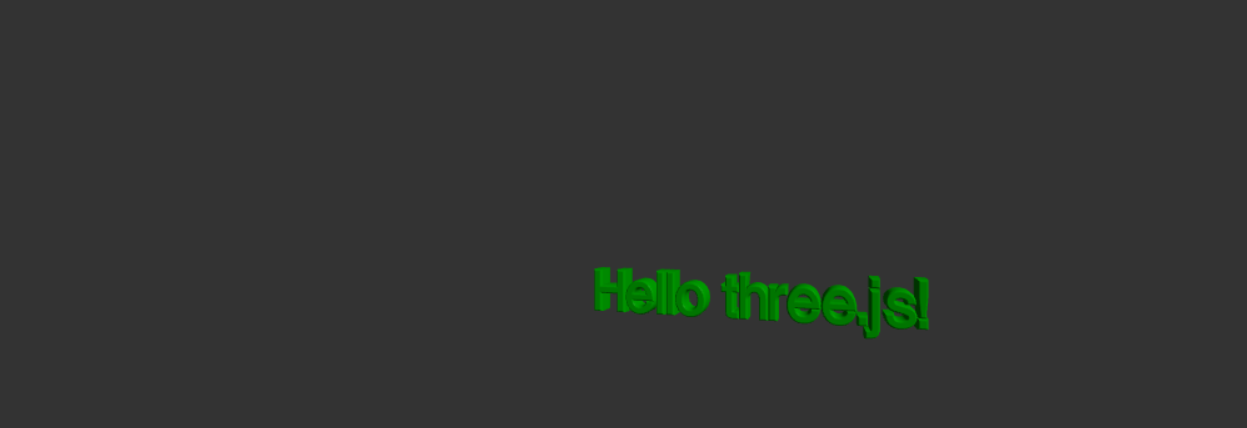
效果图
文档链接
http://www.webgl3d.cn/Three.js/

北京人形旗下天工造物具身智能开源社区,聚焦具身天工与慧思开物两大平台
更多推荐
 4
4 0
0- 0


 已为社区贡献1条内容

所有评论(0)