鸿蒙开发微博文档案例
一、微博超话页面详细案例
我们要制作微博超话页面,让微博页面内看帖、广场、创建按钮、添加按钮实现页面点击效果和页面跳转。
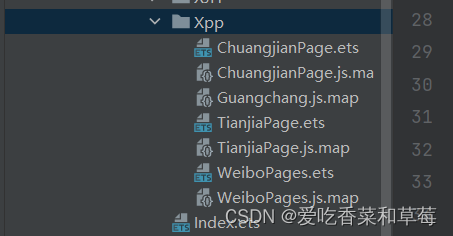
1、创建一个文件夹
首先我们来创建一个文件夹命名为Xpp,在文件夹下新建一个Page项目,命名为WeiboPages。
1.2使用Tabs组件添加看贴和广场两个页面
Tabs() {
  TabContent() {
  }.tabBar('看帖')
  TabContent() {

Guangchang()
  }.tabBar('广场')
}.barWidth('50%')

.zIndex(5)
给整体布局设置一个Scroll,Column设置高为2000,宽度为百分之九十
// Kantie()
Scroll() {
  Column() {

 }.height(2000).width('98%')
}
设置一个层叠效果,使用borderRadius设置圆角
Stack() {
  TextInput({ placeholder: '正在活跃 韩剧眼泪女王' }).textAlign(TextAlign.Center)
Image($r('app.media.sousuo')).width(20).margin({ right: 195 })
}.margin({ left: 10, right: 10 }) //左右边框间距
.borderRadius(20)
效果图如下:

1.3定义一个类,导出所定义的类
export  class ImagesItem2 {
   images2: ResourceStr
   name2: string
   name22: string
   constructor(images2: ResourceStr, name2: string, name22: string) {
     this.images2 = images2;
     this.name2 = name2;
     this.name22 = name22;
   }
 }
1.3.1导入定义的类
import {ImagesItem2 } from '../../components/xpp/ContenItems'
@State list4: Array<ImagesItem2> = [
  new ImagesItem2($r('app.media.2dongman1'), '剑网3', '日新帖140'),
  new ImagesItem2($r('app.media.2dongman2'), '和平精英', '日新帖820'),
  new ImagesItem2($r('app.media.dongman1'), '男主车', '日新帖1'),
  new ImagesItem2($r('app.media.2dongman4'), '仙剑4', '日新帖79'),
  new ImagesItem2($r('app.media.2dongman5'), '赵婧祎', '周新帖4'),
  new ImagesItem2($r('app.media.2dongman1'), '剑网3', '日新帖140'),
]
Row({ space: 10 }) {
  Text('你可能感兴趣的超话').margin({ bottom: 5 })
  Blank()
  Text('一键签到').margin({ bottom: 5 })
  Image($r('app.media.dayufuhao')).width(20).margin({ bottom: 5 })
}.width('95%')
.margin({ top: 17 })
List() {
  ForEach(this.list4, (item2: ImagesItem2) => {
    ListItem() {
      ItemCard2(item2)
    }
  })
}.height(100)
.listDirection(Axis.Horizontal)
.margin({ left: 10 })
效果图如下:

1.3.2定义一个类,导出类
export  class Yyjs {
   titley: string
   listy: Array<ContenItem1>
   constructor(titley: string, listy: Array<ContenItem1>) {
     this.titley = titley;
     this.listy = listy;
   }
 }
1.3.3导入所定义的类
import {Yyjs} from '../../components/xpp/ContenItems'
listx: Array<ContenItem1> = [
  new ContenItem1($r('app.media.xiandingxiaoka'), '限定小卡', '更多', $r('app.media.dayufuhao'), $r('app.media.xiandingxiaoka1'), 'k宝生日微博抽卡活动#', $r('app.media.huangzuan'), 'K宝 133人参与', $r('app.media.quchouka')),
  new ContenItem1($r('app.media.yuyinjiesuo'), '语音解锁', '更多', $r('app.media.dayufuhao'), $r('app.media.yuyinjiesuo1'), '带#骆珉敏一敏惊任#', $r('app.media.huangzuan'), '任敏超话', $r('app.media.qujiesuo')),
  new ContenItem1($r('app.media.zhengjihuodong'), '语音解锁', '更多', $r('app.media.dayufuhao'), $r('app.media.zhengjihuodong1'), '#无限暖暖奇想测试3', $r('app.media.huangzuan'), '无限暖暖 606发帖', $r('app.media.qukankan'))
]

@State yyjs: Yyjs = new Yyjs("语音解锁", this.listx)
@State listyy: Array<Yyjs> = [
  new Yyjs("限定小卡", this.listx),
]
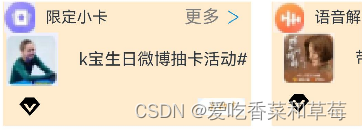
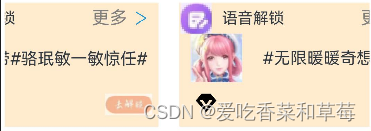
设置一个Scroll滚动,使用ForEach循环渲染
Scroll() {
  Row() {
    ForEach(this.listx, (items) => {
      Column() {
        Row({ space: 5 }) {
          Image(items.imagey).width(30).margin(5).height(30)
          Text(items.titley).fontSize(15)
          Blank()
          Text(items.titley1).fontColor(Color.Gray).fontSize(17)
          Image(items.imagey1).width(17)
        }.margin({right:12})
        .width('98%')
        .height(30)
        Column() {
          Row() {
            Image(items.imagey2).width(50).margin({ right: 20 })
            Text(items.titley2).fontSize(16)
          }
          Row({ space: 5 }) {
            Row() {
              Image(items.imagey3).width(20)
              Text(items.title4).fontSize(16).margin({ left: 10 })
            }.width('40%').margin(10)
            Image(items.imagey4).width('20%')
          }.width('95%')
          .justifyContent(FlexAlign.SpaceBetween)
        }
      }.backgroundColor('#FFEBCD')
      .width('70%')
      .height('6%')
      .margin({ right: 20 })
    })
  }.margin({ left: 5, right: 5 })
}
.scrollable(ScrollDirection.Horizontal) // 滚动方向为水平方向
.scrollBar(BarState.Off) //设置滚动条为不显示,隐藏掉
效果图如下:
1.4定义一个类,导出类
export  class ImagesItem3 {
   images3: ResourceStr
   name3: string
   constructor(images3: ResourceStr, name3: string) {
     this.images3 = images3;
     this.name3 = name3;
   }
 }
1.4.1导入类
import {ImagesItem3} from '../../components/xpp/ContenItems'
@Builder function ItemCard3(item3: ImagesItem3) {
  Row({ space: 5 }) {
    Image(item3.images3).width(20)
    Text(item3.name3).fontSize(15)
  }
  .borderRadius(10)
  .justifyContent(FlexAlign.Start)
  .border({ width: 1 })
  .borderColor(Color.Gray)
  .margin(8)
  .width('27%')
  .height('30%')
}
@State List5: Array<ImagesItem3> = [
  new ImagesItem3($r('app.media.huomiao'), '必刷超话'),
  new ImagesItem3($r('app.media.loufang'), '附近'),
  new ImagesItem3($r('app.media.aixin'), '美好生活')
]
List() {
  ForEach(this.List5, (item3: ImagesItem3) => {
    ListItem() {
      ItemCard3(item3)
    }
  })
}.height(80).margin(10)
.listDirection(Axis.Horizontal)
效果图如下:

Row({ space: 8 }) {
  Image($r('app.media.xukai')).width(50).height(50)
  Column({space:5}) {
    Text('许凯超话')
    Text('4小时前 @Baby妮SoSo').fontSize(13)
  }
  Image($r('app.media.lv3')).width(20).margin({ bottom: -15 })
  Row() {
    Image($r('app.media.xukaiguanzhu')).width('30%')
  }
}.width('90%').margin({ top: -45,right:15 })
Column({ space: 5 }) {
  Row() {
    Image($r('app.media.huangzuan')).width(20)
    Text('许凯超话 #子夜归##许凯夜归#许凯梅逐雨#').fontColor(Color.Blue).fontSize(16)
  }
  Row() {
    Text('20240428许凯子夜归出妆').fontSize(16).margin({ right: 130 })
  }
  Row() {
    Text('凯怎么每天都那么帅呢? 📹Baby妮SoSo的微').fontSize(16)
  }
  Image($r('app.media.xukaidatupian')).width('50%')
}.margin({left:5})

1.4.2定义一个类,导出类
export class Czy{
  imageC:ResourceStr
  nameC:string
  nameC1:string
  imageC1:ResourceStr
  imageC2:ResourceStr
  imageC3:ResourceStr
  nameC2:string
  nameC3:string
  imageC4:ResourceStr
  imageC5:ResourceStr
  imageC6:ResourceStr
  imageC7:ResourceStr
  imageC8:ResourceStr
  imageC9:ResourceStr
constructor( imageC:ResourceStr,nameC:string,nameC1:string,imageC1:ResourceStr,imageC2:ResourceStr,imageC3:ResourceStr,nameC2:string,nameC3:string,imageC4:ResourceStr,imageC5:ResourceStr,imageC6:ResourceStr,imageC7:ResourceStr,imageC8:ResourceStr,imageC9:ResourceStr) {
    this.imageC=imageC
    this.nameC=nameC
    this.nameC1=nameC1
    this.imageC1=imageC1
    this.imageC2=imageC2
    this.imageC3=imageC3
    this.nameC2=nameC2
    this.nameC3=nameC3
    this.imageC4=imageC4
    this.imageC5=imageC5
    this.imageC6=imageC6
    this.imageC7=imageC7
    this.imageC8=imageC8
    this.imageC9=imageC9
  }
}
1.4.3导入定义的类
import { Czy } from '../../components/xpp/ContenItems'
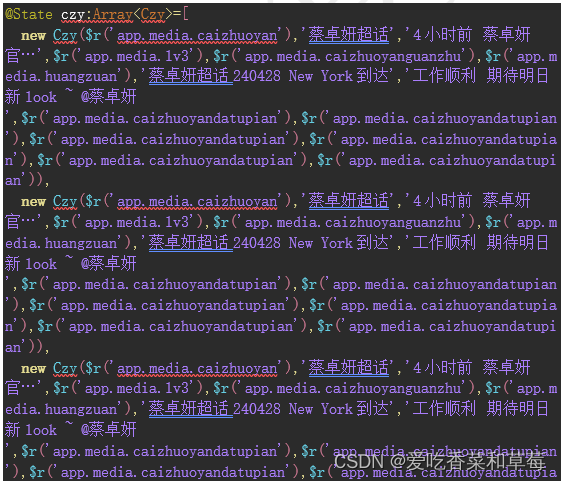
使用@State装饰器,声明变量

1.5设置List列表
List(){
  ForEach(this.czy,(itemCz:Czy)=>{
    ListItem(){
    Column(){
      Row({ space: 8 }) {
        Image(itemCz.imageC).width(50).height(50)
        Column({ space: 5 }) {
          Text(itemCz.nameC)
          Text(itemCz.nameC1).fontSize(13)
        }
        Image(itemCz.imageC1).width(20).margin({ bottom: -15 })
        Row() {
          Image(itemCz.imageC2).width('20%').margin({ left: 50 })
        }
      }.width('95%').margin({ top: 10 })
      Column({ space: 10 }) {
        Row({ space: 5 }) {
          Image(itemCz.imageC3).width(20)
          Text(itemCz.nameC2).fontColor(Color.Blue).fontSize(16)
        }.margin({ right: 30,top:5 })
        Row() {
          Text(itemCz.nameC3).fontSize(14).margin({ right:60 })
        }
       Column({space:10}){
         Row({ space: 10 }) {
           Image(itemCz.imageC4).width(90)
           Image(itemCz.imageC5).width(90)
           Image(itemCz.imageC6).width(90)
         }
         Row({ space: 10 }) {
           Image(itemCz.imageC7).width(90)
           Image(itemCz.imageC8).width(90)
           Image(itemCz.imageC9).width(90)
         }
       }.height(80).width('90%').margin({left:30}).justifyContent(FlexAlign.Center)
      }.width('98%')
    }.height(300).width('95%').margin({top:20})
    }
  })
}.listDirection(Axis.Vertical).height('90%')
效果图如下:


1.6微博主页面所有代码如下所示:
import { Chfl, ImageItem, ImagesItem2, ImagesItem3, Yyjs, ContenItem1,Synn,Mt,Czy } from '../../components/xpp/ContenItems'
import ContenItem from '../../components/xpp/ContenItems'
import { Guangchang } from '../../components/xpp/Guangchang'
import router from '@ohos.router'
import router1 from '@ohos.router'
// import { Kantie } from '../../components/xpp/Kantie'
@Builder function ItemCard2(item2: ImagesItem2) {
  Row({ space: 10 }) {
    Column({ space: 5 }) {
      Image(item2.images2).width(50).height(50).borderRadius(2)
      Text(item2.name2)
      Text(item2.name22).fontColor(Color.Gray)
    }
  }.height(50)
  .width(75)
}
@Builder function ItemCard3(item3: ImagesItem3) {
  Row({ space: 5 }) {
    Image(item3.images3).width(20)
    Text(item3.name3).fontSize(15)
  }
  .borderRadius(10)
  .justifyContent(FlexAlign.Start)
  .border({ width: 1 })
  .borderColor(Color.Gray)
  .margin(8)
  .width('27%')
  .height('30%')
}
@Component
export struct WeiboPage {
  scroller: Scroller = new Scroller();
  @Provide list3: Array<ImageItem> = [
    new ImageItem($r('app.media.yuange'), 'yx喽', '正在空降'),
    new ImageItem($r('app.media.dongman1'), '苏州KS…', '正在空降'),
    new ImageItem($r('app.media.dongman2'), 'BLG电…', '正在空降'),
    new ImageItem($r('app.media.dongman3'), '猫猫熊…', '正在空降'),
    new ImageItem($r('app.media.dongman4'), '4AM战队', '正在空降'),
    new ImageItem($r('app.media.yuange'), 'yx喽', '正在空降'),
  ]
  @State list4: Array<ImagesItem2> = [
    new ImagesItem2($r('app.media.2dongman1'), '剑网3', '日新帖140'),
    new ImagesItem2($r('app.media.2dongman2'), '和平精英', '日新帖820'),
    new ImagesItem2($r('app.media.dongman1'), '男主车', '日新帖1'),
    new ImagesItem2($r('app.media.2dongman4'), '仙剑4', '日新帖79'),
    new ImagesItem2($r('app.media.2dongman5'), '赵婧祎', '周新帖4'),
    new ImagesItem2($r('app.media.2dongman1'), '剑网3', '日新帖140'),
  ]
  @State List5: Array<ImagesItem3> = [
    new ImagesItem3($r('app.media.huomiao'), '必刷超话'),
    new ImagesItem3($r('app.media.loufang'), '附近'),
    new ImagesItem3($r('app.media.aixin'), '美好生活')
  ]
  list: Array<ContenItem> = [
    new ContenItem('体育运动', $r('app.media.lanqiu'), 'CBA', $r('app.media.lv3'), '7万帖子 194万CBA球迷', $r('app.media.guanzhu1')),
    new ContenItem('体育运动', $r('app.media.sunyingsha'), '孙颖莎', $r('app.media.lv3'), '107万帖子 109万豆沙包', $r('app.media.guanzhu1')),
    new ContenItem('体育运动', $r('app.media.datou'), '樊振东', $r('app.media.lv3'), '101万帖子 164万繁星', $r('app.media.guanzhu1'))
  ]
  list1: Array<ContenItem> = [
    new ContenItem('当前热门', $r('app.media.dongman1'), '崩坏星穹铁道', $r('app.media.lv3'), '77万帖子 351万开拓者', $r('app.media.guanzhu1')),
    new ContenItem('当前热门', $r('app.media.xiaozhan'), '肖战', $r('app.media.lv3'), '1亿帖子 1327万小飞侠', $r('app.media.guanzhu1')),
    new ContenItem('当前热门', $r('app.media.lingengxin'), '林更新', $r('app.media.lv3'), '40万帖子 73万Kids', $r('app.media.guanzhu1'))
  ]
  list2: Array<ContenItem> = [
    new ContenItem('动漫', $r('app.media.dongman1'), '崩坏星穹铁道', $r('app.media.lv3'), '77万帖子 351万开拓者', $r('app.media.guanzhu1')),
    new ContenItem('动漫', $r('app.media.xiaozhan'), '肖战', $r('app.media.lv3'), '1亿帖子 1327万小飞侠', $r('app.media.guanzhu1')),
    new ContenItem('动漫', $r('app.media.datou'), '林更新', $r('app.media.lv3'), '40万帖子 73万Kids', $r('app.media.guanzhu1'))
  ]
  listx: Array<ContenItem1> = [
    new ContenItem1($r('app.media.xiandingxiaoka'), '限定小卡', '更多', $r('app.media.dayufuhao'), $r('app.media.xiandingxiaoka1'), 'k宝生日微博抽卡活动#', $r('app.media.huangzuan'), 'K宝 133人参与', $r('app.media.quchouka')),
    new ContenItem1($r('app.media.yuyinjiesuo'), '语音解锁', '更多', $r('app.media.dayufuhao'), $r('app.media.yuyinjiesuo1'), '带#骆珉敏一敏惊任#', $r('app.media.huangzuan'), '任敏超话', $r('app.media.qujiesuo')),
    new ContenItem1($r('app.media.zhengjihuodong'), '语音解锁', '更多', $r('app.media.dayufuhao'), $r('app.media.zhengjihuodong1'), '#无限暖暖奇想测试3', $r('app.media.huangzuan'), '无限暖暖 606发帖', $r('app.media.qukankan'))
  ]
  @State yyjs: Yyjs = new Yyjs("语音解锁", this.listx)
  @State listyy: Array<Yyjs> = [
    new Yyjs("限定小卡", this.listx),
  ]
  @Provide chfl: Chfl = new Chfl("体育运动", this.list)
  @Provide list11: Array<Chfl> = [
    new Chfl("体育运动", this.list),
    new Chfl("当前热门", this.list1),
    new Chfl("动漫", this.list2)
  ]
  @Provide gameS:Array<Synn>=[
    new Synn($r('app.media.youxitu1'),'闪耀暖暖',$r('app.media.wuxing'),'图返,原因是这位','8.2','9195人已评价'),
    new Synn($r('app.media.wuqimitu'),'无期迷途',$r('app.media.wuxing'),'抽一个b服礼包','9.1','5558人已评价'),
    new Synn($r('app.media.chongfanweilai'),'重返未来',$r('app.media.wuxing'),'来吃了 玛蒂尔达…','8.7','3124人已评价')
  ]
  @Provide mingM:Array<Mt>=[
    new Mt($r('app.media.mingxing2'),'梅婷','生日倒计时2天','已送4.8万祝福',$r('app.media.zhufu')),
    new Mt($r('app.media.xusong'),'许嵩','生日倒计时1天','已送5610祝福',$r('app.media.zhufu')),
    new Mt($r('app.media.chengyi'),'成毅','生日倒计时4天','已送6.5万祝福',$r('app.media.zhufu')),
    new Mt($r('app.media.chengjunming'),'陈俊铭','生日倒计时4天','已送3895祝福',$r('app.media.zhufu')),
  ]
  @State czy:Array<Czy>=[
    new Czy($r('app.media.caizhuoyan'),'蔡卓妍超话','4小时前 蔡卓妍官…',$r('app.media.lv3'),$r('app.media.caizhuoyanguanzhu'),$r('app.media.huangzuan'),'蔡卓妍超话240428 New York到达','工作顺利 期待明日新look ~ @蔡卓妍',$r('app.media.caizhuoyandatupian'),$r('app.media.caizhuoyandatupian'),$r('app.media.caizhuoyandatupian'),$r('app.media.caizhuoyandatupian'),$r('app.media.caizhuoyandatupian'),$r('app.media.caizhuoyandatupian')),
    new Czy($r('app.media.caizhuoyan'),'蔡卓妍超话','4小时前 蔡卓妍官…',$r('app.media.lv3'),$r('app.media.caizhuoyanguanzhu'),$r('app.media.huangzuan'),'蔡卓妍超话240428 New York到达','工作顺利 期待明日新look ~ @蔡卓妍',$r('app.media.caizhuoyandatupian'),$r('app.media.caizhuoyandatupian'),$r('app.media.caizhuoyandatupian'),$r('app.media.caizhuoyandatupian'),$r('app.media.caizhuoyandatupian'),$r('app.media.caizhuoyandatupian')),
    new Czy($r('app.media.caizhuoyan'),'蔡卓妍超话','4小时前 蔡卓妍官…',$r('app.media.lv3'),$r('app.media.caizhuoyanguanzhu'),$r('app.media.huangzuan'),'蔡卓妍超话240428 New York到达','工作顺利 期待明日新look ~ @蔡卓妍',$r('app.media.caizhuoyandatupian'),$r('app.media.caizhuoyandatupian'),$r('app.media.caizhuoyandatupian'),$r('app.media.caizhuoyandatupian'),$r('app.media.caizhuoyandatupian'),$r('app.media.caizhuoyandatupian'))  ]
  build() {
    Stack({ alignContent: Alignment.TopStart }) {
      Row() {
        Image($r('app.media.chuangjian')).width(30)
          .onClick(() => {
            router1.pushUrl({
              url: 'pages/Xpp/ChuangjianPage'
            }, router.RouterMode.Single, (err) => {
              if (err) {
                console.log(`路由失败,errCode:${err.code}errMsg:${err.message}`)
                return;
              }
              console.info('Invoke replaceUrl succeeded.');
            })
          })
      }.width('10%')
      .height('6%')
      .zIndex(10)
      .margin({ left: 5 })
      Stack({ alignContent: Alignment.TopEnd }) {
        Row() {
          Image($r('app.media.tianjia'))
            .width(30)
            .onClick(() => {
              router.pushUrl({
                url: 'pages/Xpp/TianjiaPage'

              }, router.RouterMode.Single, (err) => {
                if (err) {
                  console.log(`路由失败,errCode:${err.code}errMsg:${err.message}`)
                  return;
                }
                console.info('Invoke replaceUrl succeeded.');
              })
            })
        }.width('10%')
        .height('6%')
        .zIndex(10)
        .margin({ right: 5 })
        Tabs() {
          TabContent() {
            // Kantie()
            Scroll() {
              Column() {
                Stack() {
                  TextInput({ placeholder: '正在活跃 韩剧眼泪女王' }).textAlign(TextAlign.Center)
                  Image($r('app.media.sousuo')).width(20).margin({ right: 195 })
                }.margin({ left: 10, right: 10 }) //左右边框间距
                .borderRadius(20)
                Row({ space: 10 }) {
                  Text('你可能感兴趣的超话').margin({ bottom: 5 })
                  Blank()
                  Text('一键签到').margin({ bottom: 5 })
                  Image($r('app.media.dayufuhao')).width(20).margin({ bottom: 5 })
                }.width('95%')
                .margin({ top: 17 })
                List() {
                  ForEach(this.list4, (item2: ImagesItem2) => {
                    ListItem() {
                      ItemCard2(item2)
                    }
                  })
                }.height(100)
                .listDirection(Axis.Horizontal)
                .margin({ left: 10 })
                Scroll() {
                  Row() {
                    ForEach(this.listx, (items) => {
                      Column() {
                        Row({ space: 5 }) {
                          Image(items.imagey).width(30).margin(5).height(30)
                          Text(items.titley).fontSize(15)
                          Blank()
                          Text(items.titley1).fontColor(Color.Gray).fontSize(17)
                          Image(items.imagey1).width(17)
                        }.margin({right:12})
                        .width('98%')
                        .height(30)
                        Column() {
                          Row() {
                            Image(items.imagey2).width(50).margin({ right: 20 })
                            Text(items.titley2).fontSize(16)
                          }
                          Row({ space: 5 }) {
                            Row() {
                              Image(items.imagey3).width(20)
                              Text(items.title4).fontSize(16).margin({ left: 10 })
                            }.width('40%').margin(10)
                            Image(items.imagey4).width('20%')
                          }.width('95%')
                          .justifyContent(FlexAlign.SpaceBetween)
                        }
                      }.backgroundColor('#FFEBCD')
                      .width('70%')
                      .height('6%')
                      .margin({ right: 20 })
                    })
                  }.margin({ left: 5, right: 5 })
                }
                .scrollable(ScrollDirection.Horizontal) // 滚动方向为水平方向
                .scrollBar(BarState.Off) //设置滚动条为不显示,隐藏掉
                List() {
                  ForEach(this.List5, (item3: ImagesItem3) => {
                    ListItem() {
                      ItemCard3(item3)
                    }
                  })
                }.height(80).margin(10)
                .listDirection(Axis.Horizontal)
                Row({ space: 8 }) {
                  Image($r('app.media.xukai')).width(50).height(50)
                  Column({space:5}) {
                    Text('许凯超话')
                    Text('4小时前 @Baby妮SoSo').fontSize(13)
                  }
                  Image($r('app.media.lv3')).width(20).margin({ bottom: -15 })
                  Row() {
                    Image($r('app.media.xukaiguanzhu')).width('30%')
                  }
                }.width('90%').margin({ top: -45,right:15 })
                Column({ space: 5 }) {
                  Row() {
                    Image($r('app.media.huangzuan')).width(20)
                    Text('许凯超话 #子夜归##许凯夜归#许凯梅逐雨#').fontColor(Color.Blue).fontSize(16)
                  }
                  Row() {
                    Text('20240428许凯子夜归出妆').fontSize(16).margin({ right: 130 })
                  }
                  Row() {
                    Text('凯怎么每天都那么帅呢? 📹Baby妮SoSo的微').fontSize(16)
                  }
                  Image($r('app.media.xukaidatupian')).width('50%')
                }.margin({left:5})
               List(){
                 ForEach(this.czy,(itemCz:Czy)=>{
                   ListItem(){
                   Column(){
                     Row({ space: 8 }) {
                       Image(itemCz.imageC).width(50).height(50)
                       Column({ space: 5 }) {
                         Text(itemCz.nameC)
                         Text(itemCz.nameC1).fontSize(13)
                       }
                       Image(itemCz.imageC1).width(20).margin({ bottom: -15 })
                       Row() {
                         Image(itemCz.imageC2).width('20%').margin({ left: 50 })
                       }
                     }.width('95%').margin({ top: 10 })
                     Column({ space: 10 }) {
                       Row({ space: 5 }) {
                         Image(itemCz.imageC3).width(20)
                         Text(itemCz.nameC2).fontColor(Color.Blue).fontSize(16)
                       }.margin({ right: 30,top:5 })
                       Row() {
                         Text(itemCz.nameC3).fontSize(14).margin({ right:60 })
                       }
                      Column({space:10}){
                        Row({ space: 10 }) {
                          Image(itemCz.imageC4).width(90)
                          Image(itemCz.imageC5).width(90)
                          Image(itemCz.imageC6).width(90)
                        }
                        Row({ space: 10 }) {
                          Image(itemCz.imageC7).width(90)
                          Image(itemCz.imageC8).width(90)
                          Image(itemCz.imageC9).width(90)
                        }
                      }.height(80).width('90%').margin({left:30}).justifyContent(FlexAlign.Center)
                     }.width('98%')
                   }.height(300).width('95%').margin({top:20})
                   }
                 })
               }.listDirection(Axis.Vertical).height('90%')
              }.height(2000).width('98%')
            }
          }.tabBar('看帖')
          TabContent() {
            Guangchang()
          }.tabBar('广场')
        }.barWidth('50%')
        .zIndex(5)
      }.height(800)
    }
  }
}
1.7微博超话总页面定义的所有类:
export default class ContenItem {
  title: string
  image: ResourceStr
  title1: string
  image1: ResourceStr
  title2:string
  image2:ResourceStr
  constructor(title: string, image: ResourceStr, title1: string, image1: ResourceStr,title2:string,image2:ResourceStr) {
    this.title = title
    this.image = image
    this.title1 = title1
    this.image1 = image1
    this.title2 = title2
    this.image2 = image2
  }
}
export class Chfl {
   title: string
   list: Array<ContenItem>
   constructor(title: string, list: Array<ContenItem>) {
     this.title = title;
     this.list = list;
   }
 }
export  class ImageItem {
   images: ResourceStr
   name: string
   name1: string
   constructor(images: ResourceStr, name: string, name1: string) {
     this.images = images;
     this.name = name;
     this.name1 = name1;
   }
 }
export  class ImagesItem2 {
   images2: ResourceStr
   name2: string
   name22: string
   constructor(images2: ResourceStr, name2: string, name22: string) {
     this.images2 = images2;
     this.name2 = name2;
     this.name22 = name22;
   }
 }
export  class ImagesItem3 {
   images3: ResourceStr
   name3: string
   constructor(images3: ResourceStr, name3: string) {
     this.images3 = images3;
     this.name3 = name3;
   }
 }
export  class Yyjs {
   titley: string
   listy: Array<ContenItem1>
   constructor(titley: string, listy: Array<ContenItem1>) {
     this.titley = titley;
     this.listy = listy;
   }
 }
export  class ContenItem1 {
   imagey: ResourceStr
   titley: string
   titley1: string
   imagey1: ResourceStr
   imagey2: ResourceStr
   titley2: string
   imagey3: ResourceStr
   titley4: string
   imagey4: ResourceStr
   constructor(imagey: ResourceStr, titley: string, titley1: string, imagey1: ResourceStr, imagey2: ResourceStr, titley2: string, imagey3: ResourceStr, titley4: string, imagey4: ResourceStr) {
     this.imagey = imagey;
     this.titley = titley;
     this.titley1 = titley1;
     this.imagey1 = imagey1;
     this.imagey2 = imagey2;
     this.titley2 = titley2;
     this.imagey3 = imagey3;
     this.titley4 = titley4;
     this.imagey4 = imagey4;
   }
 }
 export class Synn {
   imageS:ResourceStr
   nameS:string
   imageS1:ResourceStr
   nameS1:string
   nameS2:string
   nameS3:string
   constructor(imageS:ResourceStr, nameS:string, imageS1:ResourceStr, nameS1:string, nameS2:string, nameS3:string) {
     this.imageS=imageS
     this.nameS=nameS
     this.imageS1=imageS1
     this.nameS1=nameS1
     this.nameS2=nameS2
     this.nameS3=nameS3
   }
 }
 export class Mt{
   imageM:ResourceStr
   nameM:string
   nameM1:string
   nameM2:string
   imageM1:ResourceStr
   constructor(imageM:ResourceStr, nameM:string, nameM1:string, nameM2:string, imageM1:ResourceStr) {
     this.imageM=imageM
     this.nameM=nameM
     this.nameM1=nameM1
     this.nameM2=nameM2
     this.imageM1=imageM1
   }
 }
 export class ImageG{
   imageG: ResourceStr
   nameG:string
   constructor(imageG: ResourceStr,nameG:string) {
     this.imageG =imageG
     this.nameG=nameG
   }
 }
 export class ImageW{
   imageW:ResourceStr
   nameW:string
   constructor(imageW:ResourceStr, nameW:string) {
     this.imageW=imageW
     this.nameW=nameW
   }
 }
 export class ImageL{
   imageL:ResourceStr
   nameL:string
   constructor(imageL:ResourceStr,nameL:string) {
     this.imageL=imageL
     this.nameL=nameL
   }
 }
 export class ImageSy{
   imageSy:ResourceStr
   imageSy1:ResourceStr
   nameSy:string
   nameSy1:string
   constructor(imageSy:ResourceStr,imageSy1:ResourceStr,nameSy:string,nameSy1:string) {
     this.imageSy=imageSy
     this.imageSy1=imageSy1
     this.nameSy=nameSy
     this.nameSy1=nameSy1
   }
 }
 export class Czy{
   imageC:ResourceStr
   nameC:string
   nameC1:string
   imageC1:ResourceStr
   imageC2:ResourceStr
   imageC3:ResourceStr
   nameC2:string
   nameC3:string
   imageC4:ResourceStr
   imageC5:ResourceStr
   imageC6:ResourceStr
   imageC7:ResourceStr
   imageC8:ResourceStr
   imageC9:ResourceStr
   constructor( imageC:ResourceStr,nameC:string,nameC1:string,imageC1:ResourceStr,imageC2:ResourceStr,imageC3:ResourceStr,nameC2:string,nameC3:string,imageC4:ResourceStr,imageC5:ResourceStr,imageC6:ResourceStr,imageC7:ResourceStr,imageC8:ResourceStr,imageC9:ResourceStr) {
     this.imageC=imageC
     this.nameC=nameC
     this.nameC1=nameC1
     this.imageC1=imageC1
     this.imageC2=imageC2
     this.imageC3=imageC3
     this.nameC2=nameC2
     this.nameC3=nameC3
     this.imageC4=imageC4
     this.imageC5=imageC5
     this.imageC6=imageC6
     this.imageC7=imageC7
     this.imageC8=imageC8
     this.imageC9=imageC9
   }
 }
二、创建页面
2.1给创建图片设置点击事件,实现页面的跳转
首先使用层叠效果,将创建按钮,层叠到顶部开头(TopStart),使用zIndex层级放在层叠上,能够点击。
我们给创建图片设置点击事件,设置路由,用车if语句判断成功或失败.
Stack({ alignContent: Alignment.TopStart }) {
  Row() {
    Image($r('app.media.chuangjian')).width(30)
      .onClick(() => {
        router1.pushUrl({
          url: 'pages/Xpp/ChuangjianPage'
        }, router.RouterMode.Single, (err) => {
          if (err) {
            console.log(`路由失败,errCode:${err.code}errMsg:${err.message}`)
            return;
          }
          console.info('Invoke replaceUrl succeeded.');
        })
      })
  }.width('10%')
  .height('6%')
  .zIndex(10)
  .margin({ left: 5 })

}
2.2设置创建页面布局内容
使用row和column先进行总体的布局,blank用来填充空白,用TextInput设置一个单行输入框,placeholder设置无输入时的提示文本,borderRadius设置圆角边框,设置Button按钮。
@Entry
@Component
struct ChuangjianPage {
  build() {
    Column() {
      Row() {
        Image($r('app.media.xiaoyu')).width(30)
        Text('返回')
        Blank()
        Text('申请创造超话')
        Blank()
        Image($r('app.media.sanxiaodian')).width(30)
      }.height(40)
      .width('90%')
      .justifyContent(FlexAlign.SpaceBetween)

      Divider().strokeWidth(3)
      Row() {
        Image($r('app.media.shuxian')).width(30)
        Text('超话分类').fontSize(20).margin({ right: 10 })
        Text('不超过32个字符').fontColor(Color.Grey).fontSize(15)
      }.width('90%')
      .height(40)
      .margin({ right: 26 })
      TextInput({ placeholder: '输入超话名称' })
        .margin(10).placeholderFont({ size: 25 }).borderRadius(5)
      Row() {
        Image($r('app.media.shuxian')).width(30)
        Text('超话分类').fontSize(20).margin({ right: 10 })
      }.width('90%')
      .height(40)
      .margin({ right: 26 })
      Stack() {
        TextInput({ placeholder: '选择超话分类' })
          .margin(10).placeholderFont({ size: 25 }).borderRadius(5)
        Image($r('app.media.dayufuhao')).width(30)
      }.alignContent(Alignment.End)
      Row() {
        Image($r('app.media.shuxian')).width(30)
        Text('隐私设置').fontSize(20).margin({ right: 10 })
      }.width('90%')
      .height(40)
      .margin({ right: 26 })
      Row({ space: 10 }) {
        Text('公开').fontSize(28).fontColor(Color.Black)
        Text('任何人都能查看超话帖子').fontSize(20).fontColor(Color.Gray)
        Image($r('app.media.yuanquanduihao')).width(30)
      }.height(65)
      .backgroundColor('#DBDBDB')
      .width('97%')
      .borderRadius(10)
      Row({ space: 10 }) {
        Text('封闭').fontSize(28).fontColor(Color.Black)
        Text('已关注的用户才能查看').fontSize(20).fontColor(Color.Gray)
        Image($r('app.media.yuanqun')).width(30).margin({ left: 20 })
      }
      .height(65)
      .backgroundColor('#DBDBDB')
      .width('97%')
      .borderRadius(10)
      .margin(8)
      Row() {
        Image($r('app.media.shuxian')).width(30)
        Text('个人信息').fontSize(20)
      }.width('90%')
      .margin({ right: 26 })
      Text('⭐ 继续完成以下操作,超话创建成功成为主持人').fontColor(Color.Orange).margin(5)
      Column() {
        Row() {
          Text('完成身份验证').fontSize(28)
          Blank()
          Text('去验证').fontSize(18).fontColor(Color.Orange)
          Image($r('app.media.dayufuhao')).width(25)
        }.width('90%').margin(8)
        Divider().strokeWidth(1)
        Row() {
          Text('绑定手机号').fontSize(28)
          Blank()
          Text('已绑定').fontSize(18).fontColor(Color.Orange)
        }.width('90%')
        .margin(8)
      }.borderRadius(10)
      .border({ width: 1 })
      Button('申请创建').height(40)
        .width('98%').backgroundColor(Color.Orange)
        .margin({ top: 10 })
      Row() {
        Divider().vertical(false).strokeWidth(2).width('39%').margin(8)
        Text('创建规则')
        Divider().vertical(false).strokeWidth(2).width('38%').margin(8)
      }.width('100%')
      .justifyContent(FlexAlign.Center)
      .margin(10)
      Text('1.名称不超过32个字符,限汉字、字母、数字、下划线')
      Text('2.已满18周岁且创建时完成身份验证和手机号绑定的用户申请后可立即开通,自动成为超话主持人')
    }
  }
}
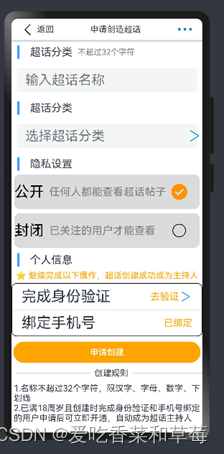
2.3给返回字体设置点击事件,实现返回到主页面
Text('返回')
  .onClick(() => {
    router1.back();
  })
导入路由:
import router1 from '@ohos.router'
2.3.1CustomDialogController设置…的自定义弹窗效果
给…按钮设置点击效果,实现弹窗效果
Image($r('app.media.sanxiaodian')).width(30)
  .onClick(() => {
    this.dialogController.open()
  })
2.3.2导入对象
//自定义弹窗
dialogController: CustomDialogController = new CustomDialogController({
  builder: CustomDialogExample({
    cancel: this.onCancel,
    confirm: this.onAccept,
  }),
  alignment: DialogAlignment.Bottom, // 可设置dialog的对齐方式,设定显示在底部或中间等,默认为底部显示
  customStyle: true,
})
onCancel() {
  console.info('Callback when the first button is clicked')
}
onAccept() {
  console.info('Callback when the second button is clicked')
}
2.3.3给…设置动态弹窗
//动态中的“...”弹窗
@CustomDialog
struct CustomDialogExample {
  controller: CustomDialogController
  cancel: () => void
  confirm: () => void
2.4设置弹窗里面的内容效果布局
先定义一个类,然后导出到创建页面
export class ImageG{
  imageG: ResourceStr
  nameG:string
  constructor(imageG: ResourceStr,nameG:string) {
    this.imageG =imageG
    this.nameG=nameG
  }
}
export class ImageW{
  imageW:ResourceStr
  nameW:string
  constructor(imageW:ResourceStr, nameW:string) {
    this.imageW=imageW
    this.nameW=nameW
  }
}
export class ImageL{
  imageL:ResourceStr
  nameL:string
  constructor(imageL:ResourceStr,nameL:string) {
    this.imageL=imageL
    this.nameL=nameL
  }
}
2.4.1导入定义的类
import { ImageG,ImageW,ImageL } from '../../components/xpp/ContenItems'
利用ForEach循环渲染,List列表循环,给List设置Horizontal为横向
  build() {
    Column({ space: 15 }) {
      Divider().vertical(false).strokeWidth(6).width('16%').margin(8)
      Text('分享')
      Row() {
        List({ space: 10 }) {
          ForEach(this.Gxt, (itemG: ImageG) => {
            ListItem() {
              Column({ space: 5 }) {
                Image(itemG.imageG).width(50)
                Text(itemG.nameG)
              }
            }
          })
        }.listDirection(Axis.Horizontal)
      }.height('20%')
      .width('98%')
      Row() {
        List({space:10}) {
          ForEach(this.Wb, (itemW: ImageW) => {
            ListItem() {
              Column() {
                Image(itemW.imageW).width(70)
                Text(itemW.nameW)
              }
            }
          })
        }.listDirection(Axis.Horizontal)
      }.height('26%')
      .width('95%')
      Row(){
        List({space:10}){
          ForEach(this.Llq,(itemL:ImageL)=>{
            ListItem(){
              Column(){
                Image(itemL.imageL).width(70)
                Text(itemL.nameL)
              }
            }
          })
        }.listDirection(Axis.Horizontal)
      }.height('20%')
      .width('98%')
      .margin({top:-30})
      Row() {
        Button('取消')
          .height('12%')
          .width('90%')
          .onClick(() => {
            this.controller.close()
            this.confirm()
          })
          .backgroundColor('#FFFFFF')
          .fontColor(Color.Black)
      }
    }.backgroundColor('#F2F2F2').height(450)
  }
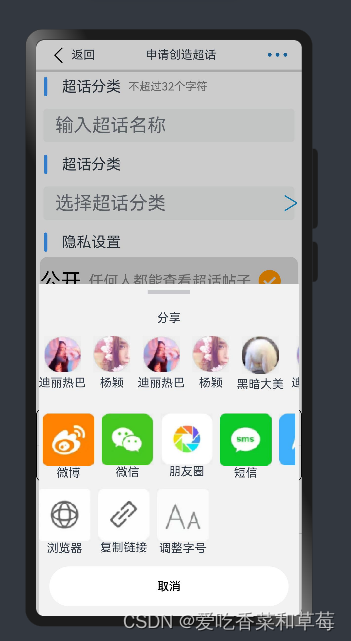
2.5创建页面全部代码:
import router1 from '@ohos.router'
import { ImageG,ImageW,ImageL } from '../../components/xpp/ContenItems'
@Entry
@Component
struct ChuangjianPage {
  //自定义弹窗
  dialogController: CustomDialogController = new CustomDialogController({
    builder: CustomDialogExample({
      cancel: this.onCancel,
      confirm: this.onAccept,
    }),
    alignment: DialogAlignment.Bottom, // 可设置dialog的对齐方式,设定显示在底部或中间等,默认为底部显示
    customStyle: true,
  })
  onCancel() {
    console.info('Callback when the first button is clicked')
  }
  onAccept() {
    console.info('Callback when the second button is clicked')
  }
  build() {
    Column() {
      Row() {
        Image($r('app.media.xiaoyu')).width(30)
        Text('返回')
          .onClick(() => {
            router1.back();
          })
        Blank()
        Text('申请创造超话')
        Blank()
        Image($r('app.media.sanxiaodian')).width(30)
          .onClick(() => {
            this.dialogController.open()
          })
      }.height(40)
      .width('90%')
      .justifyContent(FlexAlign.SpaceBetween)

      Divider().strokeWidth(3)
      Row() {
        Image($r('app.media.shuxian')).width(30)
        Text('超话分类').fontSize(20).margin({ right: 10 })
        Text('不超过32个字符').fontColor(Color.Grey).fontSize(15)
      }.width('90%')
      .height(40)
      .margin({ right: 26 })
      TextInput({ placeholder: '输入超话名称' })
        .margin(10).placeholderFont({ size: 25 }).borderRadius(5)
      Row() {
        Image($r('app.media.shuxian')).width(30)
        Text('超话分类').fontSize(20).margin({ right: 10 })
      }.width('90%')
      .height(40)
      .margin({ right: 26 })
      Stack() {
        TextInput({ placeholder: '选择超话分类' })
          .margin(10).placeholderFont({ size: 25 }).borderRadius(5)
        Image($r('app.media.dayufuhao')).width(30)
      }.alignContent(Alignment.End)
      Row() {
        Image($r('app.media.shuxian')).width(30)
        Text('隐私设置').fontSize(20).margin({ right: 10 })
      }.width('90%')
      .height(40)
      .margin({ right: 26 })
      Row({ space: 10 }) {
        Text('公开').fontSize(28).fontColor(Color.Black)
        Text('任何人都能查看超话帖子').fontSize(20).fontColor(Color.Gray)
        Image($r('app.media.yuanquanduihao')).width(30)
      }.height(65)
      .backgroundColor('#DBDBDB')
      .width('97%')
      .borderRadius(10)
      Row({ space: 10 }) {
        Text('封闭').fontSize(28).fontColor(Color.Black)
        Text('已关注的用户才能查看').fontSize(20).fontColor(Color.Gray)
        Image($r('app.media.yuanqun')).width(30).margin({ left: 20 })
      }
      .height(65)
      .backgroundColor('#DBDBDB')
      .width('97%')
      .borderRadius(10)
      .margin(8)
      Row() {
        Image($r('app.media.shuxian')).width(30)
        Text('个人信息').fontSize(20)
      }.width('90%')
      .margin({ right: 26 })
      Text('⭐ 继续完成以下操作,超话创建成功成为主持人').fontColor(Color.Orange).margin(5)
      Column() {
        Row() {
          Text('完成身份验证').fontSize(28)
          Blank()
          Text('去验证').fontSize(18).fontColor(Color.Orange)
          Image($r('app.media.dayufuhao')).width(25)
        }.width('90%').margin(8)
        Divider().strokeWidth(1)
        Row() {
          Text('绑定手机号').fontSize(28)
          Blank()
          Text('已绑定').fontSize(18).fontColor(Color.Orange)
        }.width('90%')
        .margin(8)
      }.borderRadius(10)
      .border({ width: 1 })
      Button('申请创建').height(40)
        .width('98%').backgroundColor(Color.Orange)
        .margin({ top: 10 })
      Row() {
        Divider().vertical(false).strokeWidth(2).width('39%').margin(8)
        Text('创建规则')
        Divider().vertical(false).strokeWidth(2).width('38%').margin(8)
      }.width('100%')
      .justifyContent(FlexAlign.Center)
      .margin(10)
      Text('1.名称不超过32个字符,限汉字、字母、数字、下划线')
      Text('2.已满18周岁且创建时完成身份验证和手机号绑定的用户申请后可立即开通,自动成为超话主持人')
    }
  }
}
//动态中的“...”弹窗
@CustomDialog
struct CustomDialogExample {
  controller: CustomDialogController
  cancel: () => void
  confirm: () => void
  @State Gxt: Array<ImageG> = [
    new ImageG($r('app.media.dilireba'), '迪丽热巴'),
    new ImageG($r('app.media.baby'), '杨颖'),
    new ImageG($r('app.media.dilireba'), '迪丽热巴'),
    new ImageG($r('app.media.baby'), '杨颖'),
    new ImageG($r('app.media.heiandamei'), '黑暗大美'),
    new ImageG($r('app.media.dilireba'), '迪丽热巴'),
    new ImageG($r('app.media.heiandamei'), '黑暗大美'),
    new ImageG($r('app.media.baby'), '杨颖'),
  ]
  @State Wb:Array<ImageW> = [
    new ImageW($r('app.media.weibo'), '微博'),
    new ImageW($r('app.media.weixin'), '微信'),
    new ImageW($r('app.media.pengyouquan'), '朋友圈'),
    new ImageW($r('app.media.duanxin'), '短信'),
    new ImageW($r('app.media.QQ'), 'QQ'),
    new ImageW($r('app.media.zhifubao'), '支付宝'),
    new ImageW($r('app.media.dingding'), '钉钉')
  ]
  @State Llq:Array<ImageL> =[
    new ImageL($r('app.media.liulanqi'), '浏览器'),
    new ImageL($r('app.media.fuzhilianjie'), '复制链接'),
    new ImageL($r('app.media.tioazhengzihao'), '调整字号')
  ]
  // @Consume Gxt:ImageG[]
  // @Consume Wb:ImageW []
  build() {
    Column({ space: 15 }) {
      Divider().vertical(false).strokeWidth(6).width('16%').margin(8)
      Text('分享')
      Row() {
        List({ space: 10 }) {
          ForEach(this.Gxt, (itemG: ImageG) => {
            ListItem() {
              Column({ space: 5 }) {
                Image(itemG.imageG).width(50)
                Text(itemG.nameG)
              }
            }
          })
        }.listDirection(Axis.Horizontal)
      }.height('20%')
      .width('98%')
      Row() {
        List({space:10}) {
          ForEach(this.Wb, (itemW: ImageW) => {
            ListItem() {
              Column() {
                Image(itemW.imageW).width(70)
                Text(itemW.nameW)
              }
            }
          })
        }.listDirection(Axis.Horizontal)
      }.height('26%')
      .width('95%')
      Row(){
        List({space:10}){
          ForEach(this.Llq,(itemL:ImageL)=>{
            ListItem(){
              Column(){
                Image(itemL.imageL).width(70)
                Text(itemL.nameL)
              }
            }
          })
        }.listDirection(Axis.Horizontal)
      }.height('20%')
      .width('98%')
      .margin({top:-30})
      Row() {
        Button('取消')
          .height('12%')
          .width('90%')
          .onClick(() => {
            this.controller.close()
            this.confirm()
          })
          .backgroundColor('#FFFFFF')
          .fontColor(Color.Black)
      }
    }.backgroundColor('#F2F2F2').height(450)
  }
}
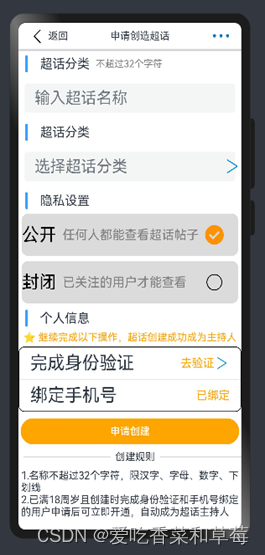
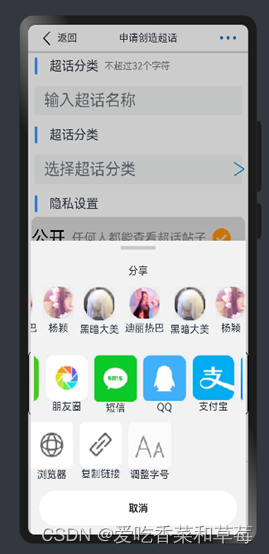
2.6创建页面效果图:
三、广场页面
TabContent() {
  Guangchang()
}.tabBar('广场')
3.1设置滑动
首次先整体设置一个滑动Scroll,高度为800。
export struct Guangchang {
scroller: Scroller = new Scroller();
  build() {
    Scroll() {
    }.height(800)
  }
}
整体设一个Column垂直布局,高度设置为1700。Column放在Scroll里面
export struct Guangchang {
  build() {
    Scroll() {

Column({ space: 5 }) {
}.height(1700)
    }.height(800)
  }
}
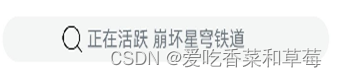
3.2设置一个文本输入框
设置一个Stack层叠,然后使用TextInput单行文本输入框,placeholder显示设置无输入时的提示文本,使用.textAlign设置文本在输入框中的对齐方式,默认值为TextAlign.Start,使用TextAlign.Center居中对齐。
Stack() {
  TextInput({ placeholder: '正在活跃 崩坏星穹铁道' }).textAlign(TextAlign.Center)
  Image($r('app.media.sousuo')).width(20).margin({ right: 195 })
}.margin({ left: 10, right: 10 }) //左右边框间距
.borderRadius(20)
效果图如下所示:
3.3设置轮播效果
首先定义一个数组为images,存放轮播的图片
images = [
$r('app.media.lunbo1'),
$r('app.media.lunbo2'),
$r('app.media.lunbo3'),
$r('app.media.lunbo4'),
$r('app.media.lunbo5')
]
使用Swiper轮播组件实现轮播,利用ForEach循环渲染,给Swiper设置height高度、border设置圆角、autoPlay为true使子组件自动循环、loop为true开启自动循环、interval设置2000为播放时间间隔。
Swiper() {
  ForEach(this.images, (item: string) => {
    Image(item).height(120)
  })
}
.height(100)
.margin(10)
.border({ radius: 20 })
.autoPlay(true) //子组件自动循环
.loop(true) //开启自动循环
.interval(2000) //播放时间间隔
使用row布局设置水平布局
Row({ space: 10 }) {
  Text('超话分类')
  Blank()
  Text('更多')
  Image($r('app.media.dayufuhao')).width(20)
}.width('90%')
.margin(2)
3.3.1效果图如下:

3.4定义一个类
export  class ImageItem {
   images: ResourceStr
   name: string
   name1: string
   constructor(images: ResourceStr, name: string, name1: string) {
     this.images = images;
     this.name = name;
     this.name1 = name1;
   }
 }
导入定义的类,利用@Consume获取@Provide提供的变量,使@Provide和@Consume之间实现双向数据同步。
import { ImageItem } from './ContenItems'
scroller: Scroller = new Scroller();
@Provide list3: Array<ImageItem> = [
  new ImageItem($r('app.media.yuange'), 'yx喽', '正在空降'),
  new ImageItem($r('app.media.dongman1'), '苏州KS…', '正在空降'),
  new ImageItem($r('app.media.dongman2'), 'BLG电…', '正在空降'),
  new ImageItem($r('app.media.dongman3'), '猫猫熊…', '正在空降'),
  new ImageItem($r('app.media.dongman4'), '4AM战队', '正在空降'),
  new ImageItem($r('app.media.yuange'), 'yx喽', '正在空降'),
]
3.4.1使用@Bulider装饰器,自定义构建函数,定义ItemCard
@Builder function ItemCard(item: ImageItem) {
  Row({ space: 10 }) {
    Column({ space: 5 }) {
      Image(item.images).width(50).height(50)
      Text(item.name)
      Text(item.name1).fontColor(Color.Orange)
    }
  }.height(50)
  .width(80)
}
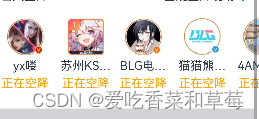
3.4.2利用List列表循环和ForEach循环渲染
Scroll(this.scroller) {
  List() {
    ForEach(this.list3, (item: ImageItem) => {
      ListItem() {
        ItemCard(item)
      }
    })
  }.height(100)
  .listDirection(Axis.Horizontal)
  .margin({ left: 10 })
}.scrollable(ScrollDirection.Horizontal)
.scrollBar(BarState.Off)
.height('7%')
Divider().strokeWidth(15).margin(8)
效果图如下所示:

3.5定义一个类
export class Chfl {
   title: string
   list: Array<ContenItem>
   constructor(title: string, list: Array<ContenItem>) {
     this.title = title;
     this.list = list;
   }
 }
导入定义的类,利用@Consume获取@Provide提供的变量,使@Provide和@Consume之间实现双向数据同步。
import {Chfl } from './ContenItems'
@Provide chfl: Chfl = new Chfl("体育运动", this.list)
@Provide list11: Array<Chfl> = [
  new Chfl("体育运动", this.list),
  new Chfl("当前热门", this.list1),
  new Chfl("动漫", this.list2)
]
@Consume list11: Chfl []
利用Scroll设置滚动,给Scroll设置滚动的方向,隐藏滚动条,使用Divider设置分割线。
scroller: Scroller = new Scroller();

Scroll(this.scroller) {
  Row() {
    ForEach(this.list11, (items) => {
      Column() {
        Row({ space: 5 }) {
          Text(items.title).fontColor(Color.Orange).fontSize(15)
        }.backgroundColor('#FFE7BA')
        .width('100%')
        ForEach(items.list, (item) => {
          Row({ space: 5 }) {
            Image(item.image).width(50).margin({ bottom: 8 })
            Column() {
              Row({ space: 5 }) {
                Text(item.title1).fontSize(15)
                Image(item.image1).width(20)
              }.margin(10)
              Text(item.title2).fontSize(10).margin({ left: 10 })
            }
            Image(item.image2).width(50)
          }.margin({ right: 5 })
        })
      }.backgroundColor('#FFEBCD')
      .width('70%')
      .height(210)
      .margin({ right: 20 })
    })
  }.margin({ left: 5, right: 5 })
}
.scrollable(ScrollDirection.Horizontal) // 滚动方向为水平方向
.scrollBar(BarState.Off) //设置滚动条为不显示,隐藏掉
Divider().strokeWidth(15).margin(8)
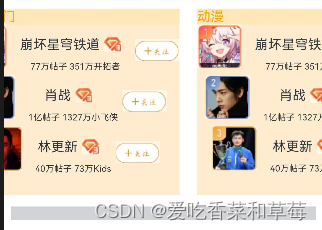
使用Row水平布局,设置效果

3.5.1定义一个类
export  class ImageItem {
   images: ResourceStr
   name: string
   name1: string
   constructor(images: ResourceStr, name: string, name1: string) {
     this.images = images;
     this.name = name;
     this.name1 = name1;
   }
 }
导入定义的类,利用@Consume获取@Provide提供的变量,使@Provide和@Consume之间实现双向数据同步。
import { ImageItem } from './ContenItems'
scroller: Scroller = new Scroller();
@Provide list3: Array<ImageItem> = [
  new ImageItem($r('app.media.yuange'), 'yx喽', '正在空降'),
  new ImageItem($r('app.media.dongman1'), '苏州KS…', '正在空降'),
  new ImageItem($r('app.media.dongman2'), 'BLG电…', '正在空降'),
  new ImageItem($r('app.media.dongman3'), '猫猫熊…', '正在空降'),
  new ImageItem($r('app.media.dongman4'), '4AM战队', '正在空降'),
  new ImageItem($r('app.media.yuange'), 'yx喽', '正在空降'),
]
3.5.2使用@Bulider装饰器,自定义构建函数,定义ItemCard
@Builder function ItemCard(item: ImageItem) {
  Row({ space: 10 }) {
    Column({ space: 5 }) {
      Image(item.images).width(50).height(50)
      Text(item.name)
      Text(item.name1).fontColor(Color.Orange)
    }
  }.height(50)
  .width(80)
}
利用List列表循环和ForEach循环渲染
Scroll(this.scroller) {
  List() {
    ForEach(this.list3, (item: ImageItem) => {
      ListItem() {
        ItemCard(item)
      }
    })
  }.height(100)
  .listDirection(Axis.Horizontal)
  .margin({ left: 10 })
}.scrollable(ScrollDirection.Horizontal)
.scrollBar(BarState.Off)
.height('7%')
Divider().strokeWidth(15).margin(8)
Row({ space: 10 }) {
  Text('高分热门游戏')
  Blank()
  Text('更多')
  Image($r('app.media.dayufuhao')).width(20)
}.width('90%')
.margin(2)
Divider().strokeWidth(1).margin(8)
效果图如下所示:

3.6定义一个类
export class Synn {
  imageS:ResourceStr
  nameS:string
  imageS1:ResourceStr
  nameS1:string
  nameS2:string
  nameS3:string
  constructor(imageS:ResourceStr, nameS:string, imageS1:ResourceStr, nameS1:string, nameS2:string, nameS3:string) {
    this.imageS=imageS
    this.nameS=nameS
    this.imageS1=imageS1
    this.nameS1=nameS1
    this.nameS2=nameS2
    this.nameS3=nameS3
  }
}
导入定义的类,利用@Consume获取@Provide提供的变量,使@Provide和@Consume之间实现双向数据同步。
import { Synn } from './ContenItems'
@Provide gameS:Array<Synn>=[
  new Synn($r('app.media.youxitu1'),'闪耀暖暖',$r('app.media.wuxing'),'图返,原因是这位','8.2','9195人已评价'),
  new Synn($r('app.media.wuqimitu'),'无期迷途',$r('app.media.wuxing'),'抽一个b服礼包','9.1','5558人已评价'),
  new Synn($r('app.media.chongfanweilai'),'重返未来',$r('app.media.wuxing'),'来吃了 玛蒂尔达…','8.7','3124人已评价')
]
@Consume gameS: Synn []
ForEach(this.gameS, (itemS: Synn) => {
  Row({ space: 15 }) {
    Image(itemS.imageS).width(90)
    Column({ space: 15 }) {
      Row() {
        Text(itemS.nameS)
        Image(itemS.imageS1).width(80).margin({ left: 80 })
      }
      Row() {
        Text(itemS.nameS1).margin({ right: 10 })
        Column({ space: 5 }) {
          Text(itemS.nameS2)
          Text(itemS.nameS3).fontSize(10)
        }.margin({ top: -10 })
      }
    }
  }
})

Divider().strokeWidth(15).margin(6).height(20)
3.6.2效果图如下所示:

3.7定义一个类
export class Mt{
  imageM:ResourceStr
  nameM:string
  nameM1:string
  nameM2:string
  imageM1:ResourceStr
  constructor(imageM:ResourceStr, nameM:string, nameM1:string, nameM2:string, imageM1:ResourceStr) {
    this.imageM=imageM
    this.nameM=nameM
    this.nameM1=nameM1
    this.nameM2=nameM2
    this.imageM1=imageM1
  }
}
导入定义的类,利用@Consume获取@Provide提供的变量,使@Provide和@Consume之间实现双向数据同步。
import { ImageItem,Mt } from './ContenItems'
@Provide mingM:Array<Mt>=[
  new Mt($r('app.media.mingxing2'),'梅婷','生日倒计时2天','已送4.8万祝福',$r('app.media.zhufu')),
  new Mt($r('app.media.xusong'),'许嵩','生日倒计时1天','已送5610祝福',$r('app.media.zhufu')),
  new Mt($r('app.media.chengyi'),'成毅','生日倒计时4天','已送6.5万祝福',$r('app.media.zhufu')),
  new Mt($r('app.media.chengjunming'),'陈俊铭','生日倒计时4天','已送3895祝福',$r('app.media.zhufu')),
]
@Consume mingM: Mt []


Row({ space: 5 }) {
  Text('最近过生日的明星')
  Blank()
  Text('更多')
  Image($r('app.media.dayufuhao')).width(20)
}.width('95%')
.margin(5)
.justifyContent(FlexAlign.SpaceBetween)
ForEach(this.mingM, (itemM: Mt) => {
  Row() {
    Image(itemM.imageM).width(90)
    Column({ space: 5 }) {
      Text(itemM.nameM).margin({ right: 48 })
      Text(itemM.nameM1).margin({ left: 25 })
      Text(itemM.nameM2)
    }.margin({ right: 20 })
    Row() {
      Image(itemM.imageM1).width('20%').margin({ left: 30 })
    }.margin({ right: 20 })
  }.justifyContent(FlexAlign.SpaceBetween)
  .width('90%')
  .height(100)
})
效果图如下所示:

3.8广场页面所有代码:
import { ImageItem, Chfl, Mt } from './ContenItems'
import { Synn } from './ContenItems'
@Builder function ItemCard(item: ImageItem) {
  Row({ space: 10 }) {
    Column({ space: 5 }) {
      Image(item.images).width(50).height(50)
      Text(item.name)
      Text(item.name1).fontColor(Color.Orange)
    }
  }.height(50)
  .width(80)
}
@Component
export struct Guangchang {
  images = [
  $r('app.media.lunbo1'),
  $r('app.media.lunbo2'),
  $r('app.media.lunbo3'),
  $r('app.media.lunbo4'),
  $r('app.media.lunbo5')
  ]
  @Consume list11: Chfl []
  @Consume list3: ImageItem []
  @Consume gameS: Synn []
  @Consume mingM: Mt []
  scroller: Scroller = new Scroller();
  build() {
    Scroll() {
      Column({ space: 5 }) {
        Stack() {
          TextInput({ placeholder: '正在活跃 崩坏星穹铁道' }).textAlign(TextAlign.Center)
          Image($r('app.media.sousuo')).width(20).margin({ right: 195 })
        }.margin({ left: 10, right: 10 }) //左右边框间距
        .borderRadius(20)
        Swiper() {
          ForEach(this.images, (item: string) => {
            Image(item).height(120)
          })
        }
        .height(100)
        .margin(10)
        .border({ radius: 20 })
        .autoPlay(true) //子组件自动循环
        .loop(true) //开启自动循环
        .interval(2000) //播放时间间隔
        Row({ space: 10 }) {
          Text('超话分类')
          Blank()
          Text('更多')
          Image($r('app.media.dayufuhao')).width(20)
        }.width('90%')
        .margin(2)
        Scroll(this.scroller) {
          List() {
            ForEach(this.list3, (item: ImageItem) => {
              ListItem() {
                ItemCard(item)
              }
            })
          }.height(100)
          .listDirection(Axis.Horizontal)
          .margin({ left: 10 })
        }.scrollable(ScrollDirection.Horizontal)
        .scrollBar(BarState.Off)
        Scroll(this.scroller) {
          Row() {
            ForEach(this.list11, (items) => {
              Column() {
                Row({ space: 5 }) {
                  Text(items.title).fontColor(Color.Orange).fontSize(15)
                }.backgroundColor('#FFE7BA')
                .width('100%')
                ForEach(items.list, (item) => {
                  Row({ space: 5 }) {
                    Image(item.image).width(50).margin({ bottom: 8 })
                    Column() {
                      Row({ space: 5 }) {
                        Text(item.title1).fontSize(15)
                        Image(item.image1).width(20)
                      }.margin(10)
                      Text(item.title2).fontSize(10).margin({ left: 10 })
                    }
                    Image(item.image2).width(50)
                  }.margin({ right: 5 })
                })
              }.backgroundColor('#FFEBCD')
              .width('70%')
              .height(210)
              .margin({ right: 20 })
            })
          }.margin({ left: 5, right: 5 })
        }
        .scrollable(ScrollDirection.Horizontal) // 滚动方向为水平方向
        .scrollBar(BarState.Off) //设置滚动条为不显示,隐藏掉
        Divider().strokeWidth(15).margin(8)
        Row({ space: 5 }) {
          Text('名人空降')
          Blank()
          Text('围观空降现场')
          Image($r('app.media.dayufuhao')).width(20)
        }.width('95%')
        .margin(5)
        Scroll(this.scroller) {
          List() {
            ForEach(this.list3, (item: ImageItem) => {
              ListItem() {
                ItemCard(item)
              }
            })
          }.height(100)
          .listDirection(Axis.Horizontal)
          .margin({ left: 10 })
        }.scrollable(ScrollDirection.Horizontal)
        .scrollBar(BarState.Off)
        .height('7%')
        Divider().strokeWidth(15).margin(8)
        Row({ space: 10 }) {
          Text('高分热门游戏')
          Blank()
          Text('更多')
          Image($r('app.media.dayufuhao')).width(20)
        }.width('90%')
        .margin(2)
        Divider().strokeWidth(1).margin(8)
        ForEach(this.gameS, (itemS: Synn) => {
          Row({ space: 15 }) {
            Image(itemS.imageS).width(90)
            Column({ space: 15 }) {
              Row() {
                Text(itemS.nameS)
                Image(itemS.imageS1).width(80).margin({ left: 80 })
              }
              Row() {
                Text(itemS.nameS1).margin({ right: 10 })
                Column({ space: 5 }) {
                  Text(itemS.nameS2)
                  Text(itemS.nameS3).fontSize(10)
                }.margin({ top: -10 })
              }
            }
          }
        })
        Divider().strokeWidth(15).margin(6).height(20)
        Row({ space: 5 }) {
          Text('最近过生日的明星')
          Blank()
          Text('更多')
          Image($r('app.media.dayufuhao')).width(20)
        }.width('95%')
        .margin(5)
        .justifyContent(FlexAlign.SpaceBetween)
        ForEach(this.mingM, (itemM: Mt) => {
          Row() {
            Image(itemM.imageM).width(90)
            Column({ space: 5 }) {
              Text(itemM.nameM).margin({ right: 48 })
              Text(itemM.nameM1).margin({ left: 25 })
              Text(itemM.nameM2)
            }.margin({ right: 20 })
            Row() {
              Image(itemM.imageM1).width('20%').margin({ left: 30 })
            }.margin({ right: 20 })
          }.justifyContent(FlexAlign.SpaceBetween)
          .width('90%')
          .height(100)
        })
      }.height(1700)
    }.height(800)
  }
}
四、添加页面
4.1给添加图片设置点击事件,实现页面跳转
首先使用层叠效果,将添加图片按钮,层叠到顶部结尾(TopEnd),使用zIndex层级放在层叠上,能够点击。
我们给添加图片设置点击事件,设置路由,使用if语句进行判断成功与否
Stack({ alignContent: Alignment.TopEnd }) {

Row() {
  Image($r('app.media.tianjia'))
    .width(30)
    .onClick(() => {
      router.pushUrl({
        url: 'pages/Xpp/TianjiaPage'
      }, router.RouterMode.Single, (err) => {
        if (err) {
          console.log(`路由失败,errCode:${err.code}errMsg:${err.message}`)
          return;
        }
        console.info('Invoke replaceUrl succeeded.');
      })
    })
}.width('10%')
.height('6%')
.zIndex(10)
.margin({ right: 5 })

}.height(800)
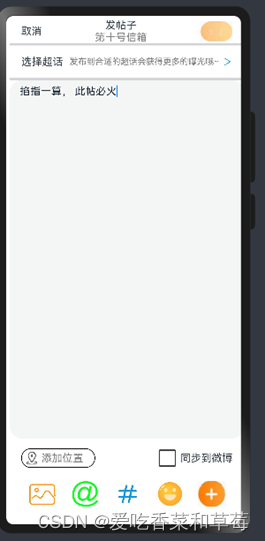
4.2设置添加页面布局内容
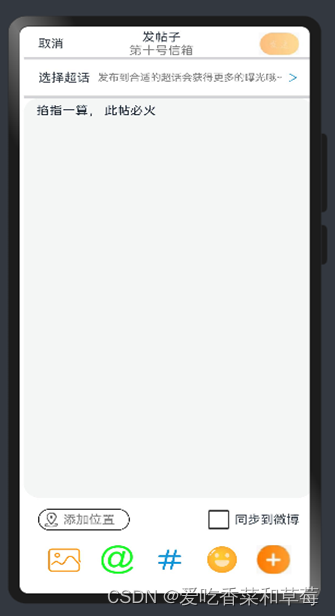
使用row和column布局设置页面内容,设置字体和图片的高度和宽度,用TextArea组件,设置多文本输入框,使用.textAlign设置文本在输入框中的对齐方式,默认值为TextAlign.Start。
@Entry
@Component
 struct TianjiaPage {
    build() {
    Column() {
      Row({ space: 10 }) {
        Column() {
          Text('发帖子')
          Text('第十号信箱').fontColor(Color.Gray)
        }
        Image($r('app.media.fasong')).width(50)
      }.width('90%')
      .justifyContent(FlexAlign.SpaceBetween)
      Divider().strokeWidth(3)
      Row({ space: 5 }) {
        Text('选择超话')
        Blank()
        Text('发布到合适的超话会获得更多的曝光哦~').fontColor(Color.Gray).fontSize(13)
        Image($r('app.media.dayufuhao')).width(16)
      }.margin(5).height(40)
      Divider().strokeWidth(3)
      TextArea({ text:"掐指一算, 此帖必火"})  .textAlign(TextAlign.Start)
        .width('100%')
        .height(550)
      Row({space:15}) {
        Row({space:5}){
          Image($r('app.media.dingwei')).width(20).margin({left:5})
          Text('添加位置').fontColor(Color.Gray)
        }.borderRadius(15)
        .border({width:1})
        .width('35%')
        .height(30)
        Row({space:5}){
          Image($r('app.media.fangkuang')).width(30)
          Text('同步到微博')
        }
      } .margin({ top:10})
      .height(40)
      .width('90%')
      .justifyContent(FlexAlign.SpaceBetween)
      Row(){
        Image($r('app.media.tupian')).width(45)
        Image($r('app.media.aitefuhao')).width(45)
        Image($r('app.media.jinghao')).width(45)
        Image($r('app.media.xiaolian')).width(45)
        Image($r('app.media.tianjia')).width(43)
      }.height(40)
      .width('90%')
      .justifyContent(FlexAlign.SpaceAround)
      .margin(15)
    }.width('100%')
    .margin(5)
  }
}
效果图片如下:
4.3给取消设置点击事件,实现返回到微博主页面
设置取消的点击事件,并导入路由
import router from '@ohos.router';
4.3.1使用onclick设置点击效果
Text('取消')
  .onClick(()=>{
    //路由返回上一页
    router.back();
  })
4.4CustomDialogController设置发帖子的自定义弹窗效果
给发帖子设置onclick点击事件,设置弹窗
Text('发帖子')
  .onClick(() => {
    this.dialogController.open()
  })
4.4.1导入对象
//自定义弹窗
dialogController: CustomDialogController = new CustomDialogController({
  builder: CustomDialogExample({
    cancel: this.onCancel,
    confirm: this.onAccept,
  }),
  alignment: DialogAlignment.Bottom, // 可设置dialog的对齐方式,设定显示在底部或中间等,默认为底部显示
  customStyle: true,
})
onCancel() {
  console.info('Callback when the first button is clicked')
}
onAccept() {
  console.info('Callback when the second button is clicked')
}
4.4.2给发帖子设置动态弹窗
//动态中的“发帖子”弹窗
@CustomDialog
struct CustomDialogExample {
  controller: CustomDialogController
  cancel: () => void
  confirm: () => void
4.4.3设置弹窗里面的内容效果布局
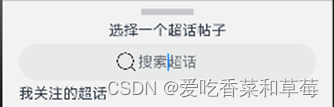
使用Divider设置分割线,vertical为false水平分割线,使用strokeWidth设置分割线宽度,使用TextInput设置单行文本输入框。
Column(){
  Divider().vertical(false).strokeWidth(6).width('16%').margin(8)
  Text('选择一个超话帖子').fontSize(16)
Row(){
  Stack(){
    Image($r('app.media.sousuo')).width(20).margin({right:90})
    TextInput({placeholder:'搜索超话'}).textAlign(TextAlign.Center).height(40)
  }.alignContent(Alignment.Center)
}.width('90%')
  .height(50)
  Text('我关注的超话').textAlign(TextAlign.Start).fontSize(16).width('90%')
 Row(){
   Image($r('app.media.sunyio')).width(60).margin({left:15})
   Column({space:5}){
    Row({space:5}){
        Image($r('app.media.huangzuan')).width(20)
        Text('孙怡')
    }.width('90%').margin({left:10})
     Text('16万粉丝 孙怡,19993年出生于吉林省…').margin({right:30})
     Divider().strokeWidth(1).width('85%')
   }
 }.height('10%')
  Text('为你推荐 关注超话可发帖').fontSize(16).width('90%')
4.5定义一个类,导出到添加页面
export class ImageSy{
  imageSy:ResourceStr
  imageSy1:ResourceStr
  nameSy:string
  nameSy1:string
  constructor(imageSy:ResourceStr,imageSy1:ResourceStr,nameSy:string,nameSy1:string) {
    this.imageSy=imageSy
    this.imageSy1=imageSy1
    this.nameSy=nameSy
    this.nameSy1=nameSy1
  }
}
4.5.1导入所定义的类
import { ImageSy } from '../../components/xpp/ContenItems';
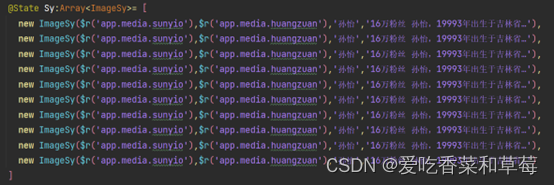
4.5.2设置一个自定义函数列表
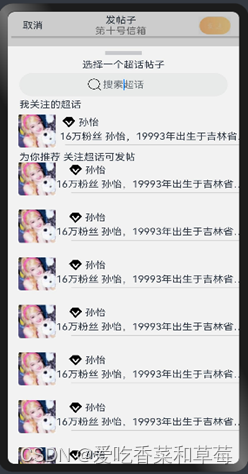
4.5.3利用For Each做循环渲染list列表嵌套
Text('为你推荐 关注超话可发帖').fontSize(16).width('90%')
     Column(){
       List({space:10}) {
         ForEach(this.Sy, (itemSy: ImageSy) => {
           ListItem() {
             Row() {
               Image(itemSy.imageSy).width(60).margin({ left: 15 })
               Column({ space: 5 }) {
                 Row({ space: 5 }) {
                   Image(itemSy.imageSy1).width(20)
                   Text(itemSy.nameSy)
                 }.width('90%').margin({ left: 10 })
                 Text(itemSy.nameSy1).margin({ right: 30 })
                 Divider().strokeWidth(1).width('85%')
               }
             }.width('90%').height('10%')
           }
         })
       }.listDirection(Axis.Vertical)
     }.width('100%').height('100%')
    }.backgroundColor('#F2F2F2').height(720)
  }
4.6添加页面全部代码:
import router from '@ohos.router';
import { ImageSy } from '../../components/xpp/ContenItems';
@Entry
@Component
 struct TianjiaPage {
  //自定义弹窗
  dialogController: CustomDialogController = new CustomDialogController({
    builder: CustomDialogExample({
      cancel: this.onCancel,
      confirm: this.onAccept,
    }),
    alignment: DialogAlignment.Bottom, // 可设置dialog的对齐方式,设定显示在底部或中间等,默认为底部显示
    customStyle: true,
  })
  onCancel() {
    console.info('Callback when the first button is clicked')
  }
  onAccept() {
    console.info('Callback when the second button is clicked')
  }
  build() {
    Column() {
      Row({ space: 10 }) {
        Text('取消')
          .onClick(()=>{
            //路由返回上一页
            router.back();
          })
        Column() {
          Text('发帖子')
            .onClick(() => {
              this.dialogController.open()
            })
          Text('第十号信箱').fontColor(Color.Gray)
        }
        Image($r('app.media.fasong')).width(50)
      }.width('90%')
      .justifyContent(FlexAlign.SpaceBetween)
      Divider().strokeWidth(3)
      Row({ space: 5 }) {
        Text('选择超话')
        Blank()
        Text('发布到合适的超话会获得更多的曝光哦~').fontColor(Color.Gray).fontSize(13)
        Image($r('app.media.dayufuhao')).width(16)
      }.margin(5).height(40)
      Divider().strokeWidth(3)
      TextArea({ text:"掐指一算, 此帖必火"})  .textAlign(TextAlign.Start)
        .width('100%')
        .height(550)
      Row({space:15}) {
        Row({space:5}){
          Image($r('app.media.dingwei')).width(20).margin({left:5})
          Text('添加位置').fontColor(Color.Gray)
        }.borderRadius(15)
        .border({width:1})
        .width('35%')
        .height(30)
        Row({space:5}){
          Image($r('app.media.fangkuang')).width(30)
          Text('同步到微博')
        }
      } .margin({ top:10})
      .height(40)
      .width('90%')
      .justifyContent(FlexAlign.SpaceBetween)
      Row(){
        Image($r('app.media.tupian')).width(45)
        Image($r('app.media.aitefuhao')).width(45)
        Image($r('app.media.jinghao')).width(45)
        Image($r('app.media.xiaolian')).width(45)
        Image($r('app.media.tianjia')).width(43)
      }.height(40)
      .width('90%')
      .justifyContent(FlexAlign.SpaceAround)
      .margin(15)
    }.width('100%')
    .margin(5)
  }
}
//动态中的“...”弹窗
@CustomDialog
struct CustomDialogExample {
  controller: CustomDialogController
  cancel: () => void
  confirm: () => void
  @State Sy:Array<ImageSy>= [
    new ImageSy($r('app.media.sunyio'),$r('app.media.huangzuan'),'孙怡','16万粉丝 孙怡,19993年出生于吉林省…'),
    new ImageSy($r('app.media.sunyio'),$r('app.media.huangzuan'),'孙怡','16万粉丝 孙怡,19993年出生于吉林省…'),
    new ImageSy($r('app.media.sunyio'),$r('app.media.huangzuan'),'孙怡','16万粉丝 孙怡,19993年出生于吉林省…'),
    new ImageSy($r('app.media.sunyio'),$r('app.media.huangzuan'),'孙怡','16万粉丝 孙怡,19993年出生于吉林省…'),
    new ImageSy($r('app.media.sunyio'),$r('app.media.huangzuan'),'孙怡','16万粉丝 孙怡,19993年出生于吉林省…'),
    new ImageSy($r('app.media.sunyio'),$r('app.media.huangzuan'),'孙怡','16万粉丝 孙怡,19993年出生于吉林省…'),
    new ImageSy($r('app.media.sunyio'),$r('app.media.huangzuan'),'孙怡','16万粉丝 孙怡,19993年出生于吉林省…'),
    new ImageSy($r('app.media.sunyio'),$r('app.media.huangzuan'),'孙怡','16万粉丝 孙怡,19993年出生于吉林省…'),
    new ImageSy($r('app.media.sunyio'),$r('app.media.huangzuan'),'孙怡','16万粉丝 孙怡,19993年出生于吉林省…'),
    new ImageSy($r('app.media.sunyio'),$r('app.media.huangzuan'),'孙怡','16万粉丝 孙怡,19993年出生于吉林省…')
  ]
  build(){
    Column(){
      Divider().vertical(false).strokeWidth(6).width('16%').margin(8)
      Text('选择一个超话帖子').fontSize(16)
    Row(){
      Stack(){
        Image($r('app.media.sousuo')).width(20).margin({right:90})
        TextInput({placeholder:'搜索超话'}).textAlign(TextAlign.Center).height(40)
      }.alignContent(Alignment.Center)
    }.width('90%')
      .height(50)
      Text('我关注的超话').textAlign(TextAlign.Start).fontSize(16).width('90%')
     Row(){
       Image($r('app.media.sunyio')).width(60).margin({left:15})
       Column({space:5}){
        Row({space:5}){
            Image($r('app.media.huangzuan')).width(20)
            Text('孙怡')
        }.width('90%').margin({left:10})
         Text('16万粉丝 孙怡,19993年出生于吉林省…').margin({right:30})
         Divider().strokeWidth(1).width('85%')
       }
     }.height('10%')
      Text('为你推荐 关注超话可发帖').fontSize(16).width('90%')
     Column(){
       List({space:10}) {
         ForEach(this.Sy, (itemSy: ImageSy) => {
           ListItem() {
             Row() {
               Image(itemSy.imageSy).width(60).margin({ left: 15 })
               Column({ space: 5 }) {
                 Row({ space: 5 }) {
                   Image(itemSy.imageSy1).width(20)
                   Text(itemSy.nameSy)
                 }.width('90%').margin({ left: 10 })
                 Text(itemSy.nameSy1).margin({ right: 30 })
                 Divider().strokeWidth(1).width('85%')
               }
             }.width('90%').height('10%')
           }
         })
       }.listDirection(Axis.Vertical)
     }.width('100%').height('100%')
    }.backgroundColor('#F2F2F2').height(720)
  }
}
4.7添加页面效果图:


北京人形旗下天工造物具身智能开源社区,聚焦具身天工与慧思开物两大平台
更多推荐
 10
10 0
0- 0



 已为社区贡献1条内容

所有评论(0)