解决树莓派4B-64位更换清华源问题(GPG error:because the public key is not available)
1、清华源官网教程:
https://mirror.tuna.tsinghua.edu.cn/help/raspbian/
查看 Raspbian 对应的 Debian 版本:
sudo apt-get install portaudio19-dev python-pyaudio python3-pyaudio sox pulseaudio libsox-fmt-all ffmpeg
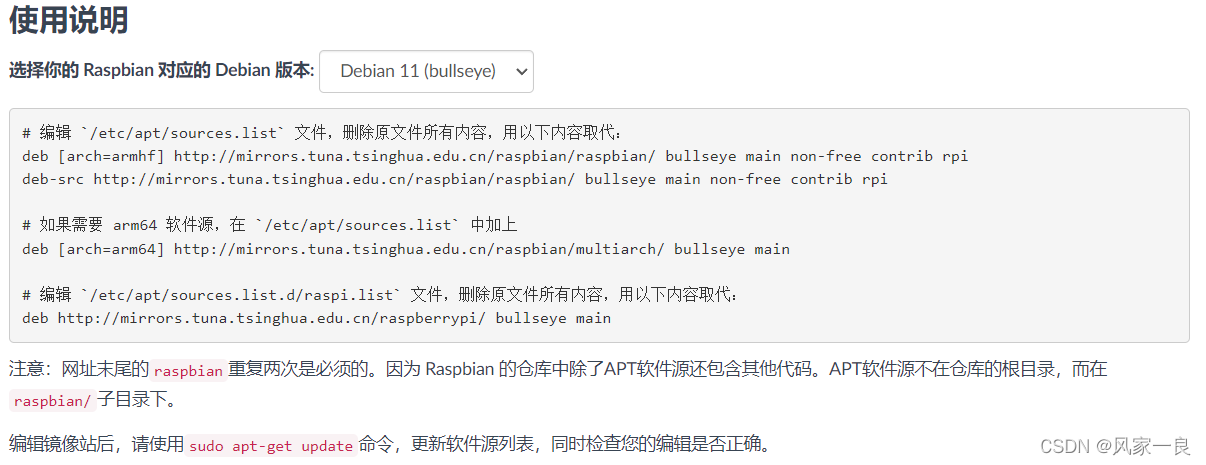
# 编辑 `/etc/apt/sources.list` 文件,删除原文件所有内容,用以下内容取代:
deb [arch=armhf] http://mirrors.tuna.tsinghua.edu.cn/raspbian/raspbian/ bullseye main non-free contrib rpi
deb-src http://mirrors.tuna.tsinghua.edu.cn/raspbian/raspbian/ bullseye main non-free contrib rpi

# 如果需要 arm64 软件源,在 `/etc/apt/sources.list` 中加上
deb [arch=arm64] http://mirrors.tuna.tsinghua.edu.cn/raspbian/multiarch/ bullseye main

# 编辑 `/etc/apt/sources.list.d/raspi.list` 文件,删除原文件所有内容,用以下内容取代:
deb http://mirrors.tuna.tsinghua.edu.cn/raspberrypi/ bullseye main
2、遇见问题(sudo apt-get update后)
Reading package lists… Done
W: GPG error: http://mirrors.tuna.tsinghua.edu.cn/raspbian/multiarch bullseye InRelease: The following signatures couldn’t be verified because the public key is not available: NO_PUBKEY E77FC0EC34276B4B
E: The repository ‘http://mirrors.tuna.tsinghua.edu.cn/raspbian/multiarch bullseye InRelease’ is not signed.
N: Updating from such a repository can’t be done securely, and is therefore disabled by default.
N: See apt-secure(8) manpage for repository creation and user configuration details

3、解决问题(更换源之后添加公钥即可),执行以下命令:
gpg --keyserver  keyserver.ubuntu.com --recv-keys E77FC0EC34276B4B
gpg --export --armor E77FC0EC34276B4B | sudo apt-key add -
拓展:另一种解决方法(更换源之后添加公钥即可),执行以下命令:
sudo apt-key adv --keyserver keyserver.ubuntu.com --recv-keys E77FC0EC34276B4B
参考:
https://mirrors.tuna.tsinghua.edu.cn/help/raspbian/
https://www.jianshu.com/p/c64deffb1308
https://ubuntuqa.com/article/455.html
https://askubuntu.com/questions/13065/how-do-i-fix-the-gpg-error-no-pubkey

北京人形旗下天工造物具身智能开源社区,聚焦具身天工与慧思开物两大平台
更多推荐
 3
3 0
0- 0


 已为社区贡献6条内容

所有评论(0)