设计模式之装饰器模式
·
在历年软件设计师开始中出现几次装饰器模式,所以装饰器模式还是挺重要的,在不保证能拿满分的情况下,每个设计模式加上案例加深印象。平时看到的装饰器基本都是形如@Decorator这样的形式,但是在设计模式中如何实现呢?我一直很困惑一点在于如何能动态的给一个对象添加额外的职责。通过学习这篇文章,加深了我对装饰器模式的了解。
意图
动态的给一个对象添加一些额外的职责。就增加功能而言,装饰器模式比生成子类更加灵活。
结构
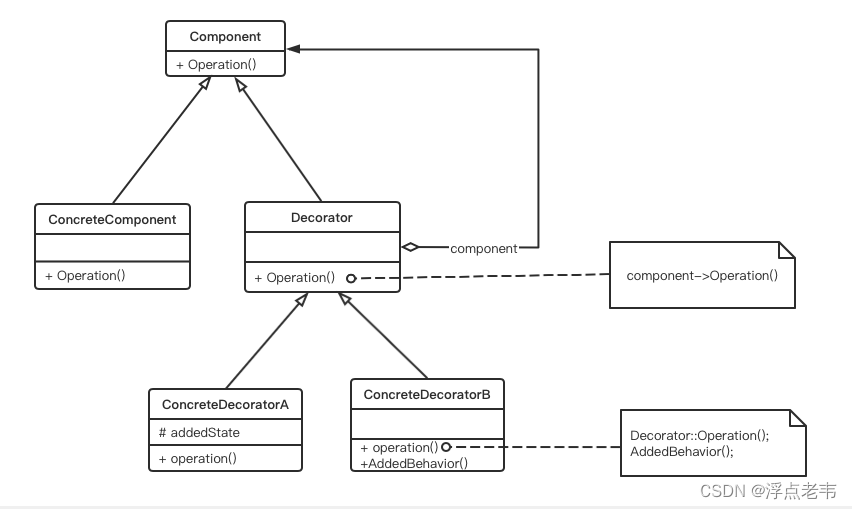
装饰器模式类图
其中:
- Component定义一个对象接口,可以给这些对象动态的添加职责。
- ConcreteComponent定义一个对象,可以给这个对象添加一些额外的职责。
- Decorator维持一个执行Component对象的指针,并定义一个与Component接口一致的接口。
- ConcreteDecorator向组件添加职责。
适应性:
- 在不影响其他对象的情况下,以动态、透明的方式给单个对象添加职责。
- 处理那些可以撤销的职责。
- 当不能采用生成子类的方式进行扩充时。一种情况是,可能有大量独立的扩展,为支持每一种组合将产生大量的子类,使得子类数目呈现爆炸式增长。另一种情况可能是,由于类定义被隐藏,或者类定义不能用于生成子类。
根据上面的类图可以得出装饰器模式的一般代码如下:
interface Component{
    public void Operation();
}

class ConcreteComponent implements Component{
    public ConcreteComponent() {
        System.out.println("创建具体构件角色");
    }

    public void Operation() {
        System.out.println("具体的角色操作Operation1");
    }
}

class Decorator implements Component {
    private Component component;
    public Decorator(Component component) {
        this.component = component;
    }
    public void Operation() {
        if (component != null) {
            component.Operation();
        }
    }
}

class ConcreteDecorator1 extends Decorator{
    public ConcreteDecorator1(Component component) {
        super(component);
    }

    public void Operation() {
        // 必须调用super.Opration();
        super.Operation();
        AddedBehavior();
    }

    public void AddedBehavior() {
        System.out.println("具体装饰ConcreteDecorator1添加操作Operation2");
    }
}

class DecoratorPattern{
    public static main() {
        Component p = new ConcreteComponent();
        p.Operation();
        System.out.println("=======添加装饰=======");
        Component cp = new ConcreteDecorator1(p);
        cp.Operation();
    }
}
案例
某发票(Invoice)由抬头(Head)部分、正文部分和脚注(Foot)部分构成。采用装饰器模式实现打印发票的功能。分析得到如下图类图。
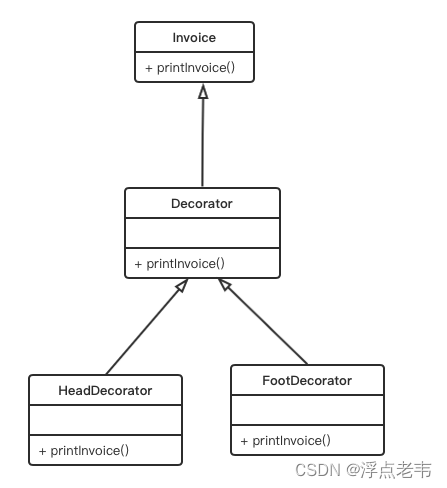
具体代码实现如下:
// 发票类
class Invoice{
    public void printInvoice() {
        System.out.println("This is the content of the invoice!");
    }
}
// 装饰类
class Decorator extends Invoice {
    protected Invoice ticket;
    public Decorator(Invoice t) {
        ticket = t;
    }

    public void printInvoice() {
        if (ticket != null) {
            ticket.printInvoice();
        }
    }
}
// 具体装饰类
class HeadDecorator extends Decorator {
    public HeadDecorator(Invoice t) {
        super(t);
    }

    public void printInvoice() {
        System.out.println("This is the header of the invoice!");
        super.printInvoice(); // 调用super的printInvoice();
    }
}

class FootDecorator extends Decorator {
    public FootDecorator(Invoice t) {
        super(t);
    }

    public void printInvoice() {
        super.printInvoice(); // 调用super的printInvoice();
        System.out.println("This is the footer of the invoice!");
    }
}

class Test {
    static main() {
        Invoice t = new Invoice();
        Invoice ticket;
        ticket = new FootDecorator(new HeadDecorator(t));
        // ticket = new HeadDecorator(new FootDecorator(t));
        ticket.printInvoice();
        System.out.println("----------------------------");
        ticket = new FootDecorator(new HeadDecorator(null));
        ticket.printInvoice();
    }
}

北京人形旗下天工造物具身智能开源社区,聚焦具身天工与慧思开物两大平台
更多推荐
 0
0 0
0- 0


 已为社区贡献4条内容

所有评论(0)