java.lang.IllegalStateException: Default FirebaseApp is not initialized in this process
·
Android 接入 FCM 报错
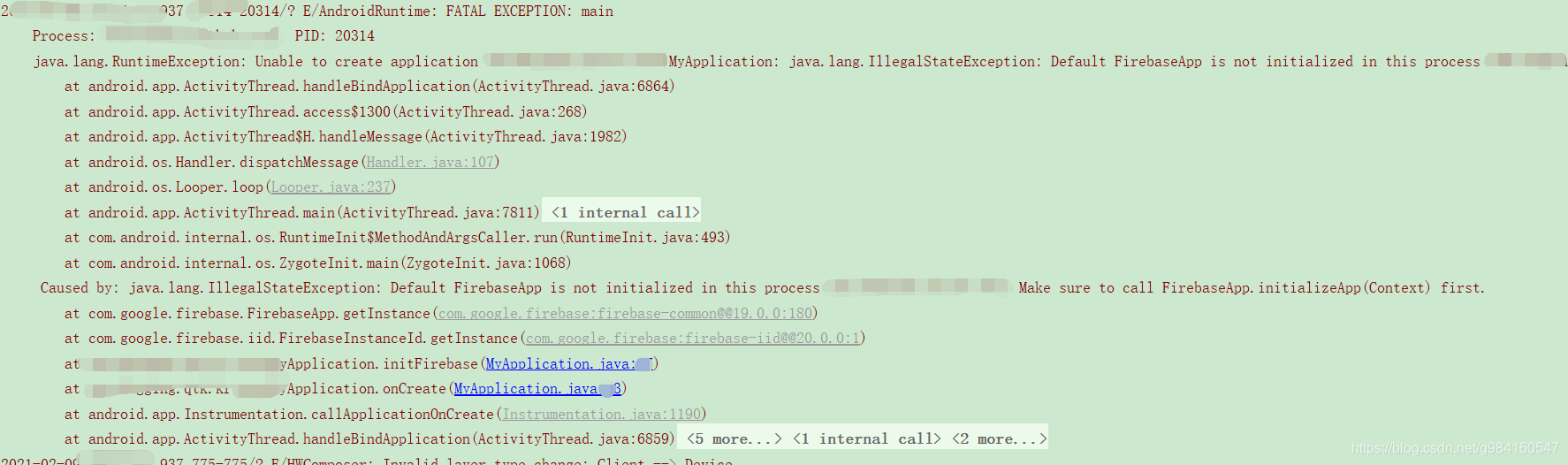
报错信息如下:
java.lang.RuntimeException: Unable to create application com.ads.app.MyApplication: java.lang.IllegalStateException: Default FirebaseApp is not initialized in this process com.ads.app. Make sure to call FirebaseApp.initializeApp(Context) first.
Caused by: java.lang.IllegalStateException: Default FirebaseApp is not initialized in this process com.ads.app. Make sure to call FirebaseApp.initializeApp(Context) first.
1、检查项目\build.gradle
 dependencies {
        classpath 'com.android.tools.build:gradle:3.2.1'
        classpath 'com.google.gms:google-services:4.2.0'
    }
2、检查google-services.json
是否放在app\目录下,必须保证google-services.json里面有当前包的包名
3、检查app\build.gradle
dependencies {
    implementation 'com.google.android.gms:play-services-auth:15.0.1'
    implementation 'com.google.firebase:firebase-core:17.2.0'
    implementation 'com.google.firebase:firebase-iid:20.0.0'
    implementation 'com.google.firebase:firebase-messaging:20.0.0'
    implementation 'com.android.installreferrer:installreferrer:1.0'
}
apply plugin: 'com.google.gms.google-services'是否放在app\build.gradle底部
4、检查Application
@Override
    public void onCreate() {
        super.onCreate();
        FirebaseApp.initializeApp(this);
        initFirebase();
    }
private void initFirebase(){
        FirebaseInstanceId.getInstance().getInstanceId()
                .addOnCompleteListener(new OnCompleteListener<InstanceIdResult>() {
                    @Override
                    public void onComplete(@NonNull Task<InstanceIdResult> task) {
                        if (!task.isSuccessful()) {
                            MLog.e( "getInstanceId failed"+task.getException());
                            return;
                        }
                        String token = task.getResult().getToken();
                    }
                });
    }
5、检查AndroidManifest.xml
Application是否被引用。
相关推荐

北京人形旗下天工造物具身智能开源社区,聚焦具身天工与慧思开物两大平台
更多推荐
 5
5 0
0- 0


 已为社区贡献6条内容

所有评论(0)