

转自:http://www.cnblogs.com/tobecrazy/p/5034408.html
结合上次研究的selenium webdriver potocol ,自己写http request调用remote driver代替selenium API
selenium web driver Json protocol 相关请看 http://www.cnblogs.com/tobecrazy/p/5020741.html
我这里使用的是Gson 和 httpclient
首先,起一个remote sever
java -Dwebdriver.ie.driver="IEDriverServer.exe" -Dwebdriver.chrome.driver="chromedriver.exe" -jar selenium-server-standalone-2.48.0.jar
这里要用到httpclient的Post 和delete method
创建一个httpclient对象
HttpClient httpClient = HttpClients.createDefault();
创建一个post请求
    JsonObject setCapability = new JsonObject();
        setCapability.addProperty("browserName","firefox");
        JsonObject capability = new JsonObject();
        capability.add("desiredCapabilities",setCapability); HttpPost httpPost = new HttpPost(base);
创建一个delete 请求
     url = base + sessionId ;
         HttpDelete httpDelete = new HttpDelete(url);
从respose 中获取session ID
|
1
2
3
4
5
6
7
8
9
10
11
12
13
14
15
16
17
18
19
20
21
22
23
24
25
26
27
28
29
30
31
|
HttpResponse response = httpClient.execute(httpPost);
try
{
HttpEntity entity = response.getEntity();
if
(entity !=
null
) {
System.out.println(
"Response content length: "
+ entity.getContentLength());
String resultEntity = EntityUtils.toString(entity);
System.out.println(
"Response content: "
+ resultEntity);
JsonObject result=
new
JsonParser().parse(resultEntity).getAsJsonObject();
JsonElement sessionIdJson = result.get(
"sessionId"
);
if
(!sessionIdJson.isJsonNull())
sessionId =sessionIdJson.getAsString();
JsonElement valueJson = result.get(
"value"
);
if
(!valueJson.isJsonNull())
{
JsonObject tm=valueJson.getAsJsonObject();
JsonElement elementIdJson = tm.get(
"ELEMENT"
);
if
(elementIdJson!=
null
)
elementId=elementIdJson.getAsString();
}
}
}
finally
{
((Closeable) response).close();
}
|
全部代码如下:

import java.io.Closeable;
import java.io.IOException;
import java.io.UnsupportedEncodingException; import org.apache.http.HttpEntity; import org.apache.http.HttpResponse; import org.apache.http.client.ClientProtocolException; import org.apache.http.client.HttpClient; import org.apache.http.client.methods.HttpDelete; import org.apache.http.client.methods.HttpPost; import org.apache.http.entity.StringEntity; import org.apache.http.impl.client.HttpClients; import org.apache.http.message.BasicHeader; import org.apache.http.protocol.HTTP; import org.apache.http.util.EntityUtils; import com.google.gson.JsonElement; import com.google.gson.JsonObject; import com.google.gson.JsonParser; public class webDriverJson { private static String base = "http://127.0.0.1:4444/wd/hub/session/"; private static String elementId; static String sessionId = ""; public static void main(String[] args) throws Exception, IOException { HttpClient httpClient = HttpClients.createDefault(); JsonObject setCapability = new JsonObject(); setCapability.addProperty("browserName","firefox"); JsonObject capability = new JsonObject(); capability.add("desiredCapabilities",setCapability); HttpPost httpPost = new HttpPost(base); //create session  postExecutor(httpClient, httpPost, capability); String url = base + sessionId + "/url"; httpPost = new HttpPost(url); JsonObject getUrl = new JsonObject(); getUrl.addProperty("url", "http://www.baidu.com"); postExecutor(httpClient, httpPost, getUrl); //find input box url = base + sessionId + "/element"; httpPost = new HttpPost(url); JsonObject findElement = new JsonObject(); findElement.addProperty("using", "id"); findElement.addProperty("value", "kw"); postExecutor(httpClient, httpPost, findElement); System.out.println(elementId); url = base + sessionId + "/element/"+elementId+"/value"; httpPost = new HttpPost(url); JsonObject typeElement = new JsonObject(); String json = "{\"value\":[\"webdriver\"]}"; JsonParser jp = new JsonParser(); typeElement = (JsonObject) jp.parse(json); postExecutor(httpClient, httpPost, typeElement); //find search button  url = base + sessionId + "/element"; httpPost = new HttpPost(url); JsonObject findSearchButton = new JsonObject(); findSearchButton.addProperty("using", "id"); findSearchButton.addProperty("value", "su"); postExecutor(httpClient, httpPost, findSearchButton); System.out.println(elementId); url = base + sessionId + "/element/"+elementId+"/click"; httpPost = new HttpPost(url); postExecutor(httpClient, httpPost,null); //delete session url = base + sessionId ; HttpDelete httpDelete = new HttpDelete(url); deleteExecutor(httpClient, httpDelete); } /** * @author Young * @param httpClient * @param httpPost * @param jo * @throws UnsupportedEncodingException * @throws IOException * @throws ClientProtocolException */ public static void postExecutor(HttpClient httpClient, HttpPost httpPost, JsonObject jo) throws UnsupportedEncodingException, IOException, ClientProtocolException { if(jo!=null) { StringEntity input = new StringEntity(jo.toString()); input.setContentEncoding("UTF-8"); input.setContentEncoding(new BasicHeader(HTTP.CONTENT_TYPE, "application/json")); httpPost.setEntity(input); } HttpResponse response = httpClient.execute(httpPost); try { HttpEntity entity = response.getEntity(); if (entity != null) { System.out.println("Response content length: " + entity.getContentLength()); String resultEntity = EntityUtils.toString(entity); System.out.println("Response content: " + resultEntity); JsonObject result= new JsonParser().parse(resultEntity).getAsJsonObject(); JsonElement sessionIdJson = result.get("sessionId"); if(!sessionIdJson.isJsonNull()) sessionId =sessionIdJson.getAsString(); JsonElement valueJson = result.get("value"); if(!valueJson.isJsonNull()) { JsonObject tm=valueJson.getAsJsonObject(); JsonElement elementIdJson = tm.get("ELEMENT"); if(elementIdJson!=null) elementId=elementIdJson.getAsString(); } } } finally { ((Closeable) response).close(); } } /** * @author Young * @param httpClient * @param delete * @throws UnsupportedEncodingException * @throws IOException * @throws ClientProtocolException */ public static void deleteExecutor(HttpClient httpClient, HttpDelete delete) throws UnsupportedEncodingException, IOException, ClientProtocolException { HttpResponse response = httpClient.execute(delete); try { HttpEntity entity = response.getEntity(); if (entity != null) { System.out.println("Response content length: " + entity.getContentLength()); String resultEntity = EntityUtils.toString(entity); System.out.println("Response content: " + resultEntity); JsonObject result= new JsonParser().parse(resultEntity).getAsJsonObject(); JsonElement sessionIdJson = result.get("sessionId"); if(!sessionIdJson.isJsonNull()) sessionId =sessionIdJson.getAsString(); JsonElement valueJson = result.get("value"); if(!valueJson.isJsonNull()) { JsonObject tm=valueJson.getAsJsonObject(); JsonElement elementIdJson = tm.get("ELEMENT"); if(elementIdJson!=null) elementId=elementIdJson.getAsString(); } } } finally { ((Closeable) response).close(); } } }
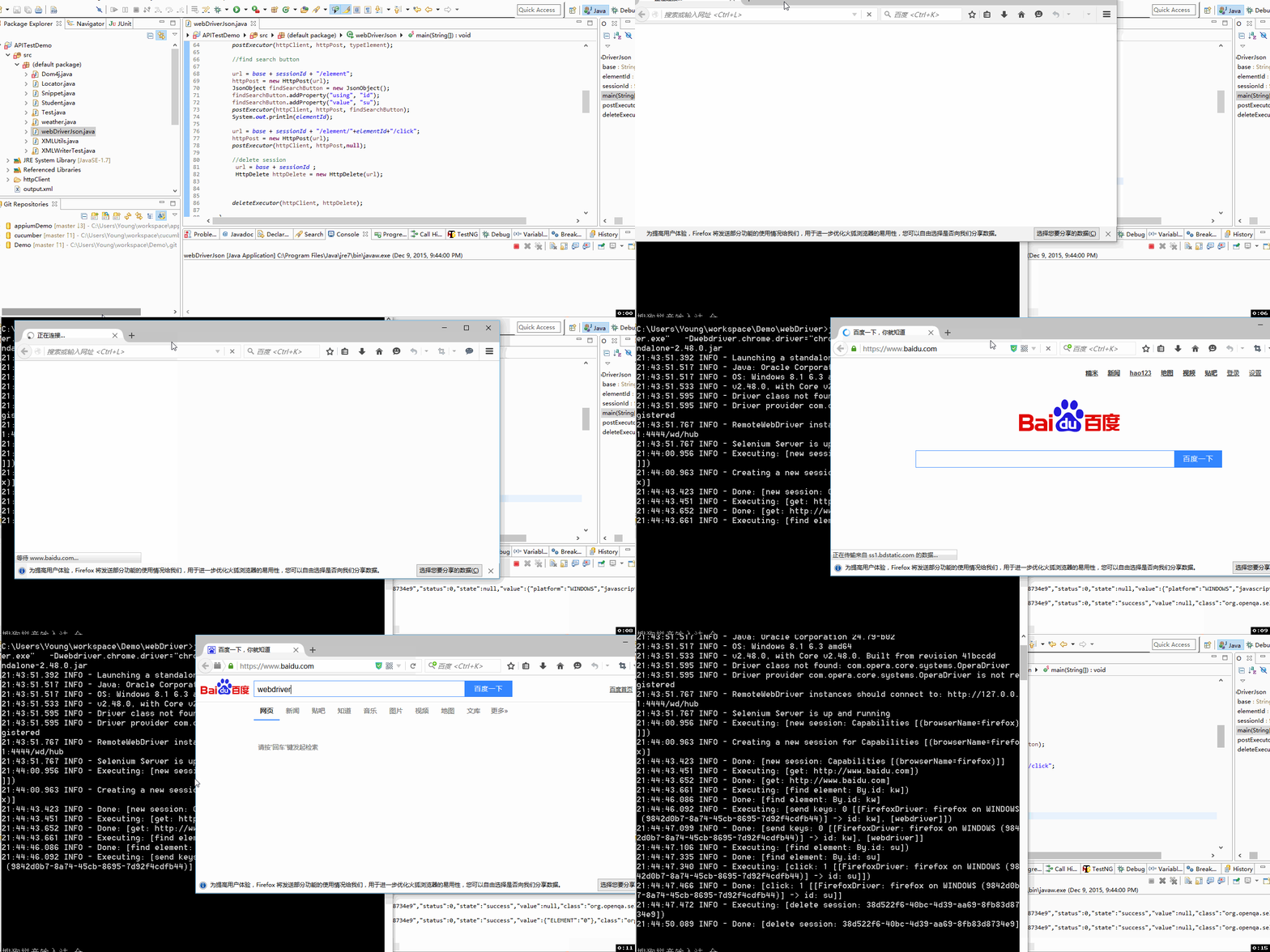
运行效果:
了解selenium 原理究竟有什么意义?
大多数人都会使用selenium去做自动化,但是不是每个人都了解selenium的原理,如果能掌握selenium原理
可以改造selenium API,使用webdriver protocol去做一些能够完善自动化测试框架的事情。、
比如,也许你在selenium自动化过程中会遇到get打开页面打不开,为了保证你脚本的健壮性,这时候你可以加入一段httprequest去获取
response的的关键值判断,如果不是2开头的可以设置refresh,再比如需要做一些准备性工作,比如环境配置也可以使用


 已为社区贡献12条内容

所有评论(0)