esp32开发笔记-wifi网络
1.总体描述
普通单片机实现以太网联网,需采用「内置 MAC + 外接 PHY 芯片」的硬件方案:单片机内置 MAC 与外接 PHY 通过 RMII 接口通信,PHY 芯片外接网络变压器后,即可接入路由器 / 交换机加入局域网。但这种方案需要开发者自行编写 PHY 驱动、移植 lwIP 协议栈、绑定 MAC 与 lwIP,开发难度大、周期长。
而 ESP32-S3 将 WiFi 射频与 MAC 硬件集成在单芯片内,同时通过函数库封装了硬件操作,还完成了 lwIP 协议栈与硬件库的适配绑定。开发者仅需初始化 lwIP 并调用硬件库初始化 WiFi,即可直接进行 TCP/UDP 等网络编程。
| 层级 | 负责内容 | ESP-IDF 对应组件 | 代码里的体现 |
| 物理层 (PHY) | 无线信号收发、调制解调 | 内置 WiFi PHY / 外接以太网 PHY | 封装为库 |
| 数据链路层 (MAC) | 帧封装 / 解封装、MAC 地址、CSMA/CA | ESP32 硬件 WiFi MAC + 驱动 | esp_wifi_init() 初始化硬件 MAC |
| 网络层 (IP) | IP 地址、ARP、ICMP、路由 | lwIP 协议栈 | esp_netif_init() 初始化 lwIP 核心 |
| 传输层 | TCP/UDP 可靠传输、端口 | lwIP TCP/UDP 实现 | httpd 底层调用 lwIP 的 TCP Socket |
| 应用层 | HTTP/MQTT/RTSP 等业务协议 | ESP-IDF 封装的应用层组件 | TCP UDP数据流 |
2.wifi扫描示例
参考idf sdk的 < esp-idf-v5.5.4\examples\wifi\scan\main\scan.c >
/* Scan Example

   This example code is in the Public Domain (or CC0 licensed, at your option.)

   Unless required by applicable law or agreed to in writing, this
   software is distributed on an "AS IS" BASIS, WITHOUT WARRANTIES OR
   CONDITIONS OF ANY KIND, either express or implied.
*/

/*
    This example shows how to scan for available set of APs.
*/
#include <string.h>
#include "freertos/FreeRTOS.h"
#include "freertos/event_groups.h"
#include "esp_wifi.h"
#include "esp_log.h"
#include "esp_event.h"
#include "nvs_flash.h"
#include "regex.h"

#define DEFAULT_SCAN_LIST_SIZE 5 //注意一定不能写太大,这个会占用大量的栈空间

#ifdef CONFIG_EXAMPLE_USE_SCAN_CHANNEL_BITMAP
#define USE_CHANNEL_BITMAP 1
#define CHANNEL_LIST_SIZE 3
static uint8_t channel_list[CHANNEL_LIST_SIZE] = {1, 6, 11};
#endif /*CONFIG_EXAMPLE_USE_SCAN_CHANNEL_BITMAP*/

static const char *TAG = "scan";

static void print_auth_mode(int authmode)
{
    switch (authmode) {
    case WIFI_AUTH_OPEN:
        ESP_LOGI(TAG, "Authmode \tWIFI_AUTH_OPEN");
        break;
    case WIFI_AUTH_OWE:
        ESP_LOGI(TAG, "Authmode \tWIFI_AUTH_OWE");
        break;
    case WIFI_AUTH_WEP:
        ESP_LOGI(TAG, "Authmode \tWIFI_AUTH_WEP");
        break;
    case WIFI_AUTH_WPA_PSK:
        ESP_LOGI(TAG, "Authmode \tWIFI_AUTH_WPA_PSK");
        break;
    case WIFI_AUTH_WPA2_PSK:
        ESP_LOGI(TAG, "Authmode \tWIFI_AUTH_WPA2_PSK");
        break;
    case WIFI_AUTH_WPA_WPA2_PSK:
        ESP_LOGI(TAG, "Authmode \tWIFI_AUTH_WPA_WPA2_PSK");
        break;
    case WIFI_AUTH_ENTERPRISE:
        ESP_LOGI(TAG, "Authmode \tWIFI_AUTH_ENTERPRISE");
        break;
    case WIFI_AUTH_WPA3_PSK:
        ESP_LOGI(TAG, "Authmode \tWIFI_AUTH_WPA3_PSK");
        break;
    case WIFI_AUTH_WPA2_WPA3_PSK:
        ESP_LOGI(TAG, "Authmode \tWIFI_AUTH_WPA2_WPA3_PSK");
        break;
    case WIFI_AUTH_WPA3_ENTERPRISE:
        ESP_LOGI(TAG, "Authmode \tWIFI_AUTH_WPA3_ENTERPRISE");
        break;
    case WIFI_AUTH_WPA2_WPA3_ENTERPRISE:
        ESP_LOGI(TAG, "Authmode \tWIFI_AUTH_WPA2_WPA3_ENTERPRISE");
        break;
    case WIFI_AUTH_WPA3_ENT_192:
        ESP_LOGI(TAG, "Authmode \tWIFI_AUTH_WPA3_ENT_192");
        break;
    default:
        ESP_LOGI(TAG, "Authmode \tWIFI_AUTH_UNKNOWN");
        break;
    }
}

static void print_cipher_type(int pairwise_cipher, int group_cipher)
{
    switch (pairwise_cipher) {
    case WIFI_CIPHER_TYPE_NONE:
        ESP_LOGI(TAG, "Pairwise Cipher \tWIFI_CIPHER_TYPE_NONE");
        break;
    case WIFI_CIPHER_TYPE_WEP40:
        ESP_LOGI(TAG, "Pairwise Cipher \tWIFI_CIPHER_TYPE_WEP40");
        break;
    case WIFI_CIPHER_TYPE_WEP104:
        ESP_LOGI(TAG, "Pairwise Cipher \tWIFI_CIPHER_TYPE_WEP104");
        break;
    case WIFI_CIPHER_TYPE_TKIP:
        ESP_LOGI(TAG, "Pairwise Cipher \tWIFI_CIPHER_TYPE_TKIP");
        break;
    case WIFI_CIPHER_TYPE_CCMP:
        ESP_LOGI(TAG, "Pairwise Cipher \tWIFI_CIPHER_TYPE_CCMP");
        break;
    case WIFI_CIPHER_TYPE_TKIP_CCMP:
        ESP_LOGI(TAG, "Pairwise Cipher \tWIFI_CIPHER_TYPE_TKIP_CCMP");
        break;
    case WIFI_CIPHER_TYPE_AES_CMAC128:
        ESP_LOGI(TAG, "Pairwise Cipher \tWIFI_CIPHER_TYPE_AES_CMAC128");
        break;
    case WIFI_CIPHER_TYPE_SMS4:
        ESP_LOGI(TAG, "Pairwise Cipher \tWIFI_CIPHER_TYPE_SMS4");
        break;
    case WIFI_CIPHER_TYPE_GCMP:
        ESP_LOGI(TAG, "Pairwise Cipher \tWIFI_CIPHER_TYPE_GCMP");
        break;
    case WIFI_CIPHER_TYPE_GCMP256:
        ESP_LOGI(TAG, "Pairwise Cipher \tWIFI_CIPHER_TYPE_GCMP256");
        break;
    default:
        ESP_LOGI(TAG, "Pairwise Cipher \tWIFI_CIPHER_TYPE_UNKNOWN");
        break;
    }

    switch (group_cipher) {
    case WIFI_CIPHER_TYPE_NONE:
        ESP_LOGI(TAG, "Group Cipher \tWIFI_CIPHER_TYPE_NONE");
        break;
    case WIFI_CIPHER_TYPE_WEP40:
        ESP_LOGI(TAG, "Group Cipher \tWIFI_CIPHER_TYPE_WEP40");
        break;
    case WIFI_CIPHER_TYPE_WEP104:
        ESP_LOGI(TAG, "Group Cipher \tWIFI_CIPHER_TYPE_WEP104");
        break;
    case WIFI_CIPHER_TYPE_TKIP:
        ESP_LOGI(TAG, "Group Cipher \tWIFI_CIPHER_TYPE_TKIP");
        break;
    case WIFI_CIPHER_TYPE_CCMP:
        ESP_LOGI(TAG, "Group Cipher \tWIFI_CIPHER_TYPE_CCMP");
        break;
    case WIFI_CIPHER_TYPE_TKIP_CCMP:
        ESP_LOGI(TAG, "Group Cipher \tWIFI_CIPHER_TYPE_TKIP_CCMP");
        break;
    case WIFI_CIPHER_TYPE_SMS4:
        ESP_LOGI(TAG, "Group Cipher \tWIFI_CIPHER_TYPE_SMS4");
        break;
    case WIFI_CIPHER_TYPE_GCMP:
        ESP_LOGI(TAG, "Group Cipher \tWIFI_CIPHER_TYPE_GCMP");
        break;
    case WIFI_CIPHER_TYPE_GCMP256:
        ESP_LOGI(TAG, "Group Cipher \tWIFI_CIPHER_TYPE_GCMP256");
        break;
    default:
        ESP_LOGI(TAG, "Group Cipher \tWIFI_CIPHER_TYPE_UNKNOWN");
        break;
    }
}

#ifdef USE_CHANNEL_BITMAP
static void array_2_channel_bitmap(const uint8_t channel_list[], const uint8_t channel_list_size, wifi_scan_config_t *scan_config) {

    for(uint8_t i = 0; i < channel_list_size; i++) {
        uint8_t channel = channel_list[i];
        scan_config->channel_bitmap.ghz_2_channels |= (1 << channel);
    }
}
#endif /*USE_CHANNEL_BITMAP*/


/* Initialize Wi-Fi as sta and set scan method */
static void wifi_scan(void)
{
    ESP_ERROR_CHECK(esp_netif_init());//网络协议栈初始化
    ESP_ERROR_CHECK(esp_event_loop_create_default());//创建默认事件循环(处理WiFi/IP等事件)
    esp_netif_t *sta_netif = esp_netif_create_default_wifi_sta();//创建WiFi STA模式网络接口(绑定WiFi硬件与lwIP)
    assert(sta_netif);

    wifi_init_config_t cfg = WIFI_INIT_CONFIG_DEFAULT();//WiFi初始化参数(默认配置)
    ESP_ERROR_CHECK(esp_wifi_init(&cfg));//初始化WiFi硬件与驱动

    uint16_t number = DEFAULT_SCAN_LIST_SIZE;
    wifi_ap_record_t ap_info[DEFAULT_SCAN_LIST_SIZE];
    uint16_t ap_count = 0;

    ESP_ERROR_CHECK(esp_wifi_set_mode(WIFI_MODE_STA));//设置WiFi模式为STA(站点模式)
    ESP_ERROR_CHECK(esp_wifi_start());//启动WiFi

    while (1)
    {
        /* code */
        memset(ap_info, 0, sizeof(ap_info));//清空AP信息缓存

    #ifdef USE_CHANNEL_BITMAP
        wifi_scan_config_t *scan_config = (wifi_scan_config_t *)calloc(1,sizeof(wifi_scan_config_t));
        if (!scan_config) {
            ESP_LOGE(TAG, "Memory Allocation for scan config failed!");
            return;
        }
        array_2_channel_bitmap(channel_list, CHANNEL_LIST_SIZE, scan_config);
        esp_wifi_scan_start(scan_config, true);//按指定信道扫描(阻塞式)
        free(scan_config);

    #else
        esp_wifi_scan_start(NULL, true);//全信道扫描(阻塞式)
    #endif /*USE_CHANNEL_BITMAP*/

        ESP_LOGI(TAG, "Max AP number ap_info can hold = %u", number);
        ESP_ERROR_CHECK(esp_wifi_scan_get_ap_num(&ap_count));//获取扫描到的AP数量
        ESP_ERROR_CHECK(esp_wifi_scan_get_ap_records(&number, ap_info));//获取扫描到的AP信息
        ESP_LOGI(TAG, "Total APs scanned = %u, actual AP number ap_info holds = %u", ap_count, number);

        for (int i = 0; i < number&&i<ap_count; i++) {
            ESP_LOGI(TAG,"AP list:------------------------------------------------");
            ESP_LOGI(TAG, "SSID \t\t%s", ap_info[i].ssid);
            ESP_LOGI(TAG, "RSSI \t\t%d", ap_info[i].rssi);
            print_auth_mode(ap_info[i].authmode);//打印认证模式(Open/WPA2/WPA3等)
            if (ap_info[i].authmode != WIFI_AUTH_WEP) {
                print_cipher_type(ap_info[i].pairwise_cipher, ap_info[i].group_cipher);//打印加密类型
            }
            ESP_LOGI(TAG, "Channel \t\t%d", ap_info[i].primary);
        }
        vTaskDelay(pdMS_TO_TICKS(1000));//每秒扫描一次
    }
}

void klp_wifi_scan(void)
{
    // Initialize NVS
    esp_err_t ret = nvs_flash_init();
    if (ret == ESP_ERR_NVS_NO_FREE_PAGES || ret == ESP_ERR_NVS_NEW_VERSION_FOUND) {
        ESP_ERROR_CHECK(nvs_flash_erase());
        ret = nvs_flash_init();
    }
    ESP_ERROR_CHECK( ret );

    wifi_scan();
}
只需要在app_main中调用 klp_wifi_scan() 即可扫描打印wifi
#include <stdio.h>
#include "klpgpio.h"
#include "klpws2812.h"
#include "klpcamera.h"
#include "klpwifiscan.h"
void app_main(void)
{
    // ws2812();
    // klpgpio();
    // klpcamera();
    klp_wifi_scan();
}
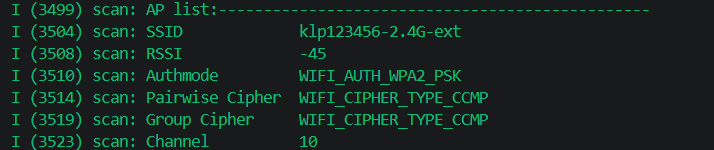
wifi信息打印如图:
3.wifi的AP和sta共存功能
- AP(热点,供其他设备连接)
- STA(站点,访问热点联网)
这里使用了napt功能,类似于路由器:
| 类型 | 全称 | 转换内容 | 适用场景 |
| NAT | Network Address Translation | 只转换 IP 地址 | 一个公网 IP 对应一个内网设备 |
| NAPT | Network Address Port Translation | 同时转换 IP 地址 + 端口号 | 一个公网 IP 对应 多个内网设备(最常用,家庭路由器都是这个) |
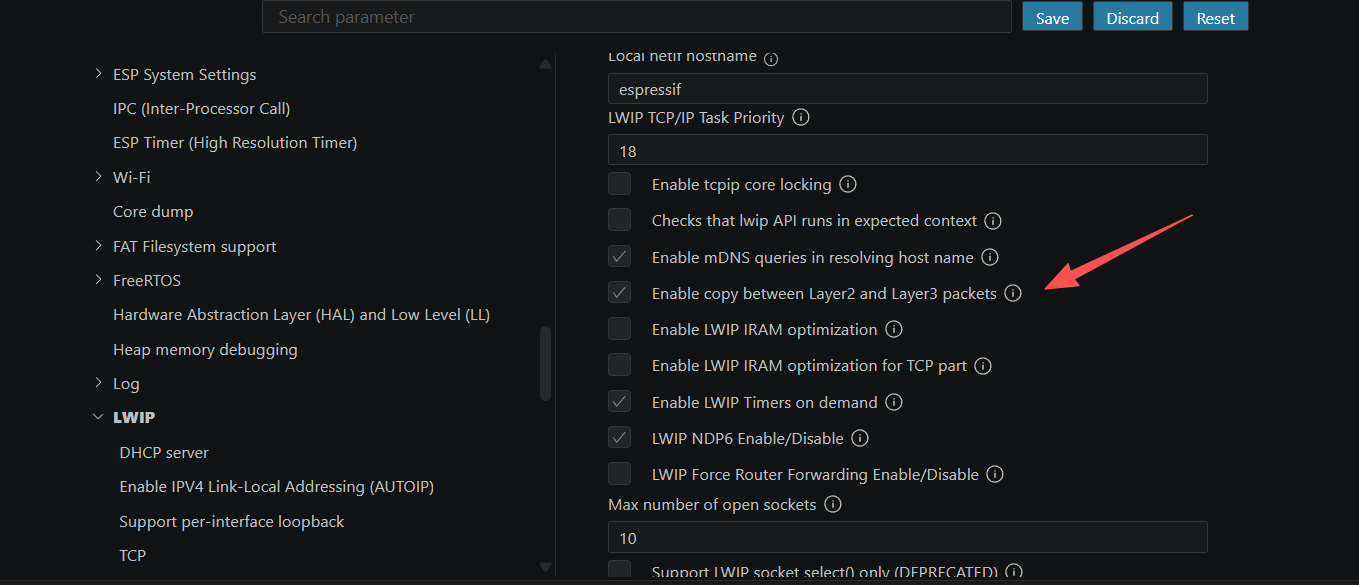
注意:必须开启 Enable L2 to L3 copy (AP+STA必须开) LWIP的NAPT,如图所示:
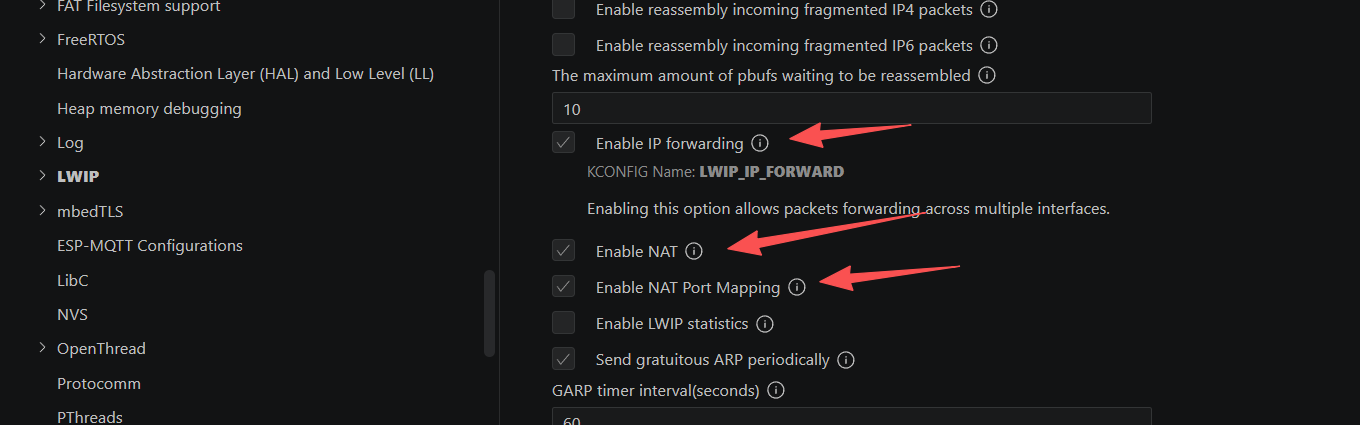
不开启以上功能会报错《E (5393) WiFi Sta: NAPT not enabled on the netif: 0x3fcbb464》,会导致连接AP的设备不能通过esp32s3的sta连接的路由器上网。
#include <stdio.h>
#include "klpwifiapsta.h"

/*
 * SPDX-FileCopyrightText: 2023-2025 Espressif Systems (Shanghai) CO LTD
 *
 * SPDX-License-Identifier: Unlicense OR CC0-1.0
 */
/*  WiFi softAP & station Example

   This example code is in the Public Domain (or CC0 licensed, at your option.)

   Unless required by applicable law or agreed to in writing, this
   software is distributed on an "AS IS" BASIS, WITHOUT WARRANTIES OR
   CONDITIONS OF ANY KIND, either express or implied.
*/
#include <string.h>
#include "freertos/FreeRTOS.h"
#include "freertos/task.h"
#include "freertos/event_groups.h"
#include "esp_mac.h"
#include "esp_wifi.h"
#include "esp_event.h"
#include "esp_log.h"
#include "esp_netif_net_stack.h"
#include "esp_netif.h"
#include "nvs_flash.h"
#include "lwip/inet.h"
#include "lwip/netdb.h"
#include "lwip/sockets.h"
#if IP_NAPT
#include "lwip/lwip_napt.h"
#endif
#include "lwip/err.h"
#include "lwip/sys.h"

/* The examples use WiFi configuration that you can set via project configuration menu.

   If you'd rather not, just change the below entries to strings with
   the config you want - ie #define EXAMPLE_ESP_WIFI_STA_SSID "mywifissid"
*/

/* STA Configuration */
#define EXAMPLE_ESP_WIFI_STA_SSID           "klp123456"
#define EXAMPLE_ESP_WIFI_STA_PASSWD         "18902101360"
#define EXAMPLE_ESP_MAXIMUM_RETRY            5      // 最多重试5次

/* AP Scan Configuration */
#define ESP_WIFI_SCAN_AUTH_MODE_THRESHOLD   WIFI_AUTH_WPA_WPA2_PSK


/* AP Configuration */
#define EXAMPLE_ESP_WIFI_AP_SSID            "esp32s3"
#define EXAMPLE_ESP_WIFI_AP_PASSWD          "18902101360"
#define EXAMPLE_ESP_WIFI_CHANNEL            0//6      // 用6信道(干扰少),0自动信道
#define EXAMPLE_MAX_STA_CONN                4      // 最多连4个设备


/* The event group allows multiple bits for each event, but we only care about two events:
 * - we are connected to the AP with an IP
 * - we failed to connect after the maximum amount of retries */
#define WIFI_CONNECTED_BIT BIT0
#define WIFI_FAIL_BIT      BIT1

/*DHCP server option*/
#define DHCPS_OFFER_DNS             0x02

static const char *TAG_AP = "WiFi SoftAP";
static const char *TAG_STA = "WiFi Sta";

static int s_retry_num = 0;

/* FreeRTOS event group to signal when we are connected/disconnected */
static EventGroupHandle_t s_wifi_event_group;

static void wifi_event_handler(void *arg, esp_event_base_t event_base,
                               int32_t event_id, void *event_data)
{
    if (event_base == WIFI_EVENT && event_id == WIFI_EVENT_AP_STACONNECTED) {
        wifi_event_ap_staconnected_t *event = (wifi_event_ap_staconnected_t *) event_data;
        ESP_LOGI(TAG_AP, "Station "MACSTR" joined, AID=%d",
                 MAC2STR(event->mac), event->aid);
    } else if (event_base == WIFI_EVENT && event_id == WIFI_EVENT_AP_STADISCONNECTED) {
        wifi_event_ap_stadisconnected_t *event = (wifi_event_ap_stadisconnected_t *) event_data;
        ESP_LOGI(TAG_AP, "Station "MACSTR" left, AID=%d, reason:%d",
                 MAC2STR(event->mac), event->aid, event->reason);
    } else if (event_base == WIFI_EVENT && event_id == WIFI_EVENT_STA_START) {
        esp_wifi_connect();
        ESP_LOGI(TAG_STA, "Station started");
    } else if (event_base == IP_EVENT && event_id == IP_EVENT_STA_GOT_IP) {
        ip_event_got_ip_t *event = (ip_event_got_ip_t *) event_data;
        ESP_LOGI(TAG_STA, "Got IP:" IPSTR, IP2STR(&event->ip_info.ip));
        s_retry_num = 0;
        xEventGroupSetBits(s_wifi_event_group, WIFI_CONNECTED_BIT);
    }
    // else if (event_base == IP_EVENT && event_id == IP_EVENT_ASSIGNED_IP_TO_CLIENT) {
    //     const ip_event_assigned_ip_to_client_t *e = (const ip_event_assigned_ip_to_client_t *)event_data;
    //     ESP_LOGI(TAG_AP, "Assigned IP to client: " IPSTR ", MAC=" MACSTR ", hostname='%s'",
    //              IP2STR(&e->ip), MAC2STR(e->mac), e->hostname);
    // }
}

/* Initialize soft AP */
esp_netif_t *wifi_init_softap(void)
{
    esp_netif_t *esp_netif_ap = esp_netif_create_default_wifi_ap();

    wifi_config_t wifi_ap_config = {
        .ap = {
            .ssid = EXAMPLE_ESP_WIFI_AP_SSID,
            .ssid_len = strlen(EXAMPLE_ESP_WIFI_AP_SSID),
            .channel = EXAMPLE_ESP_WIFI_CHANNEL,
            .password = EXAMPLE_ESP_WIFI_AP_PASSWD,
            .max_connection = EXAMPLE_MAX_STA_CONN,
            .authmode = WIFI_AUTH_WPA2_PSK,
            .pmf_cfg = {
                .required = false,
            },
        },
    };

    if (strlen(EXAMPLE_ESP_WIFI_AP_PASSWD) == 0) {
        wifi_ap_config.ap.authmode = WIFI_AUTH_OPEN;
    }

    ESP_ERROR_CHECK(esp_wifi_set_config(WIFI_IF_AP, &wifi_ap_config));

    ESP_LOGI(TAG_AP, "wifi_init_softap finished. SSID:%s password:%s channel:%d",
             EXAMPLE_ESP_WIFI_AP_SSID, EXAMPLE_ESP_WIFI_AP_PASSWD, EXAMPLE_ESP_WIFI_CHANNEL);

    return esp_netif_ap;
}

/* Initialize wifi station */
esp_netif_t *wifi_init_sta(void)
{
    esp_netif_t *esp_netif_sta = esp_netif_create_default_wifi_sta();

    wifi_config_t wifi_sta_config = {
        .sta = {
            .ssid = EXAMPLE_ESP_WIFI_STA_SSID,
            .password = EXAMPLE_ESP_WIFI_STA_PASSWD,
            .scan_method = WIFI_ALL_CHANNEL_SCAN,
            .failure_retry_cnt = EXAMPLE_ESP_MAXIMUM_RETRY,
            /* Authmode threshold resets to WPA2 as default if password matches WPA2 standards (password len => 8).
             * If you want to connect the device to deprecated WEP/WPA networks, Please set the threshold value
             * to WIFI_AUTH_WEP/WIFI_AUTH_WPA_PSK and set the password with length and format matching to
            * WIFI_AUTH_WEP/WIFI_AUTH_WPA_PSK standards.
             */
            .threshold.authmode = ESP_WIFI_SCAN_AUTH_MODE_THRESHOLD,
            .sae_pwe_h2e = WPA3_SAE_PWE_BOTH,
        },
    };

    ESP_ERROR_CHECK(esp_wifi_set_config(WIFI_IF_STA, &wifi_sta_config) );

    ESP_LOGI(TAG_STA, "wifi_init_sta finished.");

    return esp_netif_sta;
}

void softap_set_dns_addr(esp_netif_t *esp_netif_ap,esp_netif_t *esp_netif_sta)
{
    esp_netif_dns_info_t dns;
    esp_netif_get_dns_info(esp_netif_sta,ESP_NETIF_DNS_MAIN,&dns);
    uint8_t dhcps_offer_option = DHCPS_OFFER_DNS;
    ESP_ERROR_CHECK_WITHOUT_ABORT(esp_netif_dhcps_stop(esp_netif_ap));
    ESP_ERROR_CHECK(esp_netif_dhcps_option(esp_netif_ap, ESP_NETIF_OP_SET, ESP_NETIF_DOMAIN_NAME_SERVER, &dhcps_offer_option, sizeof(dhcps_offer_option)));
    ESP_ERROR_CHECK(esp_netif_set_dns_info(esp_netif_ap, ESP_NETIF_DNS_MAIN, &dns));
    ESP_ERROR_CHECK_WITHOUT_ABORT(esp_netif_dhcps_start(esp_netif_ap));
}

void klp_wifi_ap_sta(void)
{
    ESP_ERROR_CHECK(esp_netif_init());
    ESP_ERROR_CHECK(esp_event_loop_create_default());

    //Initialize NVS
    esp_err_t ret = nvs_flash_init();
    if (ret == ESP_ERR_NVS_NO_FREE_PAGES || ret == ESP_ERR_NVS_NEW_VERSION_FOUND) {
        ESP_ERROR_CHECK(nvs_flash_erase());
        ret = nvs_flash_init();
    }
    ESP_ERROR_CHECK(ret);

    /* Initialize event group */
    s_wifi_event_group = xEventGroupCreate();

    /* Register Event handler */
    ESP_ERROR_CHECK(esp_event_handler_instance_register(WIFI_EVENT,
                    ESP_EVENT_ANY_ID,
                    &wifi_event_handler,
                    NULL,
                    NULL));
    ESP_ERROR_CHECK(esp_event_handler_instance_register(IP_EVENT,
                    IP_EVENT_STA_GOT_IP,
                    &wifi_event_handler,
                    NULL,
                    NULL));
    // ESP_ERROR_CHECK(esp_event_handler_instance_register(IP_EVENT,
    //                 IP_EVENT_ASSIGNED_IP_TO_CLIENT,
    //                 &wifi_event_handler,
    //                 NULL,
    //                 NULL));

    /*Initialize WiFi */
    wifi_init_config_t cfg = WIFI_INIT_CONFIG_DEFAULT();
    ESP_ERROR_CHECK(esp_wifi_init(&cfg));

    ESP_ERROR_CHECK(esp_wifi_set_mode(WIFI_MODE_APSTA));

    /* Initialize AP */
    ESP_LOGI(TAG_AP, "ESP_WIFI_MODE_AP");
    esp_netif_t *esp_netif_ap = wifi_init_softap();

    /* Initialize STA */
    ESP_LOGI(TAG_STA, "ESP_WIFI_MODE_STA");
    esp_netif_t *esp_netif_sta = wifi_init_sta();

    /* Start WiFi */
    ESP_ERROR_CHECK(esp_wifi_start() );

    /*
     * Wait until either the connection is established (WIFI_CONNECTED_BIT) or
     * connection failed for the maximum number of re-tries (WIFI_FAIL_BIT).
     * The bits are set by event_handler() (see above)
     */
    EventBits_t bits = xEventGroupWaitBits(s_wifi_event_group,
                                           WIFI_CONNECTED_BIT | WIFI_FAIL_BIT,
                                           pdFALSE,
                                           pdFALSE,
                                           portMAX_DELAY);

    /* xEventGroupWaitBits() returns the bits before the call returned,
     * hence we can test which event actually happened. */
    if (bits & WIFI_CONNECTED_BIT) {
        ESP_LOGI(TAG_STA, "connected to ap SSID:%s password:%s",
                 EXAMPLE_ESP_WIFI_STA_SSID, EXAMPLE_ESP_WIFI_STA_PASSWD);
        softap_set_dns_addr(esp_netif_ap,esp_netif_sta);
    } else if (bits & WIFI_FAIL_BIT) {
        ESP_LOGI(TAG_STA, "Failed to connect to SSID:%s, password:%s",
                 EXAMPLE_ESP_WIFI_STA_SSID, EXAMPLE_ESP_WIFI_STA_PASSWD);
    } else {
        ESP_LOGE(TAG_STA, "UNEXPECTED EVENT");
        return;
    }

    /* Set sta as the default interface */
    esp_netif_set_default_netif(esp_netif_sta);

    /* Enable napt on the AP netif */
    if (esp_netif_napt_enable(esp_netif_ap) != ESP_OK) {
        ESP_LOGE(TAG_STA, "NAPT not enabled on the netif: %p", esp_netif_ap);
    }
    while (1)
    {
        /* code */
        vTaskDelay(pdMS_TO_TICKS(1000));
    }

}
同样 wifi扫描示例一样,也需要在 app_main 函数添加 klp_wifi_ap_sta 函数:
#include <stdio.h>
#include "klpgpio.h"
#include "klpws2812.h"
#include "klpcamera.h"
#include "klpwifiscan.h"
#include "klpwifiapsta.h"
void app_main(void)
{
    // ws2812();
    // klpgpio();
    // klpcamera();
    // klp_wifi_scan();
    klp_wifi_ap_sta();
}
4.socket编程参考
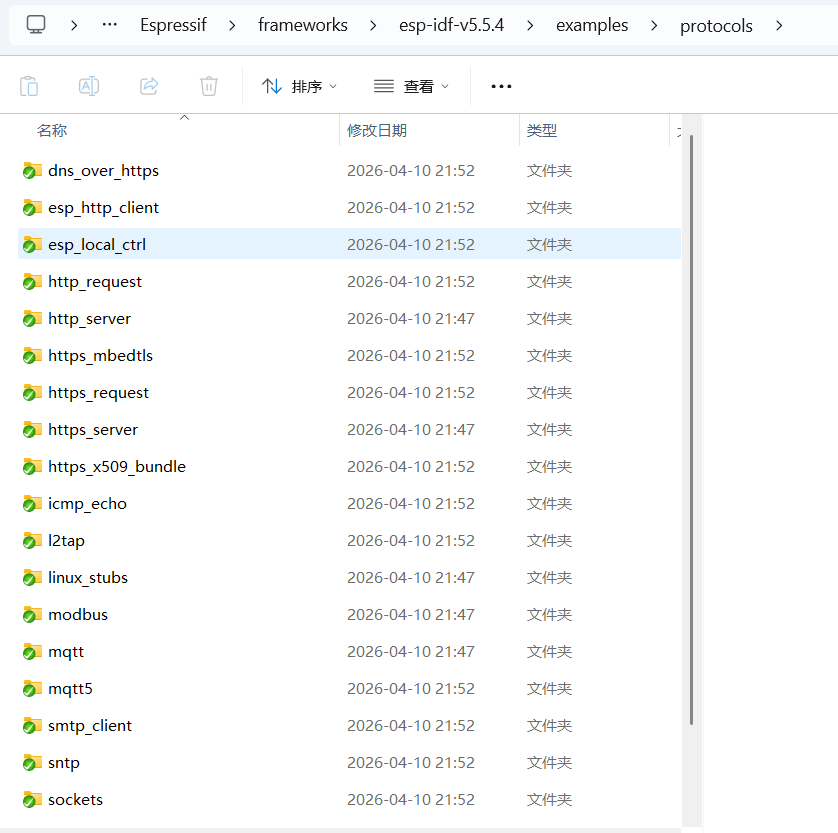
socket编程主要参考 esp32 的 idf 框架SDK例子,参考例子路径如图所示:
4.1 socket编程通用步骤
- 初始化nvsflash
- 初始化LWIP协议栈
- 配置wifi
- 设置wifi事件接口
- 连接wifi
- socke编程(tcp udp)
网络连接代码如图所示:
#include <string.h>
#include <sys/param.h>
#include "freertos/FreeRTOS.h"
#include "freertos/task.h"
#include "esp_system.h"
#include "esp_wifi.h"
#include "esp_event.h"
#include "esp_log.h"
#include "nvs_flash.h"
#include "esp_netif.h"
// #include "protocol_examples_common.h"

#include "lwip/err.h"
#include "lwip/sockets.h"
#include "lwip/sys.h"
#include <lwip/netdb.h>


/* The examples use WiFi configuration that you can set via project configuration menu

   If you'd rather not, just change the below entries to strings with
   the config you want - ie #define EXAMPLE_WIFI_SSID "mywifissid"
*/
#define EXAMPLE_ESP_WIFI_SSID      "klp123456"
#define EXAMPLE_ESP_WIFI_PASS      "18902101360"
#define EXAMPLE_ESP_MAXIMUM_RETRY  5//重连接次数

//WPA3 加密 才需要选,普通家用路由器都是 WPA2,完全不用管,不用 WPA3 → 直接选 BOTH 就行
// 第一部分 WPA3:选兼容模式
#define ESP_WIFI_SAE_MODE WPA3_SAE_PWE_BOTH
#define EXAMPLE_H2E_IDENTIFIER ""
// 第二部分 认证阈值:选 WPA2 (家用最常用)
#define ESP_WIFI_SCAN_AUTH_MODE_THRESHOLD WIFI_AUTH_WPA_WPA2_PSK

/* FreeRTOS event group to signal when we are connected*/
static EventGroupHandle_t s_wifi_event_group;

/* The event group allows multiple bits for each event, but we only care about two events:
 * - we are connected to the AP with an IP
 * - we failed to connect after the maximum amount of retries */
#define WIFI_CONNECTED_BIT BIT0
#define WIFI_FAIL_BIT      BIT1

static const char *TAG = "wifi station";

static int s_retry_num = 0;

static void event_handler(void* arg, esp_event_base_t event_base,
                                int32_t event_id, void* event_data)
{
    if (event_base == WIFI_EVENT && event_id == WIFI_EVENT_STA_START) {
        esp_wifi_connect();
    } else if (event_base == WIFI_EVENT && event_id == WIFI_EVENT_STA_DISCONNECTED) {
        if (s_retry_num < EXAMPLE_ESP_MAXIMUM_RETRY) {
            esp_wifi_connect();
            s_retry_num++;
            ESP_LOGI(TAG, "retry to connect to the AP");
        } else {
            xEventGroupSetBits(s_wifi_event_group, WIFI_FAIL_BIT);
        }
        ESP_LOGI(TAG,"connect to the AP fail");
    } else if (event_base == IP_EVENT && event_id == IP_EVENT_STA_GOT_IP) {
        ip_event_got_ip_t* event = (ip_event_got_ip_t*) event_data;
        ESP_LOGI(TAG, "got ip:" IPSTR, IP2STR(&event->ip_info.ip));
        s_retry_num = 0;
        xEventGroupSetBits(s_wifi_event_group, WIFI_CONNECTED_BIT);
    }
}

void wifi_init_sta(void)
{
    s_wifi_event_group = xEventGroupCreate();

    ESP_ERROR_CHECK(esp_netif_init());

    ESP_ERROR_CHECK(esp_event_loop_create_default());
    esp_netif_create_default_wifi_sta();

    wifi_init_config_t cfg = WIFI_INIT_CONFIG_DEFAULT();
    ESP_ERROR_CHECK(esp_wifi_init(&cfg));

    esp_event_handler_instance_t instance_any_id;
    esp_event_handler_instance_t instance_got_ip;
    ESP_ERROR_CHECK(esp_event_handler_instance_register(WIFI_EVENT,
                                                        ESP_EVENT_ANY_ID,
                                                        &event_handler,
                                                        NULL,
                                                        &instance_any_id));
    ESP_ERROR_CHECK(esp_event_handler_instance_register(IP_EVENT,
                                                        IP_EVENT_STA_GOT_IP,
                                                        &event_handler,
                                                        NULL,
                                                        &instance_got_ip));

    wifi_config_t wifi_config = {
        .sta = {
            .ssid = EXAMPLE_ESP_WIFI_SSID,
            .password = EXAMPLE_ESP_WIFI_PASS,
            /* Authmode threshold resets to WPA2 as default if password matches WPA2 standards (password len => 8).
             * If you want to connect the device to deprecated WEP/WPA networks, Please set the threshold value
             * to WIFI_AUTH_WEP/WIFI_AUTH_WPA_PSK and set the password with length and format matching to
             * WIFI_AUTH_WEP/WIFI_AUTH_WPA_PSK standards.
             */
            .threshold.authmode = ESP_WIFI_SCAN_AUTH_MODE_THRESHOLD,
            .sae_pwe_h2e = ESP_WIFI_SAE_MODE,
            .sae_h2e_identifier = EXAMPLE_H2E_IDENTIFIER,
#ifdef CONFIG_ESP_WIFI_WPA3_COMPATIBLE_SUPPORT
            .disable_wpa3_compatible_mode = 0,
#endif
        },
    };
    ESP_ERROR_CHECK(esp_wifi_set_mode(WIFI_MODE_STA) );
    ESP_ERROR_CHECK(esp_wifi_set_config(WIFI_IF_STA, &wifi_config) );
    ESP_ERROR_CHECK(esp_wifi_start() );

    ESP_LOGI(TAG, "wifi_init_sta finished.");

    /* Waiting until either the connection is established (WIFI_CONNECTED_BIT) or connection failed for the maximum
     * number of re-tries (WIFI_FAIL_BIT). The bits are set by event_handler() (see above) */
    EventBits_t bits = xEventGroupWaitBits(s_wifi_event_group,
            WIFI_CONNECTED_BIT | WIFI_FAIL_BIT,
            pdFALSE,
            pdFALSE,
            portMAX_DELAY);

    /* xEventGroupWaitBits() returns the bits before the call returned, hence we can test which event actually
     * happened. */
    if (bits & WIFI_CONNECTED_BIT) {
        ESP_LOGI(TAG, "connected to ap SSID:%s password:%s",
                 EXAMPLE_ESP_WIFI_SSID, EXAMPLE_ESP_WIFI_PASS);
    } else if (bits & WIFI_FAIL_BIT) {
        ESP_LOGI(TAG, "Failed to connect to SSID:%s, password:%s",
                 EXAMPLE_ESP_WIFI_SSID, EXAMPLE_ESP_WIFI_PASS);
    } else {
        ESP_LOGE(TAG, "UNEXPECTED EVENT");
    }
}

void wifi_connect(void)
{
    //Initialize NVS
    esp_err_t ret = nvs_flash_init();
    if (ret == ESP_ERR_NVS_NO_FREE_PAGES || ret == ESP_ERR_NVS_NEW_VERSION_FOUND) {
      ESP_ERROR_CHECK(nvs_flash_erase());
      ret = nvs_flash_init();
    }
    ESP_ERROR_CHECK(ret);

    if (CONFIG_LOG_MAXIMUM_LEVEL > CONFIG_LOG_DEFAULT_LEVEL) {
        /* If you only want to open more logs in the wifi module, you need to make the max level greater than the default level,
         * and call esp_log_level_set() before esp_wifi_init() to improve the log level of the wifi module. */
        esp_log_level_set("wifi", CONFIG_LOG_MAXIMUM_LEVEL);
    }

    ESP_LOGI(TAG, "ESP_WIFI_MODE_STA");
    wifi_init_sta();
}
网络连接代码主要参考:
5.UDP编程
参考示例:https://github.com/espressif/esp-idf/blob/master/examples/protocols/sockets/udp_client/main/udp_client.c https://github.com/espressif/esp-idf/blob/master/examples/protocols/sockets/udp_client/main/udp_client.c 参考官方的udp例子编程,首先创建一个新组件 klpudp,定义 void klpudp(void) 函数,在这个函数中初始化网络协议栈以及wifi,并注册网络wifi和ip相关事件:
/* BSD Socket API Example

   This example code is in the Public Domain (or CC0 licensed, at your option.)

   Unless required by applicable law or agreed to in writing, this
   software is distributed on an "AS IS" BASIS, WITHOUT WARRANTIES OR
   CONDITIONS OF ANY KIND, either express or implied.
*/
#include <string.h>
#include <sys/param.h>
#include "freertos/FreeRTOS.h"
#include "freertos/task.h"
#include "esp_system.h"
#include "esp_wifi.h"
#include "esp_event.h"
#include "esp_log.h"
#include "nvs_flash.h"
#include "esp_netif.h"
// #include "protocol_examples_common.h"

#include "lwip/err.h"
#include "lwip/sockets.h"
#include "lwip/sys.h"
#include <lwip/netdb.h>


/* The examples use WiFi configuration that you can set via project configuration menu

   If you'd rather not, just change the below entries to strings with
   the config you want - ie #define EXAMPLE_WIFI_SSID "mywifissid"
*/
#define EXAMPLE_ESP_WIFI_SSID      "klp123456"
#define EXAMPLE_ESP_WIFI_PASS      "18902101360"
#define EXAMPLE_ESP_MAXIMUM_RETRY  5//重连接次数

//WPA3 加密 才需要选,普通家用路由器都是 WPA2,完全不用管,不用 WPA3 → 直接选 BOTH 就行
// 第一部分 WPA3:选兼容模式
#define ESP_WIFI_SAE_MODE WPA3_SAE_PWE_BOTH
#define EXAMPLE_H2E_IDENTIFIER ""
// 第二部分 认证阈值:选 WPA2 (家用最常用)
#define ESP_WIFI_SCAN_AUTH_MODE_THRESHOLD WIFI_AUTH_WPA_WPA2_PSK

/* FreeRTOS event group to signal when we are connected*/
static EventGroupHandle_t s_wifi_event_group;

/* The event group allows multiple bits for each event, but we only care about two events:
 * - we are connected to the AP with an IP
 * - we failed to connect after the maximum amount of retries */
#define WIFI_CONNECTED_BIT BIT0
#define WIFI_FAIL_BIT      BIT1

static const char *TAG = "wifi station";

static int s_retry_num = 0;

static void event_handler(void* arg, esp_event_base_t event_base,
                                int32_t event_id, void* event_data)
{
    if (event_base == WIFI_EVENT && event_id == WIFI_EVENT_STA_START) {
        esp_wifi_connect();
    } else if (event_base == WIFI_EVENT && event_id == WIFI_EVENT_STA_DISCONNECTED) {
        if (s_retry_num < EXAMPLE_ESP_MAXIMUM_RETRY) {
            esp_wifi_connect();
            s_retry_num++;
            ESP_LOGI(TAG, "retry to connect to the AP");
        } else {
            xEventGroupSetBits(s_wifi_event_group, WIFI_FAIL_BIT);
        }
        ESP_LOGI(TAG,"connect to the AP fail");
    } else if (event_base == IP_EVENT && event_id == IP_EVENT_STA_GOT_IP) {
        ip_event_got_ip_t* event = (ip_event_got_ip_t*) event_data;
        ESP_LOGI(TAG, "got ip:" IPSTR, IP2STR(&event->ip_info.ip));
        s_retry_num = 0;
        xEventGroupSetBits(s_wifi_event_group, WIFI_CONNECTED_BIT);
    }
}

void wifi_init_sta(void)
{
    s_wifi_event_group = xEventGroupCreate();

    ESP_ERROR_CHECK(esp_netif_init());

    ESP_ERROR_CHECK(esp_event_loop_create_default());
    esp_netif_create_default_wifi_sta();

    wifi_init_config_t cfg = WIFI_INIT_CONFIG_DEFAULT();
    ESP_ERROR_CHECK(esp_wifi_init(&cfg));

    esp_event_handler_instance_t instance_any_id;
    esp_event_handler_instance_t instance_got_ip;
    ESP_ERROR_CHECK(esp_event_handler_instance_register(WIFI_EVENT,
                                                        ESP_EVENT_ANY_ID,
                                                        &event_handler,
                                                        NULL,
                                                        &instance_any_id));
    ESP_ERROR_CHECK(esp_event_handler_instance_register(IP_EVENT,
                                                        IP_EVENT_STA_GOT_IP,
                                                        &event_handler,
                                                        NULL,
                                                        &instance_got_ip));

    wifi_config_t wifi_config = {
        .sta = {
            .ssid = EXAMPLE_ESP_WIFI_SSID,
            .password = EXAMPLE_ESP_WIFI_PASS,
            /* Authmode threshold resets to WPA2 as default if password matches WPA2 standards (password len => 8).
             * If you want to connect the device to deprecated WEP/WPA networks, Please set the threshold value
             * to WIFI_AUTH_WEP/WIFI_AUTH_WPA_PSK and set the password with length and format matching to
             * WIFI_AUTH_WEP/WIFI_AUTH_WPA_PSK standards.
             */
            .threshold.authmode = ESP_WIFI_SCAN_AUTH_MODE_THRESHOLD,
            .sae_pwe_h2e = ESP_WIFI_SAE_MODE,
            .sae_h2e_identifier = EXAMPLE_H2E_IDENTIFIER,
#ifdef CONFIG_ESP_WIFI_WPA3_COMPATIBLE_SUPPORT
            .disable_wpa3_compatible_mode = 0,
#endif
        },
    };
    ESP_ERROR_CHECK(esp_wifi_set_mode(WIFI_MODE_STA) );
    ESP_ERROR_CHECK(esp_wifi_set_config(WIFI_IF_STA, &wifi_config) );
    ESP_ERROR_CHECK(esp_wifi_start() );

    ESP_LOGI(TAG, "wifi_init_sta finished.");

    /* Waiting until either the connection is established (WIFI_CONNECTED_BIT) or connection failed for the maximum
     * number of re-tries (WIFI_FAIL_BIT). The bits are set by event_handler() (see above) */
    EventBits_t bits = xEventGroupWaitBits(s_wifi_event_group,
            WIFI_CONNECTED_BIT | WIFI_FAIL_BIT,
            pdFALSE,
            pdFALSE,
            portMAX_DELAY);

    /* xEventGroupWaitBits() returns the bits before the call returned, hence we can test which event actually
     * happened. */
    if (bits & WIFI_CONNECTED_BIT) {
        ESP_LOGI(TAG, "connected to ap SSID:%s password:%s",
                 EXAMPLE_ESP_WIFI_SSID, EXAMPLE_ESP_WIFI_PASS);
    } else if (bits & WIFI_FAIL_BIT) {
        ESP_LOGI(TAG, "Failed to connect to SSID:%s, password:%s",
                 EXAMPLE_ESP_WIFI_SSID, EXAMPLE_ESP_WIFI_PASS);
    } else {
        ESP_LOGE(TAG, "UNEXPECTED EVENT");
    }
}

void wifi_connect(void)
{
    //Initialize NVS
    esp_err_t ret = nvs_flash_init();
    if (ret == ESP_ERR_NVS_NO_FREE_PAGES || ret == ESP_ERR_NVS_NEW_VERSION_FOUND) {
      ESP_ERROR_CHECK(nvs_flash_erase());
      ret = nvs_flash_init();
    }
    ESP_ERROR_CHECK(ret);

    if (CONFIG_LOG_MAXIMUM_LEVEL > CONFIG_LOG_DEFAULT_LEVEL) {
        /* If you only want to open more logs in the wifi module, you need to make the max level greater than the default level,
         * and call esp_log_level_set() before esp_wifi_init() to improve the log level of the wifi module. */
        esp_log_level_set("wifi", CONFIG_LOG_MAXIMUM_LEVEL);
    }

    ESP_LOGI(TAG, "ESP_WIFI_MODE_STA");
    wifi_init_sta();
}


#define PORT 6000


static void udp_server_task(void *pvParameters)
{
    char rx_buffer[128];
    char addr_str[128];
    int addr_family = (int)pvParameters;
    int ip_protocol = 0;
    struct sockaddr_in6 dest_addr;

    while (1) {
        // 将通用套接字地址结构体 强转为 IPv4专用格式
        if (addr_family == AF_INET) {

            struct sockaddr_in *dest_addr_ip4 = (struct sockaddr_in *)&dest_addr;
            // 绑定本机所有IP地址(AP+STA双网卡全部监听)
            dest_addr_ip4->sin_addr.s_addr = htonl(INADDR_ANY);//监听所有IP地址
            dest_addr_ip4->sin_family = AF_INET;//ipv4
            dest_addr_ip4->sin_port = htons(PORT);//端口6000
            ip_protocol = IPPROTO_IP;// 网络层使用IP协议
        } else if (addr_family == AF_INET6) {
            bzero(&dest_addr.sin6_addr.un, sizeof(dest_addr.sin6_addr.un));
            dest_addr.sin6_family = AF_INET6;
            dest_addr.sin6_port = htons(PORT);
            ip_protocol = IPPROTO_IPV6;
        }
        //创建套接字
        int sock = socket(addr_family, SOCK_DGRAM, ip_protocol);
        if (sock < 0) {
            ESP_LOGE(TAG, "Unable to create socket: errno %d", errno);
            break;
        }
        ESP_LOGI(TAG, "Socket created");

#if defined(CONFIG_LWIP_NETBUF_RECVINFO) && !defined(CONFIG_EXAMPLE_IPV6)
        int enable = 1;
        // 🔥 AP+STA 必加:开启包信息,防止回复发错网卡
        lwip_setsockopt(sock, IPPROTO_IP, IP_PKTINFO, &enable, sizeof(enable));
#endif

        // Set timeout
        struct timeval timeout;
        timeout.tv_sec = 10;
        timeout.tv_usec = 0;
        //让 recvfrom() / recvmsg() 不会永远卡死等待数据,最多等 10 秒,没收到就自动退出。
        setsockopt (sock, SOL_SOCKET, SO_RCVTIMEO, &timeout, sizeof timeout);

        int err = bind(sock, (struct sockaddr *)&dest_addr, sizeof(dest_addr));
        if (err < 0) {
            ESP_LOGE(TAG, "Socket unable to bind: errno %d", errno);
        }
        ESP_LOGI(TAG, "Socket bound, port %d", PORT);

        struct sockaddr_storage source_addr; // Large enough for both IPv4 or IPv6
        socklen_t socklen = sizeof(source_addr);

#if defined(CONFIG_LWIP_NETBUF_RECVINFO) && !defined(CONFIG_EXAMPLE_IPV6)
        struct iovec iov;
        struct msghdr msg;
        struct cmsghdr *cmsgtmp;
        u8_t cmsg_buf[CMSG_SPACE(sizeof(struct in_pktinfo))];

        iov.iov_base = rx_buffer;
        iov.iov_len = sizeof(rx_buffer);
        msg.msg_control = cmsg_buf;
        msg.msg_controllen = sizeof(cmsg_buf);
        msg.msg_flags = 0;
        msg.msg_iov = &iov;
        msg.msg_iovlen = 1;
        msg.msg_name = (struct sockaddr *)&source_addr;
        msg.msg_namelen = socklen;
#endif

        while (1) {
            ESP_LOGI(TAG, "Waiting for data");
#if defined(CONFIG_LWIP_NETBUF_RECVINFO) && !defined(CONFIG_EXAMPLE_IPV6)
            int len = recvmsg(sock, &msg, 0);
#else
            int len = recvfrom(sock, rx_buffer, sizeof(rx_buffer) - 1, 0, (struct sockaddr *)&source_addr, &socklen);
#endif
            // Error occurred during receiving
            if (len < 0) {
                ESP_LOGE(TAG, "recvfrom failed: errno %d", errno);
                break;
            }
            // Data received
            else {
                // Get the sender's ip address as string
                if (source_addr.ss_family == PF_INET) {//获取发送端的地址作为字符串
                    inet_ntoa_r(((struct sockaddr_in *)&source_addr)->sin_addr, addr_str, sizeof(addr_str) - 1);
#if defined(CONFIG_LWIP_NETBUF_RECVINFO) && !defined(CONFIG_EXAMPLE_IPV6)
                    for ( cmsgtmp = CMSG_FIRSTHDR(&msg); cmsgtmp != NULL; cmsgtmp = CMSG_NXTHDR(&msg, cmsgtmp) ) {
                        if ( cmsgtmp->cmsg_level == IPPROTO_IP && cmsgtmp->cmsg_type == IP_PKTINFO ) {
                            struct in_pktinfo *pktinfo;
                            pktinfo = (struct in_pktinfo*)CMSG_DATA(cmsgtmp);
                            ESP_LOGI(TAG, "dest ip: %s", inet_ntoa(pktinfo->ipi_addr));
                        }
                    }
#endif
                } else if (source_addr.ss_family == PF_INET6) {
                    inet6_ntoa_r(((struct sockaddr_in6 *)&source_addr)->sin6_addr, addr_str, sizeof(addr_str) - 1);
                }

                rx_buffer[len] = 0; // Null-terminate whatever we received and treat like a string...
                //打印发送数据的地址和数据
                ESP_LOGI(TAG, "Received %d bytes from %s:", len, addr_str);
                ESP_LOGI(TAG, "%s", rx_buffer);
                //返回接收到的数据
                int err = sendto(sock, rx_buffer, len, 0, (struct sockaddr *)&source_addr, sizeof(source_addr));
                if (err < 0) {
                    ESP_LOGE(TAG, "Error occurred during sending: errno %d", errno);
                    break;
                }
            }
        }

        if (sock != -1) {
            ESP_LOGE(TAG, "Shutting down socket and restarting...");
            shutdown(sock, 0);
            close(sock);
        }
    }
    vTaskDelete(NULL);
}

void klpudp(void)
{
    wifi_connect();

    xTaskCreate(udp_server_task, "udp_server", 4096, (void*)AF_INET, 5, NULL);

    while (1)
    {
        /* code */
        vTaskDelay(pdMS_TO_TICKS(1000));
    }

}
跟wifi扫描一样,在app_main中调用函数 void klpudp(void)
#include <stdio.h>
#include "klpgpio.h"
#include "klpws2812.h"
#include "klpcamera.h"
#include "klpwifiscan.h"
#include "klpwifiapsta.h"
#include "klpudp.h"
void app_main(void)
{
    // ws2812();
    // klpgpio();
    // klpcamera();
    // klp_wifi_scan();
    // klp_wifi_ap_sta();
    klpudp();
}
UDP的CMakelists.txt需要增加依赖
idf_component_register(SRCS "klpudp.c"
                    INCLUDE_DIRS "include"
                    REQUIRES esp_wifi nvs_flash esp_event esp_netif lwip)
6.TCP编程
跟udp编程一样,初始化lwip协议栈,配置wifi,建立网络连接,跟上位机socket同样编程。
6.1 tcp客户端编程
同udp编程一样先实现wifi连接,再进行tcp、ip编程(创建tcp套接字,connect到服务器,recv,send数据),总体代码:
/*
 * SPDX-FileCopyrightText: 2022 Espressif Systems (Shanghai) CO LTD
 *
 * SPDX-License-Identifier: Unlicense OR CC0-1.0
 */
#include "sdkconfig.h"
#include <string.h>
#include <unistd.h>
#include <sys/socket.h>
#include <errno.h>
#include <netdb.h>            // struct addrinfo
#include <arpa/inet.h>
#include "esp_netif.h"
#include "esp_log.h"
#include "nvs_flash.h"
// #include "protocol_examples_common.h"
#include "esp_system.h"
#include "esp_wifi.h"
#include "esp_event.h"

#include "lwip/err.h"
#include "lwip/sockets.h"
#include "lwip/sys.h"
#include <lwip/netdb.h>

// #if defined(CONFIG_EXAMPLE_SOCKET_IP_INPUT_STDIN)
// #include "addr_from_stdin.h"
// #endif

// #if defined(CONFIG_EXAMPLE_IPV4)
#define HOST_IP_ADDR "192.168.1.5"//CONFIG_EXAMPLE_IPV4_ADDR
// #elif defined(CONFIG_EXAMPLE_SOCKET_IP_INPUT_STDIN)
// #define HOST_IP_ADDR ""
// #endif

#define PORT 6000//CONFIG_EXAMPLE_PORT

static const char *TAG = "klptcpclient";
static const char *payload = "Message from ESP32 ";

/* The examples use WiFi configuration that you can set via project configuration menu

   If you'd rather not, just change the below entries to strings with
   the config you want - ie #define EXAMPLE_WIFI_SSID "mywifissid"
*/
#define EXAMPLE_ESP_WIFI_SSID      "klp123456"
#define EXAMPLE_ESP_WIFI_PASS      "18902101360"
#define EXAMPLE_ESP_MAXIMUM_RETRY  5//重连接次数

//WPA3 加密 才需要选,普通家用路由器都是 WPA2,完全不用管,不用 WPA3 → 直接选 BOTH 就行
// 第一部分 WPA3:选兼容模式
#define ESP_WIFI_SAE_MODE WPA3_SAE_PWE_BOTH
#define EXAMPLE_H2E_IDENTIFIER ""
// 第二部分 认证阈值:选 WPA2 (家用最常用)
#define ESP_WIFI_SCAN_AUTH_MODE_THRESHOLD WIFI_AUTH_WPA_WPA2_PSK

/* FreeRTOS event group to signal when we are connected*/
static EventGroupHandle_t s_wifi_event_group;

/* The event group allows multiple bits for each event, but we only care about two events:
 * - we are connected to the AP with an IP
 * - we failed to connect after the maximum amount of retries */
#define WIFI_CONNECTED_BIT BIT0
#define WIFI_FAIL_BIT      BIT1


static int s_retry_num = 0;

static void event_handler(void* arg, esp_event_base_t event_base,
                                int32_t event_id, void* event_data)
{
    if (event_base == WIFI_EVENT && event_id == WIFI_EVENT_STA_START) {
        esp_wifi_connect();
    } else if (event_base == WIFI_EVENT && event_id == WIFI_EVENT_STA_DISCONNECTED) {
        if (s_retry_num < EXAMPLE_ESP_MAXIMUM_RETRY) {
            esp_wifi_connect();
            s_retry_num++;
            ESP_LOGI(TAG, "retry to connect to the AP");
        } else {
            xEventGroupSetBits(s_wifi_event_group, WIFI_FAIL_BIT);
        }
        ESP_LOGI(TAG,"connect to the AP fail");
    } else if (event_base == IP_EVENT && event_id == IP_EVENT_STA_GOT_IP) {
        ip_event_got_ip_t* event = (ip_event_got_ip_t*) event_data;
        ESP_LOGI(TAG, "got ip:" IPSTR, IP2STR(&event->ip_info.ip));
        s_retry_num = 0;
        xEventGroupSetBits(s_wifi_event_group, WIFI_CONNECTED_BIT);
    }
}

void wifi_init_sta(void)
{
    s_wifi_event_group = xEventGroupCreate();

    ESP_ERROR_CHECK(esp_netif_init());

    ESP_ERROR_CHECK(esp_event_loop_create_default());
    esp_netif_create_default_wifi_sta();

    wifi_init_config_t cfg = WIFI_INIT_CONFIG_DEFAULT();
    ESP_ERROR_CHECK(esp_wifi_init(&cfg));

    esp_event_handler_instance_t instance_any_id;
    esp_event_handler_instance_t instance_got_ip;
    ESP_ERROR_CHECK(esp_event_handler_instance_register(WIFI_EVENT,
                                                        ESP_EVENT_ANY_ID,
                                                        &event_handler,
                                                        NULL,
                                                        &instance_any_id));
    ESP_ERROR_CHECK(esp_event_handler_instance_register(IP_EVENT,
                                                        IP_EVENT_STA_GOT_IP,
                                                        &event_handler,
                                                        NULL,
                                                        &instance_got_ip));

    wifi_config_t wifi_config = {
        .sta = {
            .ssid = EXAMPLE_ESP_WIFI_SSID,
            .password = EXAMPLE_ESP_WIFI_PASS,
            /* Authmode threshold resets to WPA2 as default if password matches WPA2 standards (password len => 8).
             * If you want to connect the device to deprecated WEP/WPA networks, Please set the threshold value
             * to WIFI_AUTH_WEP/WIFI_AUTH_WPA_PSK and set the password with length and format matching to
             * WIFI_AUTH_WEP/WIFI_AUTH_WPA_PSK standards.
             */
            .threshold.authmode = ESP_WIFI_SCAN_AUTH_MODE_THRESHOLD,
            .sae_pwe_h2e = ESP_WIFI_SAE_MODE,
            .sae_h2e_identifier = EXAMPLE_H2E_IDENTIFIER,
#ifdef CONFIG_ESP_WIFI_WPA3_COMPATIBLE_SUPPORT
            .disable_wpa3_compatible_mode = 0,
#endif
        },
    };
    ESP_ERROR_CHECK(esp_wifi_set_mode(WIFI_MODE_STA) );
    ESP_ERROR_CHECK(esp_wifi_set_config(WIFI_IF_STA, &wifi_config) );
    ESP_ERROR_CHECK(esp_wifi_start() );

    ESP_LOGI(TAG, "wifi_init_sta finished.");

    /* Waiting until either the connection is established (WIFI_CONNECTED_BIT) or connection failed for the maximum
     * number of re-tries (WIFI_FAIL_BIT). The bits are set by event_handler() (see above) */
    EventBits_t bits = xEventGroupWaitBits(s_wifi_event_group,
            WIFI_CONNECTED_BIT | WIFI_FAIL_BIT,
            pdFALSE,
            pdFALSE,
            portMAX_DELAY);

    /* xEventGroupWaitBits() returns the bits before the call returned, hence we can test which event actually
     * happened. */
    if (bits & WIFI_CONNECTED_BIT) {
        ESP_LOGI(TAG, "connected to ap SSID:%s password:%s",
                 EXAMPLE_ESP_WIFI_SSID, EXAMPLE_ESP_WIFI_PASS);
    } else if (bits & WIFI_FAIL_BIT) {
        ESP_LOGI(TAG, "Failed to connect to SSID:%s, password:%s",
                 EXAMPLE_ESP_WIFI_SSID, EXAMPLE_ESP_WIFI_PASS);
    } else {
        ESP_LOGE(TAG, "UNEXPECTED EVENT");
    }
}

void wifi_connect(void)
{
    //Initialize NVS
    esp_err_t ret = nvs_flash_init();
    if (ret == ESP_ERR_NVS_NO_FREE_PAGES || ret == ESP_ERR_NVS_NEW_VERSION_FOUND) {
      ESP_ERROR_CHECK(nvs_flash_erase());
      ret = nvs_flash_init();
    }
    ESP_ERROR_CHECK(ret);

    if (CONFIG_LOG_MAXIMUM_LEVEL > CONFIG_LOG_DEFAULT_LEVEL) {
        /* If you only want to open more logs in the wifi module, you need to make the max level greater than the default level,
         * and call esp_log_level_set() before esp_wifi_init() to improve the log level of the wifi module. */
        esp_log_level_set("wifi", CONFIG_LOG_MAXIMUM_LEVEL);
    }

    ESP_LOGI(TAG, "ESP_WIFI_MODE_STA");
    wifi_init_sta();
}

void klp_tcp_client(void)
{
    char rx_buffer[128];
    char host_ip[] = HOST_IP_ADDR;
    int addr_family = 0;
    int ip_protocol = 0;
    wifi_connect();
    while (1) {
// 👇 情况1:menuconfig 开启了【使用固定IPv4地址】
// #if defined(CONFIG_EXAMPLE_IPV4)
// 定义IPv4地址结构体(存目标服务器的IP/端口)
        struct sockaddr_in dest_addr;
        // 把字符串格式的IP(如"192.168.1.100")转为网络格式
        inet_pton(AF_INET, host_ip, &dest_addr.sin_addr);
        // 地址类型 = IPv4
        dest_addr.sin_family = AF_INET;
         // 目标服务器端口
        dest_addr.sin_port = htons(PORT);
        // 协议簇 = IPv4
        addr_family = AF_INET;
        // 网络层协议 = IP协议
        ip_protocol = IPPROTO_IP;
        // 👇 情况2:menuconfig 开启了【从串口输入IP】
// #elif defined(CONFIG_EXAMPLE_SOCKET_IP_INPUT_STDIN)
//         // 通用地址结构体(兼容IPv4/IPv6)
//         struct sockaddr_storage dest_addr = { 0 };
//         // 从串口监视器输入目标IP/端口,自动解析地址
//         ESP_ERROR_CHECK(get_addr_from_stdin(PORT, SOCK_STREAM, &ip_protocol, &addr_family, &dest_addr));
// #endif

        int sock =  socket(addr_family, SOCK_STREAM, ip_protocol);
        if (sock < 0) {
            ESP_LOGE(TAG, "Unable to create socket: errno %d", errno);
            break;
        }
        ESP_LOGI(TAG, "Socket created, connecting to %s:%d", host_ip, PORT);

        int err = connect(sock, (struct sockaddr *)&dest_addr, sizeof(dest_addr));
        if (err != 0) {
            ESP_LOGE(TAG, "Socket unable to connect: errno %d", errno);
            break;
        }
        ESP_LOGI(TAG, "Successfully connected");

        while (1) {


            int len = recv(sock, rx_buffer, sizeof(rx_buffer) - 1, 0);
            // Error occurred during receiving
            if (len < 0) {
                ESP_LOGE(TAG, "recv failed: errno %d", errno);
                break;
            }
            // Data received
            else {
                rx_buffer[len] = 0; // Null-terminate whatever we received and treat like a string
                ESP_LOGI(TAG, "Received %d bytes from %s:", len, host_ip);
                ESP_LOGI(TAG, "%s", rx_buffer);
            }
            if(len<0)continue;
            int err = send(sock, rx_buffer, len, 0);
            if (err < 0) {
                ESP_LOGE(TAG, "Error occurred during sending: errno %d", errno);
                break;
            }
        }

        if (sock != -1) {
            ESP_LOGE(TAG, "Shutting down socket and restarting...");
            shutdown(sock, 0);
            close(sock);
        }
    }
}
同样在app_main函数中调用:
#include <stdio.h>
#include "klpgpio.h"
#include "klpws2812.h"
#include "klpcamera.h"
#include "klpwifiscan.h"
#include "klpwifiapsta.h"
#include "klpudp.h"
#include "klptcpclient.h"
void app_main(void)
{
    // ws2812();
    // klpgpio();
    // klpcamera();
    // klp_wifi_scan();
    // klp_wifi_ap_sta();
    // klpudp();
    klp_tcp_client();
}
修改 klptcpclient 组件的 CMakelists.txt:
idf_component_register(SRCS "klptcpclient.c"
                    INCLUDE_DIRS "include"
                    REQUIRES esp_wifi nvs_flash esp_event esp_netif lwip)
用网络提示助手创建tcp服务器,注意代码里面的IP需要和服务器IP一致
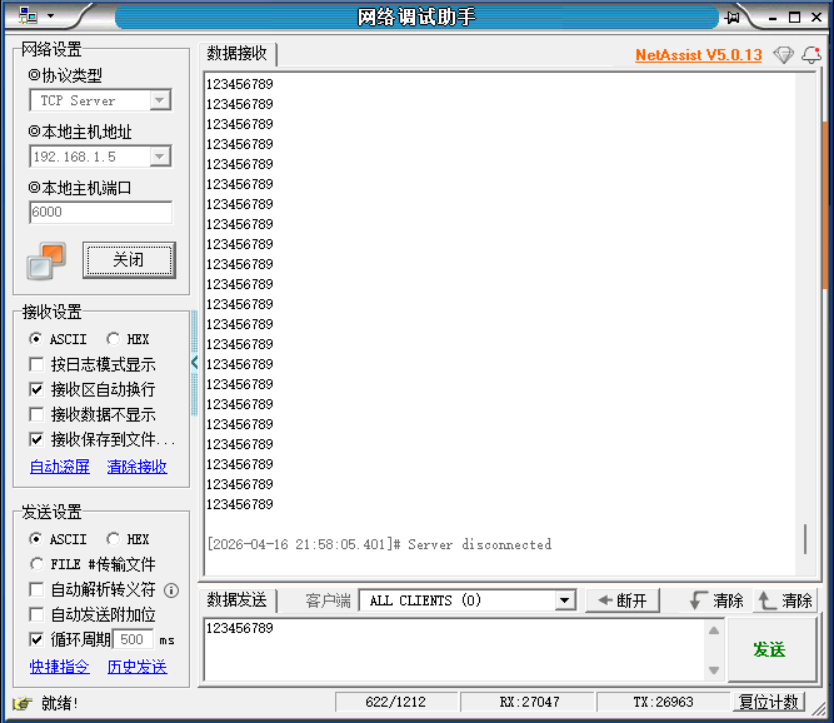
6.2 tcp服务端编程
tcp服务器编程与tcp客户端编程类似,只是增加了绑定端口,监听以及accept等待客户端访问TCP服务器,参考代码地址:https://github.com/espressif/esp-idf/blob/master/examples/protocols/sockets/tcp_transport_client/main/tcp_transport_client.chttps://github.com/espressif/esp-idf/blob/master/examples/protocols/sockets/tcp_transport_client/main/tcp_transport_client.c
实际测试代码:
#include <stdio.h>
#include "klptcpserver.h"
/*
 * SPDX-FileCopyrightText: 2022 Espressif Systems (Shanghai) CO LTD
 *
 * SPDX-License-Identifier: Unlicense OR CC0-1.0
 */
#include "sdkconfig.h"
#include <string.h>
#include <unistd.h>
#include <sys/socket.h>
#include <errno.h>
#include <netdb.h>            // struct addrinfo
#include <arpa/inet.h>
#include "esp_netif.h"
#include "esp_log.h"
#include "nvs_flash.h"
// #include "protocol_examples_common.h"
#include "esp_system.h"
#include "esp_wifi.h"
#include "esp_event.h"

#include "lwip/err.h"
#include "lwip/sockets.h"
#include "lwip/sys.h"
#include <lwip/netdb.h>
#include "freertos/FreeRTOS.h"
#include "freertos/task.h"
// #if defined(CONFIG_EXAMPLE_SOCKET_IP_INPUT_STDIN)
// #include "addr_from_stdin.h"
// #endif

// #if defined(CONFIG_EXAMPLE_IPV4)
#define HOST_IP_ADDR "192.168.1.5"//CONFIG_EXAMPLE_IPV4_ADDR
// #elif defined(CONFIG_EXAMPLE_SOCKET_IP_INPUT_STDIN)
// #define HOST_IP_ADDR ""
// #endif

// #define PORT 6000//CONFIG_EXAMPLE_PORT

static const char *TAG = "klptcpserver";
// static const char *payload = "Message from ESP32 ";

/* The examples use WiFi configuration that you can set via project configuration menu

   If you'd rather not, just change the below entries to strings with
   the config you want - ie #define EXAMPLE_WIFI_SSID "mywifissid"
*/
#define EXAMPLE_ESP_WIFI_SSID      "klp123456"
#define EXAMPLE_ESP_WIFI_PASS      "18902101360"
#define EXAMPLE_ESP_MAXIMUM_RETRY  5//重连接次数

//WPA3 加密 才需要选,普通家用路由器都是 WPA2,完全不用管,不用 WPA3 → 直接选 BOTH 就行
// 第一部分 WPA3:选兼容模式
#define ESP_WIFI_SAE_MODE WPA3_SAE_PWE_BOTH
#define EXAMPLE_H2E_IDENTIFIER ""
// 第二部分 认证阈值:选 WPA2 (家用最常用)
#define ESP_WIFI_SCAN_AUTH_MODE_THRESHOLD WIFI_AUTH_WPA_WPA2_PSK

/* FreeRTOS event group to signal when we are connected*/
static EventGroupHandle_t s_wifi_event_group;

/* The event group allows multiple bits for each event, but we only care about two events:
 * - we are connected to the AP with an IP
 * - we failed to connect after the maximum amount of retries */
#define WIFI_CONNECTED_BIT BIT0
#define WIFI_FAIL_BIT      BIT1


static int s_retry_num = 0;

static void event_handler(void* arg, esp_event_base_t event_base,
                                int32_t event_id, void* event_data)
{
    if (event_base == WIFI_EVENT && event_id == WIFI_EVENT_STA_START) {
        esp_wifi_connect();
    } else if (event_base == WIFI_EVENT && event_id == WIFI_EVENT_STA_DISCONNECTED) {
        if (s_retry_num < EXAMPLE_ESP_MAXIMUM_RETRY) {
            esp_wifi_connect();
            s_retry_num++;
            ESP_LOGI(TAG, "retry to connect to the AP");
        } else {
            xEventGroupSetBits(s_wifi_event_group, WIFI_FAIL_BIT);
        }
        ESP_LOGI(TAG,"connect to the AP fail");
    } else if (event_base == IP_EVENT && event_id == IP_EVENT_STA_GOT_IP) {
        ip_event_got_ip_t* event = (ip_event_got_ip_t*) event_data;
        ESP_LOGI(TAG, "got ip:" IPSTR, IP2STR(&event->ip_info.ip));
        s_retry_num = 0;
        xEventGroupSetBits(s_wifi_event_group, WIFI_CONNECTED_BIT);
    }
}

void wifi_init_sta(void)
{
    s_wifi_event_group = xEventGroupCreate();

    ESP_ERROR_CHECK(esp_netif_init());

    ESP_ERROR_CHECK(esp_event_loop_create_default());
    esp_netif_create_default_wifi_sta();

    wifi_init_config_t cfg = WIFI_INIT_CONFIG_DEFAULT();
    ESP_ERROR_CHECK(esp_wifi_init(&cfg));

    esp_event_handler_instance_t instance_any_id;
    esp_event_handler_instance_t instance_got_ip;
    ESP_ERROR_CHECK(esp_event_handler_instance_register(WIFI_EVENT,
                                                        ESP_EVENT_ANY_ID,
                                                        &event_handler,
                                                        NULL,
                                                        &instance_any_id));
    ESP_ERROR_CHECK(esp_event_handler_instance_register(IP_EVENT,
                                                        IP_EVENT_STA_GOT_IP,
                                                        &event_handler,
                                                        NULL,
                                                        &instance_got_ip));

    wifi_config_t wifi_config = {
        .sta = {
            .ssid = EXAMPLE_ESP_WIFI_SSID,
            .password = EXAMPLE_ESP_WIFI_PASS,
            /* Authmode threshold resets to WPA2 as default if password matches WPA2 standards (password len => 8).
             * If you want to connect the device to deprecated WEP/WPA networks, Please set the threshold value
             * to WIFI_AUTH_WEP/WIFI_AUTH_WPA_PSK and set the password with length and format matching to
             * WIFI_AUTH_WEP/WIFI_AUTH_WPA_PSK standards.
             */
            .threshold.authmode = ESP_WIFI_SCAN_AUTH_MODE_THRESHOLD,
            .sae_pwe_h2e = ESP_WIFI_SAE_MODE,
            .sae_h2e_identifier = EXAMPLE_H2E_IDENTIFIER,
#ifdef CONFIG_ESP_WIFI_WPA3_COMPATIBLE_SUPPORT
            .disable_wpa3_compatible_mode = 0,
#endif
        },
    };
    ESP_ERROR_CHECK(esp_wifi_set_mode(WIFI_MODE_STA) );
    ESP_ERROR_CHECK(esp_wifi_set_config(WIFI_IF_STA, &wifi_config) );
    ESP_ERROR_CHECK(esp_wifi_start() );

    ESP_LOGI(TAG, "wifi_init_sta finished.");

    /* Waiting until either the connection is established (WIFI_CONNECTED_BIT) or connection failed for the maximum
     * number of re-tries (WIFI_FAIL_BIT). The bits are set by event_handler() (see above) */
    EventBits_t bits = xEventGroupWaitBits(s_wifi_event_group,
            WIFI_CONNECTED_BIT | WIFI_FAIL_BIT,
            pdFALSE,
            pdFALSE,
            portMAX_DELAY);

    /* xEventGroupWaitBits() returns the bits before the call returned, hence we can test which event actually
     * happened. */
    if (bits & WIFI_CONNECTED_BIT) {
        ESP_LOGI(TAG, "connected to ap SSID:%s password:%s",
                 EXAMPLE_ESP_WIFI_SSID, EXAMPLE_ESP_WIFI_PASS);
    } else if (bits & WIFI_FAIL_BIT) {
        ESP_LOGI(TAG, "Failed to connect to SSID:%s, password:%s",
                 EXAMPLE_ESP_WIFI_SSID, EXAMPLE_ESP_WIFI_PASS);
    } else {
        ESP_LOGE(TAG, "UNEXPECTED EVENT");
    }
}

void wifi_connect(void)
{
    //Initialize NVS
    esp_err_t ret = nvs_flash_init();
    if (ret == ESP_ERR_NVS_NO_FREE_PAGES || ret == ESP_ERR_NVS_NEW_VERSION_FOUND) {
      ESP_ERROR_CHECK(nvs_flash_erase());
      ret = nvs_flash_init();
    }
    ESP_ERROR_CHECK(ret);

    if (CONFIG_LOG_MAXIMUM_LEVEL > CONFIG_LOG_DEFAULT_LEVEL) {
        /* If you only want to open more logs in the wifi module, you need to make the max level greater than the default level,
         * and call esp_log_level_set() before esp_wifi_init() to improve the log level of the wifi module. */
        esp_log_level_set("wifi", CONFIG_LOG_MAXIMUM_LEVEL);
    }

    ESP_LOGI(TAG, "ESP_WIFI_MODE_STA");
    wifi_init_sta();
}

#define PORT                        6000
#define KEEPALIVE_IDLE              5//空闲5s后发心跳包
#define KEEPALIVE_INTERVAL          5//间隔5秒发送
#define KEEPALIVE_COUNT             5//超过5次说明断开


static void do_retransmit(const int sock)
{
    int len;
    char rx_buffer[128];

    do {
        len = recv(sock, rx_buffer, sizeof(rx_buffer) - 1, 0);
        if (len < 0) {
            ESP_LOGE(TAG, "Error occurred during receiving: errno %d", errno);
        } else if (len == 0) {
            ESP_LOGW(TAG, "Connection closed");
        } else {
            rx_buffer[len] = 0; // Null-terminate whatever is received and treat it like a string
            ESP_LOGI(TAG, "Received %d bytes: %s", len, rx_buffer);

            // send() can return less bytes than supplied length.
            // Walk-around for robust implementation.
            int to_write = len;
            while (to_write > 0) {
                int written = send(sock, rx_buffer + (len - to_write), to_write, 0);
                if (written < 0) {
                    ESP_LOGE(TAG, "Error occurred during sending: errno %d", errno);
                    // Failed to retransmit, giving up
                    return;
                }
                to_write -= written;
            }
        }
    } while (len > 0);
}

static void tcp_server_task(void *pvParameters)
{
    char addr_str[128];
    int addr_family = (int)pvParameters;
    int ip_protocol = 0;
    int keepAlive = 1;
    int keepIdle = KEEPALIVE_IDLE;
    int keepInterval = KEEPALIVE_INTERVAL;
    int keepCount = KEEPALIVE_COUNT;
    struct sockaddr_storage dest_addr;

// #ifdef CONFIG_EXAMPLE_IPV4
    if (addr_family == AF_INET) {
        struct sockaddr_in *dest_addr_ip4 = (struct sockaddr_in *)&dest_addr;
        dest_addr_ip4->sin_addr.s_addr = htonl(INADDR_ANY);
        dest_addr_ip4->sin_family = AF_INET;
        dest_addr_ip4->sin_port = htons(PORT);
        ip_protocol = IPPROTO_IP;
    }
// #endif
// #ifdef CONFIG_EXAMPLE_IPV6
//     if (addr_family == AF_INET6) {
//         struct sockaddr_in6 *dest_addr_ip6 = (struct sockaddr_in6 *)&dest_addr;
//         bzero(&dest_addr_ip6->sin6_addr.un, sizeof(dest_addr_ip6->sin6_addr.un));
//         dest_addr_ip6->sin6_family = AF_INET6;
//         dest_addr_ip6->sin6_port = htons(PORT);
//         ip_protocol = IPPROTO_IPV6;
//     }
// #endif

    int listen_sock = socket(addr_family, SOCK_STREAM, ip_protocol);
    if (listen_sock < 0) {
        ESP_LOGE(TAG, "Unable to create socket: errno %d", errno);
        vTaskDelete(NULL);
        return;
    }
    int opt = 1;
    setsockopt(listen_sock, SOL_SOCKET, SO_REUSEADDR, &opt, sizeof(opt));
#if defined(CONFIG_EXAMPLE_IPV4) && defined(CONFIG_EXAMPLE_IPV6)
    // Note that by default IPV6 binds to both protocols, it is must be disabled
    // if both protocols used at the same time (used in CI)
    setsockopt(listen_sock, IPPROTO_IPV6, IPV6_V6ONLY, &opt, sizeof(opt));
#endif

    ESP_LOGI(TAG, "Socket created");

    int err = bind(listen_sock, (struct sockaddr *)&dest_addr, sizeof(dest_addr));
    if (err != 0) {
        ESP_LOGE(TAG, "Socket unable to bind: errno %d", errno);
        ESP_LOGE(TAG, "IPPROTO: %d", addr_family);
        goto CLEAN_UP;
    }
    ESP_LOGI(TAG, "Socket bound, port %d", PORT);

    err = listen(listen_sock, 1);
    if (err != 0) {
        ESP_LOGE(TAG, "Error occurred during listen: errno %d", errno);
        goto CLEAN_UP;
    }

    while (1) {

        ESP_LOGI(TAG, "Socket listening");

        struct sockaddr_storage source_addr; // Large enough for both IPv4 or IPv6
        socklen_t addr_len = sizeof(source_addr);
        int sock = accept(listen_sock, (struct sockaddr *)&source_addr, &addr_len);
        if (sock < 0) {
            ESP_LOGE(TAG, "Unable to accept connection: errno %d", errno);
            break;
        }

        // Set tcp keepalive option
        //这几行代码的作用:让 TCP 连接 自动发「心跳包」,检测对方是否还在线,防止假死连接(断网了但程序不知道)。
        setsockopt(sock, SOL_SOCKET, SO_KEEPALIVE, &keepAlive, sizeof(int));// 1. 总开关:开启 TCP 保活功能
        setsockopt(sock, IPPROTO_TCP, TCP_KEEPIDLE, &keepIdle, sizeof(int));// 2. 空闲多久后,开始发第一个心跳包(单位:秒)
        setsockopt(sock, IPPROTO_TCP, TCP_KEEPINTVL, &keepInterval, sizeof(int));// 3. 心跳包没回应,隔多久重发一次(单位:秒)
        setsockopt(sock, IPPROTO_TCP, TCP_KEEPCNT, &keepCount, sizeof(int));// 4. 重发多少次心跳都没回应,就判定连接断开
        // Convert ip address to string
// #ifdef CONFIG_EXAMPLE_IPV4
        if (source_addr.ss_family == PF_INET) {
            inet_ntoa_r(((struct sockaddr_in *)&source_addr)->sin_addr, addr_str, sizeof(addr_str) - 1);
        }
// #endif
// #ifdef CONFIG_EXAMPLE_IPV6
//         if (source_addr.ss_family == PF_INET6) {
//             inet6_ntoa_r(((struct sockaddr_in6 *)&source_addr)->sin6_addr, addr_str, sizeof(addr_str) - 1);
//         }
// #endif
        ESP_LOGI(TAG, "Socket accepted ip address: %s", addr_str);

        do_retransmit(sock);//返回消息
// 0 = SHUT_RD → 关闭「接收」通道
// 1 = SHUT_WR → 关闭「发送」通道
// 2 = SHUT_RDWR → 关闭收发双向
        shutdown(sock, 0);
        close(sock);
    }

CLEAN_UP:
    close(listen_sock);
    vTaskDelete(NULL);
}

void klp_tcp_server(void)
{
    wifi_connect();

// #ifdef CONFIG_EXAMPLE_IPV4
    xTaskCreate(tcp_server_task, "tcp_server", 4096, (void*)AF_INET, 5, NULL);
// #endif
// #ifdef CONFIG_EXAMPLE_IPV6
//     xTaskCreate(tcp_server_task, "tcp_server", 4096, (void*)AF_INET6, 5, NULL);
// #endif
    while (1)
    {
        /* code */
        vTaskDelay(1000);
    }

}
同理app_main函数调用:
#include <stdio.h>
#include "klpgpio.h"
#include "klpws2812.h"
#include "klpcamera.h"
#include "klpwifiscan.h"
#include "klpwifiapsta.h"
#include "klpudp.h"
#include "klptcpclient.h"
#include "klptcpserver.h"
void app_main(void)
{
    // ws2812();
    // klpgpio();
    // klpcamera();
    // klp_wifi_scan();
    // klp_wifi_ap_sta();
    // klpudp();
    // klp_tcp_client();
    klp_tcp_server();
}
使用网络调试助手测试
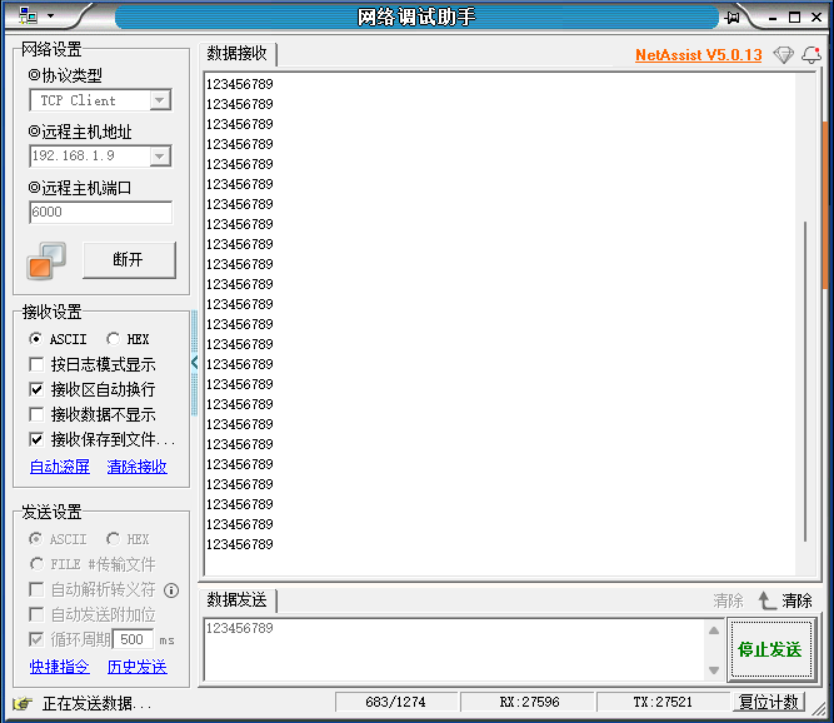
7.http编程
HTTP 是运行在 TCP 之上的应用层协议,以明文格式传输数据,遵循严格的客户端请求、服务端响应模式。例如我们可以使用网络调试助手向http网站服务器发送http请求,http网站服务器会响应http请求。
可以通过ip地址查询工具,查询网站地址,再向ip地址发送http请求,在线工具地址:
https://www.ip.cn/ip/www.baidu.com.htmlhttps://www.ip.cn/ip/www.baidu.com.html这里我向 www.baidu.com 这个地址发起get请求:
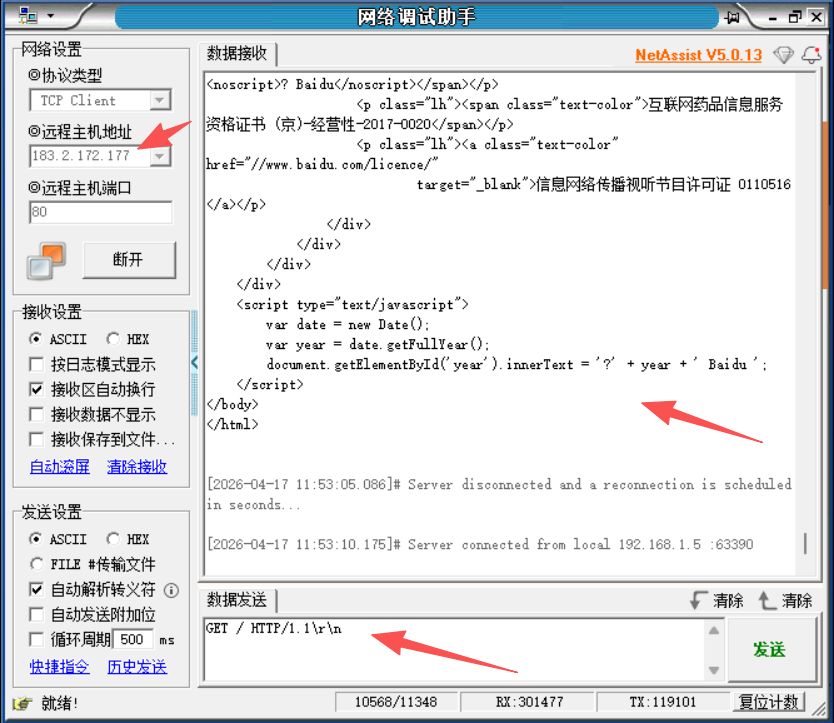
把以上响应保存为<test.html>文件即可使用浏览器,打开这个网页,如图所示:

7.1 http客户端编程
示例代码:
修改头文件 klphttpclient.h
#pragma once

#ifdef __cplusplus
extern "C" {
#endif
void klp_http_client(void);
#ifdef __cplusplus
}
#endif
修改c文件 klphttpclient.c
/*
 * SPDX-FileCopyrightText: 2022 Espressif Systems (Shanghai) CO LTD
 *
 * SPDX-License-Identifier: Unlicense OR CC0-1.0
 */
#include "sdkconfig.h"
#include <string.h>
#include <unistd.h>
#include <sys/socket.h>
#include <errno.h>
#include <netdb.h>            // struct addrinfo
#include <arpa/inet.h>
#include "esp_netif.h"
#include "esp_log.h"
#include "nvs_flash.h"
// #include "protocol_examples_common.h"
#include "esp_system.h"
#include "esp_wifi.h"
#include "esp_event.h"

#include "lwip/err.h"
#include "lwip/sockets.h"
#include "lwip/sys.h"
#include <lwip/netdb.h>

// #if defined(CONFIG_EXAMPLE_SOCKET_IP_INPUT_STDIN)
// #include "addr_from_stdin.h"
// #endif

// #if defined(CONFIG_EXAMPLE_IPV4)
#define HOST_IP_ADDR "192.168.1.5"//CONFIG_EXAMPLE_IPV4_ADDR
// #elif defined(CONFIG_EXAMPLE_SOCKET_IP_INPUT_STDIN)
// #define HOST_IP_ADDR ""
// #endif

#define PORT 6000//CONFIG_EXAMPLE_PORT

static const char *TAG = "klphttpclient";


/* The examples use WiFi configuration that you can set via project configuration menu

   If you'd rather not, just change the below entries to strings with
   the config you want - ie #define EXAMPLE_WIFI_SSID "mywifissid"
*/
#define EXAMPLE_ESP_WIFI_SSID      "klp123456"
#define EXAMPLE_ESP_WIFI_PASS      "18902101360"
#define EXAMPLE_ESP_MAXIMUM_RETRY  5//重连接次数

//WPA3 加密 才需要选,普通家用路由器都是 WPA2,完全不用管,不用 WPA3 → 直接选 BOTH 就行
// 第一部分 WPA3:选兼容模式
#define ESP_WIFI_SAE_MODE WPA3_SAE_PWE_BOTH
#define EXAMPLE_H2E_IDENTIFIER ""
// 第二部分 认证阈值:选 WPA2 (家用最常用)
#define ESP_WIFI_SCAN_AUTH_MODE_THRESHOLD WIFI_AUTH_WPA_WPA2_PSK

/* FreeRTOS event group to signal when we are connected*/
static EventGroupHandle_t s_wifi_event_group;

/* The event group allows multiple bits for each event, but we only care about two events:
 * - we are connected to the AP with an IP
 * - we failed to connect after the maximum amount of retries */
#define WIFI_CONNECTED_BIT BIT0
#define WIFI_FAIL_BIT      BIT1


static int s_retry_num = 0;

static void event_handler(void* arg, esp_event_base_t event_base,
                                int32_t event_id, void* event_data)
{
    if (event_base == WIFI_EVENT && event_id == WIFI_EVENT_STA_START) {
        esp_wifi_connect();
    } else if (event_base == WIFI_EVENT && event_id == WIFI_EVENT_STA_DISCONNECTED) {
        if (s_retry_num < EXAMPLE_ESP_MAXIMUM_RETRY) {
            esp_wifi_connect();
            s_retry_num++;
            ESP_LOGI(TAG, "retry to connect to the AP");
        } else {
            xEventGroupSetBits(s_wifi_event_group, WIFI_FAIL_BIT);
        }
        ESP_LOGI(TAG,"connect to the AP fail");
    } else if (event_base == IP_EVENT && event_id == IP_EVENT_STA_GOT_IP) {
        ip_event_got_ip_t* event = (ip_event_got_ip_t*) event_data;
        ESP_LOGI(TAG, "got ip:" IPSTR, IP2STR(&event->ip_info.ip));
        s_retry_num = 0;
        xEventGroupSetBits(s_wifi_event_group, WIFI_CONNECTED_BIT);
    }
}

void wifi_init_sta(void)
{
    s_wifi_event_group = xEventGroupCreate();

    ESP_ERROR_CHECK(esp_netif_init());

    ESP_ERROR_CHECK(esp_event_loop_create_default());
    esp_netif_create_default_wifi_sta();

    wifi_init_config_t cfg = WIFI_INIT_CONFIG_DEFAULT();
    ESP_ERROR_CHECK(esp_wifi_init(&cfg));

    esp_event_handler_instance_t instance_any_id;
    esp_event_handler_instance_t instance_got_ip;
    ESP_ERROR_CHECK(esp_event_handler_instance_register(WIFI_EVENT,
                                                        ESP_EVENT_ANY_ID,
                                                        &event_handler,
                                                        NULL,
                                                        &instance_any_id));
    ESP_ERROR_CHECK(esp_event_handler_instance_register(IP_EVENT,
                                                        IP_EVENT_STA_GOT_IP,
                                                        &event_handler,
                                                        NULL,
                                                        &instance_got_ip));

    wifi_config_t wifi_config = {
        .sta = {
            .ssid = EXAMPLE_ESP_WIFI_SSID,
            .password = EXAMPLE_ESP_WIFI_PASS,
            /* Authmode threshold resets to WPA2 as default if password matches WPA2 standards (password len => 8).
             * If you want to connect the device to deprecated WEP/WPA networks, Please set the threshold value
             * to WIFI_AUTH_WEP/WIFI_AUTH_WPA_PSK and set the password with length and format matching to
             * WIFI_AUTH_WEP/WIFI_AUTH_WPA_PSK standards.
             */
            .threshold.authmode = ESP_WIFI_SCAN_AUTH_MODE_THRESHOLD,
            .sae_pwe_h2e = ESP_WIFI_SAE_MODE,
            .sae_h2e_identifier = EXAMPLE_H2E_IDENTIFIER,
#ifdef CONFIG_ESP_WIFI_WPA3_COMPATIBLE_SUPPORT
            .disable_wpa3_compatible_mode = 0,
#endif
        },
    };
    ESP_ERROR_CHECK(esp_wifi_set_mode(WIFI_MODE_STA) );
    ESP_ERROR_CHECK(esp_wifi_set_config(WIFI_IF_STA, &wifi_config) );
    ESP_ERROR_CHECK(esp_wifi_start() );

    ESP_LOGI(TAG, "wifi_init_sta finished.");

    /* Waiting until either the connection is established (WIFI_CONNECTED_BIT) or connection failed for the maximum
     * number of re-tries (WIFI_FAIL_BIT). The bits are set by event_handler() (see above) */
    EventBits_t bits = xEventGroupWaitBits(s_wifi_event_group,
            WIFI_CONNECTED_BIT | WIFI_FAIL_BIT,
            pdFALSE,
            pdFALSE,
            portMAX_DELAY);

    /* xEventGroupWaitBits() returns the bits before the call returned, hence we can test which event actually
     * happened. */
    if (bits & WIFI_CONNECTED_BIT) {
        ESP_LOGI(TAG, "connected to ap SSID:%s password:%s",
                 EXAMPLE_ESP_WIFI_SSID, EXAMPLE_ESP_WIFI_PASS);
    } else if (bits & WIFI_FAIL_BIT) {
        ESP_LOGI(TAG, "Failed to connect to SSID:%s, password:%s",
                 EXAMPLE_ESP_WIFI_SSID, EXAMPLE_ESP_WIFI_PASS);
    } else {
        ESP_LOGE(TAG, "UNEXPECTED EVENT");
    }
}

void wifi_connect(void)
{
    //Initialize NVS
    esp_err_t ret = nvs_flash_init();
    if (ret == ESP_ERR_NVS_NO_FREE_PAGES || ret == ESP_ERR_NVS_NEW_VERSION_FOUND) {
      ESP_ERROR_CHECK(nvs_flash_erase());
      ret = nvs_flash_init();
    }
    ESP_ERROR_CHECK(ret);

    if (CONFIG_LOG_MAXIMUM_LEVEL > CONFIG_LOG_DEFAULT_LEVEL) {
        /* If you only want to open more logs in the wifi module, you need to make the max level greater than the default level,
         * and call esp_log_level_set() before esp_wifi_init() to improve the log level of the wifi module. */
        esp_log_level_set("wifi", CONFIG_LOG_MAXIMUM_LEVEL);
    }

    ESP_LOGI(TAG, "ESP_WIFI_MODE_STA");
    wifi_init_sta();
}


/* Constants that aren't configurable in menuconfig */
#define WEB_SERVER "www.baidu.com"
#define WEB_PORT "80"
#define WEB_PATH "/"

static const char *REQUEST = "GET " WEB_PATH " HTTP/1.0\r\n"
    "Host: "WEB_SERVER":"WEB_PORT"\r\n"
    "User-Agent: esp-idf/1.0 esp32\r\n"
    "\r\n";

static void http_get_task(void *pvParameters)
{
    const struct addrinfo hints = {
        .ai_family = AF_INET,
        .ai_socktype = SOCK_STREAM,
    };
    struct addrinfo *res;
    struct in_addr *addr;
    int s, r;
    char recv_buf[64];

    while(1) {
        //域名转ip地址
        int err = getaddrinfo(WEB_SERVER, WEB_PORT, &hints, &res);

        if(err != 0 || res == NULL) {
            ESP_LOGE(TAG, "DNS lookup failed err=%d res=%p", err, res);
            vTaskDelay(1000 / portTICK_PERIOD_MS);
            continue;
        }

        /* Code to print the resolved IP.

           Note: inet_ntoa is non-reentrant, look at ipaddr_ntoa_r for "real" code */
        addr = &((struct sockaddr_in *)res->ai_addr)->sin_addr;
        ESP_LOGI(TAG, "DNS lookup succeeded. IP=%s", inet_ntoa(*addr));

        s = socket(res->ai_family, res->ai_socktype, 0);
        if(s < 0) {
            ESP_LOGE(TAG, "... Failed to allocate socket.");
            freeaddrinfo(res);
            vTaskDelay(1000 / portTICK_PERIOD_MS);
            continue;
        }
        ESP_LOGI(TAG, "... allocated socket");

        if(connect(s, res->ai_addr, res->ai_addrlen) != 0) {
            ESP_LOGE(TAG, "... socket connect failed errno=%d", errno);
            close(s);
            freeaddrinfo(res);
            vTaskDelay(4000 / portTICK_PERIOD_MS);
            continue;
        }

        ESP_LOGI(TAG, "... connected");
        freeaddrinfo(res);

        if (write(s, REQUEST, strlen(REQUEST)) < 0) {
            ESP_LOGE(TAG, "... socket send failed");
            close(s);
            vTaskDelay(4000 / portTICK_PERIOD_MS);
            continue;
        }
        ESP_LOGI(TAG, "... socket send success");

        struct timeval receiving_timeout;
        receiving_timeout.tv_sec = 5;
        receiving_timeout.tv_usec = 0;
        if (setsockopt(s, SOL_SOCKET, SO_RCVTIMEO, &receiving_timeout,
                sizeof(receiving_timeout)) < 0) {
            ESP_LOGE(TAG, "... failed to set socket receiving timeout");
            close(s);
            vTaskDelay(4000 / portTICK_PERIOD_MS);
            continue;
        }
        ESP_LOGI(TAG, "... set socket receiving timeout success");

        /* Read HTTP response */
        do {
            bzero(recv_buf, sizeof(recv_buf));
            r = read(s, recv_buf, sizeof(recv_buf)-1);
            for(int i = 0; i < r; i++) {
                putchar(recv_buf[i]);
            }
        } while(r > 0);

        ESP_LOGI(TAG, "... done reading from socket. Last read return=%d errno=%d.", r, errno);
        close(s);
        for(int countdown = 10; countdown >= 0; countdown--) {
            ESP_LOGI(TAG, "%d... ", countdown);
            vTaskDelay(1000 / portTICK_PERIOD_MS);
        }
        ESP_LOGI(TAG, "Starting again!");
    }
}
void klp_http_client(void)
{
    wifi_connect();
    xTaskCreate(&http_get_task, "http_get_task", 4096, NULL, 5, NULL);
}
修改 CMakelists.txt 文件
idf_component_register(SRCS "klphttpclient.c"
                    INCLUDE_DIRS "include"
                    REQUIRES esp_wifi nvs_flash esp_event esp_netif lwip)
以上服务器会使用http get方法访问百度,以上测试的主要代码都是基于官方idf sdk修改。
7.2 http服务器编程
用esp32s3做服务器,web浏览器访问esp32s3的服务器,参考代码地址:
https://github.com/espressif/esp-idf/blob/release/v5.5/examples/protocols/http_server/advanced_tests/main/main.chttps://github.com/espressif/esp-idf/blob/release/v5.5/examples/protocols/http_server/advanced_tests/main/main.c http服务器相关的代码,idf库对服务器代码进行了封装,我们只需要调用相应接口就能创建http服务器,创建http服务流程:
(1)创建http服务器,并注册服务器响应接口
static esp_err_t klp_get_handler(httpd_req_t *req)
{

    httpd_resp_set_type(req, HTTPD_TYPE_TEXT);
    //ESP32_HTML_PAGE 这是html网页字符串
    httpd_resp_send(req, ESP32_HTML_PAGE, HTTPD_RESP_USE_STRLEN);
    return ESP_OK;

}
static const httpd_uri_t basic_handlers[] = {
    { .uri      = "/",
      .method   = HTTP_GET,
      .handler  = klp_get_handler,
      .user_ctx = NULL,
    },
};
static const int basic_handlers_no = sizeof(basic_handlers)/sizeof(httpd_uri_t);

static httpd_handle_t test_httpd_start(void)
{
    pre_start_mem = esp_get_free_heap_size();
    httpd_handle_t hd;
    httpd_config_t config = HTTPD_DEFAULT_CONFIG();
    /* Modify this setting to match the number of test URI handlers */
    config.max_uri_handlers  = basic_handlers_no;
    config.server_port = 80;

    /* This check should be a part of http_server */
    config.max_open_sockets = (CONFIG_LWIP_MAX_SOCKETS - 3);
    //创建http服务器,打印相关参数
    if (httpd_start(&hd, &config) == ESP_OK) {
        ESP_LOGI(TAG, "Started HTTP server on port: '%d'", config.server_port);
        ESP_LOGI(TAG, "Max URI handlers: '%d'", config.max_uri_handlers);
        ESP_LOGI(TAG, "Max Open Sessions: '%d'", config.max_open_sockets);
        ESP_LOGI(TAG, "Max Header Length: '%d'", CONFIG_HTTPD_MAX_REQ_HDR_LEN);
        ESP_LOGI(TAG, "Max URI Length: '%d'", CONFIG_HTTPD_MAX_URI_LEN);
        ESP_LOGI(TAG, "Max Stack Size: '%d'", config.stack_size);
        return hd;
    }
    return NULL;
}
(2)使用浏览器访问相应接口
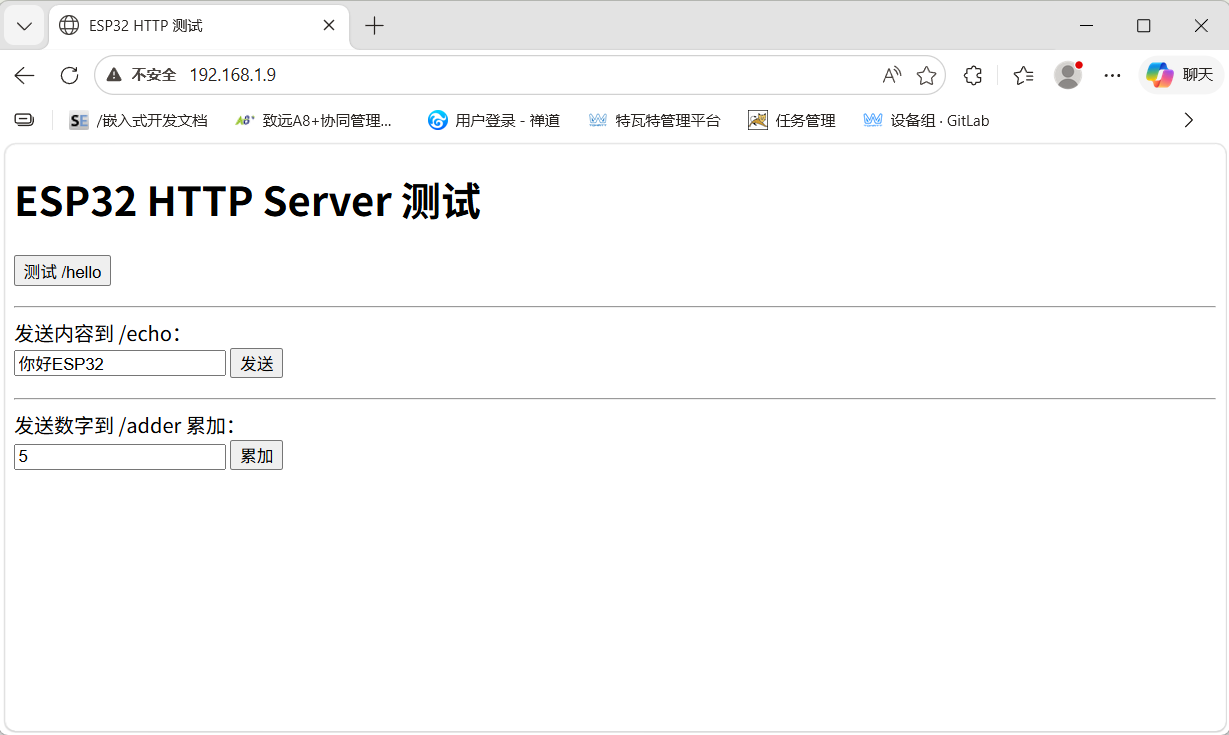
具体实现代码:
#include <stdio.h>
#include "klphttpserver.h"
#include <esp_http_server.h>
#include "sdkconfig.h"
#include <string.h>
#include <unistd.h>
#include <sys/socket.h>
#include <errno.h>
#include <netdb.h>            // struct addrinfo
#include <arpa/inet.h>
#include "esp_netif.h"
#include "esp_log.h"
#include "nvs_flash.h"
#include "esp_system.h"
#include "esp_wifi.h"
#include "esp_event.h"
// #include "lwip/err.h"
// #include "lwip/sockets.h"
// #include "lwip/sys.h"
// #include <lwip/netdb.h>
#include "freertos/FreeRTOS.h"
#include "freertos/task.h"
#include "esp_check.h"
// #if defined(CONFIG_EXAMPLE_SOCKET_IP_INPUT_STDIN)
// #include "addr_from_stdin.h"
// #endif

// #if defined(CONFIG_EXAMPLE_IPV4)
#define HOST_IP_ADDR "192.168.1.5"//CONFIG_EXAMPLE_IPV4_ADDR
// #elif defined(CONFIG_EXAMPLE_SOCKET_IP_INPUT_STDIN)
// #define HOST_IP_ADDR ""
// #endif

// #define PORT 6000//CONFIG_EXAMPLE_PORT

static const char *TAG = "klptcpserver";
// static const char *payload = "Message from ESP32 ";

/* The examples use WiFi configuration that you can set via project configuration menu

   If you'd rather not, just change the below entries to strings with
   the config you want - ie #define EXAMPLE_WIFI_SSID "mywifissid"
*/
#define EXAMPLE_ESP_WIFI_SSID      "klp123456"
#define EXAMPLE_ESP_WIFI_PASS      "18902101360"
#define EXAMPLE_ESP_MAXIMUM_RETRY  5//重连接次数

//WPA3 加密 才需要选,普通家用路由器都是 WPA2,完全不用管,不用 WPA3 → 直接选 BOTH 就行
// 第一部分 WPA3:选兼容模式
#define ESP_WIFI_SAE_MODE WPA3_SAE_PWE_BOTH
#define EXAMPLE_H2E_IDENTIFIER ""
// 第二部分 认证阈值:选 WPA2 (家用最常用)
#define ESP_WIFI_SCAN_AUTH_MODE_THRESHOLD WIFI_AUTH_WPA_WPA2_PSK

/* FreeRTOS event group to signal when we are connected*/
static EventGroupHandle_t s_wifi_event_group;

/* The event group allows multiple bits for each event, but we only care about two events:
 * - we are connected to the AP with an IP
 * - we failed to connect after the maximum amount of retries */
#define WIFI_CONNECTED_BIT BIT0
#define WIFI_FAIL_BIT      BIT1

static int s_retry_num = 0;

static void event_handler(void* arg, esp_event_base_t event_base,
                                int32_t event_id, void* event_data)
{
    if (event_base == WIFI_EVENT && event_id == WIFI_EVENT_STA_START) {
        esp_wifi_connect();
    } else if (event_base == WIFI_EVENT && event_id == WIFI_EVENT_STA_DISCONNECTED) {
        if (s_retry_num < EXAMPLE_ESP_MAXIMUM_RETRY) {
            esp_wifi_connect();
            s_retry_num++;
            ESP_LOGI(TAG, "retry to connect to the AP");
        } else {
            xEventGroupSetBits(s_wifi_event_group, WIFI_FAIL_BIT);
        }
        ESP_LOGI(TAG,"connect to the AP fail");
    } else if (event_base == IP_EVENT && event_id == IP_EVENT_STA_GOT_IP) {
        ip_event_got_ip_t* event = (ip_event_got_ip_t*) event_data;
        ESP_LOGI(TAG, "got ip:" IPSTR, IP2STR(&event->ip_info.ip));
        s_retry_num = 0;
        xEventGroupSetBits(s_wifi_event_group, WIFI_CONNECTED_BIT);
    }
}


static int pre_start_mem, post_stop_mem;

struct async_resp_arg {
    httpd_handle_t hd;
    int fd;
};

/********************* Basic Handlers Start *******************/

static esp_err_t hello_get_handler(httpd_req_t *req)
{
#define STR "Hello World html!"
    ESP_LOGI(TAG, "Free Stack for server task: '%d'", uxTaskGetStackHighWaterMark(NULL));
    httpd_resp_send(req, STR, HTTPD_RESP_USE_STRLEN);
    return ESP_OK;
#undef STR
}

/* This handler is intended to check what happens in case of empty values of headers.
 * Here `Header2` is an empty header and `Header1` and `Header3` will have `Value1`
 * and `Value3` in them. */
static esp_err_t test_header_get_handler(httpd_req_t *req)
{
    httpd_resp_set_type(req, HTTPD_TYPE_TEXT);
    int buf_len;
    char *buf;

    buf_len = httpd_req_get_hdr_value_len(req, "Header1");
    if (buf_len > 0) {
        buf = malloc(++buf_len);
        if (!buf) {
            ESP_LOGE(TAG, "Failed to allocate memory of %d bytes!", buf_len);
            httpd_resp_send_err(req, HTTPD_500_INTERNAL_SERVER_ERROR, "Memory allocation failed");
            return ESP_ERR_NO_MEM;
        }
        /* Copy null terminated value string into buffer */
        if (httpd_req_get_hdr_value_str(req, "Header1", buf, buf_len) == ESP_OK) {
            ESP_LOGI(TAG, "Header1 content: %s", buf);
            if (strcmp("Value1", buf) != 0) {
                httpd_resp_send_err(req, HTTPD_400_BAD_REQUEST, "Wrong value of Header1 received");
                free(buf);
                return ESP_ERR_INVALID_ARG;
            } else {
                ESP_LOGI(TAG, "Expected value and received value matched for Header1");
            }
        } else {
            ESP_LOGE(TAG, "Error in getting value of Header1");
            httpd_resp_send_err(req, HTTPD_400_BAD_REQUEST, "Error in getting value of Header1");
            free(buf);
            return ESP_FAIL;
        }
        free(buf);
    } else {
        ESP_LOGE(TAG, "Header1 not found");
        httpd_resp_send_err(req, HTTPD_400_BAD_REQUEST, "Header1 not found");
        return ESP_ERR_NOT_FOUND;
    }

    buf_len = httpd_req_get_hdr_value_len(req, "Header3");
    if (buf_len > 0) {
        buf = malloc(++buf_len);
        if (!buf) {
            ESP_LOGE(TAG, "Failed to allocate memory of %d bytes!", buf_len);
            httpd_resp_send_err(req, HTTPD_500_INTERNAL_SERVER_ERROR, "Memory allocation failed");
            return ESP_ERR_NO_MEM;
        }
        /* Copy null terminated value string into buffer */
        if (httpd_req_get_hdr_value_str(req, "Header3", buf, buf_len) == ESP_OK) {
            ESP_LOGI(TAG, "Header3 content: %s", buf);
            if (strcmp("Value3", buf) != 0) {
                httpd_resp_send_err(req, HTTPD_400_BAD_REQUEST, "Wrong value of Header3 received");
                free(buf);
                return ESP_ERR_INVALID_ARG;
            } else {
                ESP_LOGI(TAG, "Expected value and received value matched for Header3");
            }
        } else {
            ESP_LOGE(TAG, "Error in getting value of Header3");
            httpd_resp_send_err(req, HTTPD_400_BAD_REQUEST, "Error in getting value of Header3");
            free(buf);
            return ESP_FAIL;
        }
        free(buf);
    } else {
        ESP_LOGE(TAG, "Header3 not found");
        httpd_resp_send_err(req, HTTPD_400_BAD_REQUEST, "Header3 not found");
        return ESP_ERR_NOT_FOUND;
    }

    buf_len = httpd_req_get_hdr_value_len(req, "Header2");
    buf = malloc(++buf_len);
    if (!buf) {
        ESP_LOGE(TAG, "Failed to allocate memory of %d bytes!", buf_len);
        httpd_resp_send_err(req, HTTPD_500_INTERNAL_SERVER_ERROR, "Memory allocation failed");
        return ESP_ERR_NO_MEM;
    }
    if (httpd_req_get_hdr_value_str(req, "Header2", buf, buf_len) == ESP_OK) {
        ESP_LOGI(TAG, "Header2 content: %s", buf);
        httpd_resp_send(req, buf, HTTPD_RESP_USE_STRLEN);
    } else {
        ESP_LOGE(TAG, "Header2 not found");
        httpd_resp_send_err(req, HTTPD_400_BAD_REQUEST, "Header2 not found");
        return ESP_FAIL;
    }

    return ESP_OK;
}

static esp_err_t hello_type_get_handler(httpd_req_t *req)
{
#define STR "Hello World!"
    httpd_resp_set_type(req, HTTPD_TYPE_TEXT);
    httpd_resp_send(req, STR, HTTPD_RESP_USE_STRLEN);
    return ESP_OK;
#undef STR
}

static esp_err_t hello_status_get_handler(httpd_req_t *req)
{
#define STR "Hello World!"
    httpd_resp_set_status(req, HTTPD_500);
    httpd_resp_send(req, STR, HTTPD_RESP_USE_STRLEN);
    return ESP_OK;
#undef STR
}

static esp_err_t echo_post_handler(httpd_req_t *req)
{
    ESP_LOGI(TAG, "/echo handler read content length %d", req->content_len);

    char*  buf = malloc(req->content_len + 1);
    size_t off = 0;
    int    ret;

    if (!buf) {
        ESP_LOGE(TAG, "Failed to allocate memory of %d bytes!", req->content_len + 1);
        httpd_resp_send_500(req);
        return ESP_FAIL;
    }

    while (off < req->content_len) {
        /* Read data received in the request */
        ret = httpd_req_recv(req, buf + off, req->content_len - off);
        if (ret <= 0) {
            if (ret == HTTPD_SOCK_ERR_TIMEOUT) {
                httpd_resp_send_408(req);
            }
            free (buf);
            return ESP_FAIL;
        }
        off += ret;
        ESP_LOGI(TAG, "/echo handler recv length %d", ret);
    }
    buf[off] = '\0';

    if (req->content_len < 128) {
        ESP_LOGI(TAG, "/echo handler read %s", buf);
    }

    /* Search for Custom header field */
    char*  req_hdr = 0;
    size_t hdr_len = httpd_req_get_hdr_value_len(req, "Custom");
    if (hdr_len) {
        /* Read Custom header value */
        req_hdr = malloc(hdr_len + 1);
        if (!req_hdr) {
            ESP_LOGE(TAG, "Failed to allocate memory of %d bytes!", hdr_len + 1);
            httpd_resp_send_500(req);
            return ESP_FAIL;
        }
        httpd_req_get_hdr_value_str(req, "Custom", req_hdr, hdr_len + 1);

        /* Set as additional header for response packet */
        httpd_resp_set_hdr(req, "Custom", req_hdr);
    }
    httpd_resp_send(req, buf, req->content_len);
    free (req_hdr);
    free (buf);
    return ESP_OK;
}

static void adder_free_func(void *ctx)
{
    ESP_LOGI(TAG, "Custom Free Context function called");
    free(ctx);
}

/* Create a context, keep incrementing value in the context, by whatever was
 * received. Return the result
 */
static esp_err_t adder_post_handler(httpd_req_t *req)
{
    char buf[10];
    char outbuf[50];
    int  ret;

    /* Read data received in the request */
    ret = httpd_req_recv(req, buf, sizeof(buf));
    if (ret <= 0) {
        if (ret == HTTPD_SOCK_ERR_TIMEOUT) {
            httpd_resp_send_408(req);
        }
        return ESP_FAIL;
    }

    buf[ret] = '\0';
    int val = atoi(buf);
    ESP_LOGI(TAG, "/adder handler read %d", val);

    if (! req->sess_ctx) {
        ESP_LOGI(TAG, "/adder allocating new session");
        req->sess_ctx = malloc(sizeof(int));
        ESP_RETURN_ON_FALSE(req->sess_ctx, ESP_ERR_NO_MEM, TAG, "Failed to allocate sess_ctx");
        req->free_ctx = adder_free_func;
        *(int *)req->sess_ctx = 0;
    }
    int *adder = (int *)req->sess_ctx;
    *adder += val;

    snprintf(outbuf, sizeof(outbuf),"%d", *adder);
    httpd_resp_send(req, outbuf, HTTPD_RESP_USE_STRLEN);
    return ESP_OK;
}

static esp_err_t leftover_data_post_handler(httpd_req_t *req)
{
    /* Only echo the first 10 bytes of the request, leaving the rest of the
     * request data as is.
     */
    char buf[11];
    int  ret;

    /* Read data received in the request */
    ret = httpd_req_recv(req, buf, sizeof(buf) - 1);
    if (ret <= 0) {
        if (ret == HTTPD_SOCK_ERR_TIMEOUT) {
            httpd_resp_send_408(req);
        }
        return ESP_FAIL;
    }

    buf[ret] = '\0';
    ESP_LOGI(TAG, "leftover data handler read %s", buf);
    httpd_resp_send(req, buf, HTTPD_RESP_USE_STRLEN);
    return ESP_OK;
}

static void generate_async_resp(void *arg)
{
    char buf[250];
    struct async_resp_arg *resp_arg = (struct async_resp_arg *)arg;
    httpd_handle_t hd = resp_arg->hd;
    int fd = resp_arg->fd;
#define HTTPD_HDR_STR      "HTTP/1.1 200 OK\r\n"                   \
                           "Content-Type: text/html\r\n"           \
                           "Content-Length: %d\r\n"
#define STR "Hello Double World!"

    ESP_LOGI(TAG, "Executing queued work fd : %d", fd);

    snprintf(buf, sizeof(buf), HTTPD_HDR_STR,
         strlen(STR));
    httpd_socket_send(hd, fd, buf, strlen(buf), 0);
    /* Space for sending additional headers based on set_header */
    httpd_socket_send(hd, fd, "\r\n", strlen("\r\n"), 0);
    httpd_socket_send(hd, fd, STR, strlen(STR), 0);
#undef STR
    free(arg);
}

static esp_err_t async_get_handler(httpd_req_t *req)
{
#define STR "Hello World!"
    httpd_resp_send(req, STR, HTTPD_RESP_USE_STRLEN);
    /* Also register a HTTPD Work which sends the same data on the same
     * socket again
     */
    struct async_resp_arg *resp_arg = malloc(sizeof(struct async_resp_arg));
    ESP_RETURN_ON_FALSE(resp_arg, ESP_ERR_NO_MEM, TAG, "Failed to allocate resp_arg");
    resp_arg->hd = req->handle;
    resp_arg->fd = httpd_req_to_sockfd(req);
    if (resp_arg->fd < 0) {
        return ESP_FAIL;
    }

    ESP_LOGI(TAG, "Queuing work fd : %d", resp_arg->fd);
    httpd_queue_work(req->handle, generate_async_resp, resp_arg);
    return ESP_OK;
#undef STR
}

// 网页 HTML 代码(已转义,直接用于 ESP32 程序)
const char ESP32_HTML_PAGE[] = R"HTML(
<!DOCTYPE html>
<html>
<head>
    <meta charset="utf-8">
    <title>ESP32 HTTP 测试</title>
</head>
<body>
    <h1>ESP32 HTTP Server 测试</h1>

    <button onclick="getHello()">测试 /hello</button>
    <p id="hello_result"></p>
    <hr>

    发送内容到 /echo:<br>
    <input type="text" id="echo_msg" value="你好ESP32">
    <button onclick="postEcho()">发送</button>
    <p id="echo_result"></p>
    <hr>

    发送数字到 /adder 累加:<br>
    <input type="number" id="add_num" value="5">
    <button onclick="postAdder()">累加</button>
    <p id="adder_result"></p>

<script>
const ip = "192.168.1.9";
const port = "80";
const base = `http://${ip}:${port}`;

// 测试 /hello
async function getHello() {
    let res = await fetch(base + "/hello");//发送到hello接口
    let txt = await res.text();
    document.getElementById("hello_result").innerText = "返回:" + txt;
}

// 测试 /echo
async function postEcho() {
    let msg = document.getElementById("echo_msg").value;
    let res = await fetch(base + "/echo", {
        method: "POST",
        body: msg
    });
    let txt = await res.text();
    document.getElementById("echo_result").innerText = "返回:" + txt;
}

// 测试 /adder
async function postAdder() {
    let num = document.getElementById("add_num").value;
    let res = await fetch(base + "/adder", {
        method: "POST",
        body: num
    });
    let txt = await res.text();
    document.getElementById("adder_result").innerText = "当前总和:" + txt;
}
</script>

</body>
</html>
)HTML";

static esp_err_t klp_get_handler(httpd_req_t *req)
{

    httpd_resp_set_type(req, HTTPD_TYPE_TEXT);
    httpd_resp_send(req, ESP32_HTML_PAGE, HTTPD_RESP_USE_STRLEN);
    return ESP_OK;

}
static const httpd_uri_t basic_handlers[] = {
    { .uri      = "/",
      .method   = HTTP_GET,
      .handler  = klp_get_handler,
      .user_ctx = NULL,
    },
    { .uri      = "/hello/type_html",
      .method   = HTTP_GET,
      .handler  = hello_type_get_handler,
      .user_ctx = NULL,
    },
    { .uri      = "/test_header",
      .method   = HTTP_GET,
      .handler  = test_header_get_handler,
      .user_ctx = NULL,
    },
    { .uri      = "/hello",
      .method   = HTTP_GET,
      .handler  = hello_get_handler,
      .user_ctx = NULL,
    },
    { .uri      = "/hello/status_500",
      .method   = HTTP_GET,
      .handler  = hello_status_get_handler,
      .user_ctx = NULL,
    },
    { .uri      = "/echo",
      .method   = HTTP_POST,
      .handler  = echo_post_handler,
      .user_ctx = NULL,
    },
    { .uri      = "/echo",
      .method   = HTTP_PUT,
      .handler  = echo_post_handler,
      .user_ctx = NULL,
    },
    { .uri      = "/leftover_data",
      .method   = HTTP_POST,
      .handler  = leftover_data_post_handler,
      .user_ctx = NULL,
    },
    { .uri      = "/adder",
      .method   = HTTP_POST,
      .handler  = adder_post_handler,
      .user_ctx = NULL,
    },
    { .uri      = "/async_data",
      .method   = HTTP_GET,
      .handler  = async_get_handler,
      .user_ctx = NULL,
    }
};

static const int basic_handlers_no = sizeof(basic_handlers)/sizeof(httpd_uri_t);
//注册uri请求接口
static void register_basic_handlers(httpd_handle_t hd)
{
    int i;
    ESP_LOGI(TAG, "Registering basic handlers");
    ESP_LOGI(TAG, "No of handlers = %d", basic_handlers_no);
    for (i = 0; i < basic_handlers_no; i++) {
        if (httpd_register_uri_handler(hd, &basic_handlers[i]) != ESP_OK) {
            ESP_LOGW(TAG, "register uri failed for %d", i);
            return;
        }
    }
    ESP_LOGI(TAG, "Success");
}
//测试http服务器
static httpd_handle_t test_httpd_start(void)
{
    pre_start_mem = esp_get_free_heap_size();
    httpd_handle_t hd;
    httpd_config_t config = HTTPD_DEFAULT_CONFIG();
    /* Modify this setting to match the number of test URI handlers */
    config.max_uri_handlers  = basic_handlers_no;
    config.server_port = 80;

    /* This check should be a part of http_server */
    config.max_open_sockets = (CONFIG_LWIP_MAX_SOCKETS - 3);

    if (httpd_start(&hd, &config) == ESP_OK) {
        ESP_LOGI(TAG, "Started HTTP server on port: '%d'", config.server_port);
        ESP_LOGI(TAG, "Max URI handlers: '%d'", config.max_uri_handlers);
        ESP_LOGI(TAG, "Max Open Sessions: '%d'", config.max_open_sockets);
        ESP_LOGI(TAG, "Max Header Length: '%d'", CONFIG_HTTPD_MAX_REQ_HDR_LEN);
        ESP_LOGI(TAG, "Max URI Length: '%d'", CONFIG_HTTPD_MAX_URI_LEN);
        ESP_LOGI(TAG, "Max Stack Size: '%d'", config.stack_size);
        return hd;
    }
    return NULL;
}

static void test_httpd_stop(httpd_handle_t hd)
{
    httpd_stop(hd);
    post_stop_mem = esp_get_free_heap_size();
    ESP_LOGI(TAG, "HTTPD Stop: Current free memory: %d", post_stop_mem);
}

httpd_handle_t start_tests(void)
{
    httpd_handle_t hd = test_httpd_start();
    if (hd) {
        register_basic_handlers(hd);
    }
    return hd;
}

void stop_tests(httpd_handle_t hd)
{
    ESP_LOGI(TAG, "Stopping httpd");
    test_httpd_stop(hd);
}
static void disconnect_handler(void* arg, esp_event_base_t event_base,
                               int32_t event_id, void* event_data)
{
    httpd_handle_t* server = (httpd_handle_t*) arg;
    if (*server) {
        ESP_LOGI(TAG, "Stopping webserver");
        stop_tests(*server);
        *server = NULL;
    }
}

static void connect_handler(void* arg, esp_event_base_t event_base,
                            int32_t event_id, void* event_data)
{
    httpd_handle_t* server = (httpd_handle_t*) arg;
    if (*server == NULL) {
        ESP_LOGI(TAG, "Starting webserver");
        *server = start_tests();
    }
}

void wifi_init_sta(void)
{
    static httpd_handle_t server = NULL;
    s_wifi_event_group = xEventGroupCreate();

    ESP_ERROR_CHECK(esp_netif_init());

    ESP_ERROR_CHECK(esp_event_loop_create_default());
    esp_netif_create_default_wifi_sta();

    wifi_init_config_t cfg = WIFI_INIT_CONFIG_DEFAULT();
    ESP_ERROR_CHECK(esp_wifi_init(&cfg));

    esp_event_handler_instance_t instance_any_id;
    esp_event_handler_instance_t instance_got_ip;
    ESP_ERROR_CHECK(esp_event_handler_instance_register(WIFI_EVENT,
                                                        ESP_EVENT_ANY_ID,
                                                        &event_handler,
                                                        NULL,
                                                        &instance_any_id));
    ESP_ERROR_CHECK(esp_event_handler_instance_register(IP_EVENT,
                                                        IP_EVENT_STA_GOT_IP,
                                                        &event_handler,
                                                        NULL,
                                                        &instance_got_ip));

    //注册其他事件监听
    ESP_ERROR_CHECK(esp_event_handler_register(IP_EVENT, IP_EVENT_STA_GOT_IP, &connect_handler, &server));
    ESP_ERROR_CHECK(esp_event_handler_register(WIFI_EVENT, WIFI_EVENT_STA_DISCONNECTED, &disconnect_handler, &server));

    wifi_config_t wifi_config = {
        .sta = {
            .ssid = EXAMPLE_ESP_WIFI_SSID,
            .password = EXAMPLE_ESP_WIFI_PASS,
            /* Authmode threshold resets to WPA2 as default if password matches WPA2 standards (password len => 8).
             * If you want to connect the device to deprecated WEP/WPA networks, Please set the threshold value
             * to WIFI_AUTH_WEP/WIFI_AUTH_WPA_PSK and set the password with length and format matching to
             * WIFI_AUTH_WEP/WIFI_AUTH_WPA_PSK standards.
             */
            .threshold.authmode = ESP_WIFI_SCAN_AUTH_MODE_THRESHOLD,
            .sae_pwe_h2e = ESP_WIFI_SAE_MODE,
            .sae_h2e_identifier = EXAMPLE_H2E_IDENTIFIER,
#ifdef CONFIG_ESP_WIFI_WPA3_COMPATIBLE_SUPPORT
            .disable_wpa3_compatible_mode = 0,
#endif
        },
    };
    ESP_ERROR_CHECK(esp_wifi_set_mode(WIFI_MODE_STA) );
    ESP_ERROR_CHECK(esp_wifi_set_config(WIFI_IF_STA, &wifi_config) );
    ESP_ERROR_CHECK(esp_wifi_start() );

    ESP_LOGI(TAG, "wifi_init_sta finished.");

    /* Waiting until either the connection is established (WIFI_CONNECTED_BIT) or connection failed for the maximum
     * number of re-tries (WIFI_FAIL_BIT). The bits are set by event_handler() (see above) */
    EventBits_t bits = xEventGroupWaitBits(s_wifi_event_group,
            WIFI_CONNECTED_BIT | WIFI_FAIL_BIT,
            pdFALSE,
            pdFALSE,
            portMAX_DELAY);

    /* xEventGroupWaitBits() returns the bits before the call returned, hence we can test which event actually
     * happened. */
    if (bits & WIFI_CONNECTED_BIT) {
        ESP_LOGI(TAG, "connected to ap SSID:%s password:%s",
                 EXAMPLE_ESP_WIFI_SSID, EXAMPLE_ESP_WIFI_PASS);
    } else if (bits & WIFI_FAIL_BIT) {
        ESP_LOGI(TAG, "Failed to connect to SSID:%s, password:%s",
                 EXAMPLE_ESP_WIFI_SSID, EXAMPLE_ESP_WIFI_PASS);
    } else {
        ESP_LOGE(TAG, "UNEXPECTED EVENT");
    }
}


void wifi_connect(void)
{
    //Initialize NVS
    esp_err_t ret = nvs_flash_init();
    if (ret == ESP_ERR_NVS_NO_FREE_PAGES || ret == ESP_ERR_NVS_NEW_VERSION_FOUND) {
      ESP_ERROR_CHECK(nvs_flash_erase());
      ret = nvs_flash_init();
    }
    ESP_ERROR_CHECK(ret);

    if (CONFIG_LOG_MAXIMUM_LEVEL > CONFIG_LOG_DEFAULT_LEVEL) {
        /* If you only want to open more logs in the wifi module, you need to make the max level greater than the default level,
         * and call esp_log_level_set() before esp_wifi_init() to improve the log level of the wifi module. */
        esp_log_level_set("wifi", CONFIG_LOG_MAXIMUM_LEVEL);
    }

    ESP_LOGI(TAG, "ESP_WIFI_MODE_STA");
    wifi_init_sta();
}


void klp_http_server(void)
{

    wifi_connect();//wifi连接
    /* Start the server for the first time */
    // server = start_tests();
    while (1)
    {
        /* code */
        vTaskDelay(1000 / portTICK_PERIOD_MS);
    }

}
重要接口以及功能说明:
| 函数接口 | 核心作用 | 你的代码中用来做什么 | 重点标记 |
|---|---|---|---|
httpd_start | 启动 HTTP 服务器 | 创建并启动 80 端口 Web 服务 | ✅ 开服务器 |
httpd_register_uri_handler | 注册 URI 接口 | 把 / /hello /echo 等路径绑定处理函数 | ✅ 注册接口 |
httpd_req_recv | 接收客户端请求数据 | 读取 POST 上来的文本、数字等内容 | ✅ 收客户端数据 |
httpd_resp_send | 发送响应数据给客户端 | 返回网页、文本、回显内容、累加结果 | ✅ 给客户端回数据 |
httpd_stop | 关闭并释放 HTTP 服务器 | WiFi 断开时停止服务 | 配套函数 |
httpd_resp_set_type | 设置返回内容类型(HTML / 文本) | 告诉浏览器返回的是网页 | 配套函数 |
httpd_req_get_hdr_value_str | 获取 HTTP 请求头 | 解析客户端带的 Header 信息 | 配套函数 |
8.https编程
https跟http不同的地方是http使用了加密传输,http只需要建立tcp连接,再发送明文 GET,POST,DELETE,PUT等方法,https增加了加解密流程,具体流程解释:
步骤 1:TCP 三次握手(建立可靠传输通道)
HTTPS 基于 TCP,所以先完成 TCP 三次握手:
- 客户端发送
SYN包(随机序列号 x) - 服务器回复
SYN+ACK包(确认 x+1,随机序列号 y) - 客户端回复
ACK包(确认 y+1)
耗时:1RTT(往返时间)
步骤 2:TLS 握手(核心:证书验证 + 密钥协商)
这是 HTTPS 最复杂的阶段,主流使用 TLS 1.3(1RTT),TLS 1.2(2RTT)已逐步淘汰。下面分别说明:
🔹 TLS 1.3 握手流程(当前 90% 以上网站支持)
仅需 1RTT 完成所有协商,大幅提升性能:
-
客户端发送 Client Hello
- 支持的最高 TLS 版本(如 TLS 1.3)
- 支持的加密套件(仅 AEAD 算法,如 AES-GCM、ChaCha20-Poly1305)
- 客户端随机数 Client Random(用于生成会话密钥)
- 密钥交换参数(如 ECDHE 的公钥,提前发送)
- 支持的扩展(如 ALPN 协商 HTTP/2/3)
-
服务器一次性回复所有消息
- Server Hello:确认 TLS 版本、选定加密套件、生成服务器随机数 Server Random
- 证书链:服务器证书 + 所有中间 CA 证书(不含根证书)
- 证书验证:服务器用自己的私钥对握手消息签名,证明持有对应私钥
- 密钥交换参数:服务器的 ECDHE 公钥
- Finished:用预生成的会话密钥加密的验证消息
-
客户端验证证书并生成会话密钥
- 验证证书链合法性(见下文 "证书验证完整过程")
- 用客户端私钥 + 服务器 ECDHE 公钥,计算出预主密钥 Pre-Master Secret
- 用
Client Random + Server Random + Pre-Master Secret,通过 HKDF 算法生成会话密钥(对称密钥) - 解密服务器的
Finished消息,验证握手完整性
-
客户端发送 Finished
- 用会话密钥加密的验证消息
- 服务器收到后解密验证,握手完成
关键改进:TLS 1.3 删除了不安全的 RSA 密钥交换,仅支持 ECDHE,默认提供前向保密;合并了多个消息,减少了 1RTT。
🔹 TLS 1.2 握手流程(兼容旧设备)
需要 2RTT,流程更繁琐:
- Client Hello(同 TLS 1.3,但支持更多加密套件)
- Server Hello(确认版本、加密套件、Server Random)
- 服务器发送证书链
- 服务器发送 Server Key Exchange(仅 ECDHE 需要,发送公钥参数)
- 服务器发送 Server Hello Done
- 客户端验证证书
- 客户端发送 Client Key Exchange(RSA:用服务器公钥加密预主密钥;ECDHE:发送客户端公钥)
- 双方生成会话密钥
- 客户端发送 Change Cipher Spec(通知后续用对称加密)
- 客户端发送 Finished
- 服务器发送 Change Cipher Spec
- 服务器发送 Finished
步骤 3:加密 HTTP 请求与响应传输
握手完成后,所有 HTTP 数据都用会话密钥(对称加密)加密传输:
- 客户端将 HTTP 请求头 + 请求体,用会话密钥加密(如 AES-GCM),同时生成 MAC(消息认证码)保证完整性
- 加密后的数据通过 TCP 发送给服务器
- 服务器用相同的会话密钥解密数据,验证 MAC,处理 HTTP 请求
- 服务器将 HTTP 响应加密,发送给客户端
- 客户端解密响应,渲染页面
为什么不用非对称加密直接传数据?非对称加密速度比对称加密慢100-1000 倍,只适合加密小数据(如预主密钥)。
步骤 4:TCP 四次挥手(断开连接)
数据传输完成后,正常断开 TCP 连接:
- 客户端发送
FIN包 - 服务器回复
ACK包 - 服务器发送
FIN包 - 客户端回复
ACK包
三、核心细节详解
🔹 证书验证的完整过程(最关键的安全环节)
客户端收到服务器的证书链后,会从下往上逐级验证,直到根证书:
- 域名匹配检查:证书中的
Subject Alternative Name(SAN)字段必须包含当前访问的域名(如*.baidu.com) - 有效期检查:证书必须在有效期内,未过期也未提前生效
- 吊销状态检查:通过 CRL(证书吊销列表)或 OCSP(在线证书状态协议)检查证书是否被 CA 吊销
- 签名验证(核心):
- 用上级 CA 的公钥验证当前证书的数字签名
- 如果验证通过,说明该证书确实由上级 CA 签发
- 重复此过程,直到验证到根证书
- 根证书信任检查:如果根证书存在于操作系统 / 浏览器的受信任根证书存储区,则整个证书链合法;否则浏览器会弹出 "不安全连接" 警告
根证书为什么可信?根证书由全球公认的根 CA 机构自签名生成,预装在所有主流操作系统(Windows、macOS、Linux)和浏览器(Chrome、Firefox、Safari)中。用户信任操作系统 / 浏览器,也就信任了它们预装的根证书。
🔹 密钥协商的两种方式
| 方式 | 原理 | 优点 | 缺点 | 现状 |
|---|---|---|---|---|
| RSA | 客户端生成预主密钥,用服务器公钥加密发送给服务器 | 实现简单 | 不支持前向保密;服务器私钥泄露会导致所有历史通信被解密 | 已被 TLS 1.3 淘汰 |
| ECDHE | 双方交换椭圆曲线公钥参数,各自独立计算出相同的预主密钥 | 支持前向保密;每次会话生成不同的密钥对 | 实现稍复杂 | TLS 1.3 唯一支持的密钥交换方式 |
前向保密(Forward Secrecy):即使服务器的长期私钥泄露,攻击者也无法解密之前的加密通信。因为每次会话的密钥都是临时生成的,且不会被存储。
🔹 数据完整性与防篡改
HTTPS 不仅加密数据,还通过 ** 消息认证码(MAC)** 保证数据完整性:
- 发送方:用会话密钥对加密后的数据生成 MAC,随数据一起发送
- 接收方:用相同的会话密钥重新计算 MAC,与收到的 MAC 对比
- 如果不一致,说明数据在传输过程中被篡改,直接丢弃
四、常见问题解答
-
自签名证书为什么不安全?自签名证书没有被权威 CA 签发,浏览器不信任它的根证书,无法验证服务器身份,容易遭受中间人攻击。
-
HTTPS 如何防止中间人攻击?中间人可以拦截并转发通信,但无法伪造合法的数字证书(因为没有 CA 的私钥)。客户端验证证书失败后会弹出警告,阻止用户继续访问。
-
为什么有些网站显示 "证书不安全"?常见原因:证书过期、域名不匹配、证书被吊销、使用自签名证书、证书链不完整。
-
根证书可以自己添加吗?可以,但非常危险。如果添加了不可信的根证书,攻击者可以用该根证书签发伪造的证书,实施中间人攻击,窃取所有 HTTPS 通信数据。
简化流程
一、整体流程总览
HTTPS = HTTP + TLS(安全层)访问一个 HTTPS 网站,整体分为 4 大步:
- 建立 TCP 连接(三次握手)
- TLS 握手(核心:身份认证 + 协商加密密钥)
- 加密传输 HTTP 数据(对称加密)
- 断开连接(TCP 四次挥手)
下面逐步骤详细讲。
二、步骤 1:建立 TCP 连接
HTTPS 基于 TCP,所以先建可靠通道:
- 客户端 → 服务器:SYN
- 服务器 → 客户端:SYN+ACK
- 客户端 → 服务器:ACK
TCP 通道建立完成,接下来才开始 TLS 安全握手。
三、步骤 2:TLS 握手(最核心,含证书、加解密)
2.1 客户端发起:Client Hello
客户端告诉服务器:
- 我支持的 TLS 版本(TLS 1.2 / 1.3)
- 支持的加密算法套件(AES、ChaCha20 等)
- 生成一个客户端随机数 Client Random
- 支持的扩展(如 ALPN 选 HTTP/2)
2.2 服务器回复:Server Hello + 证书链
服务器回应:
- 确定 TLS 版本、加密算法
- 生成服务器随机数 Server Random
- 发送证书链(关键)证书链一般是:
服务器证书 → 中间 CA 证书 →(根证书一般不发,客户端本地有)
2.3 客户端验证证书(根证书在这里起作用)
这一步决定 HTTPS 是否 “安全”。客户端拿到证书链后,做从上到下信任校验:
-
检查域名证书里的域名必须和你访问的域名一致,否则直接报错。
-
检查有效期没过期、没被吊销。
-
验证签名(核心)
- 用签发它的 CA 公钥解开服务器证书的签名
- 再用上一级 CA 的公钥验证中间 CA
- 一直往上,直到根证书
-
根证书信任校验根证书是操作系统 / 浏览器自带的受信任根证书。只要根证书在本地信任列表里,整个证书链就可信。
一句话:你信操作系统 → 操作系统信根 CA → 根 CA 信中间 CA → 中间 CA 信服务器证书所以你信任这个服务器。
如果验证失败:浏览器红锁、提示不安全、拒绝连接。
2.4 密钥协商(非对称加密只干这件事)
验证通过后,双方协商一个对称会话密钥。
主流两种方式:
-
RSA(老方式,TLS1.2)
- 客户端用服务器公钥加密一个「预主密钥」
- 发给服务器
- 服务器用自己的私钥解密得到预主密钥
-
ECDHE(TLS1.3 强制,更安全)
- 双方各生成临时公私钥
- 交换公钥,各自算出相同的预主密钥
- 支持前向保密:就算服务器私钥泄露,历史数据也解不开
2.5 生成最终会话密钥(对称密钥)
双方用三样东西计算:
- 客户端随机数
- 服务器随机数
- 预主密钥
最终得到一组对称加密密钥:
- 客户端→服务器加密密钥
- 服务器→客户端加密密钥
- 消息校验密钥(防篡改)
2.6 握手结束确认
双方互相发 Finished 消息,用会话密钥加密验证。验证通过,TLS 握手完成。
四、步骤 3:加密传输 HTTP 数据
握手完成后,所有 HTTP 内容都用对称加密传输:
- 客户端把 HTTP 请求(头 + 体)用会话密钥加密
- 发给服务器
- 服务器用相同密钥解密,处理请求
- 服务器加密 HTTP 响应,发回客户端
- 客户端解密,渲染页面
为什么用对称加密?
- 非对称加密慢,只适合加密小数据(密钥)
- 对称加密快,适合传输大量 HTTP 数据
五、步骤 4:断开连接
数据传输完毕:
- 客户端发 FIN
- 服务器 ACK
- 服务器发 FIN
- 客户端 ACK
TCP 断开,会话结束。
https加密的精髓就是 私钥加密公钥能破解,公钥加密私钥能破解。IDF SDK把电脑 / 浏览器里预装的所有主流根证书(DigiCert、Let's Encrypt 等),打包进了 ESP32 固件,直接调用即,不用自己导出证书!
8.1 网络时间同步 sntp
在进行https编程之前需要校准系统时间,esp32s3的idf框架有时间校准例子,参考例子修改,参考代码地址:
https://github.com/espressif/esp-idf/blob/484e56869c6f6b8f777cc76d73fc02390587a7c5/examples/protocols/https_request/main/time_sync.chttps://github.com/espressif/esp-idf/blob/484e56869c6f6b8f777cc76d73fc02390587a7c5/examples/protocols/https_request/main/time_sync.c时间校准组件头文件:
#pragma once

#ifdef __cplusplus
extern "C" {
#endif
void klp_sntp(void);
#ifdef __cplusplus
}
#endif
时间校准组件C文件:
/*
 * SPDX-FileCopyrightText: 2022 Espressif Systems (Shanghai) CO LTD
 *
 * SPDX-License-Identifier: Unlicense OR CC0-1.0
 */
#include "sdkconfig.h"
#include <string.h>
#include <unistd.h>
#include <sys/socket.h>
#include <errno.h>
#include <netdb.h>            // struct addrinfo
#include <arpa/inet.h>
#include "esp_netif.h"
#include "esp_log.h"
#include "nvs_flash.h"
// #include "protocol_examples_common.h"
#include "esp_system.h"
#include "esp_wifi.h"
#include "esp_event.h"

#include "lwip/err.h"
#include "lwip/sockets.h"
#include "lwip/sys.h"
#include <lwip/netdb.h>
#include <esp_sntp.h>
// #include "time_sync.h"
#include "esp_netif_sntp.h"
#include "klpsntp.h"
// #if defined(CONFIG_EXAMPLE_SOCKET_IP_INPUT_STDIN)
// #include "addr_from_stdin.h"
// #endif

// #if defined(CONFIG_EXAMPLE_IPV4)
#define HOST_IP_ADDR "192.168.1.5"//CONFIG_EXAMPLE_IPV4_ADDR
// #elif defined(CONFIG_EXAMPLE_SOCKET_IP_INPUT_STDIN)
// #define HOST_IP_ADDR ""
// #endif

#define PORT 6000//CONFIG_EXAMPLE_PORT

static const char *TAG = "klpsntpclient";


/* The examples use WiFi configuration that you can set via project configuration menu

   If you'd rather not, just change the below entries to strings with
   the config you want - ie #define EXAMPLE_WIFI_SSID "mywifissid"
*/
#define EXAMPLE_ESP_WIFI_SSID      "klp123456"
#define EXAMPLE_ESP_WIFI_PASS      "18902101360"
#define EXAMPLE_ESP_MAXIMUM_RETRY  5//重连接次数

//WPA3 加密 才需要选,普通家用路由器都是 WPA2,完全不用管,不用 WPA3 → 直接选 BOTH 就行
// 第一部分 WPA3:选兼容模式
#define ESP_WIFI_SAE_MODE WPA3_SAE_PWE_BOTH
#define EXAMPLE_H2E_IDENTIFIER ""
// 第二部分 认证阈值:选 WPA2 (家用最常用)
#define ESP_WIFI_SCAN_AUTH_MODE_THRESHOLD WIFI_AUTH_WPA_WPA2_PSK

/* FreeRTOS event group to signal when we are connected*/
static EventGroupHandle_t s_wifi_event_group;

/* The event group allows multiple bits for each event, but we only care about two events:
 * - we are connected to the AP with an IP
 * - we failed to connect after the maximum amount of retries */
#define WIFI_CONNECTED_BIT BIT0
#define WIFI_FAIL_BIT      BIT1


static int s_retry_num = 0;

static void event_handler(void* arg, esp_event_base_t event_base,
                                int32_t event_id, void* event_data)
{
    if (event_base == WIFI_EVENT && event_id == WIFI_EVENT_STA_START) {
        esp_wifi_connect();
    } else if (event_base == WIFI_EVENT && event_id == WIFI_EVENT_STA_DISCONNECTED) {
        if (s_retry_num < EXAMPLE_ESP_MAXIMUM_RETRY) {
            esp_wifi_connect();
            s_retry_num++;
            ESP_LOGI(TAG, "retry to connect to the AP");
        } else {
            xEventGroupSetBits(s_wifi_event_group, WIFI_FAIL_BIT);
        }
        ESP_LOGI(TAG,"connect to the AP fail");
    } else if (event_base == IP_EVENT && event_id == IP_EVENT_STA_GOT_IP) {
        ip_event_got_ip_t* event = (ip_event_got_ip_t*) event_data;
        ESP_LOGI(TAG, "got ip:" IPSTR, IP2STR(&event->ip_info.ip));
        s_retry_num = 0;
        xEventGroupSetBits(s_wifi_event_group, WIFI_CONNECTED_BIT);
    }
}

void wifi_init_sta(void)
{
    s_wifi_event_group = xEventGroupCreate();

    ESP_ERROR_CHECK(esp_netif_init());

    ESP_ERROR_CHECK(esp_event_loop_create_default());
    esp_netif_create_default_wifi_sta();

    wifi_init_config_t cfg = WIFI_INIT_CONFIG_DEFAULT();
    ESP_ERROR_CHECK(esp_wifi_init(&cfg));

    esp_event_handler_instance_t instance_any_id;
    esp_event_handler_instance_t instance_got_ip;
    ESP_ERROR_CHECK(esp_event_handler_instance_register(WIFI_EVENT,
                                                        ESP_EVENT_ANY_ID,
                                                        &event_handler,
                                                        NULL,
                                                        &instance_any_id));
    ESP_ERROR_CHECK(esp_event_handler_instance_register(IP_EVENT,
                                                        IP_EVENT_STA_GOT_IP,
                                                        &event_handler,
                                                        NULL,
                                                        &instance_got_ip));

    wifi_config_t wifi_config = {
        .sta = {
            .ssid = EXAMPLE_ESP_WIFI_SSID,
            .password = EXAMPLE_ESP_WIFI_PASS,
            /* Authmode threshold resets to WPA2 as default if password matches WPA2 standards (password len => 8).
             * If you want to connect the device to deprecated WEP/WPA networks, Please set the threshold value
             * to WIFI_AUTH_WEP/WIFI_AUTH_WPA_PSK and set the password with length and format matching to
             * WIFI_AUTH_WEP/WIFI_AUTH_WPA_PSK standards.
             */
            .threshold.authmode = ESP_WIFI_SCAN_AUTH_MODE_THRESHOLD,
            .sae_pwe_h2e = ESP_WIFI_SAE_MODE,
            .sae_h2e_identifier = EXAMPLE_H2E_IDENTIFIER,
#ifdef CONFIG_ESP_WIFI_WPA3_COMPATIBLE_SUPPORT
            .disable_wpa3_compatible_mode = 0,
#endif
        },
    };
    ESP_ERROR_CHECK(esp_wifi_set_mode(WIFI_MODE_STA) );
    ESP_ERROR_CHECK(esp_wifi_set_config(WIFI_IF_STA, &wifi_config) );
    ESP_ERROR_CHECK(esp_wifi_start() );

    ESP_LOGI(TAG, "wifi_init_sta finished.");

    /* Waiting until either the connection is established (WIFI_CONNECTED_BIT) or connection failed for the maximum
     * number of re-tries (WIFI_FAIL_BIT). The bits are set by event_handler() (see above) */
    EventBits_t bits = xEventGroupWaitBits(s_wifi_event_group,
            WIFI_CONNECTED_BIT | WIFI_FAIL_BIT,
            pdFALSE,
            pdFALSE,
            portMAX_DELAY);

    /* xEventGroupWaitBits() returns the bits before the call returned, hence we can test which event actually
     * happened. */
    if (bits & WIFI_CONNECTED_BIT) {
        ESP_LOGI(TAG, "connected to ap SSID:%s password:%s",
                 EXAMPLE_ESP_WIFI_SSID, EXAMPLE_ESP_WIFI_PASS);
    } else if (bits & WIFI_FAIL_BIT) {
        ESP_LOGI(TAG, "Failed to connect to SSID:%s, password:%s",
                 EXAMPLE_ESP_WIFI_SSID, EXAMPLE_ESP_WIFI_PASS);
    } else {
        ESP_LOGE(TAG, "UNEXPECTED EVENT");
    }
}

void wifi_connect(void)
{
    //Initialize NVS
    esp_err_t ret = nvs_flash_init();
    if (ret == ESP_ERR_NVS_NO_FREE_PAGES || ret == ESP_ERR_NVS_NEW_VERSION_FOUND) {
      ESP_ERROR_CHECK(nvs_flash_erase());
      ret = nvs_flash_init();
    }
    ESP_ERROR_CHECK(ret);

    if (CONFIG_LOG_MAXIMUM_LEVEL > CONFIG_LOG_DEFAULT_LEVEL) {
        /* If you only want to open more logs in the wifi module, you need to make the max level greater than the default level,
         * and call esp_log_level_set() before esp_wifi_init() to improve the log level of the wifi module. */
        esp_log_level_set("wifi", CONFIG_LOG_MAXIMUM_LEVEL);
    }

    ESP_LOGI(TAG, "ESP_WIFI_MODE_STA");
    wifi_init_sta();
}


void initialize_sntp(void)
{
    ESP_LOGI(TAG, "Initializing SNTP");

    esp_sntp_config_t config = ESP_NETIF_SNTP_DEFAULT_CONFIG_MULTIPLE(1,
                               ESP_SNTP_SERVER_LIST("ntp.aliyun.com" ) );//建议使用国内的ntp服务器
    esp_netif_sntp_init(&config);
}

static esp_err_t obtain_time(void)
{
    // wait for time to be set
    int retry = 0;
    const int retry_count = 10;
    // 同步成功后,时间会被系统【自动写入 ESP32 内核 RTC 时钟】
    while (esp_netif_sntp_sync_wait(pdMS_TO_TICKS(2000)) != ESP_OK && ++retry < retry_count) {
        ESP_LOGI(TAG, "Waiting for system time to be set... (%d/%d)", retry, retry_count);
    }
    if (retry == retry_count) {
        return ESP_FAIL;
    }
    setenv("TZ", "CST-8", 1);  // 设置时区为东八区(中国标准时间)
    tzset();                   // 生效时区设置
    return ESP_OK;
}

void klp_sntp(void)
{
    wifi_connect();
    initialize_sntp();
    obtain_time();
    while (1) {
        time_t now;
        time(&now);
        ESP_LOGI(TAG, "Time is %s", ctime(&now));
        vTaskDelay(1000 / portTICK_PERIOD_MS);
    }

}
CMakelists.txt修改
idf_component_register(SRCS "klpsntp.c"
                    INCLUDE_DIRS "include"
                    REQUIRES esp_wifi nvs_flash esp_event esp_netif lwip esp_timer)
8.2 https客户端编程测试
使用 mbedtls 库进行https访问代码:
头文件:
#pragma once

#ifdef __cplusplus
extern "C" {
#endif
// void klp_sntp(void);
void klp_https_request(void);
#ifdef __cplusplus
}
#endif
C文件
#include "sdkconfig.h"
#include <string.h>
#include <unistd.h>
#include <sys/socket.h>
#include <errno.h>
#include <netdb.h>
#include <arpa/inet.h>
#include "esp_netif.h"
#include "esp_log.h"
#include "nvs_flash.h"
#include "esp_system.h"
#include "esp_wifi.h"
#include "esp_event.h"

#include "lwip/err.h"
#include "lwip/sockets.h"
#include "lwip/sys.h"
#include <lwip/netdb.h>
#include <esp_sntp.h>
#include "esp_netif_sntp.h"

// mbedTLS 相关头文件(TLS/SSL 加密通信)
#include "mbedtls/platform.h"
#include "mbedtls/net_sockets.h"
#include "mbedtls/esp_debug.h"
#include "mbedtls/ssl.h"
#include "mbedtls/error.h"
#include "mbedtls/ctr_drbg.h"   // 确定性随机数生成器
#include "mbedtls/entropy.h"    // 熵源(硬件随机数)
#include "esp_crt_bundle.h"     // ESP-IDF 内置 CA 证书包

// ======================================
// 配置宏定义
// ======================================
#define WEB_SERVER "www.boce.com"       // HTTPS 服务器域名
#define WEB_PORT "443"                   // HTTPS 标准端口
#define WEB_URL "https://www.boce.com/help/1018.html"  // 要请求的完整 URL

// WiFi 配置
#define EXAMPLE_ESP_WIFI_SSID      "klp123456"  // WiFi 名称
#define EXAMPLE_ESP_WIFI_PASS      "18902101360" // WiFi 密码
#define EXAMPLE_ESP_MAXIMUM_RETRY  5              // WiFi 重连最大次数
#define ESP_WIFI_SAE_MODE WPA3_SAE_PWE_BOTH       // WPA3 兼容模式
#define EXAMPLE_H2E_IDENTIFIER ""
#define ESP_WIFI_SCAN_AUTH_MODE_THRESHOLD WIFI_AUTH_WPA_WPA2_PSK // 支持 WPA2

static const char *TAG = "klphttpsre"; // 日志标签

// HTTP GET 请求报文(HTTP/1.0 协议,请求完成后服务器主动断开)
static const char *REQUEST = "GET " WEB_URL " HTTP/1.0\r\n"
    "Host: "WEB_SERVER"\r\n"
    "User-Agent: esp-idf/1.0 esp32\r\n"
    "\r\n";

// ======================================
// WiFi 连接相关变量和函数
// ======================================
static EventGroupHandle_t s_wifi_event_group; // FreeRTOS 事件组(用于同步 WiFi 连接状态)
#define WIFI_CONNECTED_BIT BIT0  // WiFi 连接成功标志位
#define WIFI_FAIL_BIT      BIT1  // WiFi 连接失败标志位
static int s_retry_num = 0;      // WiFi 重连计数器

/**
 * @brief WiFi 事件处理回调函数
 *
 * 处理 WiFi 启动、断开、获取 IP 等事件
 */
static void event_handler(void* arg, esp_event_base_t event_base, int32_t event_id, void* event_data)
{
    if (event_base == WIFI_EVENT && event_id == WIFI_EVENT_STA_START) {
        // WiFi 启动完成,开始连接
        esp_wifi_connect();
    } else if (event_base == WIFI_EVENT && event_id == WIFI_EVENT_STA_DISCONNECTED) {
        // WiFi 断开,尝试重连
        if (s_retry_num < EXAMPLE_ESP_MAXIMUM_RETRY) {
            esp_wifi_connect();
            s_retry_num++;
            ESP_LOGI(TAG, "retry to connect to the AP");
        } else {
            // 重连次数用完,设置失败标志
            xEventGroupSetBits(s_wifi_event_group, WIFI_FAIL_BIT);
        }
        ESP_LOGI(TAG,"connect to the AP fail");
    } else if (event_base == IP_EVENT && event_id == IP_EVENT_STA_GOT_IP) {
        // 成功获取到 IP 地址
        ip_event_got_ip_t* event = (ip_event_got_ip_t*) event_data;
        ESP_LOGI(TAG, "got ip:" IPSTR, IP2STR(&event->ip_info.ip));
        s_retry_num = 0;
        xEventGroupSetBits(s_wifi_event_group, WIFI_CONNECTED_BIT); // 设置连接成功标志
    }
}

/**
 * @brief 初始化 WiFi Station 模式
 *
 * 创建事件组、初始化网络接口、注册事件回调、启动 WiFi
 */
void wifi_init_sta(void)
{
    s_wifi_event_group = xEventGroupCreate(); // 创建事件组

    ESP_ERROR_CHECK(esp_netif_init());                          // 初始化网络接口
    ESP_ERROR_CHECK(esp_event_loop_create_default());             // 创建默认事件循环
    esp_netif_create_default_wifi_sta();                         // 创建默认 WiFi Station

    wifi_init_config_t cfg = WIFI_INIT_CONFIG_DEFAULT();         // 加载 WiFi 默认配置
    ESP_ERROR_CHECK(esp_wifi_init(&cfg));                        // 初始化 WiFi

    // 注册 WiFi 事件回调(所有 WiFi 事件)
    esp_event_handler_instance_t instance_any_id;
    esp_event_handler_instance_t instance_got_ip;
    ESP_ERROR_CHECK(esp_event_handler_instance_register(WIFI_EVENT, ESP_EVENT_ANY_ID, &event_handler, NULL, &instance_any_id));
    // 注册 IP 事件回调(仅获取 IP 事件)
    ESP_ERROR_CHECK(esp_event_handler_instance_register(IP_EVENT, IP_EVENT_STA_GOT_IP, &event_handler, NULL, &instance_got_ip));

    // 配置 WiFi 参数
    wifi_config_t wifi_config = {
        .sta = {
            .ssid = EXAMPLE_ESP_WIFI_SSID,
            .password = EXAMPLE_ESP_WIFI_PASS,
            .threshold.authmode = ESP_WIFI_SCAN_AUTH_MODE_THRESHOLD,
            .sae_pwe_h2e = ESP_WIFI_SAE_MODE,
        },
    };
    ESP_ERROR_CHECK(esp_wifi_set_mode(WIFI_MODE_STA) );             // 设置为 Station 模式
    ESP_ERROR_CHECK(esp_wifi_set_config(WIFI_IF_STA, &wifi_config) ); // 写入 WiFi 配置
    ESP_ERROR_CHECK(esp_wifi_start() );                               // 启动 WiFi

    ESP_LOGI(TAG, "wifi_init_sta finished.");

    // 等待 WiFi 连接成功或失败(阻塞直到事件组标志位被设置)
    EventBits_t bits = xEventGroupWaitBits(s_wifi_event_group, WIFI_CONNECTED_BIT | WIFI_FAIL_BIT, pdFALSE, pdFALSE, portMAX_DELAY);
}

/**
 * @brief 连接 WiFi 的入口函数
 *
 * 初始化 NVS、调用 wifi_init_sta()
 */
void wifi_connect(void)
{
    // 初始化 NVS(Non-Volatile Storage,用于保存 WiFi 配置等)
    esp_err_t ret = nvs_flash_init();
    if (ret == ESP_ERR_NVS_NO_FREE_PAGES || ret == ESP_ERR_NVS_NEW_VERSION_FOUND) {
      ESP_ERROR_CHECK(nvs_flash_erase()); // 如果 NVS 满了或版本不对,先擦除
      ret = nvs_flash_init();
    }
    ESP_ERROR_CHECK(ret);
    wifi_init_sta(); // 初始化并连接 WiFi
}

// ======================================
// SNTP 时间同步相关函数
// ======================================
/**
 * @brief 初始化 SNTP 客户端
 *
 * 配置 NTP 服务器(阿里云)
 */
static void initialize_sntp(void)
{
    ESP_LOGI(TAG, "Initializing SNTP");
    esp_sntp_config_t config = ESP_NETIF_SNTP_DEFAULT_CONFIG("ntp.aliyun.com"); // 使用阿里云 NTP 服务器
    esp_netif_sntp_init(&config);
}

/**
 * @brief 等待时间同步完成
 *
 * @return ESP_OK 同步成功,ESP_FAIL 同步失败
 */
static esp_err_t obtain_time(void)
{
    int retry = 0;
    const int retry_count = 10;
    // 等待时间同步(最多等待 10*2=20 秒)
    while (esp_netif_sntp_sync_wait(pdMS_TO_TICKS(2000)) != ESP_OK && ++retry < retry_count) {
        ESP_LOGI(TAG, "Waiting for system time to be set... (%d/%d)", retry, retry_count);
    }
    if (retry == retry_count) return ESP_FAIL; // 同步超时

    // 设置时区为东八区(中国标准时间)
    setenv("TZ", "CST-8", 1);
    tzset(); // 生效时区设置
    return ESP_OK;
}

// ======================================
// HTTPS 请求任务(核心功能)
// ======================================
/**
 * @brief HTTPS GET 请求任务
 *
 * 完整流程:初始化 mbedTLS -> 连接服务器 -> TLS 握手 -> 发送请求 -> 读取响应 -> 清理资源 -> 循环
 */
static void https_get_task(void *pvParameters)
{
    char buf[512];                    // 数据收发缓冲区(512字节)
    int ret, flags, len;              // 返回值、证书验证标志、数据长度

    // mbedTLS 上下文结构体("容器",存放 TLS 连接的所有状态和配置)
    mbedtls_ssl_context ssl;          // SSL 上下文(核心:保存 TLS 连接状态)
    mbedtls_ssl_config conf;          // SSL 配置(加密套件、验证模式等)
    mbedtls_net_context server_fd;    // 网络上下文(socket 连接句柄)
    mbedtls_ctr_drbg_context ctr_drbg;// 确定性随机数生成器(DRBG)
    mbedtls_entropy_context entropy;  // 熵源(从 ESP32 硬件 RNG 获取随机数)

    // ======================================
    // 1. 初始化所有 mbedTLS 上下文(必须先初始化,否则有未定义行为)
    // ======================================
    mbedtls_ssl_init(&ssl);           // 初始化 SSL 上下文
    mbedtls_ssl_config_init(&conf);   // 初始化 SSL 配置
    mbedtls_ctr_drbg_init(&ctr_drbg); // 初始化随机数生成器
    mbedtls_entropy_init(&entropy);   // 初始化熵源

    // ======================================
    // 2. 给随机数生成器播种(解决 "No RNG was provided" 错误)
    // ======================================
    ESP_LOGI(TAG, "Seeding the random number generator...");
    // 参数说明:
    // &ctr_drbg: 随机数生成器上下文
    // mbedtls_entropy_func: 熵源函数(从 ESP32 硬件 RNG 读取随机数)
    // &entropy: 熵源上下文
    // NULL, 0: 额外的自定义种子(不需要,传 NULL)
    ret = mbedtls_ctr_drbg_seed(&ctr_drbg, mbedtls_entropy_func, &entropy, NULL, 0);
    if (ret != 0) {
        ESP_LOGE(TAG, "mbedtls_ctr_drbg_seed returned -0x%x", -ret);
        abort(); // 播种失败,直接终止程序
    }

    // ======================================
    // 3. 绑定 ESP-IDF 内置 CA 证书包(验证服务器身份)
    // ======================================
    ESP_LOGI(TAG, "Attaching the certificate bundle...");
    ret = esp_crt_bundle_attach(&conf); // 把系统内置的 CA 证书绑定到 SSL 配置
    if(ret < 0) {
        ESP_LOGE(TAG, "esp_crt_bundle_attach returned -0x%x", -ret);
        abort();
    }

    // ======================================
    // 4. 设置 TLS 主机名(防止证书域名不匹配)
    // ======================================
    ESP_LOGI(TAG, "Setting hostname for TLS session...");
    // 检查服务器证书里的域名是否和 WEB_SERVER 一致
    if((ret = mbedtls_ssl_set_hostname(&ssl, WEB_SERVER)) != 0) {
        ESP_LOGE(TAG, "mbedtls_ssl_set_hostname returned -0x%x", -ret);
        abort();
    }

    // ======================================
    // 5. 加载 SSL 默认配置
    // ======================================
    ESP_LOGI(TAG, "Setting up the SSL/TLS structure...");
    // 参数说明:
    // &conf: SSL 配置
    // MBEDTLS_SSL_IS_CLIENT: 角色是客户端
    // MBEDTLS_SSL_TRANSPORT_STREAM: 传输层是 TCP 流
    // MBEDTLS_SSL_PRESET_DEFAULT: 使用默认安全配置
    if((ret = mbedtls_ssl_config_defaults(&conf, MBEDTLS_SSL_IS_CLIENT, MBEDTLS_SSL_TRANSPORT_STREAM, MBEDTLS_SSL_PRESET_DEFAULT)) != 0) {
        ESP_LOGE(TAG, "mbedtls_ssl_config_defaults returned %d", ret);
        goto exit; // 加载失败,跳转到清理资源
    }

    // ======================================
    // 6. 配置证书验证模式和绑定 RNG
    // ======================================
    mbedtls_ssl_conf_authmode(&conf, MBEDTLS_SSL_VERIFY_REQUIRED); // 强制验证服务器证书(验证失败直接断开)
    mbedtls_ssl_conf_rng(&conf, mbedtls_ctr_drbg_random, &ctr_drbg); // 把 RNG 绑定到 SSL 配置

#ifdef CONFIG_MBEDTLS_DEBUG
    mbedtls_esp_enable_debug_log(&conf, CONFIG_MBEDTLS_DEBUG_LEVEL); // 如果开启了 mbedTLS 调试,启用日志
#endif

    // ======================================
    // 7. 最终 SSL 初始化(把配置和上下文绑定)
    // ======================================
    ESP_LOGI(TAG, "Calling mbedtls_ssl_setup...");
    if ((ret = mbedtls_ssl_setup(&ssl, &conf)) != 0) {
        ESP_LOGE(TAG, "mbedtls_ssl_setup returned -0x%x", -ret);
        char error_buf[200];
        memset(error_buf, 0, sizeof(error_buf));
        mbedtls_strerror(ret, error_buf, sizeof(error_buf)); // 把错误码翻译成人类可读的文字
        ESP_LOGE(TAG,"%s\n", error_buf);
        goto exit;
    }
    ESP_LOGI(TAG, "mbedtls_ssl_setup successful!");

    // ======================================
    // 8. 主循环:重复发送 HTTPS 请求
    // ======================================
    while(1) {
        // 8.1 初始化网络上下文并连接服务器
        mbedtls_net_init(&server_fd);
        ESP_LOGI(TAG, "Connecting to %s:%s...", WEB_SERVER, WEB_PORT);
        if ((ret = mbedtls_net_connect(&server_fd, WEB_SERVER, WEB_PORT, MBEDTLS_NET_PROTO_TCP)) != 0) {
            ESP_LOGE(TAG, "mbedtls_net_connect returned -%x", -ret);
            goto exit;
        }
        ESP_LOGI(TAG, "Connected.");

        // 8.2 把 SSL 上下文和网络连接绑定(SSL 读写数据会通过这个 socket)
        mbedtls_ssl_set_bio(&ssl, &server_fd, mbedtls_net_send, mbedtls_net_recv, NULL);

        // 8.3 执行 TLS 握手(最关键的一步,协商加密套件和密钥)
        ESP_LOGI(TAG, "Performing the SSL/TLS handshake...");
        while ((ret = mbedtls_ssl_handshake(&ssl)) != 0) {
            // 如果是 "等待读/写" 错误,继续重试(非阻塞 socket 的正常行为)
            if (ret != MBEDTLS_ERR_SSL_WANT_READ && ret != MBEDTLS_ERR_SSL_WANT_WRITE) {
                ESP_LOGE(TAG, "mbedtls_ssl_handshake returned -0x%x", -ret);
                goto exit;
            }
        }
        ESP_LOGI(TAG, "TLS handshake successful!");

        // 8.4 验证服务器证书
        ESP_LOGI(TAG, "Verifying peer X.509 certificate...");
        if ((flags = mbedtls_ssl_get_verify_result(&ssl)) != 0) {
            // flags 不为 0 表示证书验证失败(比如证书过期、域名不匹配)
            ESP_LOGW(TAG, "Failed to verify peer certificate! (flags: 0x%x)", flags);
        } else {
            ESP_LOGI(TAG, "Certificate verified.");
        }

        // 8.5 打印协商好的加密套件
        ESP_LOGI(TAG, "Cipher suite is %s", mbedtls_ssl_get_ciphersuite(&ssl));

        // 8.6 发送 HTTP GET 请求
        ESP_LOGI(TAG, "Writing HTTP request...");
        size_t written_bytes = 0;
        do {
            // 发送数据(可能一次发不完,循环直到发完)
            ret = mbedtls_ssl_write(&ssl, (const unsigned char *)REQUEST + written_bytes, strlen(REQUEST) - written_bytes);
            if (ret >= 0) {
                ESP_LOGI(TAG, "%d bytes written", ret);
                written_bytes += ret;
            } else if (ret != MBEDTLS_ERR_SSL_WANT_WRITE && ret != MBEDTLS_ERR_SSL_WANT_READ) {
                // 真正的错误,跳出
                ESP_LOGE(TAG, "mbedtls_ssl_write returned -0x%x", -ret);
                goto exit;
            }
        } while(written_bytes < strlen(REQUEST));

        // 8.7 读取 HTTP 响应
        ESP_LOGI(TAG, "Reading HTTP response...");
        do {
            len = sizeof(buf) - 1;
            memset(buf, 0, sizeof(buf));
            ret = mbedtls_ssl_read(&ssl, (unsigned char *)buf, len);

            // 如果是 "等待读/写" 错误,继续重试
            if (ret == MBEDTLS_ERR_SSL_WANT_READ || ret == MBEDTLS_ERR_SSL_WANT_WRITE) {
                continue;
            }

            // 服务器发送关闭通知
            if (ret == MBEDTLS_ERR_SSL_PEER_CLOSE_NOTIFY) {
                ret = 0;
                break;
            }

            // 读取出错
            if (ret < 0) {
                ESP_LOGE(TAG, "mbedtls_ssl_read returned -0x%x", -ret);
                break;
            }

            // 连接关闭
            if (ret == 0) {
                ESP_LOGI(TAG, "connection closed");
                break;
            }

            // 成功读取到数据,打印到串口
            len = ret;
            ESP_LOGD(TAG, "%d bytes read", len);
            for (int i = 0; i < len; i++) {
                putchar(buf[i]);
            }
        } while(1);

        // 8.8 发送 TLS 关闭通知
        mbedtls_ssl_close_notify(&ssl);

    exit:
        // ======================================
        // 9. 清理资源(每次请求完或出错时)
        // ======================================
        mbedtls_ssl_session_reset(&ssl); // 重置 SSL 会话
        mbedtls_net_free(&server_fd);    // 关闭并释放 socket

        if (ret != 0) {
            memset(buf, 0, sizeof(buf));
            mbedtls_strerror(ret, buf, 100);
            ESP_LOGE(TAG, "Last error was: -0x%x - %s", -ret, buf);
        }

        putchar('\n');
        static int request_count;
        ESP_LOGI(TAG, "Completed %d requests", ++request_count);
        ESP_LOGI(TAG, "Minimum free heap size: %" PRIu32 " bytes\n", esp_get_minimum_free_heap_size());

        // 倒计时 10 秒后重新开始
        for (int countdown = 10; countdown >= 0; countdown--) {
            ESP_LOGI(TAG, "%d...", countdown);
            vTaskDelay(1000 / portTICK_PERIOD_MS);
        }
        ESP_LOGI(TAG, "Starting again!");
    }
}

// ======================================
// 主入口函数
// ======================================
void klp_https_request(void)
{
    wifi_connect();       // 连接 WiFi
    initialize_sntp();    // 初始化 SNTP
    obtain_time();        // 等待时间同步

    // 创建 HTTPS 请求任务(栈大小 16384 字节,优先级 5)
    xTaskCreate(&https_get_task, "https_get_task", 16384, NULL, 5, NULL);

    // 主任务死循环(不做任何事,HTTPS 请求在上面的任务里执行)
    while(1) {
        vTaskDelay(1000 / portTICK_PERIOD_MS);
    }
}
CMakelists.txt
idf_component_register(SRCS "klphttpsrequest.c"
                    INCLUDE_DIRS "include"
                    REQUIRES esp_wifi nvs_flash esp_event esp_netif lwip esp_timer esp-tls)
8.3 esp_tls https测试
esp_tls 是 ESP32 对底层 mbedTLS 的高级封装作用:一行代码建立 HTTPS 连接,自动处理 TLS 握手、证书验证、数据加密,不用再管:随机数、SSL 初始化、握手循环、WANT_READ/WANT_WRITE 这些麻烦事。
esp_tls 标准使用流程(背会就能写代码)
// 1. 创建句柄
tls = esp_tls_init();

// 2. 配置证书(系统证书包)
esp_tls_cfg_t cfg = {.crt_bundle_attach = esp_crt_bundle_attach};

// 3. 建立连接
esp_tls_conn_http_new_sync(url, &cfg, tls);

// 4. 发送数据
esp_tls_conn_write(tls, data, len);

// 5. 接收数据
esp_tls_conn_read(tls, buf, len);

// 6. 销毁连接
esp_tls_conn_destroy(tls);实际测试代码:
头文件:
#pragma once

#ifdef __cplusplus
extern "C" {
#endif
void klpesptlshttpsclient(void);
#ifdef __cplusplus
}
#endif
c文件:
#include <stdio.h>
#include <string.h>
#include <stdlib.h>
#include <inttypes.h>
#include "freertos/FreeRTOS.h"
#include "freertos/task.h"
#include "freertos/event_groups.h"
#include "esp_wifi.h"
#include "esp_event.h"
#include "esp_log.h"
#include "nvs_flash.h"
#include "esp_sntp.h"
#include "esp_netif.h"
#include "esp_tls.h"
#include "esp_crt_bundle.h"
#include "esp_random.h"
#include "esp_netif_sntp.h"

/* 日志标签 */
static const char *TAG = "klphttpclient";

/* ==============================================
   【可自行修改】配置:访问任意HTTPS网站
   ============================================== */
#define WEB_SERVER        "www.baidu.com"    // 目标网站域名
#define WEB_URL           "https://www.baidu.com" // 目标URL
#define WEB_PORT          "443"

// HTTP GET 请求报文
static const char HTTPS_REQUEST[] = "GET " WEB_URL " HTTP/1.1\r\n"
                             "Host: "WEB_SERVER"\r\n"
                             "User-Agent: esp-idf/1.0 esp32\r\n"
                             "Connection: close\r\n"
                             "\r\n";

/* ==============================================
   WiFi 配置(你的WiFi账号密码)
   ============================================== */
#define EXAMPLE_ESP_WIFI_SSID      "klp123456"
#define EXAMPLE_ESP_WIFI_PASS      "18902101360"
#define EXAMPLE_ESP_MAXIMUM_RETRY  5
#define ESP_WIFI_SAE_MODE WPA3_SAE_PWE_BOTH
#define ESP_WIFI_SCAN_AUTH_MODE_THRESHOLD WIFI_AUTH_WPA_WPA2_PSK

static EventGroupHandle_t s_wifi_event_group;
#define WIFI_CONNECTED_BIT BIT0
#define WIFI_FAIL_BIT      BIT1
static int s_retry_num = 0;

/* ==============================================
   WiFi 事件处理 + 连接函数
   ============================================== */
static void event_handler(void* arg, esp_event_base_t event_base, int32_t event_id, void* event_data)
{
    if (event_base == WIFI_EVENT && event_id == WIFI_EVENT_STA_START) {
        esp_wifi_connect();
    } else if (event_base == WIFI_EVENT && event_id == WIFI_EVENT_STA_DISCONNECTED) {
        if (s_retry_num < EXAMPLE_ESP_MAXIMUM_RETRY) {
            esp_wifi_connect();
            s_retry_num++;
            ESP_LOGI(TAG, "retry to connect to the AP");
        } else {
            xEventGroupSetBits(s_wifi_event_group, WIFI_FAIL_BIT);
        }
        ESP_LOGI(TAG,"connect to the AP fail");
    } else if (event_base == IP_EVENT && event_id == IP_EVENT_STA_GOT_IP) {
        ip_event_got_ip_t* event = (ip_event_got_ip_t*) event_data;
        ESP_LOGI(TAG, "got ip:" IPSTR, IP2STR(&event->ip_info.ip));
        s_retry_num = 0;
        xEventGroupSetBits(s_wifi_event_group, WIFI_CONNECTED_BIT);
    }
}

void wifi_init_sta(void)
{
    s_wifi_event_group = xEventGroupCreate();
    ESP_ERROR_CHECK(esp_netif_init());
    ESP_ERROR_CHECK(esp_event_loop_create_default());
    esp_netif_create_default_wifi_sta();

    wifi_init_config_t cfg = WIFI_INIT_CONFIG_DEFAULT();
    ESP_ERROR_CHECK(esp_wifi_init(&cfg));

    esp_event_handler_instance_t instance_any_id;
    esp_event_handler_instance_t instance_got_ip;
    ESP_ERROR_CHECK(esp_event_handler_instance_register(WIFI_EVENT, ESP_EVENT_ANY_ID, &event_handler, NULL, &instance_any_id));
    ESP_ERROR_CHECK(esp_event_handler_instance_register(IP_EVENT, IP_EVENT_STA_GOT_IP, &event_handler, NULL, &instance_got_ip));

    wifi_config_t wifi_config = {
        .sta = {
            .ssid = EXAMPLE_ESP_WIFI_SSID,
            .password = EXAMPLE_ESP_WIFI_PASS,
            .threshold.authmode = ESP_WIFI_SCAN_AUTH_MODE_THRESHOLD,
            .sae_pwe_h2e = ESP_WIFI_SAE_MODE,
        },
    };
    ESP_ERROR_CHECK(esp_wifi_set_mode(WIFI_MODE_STA) );
    ESP_ERROR_CHECK(esp_wifi_set_config(WIFI_IF_STA, &wifi_config) );
    ESP_ERROR_CHECK(esp_wifi_start() );

    EventBits_t bits = xEventGroupWaitBits(s_wifi_event_group, WIFI_CONNECTED_BIT | WIFI_FAIL_BIT, pdFALSE, pdFALSE, portMAX_DELAY);
    if (bits & WIFI_CONNECTED_BIT) {
        ESP_LOGI(TAG, "connected to ap SSID:%s", EXAMPLE_ESP_WIFI_SSID);
    } else if (bits & WIFI_FAIL_BIT) {
        ESP_LOGE(TAG, "Failed to connect to SSID:%s", EXAMPLE_ESP_WIFI_SSID);
    }
}

void wifi_connect(void)
{
    esp_err_t ret = nvs_flash_init();
    if (ret == ESP_ERR_NVS_NO_FREE_PAGES || ret == ESP_ERR_NVS_NEW_VERSION_FOUND) {
      ESP_ERROR_CHECK(nvs_flash_erase());
      ret = nvs_flash_init();
    }
    ESP_ERROR_CHECK(ret);
    wifi_init_sta();
}

/* ==============================================
   SNTP 时间同步(证书验证必须要时间)
   ============================================== */
static void initialize_sntp(void)
{
    ESP_LOGI(TAG, "Initializing SNTP");
    esp_sntp_config_t config = ESP_NETIF_SNTP_DEFAULT_CONFIG("ntp.aliyun.com");
    esp_netif_sntp_init(&config);
}

static esp_err_t obtain_time(void)
{
    int retry = 0;
    const int retry_count = 10;
    while (esp_netif_sntp_sync_wait(pdMS_TO_TICKS(2000)) != ESP_OK && ++retry < retry_count) {
        ESP_LOGI(TAG, "Waiting for system time... (%d/%d)", retry, retry_count);
    }
    if (retry == retry_count) return ESP_FAIL;
    setenv("TZ", "CST-8", 1);
    tzset();
    return ESP_OK;
}

/* ==============================================
   核心:HTTPS GET 请求(支持任意网站)
   🔥 关键修改:使用系统证书包,无固定证书限制
   ============================================== */
static void https_get_request(void)
{
    char buf[512];
    int ret, len;

    // 🔥 核心配置:启用系统全局证书包,支持所有正规HTTPS网站
    esp_tls_cfg_t cfg = {
        .crt_bundle_attach = esp_crt_bundle_attach,
    };

    esp_tls_t *tls = esp_tls_init();
    if (!tls) {
        ESP_LOGE(TAG, "Failed to allocate esp_tls handle!");
        return;
    }

    // 建立HTTPS连接
    if (esp_tls_conn_http_new_sync(WEB_URL, &cfg, tls) == 1) {
        ESP_LOGI(TAG, "HTTPS 连接成功!");
    } else {
        ESP_LOGE(TAG, "HTTPS 连接失败!");
        goto cleanup;
    }

    // 发送HTTP请求
    size_t written_bytes = 0;
    do {
        ret = esp_tls_conn_write(tls, HTTPS_REQUEST + written_bytes, strlen(HTTPS_REQUEST) - written_bytes);
        if (ret >= 0) {
            ESP_LOGI(TAG, "%d bytes written", ret);
            written_bytes += ret;
        } else if (ret != ESP_TLS_ERR_SSL_WANT_READ && ret != ESP_TLS_ERR_SSL_WANT_WRITE) {
            ESP_LOGE(TAG, "esp_tls_conn_write error");
            goto cleanup;
        }
    } while (written_bytes < strlen(HTTPS_REQUEST));

    // 读取响应
    ESP_LOGI(TAG, "Reading HTTP response...");
    do {
        len = sizeof(buf) - 1;
        memset(buf, 0x00, sizeof(buf));
        ret = esp_tls_conn_read(tls, (char *)buf, len);

        if (ret == ESP_TLS_ERR_SSL_WANT_WRITE || ret == ESP_TLS_ERR_SSL_WANT_READ) continue;
        if (ret < 0) { ESP_LOGE(TAG, "read error"); break; }
        if (ret == 0) { ESP_LOGI(TAG, "connection closed"); break; }

        // 打印服务器返回的数据
        for (int i = 0; i < ret; i++) putchar(buf[i]);
        putchar('\n');
    } while (1);

cleanup:
    esp_tls_conn_destroy(tls);
    // 倒计时后重试
    for (int countdown = 10; countdown >= 0; countdown--) {
        ESP_LOGI(TAG, "%d...", countdown);
        vTaskDelay(1000 / portTICK_PERIOD_MS);
    }
}

/* ==============================================
   HTTPS 任务
   ============================================== */
static void https_request_task(void *pvparameters)
{
    ESP_LOGI(TAG, "Start HTTPS Client");
    while(1){
        https_get_request(); // 循环请求
        ESP_LOGI(TAG, "Minimum free heap size: %" PRIu32 " bytes", esp_get_minimum_free_heap_size());
    }
}

/* ==============================================
   主函数
   ============================================== */
void klpesptlshttpsclient(void)
{
    wifi_connect();       // 连接WiFi
    initialize_sntp();    // 初始化时间同步
    obtain_time();        // 同步时间(必须!)

    // 创建HTTPS任务
    xTaskCreate(&https_request_task, "https_get_task", 8192, NULL, 5, NULL);
}
CMakelists.txt文件:
# Embed the server root certificate into the final binary
#
# (If this was a component, we would set COMPONENT_EMBED_TXTFILES here.)
idf_component_register(SRCS "klpesptlshttpsclient.c"
                    INCLUDE_DIRS "include"
                    PRIV_REQUIRES esp_wifi nvs_flash esp_event esp-tls  esp_timer  esp_netif lwip)
                    # EMBED_TXTFILES server_root_cert.pem local_server_cert.pem)
9.esp32s3网络编程总结
使用esp32s3网络相关编程的时候,首先要初始化lwip协议栈和连接wifi,就可以用socket进行网络编程,配置wifi连接网络主要参考官方idf例子,至于怎么进行网络编程可以参考IDF SDK的一些例子即可。
9.1 wifi配置连接例子
9.2 udp编程例子
9.3 tcp编程例子
TCP服务器:
9.4 http编程
9.5 https编程
9.6 代码参考github地址
https://github.com/1358484518/learning_ESP32S3https://github.com/1358484518/learning_ESP32S3

北京人形旗下天工造物具身智能开源社区,聚焦具身天工与慧思开物两大平台
更多推荐
 0
0 0
0- 0


 已为社区贡献4条内容

所有评论(0)