微信小程序授权登录
1. 微信授权登录
官方文档:https://developers.weixin.qq.com/miniprogram/dev/framework/open-ability/login.html
小程序可以通过微信官方提供的登录能力方便地获取微信提供的用户身份标识,快速建立小程序内的用户体系。
1.1. 登录流程时序
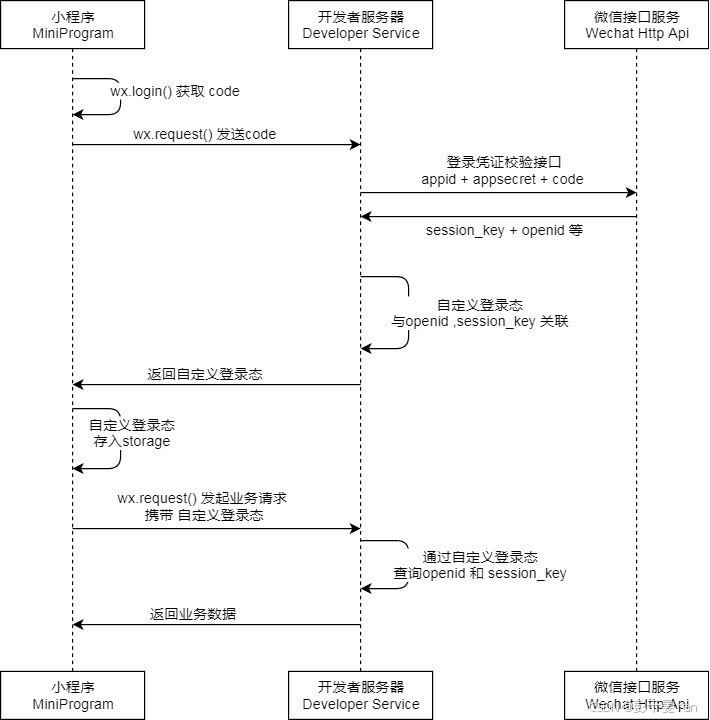
说明:
- 调用 wx.login() 获取 临时登录凭证code ,并回传到开发者服务器。
- 调用 auth.code2Session 接口,换取 用户唯一标识 OpenID 、 用户在微信开放平台账号下的唯一标识UnionID(若当前小程序已绑定到微信开放平台账号) 和 会话密钥 session_key。
之后开发者服务器可以根据用户标识来生成自定义登录态,用于后续业务逻辑中前后端交互时识别用户身份。
1.2. 小程序端
官方文档:https://developers.weixin.qq.com/miniprogram/dev/api/open-api/login/wx.login.html
wx.login(Object object)调用接口获取登录凭证(code)。通过凭证进而换取用户登录态信息,包括用户在当前小程序的唯一标识(openid)
详情见官方文档
1.3. 服务器端
官方文档:https://developers.weixin.qq.com/miniprogram/dev/OpenApiDoc/user-login/code2Session.html
登录凭证校验。通过 wx.login 接口获得临时登录凭证 code 后传到开发者服务器调用此接口完成登录流程。
详情见官方文档
1.4. 微信Java开发工具包
文档:https://gitee.com/binary/weixin-java-tools
微信Java开发工具包,支持包括微信支付、开放平台、公众号、企业微信/企业号、小程序等微信功能模块的后端开发。
微信小程序:weixin-java-miniapp
<dependency>
    <groupId>com.github.binarywang</groupId>
    <artifactId>weixin-java-miniapp</artifactId>
    <version>4.5.5.B</version>
</dependency>
2. 准备工作
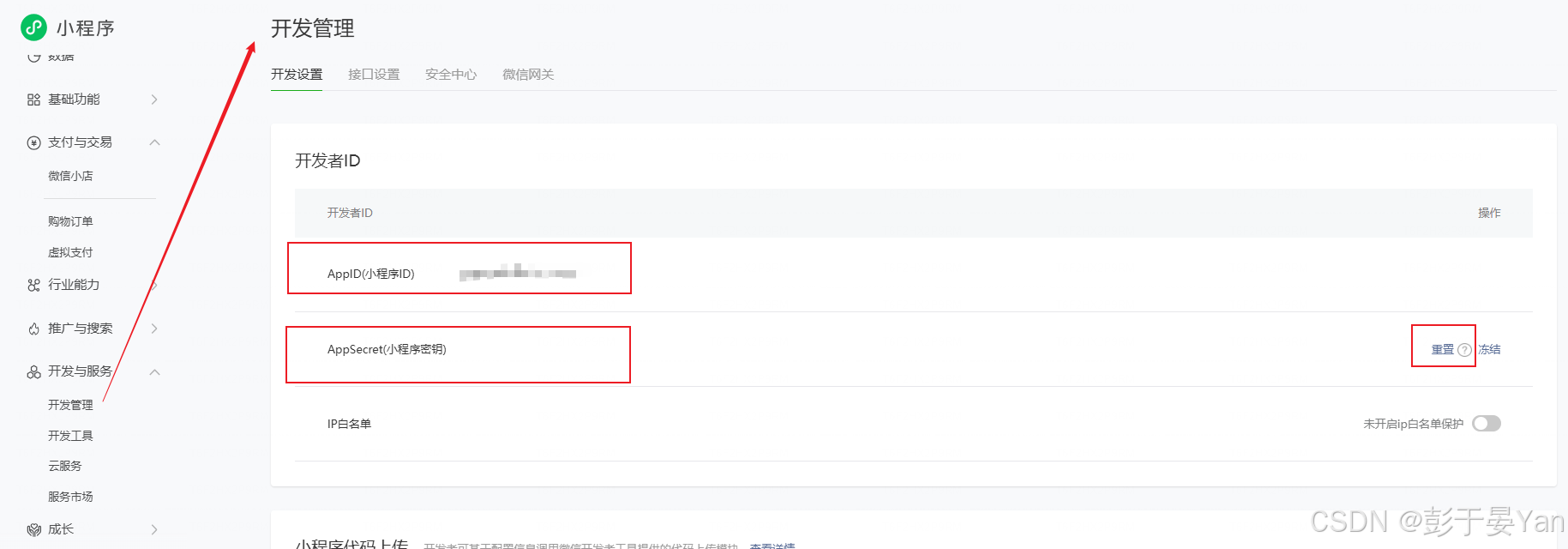
首先扫码登录微信公众平台,在【开发管理】页面获取AppID和AppSecrt,此处后面配置会用到。如果忘记AppSecrt可点击重置保存。
其次,小程序登录需要获取code值,什么是code?用大白话来说,它就是微信给小程序用户发的「一次性临时门票」,用来换「永久身份证(openId)」。
接着讲如何获取登录接口所需要的code值。
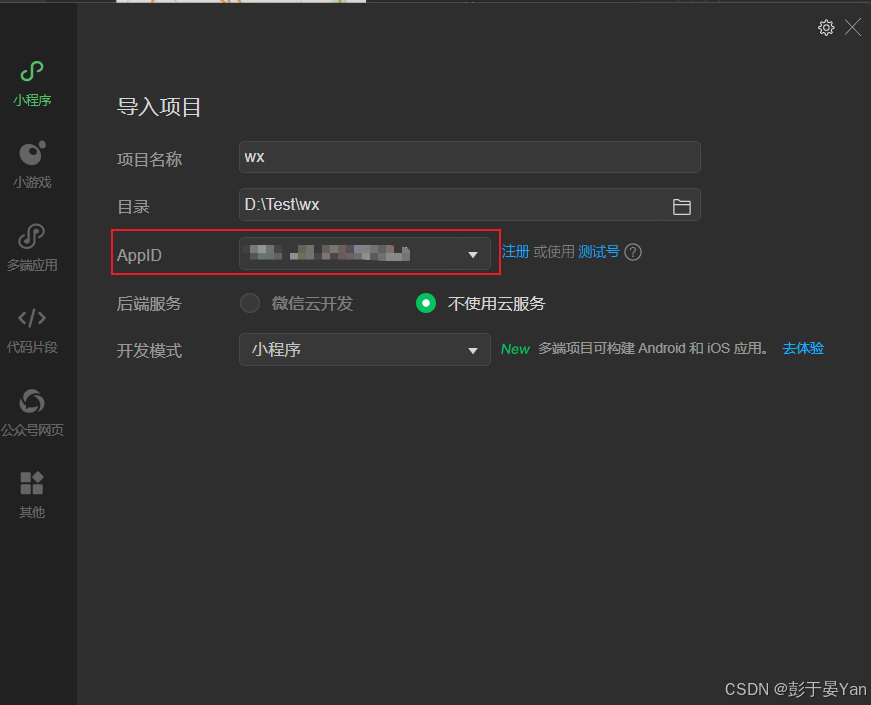
打开微信开发者工具,加入AppId对应的开发者平台
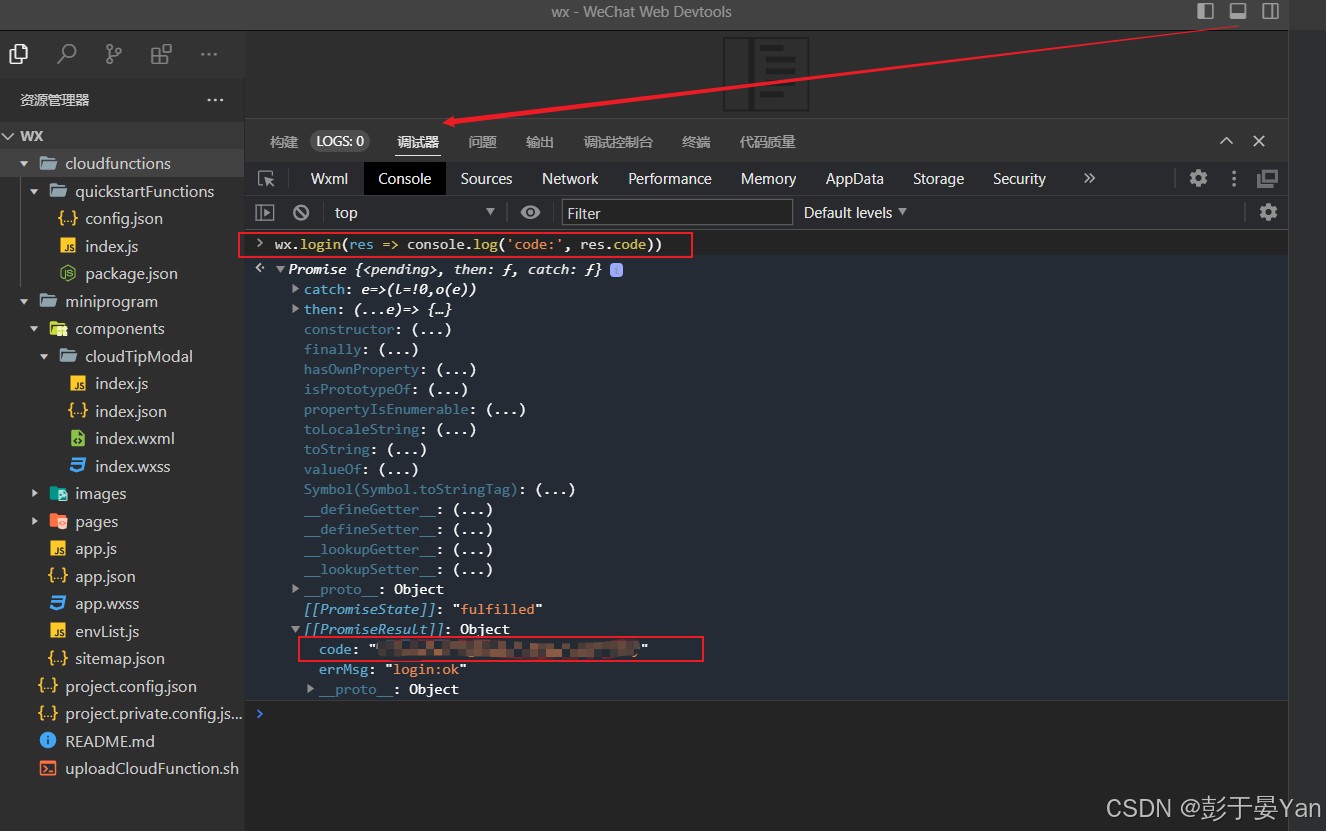
等待项目自动编译并运行后,在console控制台输入wx.login(res => console.log('code:', res.code))
点击 [[PromiseResult]]: Object 前面的小箭头 ▶️,展开后就能看到 code 字段,直接复制后面的字符串即可!
3. 登录接口开发
3.1. 引入依赖
<dependency>
    <groupId>com.github.binarywang</groupId>
    <artifactId>weixin-java-miniapp</artifactId>
</dependency>
3.2. yaml配置
# 可选多个appId配置
wx:
  miniapp:
    appId: wxcc651fcbab275e33
    secret: 5f353399a2eae7ff6ceda383e924c5f6
    configs:
      - appid:  wxcc651fcbab275e33
        secret: 5f353399a2eae7ff6ceda383e924c5f6
        token: s5sda5daf5dawdd
        aesKey: eRA7lTyHSqDZk4j39eOBMwRfxHLUNMZq2Qlc6FiFJtV
        msgDataFormat: JSON
      - appid:  wxcc651fcbab275e34
        secret: 5f353399a2eae7ff6ceda383e924c5f7
        token: s5sda5daf5dawdf
        aesKey: qgMtJkuKxsDC31DEdZXVAAXJQuuT4TXHe3ftgEwE1uB
        msgDataFormat: JSON
3.3. WxMaProperties
@Data
@ConfigurationProperties(prefix = "wx.miniapp")
public class WxMaProperties {

//    private String appId;
//
//    private String secret;


    private List<Config> configs;

    @Data
    public static class Config {
        /**
         * 设置微信小程序的appid
         */
        private String appid;

        /**
         * 设置微信小程序的Secret
         */
        private String secret;

        /**
         * 设置微信小程序消息服务器配置的token
         */
        private String token;

        /**
         * 设置微信小程序消息服务器配置的EncodingAESKey
         */
        private String aesKey;

        /**
         * 消息格式,XML或者JSON
         */
        private String msgDataFormat;
    }

}
3.4. WxMaConfiguration
配置WxMaService,通过WxMaService可以快速获取微信OpenId
/**
 * @author <a href="https://github.com/binarywang">Binary Wang</a>
 */
@Slf4j
@Configuration
@EnableConfigurationProperties(WxMaProperties.class)
public class WxMaConfiguration {

    @Autowired
    private final WxMaProperties properties;

    @Autowired
    public WxMaConfiguration(WxMaProperties properties) {
        this.properties = properties;
    }

//    @Bean
//    public WxMaService wxMaService() {
//        WxMaDefaultConfigImpl config = new WxMaDefaultConfigImpl();
//        config.setAppid(properties.getAppId());
//        config.setSecret(properties.getSecret());
//
//        WxMaService service = new WxMaServiceImpl();
//        service.setWxMaConfig(config);
//        return service;
//    }

    @Bean
    public WxMaService wxMaService() {
        List<WxMaProperties.Config> configs = this.properties.getConfigs();
        if (configs == null) {
            throw new WxRuntimeException("大哥,拜托先看下项目首页的说明(readme文件),添加下相关配置,注意别配错了!");
        }
        WxMaService maService = new WxMaServiceImpl();

        maService.setMultiConfigs(
            configs.stream()
                .map(a -> {
                    WxMaDefaultConfigImpl config = new WxMaDefaultConfigImpl();
//                WxMaDefaultConfigImpl config = new WxMaRedisConfigImpl(new JedisPool());
                    // 使用上面的配置时,需要同时引入jedis-lock的依赖,否则会报类无法找到的异常
                    config.setAppid(a.getAppid());
                    config.setSecret(a.getSecret());
                   // config.setToken(a.getToken());
                   // config.setAesKey(a.getAesKey());
                  //  config.setMsgDataFormat(a.getMsgDataFormat());
                    return config;
                }).collect(Collectors.toMap(WxMaDefaultConfigImpl::getAppid, a -> a, (o, n) -> o)));
        return maService;
    }
}
3.5. UserDetail
控制台输入wx.getUserInfo({success:res=>console.log(res)})即可获取如下参数值,sessionKey需从登录接口返回值中获取。
@Data
public class UserDetail {

    private String appid;

    private String sessionKey;

    private String encryptedData;

    private String iv;

    private String rawData;

    private String signature;
}
3.6. UserInfoApiController
@Slf4j
@RestController
@RequestMapping("/userInfo")
public class UserInfoApiController {

    @Autowired
    private WxMaService wxMaService;

    /**
     * 登录接口
     */
    @GetMapping("/wxLogin")
    public ResponseEntity<String> wxLogin(@RequestParam String code) {
        String openId = null;
        try {
            //获取openId
            WxMaJscode2SessionResult sessionInfo = wxMaService.getUserService().getSessionInfo(code);
            log.info("【小程序授权】sessionInfo={}", JSONUtil.toJsonStr(sessionInfo));
            openId = sessionInfo.getOpenid();
            log.info("【小程序授权】openId={}", openId);
            // TODO: 根据openId获取用户信息
        } catch (Exception e) {
            throw new RuntimeException("微信登录失败");
        }
        return ResponseEntity.ok("登录成功");
    }


    /**
     * 获取用户信息接口
     */
    @PostMapping("/info")
    public String info(@RequestBody UserDetail userDetail) {
        String appid = userDetail.getAppid();
        String iv = userDetail.getIv();
        String signature = userDetail.getSignature();
        String rawData = userDetail.getRawData();
        String sessionKey = userDetail.getSessionKey();
        String encryptedData = userDetail.getEncryptedData();
        if (!wxMaService.switchover(appid)) {
            throw new IllegalArgumentException(String.format("未找到对应appid=[%s]的配置,请核实!", appid));
        }

        // 用户信息校验
        if (!wxMaService.getUserService().checkUserInfo(sessionKey, rawData, signature)) {
            WxMaConfigHolder.remove();//清理ThreadLocal
            return "user check failed";
        }

        // 解密用户信息
        WxMaUserInfo userInfo = wxMaService.getUserService().getUserInfo(sessionKey, encryptedData, iv);
        //WxMaPhoneNumberInfo userInfo = wxMaService.getUserService().getPhoneNoInfo(sessionKey, encryptedData, iv);
        WxMaConfigHolder.remove();//清理ThreadLocal
        return JSONUtil.toJsonStr(userInfo);
    }
}

北京人形旗下天工造物具身智能开源社区,聚焦具身天工与慧思开物两大平台
更多推荐
 6
6 0
0- 0


 已为社区贡献2条内容

所有评论(0)