uniapp,h5获取当前位置信息
·
用组件map
   <map
          id="mapContainer"
          style="height: 400rpx; width: 100%"
          :longitude="longitude"
          :latitude="latitude"
          :zoom="zoom"
          :markers="markers"
        ></map>
getLocation方法获取位置信息
   uni.getLocation({
      type: "gcj02",
      isHighAccuracy: true,
      success: (res) => {
        console.log("当前位置的经度:" + res.longitude);
        console.log("当前位置的纬度:" + res.latitude);
        this.longitude = res.longitude;
        this.latitude = res.latitude;

        // 添加标记到地图
        this.addMarker();

        // 转换经纬度为详细地址
        this.getAddressFromCoords(res.longitude, res.latitude);
      },
      fail: (err) => {
        console.log("获取位置失败:", err);
      },
    });
需要在manifest.json里配置地图
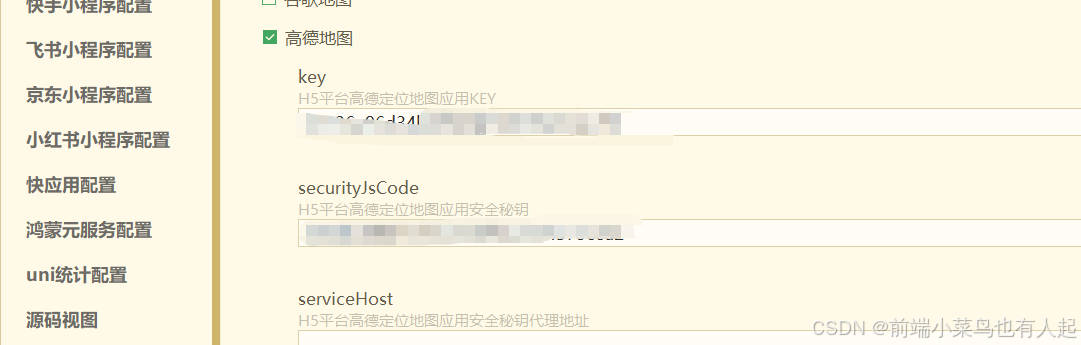

这里必须是web端!!!
添加标记点
   addMarker() {
      console.log("添加标记到地图");
      console.log("标记位置:", this.longitude, this.latitude);

      // 更新 markers 数组,用于 uni-app 原生 map 组件显示标记
      this.markers = [
        {
          id: 1,
          longitude: this.longitude,
          latitude: this.latitude,
          title: "我的位置",
          iconPath: "/static/image/index/user.png", // 使用默认图标
          width: 30,
          height: 30,
        },
      ];

      console.log("标记已添加:", this.markers);
    },
经纬度转换位置信息
    getAddressFromCoords(longitude, latitude) {
      console.log("转换经纬度为详细地址:", longitude, latitude);
      // 使用高德地图的逆地理编码 API(按照官方文档格式,默认返回 JSON)
      uni.request({
        url: `https://restapi.amap.com/v3/geocode/regeo?location=${longitude},${latitude}&key=0cdfc71801d70f0&radius=500&extensions=base`,
        success: (response) => {
          console.log("高德地图逆地理编码响应:", response);
          if (response.data && response.data.status === "1") {
            this.currentAddress = response.data.regeocode.formatted_address;
            console.log("地址获取成功:", this.currentAddress);
          } else {
            console.log("逆地理编码失败:", response.data.info);
            this.currentAddress = "获取地址失败";
          }
        },
        fail: (error) => {
          console.log("逆地理编码请求失败:", error);
          this.currentAddress = "获取地址失败";
        },
      });
    },
这个key是web服务端!!!


北京人形旗下天工造物具身智能开源社区,聚焦具身天工与慧思开物两大平台
更多推荐
 3
3 0
0- 0


 已为社区贡献7条内容

所有评论(0)