spice-gtk源码分析(七):输入通道与光标处理
输入通道负责将客户端的键盘和鼠标输入转发到远程虚拟机,光标通道则负责接收并显示远程光标图像。本文分析spice-gtk中这两个通道的实现。
背景与目标
spice-gtk作为SPICE协议的客户端实现,需要处理两类输入相关的通道:
- InputsChannel(输入通道):将本地键盘鼠标事件转发到服务器
- CursorChannel(光标通道):接收并显示远程光标图像
这两个通道协同工作,为用户提供完整的远程桌面输入体验。
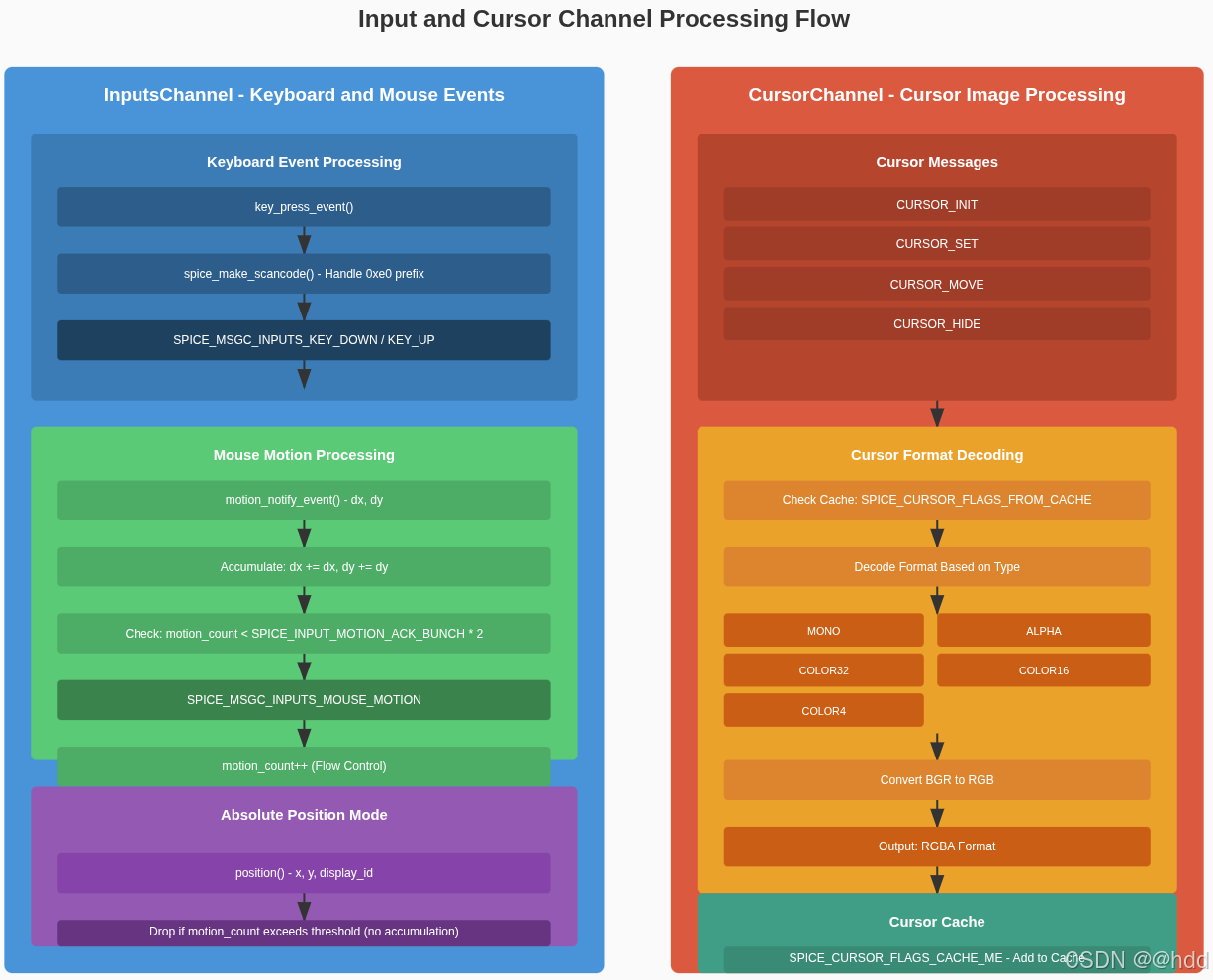
InputsChannel:键盘鼠标输入转发
核心数据结构
SpiceInputsChannel继承自SpiceChannel,使用私有结构体存储输入状态:
// channel-inputs.c
struct _SpiceInputsChannelPrivate {
    int                         bs;          // 按钮状态(button_state)
    int                         dx, dy;      // 鼠标相对移动量
    unsigned int                x, y, dpy;   // 鼠标绝对位置和显示器ID
    int                         motion_count;// 移动计数(用于流控)
    int                         modifiers;   // 键盘修饰键状态
    guint32                     locks;       // 锁定键状态(CapsLock/NumLock/ScrollLock)
};
状态字段说明:
| 字段 | 类型 | 说明 |
|---|---|---|
bs | int | 鼠标按键状态位掩码,使用SPICE_MOUSE_BUTTON_MASK_*常量 |
dx, dy | int | 相对坐标模式下的鼠标移动增量 |
x, y | unsigned int | 绝对坐标模式下的鼠标位置 |
dpy | unsigned int | 显示器ID(多显示器环境) |
motion_count | int | 待确认的移动消息计数,用于流控 |
modifiers | int | 当前键盘修饰键状态 |
locks | guint32 | 锁定键状态,使用SpiceInputsLock枚举 |
键盘按键处理
spice-gtk使用XT扫描码集1(PC XT scancode set 1)来编码键盘按键。对于带有0xe0前缀的扩展键,需要将前缀去掉并将扫描码与0x100进行OR运算。
// channel-inputs.c
void spice_inputs_channel_key_press(SpiceInputsChannel *channel, guint scancode)
{
    SpiceMsgcKeyDown down;
    SpiceMsgOut *msg;

    g_return_if_fail(channel != NULL);
    g_return_if_fail(SPICE_CHANNEL(channel)->priv->state != SPICE_CHANNEL_STATE_UNCONNECTED);
    if (SPICE_CHANNEL(channel)->priv->state != SPICE_CHANNEL_STATE_READY)
        return;
    if (spice_channel_get_read_only(SPICE_CHANNEL(channel)))
        return;

    // 构建按键按下消息
    // spice_make_scancode处理扩展键前缀(0xe0)
    down.code = spice_make_scancode(scancode, FALSE);
    msg = spice_msg_out_new(SPICE_CHANNEL(channel), SPICE_MSGC_INPUTS_KEY_DOWN);
    msg->marshallers->msgc_inputs_key_down(msg->marshaller, &down);
    spice_msg_out_send(msg);
}

void spice_inputs_channel_key_release(SpiceInputsChannel *channel, guint scancode)
{
    SpiceMsgcKeyUp up;
    SpiceMsgOut *msg;

    // ... 参数检查 ...

    // 释放事件使用TRUE标志
    up.code = spice_make_scancode(scancode, TRUE);
    msg = spice_msg_out_new(SPICE_CHANNEL(channel), SPICE_MSGC_INPUTS_KEY_UP);
    msg->marshallers->msgc_inputs_key_up(msg->marshaller, &up);
    spice_msg_out_send(msg);
}
扫描码编码规则:
| 按键类型 | 按下序列 | 释放序列 | 说明 |
|---|---|---|---|
| 普通键(如A) | 0x1e | 0x9e (0x1e + 0x80) | 第7位表示释放 |
| 左Ctrl | 0x1d | 0x9d | 普通键 |
| 右Ctrl | 0xe0 0x1d | 0xe0 0x9d | E0扩展键 |
| Pause | 0xe1 0x1d 0x45 ... | (无) | 特殊序列 |
鼠标移动处理
spice-gtk支持两种鼠标模式:相对坐标模式(SERVER模式)和绝对坐标模式(CLIENT模式)。
相对坐标模式(motion)
// channel-inputs.c
void spice_inputs_channel_motion(SpiceInputsChannel *channel, gint dx, gint dy,
                                 gint button_state)
{
    SpiceInputsChannelPrivate *c;

    g_return_if_fail(channel != NULL);
    g_return_if_fail(SPICE_CHANNEL(channel)->priv->state != SPICE_CHANNEL_STATE_UNCONNECTED);
    if (SPICE_CHANNEL(channel)->priv->state != SPICE_CHANNEL_STATE_READY)
        return;

    if (dx == 0 && dy == 0)
        return;

    c = channel->priv;
    c->bs  = button_state;  // 更新按钮状态
    c->dx += dx;            // 累加移动量
    c->dy += dy;

    // 流控:如果待确认消息少于阈值,立即发送
    if (c->motion_count < SPICE_INPUT_MOTION_ACK_BUNCH * 2) {
        send_motion(channel);
    }
}

static SpiceMsgOut* mouse_motion(SpiceInputsChannel *channel)
{
    SpiceInputsChannelPrivate *c = channel->priv;
    SpiceMsgcMouseMotion motion;
    SpiceMsgOut *msg;

    if (!c->dx && !c->dy)
        return NULL;

    motion.buttons_state = c->bs;
    motion.dx            = c->dx;
    motion.dy            = c->dy;
    msg = spice_msg_out_new(SPICE_CHANNEL(channel),
                            SPICE_MSGC_INPUTS_MOUSE_MOTION);
    msg->marshallers->msgc_inputs_mouse_motion(msg->marshaller, &motion);

    c->motion_count++;
    c->dx = 0;  // 清零累加值
    c->dy = 0;

    return msg;
}
鼠标移动流控机制分析:
spice_inputs_channel_motion()函数实现了移动量累加的设计,将多次小移动合并为一次发送,减少网络消息数量。dx和dy会累加到私有结构的dx和dy字段中,直到满足发送条件。SPICE_INPUT_MOTION_ACK_BUNCH流控机制通过motion_count计数器实现,当待确认的移动消息数量小于阈值(SPICE_INPUT_MOTION_ACK_BUNCH * 2)时,立即发送累积的移动量。这种设计可以平衡延迟和吞吐量:小移动时延迟发送减少消息数,大移动时立即发送保证响应性。在绝对坐标模式下,由于每次位置都是独立的,不能像相对模式那样累加,所以超额消息会被直接丢弃。
绝对坐标模式(position)
// channel-inputs.c
void spice_inputs_channel_position(SpiceInputsChannel *channel, gint x, gint y,
                                   gint display, gint button_state)
{
    SpiceInputsChannelPrivate *c;

    g_return_if_fail(channel != NULL);

    if (SPICE_CHANNEL(channel)->priv->state != SPICE_CHANNEL_STATE_READY)
        return;

    c = channel->priv;
    c->bs  = button_state;
    c->x   = x;      // 绝对X坐标
    c->y   = y;      // 绝对Y坐标
    c->dpy = display; // 显示器ID

    if (c->motion_count < SPICE_INPUT_MOTION_ACK_BUNCH * 2) {
        send_position(channel);
    } else {
        CHANNEL_DEBUG(channel, "over SPICE_INPUT_MOTION_ACK_BUNCH * 2, dropping");
    }
}

static SpiceMsgOut* mouse_position(SpiceInputsChannel *channel)
{
    SpiceInputsChannelPrivate *c = channel->priv;
    SpiceMsgcMousePosition position;
    SpiceMsgOut *msg;

    if (c->dpy == -1)
        return NULL;

    position.buttons_state = c->bs;
    position.x             = c->x;
    position.y             = c->y;
    position.display_id    = c->dpy;
    msg = spice_msg_out_new(SPICE_CHANNEL(channel),
                            SPICE_MSGC_INPUTS_MOUSE_POSITION);
    msg->marshallers->msgc_inputs_mouse_position(msg->marshaller, &position);

    c->motion_count++;
    c->dpy = -1;  // 标记已发送

    return msg;
}
鼠标按键处理
鼠标按键事件会同时更新按钮状态并发送移动消息(如果有累积的移动量):
// channel-inputs.c
void spice_inputs_channel_button_press(SpiceInputsChannel *channel, gint button,
                                       gint button_state)
{
    SpiceInputsChannelPrivate *c;
    SpiceMsgcMousePress press;
    SpiceMsgOut *msg;

    // ... 参数检查 ...

    c = channel->priv;
    switch (button) {
    case SPICE_MOUSE_BUTTON_LEFT:
        button_state |= SPICE_MOUSE_BUTTON_MASK_LEFT;
        break;
    case SPICE_MOUSE_BUTTON_MIDDLE:
        button_state |= SPICE_MOUSE_BUTTON_MASK_MIDDLE;
        break;
    case SPICE_MOUSE_BUTTON_RIGHT:
        button_state |= SPICE_MOUSE_BUTTON_MASK_RIGHT;
        break;
    case SPICE_MOUSE_BUTTON_SIDE:
        button_state |= SPICE_MOUSE_BUTTON_MASK_SIDE;
        break;
    case SPICE_MOUSE_BUTTON_EXTRA:
        button_state |= SPICE_MOUSE_BUTTON_MASK_EXTRA;
        break;
    }

    c->bs = button_state;
    // 发送累积的移动消息
    send_motion(channel);
    send_position(channel);

    // 发送按键按下消息
    msg = spice_msg_out_new(SPICE_CHANNEL(channel),
                            SPICE_MSGC_INPUTS_MOUSE_PRESS);
    press.button = button;
    press.buttons_state = button_state;
    msg->marshallers->msgc_inputs_mouse_press(msg->marshaller, &press);
    spice_msg_out_send(msg);
}
键盘锁定键同步
spice-gtk支持同步虚拟机的键盘LED状态(CapsLock、NumLock、ScrollLock):
// channel-inputs.h
typedef enum {
    SPICE_INPUTS_SCROLL_LOCK = (1 << 0),
    SPICE_INPUTS_NUM_LOCK    = (1 << 1),
    SPICE_INPUTS_CAPS_LOCK   = (1 << 2)
} SpiceInputsLock;

// channel-inputs.c
void spice_inputs_channel_set_key_locks(SpiceInputsChannel *channel, guint locks)
{
    SpiceMsgOut *msg;

    if (spice_channel_get_read_only(SPICE_CHANNEL(channel)))
        return;

    msg = set_key_locks(channel, locks);
    if (!msg)
        return;

    spice_msg_out_send(msg);
}

/* coroutine context */
static void inputs_handle_modifiers(SpiceChannel *channel, SpiceMsgIn *in)
{
    SpiceInputsChannelPrivate *c = SPICE_INPUTS_CHANNEL(channel)->priv;
    SpiceMsgInputsKeyModifiers *modifiers = spice_msg_in_parsed(in);

    c->modifiers = modifiers->modifiers;
    // 在协程上下文中发出信号
    g_coroutine_signal_emit(channel, signals[SPICE_INPUTS_MODIFIERS], 0);
}
锁定键同步流程:
- 客户端调用
spice_inputs_channel_set_key_locks()设置锁定键状态 - 服务器接收
SPICE_MSGC_INPUTS_KEY_MODIFIERS消息并更新虚拟机状态 - 服务器发送
SPICE_MSG_INPUTS_KEY_MODIFIERS消息通知客户端当前状态 - 客户端通过
inputs-modifiers信号通知应用程序
CursorChannel:远程光标处理
核心数据结构
SpiceCursorChannel管理远程光标的形状和位置:
// channel-cursor.c
struct display_cursor {
    SpiceCursorHeader           hdr;         // 光标头部信息
    gboolean                    default_cursor; // 是否使用默认光标
    int                         refcount;    // 引用计数
    guint32                     data[];      // RGBA像素数据
};

struct _SpiceCursorChannelPrivate {
    display_cache               *cursors;    // 光标缓存
    gboolean                    init_done;   // 初始化是否完成
    SpiceCursorShape            last_cursor; // 最后一个光标形状
};

// channel-cursor.h
struct _SpiceCursorShape {
    SpiceCursorType type;        // 光标类型
    guint16 width;               // 宽度
    guint16 height;              // 高度
    guint16 hot_spot_x;          // 热点X坐标
    guint16 hot_spot_y;          // 热点Y坐标
    gpointer data;               // 像素数据(RGBA格式)
};
光标类型与解码
spice-gtk支持多种光标格式,需要转换为统一的RGBA格式:
// channel-cursor.c
static display_cursor *set_cursor(SpiceChannel *channel, SpiceCursor *scursor)
{
    SpiceCursorChannelPrivate *c = SPICE_CURSOR_CHANNEL(channel)->priv;
    SpiceCursorHeader *hdr = &scursor->header;
    display_cursor *cursor;
    size_t size;
    guint32 i, pix_mask, pix;
    const guint8* data;
    guint8 *rgba;
    guint8 val;
    guint32 palette[16];

    // 检查是否从缓存加载
    if (scursor->flags & SPICE_CURSOR_FLAGS_FROM_CACHE) {
        cursor = cache_find(c->cursors, hdr->unique);
        g_return_val_if_fail(cursor != NULL, NULL);
        return display_cursor_ref(cursor);
    }

    size = 4u * hdr->width * hdr->height;
    cursor = g_malloc0(sizeof(*cursor) + size);
    cursor->hdr = *hdr;
    cursor->default_cursor = FALSE;
    cursor->refcount = 1;
    data = scursor->data;

    // 根据光标类型解码
    switch (hdr->type) {
    case SPICE_CURSOR_TYPE_MONO:
        // 单色光标:AND/XOR掩码
        mono_cursor(cursor, data);
        break;
    case SPICE_CURSOR_TYPE_ALPHA:
        // 带Alpha通道:直接复制
        memcpy(cursor->data, data, size);
        break;
    case SPICE_CURSOR_TYPE_COLOR32:
        // 32位彩色:需要处理透明掩码
        memcpy(cursor->data, data, size);
        for (i = 0; i < hdr->width * hdr->height; i++) {
            pix_mask = get_pix_mask(data, size, i);
            if (pix_mask && cursor->data[i] == 0xffffff) {
                cursor->data[i] = get_pix_hack(i, hdr->width);
            } else {
                cursor->data[i] |= (pix_mask ? 0 : 0xff000000);
            }
        }
        break;
    case SPICE_CURSOR_TYPE_COLOR16:
        // 16位彩色:转换为32位
        size /= 2u;
        for (i = 0; i < hdr->width * hdr->height; i++) {
            pix_mask = get_pix_mask(data, size, i);
            pix = *(SPICE_UNALIGNED_CAST(guint16 *, data) + i);
            if (pix_mask && pix == 0x7fff) {
                cursor->data[i] = get_pix_hack(i, hdr->width);
            } else {
                cursor->data[i] |= ((pix & 0x1f) << 3) | ((pix & 0x3e0) << 6) |
                    ((pix & 0x7c00) << 9) | (pix_mask ? 0 : 0xff000000);
            }
        }
        break;
    case SPICE_CURSOR_TYPE_COLOR4:
        // 4位调色板:查找调色板并转换
        size = ((unsigned int)(SPICE_ALIGN(hdr->width, 2) / 2)) * hdr->height;
        memcpy(palette, data + size, sizeof(palette));
        for (i = 0; i < hdr->width * hdr->height; i++) {
            pix_mask = get_pix_mask(data, size + (sizeof(uint32_t) << 4), i);
            int idx = (i & 1) ? (data[i >> 1] & 0x0f) : ((data[i >> 1] & 0xf0) >> 4);
            pix = palette[idx];
            if (pix_mask && pix == 0xffffff) {
                cursor->data[i] = get_pix_hack(i, hdr->width);
            } else {
                cursor->data[i] = pix | (pix_mask ? 0 : 0xff000000);
            }
        }
        break;
    }

    // 转换为RGBA格式(BGR -> RGB)
    rgba = (guint8*)cursor->data;
    for (i = 0; i < hdr->width * hdr->height; i++) {
        val = rgba[0];
        rgba[0] = rgba[2];
        rgba[2] = val;
        rgba += 4;
    }

    // 如果标记为可缓存,添加到缓存
    if (scursor->flags & SPICE_CURSOR_FLAGS_CACHE_ME) {
        cache_add(c->cursors, hdr->unique, display_cursor_ref(cursor));
    }

    return cursor;
}
光标解码机制分析:
set_cursor()函数支持多种光标格式,这些格式的存在有历史原因:MONO格式是Windows传统的光标格式,使用AND/XOR掩码实现透明效果;ALPHA格式是现代格式,直接包含RGBA数据;COLOR32/COLOR16/COLOR4是不同色深的彩色光标格式。所有格式最终都需要转换为RGBA格式,因为这是GTK/Cairo使用的标准格式。BGR到RGB的转换是必要的,因为SPICE协议使用BGR字节序(Windows风格),而GTK使用RGB字节序(X11风格)。缓存机制通过SPICE_CURSOR_FLAGS_CACHE_ME标志启用,解码后的光标会被存储在缓存中,当服务器发送SPICE_CURSOR_FLAGS_FROM_CACHE标志时,直接从缓存加载,避免重复解码,这对于频繁使用的光标(如箭头、手型等)特别有效。
光标类型对比:
| 类型 | 数据格式 | 解码复杂度 | 用途 |
|---|---|---|---|
| MONO | AND/XOR掩码 | 高(需要合成) | 传统单色光标 |
| ALPHA | RGBA | 低(直接使用) | 现代带透明度的光标 |
| COLOR32 | 32位BGR + 掩码 | 中(需处理掩码) | 彩色光标 |
| COLOR16 | 16位RGB565 + 掩码 | 中(需转换) | 压缩彩色光标 |
| COLOR4 | 4位索引 + 调色板 | 高(需查表) | 低色彩光标 |
光标信号
spice-gtk通过GObject信号通知应用程序光标变化:
// channel-cursor.c
/* coroutine context */
static void emit_cursor_set(SpiceChannel *channel, display_cursor *cursor)
{
    SpiceCursorChannelPrivate *c;

    g_return_if_fail(cursor != NULL);

    c = SPICE_CURSOR_CHANNEL(channel)->priv;

    // 更新last_cursor属性
    c->last_cursor.type = cursor->hdr.type;
    c->last_cursor.width = cursor->hdr.width;
    c->last_cursor.height = cursor->hdr.height;
    c->last_cursor.hot_spot_x = cursor->hdr.hot_spot_x;
    c->last_cursor.hot_spot_y = cursor->hdr.hot_spot_y;
    g_free(c->last_cursor.data);
    c->last_cursor.data = g_memdup(cursor->data,
                                   cursor->hdr.width * cursor->hdr.height * 4);

    // 通知属性变化(新API)
    g_coroutine_object_notify(G_OBJECT(channel), "cursor");
    // 发出信号(旧API,已废弃)
    g_coroutine_signal_emit(channel, signals[SPICE_CURSOR_SET], 0,
                            cursor->hdr.width, cursor->hdr.height,
                            cursor->hdr.hot_spot_x, cursor->hdr.hot_spot_y,
                            cursor->default_cursor ? NULL : cursor->data);
}
光标信号列表:
| 信号名 | 参数 | 说明 |
|---|---|---|
cursor-set | width, height, hot_x, hot_y, rgba | 光标形状改变(已废弃,使用属性通知) |
cursor-move | x, y | 光标位置改变 |
cursor-hide | 无 | 隐藏光标 |
cursor-reset | 无 | 重置为默认光标 |
消息处理
CursorChannel处理以下消息类型:
// channel-cursor.c
static void channel_set_handlers(SpiceChannelClass *klass)
{
    static const spice_msg_handler handlers[] = {
        [ SPICE_MSG_CURSOR_INIT ]              = cursor_handle_init,
        [ SPICE_MSG_CURSOR_RESET ]             = cursor_handle_reset,
        [ SPICE_MSG_CURSOR_SET ]               = cursor_handle_set,
        [ SPICE_MSG_CURSOR_MOVE ]              = cursor_handle_move,
        [ SPICE_MSG_CURSOR_HIDE ]              = cursor_handle_hide,
        [ SPICE_MSG_CURSOR_TRAIL ]             = cursor_handle_trail,
        [ SPICE_MSG_CURSOR_INVAL_ONE ]         = cursor_handle_inval_one,
        [ SPICE_MSG_CURSOR_INVAL_ALL ]         = cursor_handle_inval_all,
    };

    spice_channel_set_handlers(klass, handlers, G_N_ELEMENTS(handlers));
}

/* coroutine context */
static void cursor_handle_move(SpiceChannel *channel, SpiceMsgIn *in)
{
    SpiceMsgCursorMove *move = spice_msg_in_parsed(in);
    SpiceCursorChannelPrivate *c = SPICE_CURSOR_CHANNEL(channel)->priv;

    g_return_if_fail(c->init_done == TRUE);

    // 发出光标移动信号
    g_coroutine_signal_emit(channel, signals[SPICE_CURSOR_MOVE], 0,
                            move->position.x, move->position.y);
}
总结
spice-gtk的输入和光标处理实现了完整的远程桌面输入体验:
- InputsChannel负责将本地输入事件转发到服务器,支持键盘、鼠标相对/绝对坐标模式,以及键盘锁定键同步
- CursorChannel负责接收并显示远程光标,支持多种光标格式和缓存机制
- 两个通道通过GObject信号和属性通知机制与应用程序交互
- 使用协程上下文处理消息,确保非阻塞的异步操作
这种设计使得spice-gtk能够提供流畅的远程桌面输入体验,同时保持代码的清晰和可维护性。

北京人形旗下天工造物具身智能开源社区,聚焦具身天工与慧思开物两大平台
更多推荐
 42
42 0
0- 0


 已为社区贡献4条内容

所有评论(0)