Python 自动化测试框架(Pytest)—— 插件详解
·
Python 自动化测试框架(Pytest)—— 插件详解
一、插件管理
Pytest 的插件分为两类:
- 内置插件:无需安装,随 Pytest 自带(如 terminal、python、capture 等)。
- 第三方插件:需通过 pip 安装,扩展 Pytest 功能。
插件启用/禁用方式(abc 为插件名)
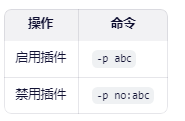
示例:pytest -p no:cacheprovider 可禁用缓存插件。
插件使用方式
- 命令行参数(如 --html=report.html)
- 配置文件(pytest.ini、pyproject.toml、tox.ini)
- Fixture(如 caplog, tmp_path)
- Mark 标记(如 @pytest.mark.skip)
二、常用第三方插件推荐
1. pytest-html —— 生成 HTML 测试报告
- 用途:生成美观、可交互的 HTML 测试报告。
- 安装:
pip install pytest-html
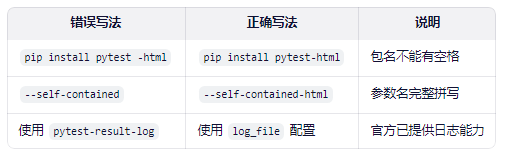
⚠️ 注意:包名是 pytest-html,不是 pytest -html(中间无空格)。
配置文件(pytest.ini):
addopts = --html=reports/report.html --self-contained-html
✅ --self-contained-html 表示将 CSS/JS 内嵌到 HTML 中,便于分享。
2. pytest-xdist —— 并行/分布式执行测试
- 用途: 利用多 CPU 或多机器并行运行测试,提升执行效率(适用于耗时较长的测试用例)。
- 安装:
pip install pytest-xdist
- 使用方式:
pytest -n 4          # 启动 4 个并行进程
pytest -n auto       # 自动使用所有可用 CPU 核心
注意事项:
- 并发可能导致资源竞争(如数据库、文件读写)
- 测试用例应尽量无状态、独立
- 不保证执行顺序
3. pytest-rerunfailures —— 失败用例自动重试
- 用途:对失败的测试用例自动重试,减少偶发性失败(flaky tests)的影响。
- 安装
pip install pytest-rerunfailures
配置文件(pytest.ini)
addopts = --reruns 3 --reruns-delay 1
–reruns 3:失败后最多重试 3 次
–reruns-delay 2:每次重试前等待 2 秒
💡 支持对单个用例标记重试:
python
@pytest.mark.flaky(reruns=5)
def test_flaky():
...
4. 添加log
Pytest 从 v3.3 起原生支持日志记录,无需额外插件。
配置方式(pytest.ini):
[tool:pytest]
log_file = logs/pytest.log
log_file_level = INFO
log_file_format = %(asctime)s [%(levelname)-8s] %(name)s: %(message)s
log_file_date_format = %Y-%m-%d %H:%M:%S
log_cli = true
log_cli_level = INFO
效果:
- 日志同时输出到控制台和 logs/pytest.log
- 自动记录每个测试的开始、结束、异常等信息
- 无需额外插件,稳定可靠
📝 如果你需要结构化日志(如 JSON),可搭配 pytest-json-report:
pip install pytest-json-report
pytest --json-report --json-report-file=report.json
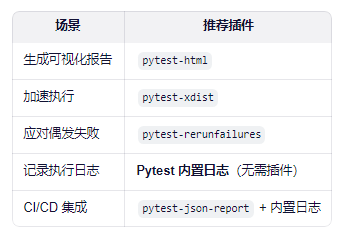
三、最佳实践建议
四、常见错误避坑指南

北京人形旗下天工造物具身智能开源社区,聚焦具身天工与慧思开物两大平台
更多推荐
 4
4 0
0- 0


 已为社区贡献2条内容

所有评论(0)