抖音去水印 微信小程序云函数版 搭建到运行详细步骤+项目源码
·
技术栈:uniapp+vue3+unicloud
开发工具:hbuilder+微信开发者工具
1.在unicloud申请云空间
2.创建getVideo云函数用于获取原始链接,创建proxySave云函数用于获取保存视频
3.getVideo云函数文件如下
'use strict';
exports.main = async (event, context) => {
    // 1. 获取前端传来的短链接
    let { url } = event;
    if (!url) return { code: 400, msg: '请提供链接' };

    // 正则提取链接(处理中文文案混合的情况)
    const urlReg = /(http:\/\/|https:\/\/)((\w|=|\?|\.|\/|&|-)+)/g;
    const match = url.match(urlReg);
    if(match) url = match[0];

    try {
        // 2. 使用接口
        const apiUrl = `/api/video/douyin?url=${encodeURIComponent(url)}`;

        console.log('正在请求接口:', apiUrl); // 日志:方便调试

        const res = await uniCloud.httpclient.request(apiUrl, {
            dataType: 'json',
            method: 'GET'
        });

        // 日志:在 HBuilderX 控制台可以看到第三方返回的具体数据
        console.log('第三方接口返回:', JSON.stringify(res.data));

        // 3. 适配接口返回的数据结构
        // 该接口通常返回 code: 200 和 data 对象
        if (res.data && res.data.code === 200) {
            const d = res.data.data;

            return {
                code: 200,
                data: {
                    // 注意:不同接口字段名不同,这里根据经验适配
                    // 如果解析成功但播放不了,请看控制台日志里的真实字段名
                    url: d.url,       // 视频地址
                    cover: d.cover,   // 封面图
                    title: d.title    // 视频标题
                }
            };
        } else {
            return {
                code: 500,
                msg: res.data.msg || '解析失败,接口返回错误',
                debug: res.data
            };
        }

    } catch (e) {
        return { code: 500, msg: '云函数内部请求出错', error: e.message };
    }
};
4.proxySave云函数文件如下
'use strict';
exports.main = async (event, context) => {
  const { url } = event;
  if (!url) return { code: 400, msg: '缺少参数' };

  try {
    // 1. 请求外部视频流 (下载视频到内存中)
    // 注意:dataType: 'buffer' 是关键,表示以二进制形式获取
    const res = await uniCloud.httpclient.request(url, {
      method: 'GET',
      dataType: 'buffer',
      followRedirect: true,
      headers: {
        'User-Agent': 'Mozilla/5.0 (iPhone; CPU iPhone OS 13_2_3 like Mac OS X) AppleWebKit/605.1.15 (KHTML, like Gecko) Version/13.0.3 Mobile/15E148 Safari/604.1'
      }
    });

    if (res.status !== 200) {
      return { code: 500, msg: '云端下载失败,源地址无法访问' };
    }

    // 2. 生成一个随机文件名 (防止文件名冲突)
    // 格式:video_时间戳_随机数.mp4
    const filename = `video_${Date.now()}_${Math.floor(Math.random()*1000)}.mp4`;

    // 3. 将内存中的视频上传到你的云存储
    const uploadRes = await uniCloud.uploadFile({
      cloudPath: filename,
      fileContent: res.data // 这里的 data 就是刚才下载的二进制流
    });

    // 4. 返回云存储的 FileID 或 链接
    return {
      code: 200,
      tempUrl: uploadRes.fileID // 阿里云返回 url,腾讯云返回 fileID (uni会自动处理)
    };

  } catch (e) {
    return { code: 500, msg: '中转出错', error: e.message };
  }
};
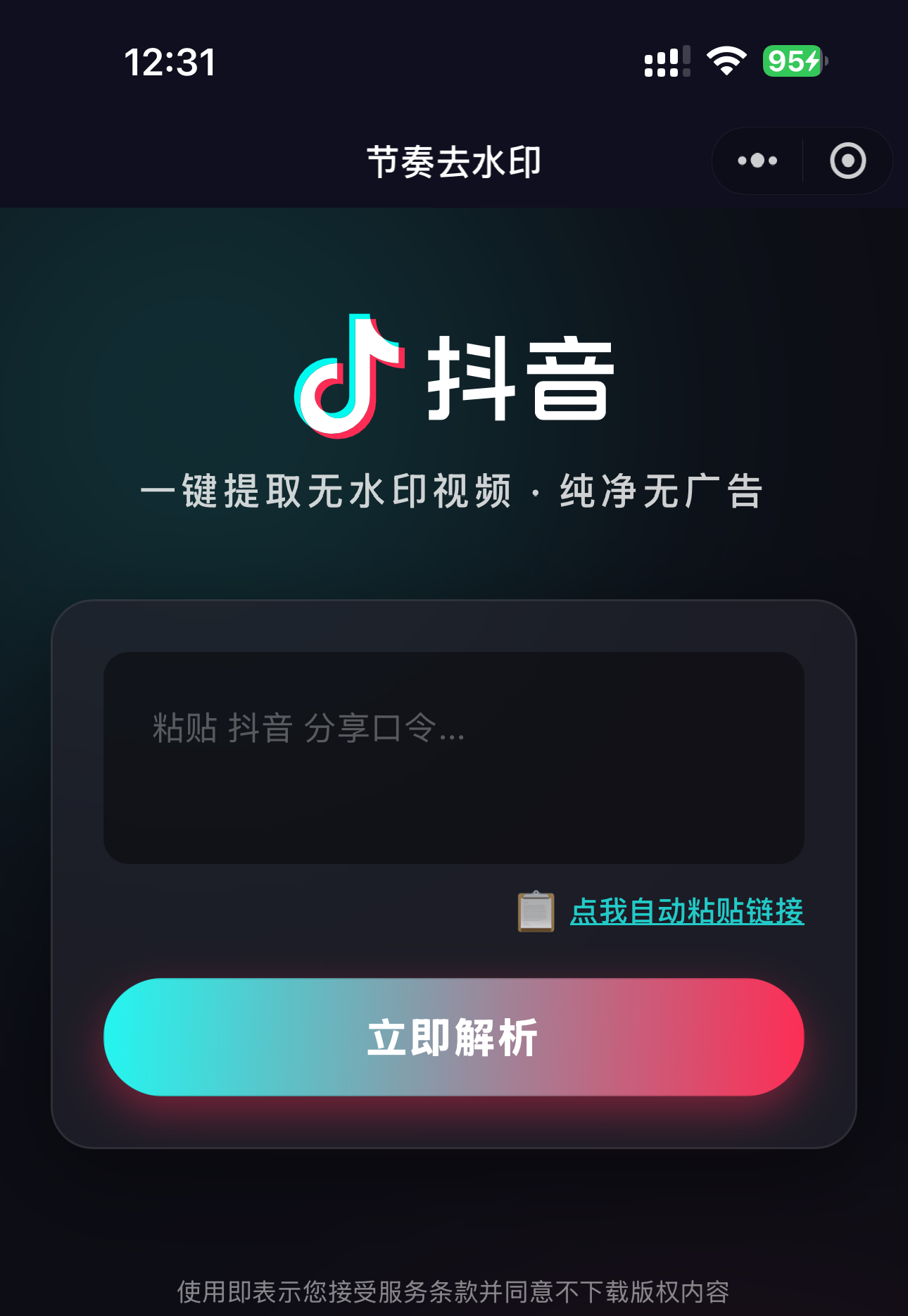
5.index.vue文件
<template>
	<view class="container">
		<view class="bg-glow bg-blue"></view>
		<view class="bg-glow bg-pink"></view>

		<view class="content-wrapper">
			<view class="logo-area">
				<image class="logo" src="../../static/logo-horizont-dark.svg" mode="heightFix"></image>
				<text class="slogan">一键提取无水印视频 · 纯净无广告</text>
			</view>

			<view class="card input-card">
				<view class="input-container">
					<textarea v-model="inputUrl" placeholder="粘贴 抖音 分享口令..." placeholder-class="placeholder-text"
						class="url-input" :maxlength="-1"></textarea>

					<view v-if="inputUrl" class="clear-btn" @click="inputUrl = ''">
						✕
					</view>
				</view>

				<view class="paste-wrapper" @click="autoPaste">
					<text class="paste-icon">📋</text>
					<text class="paste-text">点我自动粘贴链接</text>
				</view>

				<button @click="parseVideo" :loading="loading" class="douyin-btn parse-btn" hover-class="btn-hover">
					{{ loading ? '解析中...' : '立即解析' }}
				</button>
			</view>

			<view v-if="videoData.url" class="card result-card fade-in">
				<view class="video-header">
					<text class="video-title">{{ videoData.title || '获取成功' }}</text>
				</view>

				<video :src="videoData.url" class="video-player" :poster="videoData.cover" controls
					object-fit="contain"></video>

				<view class="action-row">
					<button class="action-btn outline big-text" @click="copyUrl">复制链接</button>
					<button class="action-btn primary big-text" @click="downloadVideo" :loading="isSaving"
						:disabled="isSaving">
						{{ isSaving ? '下载中...' : '保存视频' }}
					</button>
					<!-- <button class="action-btn primary big-text" @click="copyUrl">复制链接粘贴到默认浏览器</button> -->
				</view>
			</view>

			<view class="footer">
				<text class="disclaimer">
					使用即表示您接受服务条款并同意不下载版权内容
				</text>
			</view>
		</view>
	</view>
</template>

<script setup>
	import {
		ref
	} from 'vue';

	const inputUrl = ref('');
	const loading = ref(false);
	// 新增:专门控制保存按钮的 loading 状态
	const isSaving = ref(false);
	const videoData = ref({
		url: '',
		cover: '',
		title: ''
	});

	const autoPaste = () => {
		uni.getClipboardData({
			success: function(res) {
				if (res.data) {
					// 尝试提取
					const match = res.data.match(/(https?:\/\/[^\s]+)/);
					inputUrl.value = match ? match[0] : res.data;
					uni.showToast({
						title: '已粘贴',
						icon: 'none'
					});
				}
			}
		});
	};

	const parseVideo = async () => {
		let rawText = inputUrl.value;
		if (!rawText) {
			uni.showToast({
				title: '请先粘贴链接',
				icon: 'none'
			});
			return;
		}

		// 智能提取链接
		const urlReg = /(https?:\/\/[a-zA-Z0-9\.\/\-_]+)/;
		const match = rawText.match(urlReg);
		if (match) {
			inputUrl.value = match[0];
			rawText = match[0];
		}

		loading.value = true;
		videoData.value = {
			url: '',
			cover: '',
			title: ''
		};

		try {
			const res = await uniCloud.callFunction({
				name: 'getVideo',
				data: {
					url: rawText
				}
			});

			if (res.result.code === 200) {
				videoData.value = res.result.data;
				uni.showToast({
					title: '解析成功',
					icon: 'success'
				});
			} else {
				uni.showToast({
					title: res.result.msg || '解析失败',
					icon: 'none'
				});
			}
		} catch (e) {
			uni.showToast({
				title: '网络错误',
				icon: 'none'
			});
		} finally {
			loading.value = false;
		}
	};

	const copyUrl = () => {
		uni.setClipboardData({
			data: videoData.value.url,
			success: () => uni.showToast({
				title: '链接已复制'
			})
		});
	};


	// 核心下载逻辑
	const startDownloadProcess = async () => {
		if (!videoData.value.url) return;

		// #ifndef H5
		try {
			// 1. 开启按钮 Loading 动画 (已在 downloadVideo 外层开启)

			// 提示用户进度(配合按钮动画,双重提示)
			uni.showLoading({
				title: '云端转存中...',
				mask: true
			});

			// --- 核心:调用云函数中转 (解决域名问题) ---
			const cloudRes = await uniCloud.callFunction({
				name: 'proxySave', // 之前创建的中转云函数
				data: {
					url: videoData.value.url
				}
			});

			if (cloudRes.result.code !== 200) {
				throw new Error(cloudRes.result.msg || '转存失败');
			}

			const safeUrl = cloudRes.result.tempUrl;

			// 获取真实链接
			const tempFiles = await uniCloud.getTempFileURL({
				fileList: [safeUrl]
			});
			const finalHttpUrl = tempFiles.fileList[0].tempFileURL;

			// --- 开始下载 ---
			uni.showLoading({
				title: '写入相册...',
				mask: true
			});

			uni.downloadFile({
				url: finalHttpUrl,
				success: (res) => {
					if (res.statusCode === 200) {
						uni.saveVideoToPhotosAlbum({
							filePath: res.tempFilePath,
							success: () => uni.showToast({
								title: '保存成功!'
							}),
							fail: (err) => {
								// 如果 saveVideoToPhotosAlbum 失败,可能需要再次检查权限
								uni.showToast({
									title: '保存失败,请检查相册权限',
									icon: 'none'
								});
							}
						});
					} else {
						uni.showToast({
							title: '下载连接失败',
							icon: 'none'
						});
					}
				},
				fail: (err) => {
					console.error(err);
					uni.showToast({
						title: '下载出错',
						icon: 'none'
					});
				},
				// 3. 关键:无论成功还是失败,最后都要关闭 Loading
				complete: () => {
					uni.hideLoading(); // 关闭屏幕中间的弹窗
					isSaving.value = false; // 关闭按钮上的转圈动画
				}
			});

		} catch (e) {
			console.error(e);
			uni.hideLoading();
			isSaving.value = false; // 出错了也要记得关掉动画
			uni.showToast({
				title: '错误: ' + (e.message || '未知错误'),
				icon: 'none'
			});
		}
		// #endif
	};

	// 修改后的下载函数 重点修改这个函数
	// 在 downloadVideo 函数中,添加更详细的错误处理
	const downloadVideo = async () => {
		// #ifdef H5
		uni.showModal({
			title: '提示',
			content: '浏览器请长按视频保存',
			showCancel: false
		});
		return;
		// #endif

		if (isSaving.value) return; // 防抖

		try {
			// 1. 启动 isSaving 锁住按钮
			isSaving.value = true;

			// 2. 检查权限
			const {
				authSetting
			} = await uni.getSetting();

			if (authSetting['scope.writePhotosAlbum']) {
				// 已有权限,开始下载
				await startDownloadProcess();
			} else {
				// 请求权限
				try {
					await uni.authorize({
						scope: 'scope.writePhotosAlbum'
					});
					await startDownloadProcess();
				} catch (authErr) {
					// 授权失败
					isSaving.value = false;

					uni.showModal({
						title: '需要相册权限',
						content: '请开启相册权限以保存视频',
						confirmText: '去设置',
						success: (res) => {
							if (res.confirm) {
								uni.openSetting();
							}
						}
					});
				}
			}
		} catch (error) {
			console.error('权限检查失败:', error);
			isSaving.value = false;
			uni.showToast({
				title: '权限检查失败',
				icon: 'none'
			});
		}
	};
</script>

<style lang="scss">
	/* 2. 输入框区域 */
	.input-card {
		display: flex;
		flex-direction: column;
	}

	/* 新增:输入框容器,用于定位清空按钮 */
	.input-container {
		position: relative;
	}

	.url-input {
		width: 100%;
		height: 100px;
		background: rgba(0, 0, 0, 0.4);
		border-radius: 12px;
		color: #fff;
		padding: 16px 40px 16px 16px;
		/* 调整右侧内边距,给按钮留出空间 */
		font-size: 16px;
		line-height: 1.5;
		box-sizing: border-box;
		border: 2px solid transparent;
		transition: all 0.3s;
	}

	/* 新增:清空按钮样式 */
	.clear-btn {
		position: absolute;
		top: 10px;
		/* 距离顶部 */
		right: 10px;
		/* 距离右侧 */
		width: 24px;
		height: 24px;
		line-height: 24px;
		text-align: center;
		border-radius: 50%;
		background: rgba(255, 255, 255, 0.2);
		color: #fff;
		font-size: 14px;
		font-weight: bold;
		opacity: 0.8;
		z-index: 10;
		cursor: pointer;
		transition: opacity 0.2s;
	}

	.clear-btn:active {
		opacity: 1;
	}

	/* 页面容器 */
	.container {
		min-height: 100vh;
		background-color: #0d0d15;
		/* 更深的黑 */
		position: relative;
		overflow-x: hidden;
		color: #fff;
		font-family: -apple-system, BlinkMacSystemFont, 'Segoe UI', Roboto, sans-serif;
	}

	/* 增强光晕 */
	.bg-glow {
		position: absolute;
		width: 350px;
		height: 350px;
		border-radius: 50%;
		filter: blur(90px);
		opacity: 0.15;
		z-index: 1;
	}

	.bg-blue {
		top: -80px;
		left: -80px;
		background: #24f6f0;
	}

	.bg-pink {
		bottom: -80px;
		right: -80px;
		background: #fe2d55;
	}

	.content-wrapper {
		position: relative;
		z-index: 10;
		padding: 50px 24px;
		display: flex;
		flex-direction: column;
		align-items: center;
	}

	/* 1. Logo 放大 */
	.logo-area {
		display: flex;
		flex-direction: column;
		align-items: center;
		margin-bottom: 40px;
	}

	.logo {
		height: 60px;
		/* Logo 变大 */
		margin-bottom: 12px;
	}

	.slogan {
		font-size: 18px;
		/* 字号加大 */
		font-weight: 600;
		color: rgba(255, 255, 255, 0.8);
		letter-spacing: 2px;
	}

	/* 卡片通用 */
	.card {
		width: 100%;
		background: rgba(35, 35, 45, 0.7);
		backdrop-filter: blur(15px);
		border-radius: 20px;
		/* 圆角加大 */
		border: 1px solid rgba(255, 255, 255, 0.08);
		padding: 24px;
		/* 内边距加大 */
		box-sizing: border-box;
		margin-bottom: 25px;
		box-shadow: 0 10px 40px rgba(0, 0, 0, 0.4);
	}

	/* 2. 输入框区域 */
	.input-card {
		display: flex;
		flex-direction: column;
	}

	.url-input {
		width: 100%;
		height: 100px;
		/* 高度加大 */
		background: rgba(0, 0, 0, 0.4);
		border-radius: 12px;
		color: #fff;
		padding: 16px;
		font-size: 16px;
		/* 输入文字变大 */
		line-height: 1.5;
		box-sizing: border-box;
		border: 2px solid transparent;
		/* 边框预留 */
		transition: all 0.3s;
	}

	.url-input:focus {
		border-color: rgba(36, 246, 240, 0.5);
		/* 聚焦时亮青色边框 */
	}

	.placeholder-text {
		font-size: 16px;
		color: rgba(255, 255, 255, 0.3);
	}

	/* 粘贴提示条 */
	.paste-wrapper {
		display: flex;
		justify-content: flex-end;
		align-items: center;
		padding: 12px 0;
		opacity: 0.8;
	}

	.paste-icon {
		margin-right: 4px;
		font-size: 16px;
	}

	.paste-text {
		font-size: 14px;
		color: #24f6f0;
		font-weight: 600;
		text-decoration: underline;
	}

	/* === 核心:超级按钮 === */
	.douyin-btn {
		background: linear-gradient(92deg, #24f6f0 0%, #fe2d55 100%);
		color: #fff;
		border-radius: 30px;
		/* 更圆润 */
		font-weight: 800;
		/* 超粗字体 */
		font-size: 20px;
		/* 超大字号 */
		letter-spacing: 1px;
		border: none;
		width: 100%;
		height: 56px;
		/* 按钮加高 */
		line-height: 56px;
		margin-top: 10px;
		box-shadow: 0 8px 20px rgba(254, 45, 85, 0.4);
		/* 发光投影 */
		transition: transform 0.1s;
	}

	.btn-hover {
		opacity: 0.95;
		transform: scale(0.98);
		box-shadow: 0 4px 10px rgba(254, 45, 85, 0.3);
	}

	/* 3. 结果区域 */
	.video-header {
		margin-bottom: 15px;
	}

	.video-title {
		font-size: 18px;
		/* 标题加大 */
		font-weight: 700;
		color: #fff;
		line-height: 1.4;
		display: -webkit-box;
		-webkit-box-orient: vertical;
		-webkit-line-clamp: 2;
		overflow: hidden;
	}

	.video-player {
		width: 100%;
		height: 220px;
		border-radius: 12px;
		background-color: #000;
		margin-bottom: 25px;
		box-shadow: 0 4px 12px rgba(0, 0, 0, 0.5);
	}

	.action-row {
		display: flex;
		gap: 16px;
		/* 按钮间距加大 */
	}

	.action-btn {
		flex: 1;
		border-radius: 25px;
		height: 50px;
		/* 按钮加高 */
		line-height: 50px;
		border: none;
		font-weight: 700;
	}

	.big-text {
		font-size: 16px;
	}

	/* 按钮文字加大 */

	.action-btn.outline {
		background: rgba(255, 255, 255, 0.1);
		border: 1px solid rgba(255, 255, 255, 0.2);
		color: #fff;
	}

	.action-btn.primary {
		background: #fe2d55;
		color: #fff;
		box-shadow: 0 4px 15px rgba(254, 45, 85, 0.3);
	}

	/* 4. 底部条款 */
	.footer {
		margin-top: 30px;
		padding: 0 20px;
		text-align: center;
		opacity: 0.5;
	}

	.disclaimer {
		font-size: 12px;
		color: #fff;
	}

	/* 动画 */
	.fade-in {
		animation: fadeIn 0.4s cubic-bezier(0.25, 0.8, 0.25, 1);
	}

	@keyframes fadeIn {
		from {
			opacity: 0;
			transform: translateY(20px);
		}

		to {
			opacity: 1;
			transform: translateY(0);
		}
	}
</style>
6.配置好自己的微信小程序AppID运行
7.体验demo>>>节奏去水印小程序
8.懒人版>下载资源直接运行

北京人形旗下天工造物具身智能开源社区,聚焦具身天工与慧思开物两大平台
更多推荐
 24
24 0
0- 0


 已为社区贡献1条内容

所有评论(0)