解决OpenEuler安装httpd报Error: Transaction test error: file xxx from install conflicts with file from x错误
一、OpenEuler中安装Apache服务
我们需要在当前的系统中检查是否已经安装了Apache服务,若没有安装则需要安装:
#1-检查系统是否已经安装Apache应用(若执行如下的查看httpd服务没有显示running,则需要启动)
systemctl status httpd
systemctl restart httpd


#2-若当前系统没有安装Apache则需要先安装Apache服务
#2.1-方法一:正常在红帽系系统【如:redhat\centos\almalinux\rockylinux】在线安装Apache服务命令
yum install httpd -y

#2.2-方法二:国产信创系统OpenEuler安装Apache服务命令【需要使用到入OpenEuler的第三方扩展仓库OEPKGS查找我们系统为匹配到的软件包安装能避免很多错误】
#2.2.1-查看当前OpenEuler系统的版本
cat /etc/os-release
#2.2.2-查看当前OpenEuler系统架构
uname -m
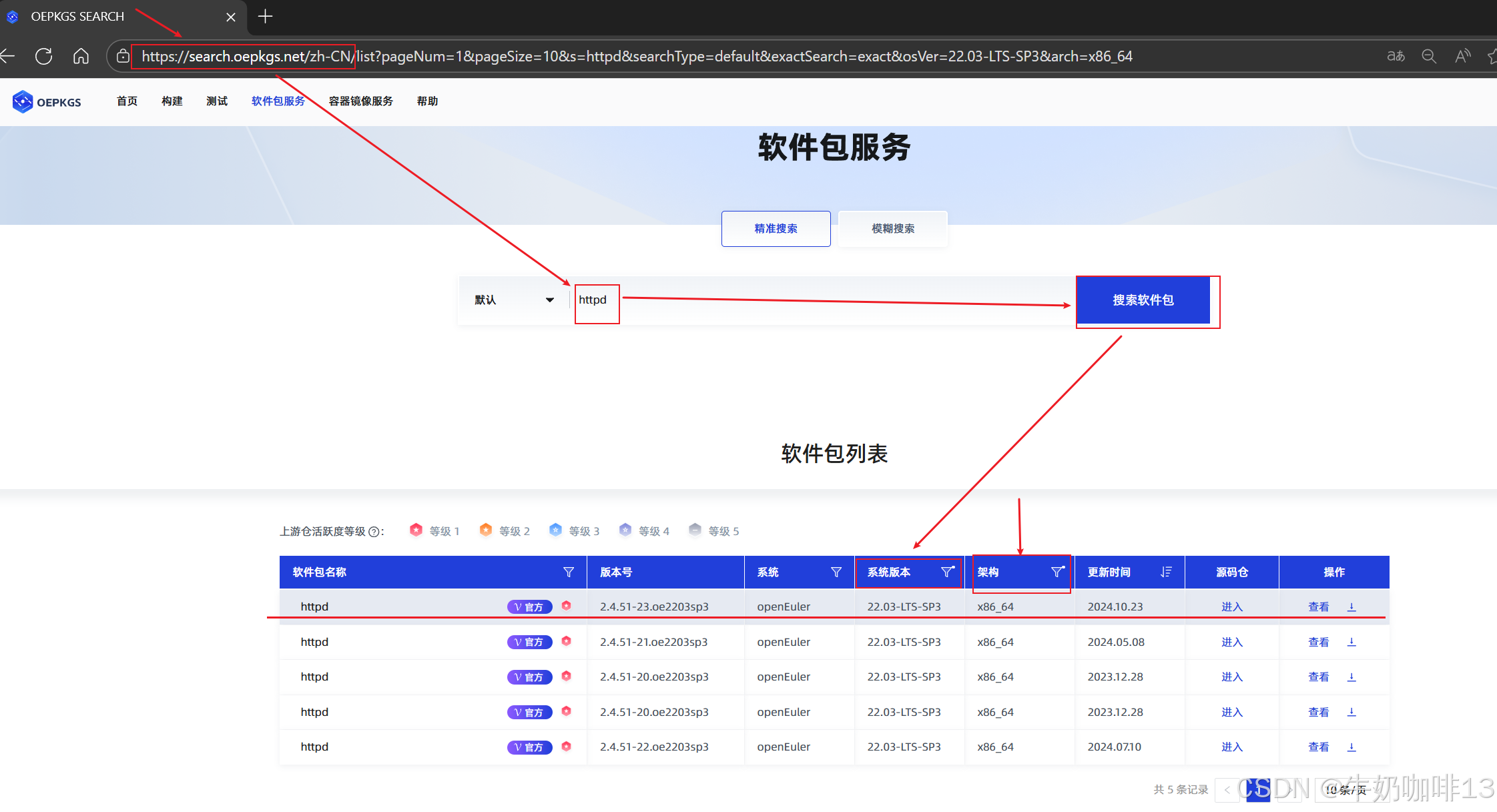
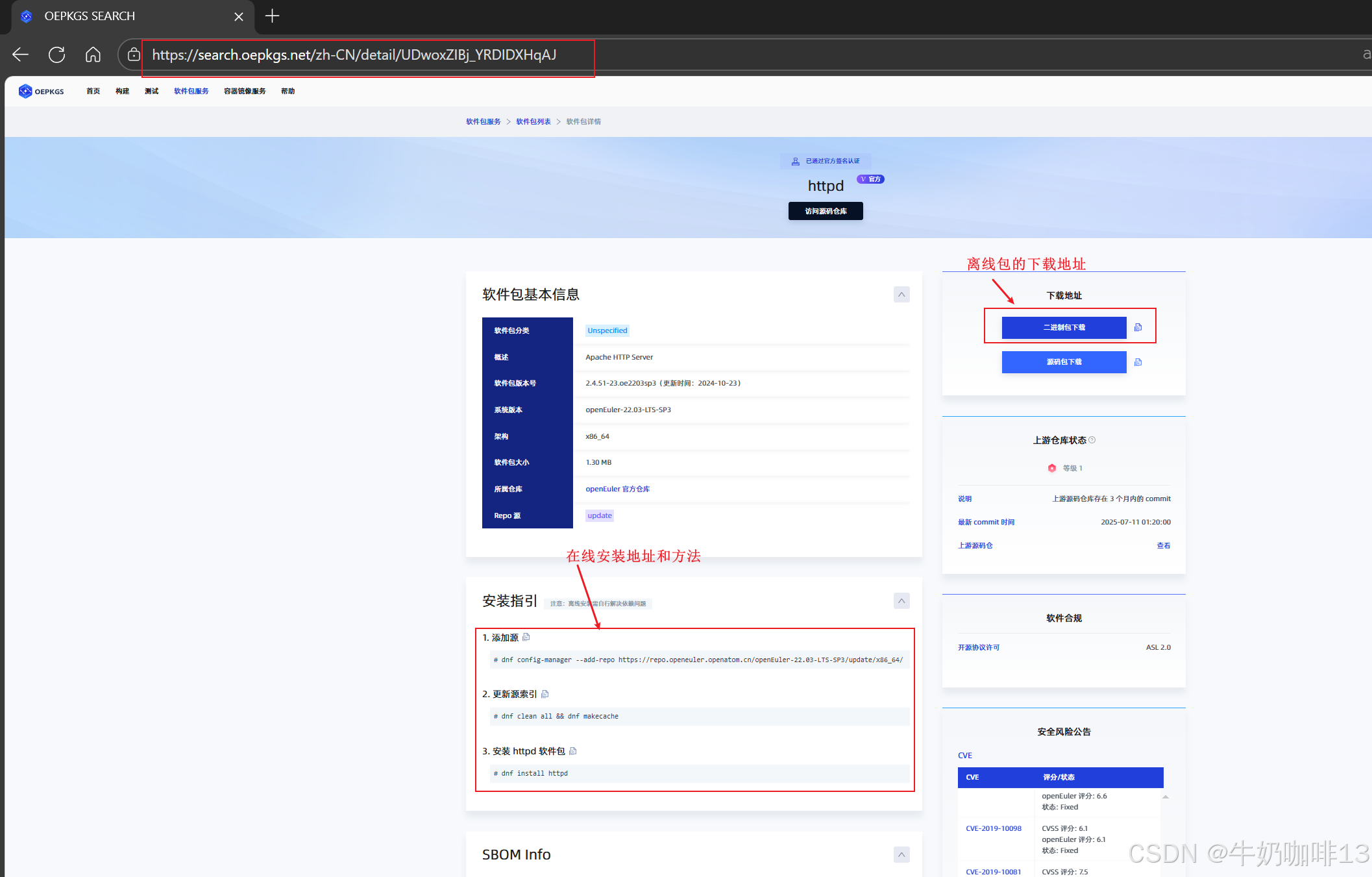
#2.2.3-根据查询到的OpenEuler系统版本到第三方扩展仓库OEPKGS查找Apache服务(httpd)的包,点击【查看】即可进入该httpd的软件包地址(提供在线安装地址命令、离线包等内容下载)
https://search.oepkgs.net/zh-CN/list?pageNum=1&pageSize=10&s=httpd&searchType=default&exactSearch=exact&osVer=22.03-LTS-SP3&arch=x86_64
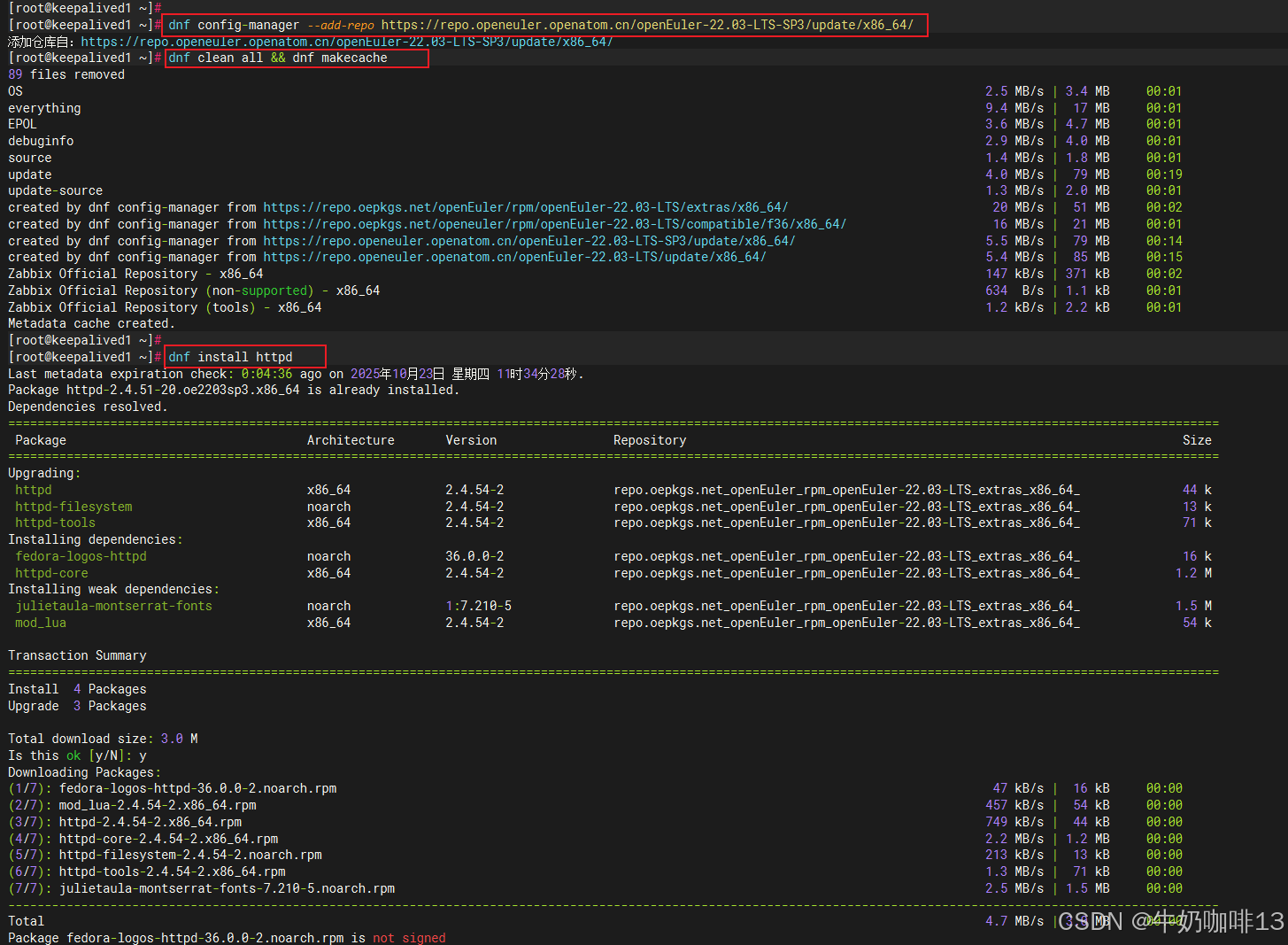
#2.2.4-在OpenEuler上在线安装Apache服务
dnf config-manager --add-repo https://repo.openeuler.openatom.cn/openEuler-22.03-LTS-SP3/update/x86_64/
dnf clean all && dnf makecache
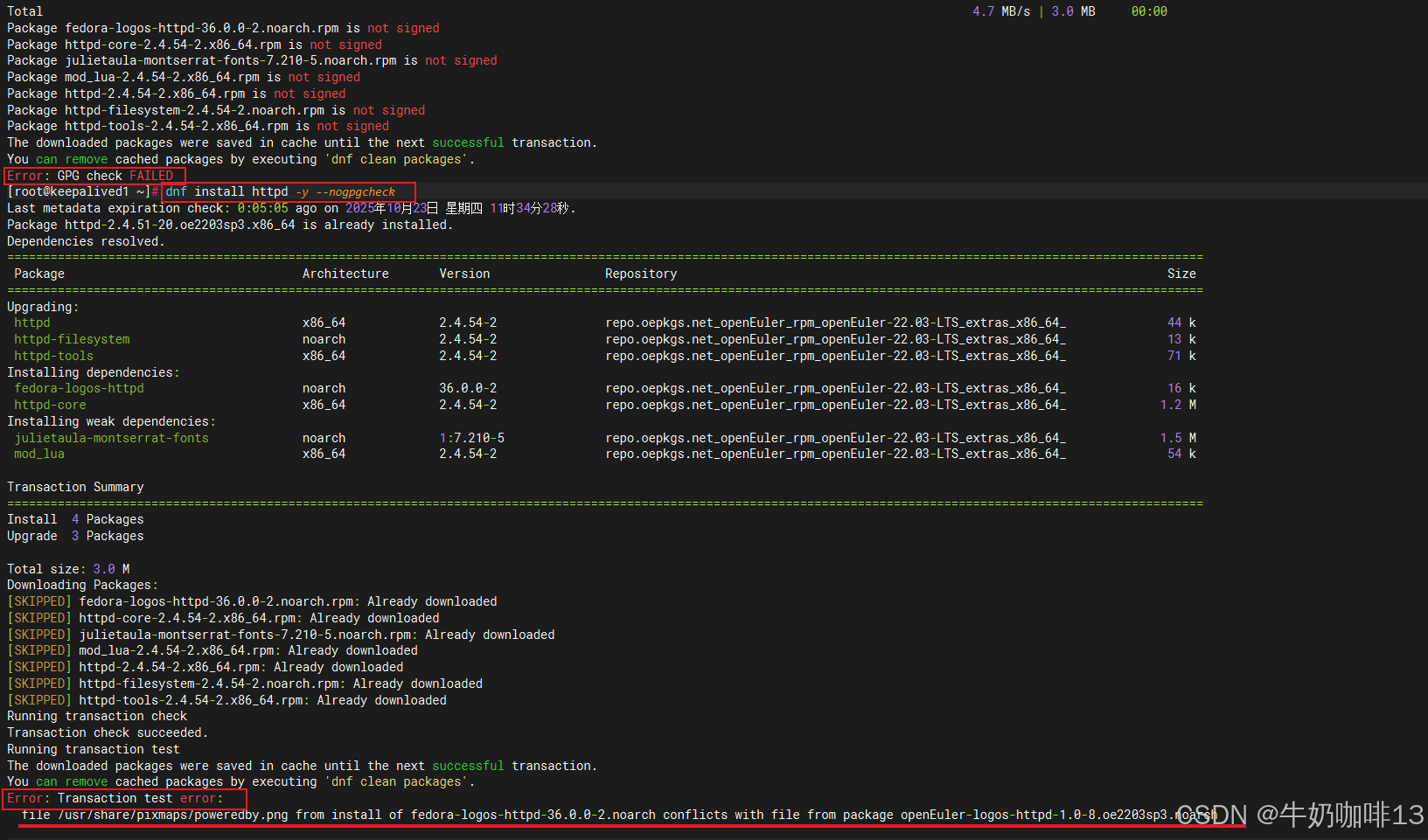
dnf install httpd -y --nogpgcheck

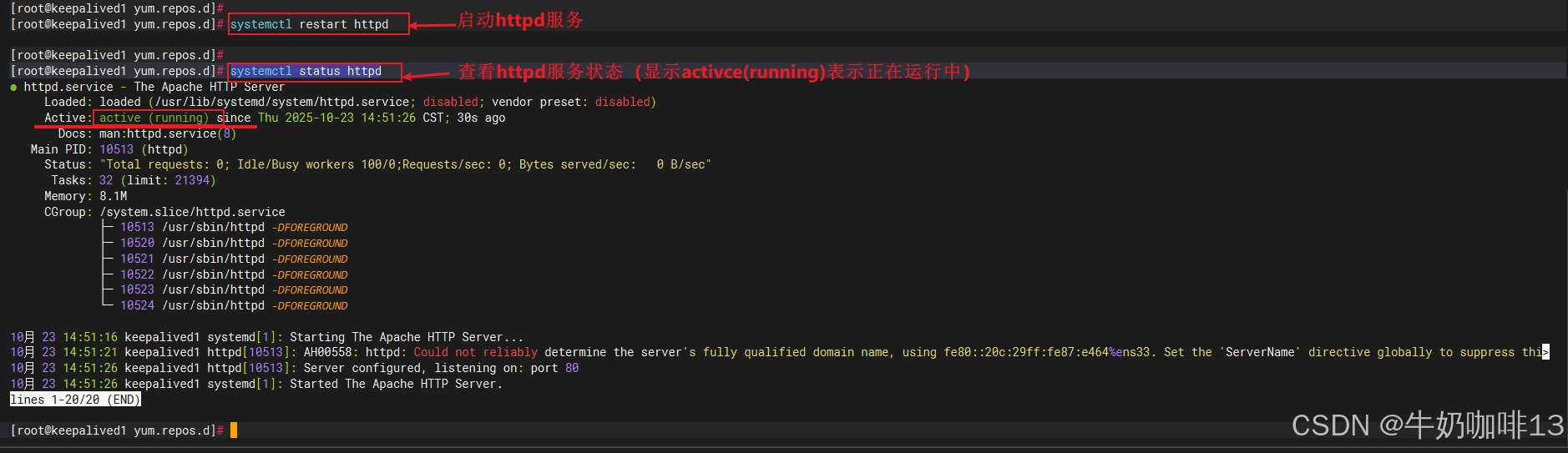
#-启动httpd服务并查看其运行状态
systemctl restart httpd
systemctl status httpd


二、分析并解决【Error: Transaction test error file xx文件 from install of 当前需安装的安装包 conflicts with file from 已经安装过的安装包】这类问题的思路与方法
注意:如果在OpenEuler上安装Apache服务时提示“Error: Transaction test error:
file /usr/share/pixmaps/poweredby.png from install of fedora-logos-httpd-36.0.0-2.noarch conflicts with file from package openEuler-logos-httpd-1.0-8.oe2203sp3.noarch”错误时是由于我们当前的fedora-logos-httpd-36.0.0-2.noarch.rpm包里面含有【/usr/share/pixmaps/poweredby.png】这个文件但是该包含有的这个文件与openEuler-logos-httpd-1.0-8.oe2203sp3.noarch.rpm中已经安装的这个文件相同,这就导致矛盾了。因此为了解决这个问题,我们可以先找到我们的这个httpd-1.0-8.oe2203sp3.noarch.rpm包实行强制安装替换掉这个相同的文件导致的矛盾(若担心可以先将【/usr/share/pixmaps/poweredby.png】这个文件备份一份后再操作)。
#解决OpenEuler安装httpd报Error: Transaction test error:
  file /usr/share/pixmaps/poweredby.png from install of fedora-logos-httpd-36.0.0-2.noarch conflicts with file from package openEuler-logos-httpd-1.0-8.oe2203sp3.noarch这类错误问题的方法

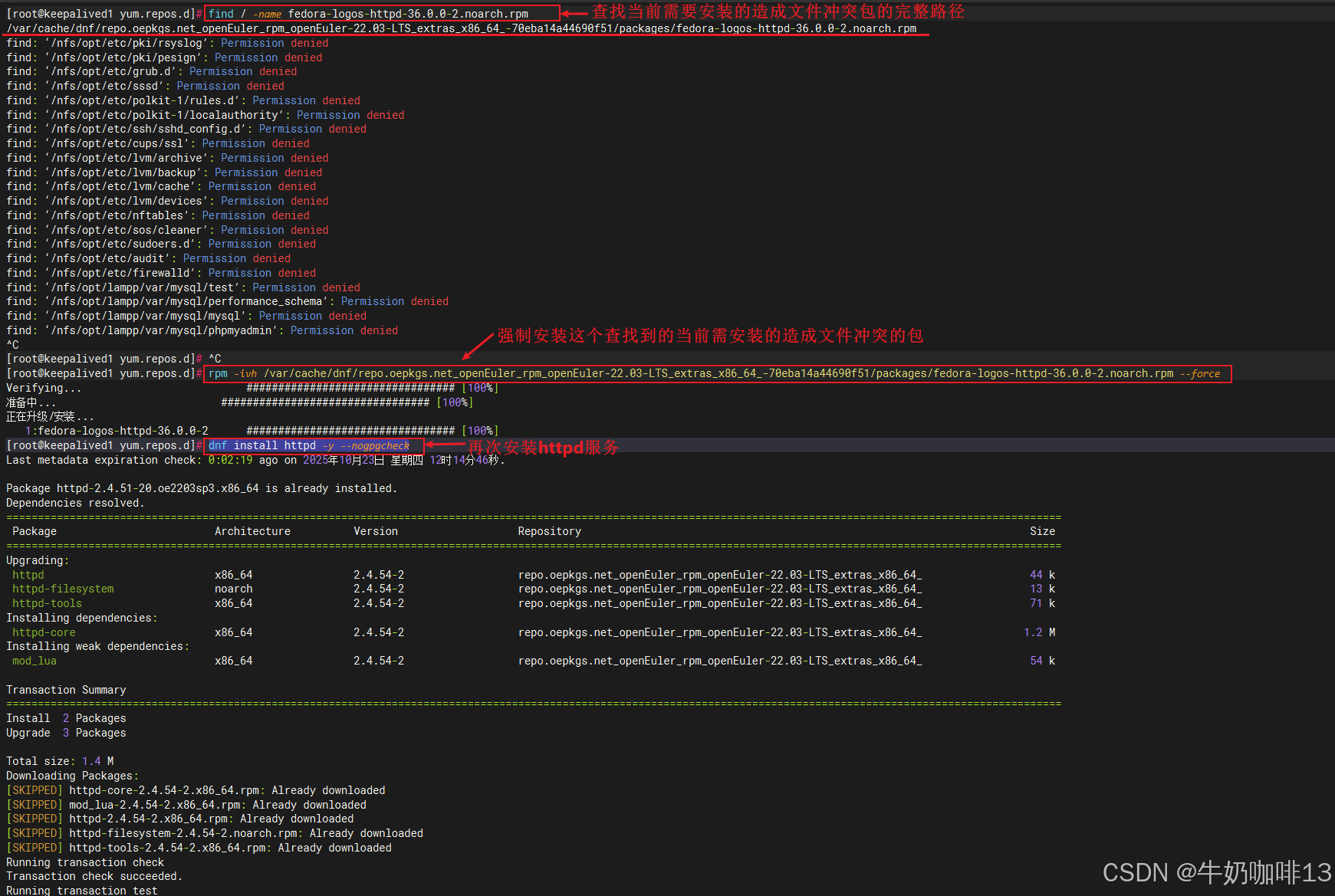
#1-我们先根据报错提示查找到【fedora-logos-httpd-36.0.0-2.noarch.rpm】包所在的路径
find / -name fedora-logos-httpd-36.0.0-2.noarch.rpm

#2-使用查找到的这个【fedora-logos-httpd-36.0.0-2.noarch.rpm】先进行强制安装
#强制安装的语法是:【rpm 需要安装的包 --force】或者是【rpm 需要安装的包 --replacefiles】
#在强制安装前先对【/usr/share/pixmaps/poweredby.png】文件进行备份
mv /usr/share/pixmaps/poweredby.png /usr/share/pixmaps/poweredby.png.bak
rpm -ivh /var/cache/dnf/repo.oepkgs.net_openEuler_rpm_openEuler-22.03-LTS_extras_x86_64_-70eba14a44690f51/packages/fedora-logos-httpd-36.0.0-2.noarch.rpm --force

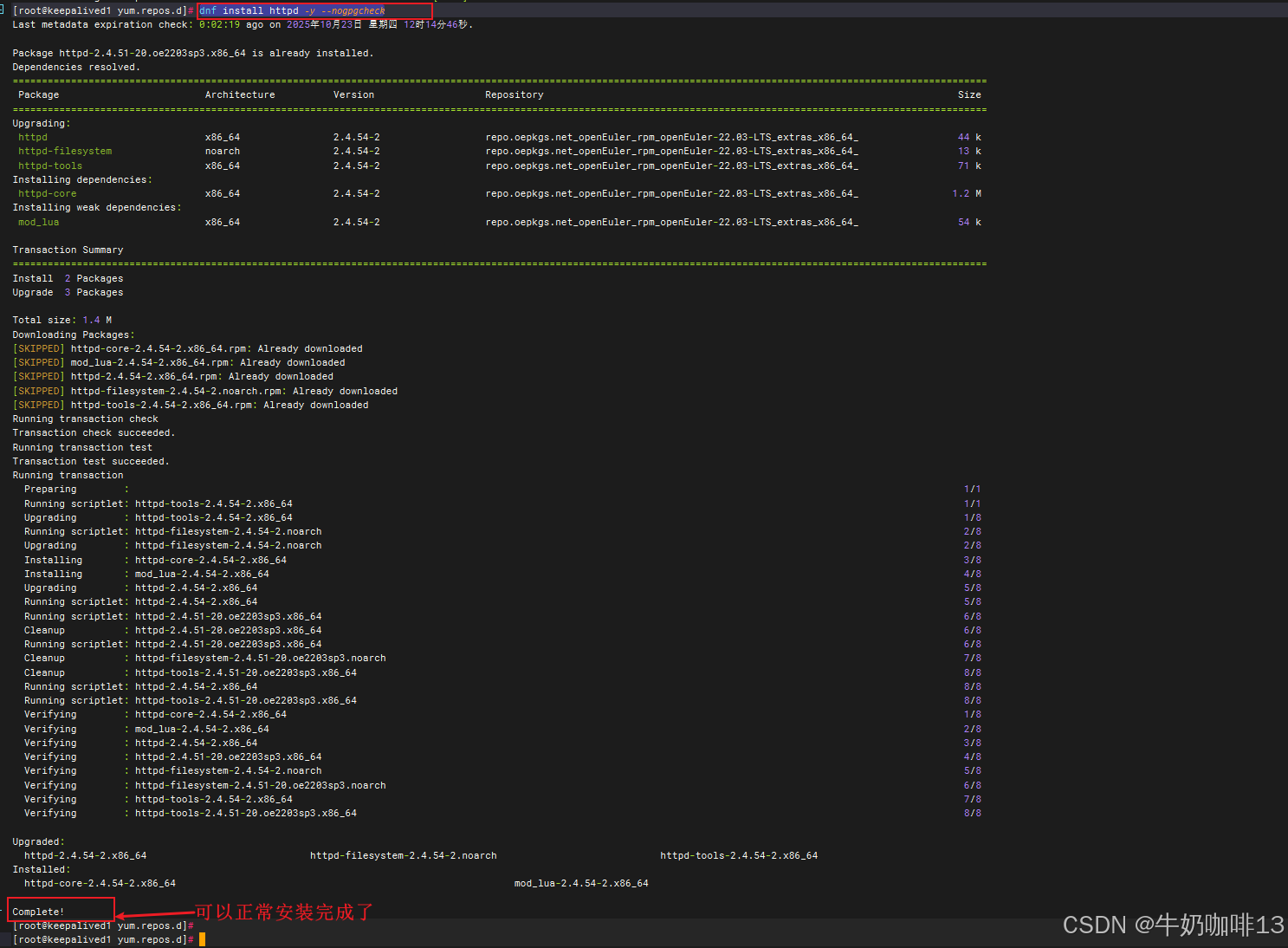
#3-再次安装httpd就可以成功安装了
dnf install httpd -y --nogpgcheck
三、Apache的web应用为什么叫做httpd?
Apache HTTP Server项目最开始是叫做Apache,它是由Apache基金会开发的在全世界十分流行的web服务器软件,且它是开源的;具备跨平台、安全性高、可扩展性强等特点,支持多种编程语言的web应用平台框架。但随着项目的发展,Apache基金会下面已经有多个开源项目;为了更好地描述它的功能,且与其他项目做区分;因此Apache基金会在2.0版本开始就将Apache HTTP Server的守护进程名称命名为httpd。
httpd作为Apache的核心模块,主要负责处理HTTP的请求和响应。而Apache是一个完整的Web服务器软件,除了包含httpd外还有其他的模块(如:SLL加密、虚拟主机等)和功能。
一般在类Unix系统中,通常将Apache HTTP Server称为httpd;但是在windows系统中则直接称为Apache。

北京人形旗下天工造物具身智能开源社区,聚焦具身天工与慧思开物两大平台
更多推荐
 15
15 0
0- 0


 已为社区贡献8条内容

所有评论(0)