微信小程序逆向
·
学习目标
- 熟悉 微信小程序逆向
- 熟悉 开发者工具检测
一、工具的准备
注意:会有封号概率,用小号调试
- WeChatOpenDevTools 工具包(git地址:https://github.com/JaveleyQAQ/WeChatOpenDevTools-Python
- 微信 PC 端安装
- 安装好 WeChatOpenDevTools 工具需要用的 py 库
- 进入到文件解压地址
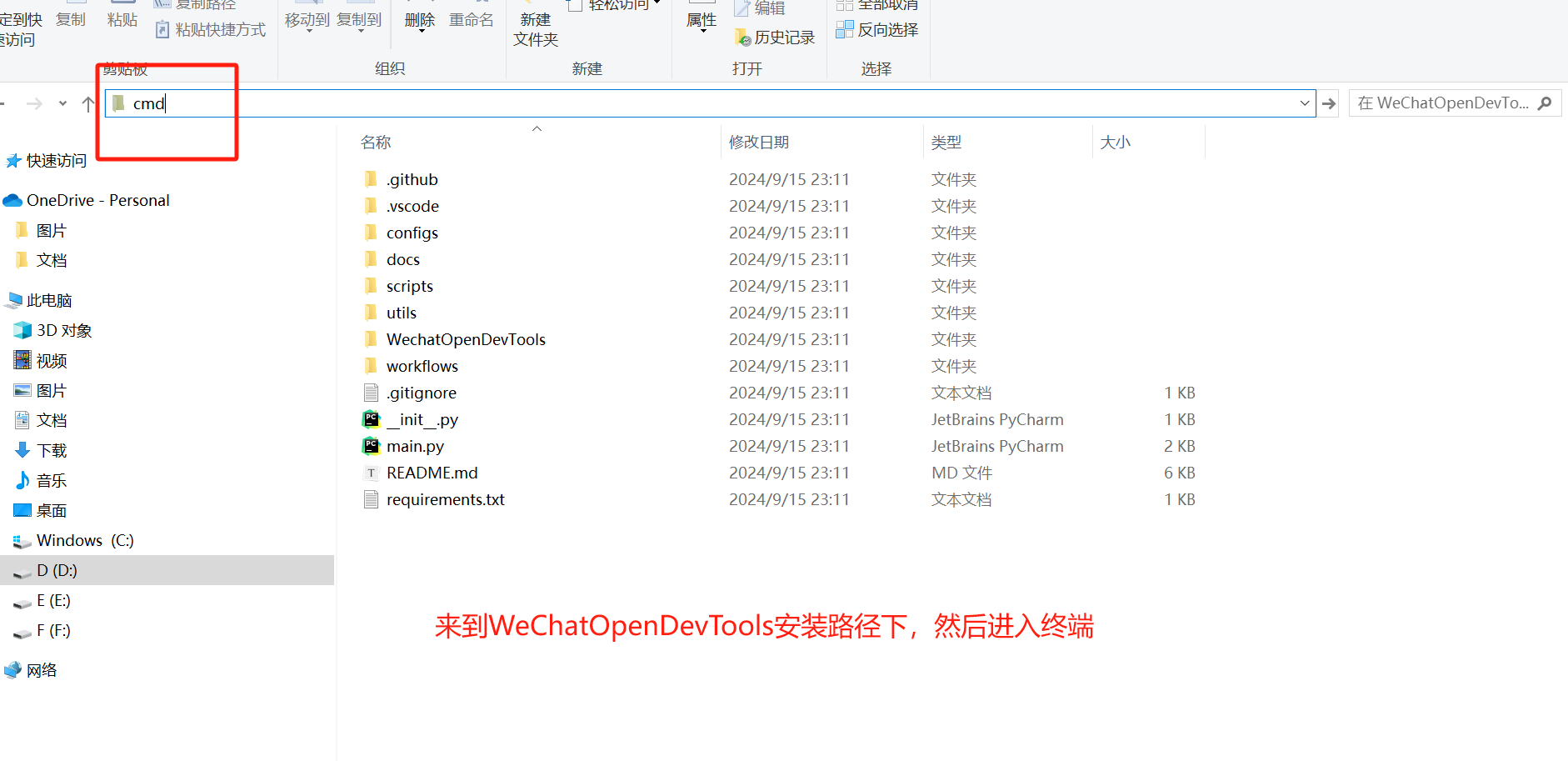
pip3 install -r requirements.txt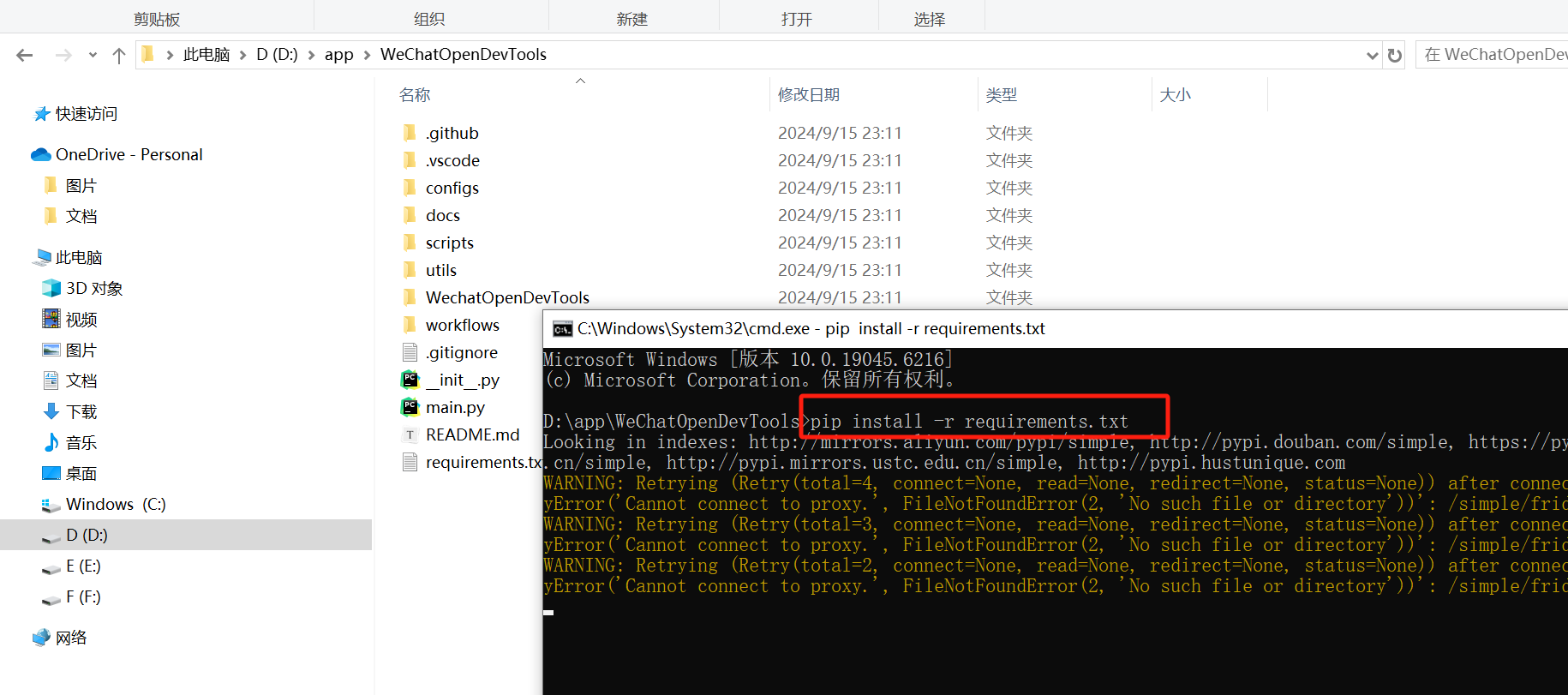
- 开启工具启动注入端(要是关闭的话,说明版本不对应)
python main.py -all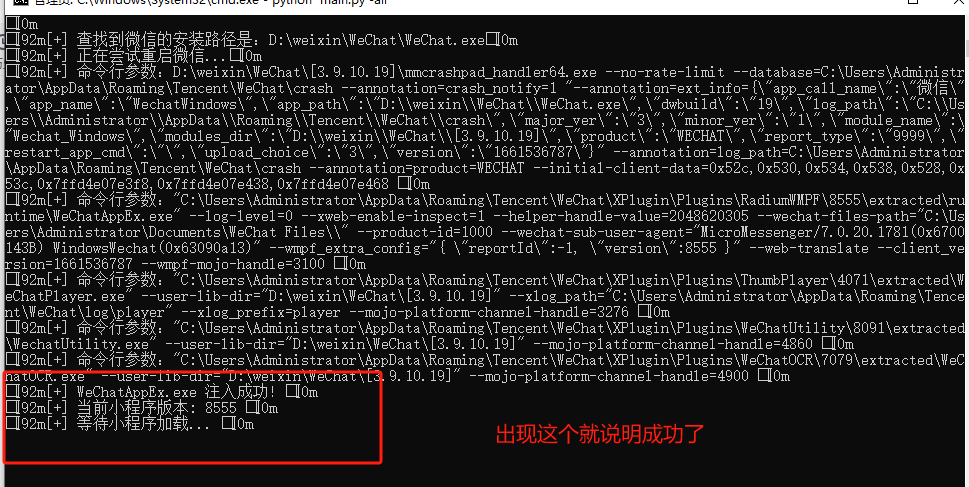
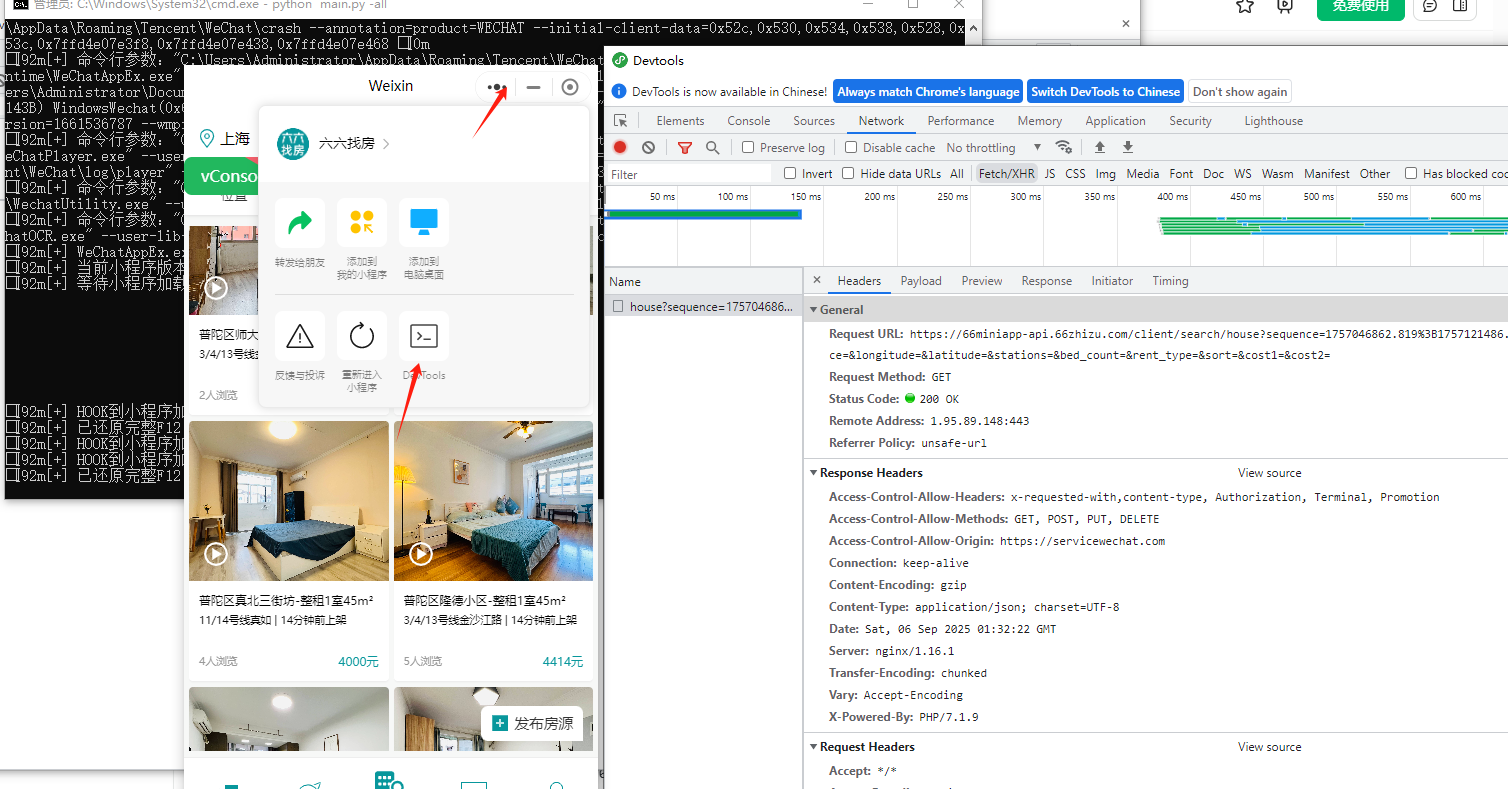
二、案例
1.逆向目标
小程序:六六找房
2.逆向分析
xhr进行定位:
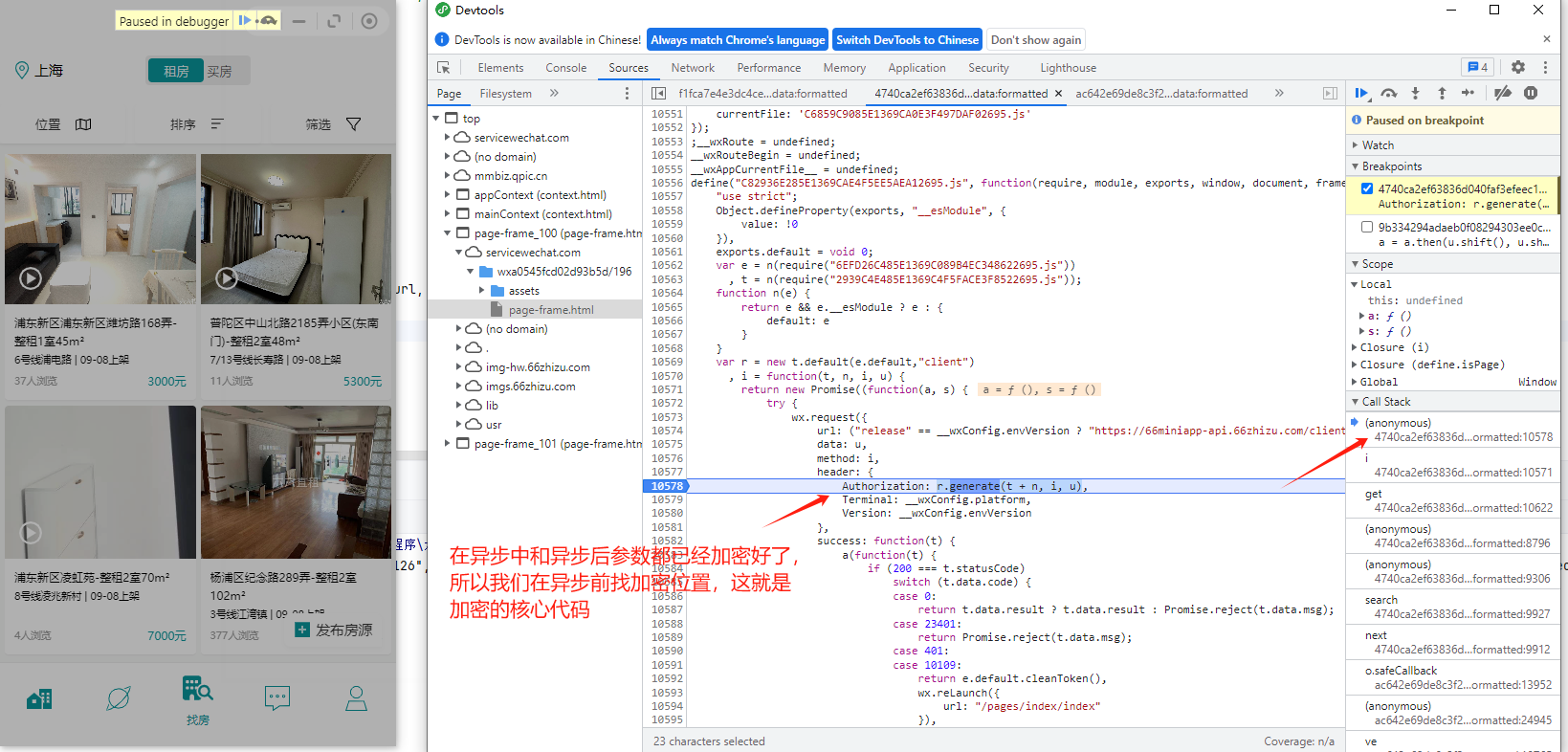
3.代码分析
python 代码:
import requests
import execjs
import os
import csv

with open('六六找房.js','r')as f:
    js_code=f.read()

js=execjs.compile(js_code)
Authorization=js.call('getAuthorization')

class Liuliu():
    def __init__(self):
        self.url='https://66miniapp-api.66zhizu.com/client/search/house'
        self.headers = {
            'Accept': '*/*',
            'Accept-Language': 'zh-CN,zh;q=0.9',
            # 'Authorization': 'timestamp=1757642471;oauth2=6120cfc9668cbbbbfac9c63814c255c3;signature=c3bee25936e9ae4e79d8007090d252e1;secret=6120cfc9668cbbbbfac9c63814c255c3',
            "Authorization":str(Authorization),
            'Connection': 'keep-alive',
            'Content-Type': 'application/json',
            'Referer': 'https://servicewechat.com/wxa0545fcd02d93b5d/196/page-frame.html',
            'Sec-Fetch-Dest': 'empty',
            'Sec-Fetch-Mode': 'cors',
            'Sec-Fetch-Site': 'cross-site',
            'Terminal': 'windows',
            'User-Agent': 'Mozilla/5.0 (Windows NT 10.0; Win64; x64) AppleWebKit/537.36 (KHTML, like Gecko) Chrome/107.0.0.0 Safari/537.36 MicroMessenger/7.0.20.1781(0x6700143B) NetType/WIFI MiniProgramEnv/Windows WindowsWechat/WMPF WindowsWechat(0x63090a13) XWEB/8555',
            'xweb_xhr': '1',
        }
        self.name='liuliu.csv'
        self.sequence="1757244352.719;1757598127.458"

    def get_info(self,sequence):
        params = {
            "sequence": sequence,
            "city": "上海",
            "region": "",
            "distance": "",
            "longitude": "",
            "latitude": "",
            "stations": "",
            "bed_count": "",
            "rent_type": "",
            "sort": "",
            "cost1": "",
            "cost2": ""
        }

        response = requests.get(url=self.url, params=params, headers=self.headers)
        return response.json()


    def parse_data(self,data):
        self.sequence=data['result']['sequence']
        items=data['result']['items']
        if not items:
            return False
        item=dict()
        for i in items:
            item['photo_url']=i['photo']
            item['title']=i['title']
            item['sub_title']=i['sub_title_1']
            item['price']=i['price_label']
            item['view_number_label']=i['view_number_label']
            item['time_label']=i['time_label']
            self.save(item)
            print(f'{item['title']}---保存成功')
        return True   # 返回True表示还有更多数据

    def save(self,item):
        file_exists = os.path.exists(self.name)
        with open('liuliu.csv', 'a', newline='',encoding='utf-8') as f:
            header = ['photo_url', 'title', 'sub_title','price','view_number_label','time_label']
            f_csv = csv.DictWriter(f, fieldnames=header)
            if not file_exists:
                f_csv.writeheader()
            f_csv.writerow(item)


    def main(self):
        page = 1
        has_more = True
        while has_more:
            print("*"*200)
            print(f"正在爬取第{page}页...")
            data = self.get_info(self.sequence)
            has_more = self.parse_data(data)
            page += 1

            # 添加延时,避免请求过于频繁
            import time
            time.sleep(1)

        print("所有页面已爬取完毕")


if __name__ == '__main__':
    liu=Liuliu()
    liu.main()
javascript 代码:
var CryptoJS = require("crypto-js")
function r () {
return Math.round((new Date).getTime() / 1e3)
}
function get_MD5(text) {
return CryptoJS.MD5(text).toString()
}
function core(e, t) {
var n = r().toString(),
s = get_MD5(n),
u = "request_url=".concat("client/search/house", "&content=").concat(n, "&request_method=").concat("get", "×tamp=").concat(n, "&secret=").concat(s),
l = get_MD5(u);
return "timestamp=".concat(n, ";oauth2=").concat(s, ";signature=").concat(l, ";secret=").concat(s)
}
function getAuthorization() {
Authorization = core("/search/house", "GET")
return Authorization
}
// console.log(getAuthorization())
北京人形旗下天工造物具身智能开源社区,聚焦具身天工与慧思开物两大平台
更多推荐
 8
8 0
0- 0


 已为社区贡献5条内容

所有评论(0)