正则表达式练习系列--->单词匹配
·
正则表达练习系列--->单词匹配
汇总
#re.search()匹配模式
#re.search(pattern, text, re.IGNORECASE)
#re.IGNORECASE忽略大小写

#match = re.search(pattern, text, re.IGNORECASE)
#match.group()返回匹配到的字符串
#match.start()返回匹配字符串的起始位置(索引,从0开始)
#match.end()返回匹配字符串的结束位置(索引,不包含该位置字符)

#pattern = r"\byanxiao\b"  # \b 是单词边界,确保精确匹配"yanxiao"这个单词

#enumerate()函数

#字典的使用
# 遍历所有匹配
for match in matches:
    # 记录每个匹配的内容和位置
    results.append({
        "word": match.group(),
        "start": match.start(),
        "end": match.end()
    })


# 将结果写入flag.txt文件
with open("flag.txt", "w", encoding="utf-8") as file:
    # join方法将列表中的字符串用换行符连接
    file.write("\n".join(output_lines))
a.检查字符串是否包含特定单词(1)
import re

# 检查文本中是否包含"apple"(不区分大小写)
text = "I like Apple and bananas"
pattern = r"apple"
match = re.search(pattern, text, re.IGNORECASE)  # re.IGNORECASE 忽略大小写

if match:
    print(f"找到匹配: '{match.group()}' 在位置 {match.start()}-{match.end()}")
else:
    print("未找到匹配")


#找到匹配: 'Apple' 在位置 7-12
代码详解
import re  # 导入Python的正则表达式模块re,用于处理正则表达式相关操作

# 定义要检查的文本内容
text = "I like Apple and bananas"

# 定义要匹配的正则表达式模式:查找"apple"这个单词
# r前缀表示这是一个原始字符串,避免正则表达式中的特殊字符被Python解释器转义
pattern = r"apple"

# 使用re.search()函数在文本中搜索匹配模式
# 参数说明:
#   pattern: 要匹配的正则表达式模式
#   text: 要在其中搜索的文本
#   re.IGNORECASE: 可选标志,表示忽略大小写进行匹配
match = re.search(pattern, text, re.IGNORECASE)

# 判断是否找到匹配结果
if match:
    # 如果找到匹配,输出相关信息
    # match.group()返回匹配到的字符串
    # match.start()返回匹配字符串的起始位置(索引,从0开始)
    # match.end()返回匹配字符串的结束位置(索引,不包含该位置字符)
    print(f"找到匹配: '{match.group()}' 在位置 {match.start()}-{match.end()}")
else:
    # 如果未找到匹配,输出提示信息
    print("未找到匹配")
a.检查字符串包含特定单词多少个(2)
#查看有多少个yanxiao

First paragraph: In today's CTF competition, yanxiao quickly tackled the web challenge, demonstrating how yanxiao's deep understanding of XSS vulnerabilities gives an edge. Teammates relied on yanxiao to decode the hidden message in the forensic task, as yanxiao's attention to detail is unmatched. When the crypto problem seemed unsolvable, yanxiao suggested a shift cipher approach, proving why yanxiao is a key asset to the team.
import re

text = "First paragraph: In today's CTF competition, yanxiao quickly tackled the web challenge, demonstrating how yanxiao's deep understanding of XSS vulnerabilities gives an edge. Teammates relied on yanxiao to decode the hidden message in the forensic task, as yanxiao's attention to detail is unmatched. When the crypto problem seemed unsolvable, yanxiao suggested a shift cipher approach, proving why yanxiao is a key asset to the team."
pattern = r"\byanxiao\b"  # \b 是单词边界,确保精确匹配"yanxiao"这个单词

# findall 会返回所有匹配的列表,列表长度就是出现次数
matches = re.findall(pattern, text, re.IGNORECASE)
count = len(matches)

print(f"单词 'yanxiao' 出现的次数为: {count}")

#单词 'yanxiao' 出现的次数为: 6
a.检查字符串包含特定单词多少个,每一个的位置在哪里(3)
import re

# 要检查的文本内容
text = "First paragraph: In today's CTF competition, yanxiao quickly tackled the web challenge, demonstrating how yanxiao's deep understanding of XSS vulnerabilities gives an edge. Teammates relied on yanxiao to decode the hidden message in the forensic task, as yanxiao's attention to detail is unmatched. When the crypto problem seemed unsolvable, yanxiao suggested a shift cipher approach, proving why yanxiao is a key asset to the team."

# 定义要查找的单词模式,\b表示单词边界
pattern = r"\byanxiao\b"

# 使用finditer获取所有匹配对象,包含位置信息
matches = re.finditer(pattern, text)

# 存储结果的列表
results = []

# 遍历所有匹配
for match in matches:
    # 记录每个匹配的内容和位置
    results.append({
        "word": match.group(),
        "start": match.start(),
        "end": match.end()
    })

# 输出结果
print(f"单词 'yanxiao' 共出现 {len(results)} 次:")
for i, item in enumerate(results, 1):
    print(f"第 {i} 次: 位置 {item['start']}-{item['end']}")


# 单词 'yanxiao' 共出现 6 次:
# 第 1 次: 位置 45-52
# 第 2 次: 位置 106-113
# 第 3 次: 位置 193-200
# 第 4 次: 位置 255-262
# 第 5 次: 位置 342-349
# 第 6 次: 位置 397-404
enumerate()函数
enumerate 是 Python 内置函数,用于将一个可迭代对象(如列表、字符串、元组等)组合成一个索引序列,同时返回元素的索引和值。
它的基本语法是:
enumerate(iterable, start=0)
iterable:需要遍历的可迭代对象start:可选参数,指定索引的起始值,默认从 0 开始
举个例子(结合之前的代码):
# 假设有一个列表
fruits = ['apple', 'banana', 'orange']

# 不使用 enumerate
index = 0
for fruit in fruits:
    print(f"第 {index+1} 个水果:{fruit}")
    index += 1

# 使用 enumerate(更简洁)
for i, fruit in enumerate(fruits, start=1):  # start=1 表示索引从 1 开始
    print(f"第 {i} 个水果:{fruit}")
第 1 个水果:apple
第 2 个水果:banana
第 3 个水果:orange
代码详解
text = "..." 包含多个 'yanxiao' 的文本

matches  →  [匹配1, 匹配2, 匹配3, 匹配4, 匹配5, 匹配6]
            (finditer返回的匹配对象集合)

循环开始:
第1次循环:
match = 匹配1(第一个'yanxiao')
→ 提取信息:
   match.group() → 'yanxiao'(匹配到的单词)
   match.start() → 45(起始位置)
   match.end() → 52(结束位置)
→ 把这些信息打包成字典:{"word": "yanxiao", "start": 45, "end": 52}
→ 追加到results列表 → results = [{"word":..., "start":..., "end":...}]

第2次循环:
match = 匹配2(第二个'yanxiao')
→ 提取信息:start=106, end=113
→ 打包成新字典,追加到results → results = [第一个字典, 第二个字典]

... 以此类推 ...

第6次循环结束后:
results = [
  {"word": "yanxiao", "start": 45, "end": 52},
  {"word": "yanxiao", "start": 106, "end": 113},
  {"word": "yanxiao", "start": 193, "end": 200},
  {"word": "yanxiao", "start": 255, "end": 262},
  {"word": "yanxiao", "start": 342, "end": 349},
  {"word": "yanxiao", "start": 397, "end": 404}
]
a.检查字符串包含特定单词多少个,每一个的位置在哪里,并将它写进flag.txt中
import re

# 要检查的文本内容
text = "First paragraph: In today's CTF competition, yanxiao quickly tackled the web challenge, demonstrating how yanxiao's deep understanding of XSS vulnerabilities gives an edge. Teammates relied on yanxiao to decode the hidden message in the forensic task, as yanxiao's attention to detail is unmatched. When the crypto problem seemed unsolvable, yanxiao suggested a shift cipher approach, proving why yanxiao is a key asset to the team."

# 定义要查找的单词模式,\b表示单词边界
pattern = r"\byanxiao\b"

# 使用finditer获取所有匹配对象,包含位置信息
matches = re.finditer(pattern, text)

# 存储结果的列表
results = []

# 遍历所有匹配
for match in matches:
    # 记录每个匹配的内容和位置
    results.append({
        "word": match.group(),
        "start": match.start(),
        "end": match.end()
    })

# 准备要写入文件的内容
output_lines = [f"单词 '{results[0]['word']}' 共出现 {len(results)} 次:"]


for i, item in enumerate(results, 1):
    output_lines.append(f"第 {i} 次: 位置 {item['start']}-{item['end']}")

# 将结果写入flag.txt文件
with open("flag.txt", "w", encoding="utf-8") as file:
    # join方法将列表中的字符串用换行符连接
    file.write("\n".join(output_lines))

# 同时在控制台显示结果
print("\n".join(output_lines))
print("\n结果已成功写入flag.txt文件")
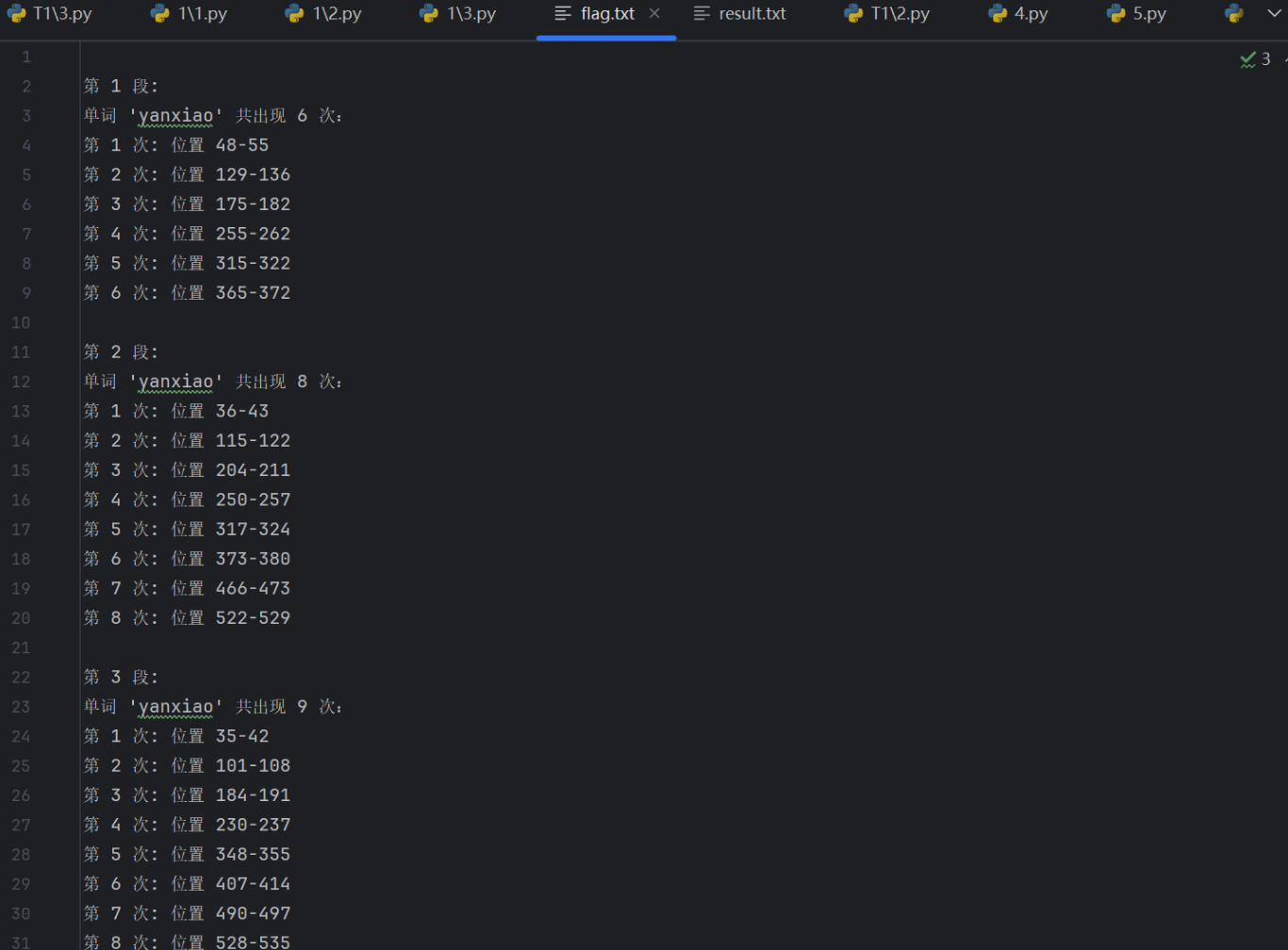
a.检查字符串包含特定单词多少个,每一个的位置在哪里,并将它写进flag.txt中,这次处理三段话
import re

# 定义三段文本
paragraphs = [
    # 第一段
    "In today's CTF competition preparation session, yanxiao shared valuable tips on web security, and everyone listened carefully to yanxiao's analysis of common vulnerabilities. yanxiao demonstrated a clever approach to bypassing authentication, showing why yanxiao is considered a top player. Teammates often rely on yanxiao's insights to solve tricky challenges, as yanxiao always thinks outside the box.",
    # 第二段
    "During the regional CTF tournament, yanxiao quickly identified the SQL injection point in the first challenge, and yanxiao's speed surprised the opponents. When teammates got stuck on the crypto problem, yanxiao suggested a possible cipher type, and yanxiao's hint led them to the solution. The audience cheered when yanxiao successfully exploited the buffer overflow, and yanxiao's calm under pressure helped the team stay focused. Even the judges commented on how yanxiao's strategic thinking set their team apart, with yanxiao's contributions being crucial to their lead.",
    # 第三段
    "At the CTF workshop for beginners, yanxiao explained binary exploitation basics in simple terms, and yanxiao's examples made complex concepts easy to grasp. Newcomers frequently asked yanxiao for advice on practice platforms, and yanxiao patiently recommended resources tailored to their skills. When a participant struggled with a forensics task, yanxiao walked them through file carving step by step, and yanxiao's encouragement boosted their confidence. By the end, everyone agreed that yanxiao's guidance was invaluable, as yanxiao not only taught techniques but also shared the mindset needed to excel in CTFs, with yanxiao's passion for the sport inspiring everyone in attendance."
]

# 定义要查找的单词模式
pattern = r"\byanxiao\b"

# 存储所有段落的结果
all_results = []

# 处理每一段
for para_num, text in enumerate(paragraphs, 1):
    # 查找所有匹配
    matches = re.finditer(pattern, text)

    # 存储当前段落的结果
    results = []
    for match in matches:
        results.append({
            "word": match.group(),
            "start": match.start(),
            "end": match.end()
        })

    all_results.append({
        "paragraph": para_num,
        "count": len(results),
        "matches": results
    })

# 准备输出内容
output_lines = []
for result in all_results:
    para_num = result["paragraph"]
    count = result["count"]
    matches = result["matches"]

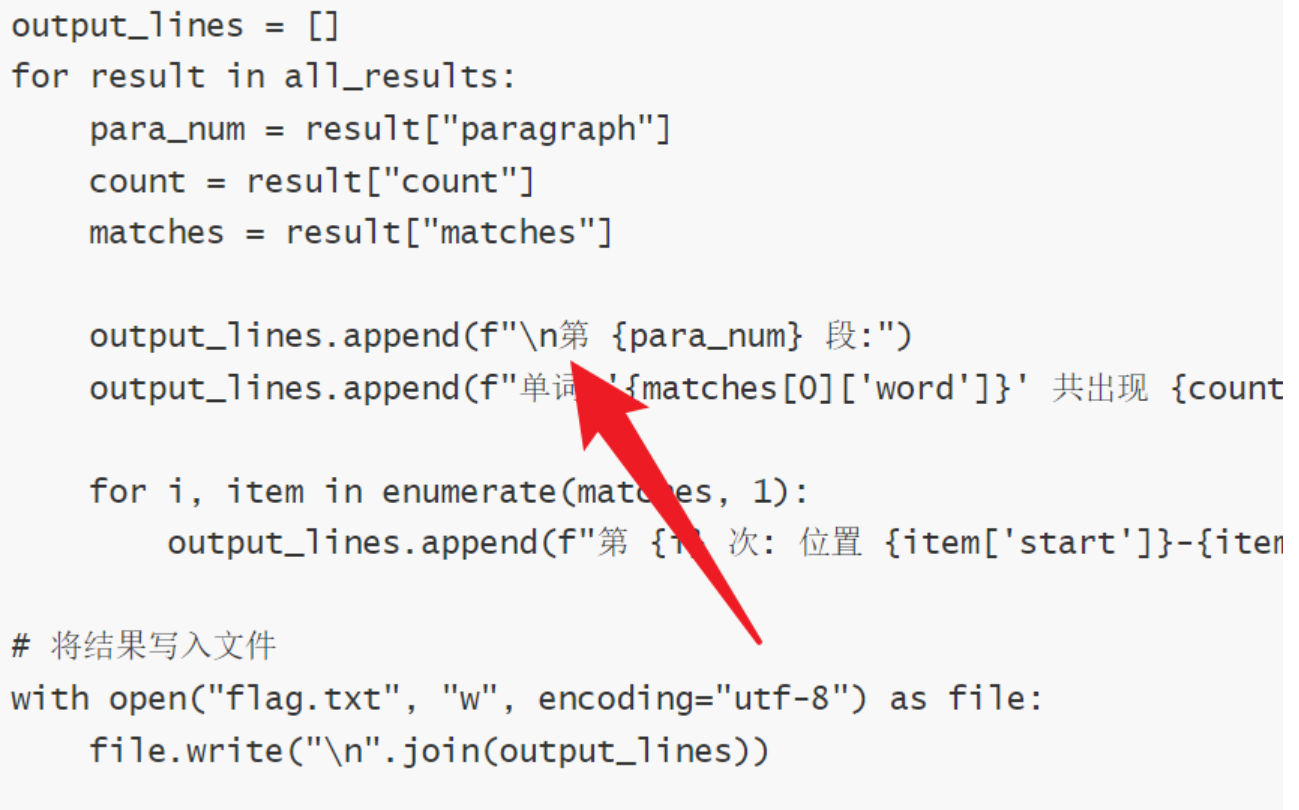
    output_lines.append(f"\n第 {para_num} 段:")
    output_lines.append(f"单词 '{matches[0]['word']}' 共出现 {count} 次:")

    for i, item in enumerate(matches, 1):
        output_lines.append(f"第 {i} 次: 位置 {item['start']}-{item['end']}")

# 将结果写入文件
with open("flag.txt", "w", encoding="utf-8") as file:
    file.write("\n".join(output_lines))

# 在控制台显示结果
print("\n".join(output_lines))
print("\n结果已成功写入flag.txt文件")
a.取消flag.txt的空行

北京人形旗下天工造物具身智能开源社区,聚焦具身天工与慧思开物两大平台
更多推荐
 10
10 0
0- 0


 已为社区贡献5条内容

所有评论(0)