Vue2 Vue父子传参使用computed属性,子组件接收参数为undefined, 问题二 子组件自定义事件传递数据,父组件直接把props或绑定对象替换掉,导致无限递归
背景:
在项目中,我封装了一个查询组件,父组件想用计算属性初始化日期,然后当子组件改变筛选条件的时候触发自定义事件通知父组件
//父组件
// 父组件
computed: {
  startDate() {
    return new Date().daysAgo(7).toMidnight().strftime()
  },
  endDate() {
    return new Date().daysAgo(1).toMidnight().strftime()
  }
},
data() {
  return {
    query: {
      //不能这样使用
      createTime: [this.startDate, this.endDate],
      regionId: null
    }
  }
}
然后把query通过props 传给子组件
<ChildFilterBar :model="query" @update:model="updateQuery" />
一. 问题 (一)
1.问题现象
子组件mounted
mounted() {
console.log('子组件获取 model:', this.model) // 对象看起来完整
console.log('子组件获取 createTime:', this.model.createTime) // undefined
}
2. 为什么子组件会是undefined?
1. Vue初始化顺序
Vue组织初始化顺序(Vue2):
- 初始化props
- 初始化data()
- 初始化computed
- 生命周期钩子(created->mounted...)
我的写法中
query: { createTime: [this.startDate, this.endDate] }
- data( ) 初始化时,computed,startDate和computed,endDate还没计算
- 子组件mounted时接收的props自然是[undefined,undefined]
3. 解决方案
1. 父组件钩子里重新赋值(推荐)
data() {
return {
query: {
createTime: [],
regionId: null
}
}
},
created() {
this.query.createTime = [this.startDate, this.endDate]
}
- 子组件mounted时拿到完整数据
2. 父组件用computed 构建对象
computed: {
query() {
return {
createTime: [this.startDate, this.endDate],
regionId: null
}
}
}
3. 子组件watch 或 $nextTick
使用watch
watch: {
model: {
deep: true,
immediate: true,
handler(val) {
this.localModel = { ...val }
}
}
}
4. 总结
1. 问题根源: data( ) 初始化早于computed -> 父组件data里计算属性还没值->子组件mounted时props是undefined
2.核心解决办法:保证父组件传递给子组件的数据在props传递时已经是可用值
- 最推荐在父组件created 或mounted钩子里赋值
- 或使用computed构建只读对象
- 异步更新可用watch / nextTick
二. 问题 (二)
子组件
  watch: {
    model: {
      handler (newVal) {
        this.localModel = { ...newVal };
      },
      deep: true
    },
    // 监听 localModel 改变时通知父组件
    localModel: {
      handler (newVal) {
        this.$emit("update:model", newVal);
      },
      deep: true
    }
  },
父组件
updateQuery (newQuery) {
console.log('子组件传过来的newQuery', newQuery)
this.query = newQuery //这样会导致 子组件一直触发localmodel改变,无限递归
this.toQuery()
},
导致问题:
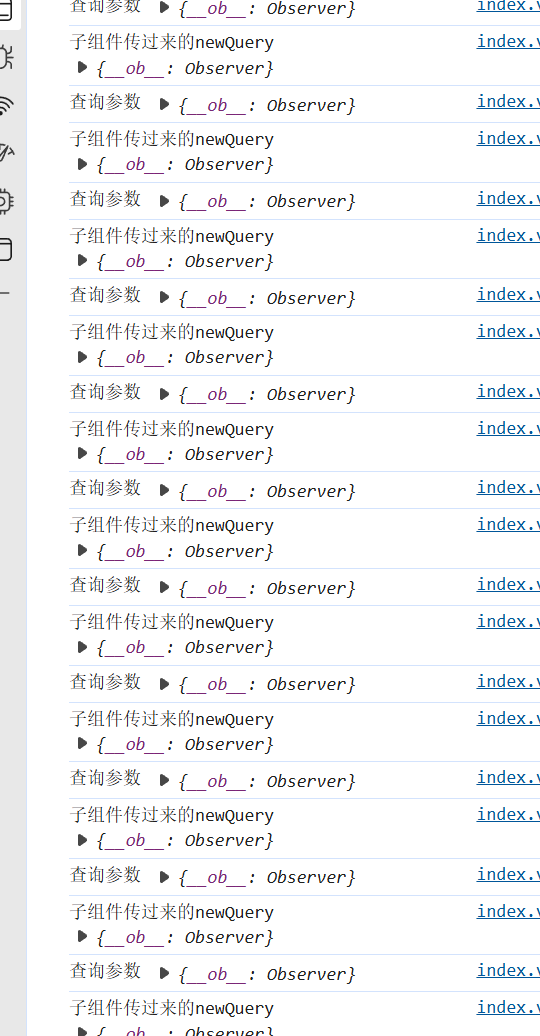
1.问题现象
- 子组件通过
$emit('update:model', model)触发 - 父组件this.query=newQuery 直接替换了query对象
- Vue会检测到query变化,触发子组件的v-model更新->子组件又$emit, 父组件又赋值->无限循环
2.原因分析
- Vue的响应式系统是对象引用监控
- 当你直接this.query=newQuery,实际上改变了引用
- 子组件绑定是query对象,如果子组件watch或computed基于model做赋值,也会再次触发@emit
- 所以形成无线循环
3.正确做法,
1. 只修改对象内部字段,而不要替换对象
updateQuery(newQuery) {
console.log('子组件传过来的newQuery', newQuery)// 只修改已有字段
this.query.regionId = newQuery.regionId
this.query.createTime = newQuery.createTimethis.toQuery()
}
2.或者浅拷贝对象
updateQuery(newQuery) {
this.query = { ...newQuery } // 创建新对象,不直接绑定子组件对象
this.toQuery()
}
3.推荐方法
- 对于父子组件共享查询条件这种场景,推荐父组件data里的query 是固定对象
- 子组件通过
$emit('update:field', value)或自定义事件更新某个字段 - 父组件只修改字段,不替换整个对象引用
// 父组件
updateQueryField(field, value) {
this.query[field] = value
this.toQuery()
}
//子组件
watch: {
  localModel: {
    deep: true,
    handler(newVal, oldVal) {
      // 遍历对比,找到被修改的字段
      for (const key in newVal) {
        if (newVal[key] !== oldVal[key]) {
          // 精确通知父组件
          this.$emit("update:field", { field: key, value: newVal[key] })
        }
      }
      // 同时保留全量回传
      this.$emit("update:model", newVal)
    }
  }
}
三 . 查询组件完整代码
<template>
  <div>
    <!-- 动态字段 -->
    <div class="filter-fields">
      <div class="filter-item" v-for="field in normalizedFields" :key="field.prop">
        <div class="filter-label">{{ field.label }}</div>
        <!-- 下拉选择 @change="areaQuery" -->
        <el-select  v-if="field.type === 'select'" v-model="localModel[field.prop]" clearable class="filter-control"
          :placeholder="field.placeholder || '请选择'">
          <el-option v-for="opt in field.options" :key="opt.region_id" :label="opt.region_name"
            :value="opt.region_id" />
        </el-select>
        <!-- 日期范围选择 -->
        <DateRangePicker v-else-if="field.type === 'date'" v-model="localModel[field.prop]" class="filter-control" />

        <!-- 输入框 -->
        <el-input v-else-if="field.type === 'input'" v-model="localModel[field.prop]" class="filter-control"
          :placeholder="field.placeholder || '请输入'" />
      </div>
      <div class="filter-buttons">
        <el-button size="mini" type="success" icon="el-icon-search" @click="$emit('query')">
          筛选
        </el-button>
        <el-button size="mini" type="success" icon="el-icon-refresh-left" @click="handleClear">
          重置
        </el-button>
      </div>
    </div>

    <slot></slot>
  </div>
</template>

<script>
import DateRangePicker from "@/components/DateRangePicker";
import { mapState } from 'vuex'
export default {
  name: "SimpleFilterBar",
  components: { DateRangePicker },

  props: {
    model: {
      type: Object,
      required: true,
      default: () => ({
        createTime: [new Date(), new Date()],
        regionId: null
      })
    },
    fields: {
      type: Array, default: () =>
        [
          {
            label: '运营区',
            prop: 'regionId',
            type: 'select',
            options: []  // 响应式绑定 Vuex 数据
          },
          {
            label: '指定日期',
            prop: 'createTime',
            type: 'date'
          },
        ]
    }
  },
  data () {
    return {
      // 本地副本,安全修改
      localModel: { ...this.model }
    };
  },
  computed: {
    ...mapState('Publicdata', ['regionList']),
    // 如果fields的options为空,则从vuex中获取 默认数据
    normalizedFields () {
      return this.fields.map(f => {
        if (f.type === 'select' && (!f.options || f.options.length === 0)) {
          return { ...f, options: this.regionList }
        }
        return f
      })
    }
  },
  watch: {
    model: {
      handler (newVal) {
        this.localModel = { ...newVal };
      },
      deep: true
    },
    // 监听 localModel 改变时通知父组件
    localModel: {
      handler (newVal) {
        this.$emit("update:model", newVal);
      },
      deep: true
    }
  },
  methods: {
    // //区域发生改变时,通知父组件
    areaQuery (value) {
      this.$emit("areachange", value);
    },
    handleClear () {
      this.fields.forEach(f => {
        this.localModel[f.prop] = f.type === "date" ? [] : null;
      });
      this.$emit("clear");
    }
  }
};
</script>

<style scoped>
.filter-fields {
  display: flex;
  align-items: center;
  flex-wrap: wrap;
  gap: 15px;
}

.filter-item {
  display: flex;
  align-items: center;
  flex-wrap: nowrap;
  gap: 5px;
}

.filter-label {
  color: #666;
  white-space: nowrap;
  min-width: 40px;
  padding-right: 10px;
}

.filter-control {
  min-width: 150px;
}

.filter-buttons {
  display: flex;
  align-items: center;
  gap: 5px;
}
</style>

北京人形旗下天工造物具身智能开源社区,聚焦具身天工与慧思开物两大平台
更多推荐
 4
4 0
0- 0


 已为社区贡献3条内容

所有评论(0)