基于Compute shader的草渲染
(注:本文基于 Unity URP 22 实现)
GPU Instancing
是一种绘制调用优化技术,传递一个对象的Mesh,指定其绘制次数和材质,Unity就会为我们在GPU的统一/常量缓冲区开辟好必要的缓冲区,然后以我们指定的材质对Mesh进行我们指定次数的渲染,这样就可以达成一次Drawcall绘制海量对象的目的,可以在单个Draw Call中渲染多个相同的网格但可以有不同的变换和材质属性。
与常规渲染对比
| 特性 | 传统渲染 | GPU Instancing |
|---|---|---|
| DrawCall数量 | 每个实例1个DrawCall | 所有实例1个DrawCall |
| CPU开销 | 高 | 极低 |
| GPU内存带宽 | 高 | 中 |
| 实例数据上限 | 无限制 | 硬件/API限制 |
| 动态更新支持 | 灵活 | 需特殊处理 |
| 适用场景 | 少量独特对象 | 大量相似对象 |
使用compute shader绘制草
Compute Shader(计算着色器)是运行在显卡(GPU)上的一种特殊程序。它与传统的用于处理顶点或像素的着色器不同,compute shader利用GPU强大的并行计算能力来进行通用的、与图形渲染无关的计算。
简单理解CPU和GPU
CPU:像是一位聪明的教授,能快速、顺序地处理复杂多变的指令,告诉GPU该做什么。
GPU(包含Compute Shader):像是一支由成千上万名小学生组成的军队,每个小学生都不那么聪明,但他们可以同时处理大量简单、重复的任务(比如每人计算一个数字的平方),从而在总速度上碾压教授。
简单来说,Compute Shader就是一把让开发者可以直接调用GPU庞大计算能力进行通用计算的“钥匙”,非常适合处理像粒子模拟、物理计算、图像处理以海量植被生成等高度并行的任务。
想要深入理解,可以看看这篇文章:
如何理解和使用Compute Shader - 知乎 https://zhuanlan.zhihu.com/p/595726279
好了,现在编写来compute shader。
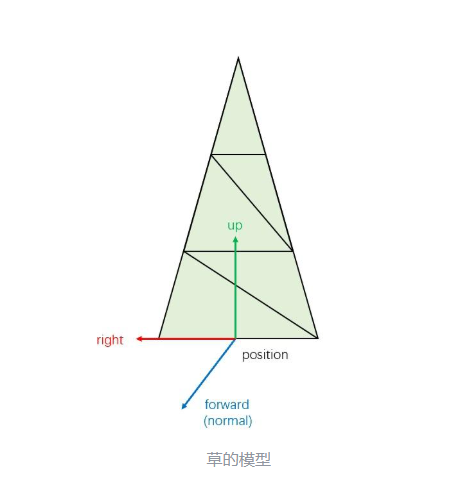
先定义组成草的单个三角形所需的基本数据:3个顶点的世界空间位置和法线
struct VertexData
{

    half3 normalWS; // 法向
    half3 positionWS; // 位置
};

struct TriangleData
{
    VertexData vertices[3]; // 三个顶点
};
生成的草数据(三角形)存入AppendStructuredBuffer<TriangleData> _Triangles;在所有线程执行完毕后,这个缓冲区里就按顺序存放了所有需要绘制的草的三角形数据。
GPU 通过 _IndirectArgsBuffer知道要去 _Triangles缓冲区里取多少个顶点数据来进行绘制。间接绘制参数存入RWStructuredBuffer<IndirectArgs> _IndirectArgsBuffer;在所有线程执行完毕后,这个缓冲区中的 numVerticesPerInstance值就是所有草地顶点数量的总和。CPU 在渲染时不需要知道具体生成了多少草,只需要发出一个命令:“请按照 _IndirectArgsBuffer里记录的参数去画吧!”(即间接绘制)。
// 间接绘制参数
struct IndirectArgs
{
    uint numVerticesPerInstance;
    uint numInstances;
    uint startVertexIndex;
    uint startInstanceIndex;
    uint startLocation;
};

AppendStructuredBuffer<TriangleData> _Triangles;
RWStructuredBuffer<IndirectArgs> _IndirectArgsBuffer;
在C#脚本中创建_trianglesBuffer作为Compute Shader的输出目的地,用于存储所有生成的三角形数据。_indirectArgsBuffer用于间接绘制,它存储绘制调用所需的参数(顶点数、实例数等)。
_trianglesBuffer = new ComputeBuffer(maxTriangles, SIZE_TRIANGLE_DATA, ComputeBufferType.Append);
_indirectArgsBuffer = new ComputeBuffer(1, SIZE_INDIRECT_ARGS, ComputeBufferType.IndirectArguments);
根据草的数量计算需要多少个线程组(每个线程组512个线程)。然后调度Compute Shader执行。
int threadGroups = Mathf.CeilToInt(grassCount / 512f);
grassComputeShader.Dispatch(_grassGenKernel, threadGroups, 1, 1);使用Graphics.DrawProceduralIndirect间接绘制命令,绘制类型为三角形。绘制所需的参数(顶点数、实例数等)从_indirectArgsBuffer中读取。
  Graphics.DrawProceduralIndirect(
  grassMaterial,
  new Bounds(transform.position, Vector3.one * areaSize),
  MeshTopology.Triangles,
  _indirectArgsBuffer,
  0,
  null,
  null,
  UnityEngine.Rendering.ShadowCastingMode.On,
  true,
  gameObject.layer
);
在compute shader中,定义了每个线程组有256个线程。每个线程通过id.x来索引,对应一株草。
[numthreads(256, 1, 1)]
void GrassGen(uint3 id : SV_DispatchThreadID)
在脚本中
int threadGroups = Mathf.CeilToInt(grassCount / 256f);
grassComputeShader.Dispatch(_grassGenKernel, threadGroups, 1, 1);Dispatch启动Compute Shader的执行。计算需要多少个线程组:grassCount / 256f,因为我们在Shader中定义了 [numthreads(256,1,1)],即每个组256个线程。我们总共需要 grassCount个线程,所以需要 grassCount/256个组。
GPU开始并行计算,生成所有草的三角形并填入 _trianglesBuffer,同时将最终的顶点数量计数到 _indirectArgsBuffer。
绘制草
采用分段构建,方便后续使用LOD优化技术
 for (int blade = 0; blade < _NUM_BLADES; blade++)
 {

     float3 bladePos = positionWS + float3(bladeOffset.x, 0, bladeOffset.y);

     // 生成单株草使用连续的四边形
     for (int seg = 0; seg < _NUM_SEGS; seg++)
     {
         VertexData vert;
         TriangleData tri;

          // 计算当前段和下一段的高度
         float currentYPos = seg * segmentHeight;
         float nextYPos = (seg + 1) * segmentHeight;

          // 计算当前段和下一段的宽度(随高度减少)
         float currentWidth = randomWidth * (1.0 - float(seg) / _NUM_SEGS);
         float nextWidth = randomWidth * (1.0 - float(seg + 1) / _NUM_SEGS);

          // 计算四个顶点位置
         float3 bottomLeft = bladePos + float3(-currentWidth * 0.5, currentYPos, 0);
         float3 bottomRight = bladePos + float3(currentWidth * 0.5, currentYPos, 0);
         float3 topLeft = bladePos + float3(-nextWidth * 0.5, nextYPos, 0);
         float3 topRight = bladePos + float3(nextWidth * 0.5, nextYPos, 0);

          // 计算法线 (垂直于草面)
         float3 edge1 = bottomRight - bottomLeft;
         float3 edge2 = topLeft - bottomLeft;
         float3 normal = normalize(cross(edge1, edge2));

         // 第一个三角形 (左下, 右下, 左上)
         vert.normalWS = normal;
         vert.positionWS = bottomLeft;
         tri.vertices[0] = vert;

         vert.normalWS = normal;
         vert.positionWS = bottomRight;
         tri.vertices[1] = vert;

         vert.normalWS = normal;
         vert.positionWS = topLeft;
         tri.vertices[2] = vert;
         _Triangles.Append(tri);

         // 第二个三角形 (右下, 右上, 左上)
         vert.normalWS = normal;
         vert.positionWS = bottomRight;
         tri.vertices[0] = vert;

         vert.normalWS = normal;
         vert.positionWS = topRight;
         tri.vertices[1] = vert;

         vert.normalWS = normal;
         vert.positionWS = topLeft;
         tri.vertices[2] = vert;

         _Triangles.Append(tri);
     }

      // 添加草尖
     if (_NUM_SEGS > 0)
     {
         VertexData vert;
         TriangleData tri;
         float topYPos = randomHeight;
         float topWidth = randomWidth * 0.1; // 草尖很细

         float3 bottomLeft = bladePos + float3(-topWidth * 0.5, topYPos - segmentHeight, 0);
         float3 bottomRight = bladePos + float3(topWidth * 0.5, topYPos - segmentHeight, 0);
         float3 top = bladePos + float3(0, topYPos, 0);

          // 计算法线
         float3 edge1 = bottomRight - bottomLeft;
         float3 edge2 = top - bottomLeft;
         float3 normal = normalize(cross(edge1, edge2));

         // 草尖三角形
         vert.normalWS = normal;
         vert.positionWS = bottomLeft;
         tri.vertices[0] = vert;

         vert.normalWS = normal;
         vert.positionWS = bottomRight;
         tri.vertices[1] = vert;

         vert.normalWS = normal;
         vert.positionWS = top;
         tri.vertices[2] = vert;
         //将生成的三角形追加到缓冲区
         _Triangles.Append(tri);
     }
 }
避免多株草完全重叠在一起,在基础位置(positionWS)周围进行小范围随机偏移(bladeOffset),使草分布更自然。
float2 bladeOffset = float2(
    (rand(float2(id.x + blade, id.x + blade * 2)) - 0.5) * 0.3,
    (rand(float2(id.x + blade * 3, id.x + blade * 4)) - 0.5) * 0.3
);
更新间接绘制参数
 // 累加顶点数量 (每段2个三角形,每个三角形3个顶点)
uint trianglesAdded = _NUM_BLADES * (_NUM_SEGS * 2 + (_NUM_SEGS > 0 ? 1 : 0));
InterlockedAdd(_IndirectArgsBuffer[0].numVerticesPerInstance, trianglesAdded * 3);
在顶点着色器可以直接从这个缓冲区中读取数据来绘制图形。
// 三角形数据结构
struct TriangleData
{
    VertexData vertices[3];
};

StructuredBuffer<TriangleData> _Triangles;


 // 计算三角形索引和顶点在三角形内的索引
 uint triangleIndex = vertexID / 3;
 uint vertexInTriangleIndex = vertexID % 3;

 // 从缓冲区获取顶点数据
 VertexData v = _Triangles[triangleIndex].vertices[vertexInTriangleIndex];
优化
LOD
近处生成高质量草(多株,高细节),远处生成低质量草(可能0株,低细节)。
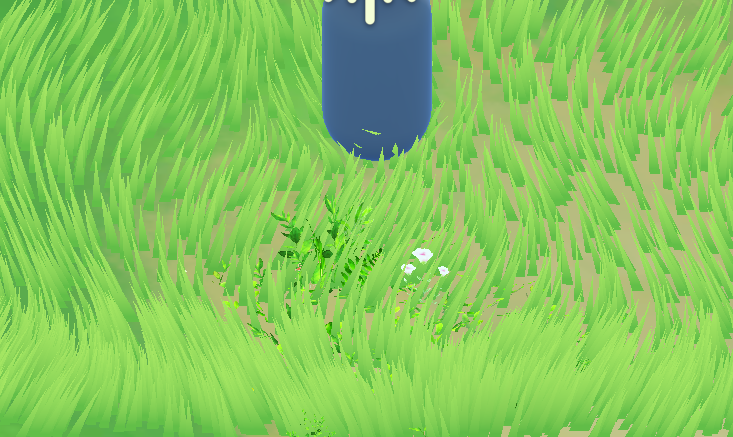
int _lodLevel(float3 positionWS) {
    float3 delta = positionWS - _WorldSpaceCameraPos;//_WorldSpaceCameraPos通过脚本传递过来
    float distSq = dot(delta, delta);
    float minDistSq = LOD_MIN_DISTANCE * LOD_MIN_DISTANCE;
    float maxDistSq = LOD_MAX_DISTANCE * LOD_MAX_DISTANCE;
    float f = 1.0 - clamp((distSq - minDistSq) / (maxDistSq - minDistSq), 0.01, 1.00);
    f = (f * f) * (f * f);
    int lod = int(LOD_LEVELS * f);
    return lod;
}
int lod = _lodLevel(positionWS);
int _NUM_BLADES = 0; // 这个位置要生成的草数量
int _NUM_SEGS = max(lod, 1); // 每株草的段数(细节)

......

 float3 positionWS = float3(randomPos.x, 0, randomPos.y);

 // 计算LOD级别
 int lod = _lodLevel(positionWS);

 // 根据LOD决定生成多少株草
 int _NUM_BLADES = 0;
 if (lod >= LOD_MAX)
 {
     _NUM_BLADES = 3;
 }
 else if (lod <= LOD_MIN)
 {

     // 远处: 50%概率不生成草,50%概率生成1株
     float randomValue = rand(float2(id.x, id.x * 2.0));
     _NUM_BLADES = (randomValue > 0.5) ? 1 : 0;
 }
 else
 {
     //_NUM_BLADES = max(lod - 1, 1); // 中等距离
     _NUM_BLADES = 2;
 }

 if (_NUM_BLADES == 0)
     return;

 // 根据LOD决定草的段数
 int _NUM_SEGS = max(lod, 1); // 至少1段
视锥体剔除
对于完全不在摄像机视野范围内的草,不生成任何几何数据,不进行绘制。
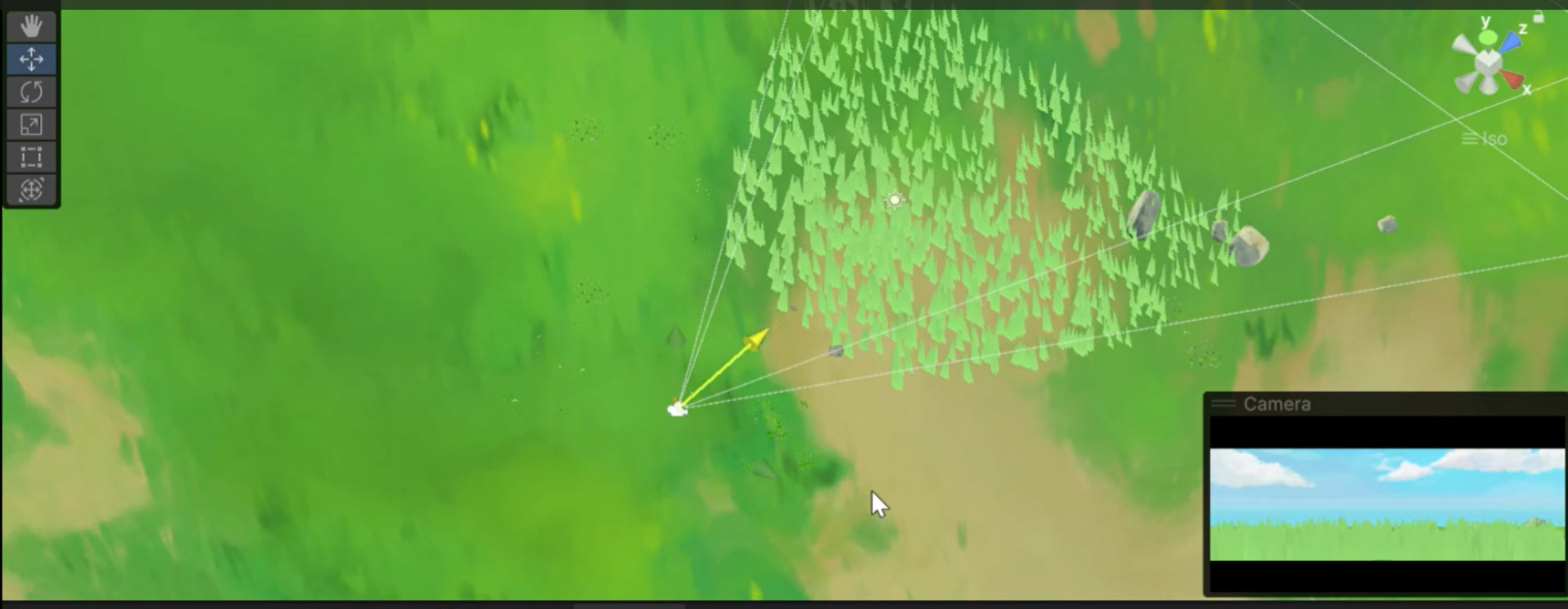
NDC 空间:
x:-1(左)~ 1(右)
y:-1(下)~ 1(上)
z:0(近)~ 1(远)
只要 x/y/z 都在这个范围内,物体就在相机视野里
// 使用NDC空间的视锥体剔除函数
bool FrustumCull(float3 positionWS, float grassHeight, float grassWidth)
{

    float radius = max(grassHeight, grassWidth) * 0.5;
    float3 centerWS = positionWS + float3(0, grassHeight * 0.5, 0);
    float4 clipPos = mul(_ViewProj, float4(centerWS, 1.0));

    // 透视除法得到NDC坐标
    float3 ndc = clipPos.xyz / clipPos.w;
    float ndcRadius = radius / max(clipPos.w, 0.0001);

    const float TOLLERANCE = 0.1 + ndcRadius;

    // 检查是否在NDC立方体内
    bool isInsideFrustum =
        ndc.x >= (-1.0 - TOLLERANCE) && ndc.x <= (1.0 + TOLLERANCE) &&
        ndc.y >= (-1.0 - TOLLERANCE) && ndc.y <= (1.0 + TOLLERANCE) &&
        ndc.z >= (0.0 - TOLLERANCE) && ndc.z <= (1.0 + TOLLERANCE);

    return !isInsideFrustum;
}
草的shader
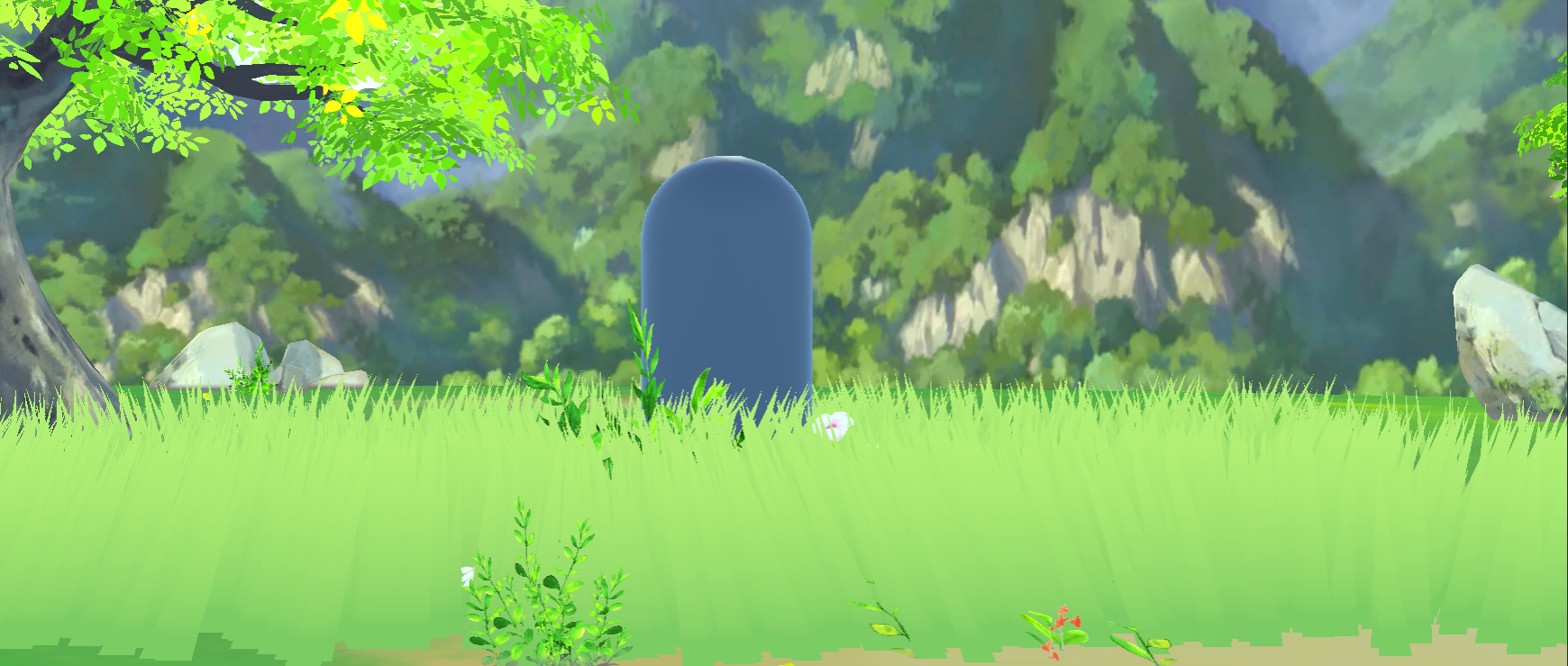
之前讲过Shader通过StructuredBuffer<TriangleData> _Triangles读取由Compute Shader生成的所有草的三角形数据。
在顶点着色器中,通过 vertexID和 instanceID计算出当前顶点对应缓冲区中的哪个数据,并提取出来
uint triangleIndex = vertexID / 3;//找到当前顶点属于第几个三角形
uint vertexInTriangleIndex = vertexID % 3;//找到是三角形里的第几个顶点
VertexData v = _Triangles[triangleIndex].vertices[vertexInTriangleIndex];
float3 positionWS = v.positionWS; // 获取世界空间位置
float3 normalWS = v.normalWS; // 获取世界空间法线
实现风效
使用正弦波 (sin) 来模拟风的周期性。
heightFactor: 高度比例(0在草根,1在草尖)。风的影响从草根(草根不动)到草尖逐渐增强,使草叶呈现出自然的弯曲,而不是整体平移。
float2 CalculateWindOffset(float3 worldPos, float heightFactor) {
    float windTime = _Time.y;
    float windWave = sin(windTime + dot(worldPos.xz, _WaveFrequency));
    float2 windOffset = _WindDirection * windWave * _WindStrength * heightFactor * _WaveScale;
    return windOffset;
}
麦浪效果 (Rippling Wheat)
主要通过采样一张噪声纹理实现
//把地面当成一张巨大的纹理来采样XZ
float2 sampleUV = float2(positionWS.x / _WaveSize + _Time.x * _WaveSpeed, positionWS.z / _WaveSize);
float3 waveRipplingSample = tex2Dlod(_NoiseRipplingMap, float4(sampleUV, 0, 0)).xyz;

// 应用偏移
positionWS.xz += sin(waveRipplingSample.r * 0.5) * _WaveSpeed * heightFactor * o.pulseIntensity * 0.3;
颜色与光照
草的基础颜色
根据从顶点着色器传递来的 i.height(该像素在草上的高度)来决定是使用根部的颜色(_Color)还是顶部的颜色(_TopColor),实现渐变的效果。
half gradientFactor = pow(i.height, _GradientPower);
gradientFactor = saturate((gradientFactor - _GradientThreshold) / max(0.001, 1 - _GradientThreshold));
fixed4 grassColor = lerp(_Color, _TopColor, gradientFactor);
光照
half ndotl = saturate(dot(normal, lightDir)); // 兰伯特
// 高光 (Blinn-Phong)
half3 halfVector = normalize(lightDir + viewDir);
half specular = pow(saturate(dot(normal, halfVector)), _SpecularPower);
grassColor.rgb += specular * _SpecularIntensity * _LightColor0.rgb;

// 边缘光
half rim = 1.0 - saturate(dot(viewDir, normal));
half3 rimLight = pow(rim, _StylizedRimPower) * _StylizedRimIntensity * _LightColor0.rgb;
grassColor.rgb += rimLight;
阴影用unity内置的方法,不过多赘述了。
交互
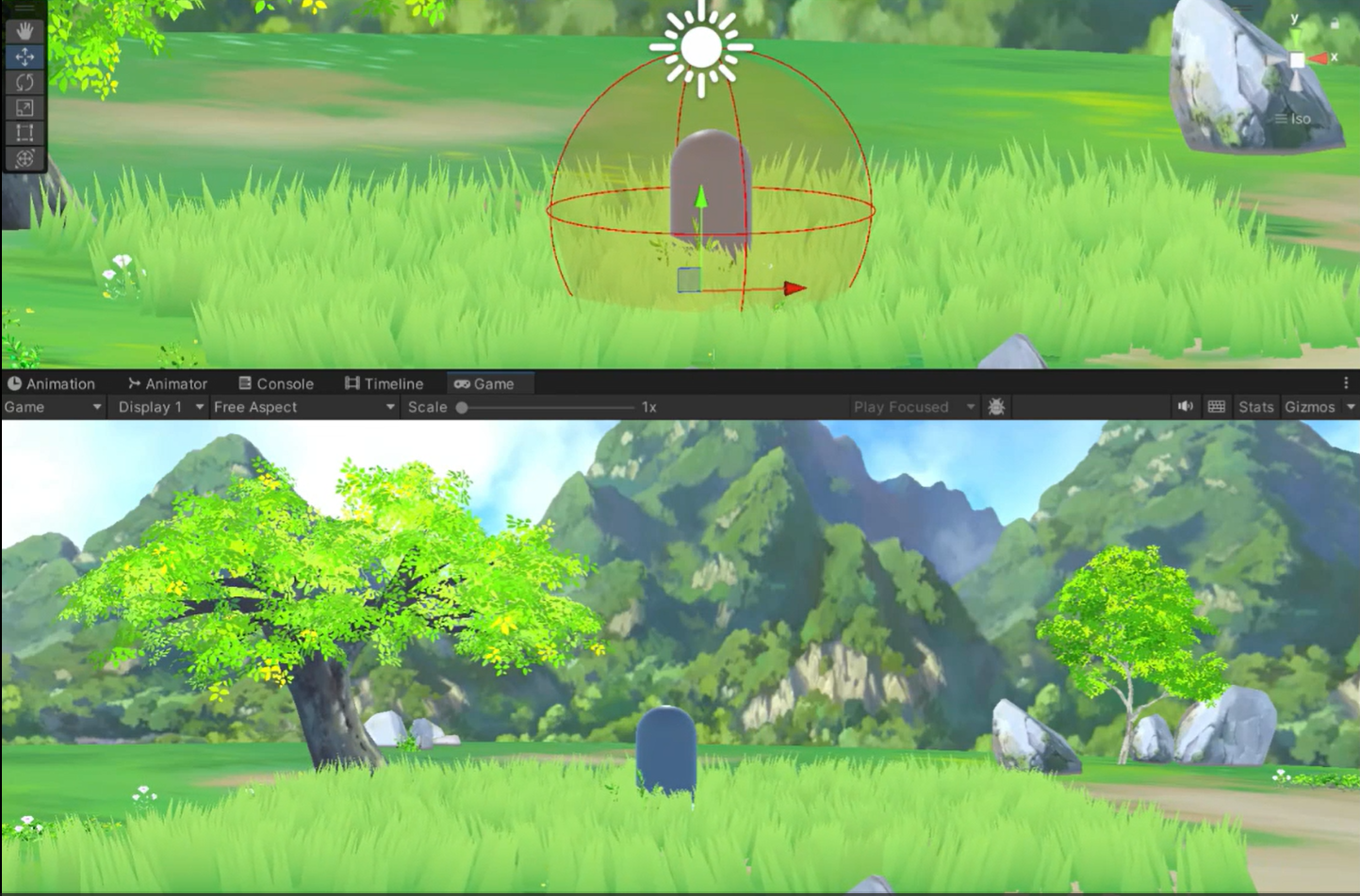
基于球体检测的顶点偏移,在角色的脚部或碰撞体周围预先定义不可见的“影响球”这些球体代表了角色对草地施加影响的范围。
在脚本中设置影响球
[System.Serializable]
public class InteractionSphere
{
    public Vector3 position;
    public float radius;
    public int id;

    public InteractionSphere(Vector3 pos, float rad, int identifier)
    {
        position = pos;
        radius = rad;
        id = identifier;
    }
}
在脚本中将球体数据传递给Shader,可以实现多角色交互。在Shader中,可以通过计算草的位置与这些球体的距离,来实现弯曲、压扁等效果。
    void UpdateInteractionSpheres()
    {

        for (int i = 0; i < _shaderInteractionSpheres.Length; i++)
        {
            _shaderInteractionSpheres[i] = Vector4.zero;
        }

        // 更新有效的交互球体
        _shaderSphereCount = Mathf.Min(interactionSpheres.Count, 10);

        for (int i = 0; i < _shaderSphereCount; i++)
        {
            InteractionSphere sphere = interactionSpheres[i];
            _shaderInteractionSpheres[i] = new Vector4(
                sphere.position.x,
                sphere.position.y,
                sphere.position.z,
                sphere.radius
            );
        }
        // 传递到Shader
        Shader.SetGlobalInt("_InteractionSphereCount", _shaderSphereCount);
        Shader.SetGlobalVectorArray("_InteractionSpheres", _shaderInteractionSpheres);
}在顶点着色器中遍历所有交互球体,检查当前顶点是否在某个球体影响范围内。如果是,则计算一个使顶点远离球心水平方向的偏移量。
 // 遍历所有交互球体
for (int i = 0; i < _InteractionSphereCount; i++)
{
    float4 sphere = _InteractionSpheres[i];
    float3 sphereCenter = sphere.xyz;
    float sphereRadius = sphere.w;

    // 计算顶点到球心的距离
    float3 toCenter = positionWS - sphereCenter;
    float sqrDistance = dot(toCenter, toCenter);
    float sqrRadius = sphereRadius * sphereRadius;


    if (sqrDistance < sqrRadius)
    {

        float distanceToSphere = sqrt(sqrDistance);


        float influence = 1.0 - (distanceToSphere / sphereRadius);
        influence = pow(influence, 2);


        float3 bendDirection = normalize(toCenter);
        bendDirection.y = 0;
        bendDirection = normalize(bendDirection);


        float heightFactorBend = saturate(positionWS.y / _GrassHeight);


        bendOffset += bendDirection * influence * _BendStrength * heightFactorBend;
    }
}

// 应用弯曲偏移
positionWS.xz += bendOffset.xz;
还有很多可以实现,比如:基于 depth buffer 剔除,交互效果可以使用RT,火烧草等
参考文章:基于GPU Instance的草地渲染学习笔记 - 知乎https://zhuanlan.zhihu.com/p/397620652
实时大规模草地渲染、优化与交互(附源码) - 知乎https://zhuanlan.zhihu.com/p/717674449
大规模草渲染-- 知乎https://www.zhihu.com/collection/987682198
URP渲染管线 - GPUInstance绘制草地 - 知乎https://zhuanlan.zhihu.com/p/354633512
Compute Shader学习笔记(三)之 草地渲染 - 知乎https://zhuanlan.zhihu.com/p/701633578

北京人形旗下天工造物具身智能开源社区,聚焦具身天工与慧思开物两大平台
更多推荐
 28
28 0
0- 0


 已为社区贡献2条内容

所有评论(0)