主流熔断方案选型指南
主流熔断方案选型
1. Netflix Hystrix (经典但已停止维护)
适用场景:传统Spring Cloud项目,需要快速集成熔断功能
优点:
-
成熟稳定,社区资源丰富
-
与Spring Cloud Netflix套件无缝集成
-
提供熔断、降级、隔离等完整功能
缺点:
-
已停止维护
-
配置相对复杂
2. Resilience4j (推荐替代方案)
适用场景:新项目或替代Hystrix的项目
优点:
-
轻量级,函数式编程风格
-
模块化设计(熔断、限流、重试、降级等可单独使用)
-
持续维护更新
缺点:
-
社区生态相对Hystrix较小
Spring Cloud OpenFeign 默认整合的是 Hystrix(已废弃) 或 Resilience4j,取决于 Spring Cloud 版本。
Spring Cloud 2020.x 之后
Hystrix 移除
推荐使用 Resilience4j 作为 Feign 的容错机制
3. Sentinel (阿里开源)
适用场景:需要丰富流量控制功能的分布式系统(例如流控、熔断、热点、授权、系统规则)
优点:
-
丰富的流量控制手段(熔断、限流、系统保护)
-
实时监控和控制台
-
阿里大规模生产验证
缺点:
-
学习曲线较陡
-
文档主要为中文
熔断选型概览
| 选型 | 技术/框架 | 特点 | 适用场景 |
|---|---|---|---|
| Hystrix | Netflix Hystrix(已维护停止) | 经典、成熟、线程隔离,配置复杂,Spring Cloud 2020+ 已移除 | 老项目维护 |
| Resilience4j | Java8+ 函数式,轻量无线程池隔离 | 新项目推荐,性能优 | Spring Boot/Spring Cloud 2020+ |
| Sentinel | Alibaba Sentinel | 规则丰富,适合流控+熔断,适配 Dubbo、Spring Cloud | 微服务高并发治理 |
| Spring Cloud CircuitBreaker | Spring Cloud 封装,默认整合 Resilience4j 或 Sentinel | 标准方案 | 与 Spring Cloud 配合使用 |
选型建议
-
传统项目维护:如果已经是Spring Cloud Netflix技术栈,继续使用Hystrix
-
新项目:推荐使用Resilience4j,它更现代且维护良好
-
高流量复杂场景:考虑Sentinel,特别是有丰富流量控制需求的系统
一、hystrix实现
1.添加配置文件application.yml
# application.yml
hystrix:
  command:
    GlobalCircuitBreaker:
      execution:
        isolation:
          thread:
            timeoutInMilliseconds: 5000
      circuitBreaker:
        requestVolumeThreshold: 20
        sleepWindowInMilliseconds: 10000
        errorThresholdPercentage: 50
  threadpool:
    default:
      coreSize: 50
      maxQueueSize: 1000
      queueSizeRejectionThreshold: 500
命令属性 (hystrix.command.GlobalCircuitBreaker)
-
execution.isolation.thread.timeoutInMilliseconds: 5000
-
设置命令执行的超时时间为5000毫秒(5秒)
-
如果命令执行超过这个时间,将被标记为超时失败
-
-
circuitBreaker.requestVolumeThreshold: 20
-
熔断器触发的最小请求数量阈值(滚动窗口内)
-
只有在20个请求之后,熔断器才会根据错误率判断是否开启
-
-
circuitBreaker.sleepWindowInMilliseconds: 10000
-
熔断器开启后的休眠时间(10秒)
-
熔断开启后,经过这段时间会允许一个测试请求尝试访问服务
-
-
circuitBreaker.errorThresholdPercentage: 50
-
错误百分比阈值(50%)
-
当滚动窗口内请求的错误率超过这个百分比时,熔断器将开启
-
线程池属性 (hystrix.threadpool.default)
-
coreSize: 50
-
线程池核心线程数
-
表示可以同时处理的最大并发请求数
-
-
maxQueueSize: 1000
-
线程池队列最大容量
-
当所有核心线程都忙时,请求会被放入队列,直到达到此上限
-
-
queueSizeRejectionThreshold: 500
-
队列拒绝阈值
-
即使maxQueueSize是1000,当队列达到500时就会开始拒绝新请求
-
这是为防止队列过满而设置的安全阀值
-
2.添加Application上开启注解
@EnableCircuitBreaker  // 启用Hystrix断路器
@EnableHystrixDashboard // 可选:启用Hystrix仪表盘
public class AuthApplication {


	@Bean
	RestTemplate restTemplate() {
		return new RestTemplate();
	}

	public static void main(String[] args) {
		log.info("启动授权模块...............................................");
		SpringApplication.run(AuthApplication.class, args);
	}
}
3. 自定义注解,方便使用
import java.lang.annotation.ElementType;
import java.lang.annotation.Retention;
import java.lang.annotation.RetentionPolicy;
import java.lang.annotation.Target;

@Retention(RetentionPolicy.RUNTIME)
@Target(ElementType.METHOD)
public @interface CustomHystrix {
    String groupKey() default "DefaultGroup";
    String commandKey() default "";
    String fallbackMethod() default "";

    /**
     * 设置命令执行的超时时间为3000毫秒(5秒)
     * 如果命令执行超过这个时间,将被标记为超时失败
     * @return
     */
    int timeout() default 3000;
    boolean circuitBreaker() default true;

    /**
     * 熔断器触发的最小请求数量阈值(滚动窗口内)
     *
     * 只有在20个请求之后,熔断器才会根据错误率判断是否开启
     * @return
     */
    int requestVolumeThreshold() default 20;

    /**
     * 熔断器开启后的休眠时间(10秒)
     *
     * 熔断开启后,经过这段时间会允许一个测试请求尝试访问服务
     * @return
     */
    int sleepWindow() default 5000;

    /**
     * 错误百分比阈值(50%)
     *
     * 当滚动窗口内请求的错误率超过这个百分比时,熔断器将开启
     * @return
     */
    int errorThresholdPercentage() default 50;
    boolean semaphore() default false;
}
4, 创建Hystrix切面
import com.cbim.auth.annotion.CustomHystrix;
import com.netflix.hystrix.HystrixCommand;
import com.netflix.hystrix.HystrixCommandGroupKey;
import com.netflix.hystrix.HystrixCommandKey;
import com.netflix.hystrix.HystrixCommandProperties;
import com.netflix.hystrix.exception.HystrixRuntimeException;
import org.aspectj.lang.ProceedingJoinPoint;
import org.aspectj.lang.annotation.Around;
import org.aspectj.lang.annotation.Aspect;
import org.aspectj.lang.reflect.MethodSignature;
import org.springframework.boot.autoconfigure.condition.ConditionalOnClass;
import org.springframework.stereotype.Component;

import java.lang.reflect.Method;

@Aspect
@Component
@ConditionalOnClass(HystrixCommand.class)
public class HystrixAspect {

    // 默认配置
    private static final HystrixCommand.Setter defaultSetter = HystrixCommand.Setter.withGroupKey(HystrixCommandGroupKey.Factory.asKey("DefaultGroup"))
            .andCommandKey(HystrixCommandKey.Factory.asKey("DefaultCommand"))
            .andCommandPropertiesDefaults(HystrixCommandProperties.Setter()
                    .withExecutionTimeoutInMilliseconds(3000)
                    .withCircuitBreakerRequestVolumeThreshold(20)
                    .withCircuitBreakerSleepWindowInMilliseconds(5000));

    @Around("@annotation(com.cbim.auth.annotion.CustomHystrix)")
    public Object hystrixCommand(ProceedingJoinPoint joinPoint) throws Throwable {
        Method method = ((MethodSignature) joinPoint.getSignature()).getMethod();
        CustomHystrix annotation = method.getAnnotation(CustomHystrix.class);

        // 动态配置
        HystrixCommand.Setter setter = buildSetter(annotation);

        return new HystrixCommand<Object>(setter) {
            @Override
            protected Object run() throws Exception {
                try {
                    return joinPoint.proceed();
                } catch (Throwable throwable) {
                    throw new Exception(throwable);
                }
            }

            @Override
            protected Object getFallback() {
                try {
                    if (!annotation.fallbackMethod().isEmpty()) {
                        Method fallbackMethod = joinPoint.getTarget().getClass()
                                .getMethod(annotation.fallbackMethod(), method.getParameterTypes());
                        return fallbackMethod.invoke(joinPoint.getTarget(), joinPoint.getArgs());
                    }
                    return null;
                } catch (Exception e) {
                    throw new HystrixRuntimeException(
                            HystrixRuntimeException.FailureType.COMMAND_EXCEPTION,
                            this.getClass(),
                            "Fallback failure",
                            e,
                            null);
                }
            }
        }.execute();
    }

    private HystrixCommand.Setter buildSetter(CustomHystrix annotation) {
        return HystrixCommand.Setter.withGroupKey(HystrixCommandGroupKey.Factory.asKey(annotation.groupKey()))
                .andCommandKey(HystrixCommandKey.Factory.asKey(annotation.commandKey()))
                .andCommandPropertiesDefaults(HystrixCommandProperties.Setter()
                        .withExecutionTimeoutInMilliseconds(annotation.timeout())
                        .withCircuitBreakerEnabled(annotation.circuitBreaker())
                        .withCircuitBreakerRequestVolumeThreshold(annotation.requestVolumeThreshold())
                        .withCircuitBreakerSleepWindowInMilliseconds(annotation.sleepWindow())
                        .withCircuitBreakerErrorThresholdPercentage(annotation.errorThresholdPercentage())
                        .withExecutionIsolationStrategy(
                                annotation.semaphore() ?
                                        HystrixCommandProperties.ExecutionIsolationStrategy.SEMAPHORE :
                                        HystrixCommandProperties.ExecutionIsolationStrategy.THREAD));
    }
}
5. 在userServiceImpl中
	@CustomHystrix(
			groupKey = "OrderService",
			fallbackMethod = "getOrderFallback",
			timeout = 2000
	)
	public String health() {
		try {
			Thread.sleep(5000);
		} catch (InterruptedException e) {

		}
		log.info("health check");
		return "success";
	}
	public String getOrderFallback() {
		return "被熔断了,请稍后重试";
	}
6, 进行测试
GET http://localhost:9999/health
二、 Resilience4j
核心模块
-
resilience4j-circuitbreaker - 断路器模式
-
防止应用程序在远程服务/资源故障时不断尝试执行可能失败的操作
-
提供三种状态:关闭、打开和半开
-
支持自定义失败率阈值、等待时间和环形缓冲区大小
-
-
resilience4j-ratelimiter - 速率限制
-
控制对某些操作的调用频率
-
支持自定义限制刷新周期、限制持续时间和超时设置
-
-
resilience4j-bulkhead - 舱壁隔离
-
限制并发执行的数量
-
提供两种实现:
-
信号量隔离(SemaphoreBulkhead)
-
固定线程池隔离(ThreadPoolBulkhead)
-
-
-
resilience4j-retry - 自动重试
-
为失败的操作提供自动重试机制
-
支持自定义重试次数、等待间隔和异常条件
-
-
resilience4j-timelimiter - 超时控制(仅仅只能在异步任务中使用)
-
为异步操作设置时间限制
-
防止长时间运行的操作阻塞调用者
-
执行顺序:Retry → CircuitBreaker → RateLimiter → Bulkhead
思考
一、 ratelimiter 和Bulkhead是否有冲突?
不冲突
| 模式 | 作用 | 控制维度 |
|---|---|---|
| Bulkhead (舱壁隔离) | 限制并发数量,并隔离资源 | 并发调用数(同一时刻允许的最大请求数) |
| RateLimiter (限流) | 限制单位时间的请求次数,保护服务免受过载 | QPS 或 TPS(单位时间允许的请求数) |
-
RateLimiter:限流保护,避免流量超标
-
Bulkhead:并发隔离,防止某服务独占资源
二、Bulkhead 和数据库连接池是否重复
Bulkhead 和数据库连接池的区别与联系
| 维度 | Bulkhead | 数据库连接池 |
|---|---|---|
| 本质作用 | 应用层的并发调用隔离,限制方法级别同时执行的调用数 | 连接资源的复用与管理,控制最大数据库连接数 |
| 控制范围 | 微服务线程(或者调用)层面 | 数据库连接资源层面 |
| 工作目标 | 防止某个接口/服务过载导致线程池或业务资源耗尽 | 限制数据库最大连接数,防止数据库过载 |
| 触发点 | 请求进入服务时,根据配置限制并发数量 | 请求申请数据库连接时,根据连接池大小控制 |
| 重叠部分 | 可能重叠限制调用并发数 | 控制实际连接数量 |
| 是否重复 | 不算重复,是应用层和资源层的多层保护 | - |
为什么 Bulkhead 不等于数据库连接池,且二者都必不可少?
-
数据库连接池 限制最大连接数,保障数据库端资源不被耗尽。
-
Bulkhead 在业务调用层限制并发,防止线程池被过度占用,避免线程等待数据库连接时线程积压,造成系统阻塞甚至雪崩。
举例:
假设数据库连接池大小是 10,若没有 Bulkhead 限制,系统可能会有 100 个线程同时请求数据库,导致大量线程在等待连接,线程池耗尽。
加上 Bulkhead 限制为 20,业务接口最多允许 20 个并发调用访问数据库,从而保护线程池和数据库连接池都不被耗尽。
Bulkhead 与数据库连接池是不同层次的保护机制,彼此互补,不冲突不重复
设计时需要合理设置两者参数,协同保护微服务的线程资源和数据库资源
在微服务中防止某个业务占用完整的数据库连接池。
三、retry 重试和 ribbon是否重复?
1. 两者的区别
Resilience4j Retry:
-
应用层面:在业务逻辑层或服务调用层实现
-
功能全面:支持自定义重试策略(固定间隔、指数退避等)
-
异常过滤:可配置针对特定异常才重试
-
上下文感知:可以获取重试次数等上下文信息
-
组合弹性:可与熔断、限流等其他弹性模式组合使用
Ribbon Retry:
-
网络层面:在HTTP客户端层实现
-
功能基础:主要处理网络层面的瞬时故障
-
自动重试:对连接失败、超时等自动重试
-
负载均衡:与Ribbon的负载均衡策略结合
2. 是否重复?
不完全是重复,而是不同层次的容错机制:
-
Ribbon重试解决的是"网络层面"的瞬时故障(如TCP连接失败、请求超时)
-
Resilience4j Retry解决的是"业务层面"的临时故障(如依赖服务返回5xx错误)
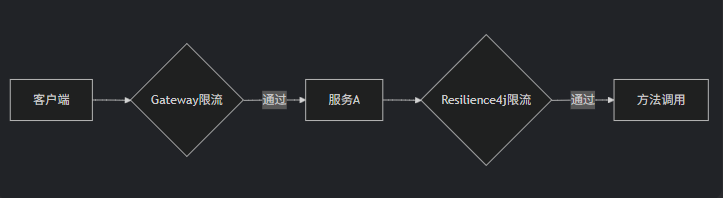
四、RateLimiter限流与Gateway限流的关系
1. 两者的区别
Resilience4j RateLimiter:
-
应用级别:保护单个服务实例
-
精细控制:可针对不同方法/接口设置不同限流规则
-
快速失败:超出限制立即拒绝或等待
-
组合弹性:可与熔断、重试等组合使用
Gateway限流(如Spring Cloud Gateway RedisRateLimiter):
-
全局级别:在API网关层实现
-
集群限流:基于Redis等实现分布式限流
-
入口控制:保护整个系统入口
-
网关特性:与路由、鉴权等网关功能集成
2. 是否重复?
不是重复,而是不同层次的流量控制:
-
Gateway限流是"全局第一道防线",防止流量洪峰冲击系统
-
Resilience4j限流是"服务内部精细控制",防止单个服务过载
-
Ribbon重试:快速重试(ms级),解决网络抖动
-
Resilience4j重试:带退避策略(s级),解决服务暂时不可用
实现
1,添加配置文件application.yml
resilience4j:
  circuitbreaker:
    instances:
      userService:
        registerHealthIndicator: true  # 是否注册健康指标(供Actuator监控)
        failureRateThreshold: 50     # 失败率阈值百分比,达到此值将触发熔断
        minimumNumberOfCalls: 2      # 计算失败率前所需的最小调用次数
        automaticTransitionFromOpenToHalfOpenEnabled: true  # 是否自动从OPEN转为HALF_OPEN
        waitDurationInOpenState: 5s   # OPEN状态持续时间,之后尝试转为HALF_OPEN
        permittedNumberOfCallsInHalfOpenState: 3  # HALF_OPEN状态下允许的调用次数
        slidingWindowType: TIME_BASED # 滑动窗口类型(COUNT_BASED基于调用次数,TIME_BASED基于时间)
        slidingWindowSize: 4        # 滑动窗口大小(基于次数则为调用次数,基于时间则为秒数)
        recordExceptions:             # 记录为失败的异常列表
          - org.springframework.web.client.HttpServerErrorException
          - java.io.IOException
          - java.util.concurrent.TimeoutException
          - java.lang.RuntimeException
        ignoreExceptions:            # 忽略不计为失败的异常列表
          - com.cbim.exception.CbimException
  retry:
    instances:
      userServiceRetry:
        maxAttempts: 3              # 最大重试次数(包括初始调用)
        waitDuration: 500ms         # 重试之间的等待时间
        retryExceptions:            # 触发重试的异常列表
          - org.springframework.web.client.ResourceAccessException
          - java.lang.RuntimeException
        ignoreExceptions:
          - java.lang.IllegalArgumentException
  ratelimiter:
    instances:
      userServiceRateLimiter:
        limitForPeriod: 10          # 限制每个刷新周期内的调用数量
        limitRefreshPeriod: 1s      # 限制刷新周期
        timeoutDuration: 100ms      # 等待获取许可的最大时间
  bulkhead:
    instances:
      userServiceBulkhead:
        maxConcurrentCalls: 2      # 最大并发调用数
        maxWaitDuration: 0       # 尝试进入舱壁时的最大等待时间
  timelimiter:
    instances:
      userServiceTimeLimiter:
        timeoutDuration: 1s         # 方法调用超时时间
        cancelRunningFuture: true   # 是否取消正在执行的Future
management:
  endpoint:
    health:
      show-details: always  # 显示详细信息
      group:
        circuitbreakers:
          include: circuitBreakers  # 创建专门的分组
  endpoints:
    web:
      exposure:
        include: health,circuitbreakers  # 暴露所需端点
  health:
    circuitbreakers:
      enabled: true  # 启用熔断器健康指示器
logging:
  level:
    io.github.resilience4j: DEBUG
    org.springframework.aop: DEBUG
2.在pom文件中添加依赖
        <!-- Resilience4j核心依赖 -->
        <dependency>
            <groupId>io.github.resilience4j</groupId>
            <artifactId>resilience4j-spring-boot2</artifactId>
            <version>1.7.1</version>
        </dependency>
        <dependency>
            <groupId>io.github.resilience4j</groupId>
            <artifactId>resilience4j-circuitbreaker</artifactId>
            <version>1.7.1</version>
        </dependency>
        <dependency>
            <groupId>io.github.resilience4j</groupId>
            <artifactId>resilience4j-retry</artifactId>
            <version>1.7.1</version>
        </dependency>
        <dependency>
            <groupId>io.github.resilience4j</groupId>
            <artifactId>resilience4j-ratelimiter</artifactId>
            <version>1.7.1</version>
        </dependency>
        <dependency>
            <groupId>io.github.resilience4j</groupId>
            <artifactId>resilience4j-bulkhead</artifactId>
            <version>1.7.1</version>
        </dependency>
        <dependency>
            <groupId>io.github.resilience4j</groupId>
            <artifactId>resilience4j-timelimiter</artifactId>
            <version>1.7.1</version>
        </dependency>

        <!-- Spring AOP支持 -->
        <dependency>
            <groupId>org.springframework.boot</groupId>
            <artifactId>spring-boot-starter-aop</artifactId>
        </dependency>
3.编写controller代码
package com.cbim.order.controller;

import com.cbim.auth.service.UserService;
import com.cbim.order.annotion.Resilient;
import io.github.resilience4j.bulkhead.BulkheadFullException;
import io.github.resilience4j.bulkhead.annotation.Bulkhead;
import io.github.resilience4j.circuitbreaker.annotation.CircuitBreaker;
import io.github.resilience4j.ratelimiter.annotation.RateLimiter;
import io.github.resilience4j.retry.annotation.Retry;
import io.github.resilience4j.timelimiter.annotation.TimeLimiter;
import lombok.extern.slf4j.Slf4j;
import org.springframework.http.HttpStatus;
import org.springframework.http.ResponseEntity;
import org.springframework.web.bind.annotation.GetMapping;
import org.springframework.web.bind.annotation.PathVariable;
import org.springframework.web.bind.annotation.RequestMapping;
import org.springframework.web.bind.annotation.ResponseBody;
import org.springframework.web.bind.annotation.RestController;
import com.cbim.order.entity.User;
import org.springframework.web.client.ResourceAccessException;

import javax.annotation.Resource;
import java.io.IOException;
import java.util.concurrent.CompletableFuture;
import java.util.concurrent.atomic.AtomicInteger;

@RestController
@RequestMapping("/users")
@Slf4j
public class UserController {
    @Resource
    private UserService userService;

    /**
     * for i in {1..20}; do curl http://172.19.80.1:9997/users/3; done
     * @param id
     * @return
     */
    @GetMapping("/{id}")
//    @Resilient(fallbackMethod = "getUserFallback")

    @CircuitBreaker(name = "userService", fallbackMethod = "getUserFallback")
    @RateLimiter(name = "userServiceRateLimiter")
    @Bulkhead(name = "userServiceBulkhead")
    public ResponseEntity<User> getUser(@PathVariable Long id){


        User user = userService.getUserById(id);
        return ResponseEntity.ok(user);
    }
    // 多个fallback方法可以根据异常类型区分处理
    private ResponseEntity<User> getUserFallback(Long id, Exception e) {
        log.warn("Fallback triggered for user id: {}, exception: {}", id, e.getClass().getSimpleName());
        User fallbackUser = new User(id, "Fallback User", "fallback@example.com");
        return ResponseEntity.status(HttpStatus.TOO_MANY_REQUESTS).body(fallbackUser);
    }

    private ResponseEntity<User> getUserFallback(Long id, BulkheadFullException e) {
        log.warn("Bulkhead full for user id: {}", id);
        User fallbackUser = new User(id, "System Busy", "try.again.later@example.com");
        return ResponseEntity.status(HttpStatus.SERVICE_UNAVAILABLE).body(fallbackUser);
    }
    public ResponseEntity<User> getUserFallback(Long id, Throwable t){
        log.warn("Fallback called for user id {} due to {}", id, t.toString());
        return ResponseEntity.ok(new User(23L, "Fallback User", "fallback@example.com"));
    }

    /**
     * TimeLimiter 仅仅只能使用异步函数,同步函数无法使用
     * @param id
     * @return
     */
    @TimeLimiter(name = "userServiceTimeLimiter", fallbackMethod = "getUserFallback2")
    @GetMapping("/TL/{id}")
    public CompletableFuture<ResponseEntity<User>> getUser2(@PathVariable Long id){
        return CompletableFuture.supplyAsync(() -> {
            if (id == 0) {
                throw new RuntimeException("Simulated failure");
            }
            User user = userService.getUserById(id);
            return ResponseEntity.ok(user);
        });
    }

    public CompletableFuture<ResponseEntity<User>> getUserFallback2(Long id, Throwable t){
        log.warn("Fallback called due to {}", t.toString());
        return CompletableFuture.completedFuture(ResponseEntity.ok(new User(0L, "Fallback User", "fallback@example.com")));
    }

}
4. service 和其实现代码
public interface UserService {
	User getUserById(Long id);
}
@Slf4j
@RefreshScope
@Service
public class UserServiceImpl implements UserService {
	private AtomicInteger counter = new AtomicInteger(0);
	@Override
	@Retry(name = "userServiceRetry")
	public User getUserById(Long id)  {
		int attempt = counter.incrementAndGet();
		System.out.println("Attempt: " + attempt);

		try {
			Thread.sleep(5000);
		} catch (InterruptedException e) {
			e.printStackTrace();
		}
		if (id % 3 == 0) { // 模拟30%失败率
			throw new RuntimeException("Simulated error");
		}
		return new User(id, "qinqingqing01", "123456");
	}
}
5.进行测试验证
for i in {1..11}; do curl http://172.19.80.1:9997/users/3; done
for i in {1..11}; do curl http://172.19.80.1:9997/users/TL/1; done
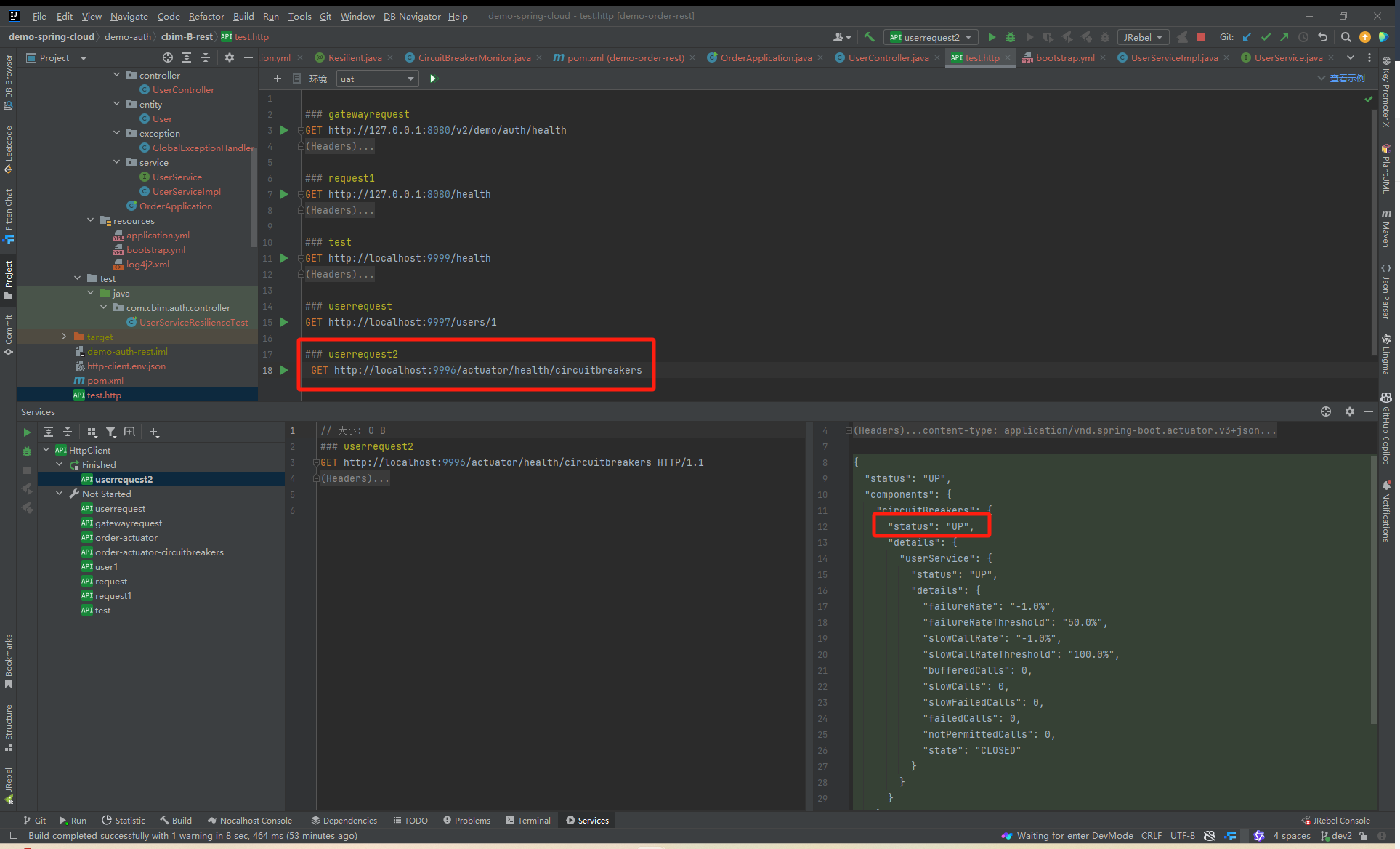
在测试之前需要确定断路器是否生效

北京人形旗下天工造物具身智能开源社区,聚焦具身天工与慧思开物两大平台
更多推荐
 25
25 0
0- 0


 已为社区贡献2条内容

所有评论(0)