使用nginx-rtmp-module+hls.js搭建直播平台
目录
1. 推流阶段:OBS --> 直播源站(视频流服务器),这里我们使用nginx-rtmp-module,是nginx的一个模块。
1、在window系统搭建,首先需要一个window的nginx-rtmp-module,资源链接关注我公众号 回复:rtmp 获取。
3、双击nginx-rtmp-win解压缩包里的start.bat运行脚本,启动服务。
一、直播的数据传输流程
1. 推流阶段:OBS --> 直播源站(视频流服务器),这里我们使用nginx-rtmp-module,是nginx的一个模块。
步骤1:视频采集与编码,OBS端,(推流软件如OBS、bilibili直播姬)
采集:OBS通过摄像头、屏幕捕捉或媒体文件获取原始音视频流(如YUV/RGB视频帧、PCM音频)。
编码:使用编码器(如H.264/AVC、H.265/HEVC、AAC)压缩原始数据,降低带宽需求。
封装:将编码后的音视频流封装为传输容器格式(如FLV、RTMP包)。
步骤2:建立推流连接
OBS配置推流地址 如:rtmp:127.0.0.1/hls/推流串、http://127.0.0.1/hls/推流串(演示使用的),为什么不使用rtmp协议演示,因为我们是在浏览器拉流的,演示播放的。由于RTMP协议依赖Flash Player插件实现浏览器端解码播放。而flash插件漏洞太多,老被黑客利用,疫情期间更明显,所以2017年Adobe宣布2020年终止Flash支持,主流浏览器(Chrome/Firefox/Edge/Safari)在2020-2021年间完全移除Flash运行环境,浏览器失去原生RTMP解码能力。所以我们使用hls.js库拉流,h5端原生支持hls,不需要hls.js依赖库。
大家应该知道不能直接进入4399游戏了,就是因为这个。哈哈哈哈哈
通过RTMP(主流推流协议)、http协议建立与CDN边缘节点或源站的TCP连接。
步骤3:数据传输至源站
OBS持续发送封装后的音视频数据包至源站服务器。
关键点:在建立连接时为了保证推流的合法性,会在视频流服务器(nginx-rtmp-module)配置验证机制,常用的是配置推流回调地址,推流地址统一带上秘钥、token,视频流服务器将其发送到预定的回调地址验证有效行,回调地址返回200允许推流,否之断开连接。
2. 源站处理与分发
步骤4:转码与转封装(可选)
源站可能对视频流进行实时转码(如1080p转720p)或转封装(RTMP转HLS/DASH),适配不同终端。
因为高码率转码计算复杂度指数级增长,更消耗CPU,所以付费给机房开空调降温。
例如:为手机用户生成低码率的HLS分片。
步骤5:CDN分发
源站将流转发至CDN边缘节点(全球部署的缓存服务器)。
路由机制:DNS调度或Anycast IP引导用户访问最近的边缘节点。
3. 用户端拉流阶段
步骤6:用户请求播放
用户通过播放器(如VLC、浏览器)输入拉流地址(如 https:127.0.0.1/hls/推流串)
地址解析:DNS将域名指向CDN边缘节点IP。
步骤7:协议协商与数据传输
拉流协议:根据地址类型选择:
HLS:通过HTTP下载
.m3u8索引文件及.ts分片。DASH:类似HLS,但使用
.mpd清单和分片(如.m4s)。RTMP(渐少):直接建立TCP流传输(低延迟但兼容性差)。
WebRTC:P2P或服务器中转,用于超低延迟场景。
数据解封装与解码:播放器拆包获得音视频数据并实时解码渲染。
二、开始搭建HLS直播平台
1、在window系统搭建,首先需要一个window的nginx-rtmp-module,资源链接关注我公众号 回复:rtmp 获取。

在这个集成了rtmp模块的nginx中,刘改conf目录下的nginx.conf配置。
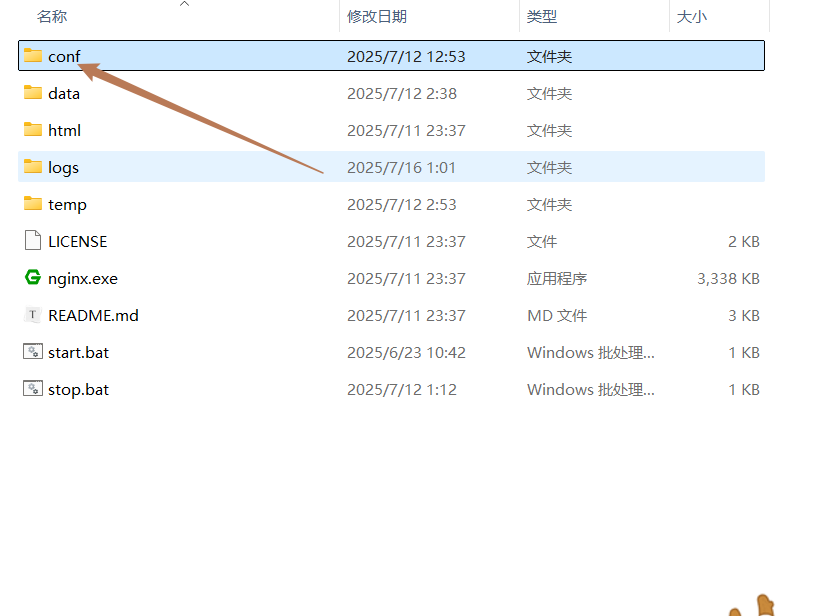
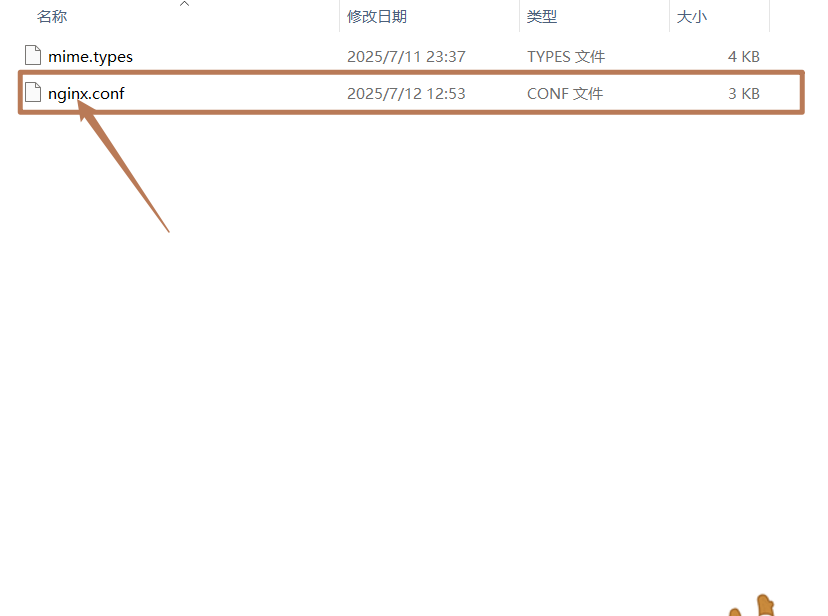
配置内容如下:
worker_processes  1;

error_log  logs/error.log info;

events {
    worker_connections  1024;
}

# rtmp  推流配置
rtmp {
    server {
        listen 1935;
        chunk_size 4096;

        application live {
            live on;
            record off;
            allow play all;
        }

        application hls{
            live on;
            hls on;
            hls_path data/hls;
            hls_fragment 5s;
            hls_playlist_length 30s;
        }
    }
}

# hls 推流配置
http {
   #gzip  on;
    server {
        listen       80;
        server_name  localhost;

        #charset koi8-r;

        #access_log  logs/host.access.log  main;

        location /hls {
            types {
                application/vnd.apple.mpegurl m3u8;
                video/mp2t ts;
            }

            # 修改成自己的存放m3u8文件的目录
            alias data/hls;
            add_header Cache-Control no-cache;

            # 添加 CORS 头部允许跨域
            add_header 'Access-Control-Allow-Origin' '*';
            add_header 'Access-Control-Allow-Methods' 'GET, OPTIONS';
            # 添加对预检请求的支持
            add_header 'Access-Control-Allow-Headers' 'Range';
            # 为了支持跨域跨域预检请求,确保OPTIONS方法也被允许
            add_header 'Access-Control-Max-Age' 1728000;
            # 针对预检请求直接返回
            if ($request_method = 'OPTIONS') {
                add_header 'Access-Control-Allow-Origin' '*';
                add_header 'Access-Control-Allow-Methods' 'GET, POST, OPTIONS';
                add_header 'Access-Control-Allow-Headers' 'DNT,X-CustomHeader,Keep-Alive,User-Agent,X-Requested-With,If-Modified-Since,Cache-Control,Content-Type,Range';
                # 告诉客户端预检请求允许的时间
                add_header 'Access-Control-Max-Age' 1728000;
                add_header 'Content-Type' 'text/plain charset=UTF-8';
                add_header 'Content-Length' 0;
                return 204;
            }
        }
    }
}
2、编写用户端拉流代码 live.html
<!DOCTYPE html>
<html lang="zh-CN">
<head>
<meta charset="UTF-8">
<meta name="viewport" content="width=device-width, initial-scale=1.0">
<title>小牛直播平台</title>
<!-- 引入hls.js库 -->
<script src="https://cdn.jsdelivr.net/npm/hls.js@latest"></script>
<link rel="stylesheet" href="https://cdnjs.cloudflare.com/ajax/libs/font-awesome/6.4.0/css/all.min.css">
<link rel="stylesheet" href="https://fonts.googleapis.com/css2?family=Inter:wght@300;400;500;600;700&display=swap">
<style>
:root {
--primary: #6C63FF;
--primary-dark: #5a52e0;
--secondary: #36D1DC;
--dark-bg: #12141D;
--card-bg: rgba(30, 33, 46, 0.8);
--accent: #FF6B6B;
--text-light: #FFFFFF;
--text-muted: #B0B3C1;
--success: #5CD85A;
--warning: #FFC107;
--error: #F44336;
--border-radius: 12px;
--transition: all 0.3s ease;
--glass-bg: rgba(255, 255, 255, 0.05);
--shadow: 0 10px 25px rgba(0, 0, 0, 0.3);
}
* {
margin: 0;
padding: 0;
box-sizing: border-box;
}
body {
font-family: 'Inter', -apple-system, BlinkMacSystemFont, sans-serif;
background: linear-gradient(135deg, var(--dark-bg) 0%, #1A1C2B 100%);
color: var(--text-light);
line-height: 1.6;
min-height: 100vh;
padding: 20px;
background-attachment: fixed;
}
.container {
max-width: 1200px;
margin: 0 auto;
}
header {
text-align: center;
margin-bottom: 30px;
padding-top: 20px;
}
.logo {
display: flex;
align-items: center;
justify-content: center;
gap: 15px;
margin-bottom: 10px;
}
.logo-icon {
font-size: 32px;
color: var(--secondary);
}
h1 {
font-size: 2.8rem;
font-weight: 700;
background: linear-gradient(to right, var(--primary), var(--secondary));
-webkit-background-clip: text;
background-clip: text;
color: transparent;
letter-spacing: -0.5px;
}
.subtitle {
color: var(--text-muted);
font-size: 1.1rem;
font-weight: 400;
margin-top: 8px;
}
.card {
background: var(--card-bg);
border-radius: var(--border-radius);
padding: 25px;
box-shadow: var(--shadow);
backdrop-filter: blur(10px);
border: 1px solid rgba(255, 255, 255, 0.08);
margin-bottom: 30px;
}
.card-header {
display: flex;
justify-content: space-between;
align-items: center;
margin-bottom: 20px;
}
.card-title {
font-size: 1.5rem;
font-weight: 600;
display: flex;
align-items: center;
gap: 10px;
}
.card-title i {
color: var(--primary);
}
.video-container {
position: relative;
border-radius: var(--border-radius);
overflow: hidden;
box-shadow: 0 8px 30px rgba(0, 0, 0, 0.4);
margin-bottom: 25px;
background: #000;
}
#video {
width: 100%;
display: block;
aspect-ratio: 16/9;
}
.video-overlay {
position: absolute;
top: 0;
left: 0;
width: 100%;
height: 100%;
display: flex;
align-items: center;
justify-content: center;
background: rgba(0, 0, 0, 0.5);
opacity: 0;
transition: var(--transition);
pointer-events: none;
}
.video-container:hover .video-overlay {
opacity: 1;
}
.input-group {
display: flex;
flex-direction: column;
gap: 15px;
margin-bottom: 20px;
}
.input-row {
display: flex;
align-items: center;
gap: 10px;
}
label {
font-weight: 500;
min-width: 90px;
color: var(--text-muted);
}
input[type="text"] {
flex: 1;
padding: 14px 20px;
border: none;
border-radius: 8px;
background: rgba(0, 0, 0, 0.25);
color: var(--text-light);
font-size: 1rem;
transition: var(--transition);
border: 1px solid rgba(255, 255, 255, 0.1);
}
input[type="text"]:focus {
outline: none;
border-color: var(--primary);
box-shadow: 0 0 0 3px rgba(108, 99, 255, 0.2);
}
.input-with-icon {
position: relative;
flex: 1;
}
.input-with-icon i {
position: absolute;
left: 15px;
top: 50%;
transform: translateY(-50%);
color: var(--text-muted);
}
.input-with-icon input {
padding-left: 45px;
}
.button-group {
display: flex;
flex-wrap: wrap;
gap: 15px;
margin: 25px 0;
}
.btn {
padding: 14px 28px;
border-radius: 8px;
border: none;
font-weight: 600;
font-size: 1rem;
cursor: pointer;
display: flex;
align-items: center;
justify-content: center;
gap: 10px;
transition: var(--transition);
box-shadow: 0 4px 6px rgba(0, 0, 0, 0.1);
}
.btn-primary {
background: linear-gradient(135deg, var(--primary), var(--primary-dark));
color: white;
}
.btn-primary:hover {
transform: translateY(-2px);
box-shadow: 0 6px 12px rgba(108, 99, 255, 0.25);
}
.btn-secondary {
background: var(--glass-bg);
color: var(--text-light);
border: 1px solid rgba(255, 255, 255, 0.15);
}
.btn-secondary:hover {
background: rgba(255, 255, 255, 0.1);
}
.btn-danger {
background: linear-gradient(135deg, var(--error), #d32f2f);
color: white;
}
.btn-success {
background: linear-gradient(135deg, var(--success), #43a047);
color: white;
}
.btn-warning {
background: linear-gradient(135deg, var(--warning), #ffa000);
color: black;
}
.status-container {
display: flex;
align-items: center;
padding: 15px 20px;
background: rgba(0, 0, 0, 0.25);
border-radius: var(--border-radius);
margin-top: 20px;
}
.status-indicator {
width: 12px;
height: 12px;
border-radius: 50%;
margin-right: 12px;
background: var(--success);
box-shadow: 0 0 10px var(--success);
animation: pulse 2s infinite;
}
@keyframes pulse {
0% {
opacity: 0.8;
}
50% {
opacity: 0.3;
}
100% {
opacity: 0.8;
}
}
#status {
font-weight: 500;
}
.status-live {
background: var(--error);
box-shadow: 0 0 10px var(--error);
}
.status-warning {
background: var(--warning);
box-shadow: 0 0 10px var(--warning);
}
.stats-grid {
display: grid;
grid-template-columns: repeat(auto-fit, minmax(200px, 1fr));
gap: 20px;
margin-top: 25px;
}
.stat-card {
background: var(--glass-bg);
border-radius: var(--border-radius);
padding: 20px;
text-align: center;
border: 1px solid rgba(255, 255, 255, 0.08);
}
.stat-value {
font-size: 2.2rem;
font-weight: 700;
color: var(--secondary);
margin: 10px 0;
}
.stat-label {
color: var(--text-muted);
font-size: 0.9rem;
}
.footer {
text-align: center;
margin-top: 40px;
padding: 20px 0;
color: var(--text-muted);
font-size: 0.9rem;
border-top: 1px solid rgba(255, 255, 255, 0.08);
}
@media (max-width: 768px) {
.input-row {
flex-direction: column;
align-items: flex-start;
}
.button-group {
flex-direction: column;
}
.btn {
width: 100%;
}
.stats-grid {
grid-template-columns: 1fr;
}
}
</style>
</head>
<body>
<div class="container">
<header>
<div class="logo">
<i class="fas fa-satellite logo-icon"></i>
<h1>超时代直播平台</h1>
</div>
<p class="subtitle">基于HLS协议的高性能实时流媒体解决方案</p>
</header>
<main>
<div class="card">
<div class="card-header">
<h2 class="card-title"><i class="fas fa-play-circle"></i> 直播播放器</h2>
<div class="status-container">
<div class="status-indicator" id="indicator"></div>
<div id="status">播放器状态:准备就绪</div>
</div>
</div>
<div class="video-container">
<video id="video" controls></video>
<div class="video-overlay">
<button class="btn btn-play btn-primary"><i class="fas fa-play"></i> 播放</button>
<button class="btn btn-pause btn-secondary"><i class="fas fa-pause"></i> 暂停</button>
</div>
</div>
<div class="input-group">
<div class="input-row">
<label for="hlsUrl">HLS地址:</label>
<div class="input-with-icon">
<i class="fas fa-link"></i>
<input id="hlsUrl" type="text"
value="http://127.0.0.1/hls/5a0b5b4a-34fb-4128-948a-a16d2c5b7e62.m3u8">
</div>
</div>
</div>
<div class="button-group">
<button id="playBtn" class="btn btn-primary"><i class="fas fa-play"></i> 播放</button>
<button id="stopBtn" class="btn btn-secondary"><i class="fas fa-pause"></i> 暂停</button>
<button id="destroyBtn" class="btn btn-warning"><i class="fas fa-times"></i> 销毁</button>
<button id="startLiveBtn" class="btn btn-success"><i class="fas fa-broadcast-tower"></i>
开启直播</button>
<button id="stopLiveBtn" class="btn btn-danger"><i class="fas fa-stop"></i> 停止直播</button>
</div>
</div>
<div class="card">
<h2 class="card-title"><i class="fas fa-wifi"></i> 推流管理</h2>
<div class="input-group">
<div class="input-row">
<label for="liveUrl">推流地址:</label>
<div class="input-with-icon">
<i class="fas fa-server"></i>
<input id="liveUrl" type="text" disabled>
</div>
</div>
<div class="input-row">
<label for="liveName">推流密钥:</label>
<div class="input-with-icon">
<i class="fas fa-key"></i>
<input id="liveName" type="text" disabled>
</div>
</div>
</div>
</div>
<div class="stats-grid">
<div class="stat-card">
<i class="fas fa-users fa-2x"></i>
<div class="stat-value">1,254</div>
<div class="stat-label">当前观众</div>
</div>
<div class="stat-card">
<i class="fas fa-signal fa-2x"></i>
<div class="stat-value">12.5 Mbps</div>
<div class="stat-label">平均码率</div>
</div>
<div class="stat-card">
<i class="fas fa-sync-alt fa-2x"></i>
<div class="stat-value">128 ms</div>
<div class="stat-label">延迟</div>
</div>
<div class="stat-card">
<i class="fas fa-history fa-2x"></i>
<div class="stat-value">8h 24m</div>
<div class="stat-label">直播时长</div>
</div>
</div>
</main>
<footer class="footer">
<p>© 2023 郑州小牛科技有限公司 | HLS直播平台 v2.0 | 技术支持: 2481771560@qq.com</p>
</footer>
</div>
<script>
const video = document.getElementById('video');
const playBtn = document.getElementById('playBtn');
const stopBtn = document.getElementById('stopBtn');
const destroyBtn = document.getElementById('destroyBtn');
const startLiveBtn = document.getElementById('startLiveBtn');
const liveUrlInput = document.getElementById('liveUrl');
const liveNameInput = document.getElementById('liveName');
const statusDiv = document.getElementById('status');
const hlsUrlInput = document.getElementById('hlsUrl');
const stopLiveBtn = document.getElementById('stopLiveBtn');
const indicator = document.getElementById('indicator');
let hls = null;
function updateStatus(message, type = 'default') {
statusDiv.textContent = `播放器状态:${message}`;
indicator.className = 'status-indicator';
switch (type) {
case 'error':
indicator.classList.add('status-warning');
break;
case 'live':
indicator.classList.add('status-live');
break;
default:
indicator.classList.add('status-default');
break;
}
}
function initHLS() {
if (Hls.isSupported()) {
hls = new Hls();
hls.loadSource(hlsUrlInput.value);
hls.attachMedia(video);
hls.on(Hls.Events.MANIFEST_PARSED, function () {
statusDiv.textContent = '播放器状态:已加载清单';
video.play().catch(e => {
statusDiv.textContent = `播放器状态:自动播放失败 - 现代浏览器(Chrome/Safari/Firefox等)要求用户必须先与页面交互(如点击/触摸),才能触发媒体自动播放`;
});
});
hls.on(Hls.Events.ERROR, function (event, data) {
let errorType = data.type;
let errorDetails = data.details;
let errorFatal = data.fatal;
console.log(`播放器状态:错误 (${errorType} - ${errorDetails})`);
statusDiv.textContent = "直播暂未开始或已结束";
if (errorFatal) {
hls.destroy();
}
});
statusDiv.textContent = '播放器状态:初始化中...';
} else if (video.canPlayType('application/vnd.apple.mpegurl')) {
video.src = hlsUrlInput.value;
video.addEventListener('loadedmetadata', function () {
statusDiv.textContent = '播放器状态:原生支持 HLS';
video.play();
});
} else {
statusDiv.textContent = '播放器状态:此浏览器不支持 HLS。';
}
}
function destroyHLS() {
if (hls) {
hls.destroy();
hls = null;
video.src = '';
updateStatus('播放器状态:已销毁', 'default');
}
}
playBtn.addEventListener('click', () => {
if (hls) {
video.play();
updateStatus('播放中');
// 显示暂停按钮
document.querySelector('.video-overlay .btn-pause').style.display = 'flex';
// 隐藏播放按钮
document.querySelector('.video-overlay .btn-play').style.display = 'none';
} else {
updateStatus('请先初始化播放器', 'error');
}
});
stopBtn.addEventListener('click', () => {
if (video.paused) {
updateStatus('播放器已暂停');
} else {
video.pause();
updateStatus('播放器已暂停');
}
// 显示播放按钮
document.querySelector('.video-overlay .btn-play').style.display = 'flex';
// 隐藏暂停按钮
document.querySelector('.video-overlay .btn-pause').style.display = 'none';
});
destroyBtn.addEventListener('click', () => {
destroyHLS();
});
stopLiveBtn.addEventListener('click', function () {
liveUrlInput.value = '';
liveNameInput.value = '';
hlsUrlInput.value = 'http://127.0.0.1/hls/5a0b5b4a-34fb-4128-948a-a16d2c5b7e62.m3u8';
localStorage.removeItem('liveUrl');
localStorage.removeItem('liveName');
if (hls) {
hls.destroy();
}
initHLS();
});
// 侦听鼠标在视频上悬停事件
video.addEventListener('mouseover', () => {
if (video.paused) {
// 显示播放按钮
document.querySelector('.video-overlay .btn-play').style.display = 'flex';
// 隐藏暂停按钮
document.querySelector('.video-overlay .btn-pause').style.display = 'none';
} else {
// 显示暂停按钮
document.querySelector('.video-overlay .btn-pause').style.display = 'flex';
// 隐藏播放按钮
document.querySelector('.video-overlay .btn-play').style.display = 'none';
}
});
// 侦听视频元素被点击事件
video.addEventListener('click', () => {
if (video.paused) {
// 显示暂停按钮
document.querySelector('.video-overlay .btn-pause').style.display = 'flex';
// 隐藏播放按钮
document.querySelector('.video-overlay .btn-play').style.display = 'none';
} else {
// 显示播放按钮
document.querySelector('.video-overlay .btn-play').style.display = 'flex';
// 隐藏暂停按钮
document.querySelector('.video-overlay .btn-pause').style.display = 'none';
}
});
startLiveBtn.addEventListener('click', function () {
liveNameInput.value = `${Math.random().toString(36).substring(2, 10)}`;
liveUrlInput.value = `http://127.0.0.1/hls`;
hlsUrlInput.value = `${liveUrlInput.value}/${liveNameInput.value}.m3u8`;
statusDiv.textContent = '播放器状态:直播已开启';
initHLS();
localStorage.setItem('liveUrl', liveUrlInput.value);
localStorage.setItem('liveName', liveNameInput.value);
});
window.addEventListener('load', function () {
if (localStorage.getItem('liveUrl') && localStorage.getItem('liveName')) {
liveUrlInput.value = localStorage.getItem('liveUrl');
liveNameInput.value = localStorage.getItem('liveName');
hlsUrlInput.value = `${liveUrlInput.value}/${liveNameInput.value}.m3u8`;
}
initHLS();
});
</script>
</body>
</html>同目录下需要一个需要一个hls.js依赖文件以支持web环境,关注公众号 回复:hls 获取。
3、双击nginx-rtmp-win解压缩包里的start.bat运行脚本,启动服务。
4、打开OBS推流软件,下面演示OBS简单使用方式。
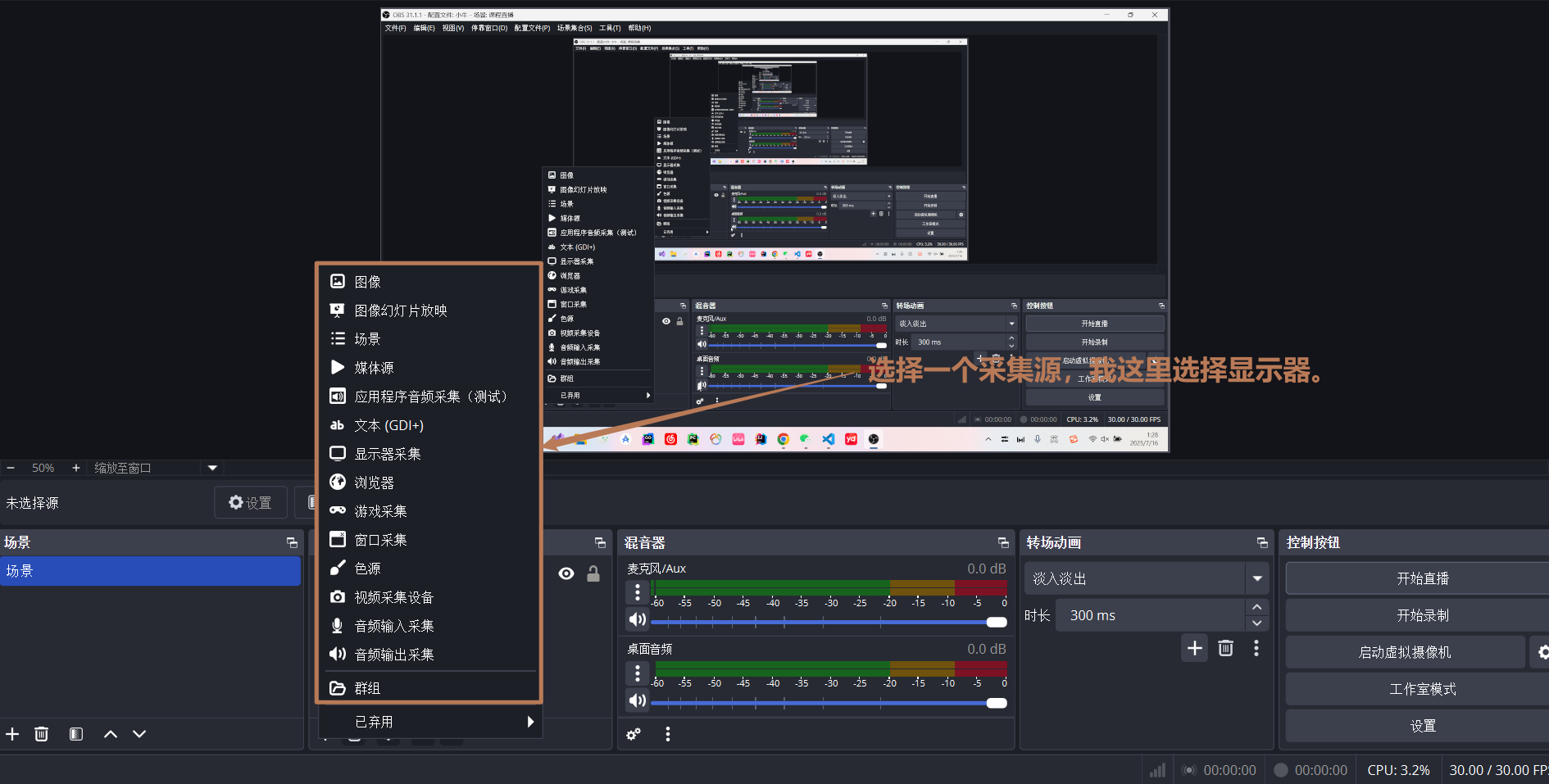
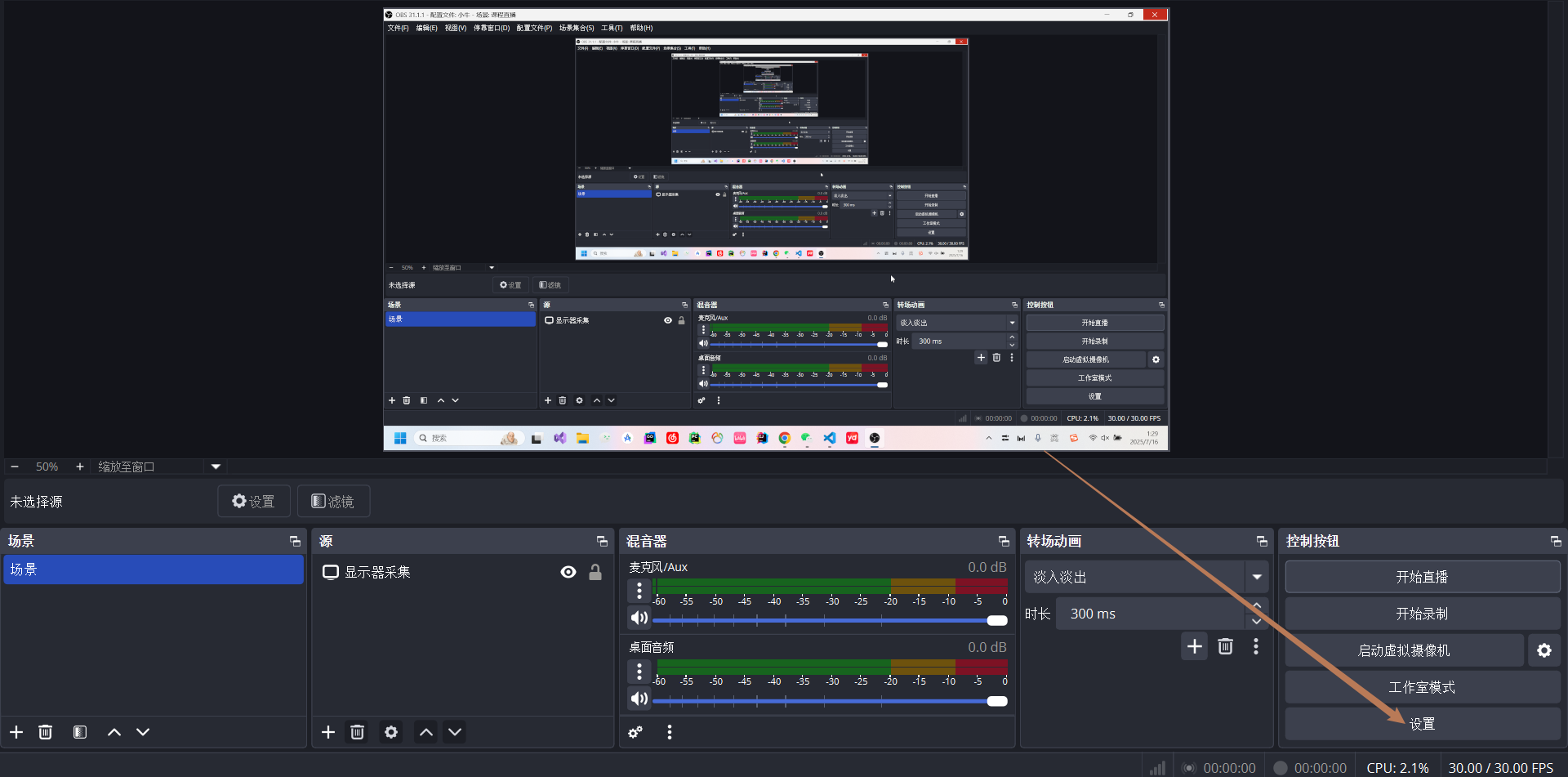
这里添加推流地址,根据我们的rtmp配置,填入图片所示就行。推流串是唯一标识直播间的,也就是说为了推流者可以与直播间正确配对。在开启直播的时候会得到这个推流串。
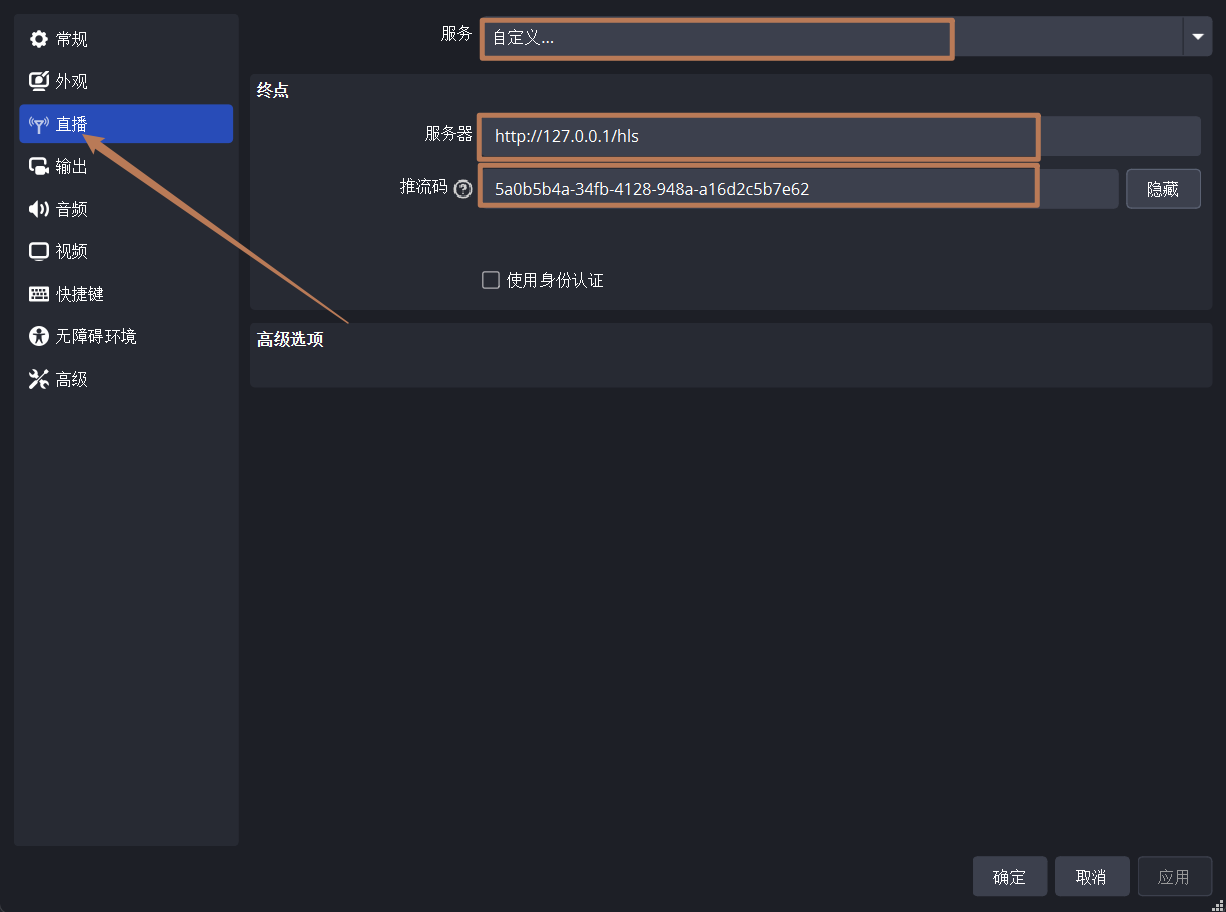
接下来开启直播,你的数据就可以推送到rtmp服务器了。然后运行前端拉流,就可以观看直播了。我们是用的hls拉去mu38视频片段,所以延迟高,rtmp协议延迟低,但兼容性差。
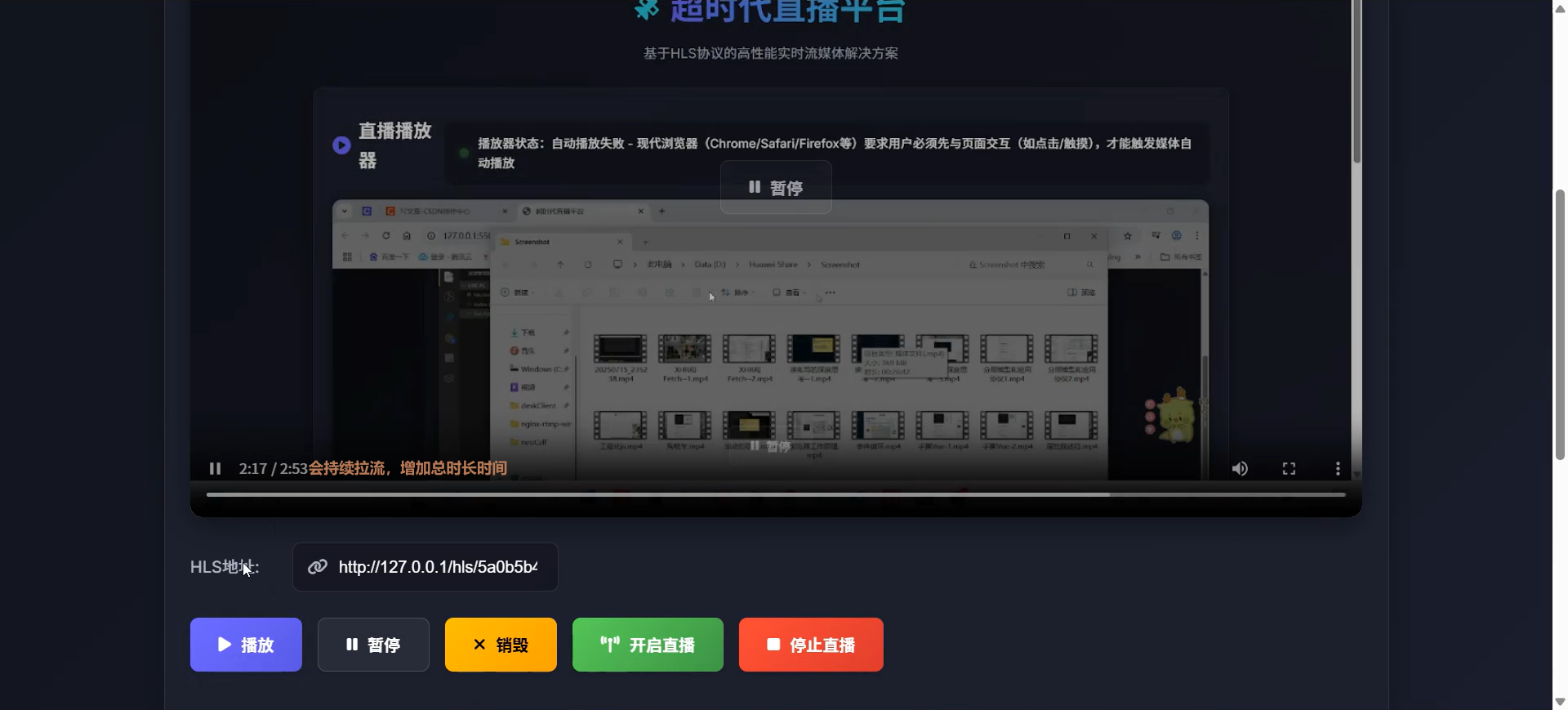
5、演示视频链接:HLS协议直播平台-CSDN直播
含大厂在职人员的交流社区,关注公众号 回复:大厂 。小牛 - 全栈工程师 | 个人官网

北京人形旗下天工造物具身智能开源社区,聚焦具身天工与慧思开物两大平台
更多推荐
 35
35 0
0- 0


 已为社区贡献1条内容

所有评论(0)