Sharding-JDBC分库分表实战指南(一)
一、ShardingSphere-JDBC概述
shardingSphere-JDBC是Apache ShardingSphere的第一个产品,也是ShardingSphere的前身。它定位为轻量级Java框架,在Java的JDBC层提供的额外服务。它使用客户端直连数据库,以jar包形式提供服务,无需额外部署和依赖,可理解为增强版的JDBC驱动,完全兼容JDBC和各种ORM框架。
shardingSphere-JDBC的核心功能是数据分片和读写分离。数据分片包括水平分库、水平分表、垂直分库、垂直分表等多种分片方式。读写分离功能可以将写操作指向主库,读操作分散到多个从库,提高系统吞吐量。
ShardingSphere 官网:概览 :: ShardingSphere
ShardingSphere github:https://github.com/apache/shardingsphere
ShardingSphere-5.2.1 Demo:https://gitee.com/original-intention/sharding-jdbc-gorgor
⼆、理解分库分表的核⼼概念
1、ShardingSphere分库分表的核⼼概念
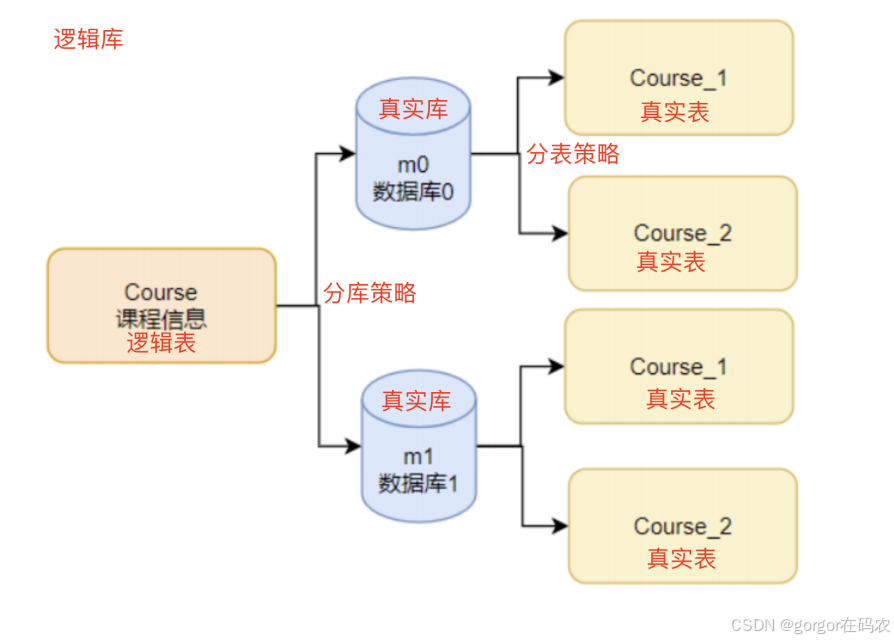
- 虚拟库: ShardingSphere的核⼼就是提供⼀个具备分库分表功能的虚拟库,他是⼀个ShardingSphereDatasource实例。应⽤程序只需要像操作单数据源⼀样访问这个ShardingSphereDatasource即可。示例中,MyBatis框架并没有特 殊指定DataSource,就是使⽤的ShardingSphere的DataSource数据源。
- 真实库: 实际保存数据的数据库。这些数据库都被包含在ShardingSphereDatasource实例当中,由ShardingSphere 决定未来需要使⽤哪个真实库。示例中,m0和m1就是两个真实库。
- 逻辑表: 应⽤程序直接操作的逻辑表。 示例中操作的course表就是⼀个逻辑表,并不需要在数据库中真实存在。
- 真实表: 实际保存数据的表。这些真实表与逻辑表表名不需要⼀致,但是需要有相同的表结构,可以分布在不同的真 实库中。应⽤可以维护⼀个逻辑表与真实表的对应关系,所有的真实表默认也会映射成为ShardingSphere的虚拟表。 示例中course_1和course_2就是真实表。
- 分布式主键⽣成算法: 给逻辑表⽣成唯⼀主键。由于逻辑表的数据是分布在多个真实表当中的,所有,单表的索引就 ⽆法保证逻辑表的ID唯⼀性。因此,在做分库分表时,通常都会独⽴出⼀个⽣成分布式ID的主键⽣成算法。示例中使⽤的SNOWFLAKE雪花算法就是⼀种很常⻅的主键⽣成算法。
- 分⽚策略: 表示逻辑表要如何分配到真实库和真实表当中,分为分库策略和分表策略两个部分。分⽚策略由分⽚键和 分⽚算法组成。分⽚键是进⾏数据⽔平拆分的关键字段。分⽚算法则表示根据分⽚键如何寻找对应的真实库和真实 表。示例当中对cid字段取模,就是⼀种简单的分⽚算法。 如果ShardingSphere匹配不到合适的分⽚策略,那就只能 进⾏全分⽚路由,这是效率最差的⼀种实现⽅式。
核心分层架构
| 层级 | 职责 | 关键实现 |
|---|---|---|
| 逻辑层 | 开发者视角的虚拟表/库(如 order_db, order_table) | LogicSchema, LogicTable |
| 物理层 | 真实存储节点(如 ds_0.order_table_0, ds_1.order_table_1) | ActualDataSource, ActualTable |
| 路由层 | 根据分片规则将 SQL 路由到物理节点 | ShardingRouter |
| 执行层 | 多线程并行操作物理库表 | ShardingExecutor |
| 归并层 | 合并多个物理节点的查询结果(如排序、聚合) | MergeEngine |
2、垂直分⽚和⽔平分⽚
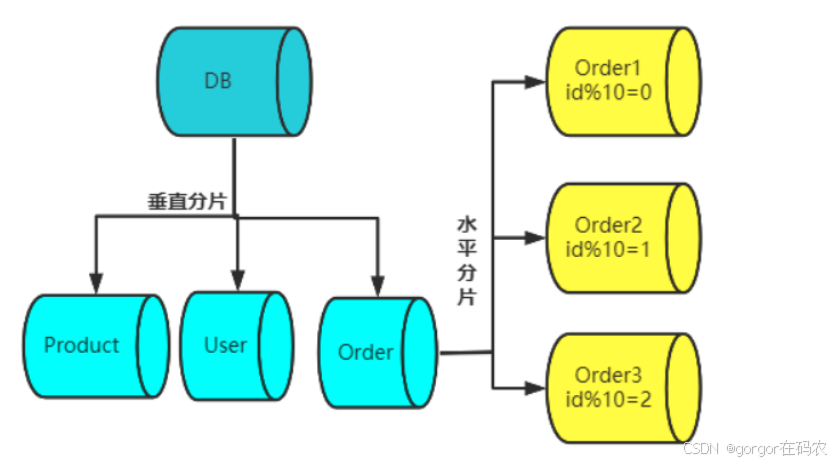
- ⼀是按照业务划分的维度,将不同的表拆分到不同的库当中。这样可以减少每个数据库的数据量以及客户端的 连接数,提⾼查询效率。这种⽅案称为垂直分库。
- ⼆是按照数据分布的维度,将原本存在同⼀张表当中的数据,拆分到多 张⼦表当中。每个⼦表只存储⼀部分数据。这样可以介绍每⼀张表的数据量,提升查询效率。这种⽅案称为⽔平分表
三、分库分表的案例
案例是基于ShardingSphere-Jdbc 5.2.1 版本进行讲解。
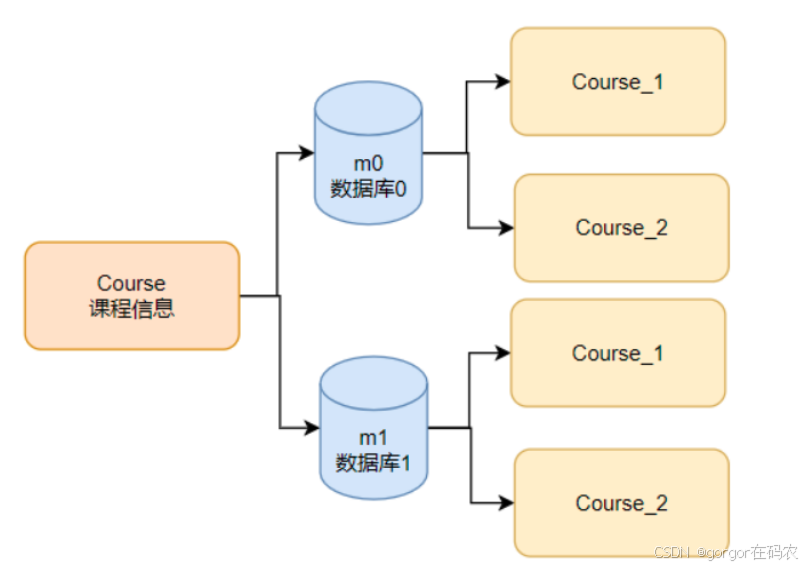
此次案例准备把一张课程表,拆分到两个库和四个表中,具体如下图:
CREATE TABLE `course` (
  `cid` bigint(20) NOT NULL,
  `cname` varchar(50) NOT NULL,
  `user_id` bigint(20) NOT NULL,
  `cstatus` varchar(10) NOT NULL,
  PRIMARY KEY (`cid`) USING BTREE
) ENGINE=InnoDB DEFAULT CHARSET=utf8 ROW_FORMAT=DYNAMIC;
shardingsphere-jdbc 整合 spring boot 核心 jar 包
 <dependency>
    <groupId>org.apache.shardingsphere</groupId>
    <artifactId>shardingsphere-jdbc-core-spring-boot-starter</artifactId>
    <version>5.2.1</version>
</dependency>
1. 快速搭建案例项目
1.1 引入 Maven依赖
<dependencyManagement>
    <dependencies>
        <dependency>
            <groupId>org.springframework.boot</groupId>
            <artifactId>spring-boot-dependencies</artifactId>
            <version>2.2.1.RELEASE</version>
            <type>pom</type>
            <scope>import</scope>
        </dependency>
        <!-- mybatisplus依赖 -->
        <dependency>
            <groupId>com.baomidou</groupId>
            <artifactId>mybatis-plus-boot-starter</artifactId>
            <version>3.0.5</version>
        </dependency>
        <dependency>
            <groupId>com.alibaba</groupId>
            <artifactId>druid-spring-boot-starter</artifactId>
            <version>1.1.20</version>
        </dependency>
    </dependencies>
</dependencyManagement>
<dependencies>
    <dependency>
        <groupId>org.springframework.boot</groupId>
        <artifactId>spring-boot-starter</artifactId>
    </dependency>
    <dependency>
        <groupId>org.springframework.boot</groupId>
        <artifactId>spring-boot-starter-test</artifactId>
    </dependency>
    <!-- 数据源连接池 -->
    <dependency>
        <groupId>com.alibaba</groupId>
        <artifactId>druid-spring-boot-starter</artifactId>
        <version>1.1.20</version>
    </dependency>
    <!-- mysql连接驱动 -->
    <dependency>
        <groupId>mysql</groupId>
        <artifactId>mysql-connector-java</artifactId>
    </dependency>
    <!-- mybatisplus依赖 -->
    <dependency>
        <groupId>com.baomidou</groupId>
        <artifactId>mybatis-plus-boot-starter</artifactId>
        <version>3.4.3.3</version>
    </dependency>
</dependencies>
1.2 在springboot的配置⽂件application.properties中增加数据库配置
pring.datasource.druid.db-type=mysql
spring.datasource.druid.driver-class-name=com.mysql.cj.jdbc.Driver
spring.datasource.druid.url=jdbc:mysql://192.168.65.212:3306/test?serverTimezone=UTC
spring.datasource.druid.username=root
spring.datasource.druid.password=root
1.3 使⽤MyBatis-plus的⽅式,直接声明Entity和Mapper,映射数据库中的course表。
public class Course {
    private Long cid;
    private String cname;
    private Long userId;
    private String cstatus;
    //省略。getter ... setter ....
}
public interface CourseMapper extends BaseMapper<Course> {
}
1.4 增加SpringBoot启动类,扫描mapper接⼝
@SpringBootApplication
@MapperScan("com.roy.jdbcdemo.mapper")
public class App {
    public static void main(String[] args) {
    SpringApplication.run(App.class,args);
    }
}
1.5 做⼀个单元测试,简单的把course课程信息插⼊到数据库,以及从数据库中进⾏查询
@SpringBootTest
@RunWith(SpringRunner.class)
public class JDBCTest {
    @Resource
    private CourseMapper courseMapper;

    @Test
    public void addcourse() {
        for (int i = 0; i < 10; i++) {
            Course c = new Course();
            c.setCname("java");
            c.setUserId(1001L);
            c.setCstatus("1");
            courseMapper.insert(c);
//insert into course values ....
            System.out.println(c);
        }
    }

    @Test
    public void queryCourse() {
        QueryWrapper<Course> wrapper = new QueryWrapper<Course>();
        wrapper.eq("cid", 1L);
        List<Course> courses = courseMapper.selectList(wrapper);
        courses.forEach(course -> System.out.println(course));
    }
}
2.引入ShardingJdbc实现分库分片
1.1 在pom.xml中引入ShardingSphere
<dependencies>
        <!-- shardingJDBC核心依赖 -->
        <dependency>
            <groupId>org.apache.shardingsphere</groupId>
            <artifactId>shardingsphere-jdbc-core-spring-boot-starter</artifactId>
            <version>5.2.1</version>
            <exclusions>
                <exclusion>
                    <artifactId>snakeyaml</artifactId>
                    <groupId>org.yaml</groupId>
                </exclusion>
            </exclusions>
        </dependency>
        <!-- 版本冲突 -->
        <dependency>
            <groupId>org.yaml</groupId>
            <artifactId>snakeyaml</artifactId>
            <version>1.33</version>
        </dependency>
        <!-- SpringBoot依赖 -->
        <dependency>
            <groupId>org.springframework.boot</groupId>
            <artifactId>spring-boot-starter</artifactId>
            <exclusions>
                <exclusion>
                    <artifactId>snakeyaml</artifactId>
                    <groupId>org.yaml</groupId>
                </exclusion>
            </exclusions>
        </dependency>
        <!-- 数据源连接池 -->
        <!--注意不要用这个依赖,他会创建数据源,跟上面ShardingJDBC的SpringBoot集成依赖有冲突 -->
        <!--        <dependency>-->
        <!--            <groupId>com.alibaba</groupId>-->
        <!--            <artifactId>druid-spring-boot-starter</artifactId>-->
        <!--            <version>1.1.20</version>-->
        <!--        </dependency>-->
        <dependency>
            <groupId>com.alibaba</groupId>
            <artifactId>druid</artifactId>
            <version>1.1.20</version>
        </dependency>
        <!-- mysql连接驱动 -->
        <dependency>
            <groupId>mysql</groupId>
            <artifactId>mysql-connector-java</artifactId>
        </dependency>
        <!-- mybatisplus依赖 -->
        <dependency>
            <groupId>com.baomidou</groupId>
            <artifactId>mybatis-plus-boot-starter</artifactId>
            <version>3.4.3.3</version>
        </dependency>
  <dependency>
            <groupId>org.springframework.boot</groupId>
            <artifactId>spring-boot-starter-test</artifactId>
        </dependency>
    </dependencies>
1.2 在对应数据库里创建分片表
按照我们之前的设计,去对应的数据库中自行创建course_1和course_2表。表结构与course表是一致的。
初始化SQL在项目:resources/sql
1.3 增加ShardingJDBC的分库分表配置
### -------------------------------数据源配置-------------------------------------------------
# 指定对应的库
spring.shardingsphere.datasource.names=m0,m1

spring.shardingsphere.datasource.m0.type=com.alibaba.druid.pool.DruidDataSource
spring.shardingsphere.datasource.m0.driver-class-name=com.mysql.cj.jdbc.Driver
spring.shardingsphere.datasource.m0.url=jdbc:mysql://localhost:3306/shardingdb1?serverTimezone=Asia/Shanghai
spring.shardingsphere.datasource.m0.username=root
spring.shardingsphere.datasource.m0.password=root

spring.shardingsphere.datasource.m1.type=com.alibaba.druid.pool.DruidDataSource
spring.shardingsphere.datasource.m1.driver-class-name=com.mysql.cj.jdbc.Driver
spring.shardingsphere.datasource.m1.url=jdbc:mysql://localhost:3306/shardingdb2?serverTimezone=Asia/Shanghai
spring.shardingsphere.datasource.m1.username=root
spring.shardingsphere.datasource.m1.password=root
### -------------------------------数据源配置-------------------------------------------------

### --------------------------------分布式序列算法配置---------------------------------------------------------
# 指定分布式主键生成策略
spring.shardingsphere.rules.sharding.tables.course.key-generate-strategy.column=cid
spring.shardingsphere.rules.sharding.tables.course.key-generate-strategy.key-generator-name=alg_snowflake
# 雪花算法,生成Long类型主键。
spring.shardingsphere.rules.sharding.key-generators.alg_snowflake.type=SNOWFLAKE
spring.shardingsphere.rules.sharding.key-generators.alg_snowflake.props.worker-id=1
spring.shardingsphere.rules.sharding.key-generators.alg_snowflake.props.max-vibration-offset=8
### --------------------------------分布式序列算法配置---------------------------------------------------------


### --------------------------------------配置实际分片节点------------------------------------------------
spring.shardingsphere.rules.sharding.tables.course.actual-data-nodes=m$->{0..1}.course_$->{1..2}
### --------------------------------------配置实际分片节点------------------------------------------------

### ---------------------------inline 分库配置--------------------------------------------------------------
# 分库字段
spring.shardingsphere.rules.sharding.tables.course.database-strategy.standard.sharding-column=user_id
# 分库算法名称
spring.shardingsphere.rules.sharding.tables.course.database-strategy.standard.sharding-algorithm-name=db_inline_algorithm
# 分库算法
spring.shardingsphere.rules.sharding.sharding-algorithms.db_inline_algorithm.type=MOD
spring.shardingsphere.rules.sharding.sharding-algorithms.db_inline_algorithm.props.sharding-count=2
### ---------------------------inline 分库配置--------------------------------------------------------------


### ---------------------------inline 分表配置--------------------------------------------------------------
# 分表字段
spring.shardingsphere.rules.sharding.tables.course.table-strategy.standard.sharding-column=user_id
# 分表算法名称
spring.shardingsphere.rules.sharding.tables.course.table-strategy.standard.sharding-algorithm-name=table_inline_algorithm
# 分表算法 --> 四种数据分片方式 INLINE|STANDARD|COMPLEX|HINT
spring.shardingsphere.rules.sharding.sharding-algorithms.table_inline_algorithm.type=INLINE
spring.shardingsphere.rules.sharding.sharding-algorithms.table_inline_algorithm.props.algorithm-expression=course_$->{user_id.intdiv(2) % 2 + 1}
### ---------------------------inline 分表配置--------------------------------------------------------------

# inline允许进行范围查询
spring.shardingsphere.rules.sharding.sharding-algorithms.table_inline_algorithm.props.allow-range-query-with-inline-sharding=true
1.4 单元测试
@SpringBootTest
@RunWith(SpringRunner.class)
public class InlineTest {

    @Autowired
    private CourseMapper courseMapper;

    @BeforeClass
    public static void setUp() {
        //设置系统属性
        System.setProperty("spring.profiles.active", "inline");
    }


    @Test
    public void testInlineDemo() {
        for (Long i = 1L; i < 10L; i++) {
            Course c = new Course();
            c.setCname("java");
            c.setUserId(i);
            c.setCstatus("1");
            courseMapper.insert(c);
        }

    }

    /**
     * 精确查询
     * @return
     */
    @Test
    public void testInlineDemo1() {
        Course course = courseMapper.selectByUseId(7L);
        System.out.println(course);
    }

    /**
     * inline 分片算法默认不支持范围查询,除非配置下面配置
     * # inline允许进行范围查询
     * spring.shardingsphere.rules.sharding.sharding-algorithms.table_standard_algorithm.props.allow-range-query-with-inline-sharding=true
     */
    @Test
    public void testBetweenDemo() {
        List<Course> courses = courseMapper.selectByBetweenUserId(1L, 6L);
        System.out.println(courses);
    }

}四、ShardingJDBC常⻅数据分⽚策略实战
分片策略全景图
| 策略类型 | 适用场景 | 支持操作符 | 分片键数量 | 实现复杂度 |
|---|---|---|---|---|
| 行表达式(Inline) | 简单取模/哈希路由 | =, IN | 单分片键 | ⭐ |
| 标准(Standard) | 精确查询+范围查询 | =, IN, >, <, BETWEEN | 单分片键 | ⭐⭐ |
| 复合(Complex) | 多字段组合路由 | =, IN, 范围查询 | 多分片键 | ⭐⭐⭐ |
| Hint(强制路由) | 外部逻辑指定路由 | 任意SQL | 无需分片键 | ⭐⭐ |
分片策略实战详解
1. 行表达式分片策略(Inline)
-
场景:单分片键的简单路由(如用户ID取模)
-
优势:零代码开发,Groovy表达式配置
-
单元测试:com.gorgor.shardingjdbc.InlineTest
-
示例配置:
### -------------------------------数据源配置-------------------------------------------------
# 指定对应的库
spring.shardingsphere.datasource.names=m0,m1

spring.shardingsphere.datasource.m0.type=com.alibaba.druid.pool.DruidDataSource
spring.shardingsphere.datasource.m0.driver-class-name=com.mysql.cj.jdbc.Driver
spring.shardingsphere.datasource.m0.url=jdbc:mysql://localhost:3306/shardingdb1?serverTimezone=Asia/Shanghai
spring.shardingsphere.datasource.m0.username=root
spring.shardingsphere.datasource.m0.password=root

spring.shardingsphere.datasource.m1.type=com.alibaba.druid.pool.DruidDataSource
spring.shardingsphere.datasource.m1.driver-class-name=com.mysql.cj.jdbc.Driver
spring.shardingsphere.datasource.m1.url=jdbc:mysql://localhost:3306/shardingdb2?serverTimezone=Asia/Shanghai
spring.shardingsphere.datasource.m1.username=root
spring.shardingsphere.datasource.m1.password=root
### -------------------------------数据源配置-------------------------------------------------

### --------------------------------分布式序列算法配置---------------------------------------------------------
# 指定分布式主键生成策略
spring.shardingsphere.rules.sharding.tables.course.key-generate-strategy.column=cid
spring.shardingsphere.rules.sharding.tables.course.key-generate-strategy.key-generator-name=alg_snowflake
# 雪花算法,生成Long类型主键。
spring.shardingsphere.rules.sharding.key-generators.alg_snowflake.type=SNOWFLAKE
spring.shardingsphere.rules.sharding.key-generators.alg_snowflake.props.worker-id=1
spring.shardingsphere.rules.sharding.key-generators.alg_snowflake.props.max-vibration-offset=8
### --------------------------------分布式序列算法配置---------------------------------------------------------


### --------------------------------------配置实际分片节点------------------------------------------------
spring.shardingsphere.rules.sharding.tables.course.actual-data-nodes=m$->{0..1}.course_$->{1..2}
### --------------------------------------配置实际分片节点------------------------------------------------

### ---------------------------inline 分库配置--------------------------------------------------------------
# 分库字段
spring.shardingsphere.rules.sharding.tables.course.database-strategy.standard.sharding-column=user_id
# 分库算法名称
spring.shardingsphere.rules.sharding.tables.course.database-strategy.standard.sharding-algorithm-name=db_inline_algorithm
# 分库算法
spring.shardingsphere.rules.sharding.sharding-algorithms.db_inline_algorithm.type=MOD
spring.shardingsphere.rules.sharding.sharding-algorithms.db_inline_algorithm.props.sharding-count=2
### ---------------------------inline 分库配置--------------------------------------------------------------


### ---------------------------inline 分表配置--------------------------------------------------------------
# 分表字段
spring.shardingsphere.rules.sharding.tables.course.table-strategy.standard.sharding-column=user_id
# 分表算法名称
spring.shardingsphere.rules.sharding.tables.course.table-strategy.standard.sharding-algorithm-name=table_inline_algorithm
# 分表算法 --> 四种数据分片方式 INLINE|STANDARD|COMPLEX|HINT
spring.shardingsphere.rules.sharding.sharding-algorithms.table_inline_algorithm.type=INLINE
spring.shardingsphere.rules.sharding.sharding-algorithms.table_inline_algorithm.props.algorithm-expression=course_$->{user_id.intdiv(2) % 2 + 1}
### ---------------------------inline 分表配置--------------------------------------------------------------

# inline允许进行范围查询
spring.shardingsphere.rules.sharding.sharding-algorithms.table_inline_algorithm.props.allow-range-query-with-inline-sharding=true
2. 标准分片策略(Standard)
-
场景:需同时处理精确查询(
=)和范围查询(BETWEEN) -
开发要点:
-
实现
PreciseShardingAlgorithm处理=和IN -
实现
RangeShardingAlgorithm处理范围查询(可选但强烈建议)
-
-
分表算法类:com.gorgor.shardingjdbc.algorithm.CustomizeStandardShardingAlgorithm
-
单元测试:com.gorgor.shardingjdbc.StandardTest
-
分库算法示例:
### -------------------------------数据源配置-------------------------------------------------
# 指定对应的库
spring.shardingsphere.datasource.names=m0,m1

spring.shardingsphere.datasource.m0.type=com.alibaba.druid.pool.DruidDataSource
spring.shardingsphere.datasource.m0.driver-class-name=com.mysql.cj.jdbc.Driver
spring.shardingsphere.datasource.m0.url=jdbc:mysql://localhost:3306/shardingdb1?serverTimezone=Asia/Shanghai
spring.shardingsphere.datasource.m0.username=root
spring.shardingsphere.datasource.m0.password=root

spring.shardingsphere.datasource.m1.type=com.alibaba.druid.pool.DruidDataSource
spring.shardingsphere.datasource.m1.driver-class-name=com.mysql.cj.jdbc.Driver
spring.shardingsphere.datasource.m1.url=jdbc:mysql://localhost:3306/shardingdb2?serverTimezone=Asia/Shanghai
spring.shardingsphere.datasource.m1.username=root
spring.shardingsphere.datasource.m1.password=root
### -------------------------------数据源配置-------------------------------------------------

### --------------------------------分布式序列算法配置---------------------------------------------------------
# 指定分布式主键生成策略
spring.shardingsphere.rules.sharding.tables.course.key-generate-strategy.column=cid
spring.shardingsphere.rules.sharding.tables.course.key-generate-strategy.key-generator-name=alg_snowflake
# 雪花算法,生成Long类型主键。
spring.shardingsphere.rules.sharding.key-generators.alg_snowflake.type=SNOWFLAKE
spring.shardingsphere.rules.sharding.key-generators.alg_snowflake.props.worker-id=1
spring.shardingsphere.rules.sharding.key-generators.alg_snowflake.props.max-vibration-offset=8
### --------------------------------分布式序列算法配置---------------------------------------------------------


### --------------------------------------配置实际分片节点------------------------------------------------
spring.shardingsphere.rules.sharding.tables.course.actual-data-nodes=m$->{0..1}.course_$->{1..2}
### --------------------------------------配置实际分片节点------------------------------------------------

### ---------------------------standard 分库配置--------------------------------------------------------------
# 分库字段
spring.shardingsphere.rules.sharding.tables.course.database-strategy.standard.sharding-column=user_id
# 分库算法名称
spring.shardingsphere.rules.sharding.tables.course.database-strategy.standard.sharding-algorithm-name=db_standard_algorithm
# 分库算法
spring.shardingsphere.rules.sharding.sharding-algorithms.db_standard_algorithm.type=MOD
spring.shardingsphere.rules.sharding.sharding-algorithms.db_standard_algorithm.props.sharding-count=2
### ---------------------------standard 分库配置--------------------------------------------------------------


### ---------------------------standard 分表配置--------------------------------------------------------------
# 分表字段
spring.shardingsphere.rules.sharding.tables.course.table-strategy.standard.sharding-column=user_id
# 分表算法名称
spring.shardingsphere.rules.sharding.tables.course.table-strategy.standard.sharding-algorithm-name=table_standard_algorithm

# 算法类型配置
spring.shardingsphere.rules.sharding.sharding-algorithms.table_standard_algorithm.type=CLASS_BASED
# 策略类型参数
# 分表算法 --> 四种数据分片方式 INLINE|STANDARD|COMPLEX|HINT
# 自定义算法需要实现对应的接口
# STANDARD-> StandardShardingAlgorithm
# COMPLEX->ComplexKeysShardingAlgorithm
# HINT -> HintShardingAlgorithm
spring.shardingsphere.rules.sharding.sharding-algorithms.table_standard_algorithm.props.strategy = STANDARD
# 自定义算法类
spring.shardingsphere.rules.sharding.sharding-algorithms.table_standard_algorithm.props.algorithmClassName=com.gorgor.shardingjdbc.algorithm.CustomizeStandardShardingAlgorithm
### ---------------------------standard 分表配置--------------------------------------------------------------


spring.shardingsphere.rules.sharding.sharding-algorithms.table_standard_algorithm.props.sharding-count=2
3. 复合分片策略(Complex)
-
场景:多字段联合路由(如
user_id+id) -
分库算法类:com.gorgor.shardingjdbc.algorithm.CustomizeDbComplexKeysShardingAlgorithm
-
分表算法类:
com.gorgor.shardingjdbc.algorithm.CustomizeComplexKeysShardingAlgorithm
- 单元测试:com.gorgor.shardingjdbc.ComplexTest
-
算法实现:
### -------------------------------数据源配置-------------------------------------------------
# 指定对应的库
spring.shardingsphere.datasource.names=m0,m1

spring.shardingsphere.datasource.m0.type=com.alibaba.druid.pool.DruidDataSource
spring.shardingsphere.datasource.m0.driver-class-name=com.mysql.cj.jdbc.Driver
spring.shardingsphere.datasource.m0.url=jdbc:mysql://localhost:3306/shardingdb1?serverTimezone=Asia/Shanghai
spring.shardingsphere.datasource.m0.username=root
spring.shardingsphere.datasource.m0.password=root

spring.shardingsphere.datasource.m1.type=com.alibaba.druid.pool.DruidDataSource
spring.shardingsphere.datasource.m1.driver-class-name=com.mysql.cj.jdbc.Driver
spring.shardingsphere.datasource.m1.url=jdbc:mysql://localhost:3306/shardingdb2?serverTimezone=Asia/Shanghai
spring.shardingsphere.datasource.m1.username=root
spring.shardingsphere.datasource.m1.password=root
### -------------------------------数据源配置-------------------------------------------------

### --------------------------------分布式序列算法配置---------------------------------------------------------
# 指定分布式主键生成策
spring.shardingsphere.rules.sharding.tables.course.key-generate-strategy.column=cid
spring.shardingsphere.rules.sharding.tables.course.key-generate-strategy.key-generator-name=customize_snowflake

# 自定义分布式主键生成策略
spring.shardingsphere.rules.sharding.key-generators.customize_snowflake.type=MY_SNOWFLAKE
spring.shardingsphere.rules.sharding.key-generators.customize_snowflake.props.worker-id=1
spring.shardingsphere.rules.sharding.key-generators.customize_snowflake.props.max-vibration-offset=8
### --------------------------------分布式序列算法配置---------------------------------------------------------


### --------------------------------------配置实际分片节点------------------------------------------------
spring.shardingsphere.rules.sharding.tables.course.actual-data-nodes=m$->{0..1}.course_$->{1..2}
### --------------------------------------配置实际分片节点------------------------------------------------

### ---------------------------complex 分库配置--------------------------------------------------------------
# 分库字段
spring.shardingsphere.rules.sharding.tables.course.database-strategy.complex.sharding-columns=cid,user_id
# 分库算法名称
spring.shardingsphere.rules.sharding.tables.course.database-strategy.complex.sharding-algorithm-name=db_complex_algorithm
# 分库算法
#spring.shardingsphere.rules.sharding.sharding-algorithms.db_complex_algorithm.type=COMPLEX_INLINE
spring.shardingsphere.rules.sharding.sharding-algorithms.db_complex_algorithm.props.strategy = COMPLEX
#spring.shardingsphere.rules.sharding.sharding-algorithms.db_complex_algorithm.props.algorithm-expression=m$->{((cid ?: 0L).toLong() + (user_id ?: 0L).toLong()) % 2}

spring.shardingsphere.rules.sharding.sharding-algorithms.db_complex_algorithm.type=CLASS_BASED
spring.shardingsphere.rules.sharding.sharding-algorithms.db_complex_algorithm.props.algorithmClassName = com.gorgor.shardingjdbc.algorithm.CustomizeDbComplexKeysShardingAlgorithm

### ---------------------------complex 分库配置--------------------------------------------------------------


### ---------------------------complex 分表配置--------------------------------------------------------------
# 分表字段
spring.shardingsphere.rules.sharding.tables.course.table-strategy.complex.sharding-columns=cid,user_id
# 分表算法名称
spring.shardingsphere.rules.sharding.tables.course.table-strategy.complex.sharding-algorithm-name=table_complex_algorithm

# 算法类型配置
# 五种分片算法类型
#   1.MOD (取模分片)
#   2.HASH_MOD (哈希取模分片)
#   3.VOLUME_RANGE (基于数据容量的范围分片)
#   4.BOUNDARY_RANGE (基于边界值的范围分片)
#   5.AUTO_INTERVAL (自动时间间隔分片)
#   6.CLASS_BASED (自定义算法)
spring.shardingsphere.rules.sharding.sharding-algorithms.table_complex_algorithm.type=CLASS_BASED
# 策略类型参数
# 分表算法 --> 四种数据分片方式 INLINE|STANDARD|COMPLEX|HINT
# 自定义算法需要实现对应的接口
#   STANDARD-> StandardShardingAlgorithm
#   COMPLEX->ComplexKeysShardingAlgorithm
#   HINT -> HintShardingAlgorithm
spring.shardingsphere.rules.sharding.sharding-algorithms.table_complex_algorithm.props.strategy = COMPLEX
# 自定义算法类
spring.shardingsphere.rules.sharding.sharding-algorithms.table_complex_algorithm.props.algorithmClassName=com.gorgor.shardingjdbc.algorithm.CustomizeComplexKeysShardingAlgorithm
### ---------------------------complex 分表配置--------------------------------------------------------------


spring.shardingsphere.rules.sharding.sharding-algorithms.table_complex_algorithm.props.sharding-count=2
4. Hint强制分片策略
-
场景:
-
分片字段不在SQL中(如按外部业务ID路由)
-
跨分片数据迁移时手动指定目标库表
-
-
单元测试:com.gorgor.shardingjdbc.HintTest
-
示例配置:
### -------------------------------数据源配置-------------------------------------------------
spring.shardingsphere.datasource.names=m0,m1
spring.shardingsphere.datasource.m0.type=com.alibaba.druid.pool.DruidDataSource
spring.shardingsphere.datasource.m0.driver-class-name=com.mysql.cj.jdbc.Driver
spring.shardingsphere.datasource.m0.url=jdbc:mysql://localhost:3306/shardingdb1?serverTimezone=Asia/Shanghai
spring.shardingsphere.datasource.m0.username=root
spring.shardingsphere.datasource.m0.password=root
spring.shardingsphere.datasource.m1.type=com.alibaba.druid.pool.DruidDataSource
spring.shardingsphere.datasource.m1.driver-class-name=com.mysql.cj.jdbc.Driver
spring.shardingsphere.datasource.m1.url=jdbc:mysql://localhost:3306/shardingdb2?serverTimezone=Asia/Shanghai
spring.shardingsphere.datasource.m1.username=root
spring.shardingsphere.datasource.m1.password=root

### --------------------------------分布式序列算法配置-----------------------------------------
spring.shardingsphere.rules.sharding.tables.course.key-generate-strategy.column=cid
spring.shardingsphere.rules.sharding.tables.course.key-generate-strategy.key-generator-name=alg_snowflake
spring.shardingsphere.rules.sharding.key-generators.alg_snowflake.type=SNOWFLAKE
spring.shardingsphere.rules.sharding.key-generators.alg_snowflake.props.worker-id=1
spring.shardingsphere.rules.sharding.key-generators.alg_snowflake.props.max-vibration-offset=8

### --------------------------------------配置实际分片节点------------------------------------
# 修正:明确指定分片范围
spring.shardingsphere.rules.sharding.tables.course.actual-data-nodes=m$->{0..1}.course_$->{1..2}

### ---------------------------hint 分库配置------------------------------------------------
spring.shardingsphere.rules.sharding.tables.course.database-strategy.hint.sharding-algorithm-name=db_hint_algorithm
spring.shardingsphere.rules.sharding.sharding-algorithms.db_hint_algorithm.type=HINT_INLINE
# 修正:确保value是整数类型
spring.shardingsphere.rules.sharding.sharding-algorithms.db_hint_algorithm.props.algorithm-expression=m$->{value}

### ---------------------------hint 分表配置------------------------------------------------
spring.shardingsphere.rules.sharding.tables.course.table-strategy.hint.sharding-algorithm-name=table_hint_algorithm
spring.shardingsphere.rules.sharding.sharding-algorithms.table_hint_algorithm.type=HINT_INLINE
# 修正:添加后缀处理
spring.shardingsphere.rules.sharding.sharding-algorithms.table_hint_algorithm.props.algorithm-expression=course_$->{value}
五、基于ShardingJDBC实现读写分离
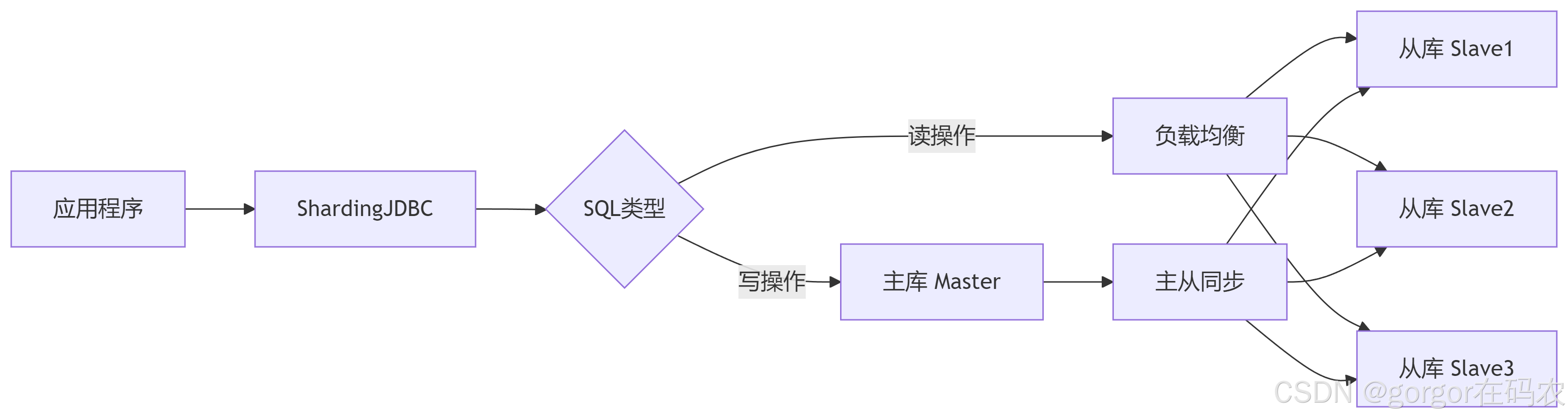
ShardingJDBC的读写分离功能通过透明化路由将写操作指向主库、读操作分散到从库,有效提升数据库吞吐量。以下是完整实现方案:
1. 核心架构原理
2. 配置数据源
### -------------------------------数据源配置-------------------------------------------------
spring.shardingsphere.datasource.names=m0,m1
spring.shardingsphere.datasource.m0.type=com.alibaba.druid.pool.DruidDataSource
spring.shardingsphere.datasource.m0.driver-class-name=com.mysql.cj.jdbc.Driver
spring.shardingsphere.datasource.m0.url=jdbc:mysql://localhost:3306/shardingdb1?serverTimezone=Asia/Shanghai
spring.shardingsphere.datasource.m0.username=root
spring.shardingsphere.datasource.m0.password=root
spring.shardingsphere.datasource.m1.type=com.alibaba.druid.pool.DruidDataSource
spring.shardingsphere.datasource.m1.driver-class-name=com.mysql.cj.jdbc.Driver
spring.shardingsphere.datasource.m1.url=jdbc:mysql://localhost:3306/shardingdb2?serverTimezone=Asia/Shanghai
spring.shardingsphere.datasource.m1.username=root
spring.shardingsphere.datasource.m1.password=root

### --------------------------------分布式序列算法配置-----------------------------------------
spring.shardingsphere.rules.sharding.tables.user.key-generate-strategy.column=userid
spring.shardingsphere.rules.sharding.tables.user.key-generate-strategy.key-generator-name=alg_snowflake
spring.shardingsphere.rules.sharding.key-generators.alg_snowflake.type=SNOWFLAKE
spring.shardingsphere.rules.sharding.key-generators.alg_snowflake.props.worker-id=1
spring.shardingsphere.rules.sharding.key-generators.alg_snowflake.props.max-vibration-offset=8
### --------------------------------分布式序列算法配置-----------------------------------------


###-----------------------配置读写分离--------------------------------------------------------------------
# 要配置成读写分离的虚拟库
spring.shardingsphere.rules.sharding.tables.user.actual-data-nodes=userdb.user
# 配置读写分离虚拟库 主库一个,从库多个
spring.shardingsphere.rules.readwrite-splitting.data-sources.userdb.static-strategy.write-data-source-name=m0
spring.shardingsphere.rules.readwrite-splitting.data-sources.userdb.static-strategy.read-data-source-names[0]=m1
# 指定负载均衡器
spring.shardingsphere.rules.readwrite-splitting.data-sources.userdb.load-balancer-name=user_lb
# 配置负载均衡器
# 按操作轮训
spring.shardingsphere.rules.readwrite-splitting.load-balancers.user_lb.type=ROUND_ROBIN
# 按事务轮训
#spring.shardingsphere.rules.readwrite-splitting.load-balancers.user_lb.type=TRANSACTION_ROUND_ROBIN
# 按操作随机
#spring.shardingsphere.rules.readwrite-splitting.load-balancers.user_lb.type=RANDOM
# 按事务随机
#spring.shardingsphere.rules.readwrite-splitting.load-balancers.user_lb.type=TRANSACTION_RANDOM
# 读请求全部强制路由到主库
#spring.shardingsphere.rules.readwrite-splitting.load-balancers.user_lb.type=FIXED_PRIMARY
3. 单元测试
单元测试类:com.gorgor.shardingjdbc.ReadwriteSplittingTest
六、广播表
广播表是 ShardingSphere 分库分表架构中的全局数据同步方案,用于解决分布式环境下跨分片数据一致性与高效关联查询的问题。以下是其核心原理、应用场景及实战配置详解:
1. 广播表核心特性
| 特性 | 说明 |
|---|---|
| 数据全冗余 | 广播表数据在所有物理分片库中均存储完整副本 |
| 写操作同步 | 执行INSERT/UPDATE/DELETE时,操作自动广播到所有分片库 |
| 读操作本地化 | 查询广播表时,直接读取当前分片副本,避免跨库网络开销 |
| 强一致性 | 通过分布式事务(如 XA)保证所有分片数据一致(需事务支持) |
2. yml 配置
### -------------------------------数据源配置-------------------------------------------------
spring.shardingsphere.datasource.names=m0,m1
spring.shardingsphere.datasource.m0.type=com.alibaba.druid.pool.DruidDataSource
spring.shardingsphere.datasource.m0.driver-class-name=com.mysql.cj.jdbc.Driver
spring.shardingsphere.datasource.m0.url=jdbc:mysql://localhost:3306/shardingdb1?serverTimezone=Asia/Shanghai
spring.shardingsphere.datasource.m0.username=root
spring.shardingsphere.datasource.m0.password=root
spring.shardingsphere.datasource.m1.type=com.alibaba.druid.pool.DruidDataSource
spring.shardingsphere.datasource.m1.driver-class-name=com.mysql.cj.jdbc.Driver
spring.shardingsphere.datasource.m1.url=jdbc:mysql://localhost:3306/shardingdb2?serverTimezone=Asia/Shanghai
spring.shardingsphere.datasource.m1.username=root
spring.shardingsphere.datasource.m1.password=root

### --------------------------------分布式序列算法配置-----------------------------------------
spring.shardingsphere.rules.sharding.tables.dict.key-generate-strategy.column=dictId
spring.shardingsphere.rules.sharding.tables.dict.key-generate-strategy.key-generator-name=alg_snowflake
spring.shardingsphere.rules.sharding.key-generators.alg_snowflake.type=SNOWFLAKE
spring.shardingsphere.rules.sharding.key-generators.alg_snowflake.props.worker-id=1
spring.shardingsphere.rules.sharding.key-generators.alg_snowflake.props.max-vibration-offset=8


### 广播表
spring.shardingsphere.rules.sharding.broadcast-tables=dict
3. 应用场景
- 字典表
- 配置表
4. 单元测试
单元测试类:com.gorgor.shardingjdbc.BroadcastTablesTest
七、绑定表
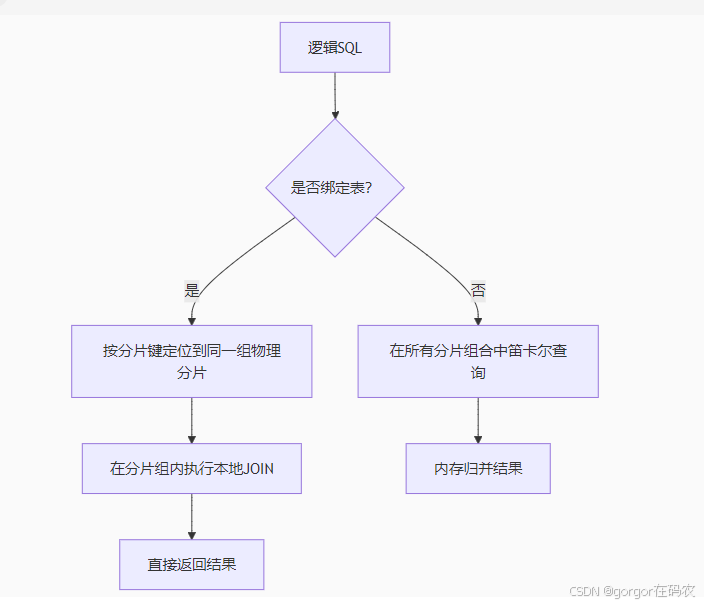
绑定表是 ShardingSphere 解决跨分片表关联查询性能问题的核心机制,通过相同分片规则将逻辑关联的表物理存储在相同分片,避免跨库笛卡尔积查询。以下是深度解析与实战指南:
1. 绑定表核心价值
| 场景 | 未绑定 | 绑定后 |
|---|---|---|
| 2表JOIN查询 | 产生 M×N 次查询(M=订单表分片数, N=明细表分片数) | 仅产生 1 次查询(同组分片内执行) |
| SQL执行效率 | 全分片广播 + 内存归并(性能灾难) | 单分片本地JOIN(毫秒级响应) |
| 网络开销 | 高(跨节点传输大量中间数据) | 零(节点内完成) |
📌 典型场景:订单表(
order)与订单明细表(order_item)按相同分片键(order_id)分片
2. 工作原理图解
3. yml 配置
### -------------------------------数据源配置-------------------------------------------------
spring.shardingsphere.datasource.names=m0,m1
spring.shardingsphere.datasource.m0.type=com.alibaba.druid.pool.DruidDataSource
spring.shardingsphere.datasource.m0.driver-class-name=com.mysql.cj.jdbc.Driver
spring.shardingsphere.datasource.m0.url=jdbc:mysql://localhost:3306/shardingdb1?serverTimezone=Asia/Shanghai
spring.shardingsphere.datasource.m0.username=root
spring.shardingsphere.datasource.m0.password=root
spring.shardingsphere.datasource.m1.type=com.alibaba.druid.pool.DruidDataSource
spring.shardingsphere.datasource.m1.driver-class-name=com.mysql.cj.jdbc.Driver
spring.shardingsphere.datasource.m1.url=jdbc:mysql://localhost:3306/shardingdb2?serverTimezone=Asia/Shanghai
spring.shardingsphere.datasource.m1.username=root
spring.shardingsphere.datasource.m1.password=root

### --------------------------------分布式序列算法配置-----------------------------------------
spring.shardingsphere.rules.sharding.tables.user_course_info.key-generate-strategy.column=infoid
spring.shardingsphere.rules.sharding.tables.user_course_info.key-generate-strategy.key-generator-name=alg_snowflake
spring.shardingsphere.rules.sharding.key-generators.alg_snowflake.type=SNOWFLAKE
spring.shardingsphere.rules.sharding.key-generators.alg_snowflake.props.worker-id=1
spring.shardingsphere.rules.sharding.key-generators.alg_snowflake.props.max-vibration-offset=8


### --------------------------------------配置实际分片节点------------------------------------------------
spring.shardingsphere.rules.sharding.tables.user.actual-data-nodes=m$->{0..1}.user_$->{1..2}
spring.shardingsphere.rules.sharding.tables.user_course_info.actual-data-nodes=m$->{0..1}.user_course_info_$->{1..2}
### --------------------------------------配置实际分片节点------------------------------------------------

### ---------------------------inline 分库配置--------------------------------------------------------------
# 分库字段
spring.shardingsphere.rules.sharding.tables.user.database-strategy.standard.sharding-column=userid
# 分库算法名称
spring.shardingsphere.rules.sharding.tables.user.database-strategy.standard.sharding-algorithm-name=db_user_inline_algorithm
# 分库算法
spring.shardingsphere.rules.sharding.sharding-algorithms.db_user_inline_algorithm.type=HASH_MOD
spring.shardingsphere.rules.sharding.sharding-algorithms.db_user_inline_algorithm.props.sharding-count=2


# 分库字段
spring.shardingsphere.rules.sharding.tables.user_course_info.database-strategy.standard.sharding-column=userid
# 分库算法名称
spring.shardingsphere.rules.sharding.tables.user_course_info.database-strategy.standard.sharding-algorithm-name=db_user_course_info_inline_algorithm
# 分库算法
spring.shardingsphere.rules.sharding.sharding-algorithms.db_user_course_info_inline_algorithm.type=HASH_MOD
spring.shardingsphere.rules.sharding.sharding-algorithms.db_user_course_info_inline_algorithm.props.sharding-count=2

### ---------------------------inline 分库配置--------------------------------------------------------------


### ---------------------------inline 分表配置--------------------------------------------------------------
spring.shardingsphere.rules.sharding.tables.user.table-strategy.standard.sharding-column=userid
spring.shardingsphere.rules.sharding.tables.user.table-strategy.standard.sharding-algorithm-name=user_tbl_alg

spring.shardingsphere.rules.sharding.tables.user_course_info.table-strategy.standard.sharding-column=userid
spring.shardingsphere.rules.sharding.tables.user_course_info.table-strategy.standard.sharding-algorithm-name=usercourse_tbl_alg
# ----------------------配置分表策略
spring.shardingsphere.rules.sharding.sharding-algorithms.user_tbl_alg.type=INLINE
spring.shardingsphere.rules.sharding.sharding-algorithms.user_tbl_alg.props.algorithm-expression=user_$->{Math.abs(userid.hashCode()%4).intdiv(2) +1}

spring.shardingsphere.rules.sharding.sharding-algorithms.usercourse_tbl_alg.type=INLINE
spring.shardingsphere.rules.sharding.sharding-algorithms.usercourse_tbl_alg.props.algorithm-expression=user_course_info_$->{Math.abs(userid.hashCode()%4).intdiv(2) +1}

### ---------------------------inline 分表配置--------------------------------------------------------------


### 指定绑定表
spring.shardingsphere.rules.sharding.binding-tables[0]=user,user_course_info
4. 单元测试
单元测试类:com.gorgor.shardingjdbc.BindingTablesTest
5. 绑定表 vs 广播表
| 维度 | 绑定表 | 广播表 |
|---|---|---|
| 数据分布 | 分片存储(不同分片存不同数据) | 全量冗余(所有分片存相同数据) |
| 适用表 | 大表(订单/交易记录) | 小表(地区/配置) |
| 存储成本 | 低(数据水平拆分) | 高(全量复制 * 分片数) |
| JOIN效率 | 高(同分片本地JOIN) | 极高(任意节点本地JOIN) |
| 写入性能 | 高(仅写目标分片) | 差(需写所有分片) |
八、分⽚审计
1. yml 配置
### -------------------------------数据源配置-------------------------------------------------
# 指定对应的库
spring.shardingsphere.datasource.names=m0,m1

spring.shardingsphere.datasource.m0.type=com.alibaba.druid.pool.DruidDataSource
spring.shardingsphere.datasource.m0.driver-class-name=com.mysql.cj.jdbc.Driver
spring.shardingsphere.datasource.m0.url=jdbc:mysql://localhost:3306/shardingdb1?serverTimezone=Asia/Shanghai
spring.shardingsphere.datasource.m0.username=root
spring.shardingsphere.datasource.m0.password=root

spring.shardingsphere.datasource.m1.type=com.alibaba.druid.pool.DruidDataSource
spring.shardingsphere.datasource.m1.driver-class-name=com.mysql.cj.jdbc.Driver
spring.shardingsphere.datasource.m1.url=jdbc:mysql://localhost:3306/shardingdb2?serverTimezone=Asia/Shanghai
spring.shardingsphere.datasource.m1.username=root
spring.shardingsphere.datasource.m1.password=root
### -------------------------------数据源配置-------------------------------------------------

### --------------------------------分布式序列算法配置---------------------------------------------------------
# 指定分布式主键生成策略
spring.shardingsphere.rules.sharding.tables.course.key-generate-strategy.column=cid
spring.shardingsphere.rules.sharding.tables.course.key-generate-strategy.key-generator-name=alg_snowflake
# 雪花算法,生成Long类型主键。
spring.shardingsphere.rules.sharding.key-generators.alg_snowflake.type=SNOWFLAKE
spring.shardingsphere.rules.sharding.key-generators.alg_snowflake.props.worker-id=1
spring.shardingsphere.rules.sharding.key-generators.alg_snowflake.props.max-vibration-offset=8
### --------------------------------分布式序列算法配置---------------------------------------------------------


### --------------------------------------配置实际分片节点------------------------------------------------
spring.shardingsphere.rules.sharding.tables.course.actual-data-nodes=m$->{0..1}.course_$->{1..2}
### --------------------------------------配置实际分片节点------------------------------------------------

### ---------------------------standard 分库配置--------------------------------------------------------------
# 分库字段
spring.shardingsphere.rules.sharding.tables.course.database-strategy.standard.sharding-column=user_id
# 分库算法名称
spring.shardingsphere.rules.sharding.tables.course.database-strategy.standard.sharding-algorithm-name=db_standard_algorithm
# 分库算法
spring.shardingsphere.rules.sharding.sharding-algorithms.db_standard_algorithm.type=MOD
spring.shardingsphere.rules.sharding.sharding-algorithms.db_standard_algorithm.props.sharding-count=2
### ---------------------------standard 分库配置--------------------------------------------------------------


### ---------------------------standard 分表配置--------------------------------------------------------------
# 分表字段
spring.shardingsphere.rules.sharding.tables.course.table-strategy.standard.sharding-column=user_id
# 分表算法名称
spring.shardingsphere.rules.sharding.tables.course.table-strategy.standard.sharding-algorithm-name=table_standard_algorithm

# 算法类型配置
spring.shardingsphere.rules.sharding.sharding-algorithms.table_standard_algorithm.type=CLASS_BASED
# 策略类型参数
# 分表算法 --> 四种数据分片方式 INLINE|STANDARD|COMPLEX|HINT
# 自定义算法需要实现对应的接口
# STANDARD-> StandardShardingAlgorithm
# COMPLEX->ComplexKeysShardingAlgorithm
# HINT -> HintShardingAlgorithm
spring.shardingsphere.rules.sharding.sharding-algorithms.table_standard_algorithm.props.strategy = STANDARD
# 自定义算法类
spring.shardingsphere.rules.sharding.sharding-algorithms.table_standard_algorithm.props.algorithmClassName=com.gorgor.shardingjdbc.algorithm.CustomizeStandardShardingAlgorithm
### ---------------------------standard 分表配置--------------------------------------------------------------


spring.shardingsphere.rules.sharding.sharding-algorithms.table_standard_algorithm.props.sharding-count=2

### ---------------------------分片审计 分表配置--------------------------------------------------------------
# 分片审计规则: SQL查询必须带上分片键
spring.shardingsphere.rules.sharding.tables.course.audit-strategy.auditor-names[0]=course_auditor
spring.shardingsphere.rules.sharding.tables.course.audit-strategy.allow-hint-disable=true

spring.shardingsphere.rules.sharding.auditors.course_auditor.type=DML_SHARDING_CONDITIONS
### ---------------------------分片审计 分表配置--------------------------------------------------------------
2. 单元测试
单元测试类:com.gorgor.shardingjdbc.AuditorTest

北京人形旗下天工造物具身智能开源社区,聚焦具身天工与慧思开物两大平台
更多推荐
 31
31 0
0- 0


 已为社区贡献2条内容

所有评论(0)