微博图片爬取 & cookie获取方式
·
# -*- coding: utf-8 -*-
import random

import requests
import json, ssl, time, math, warnings, os, re

ssl._create_default_https_context = ssl._create_unverified_context
warnings.filterwarnings("ignore")


class DzSpider(object):
    def __init__(self, cookie=''):
        # 过程数据缓存
        self.data = {}
        # 数据存储目录
        self.folder = fr'{os.getcwd()}'
        # 开始页码
        self.start_page = 1
        # 结束页码
        self.end_page = 10
        # 采集数量标识
        self.spider_num = 1
        # 页码大小
        self.page_size = 20
        # 是否自动获取页码
        self.reset_end_page = True
        # 用于存储已处理页面的内容指纹,以检测重复
        self.page_fingerprints = set()
        # 是否已结束
        self.has_finish = False
        # 请求头信息
        self.headers_str = f'''
        accept: */*
		accept-language: zh-CN,zh;q=0.9,en;q=0.8
		cache-control: no-cache
		content-type: application/x-www-form-urlencoded
		pragma: no-cache
		priority: u=1, i
		referer: https://s.weibo.com/pic?q=%E7%94%9F%E6%B0%94&Refer=weibo_pic
		sec-ch-ua: "Google Chrome";v="137", "Chromium";v="137", "Not/A)Brand";v="24"
		sec-ch-ua-mobile: ?0
		sec-ch-ua-platform: "Windows"
		sec-fetch-dest: empty
		sec-fetch-mode: cors
		sec-fetch-site: same-origin
		user-agent: Mozilla/5.0 (Windows NT 10.0; Win64; x64) AppleWebKit/537.36 (KHTML, like Gecko) Chrome/137.0.0.0 Safari/537.36
		x-requested-with: XMLHttpRequest
		Cookie: {cookie}
        '''
        self.headers = dict(
            [[y.strip() for y in x.strip().split(':', 1)] for x in self.headers_str.strip().split('\n') if x.strip()])

    def run_task(self):
        # 遍历所有的页码,采集数据
        page_index = self.start_page
        self.end_page = 60
        self.reset_end_page = True
        self.has_finish = False
        while page_index < self.end_page + 1 and not self.has_finish:
            self.get_one_page(page_index)
            page_index += 1
            print(page_index)
            time.sleep(2)

    def get_one_page(self, page_index):
        req_url = 'https://s.weibo.com/ajax_pic/list'
        params = {
            "q": self.data.get('keywords'),
            "page": page_index,
            "_t": "0",
            "__rnd": int(time.time() * 1000)
        }
        req = requests.get(req_url, headers=self.headers, params=params, verify=False)
        res = req.json()

        # --- 新增的重复内容检测逻辑 ---

        # 1. 安全地获取图片列表
        data = res.get('data')
        if not isinstance(data, dict):
            print(f"第{page_index}页响应格式不正确,无 'data' 字段或 'data' 不是字典。爬取结束。")
            self.has_finish = True
            return

        pic_list = data.get('pic_list')
        if not pic_list:
            print(f"第{page_index}页未找到图片列表,已到达末页。爬取结束。")
            self.has_finish = True
            return

        # 2. 为当前页面的内容创建一个唯一的"指纹"
        # 这个指纹由本页所有图片的URL组成
        current_page_fingerprint = frozenset(item.get('original_pic') for item in pic_list if item.get('original_pic'))

        # 3. 检查这个"指纹"是否之前已经出现过
        if current_page_fingerprint in self.page_fingerprints:
            print(f'\n在第{page_index}页检测到重复内容,确认已加载完全部页面。任务完成。')
            self.has_finish = True
            return

        # 4. 如果是新内容,将"指纹"存起来,以便下次比较
        self.page_fingerprints.add(current_page_fingerprint)

        # --- 重复内容检测逻辑结束 ---

        for item in pic_list:
            original_pic = item.get('original_pic')
            text = item.get('text')
            if original_pic is None:
                original_pic = item.get('url')
            if original_pic is None:
                continue
            if original_pic.startswith('//'):
                original_pic = 'https:' + original_pic
            print(f'========================================\n'
                  f'第{page_index}/{self.end_page}页,总第{self.spider_num}条\n'
                  f'{text}\n'
                  f'{original_pic}\n'
                  f'========================================\n')
            self.download_images(fr'{self.folder}\output\{self.data.get("keywords")}', original_pic)
            self.spider_num += 1
            # 在下载每张图片后短暂暂停,模仿人类行为,更加友好
            time.sleep(random.random() * 2)

    def download_images(self, output_dir, img_url):
        if not os.path.exists(output_dir):
            os.makedirs(output_dir)
        # 这里不用加cookie,因为cookie在初始化的时候已经加载了
        headers = {
            "accept": "image/avif,image/webp,image/apng,image/svg+xml,image/*,*/*;q=0.8",
            "accept-language": "zh-CN,zh;q=0.9,en;q=0.8",
            "referer": "https://s.weibo.com/",
            "user-agent": "Mozilla/5.0 (Windows NT 10.0; Win64; x64) AppleWebKit/537.36 (KHTML, like Gecko) Chrome/138.0.0.0 Safari/537.36"
        }

        try:
            # 移除 stream=True,直接将图片内容读入内存
            req = requests.get(img_url, headers=headers, verify=False, timeout=15)
            req.raise_for_status() # 如果请求失败 (如404),则会抛出异常

            # --- 文件名处理逻辑 ---
            # 1. 获取原始文件名 (例如 "image.png" 或 "image.gif")
            original_filename = os.path.basename(img_url.split('?', 1)[0])
            # 2. 分离文件名和扩展名 (例如 "image", ".png")
            base_name, _ = os.path.splitext(original_filename)
            # 3. 创建新的 .jpg 文件名
            new_filename = f"{base_name}.jpg"
            save_path = os.path.join(output_dir, new_filename)

            # 一次性将内存中的数据写入文件
            with open(save_path, 'wb') as f:
                f.write(req.content)

            print(f"下载成功: {new_filename}")

        except requests.exceptions.RequestException as e:
            print(f"下载失败: {img_url},错误: {e}")


    #数据流下载方式 速度慢 内容完整
    # def download_images(self, output_dir, img_url):
    #     if not os.path.exists(output_dir):
    #         os.makedirs(output_dir)
    #     headers = {
    #         "accept": "image/avif,image/webp,image/apng,image/svg+xml,image/*,*/*;q=0.8",
    #         "accept-language": "zh-CN,zh;q=0.9,en;q=0.8",
    #         "cache-control": "no-cache",
    #         "pragma": "no-cache",
    #         "priority": "i",
    #         "referer": "https://s.weibo.com/",
    #         "sec-ch-ua": "\"Not)A;Brand\";v=\"8\", \"Chromium\";v=\"138\", \"Google Chrome\";v=\"138\"",
    #         "sec-ch-ua-mobile": "?0",
    #         "sec-ch-ua-platform": "\"Windows\"",
    #         "sec-fetch-dest": "image",
    #         "sec-fetch-mode": "no-cors",
    #         "sec-fetch-site": "cross-site",
    #         "sec-fetch-storage-access": "active",
    #         "user-agent": "Mozilla/5.0 (Windows NT 10.0; Win64; x64) AppleWebKit/537.36 (KHTML, like Gecko) Chrome/138.0.0.0 Safari/537.36"
    #     }
    #     params = {}

    #     req = requests.get(img_url, headers=headers, params=params, verify=False, stream=True)
    #     file_name = img_url.split('/')[-1]
    #     save_name = os.path.join(output_dir, file_name)
    #     content_size = int(req.headers["content-length"])
    #     size = 0
    #     with open(save_name, 'wb') as f:
    #         for chunk in req.iter_content(1024):
    #             f.write(chunk)
    #             f.flush()
    #             size += len(chunk)
    #             print("\r文件下载进度:%d%%(%0.2fMB/%0.2fMB)" % (
    #                 float(size / content_size * 100), (size / 1024 / 1024),
    #                 (content_size / 1024 / 1024)),
    #                   end=" ")
    #         f.close()
    #         print()

if __name__ == '__main__':
    emotion_lst = ["admiration", "amusement", "anger", "annoyance", "approval", "caring", "confusion", "curiosity", "desire", "disappointment", "disapproval",
    "disgust", "embarrassment", "excitement", "fear", "gratitude", "grief", "joy", "love", "nervousness", "optimism", "pride",
    "realization", "relief", "remorse", "sadness", "surprise", "neutral"]
    cookie = "你的 cookie"

    # 将spider的创建放入循环中,确保每个关键词都有一个全新的爬虫实例
    for emotion in emotion_lst:
        print(f'========== 正在开始爬取【{emotion}】相关的图片 ==========')
        # 为每个emotion创建一个新的、干净的爬虫对象
        spider = DzSpider(cookie)
        spider.data.update({
            'keywords': emotion,
        })
        spider.run_task()
        print(f'========== 【{emotion}】相关的图片爬取结束 ==========\n')
步骤:
1 利用cookie身份请求到 每一份 https://s.weibo.com/ajax_pic/list 对其中的图片地址进行抓取(在json列表中 直接索引就行)
2 请求图片地址,进行下载(下载分两种方式,一直是直接放进内存然后整个下载,但是这种方式在文件很大的时候内存可能会溢出,所以可以用注释部分代码,快下载,这种方式可下载各种格式图片,包括动图)
注意:
1. 关于请求头:一般来说user-agent一定要加,像微博这种需要登录的,在初始化的时候还需要cookie;user-agent也是必需的,还有像accept、accept-language也最好加上,其他的话根据需要加,不怕麻烦就全加上hh。
2. 代码中加了重复检测,因为经过观察发现wb中的数据到后面就开始重复了,但是这样会导致后面每一页的搜索越来越慢,可以删掉自己设计一个end_page.
cookie获取
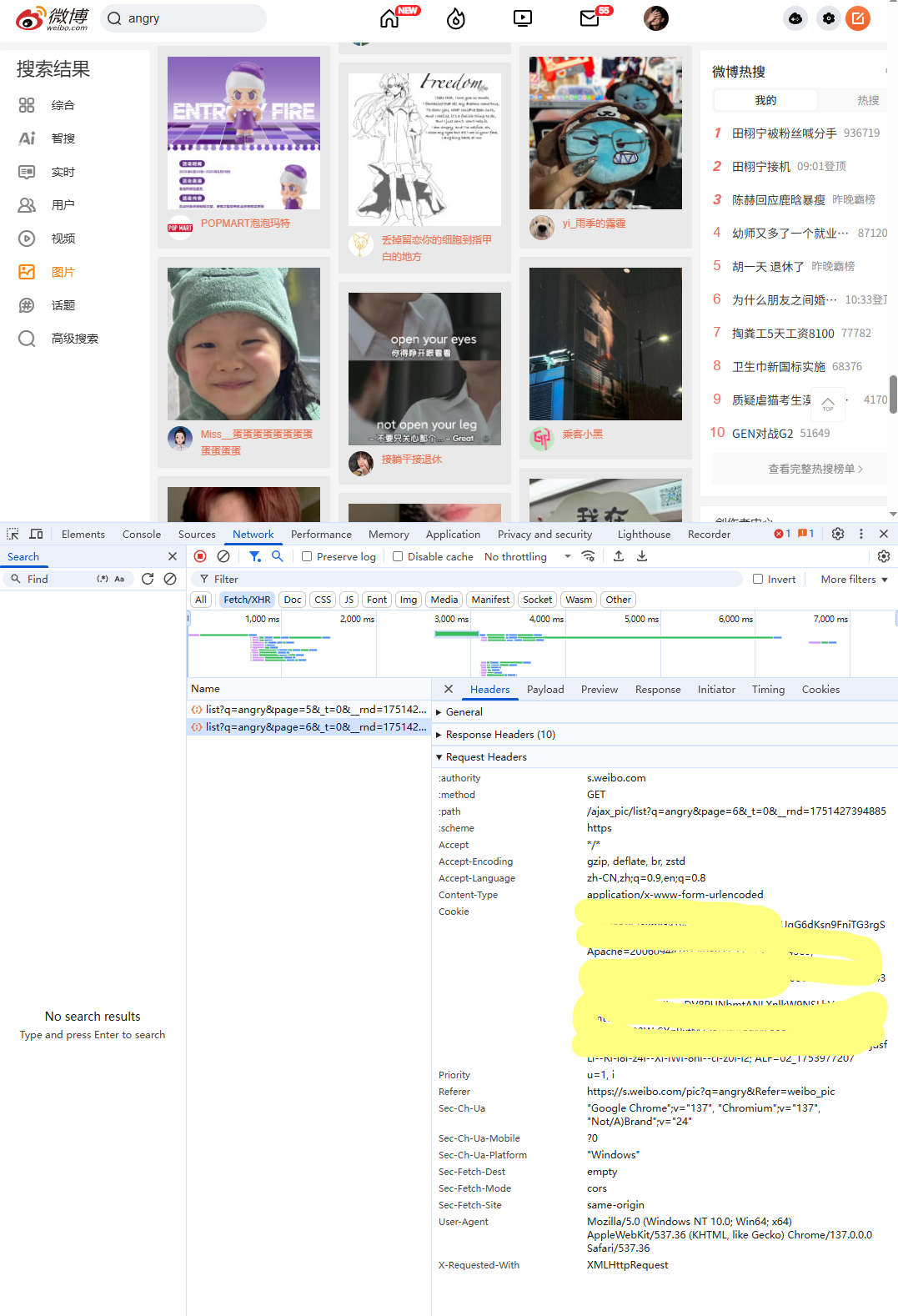 黄色部分就是所需要的cookie,但是cookie会定期刷新,有可能失效了,失效了重新获取一下就行。
在图中可以看到很多list,这些就是通过下滑页面不断刷新出来的。里面的内容在Response中,要看具体加载出来的图片可点击上面的img,里面可以查看图片的content-length。(如果加载不出来可以刷新页面)

北京人形旗下天工造物具身智能开源社区,聚焦具身天工与慧思开物两大平台
更多推荐
 5
5 0
0- 0


 已为社区贡献4条内容

所有评论(0)