微信小程序登录与获取手机号最佳实践
·
一、引言:微信小程序用户体系核心能力
微信小程序用户体系两大核心能力:
-
登录授权:通过
wx.login获取code换取用户唯一标识 -
手机号获取:通过
getPhoneNumber事件获取用户手机号
二、 Spring Boot配置(application.yml)
# 微信小程序配置
wx:
   appid: wx123456789767
   secret: your_app_secret
   # Redis中存储access_token的键名
   access-token-key: wx:access_token
三、后端实现:WeChatUtils工具类
package com.df.common.wechat;

import com.alibaba.fastjson2.JSONObject;
import com.df.common.core.redis.RedisCache;
import com.df.common.utils.StringUtils;
import lombok.extern.slf4j.Slf4j;
import org.springframework.beans.factory.annotation.Autowired;
import org.springframework.beans.factory.annotation.Value;
import org.springframework.http.*;
import org.springframework.stereotype.Component;
import org.springframework.web.client.RestTemplate;
import java.nio.charset.StandardCharsets;
import java.util.HashMap;
import java.util.Map;
import java.util.concurrent.TimeUnit;
/**
 * packageName com.df.common.wechat
 *
 * @author DaFu
 * @className WechatMiniUtils
 * @date 2025/6/18
 * @description 小程序配置
 */
@Slf4j
@Component
public class WeChatUtils {
    @Value("${wx.appid}")
    private String appid;

    @Value("${wx.secret}")
    private String secret;

    @Value("${wx.access-token-key}")
    private String accessTokenKey;
    /**
     * 接口调用凭据
     */
    private static final String ACCESS_TOKEN_URL = "https://api.weixin.qq.com/cgi-bin/token?grant_type=client_credential&appid={appid}&secret={secret}";

    /**
     * 登录凭证校验接口
     */
    private static final String JS_CODE_2_SESSION_URL = "https://api.weixin.qq.com/sns/jscode2session?appid={appid}&secret={secret}&js_code={code}&grant_type=authorization_code"; // 新增:登录凭证校验接口
    /**
     * 获取手机号接口
     */
    private static final String GET_PHONE_NUMBER_URL = "https://api.weixin.qq.com/wxa/business/getuserphonenumber?access_token=";
    @Autowired
    private RedisCache redisCache;

    /**
     * 获取并缓存 AccessToken
     *
     * @author DaFu
     */
    public String getAccessToken() {
        String accessToken = redisCache.getCacheObject(accessTokenKey);
        if (StringUtils.isNotBlank(accessToken)) {
            return accessToken;
        }
        RestTemplate restTemplate = new RestTemplate();
        ResponseEntity<String> response = restTemplate.getForEntity(
                ACCESS_TOKEN_URL, String.class, appid, secret
        );
        if (response.getStatusCode() == HttpStatus.OK) {
            JSONObject json = JSONObject.parseObject(response.getBody());
            if (json.containsKey("access_token")) {
                accessToken = json.getString("access_token");
                int expiresIn = json.getIntValue("expires_in");
                redisCache.setCacheObject(
                        accessTokenKey,
                        accessToken,
                        expiresIn - 120,
                        TimeUnit.SECONDS
                );
                return accessToken;
            } else {
                throw new RuntimeException("获取access_token失败: " + json.getString("errmsg"));
            }
        }
        throw new RuntimeException("微信接口调用失败");
    }


    /**
     * 小程序登录 - 通过code获取openid和session_key
     * @param code 小程序前端传来的code
     * @return JSONObject 包含openid和session_key
     */
    public JSONObject code2Session(String code) {
        RestTemplate restTemplate = new RestTemplate();
        Map<String, String> params = new HashMap<>();
        params.put("appid", appid);
        params.put("secret", secret);
        params.put("code", code);

        ResponseEntity<String> response = restTemplate.getForEntity(
                JS_CODE_2_SESSION_URL, String.class, params
        );

        if (response.getStatusCode() == HttpStatus.OK) {
            JSONObject json = JSONObject.parseObject(response.getBody());
            if (json.containsKey("openid") && json.containsKey("session_key")) {
                return json;
            } else {
                log.error("小程序登录失败: {}", json);
                throw new RuntimeException("小程序登录失败: " + json.getString("errmsg"));
            }
        }
        throw new RuntimeException("微信登录接口调用失败");
    }

    /**
     * 通过临时code获取手机号
     * @param phoneCode 前端getPhoneNumber事件返回的code
     * @return 手机号字符串
     */
    public String getPhoneNumber(String phoneCode) {
        String accessToken = getAccessToken();
        String url = GET_PHONE_NUMBER_URL + accessToken;
        // 构建请求体
        Map<String, String> requestBody = new HashMap<>();
        requestBody.put("code", phoneCode);
        // 设置请求头
        HttpHeaders headers = new HttpHeaders();
        headers.setContentType(MediaType.APPLICATION_JSON);
        HttpEntity<Map<String, String>> request = new HttpEntity<>(requestBody, headers);
        // 发送请求
        RestTemplate restTemplate = new RestTemplate();
        ResponseEntity<JSONObject> response = restTemplate.postForEntity(
                url, request, JSONObject.class
        );
        if (response.getStatusCode() == HttpStatus.OK) {
            JSONObject json = response.getBody();
            if (json != null && json.getIntValue("errcode") == 0) {
                JSONObject phoneInfo = json.getJSONObject("phone_info");
                return phoneInfo.getString("purePhoneNumber");
            } else {
                log.error("获取手机号失败: {}", json);
                handlePhoneError(json);
            }
        }
        throw new RuntimeException("获取手机号接口调用失败");
    }

    /**
     * 处理手机号获取错误
     * @param json 微信返回的错误信息
     */
    private void handlePhoneError(JSONObject json) {
        int errCode = json.getIntValue("errcode");
        String errMsg = json.getString("errmsg");

        switch (errCode) {
            case 40001:
            case 42001:
                // access_token 无效
                // access_token 过期
                redisCache.deleteObject(accessTokenKey);
                throw new RuntimeException("access_token已失效,请重试");
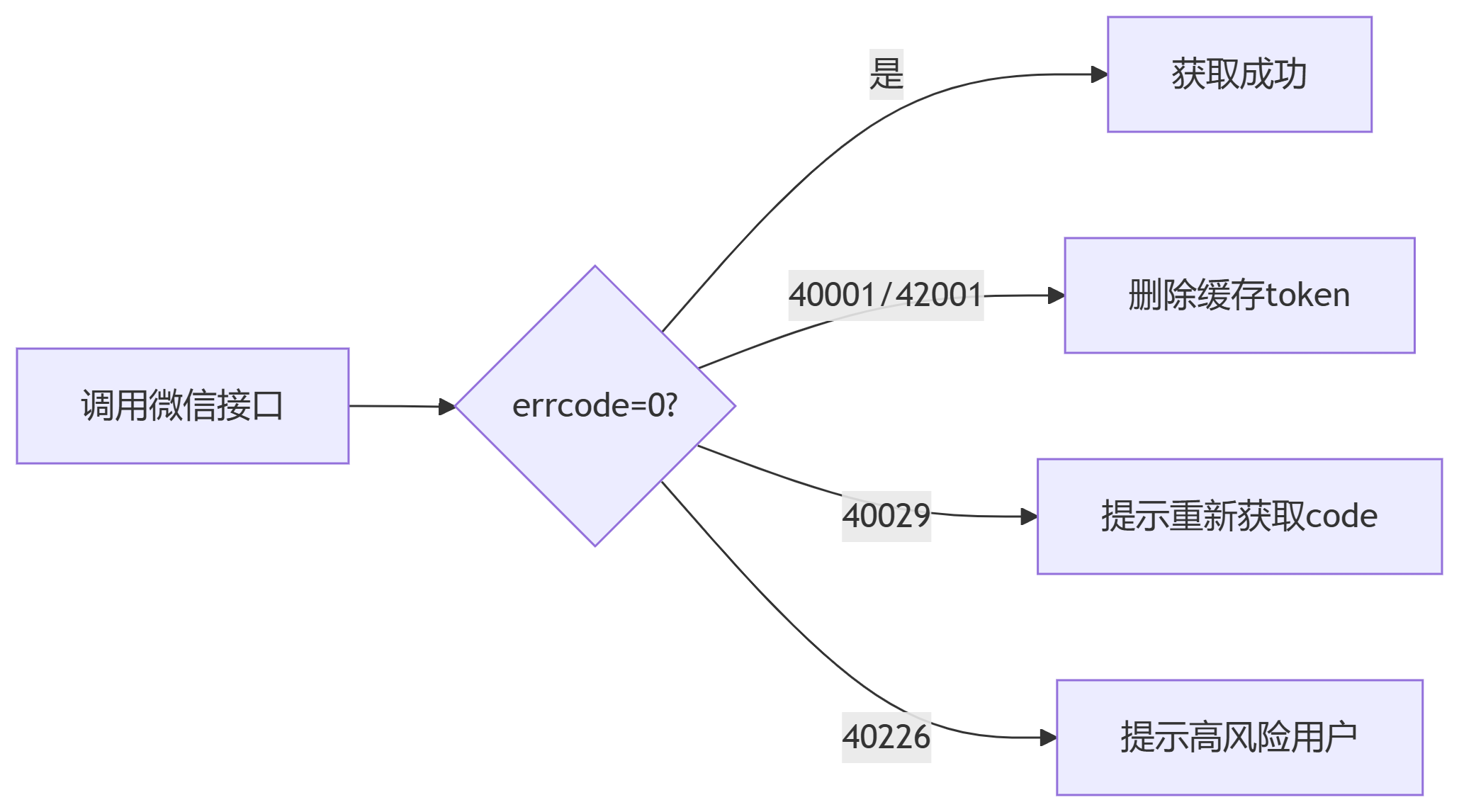
            case 40029:
                // code 无效
                throw new RuntimeException("临时code无效,请重新获取");
            case 40226:
                // 高风险用户
                throw new RuntimeException("用户风险等级过高,无法获取手机号");
            case 40417:
                // 手机号获取次数超限
                throw new RuntimeException("获取手机号次数超限,请稍后再试");
            default:
                throw new RuntimeException("获取手机号失败: " + errMsg);
        }
    }
}
四、前端实现:小程序关键代码
// 登录逻辑
Page({
  onLoad() {
    wx.login({
      success: (res) => {
        wx.request({
          url: 'https://api.yourdomain.com/login',
          method: 'POST',
          data: { code: res.code },
          success: (res) => {
            const { openid, session_key } = res.data
            wx.setStorageSync('openid', openid)
          }
        })
      }
    })
  },

  // 获取手机号事件
  getPhoneNumber(e) {
    if (!e.detail.code) {
      return wx.showToast({ title: '用户拒绝授权', icon: 'none' })
    }

    wx.request({
      url: 'https://api.yourdomain.com/phone',
      method: 'POST',
      data: {
        phoneCode: e.detail.code,
        openid: wx.getStorageSync('openid')
      },
      success: (res) => {
        if (res.data.success) {
          console.log('手机号:', res.data.phone)
        }
      }
    })
  }
})
五、后端控制器示例
@RestController
@RequestMapping("/api/wechat")
public class WechatController {

    @Autowired private WeChatUtils weChatUtils;

    // 登录接口
    @PostMapping("/login")
    public Map<String, Object> login(@RequestBody Map<String, String> params) {
        String code = params.get("code");
        try {
            JSONObject sessionInfo = weChatUtils.code2Session(code);
            return Map.of(
                "success", true,
                "openid", sessionInfo.getString("openid")
            );
        } catch (Exception e) {
            return Map.of("success", false, "message", e.getMessage());
        }
    }

    // 手机号获取接口
    @PostMapping("/phone")
    public Map<String, Object> getPhone(@RequestBody Map<String, String> params) {
        try {
            String phone = weChatUtils.getPhoneNumber(params.get("phoneCode"));
            return Map.of("success", true, "phone", phone);
        } catch (Exception e) {
            return Map.of("success", false, "message", e.getMessage());
        }
    }
}
六、关键注意事项
-
安全规范
-
禁止将session_key返回到客户端
-
access_token缓存时间需小于7200秒(建议7000秒)
-
手机号接口调用频率限制:单个小程序每日300万次
-
-
错误处理重点
-
性能优化建议
-
使用Redis缓存access_token(避免频繁请求)
-
批量手机号获取使用异步队列
-
添加限流保护(Guava RateLimiter)
-
七、完整请求流程
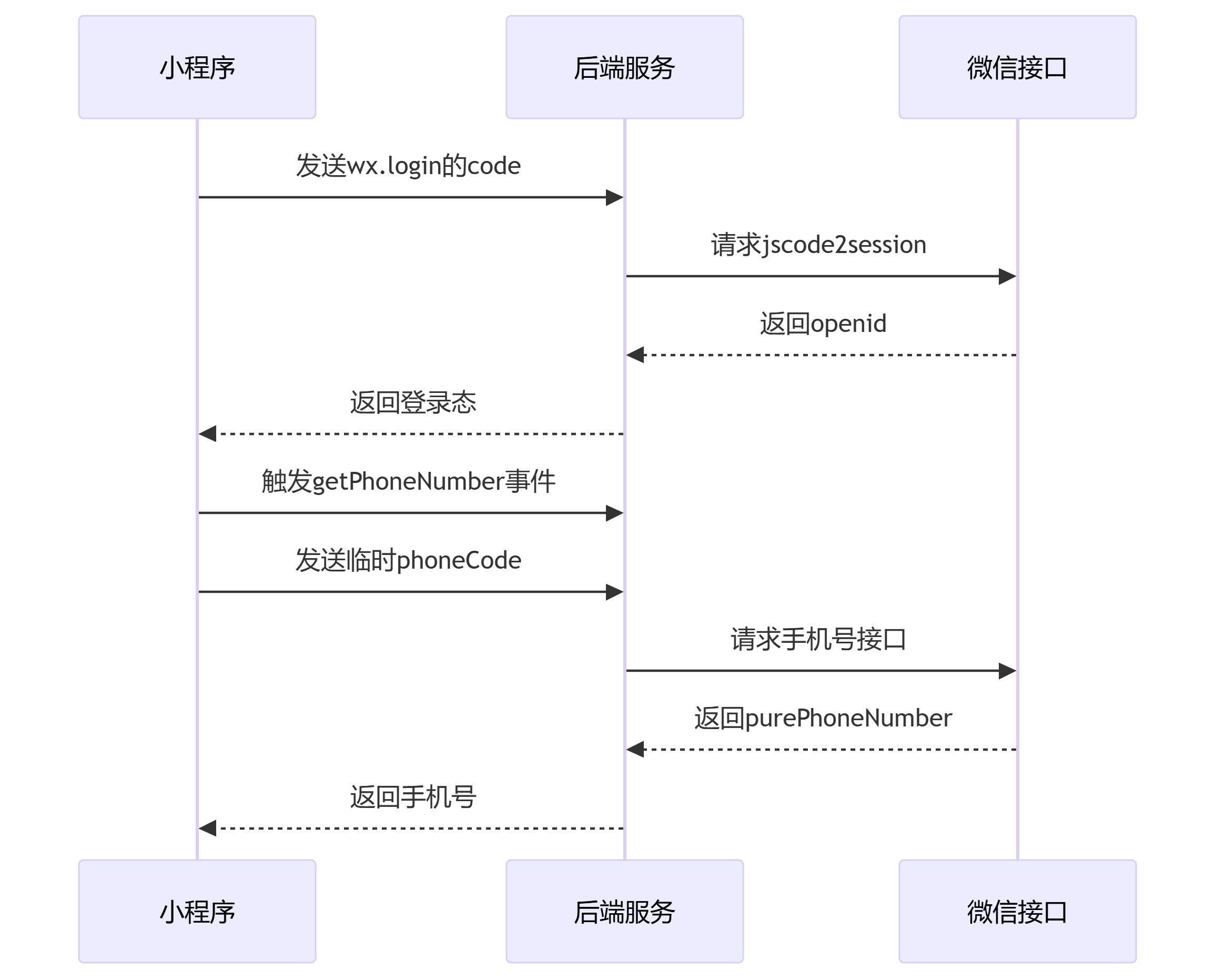
微信接口后端服务小程序微信接口后端服务小程序发送wx.login的code请求jscode2session返回openid返回登录态触发getPhoneNumber事件发送临时phoneCode请求手机号接口返回purePhoneNumber返回手机号

北京人形旗下天工造物具身智能开源社区,聚焦具身天工与慧思开物两大平台
更多推荐
 6
6 0
0- 0


 已为社区贡献2条内容

所有评论(0)