uniapp --- PDF预览 之前app 和H5 亲测有效 支持放大等功能!!
·
uniapp 兼容H5和app端 pdf预览
- 步骤一下载hybrid文件夹,放在在根目录下 (放在文章顶部了,那个zip,直接下载)
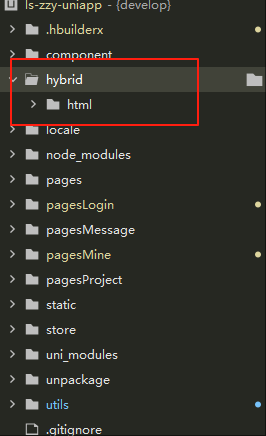
在这里插入代码片
 - 步骤二新建一个webview页面
 - <template>
  <ls-page title="预览">
    <template #right>
      <view class="" @click="share">{{ $t('分享') }}</view>
    </template>
    <web-view :src="url" @message="handlePostMessage" :webview-styles="webviewStyles"></web-view>
  </ls-page>
</template>

<script setup>
import { computed, reactive, toRefs } from 'vue';
import { onLoad } from '@dcloudio/uni-app';
const state = reactive({
  viewerUrl: '/hybrid/html/web/viewer.html', // 注意:静态的html文件需要放在根路径下的 hybrid/html 文件夹中
  fileUrl: '', // pdf网络路径
  url: '', // 最终显示在web-view中的路径
  currentPage: 1, //初始页
  totalPage: 0, //总页码
  currentReadPage: 0, //当前页码
  localPdf: '',
  webviewStyles: {
    top: '88px'   // 距离顶部的距离  如果有自己封装的头部
  }
});
const { viewerUrl, fileUrl, url, currentPage, totalPage, currentReadPage, localPdf, webviewStyles } = toRefs(state);

onLoad((options) => {
  state.fileUrl = options.url;
  state.title = options.title;
  intViewer();
  // #ifdef H5
  window.addEventListener('message', ReceiveMessage);
  // #endif
});
const share = () => {
  uni.setClipboardData({
    data: state.fileUrl,
    success() {
      uni.$ut.log('复制成功');
    }
  });
};
/**
 * @description 初始化到webviewer
 * @param {string} tag 预览的目标地址
 * @param {Number}  currentPage 初始页
 */
const intViewer = () => {
  const tag = state.fileUrl, //本地state.localPdf
    currentPage = state.currentPage;
  state.url = `${state.viewerUrl}?file=${encodeURIComponent(tag)}&page=` + currentPage;
};
/**
 * @description 组件通信
 * @param {object} data 页面通信返回的值
 */
// #ifdef APP-PLUS
const handlePostMessage = (data) => {
  let arr = data.detail.data.pop();
  state.totalPage = arr[0].totalPage; //总页数
  state.currentReadPage = arr[1].page + 1; //当前页数
  console.log('app:', state.totalPage, state.currentReadPage);
};
// #endif

// #ifdef H5
const ReceiveMessage = (event) => {
  if (event.data && event.data.data && event.data.data.arg) {
    state.totalPage = event.data.data.arg[0].totalPage;
    state.currentReadPage = event.data.data.arg[1].page + 1;
  }
  console.log('app:', state.totalPage, state.currentReadPage);
};
// #endif

//页面销毁前动作
const addBrowseRecord = () => {
  // console.log("总页数:",this.totalPage);
  // console.log("当前页数:",this.currentReadPage);
};
</script>

<style lang="scss" scoped></style>


 - 步骤三  这样就搞定啦!!
 -

北京人形旗下天工造物具身智能开源社区,聚焦具身天工与慧思开物两大平台
更多推荐
 2
2 0
0- 0


 已为社区贡献4条内容

所有评论(0)