微信小程序实现大转盘小工具
微信小程序实现大转盘小工具: “吃什么” 选择困难症救星 —— 命运转盘
引言
现代人常常面临 “中午吃什么”、“晚上吃什么” 的世纪难题,选择困难症发作时往往浪费大量时间。本文将介绍如何使用微信小程序开发一个简单有趣的 “吃什么” 命运转盘,帮助你快速做出选择。
这个转盘实现了美观的视觉效果和流畅的动画体验,只需轻轻一点,就能为你随机选择一顿美味餐食。
功能概述
这个 “吃什么” 转盘具有以下功能:
- 8 个常见餐食选项:米饭、面条、包子馒头、饺子混沌、麻食半汤、减肥、喝稀饭、再来一次
- 精美的转盘视觉效果,包括刻度线和装饰点
- 流畅的旋转动画,持续约 5 秒
- 旋转结束后高亮显示选中的餐食
- 响应式设计,适配不同屏幕尺寸
具体图片如下:
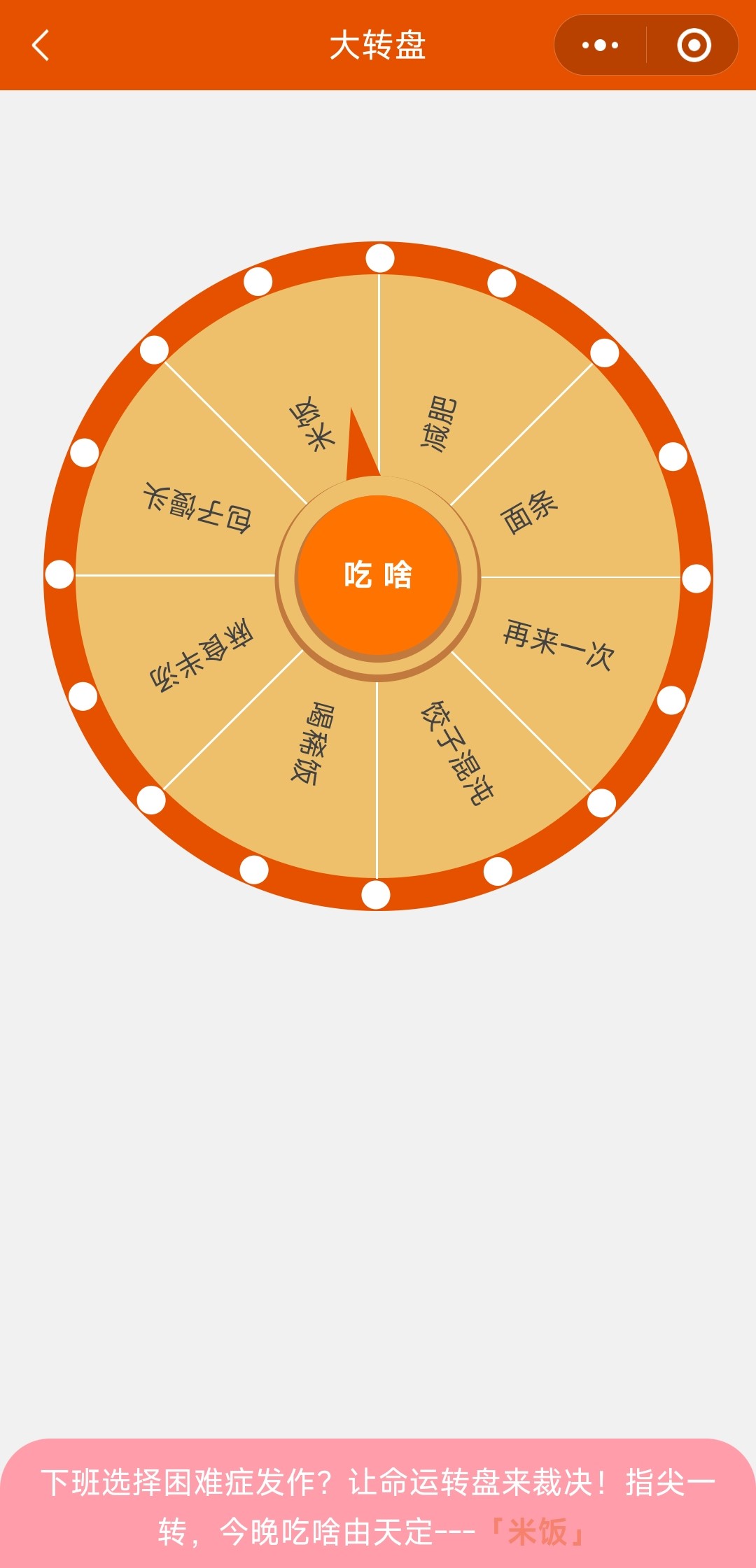
转盘工作原理
1. 角度计算
转盘上的每个元素 (文本、刻度线、装饰点) 的位置都是通过角度计算确定的:
(1)装饰点 (holeList):16 个点,均匀分布在圆周上
(2)刻度线 (lineList):8 条线,均匀分布在圆周上
(3)文本 (textList):8 个选项,均匀分布在圆周上
2. 旋转动画
使用了cubic-bezier 函数来实现更自然的加速和减速效果,转盘会旋转 5 圈后加上一个随机角度停止。
3. 随机选择
随机选择的实现分为两步:
- 在旋转开始前,使用shuffleArray函数随机打乱选项的顺序和角度
- 旋转结束后,选择特定角度位置 (250 度) 的选项作为结果
自定义与扩展
1. 更改餐食选项
只需修改 JS 中的textList数组即可添加或删除选项:
textList: ['米饭', '面条', '包子馒头', '饺子混沌', '麻食半汤', '减肥', '喝稀饭', '再来一次']
2. 更改颜色方案
修改 WXSS 中的颜色值即可改变转盘的外观:
.box-big {
  background-color: #E65100; /* 转盘外层颜色 */
}

.box-data {
  background-color: rgb(238, 192, 107); /* 转盘主体颜色 */
}

.box-btn {
  background-color: rgb(255, 115, 0); /* 按钮颜色 */
}

.end-box {
  background-color: #FF9EAA; /* 结果区域颜色 */
}
3. 调整动画效果
可以修改 CSS 动画的参数来调整旋转效果:
.rotat {
  animation: spin 5s cubic-bezier(0.17, 0.67, 0.13, 0.99) forwards;
  /* 5s是动画持续时间,cubic-bezier是缓动函数 */
}

@keyframes spin {
  100% {
    transform: rotate(calc(360deg * 5 + var(--target-angle, 0deg)));
    /* 360deg * 5 是旋转的圈数,可以修改这个值 */
  }
}
4. 添加更多选项
- JS 中的textList数组
- initText函数中的角度计算
- WXSS 中text-hole的样式,可能需要调整文字大小或位置
完整代码
下面是完整的代码,你可以直接复制到微信小程序项目中使用,以供参考。
1. 完整的js代码:
Page({

  data: {
    viewWidth: 360,
    luckAward: null,
    isRotating: false,
    holeList: [],
    lineList: [],
    textList: ['米饭', '面条', '包子馒头', '饺子混沌', '麻食半汤', '减肥', '喝稀饭', '再来一次']
  },

  onLoad: function () {
    this.initCalculate();
  },

  onReady() {
    let sys = wx.getWindowInfo();
    if (sys) {
      this.setData({
        viewWidth: sys.windowWidth
      })
    }
  },

  initCalculate: function () {
    const calculateAngles = (count, offset = 0) => {
      return Array.from({
        length: count
      }, (_, i) => ({
        angle: (i * 360 / count) + offset
      }));
    };
    this.setData({
      holeList: calculateAngles(16, -2.2),
      lineList: calculateAngles(8)
    }, () => {
      this.initText();
    });
  },
  // 初始化
  initText: function () {
    const attr = [];
    const list = this.data.textList;
    for (let i = 0; i < list.length; i++) {
      attr.push({
        angle: (i * 360 / 8) + 25,
        text: list[i]
      });
    }
    this.setData({
      textList: attr
    });
  },
  // 开始
  startClick() {
    let self = this;
    if (this.data.isRotating) return;
    this.setData({
      isRotating: true,
    }, () => {
      this.updateTextList();
    });
    setTimeout(() => {
      let datas = (self.data.textList).find(item => item.angle === 250);
      this.setData({
        isRotating: false,
        luckAward: datas.text
      });
    }, 5100);
  },

  // 随机打乱数组函数
  updateTextList() {
    const {
      textList
    } = this.data;
    const ids = textList.map(item => item.angle);
    const texts = textList.map(item => item.text);
    const shuffledIds = this.shuffleArray(ids);
    const shuffledNames = this.shuffleArray(texts);
    const newArray = shuffledIds.map((angle, index) => ({
      angle,
      text: shuffledNames[index]
    }));
    this.setData({
      textList: newArray
    });
  },

  // 通用的数组洗牌函数
  shuffleArray(array) {
    const newArray = [...array];
    for (let i = newArray.length - 1; i > 0; i--) {
      const j = Math.floor(Math.random() * (i + 1));
      [newArray[i], newArray[j]] = [newArray[j], newArray[i]];
    }
    return newArray;
  },

  /**
   * 用户点击右上角分享
   */
  onShareAppMessage() {

  }
})
2. wxml代码:
<view class="box">
  <view class="box-big">
    <view class="box-data {{isRotating?'rotat':''}}">
      <view wx:for="{{textList}}" wx:for-item="item" wx:key="index" class="text-hole" style="transform: rotate({{item.angle-10}}deg) translate(70px);">
        {{item.text}}
      </view>
      <view wx:for="{{lineList}}" wx:key="index" class="line-hole" style="transform: rotate({{item.angle}}deg);width: {{viewWidth/2.5}}px;"></view>
    </view>
    <view wx:for="{{holeList}}" wx:key="index" class="small-hole" style="transform: rotate({{item.angle}}deg) translate({{viewWidth/2.49}}px);"></view>
  </view>
  <view class="box-center">
    <view class="triangle"></view>
    <view class="box-inner">
      <view class="box-btn" bind:tap="startClick">吃 啥</view>
    </view>
  </view>
</view>
<view class="end-box">
  下班选择困难症发作?让命运转盘来裁决!指尖一转,今晚吃啥由天定---<text class="tips {{luckAward==null?'':'foods'}}">{{luckAward==null?'转一下吧~':'「'+luckAward+'」'}}</text>
</view>
3. wxss代码:
.box {
  display: flex;
  flex-direction: column;
  align-items: center;
  padding-top: 20%;
  position: relative;
}

.box-big {
  position: relative;
  padding: 34rpx;
  border-radius: 50%;
  z-index: 0;
  background-color: #E65100;
}

.box-data {
  position: relative;
  padding: 300rpx;
  border-radius: 50%;
  z-index: 1;
  background-color: rgb(238, 192, 107);
}

.box-center {
  position: absolute;
  top: 47%;
  z-index: 999;
}

.triangle {
  width: 0;
  height: 0;
  left: 60rpx;
  top: -70rpx;
  transform: rotate(-10deg);
  position: absolute;
  z-index: -1;
  border-left: 20rpx solid transparent;
  border-right: 20rpx solid transparent;
  border-bottom: 80rpx solid #E65100;
}

.box-inner {
  padding: 20rpx;
  border-radius: 50%;
  background-color: rgb(238, 192, 107);
  box-shadow: 0 5rpx 0 5rpx rgb(194, 121, 61);
}

.box-btn {
  width: 160rpx;
  height: 160rpx;
  text-align: center;
  line-height: 160rpx;
  border-radius: 160rpx;
  color: white;
  font-weight: bolder;
  background-color: rgb(255, 115, 0);
  box-shadow: 0 5rpx 0 5rpx rgb(194, 121, 61);
}

.text-hole {
  position: absolute;
  top: 50%;
  left: 50%;
  font-size: 30rpx;
  color: #444343;
  transform-origin: 0 0;
}

.line-hole {
  height: 1rpx;
  background-color: #fff;
  position: absolute;
  top: 50%;
  left: 50%;
  transform-origin: 0 0;
}

.small-hole {
  width: 30rpx;
  height: 30rpx;
  border-radius: 30rpx;
  background-color: #fff;
  position: absolute;
  top: 50%;
  left: 50%;
  transform-origin: 0 0;
}

.rotat {
  animation: spin 5s cubic-bezier(0.17, 0.67, 0.13, 0.99) forwards;
}

@keyframes spin {
  0% {
    transform: rotate(0deg);
  }

  100% {
    transform: rotate(calc(360deg * 5 + var(--target-angle, 0deg)));
  }
}

.end-box {
  position: fixed;
  bottom: 0;
  left: 0;
  right: 0;
  z-index: 9;
  text-align: center;
  padding: 20rpx 30rpx;
  color: #fff;
  line-height: 50rpx;
  border-radius: 50rpx 50rpx 0 0;
  background-color: #FF9EAA;
}

.tips {
  font-weight: bold;
  color: #E65100;
}

.foods {
  animation: blink 1s infinite;
}

@keyframes blink {

  0%,
  100% {
    opacity: 1;
  }

  50% {
    opacity: 0.2;
  }
}
4. json代码:
{
  "usingComponents": {},
  "navigationBarTitleText": "大转盘",
  "navigationBarBackgroundColor": "#E65100"
}
总结
- 微信小程序的基本页面结构和样式设计
- CSS 动画在转盘效果中的应用
- 随机算法在选项选择中的实现
- 响应式设计在小程序中的应用
- 分层设计和 Z 轴管理
你可以将这个转盘进一步扩展,比如添加更多选项、连接到美食推荐 API、增加分享功能等。希望这个小程序能帮助你解决每天的 “吃什么” 难题!
最后,关注「蒜鸟编程」(微信小程序 / 抖音 / 小红书/微信公众号/微博/今日头条/B站 同名账号),在这里,编程不再是冰冷的代码 —— 用技术解构逻辑,让开发思维与生活深度融合。后续将持续更新。
欢迎开发者在评论区交流技术细节,也欢迎对微信小工具感兴趣的朋友分享示例!一起让技术为生活赋能,探索编程带来的更多可能~

北京人形旗下天工造物具身智能开源社区,聚焦具身天工与慧思开物两大平台
更多推荐
 14
14 0
0- 0


 已为社区贡献11条内容

所有评论(0)