大模型并行训练入门指南:极简版基础知识与核心概念解析!
Tensor Parallelism
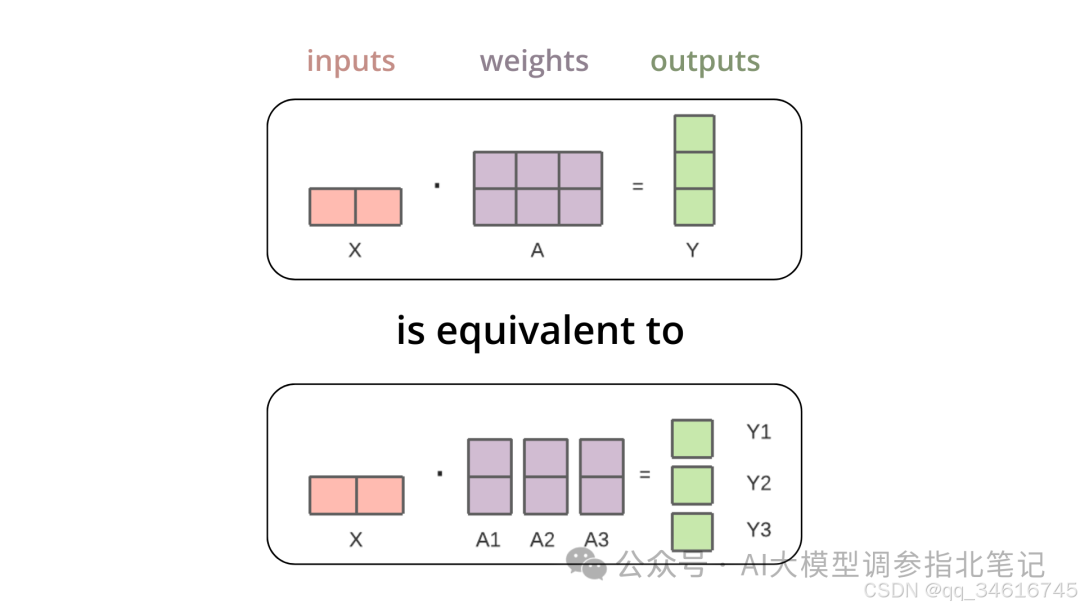
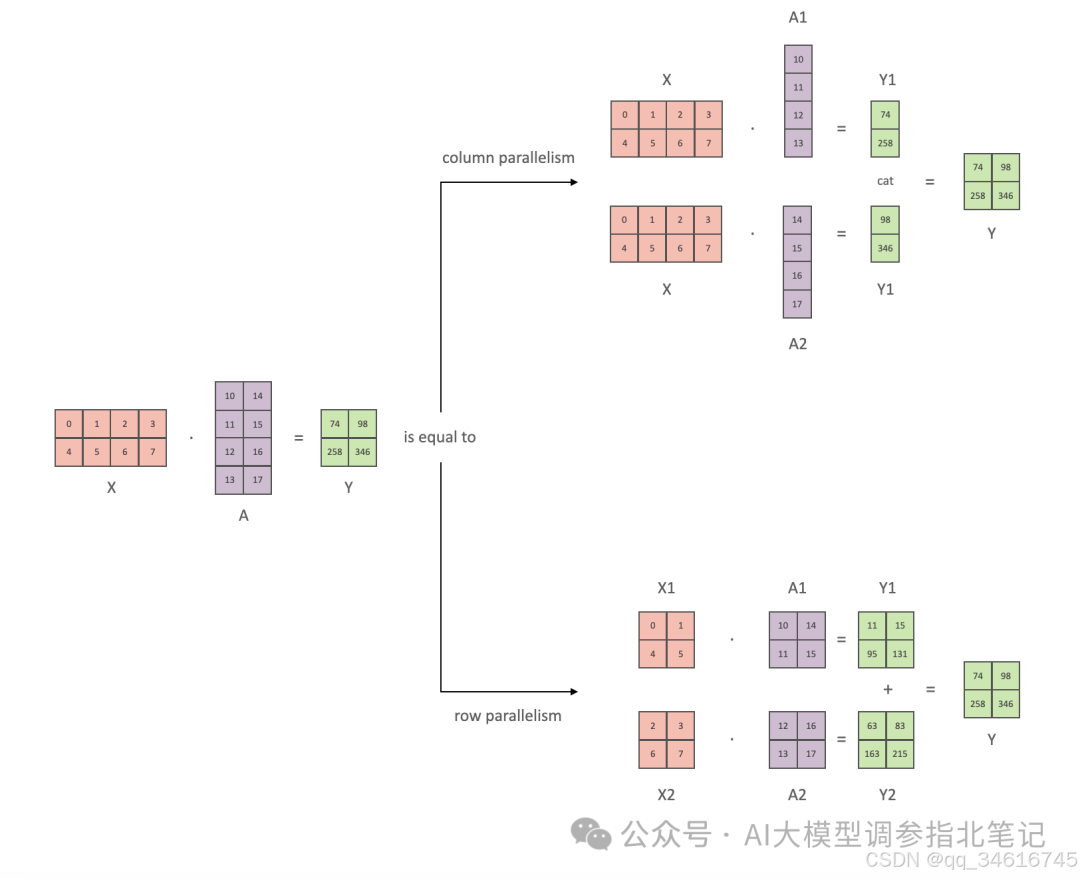
Tensor parallelism is a technique used to fit a large model in multiple GPUs. For example, when multiplying the input tensors with the first weight tensor, the matrix multiplication is equivalent to splitting the weight tensor column-wise, multiplying each column with the input separately, and then concatenating the separate outputs. These outputs are then transferred from the GPUs and concatenated together to get the final result, like below 👇
在这里插入图片描述
在这里插入图片描述
You can learn a lot more details about tensor-parallelism from the transformers docs.
3D parallelism
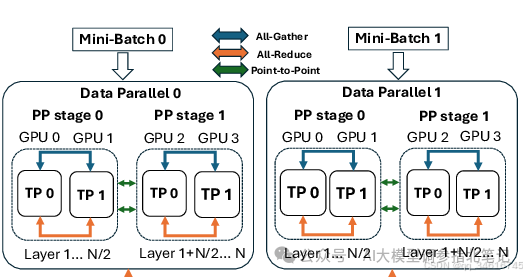
An illustration of 3D parallelism with 2 Data-Parallel ranks, 2 Pipeline-Parallel stages and 2 Tensor-Parallel ranks. Each Pipeline-Parallel stage holds half of the total layers.
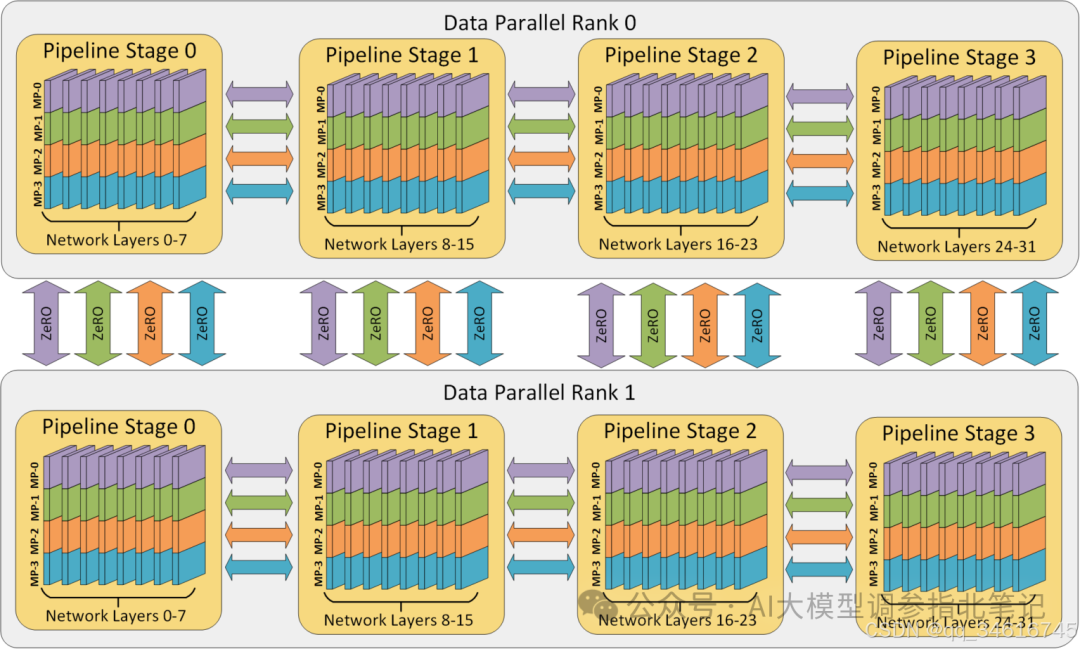
![Illustration of 3D parallelism [41] training on 384 (8 × 12 × 4) GPUs with 8-way DP, 12-way PMP, and 4-way TMP.](https://i-blog.csdnimg.cn/img_convert/a808ac05e3b087a4b8e830d1a8acd2a1.png)
Illustration of 3D parallelism [41] training on 384 (8 × 12 × 4) GPUs with 8-way DP, 12-way PMP, and 4-way TMP.
在这里插入图片描述
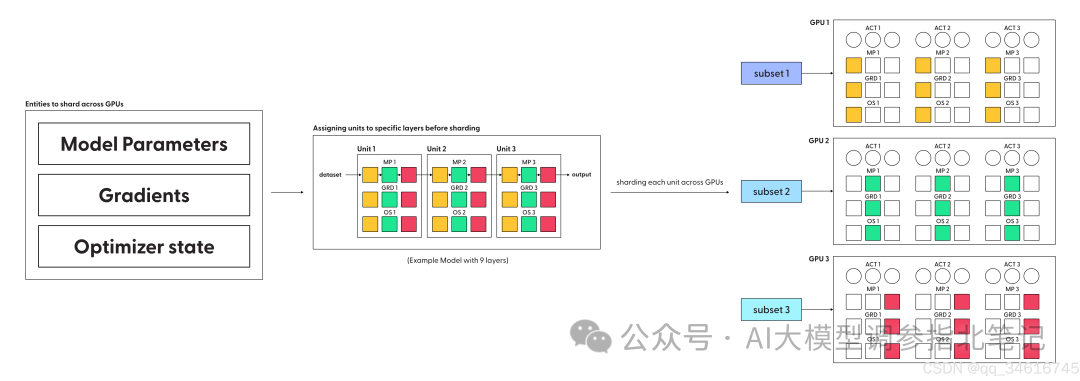
FullyShardedDataParallel
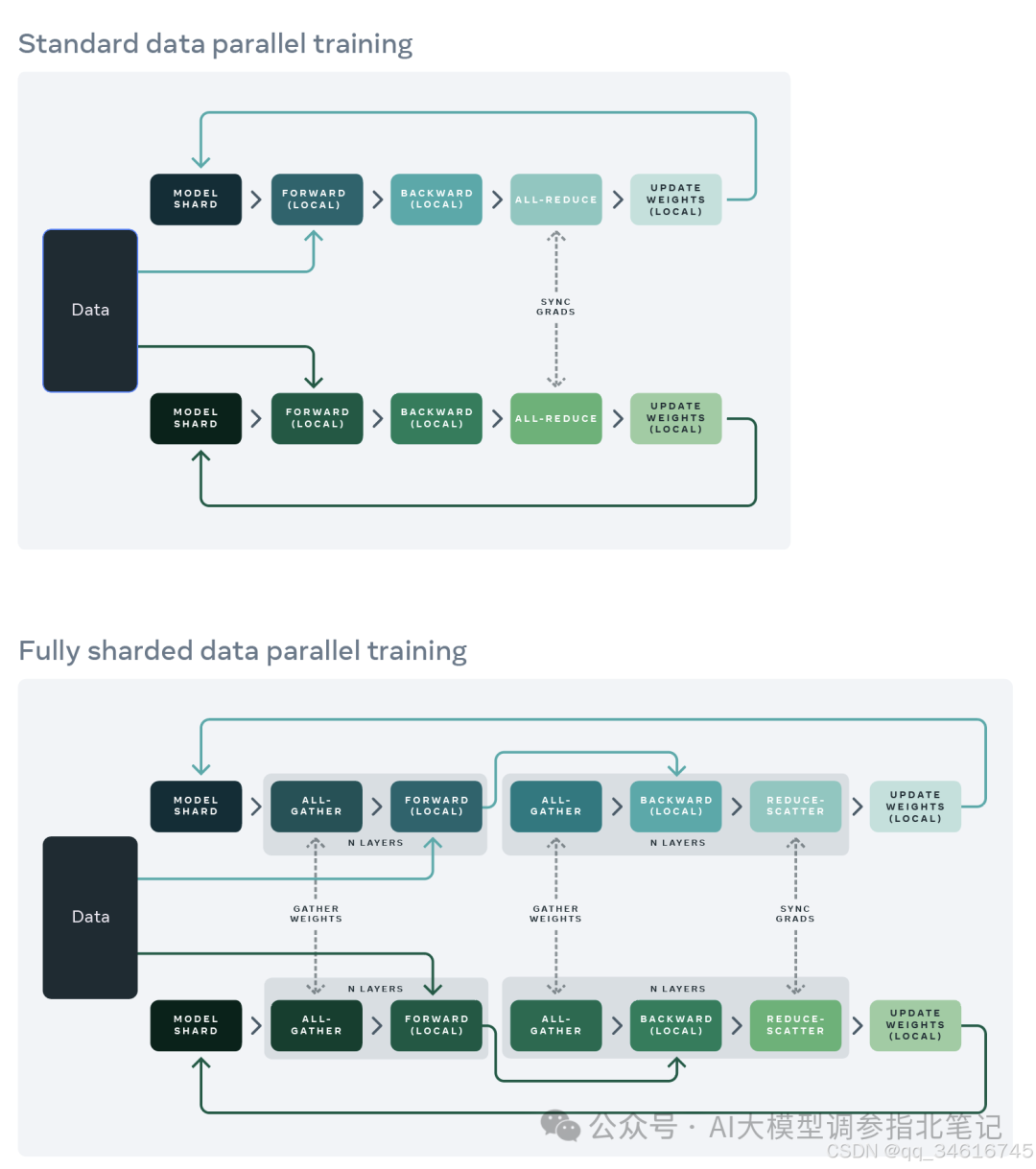
在这里插入图片描述
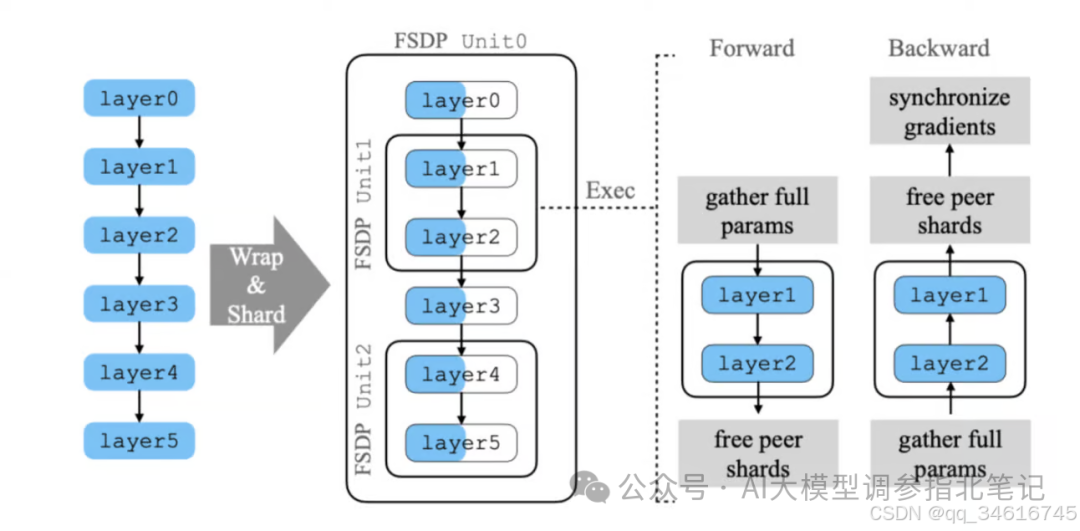
这份完整版的大模型 AI 学习资料已经上传CSDN,朋友们如果需要可以微信扫描下方CSDN官方认证二维码免费领取【保证100%免费】
在这里插入图片描述
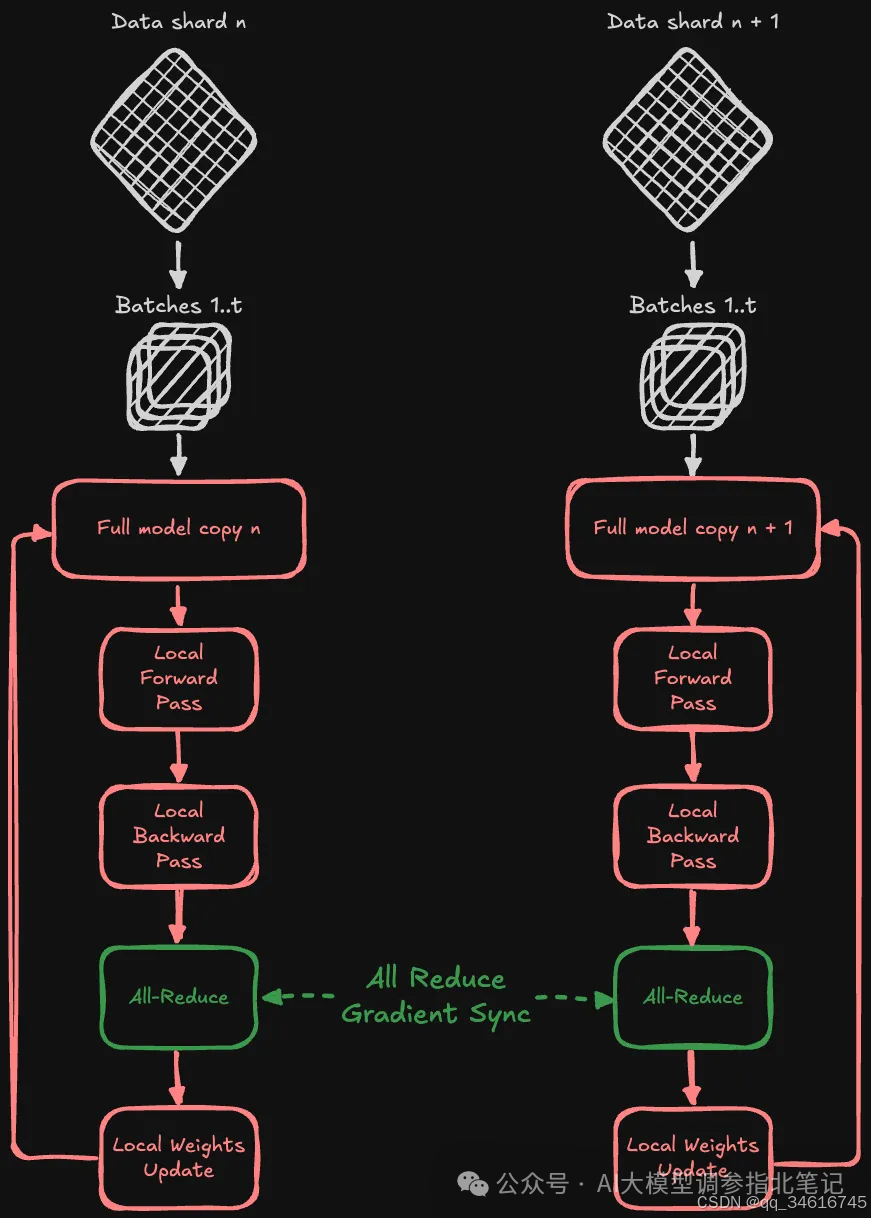
Figure 3. Visualization of naive distributed data parallelism. Visualization inspired by Ott et al., “Fully Sharded Data parallel: faster AI training with fewer GPUs” Meta article.
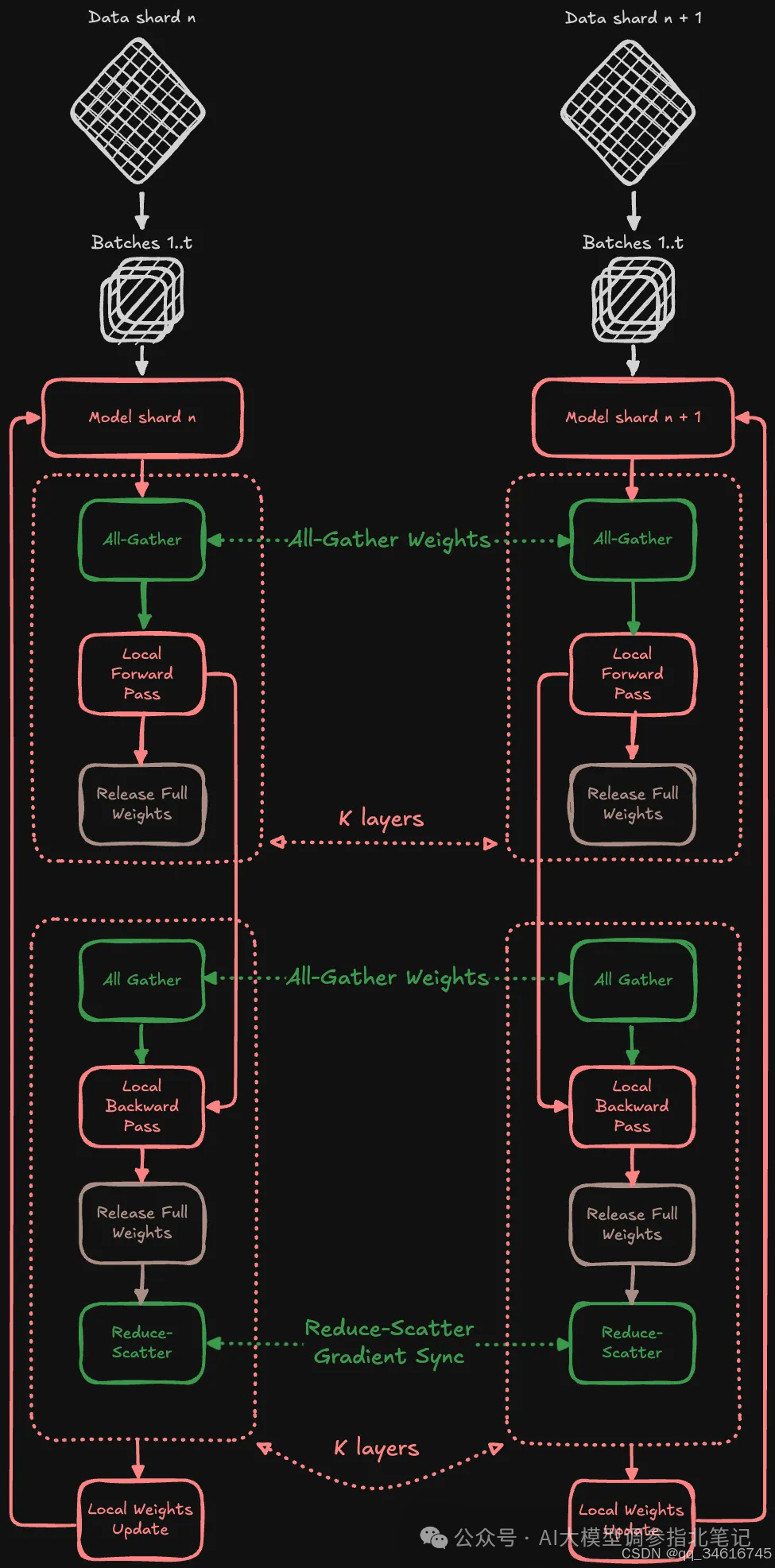
Figure 4. Visualization of fully-sharded data parallelism. Inspired by the FSDP Workflow illustration in Shojanazeri et al., “Getting Started with Fully Sharded Data Parallel (FSDP)”.
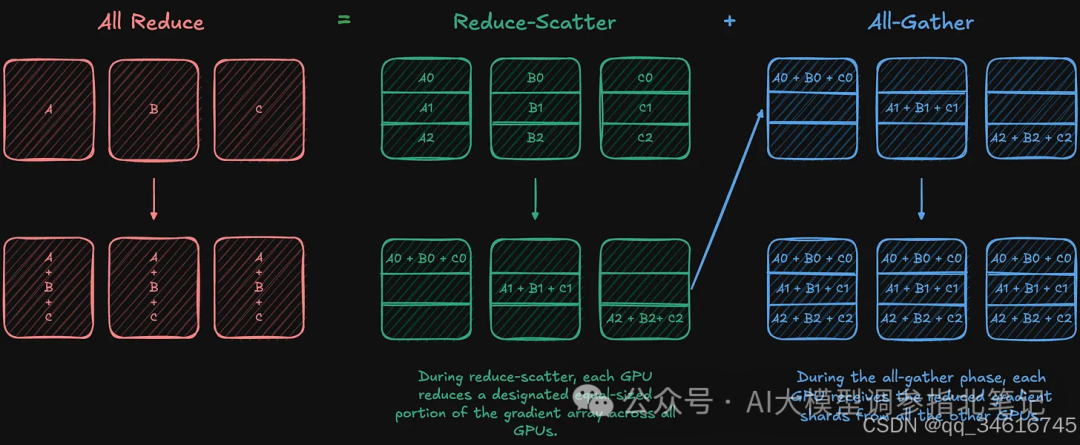
Figure 5. All-reduce operation decomposed into reduce-scatter and all-gather. Visualization inspired by Ott et al., “Fully Sharded Data Parallel: faster AI training with fewer GPUs” Meta article.
在这里插入图片描述
PagedAttention
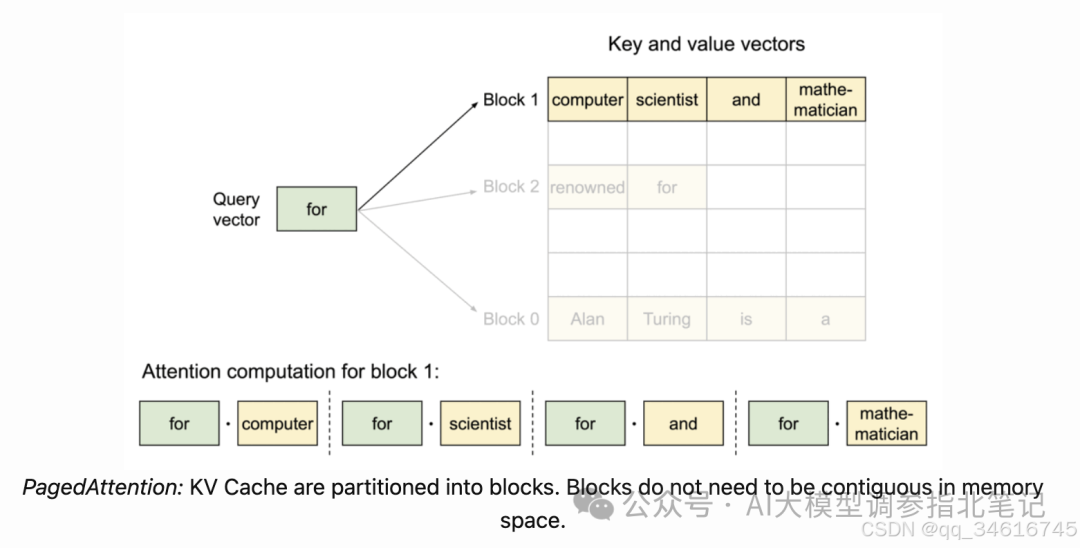
LLMs struggle with memory limitations during generation. In the decoding part of generation, all the attention keys and values generated for previous tokens are stored in GPU memory for reuse. This is called KV cache, and it may take up a large amount of memory for large models and long sequences.
PagedAttention attempts to optimize memory use by partitioning the KV cache into blocks that are accessed through a lookup table. Thus, the KV cache does not need to be stored in contiguous memory, and blocks are allocated as needed. The memory efficiency can increase GPU utilization on memory-bound workloads, so more inference batches can be supported.
The use of a lookup table to access the memory blocks can also help with KV sharing across multiple generations. This is helpful for techniques such as parallel sampling, where multiple outputs are generated simultaneously for the same prompt. In this case, the cached KV blocks can be shared among the generations.
TGI’s PagedAttention implementation leverages the custom cuda kernels developed by the vLLM Project. You can learn more about this technique in the project’s page.
在这里插入图片描述
Safetensors
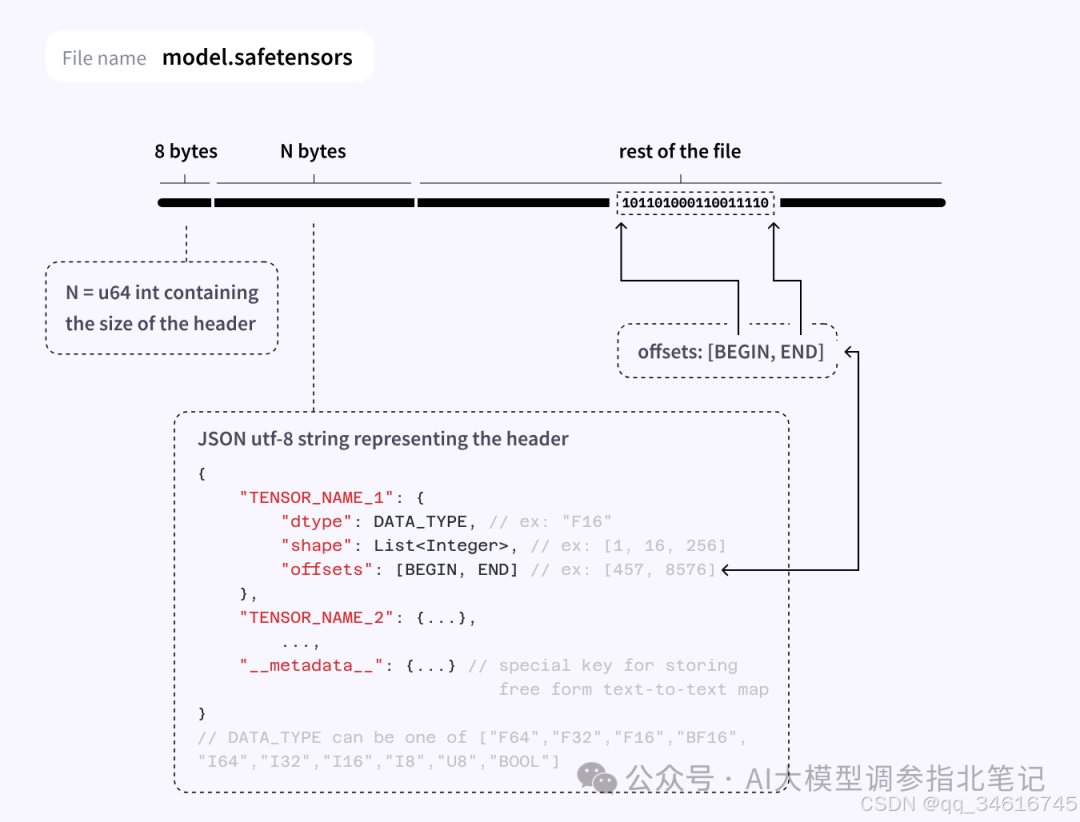
Safetensors is a model serialization format for deep learning models. It is faster and safer compared to other serialization formats like pickle (which is used under the hood in many deep learning libraries).
TGI depends on safetensors format mainly to enable tensor parallelism sharding. For a given model repository during serving, TGI looks for safetensors weights. If there are no safetensors weights, TGI converts the PyTorch weights to safetensors format.
You can learn more about safetensors by reading the safetensors documentation.
model.safetensors的内部格式如下:
在这里插入图片描述
Quantization
TGI提供了许多量化方案,可以根据您的用例高效、快速地运行llm。TGI支持GPTQ、AWQ、bit -and-bytes、EETQ、Marlin、EXL2和fp8量化。
为了利用 GPTQ、AWQ、Marlin 和 EXL2 量化,您必须提供 pre-quantized 的权重。而对于 bit-and-bytes, EETQ 和 fp8,权重是由TGI 动态量化 的。
我们建议使用官方量化脚本创建量化:
-
1. AWQ, https://github.com/casper-hansen/AutoAWQ/blob/main/examples/quantize.py
-
2. GPTQ/ Marlin, https://github.com/AutoGPTQ/AutoGPTQ/blob/main/examples/quantization/basic_usage.py
-
3. EXL2, https://github.com/turboderp/exllamav2/blob/master/doc/convert.md
对于动态量化,您只需要传递一种支持的量化类型,TGI负责其余的工作。
Quantization with bitsandbytes, EETQ & fp8
bitsandbytes 是一个用于对模型应用 8-bit 和 4-bit 量化的库。与GPTQ量化不同,bitsandbytes 不需要校准数据集 或 任何后处理-权重在加载时自动量化。然而,bitsandbytes的推理比GPTQ或FP16慢。
8-bit 量化使 multi-billion 参数规模模型适合较小的硬件,而不会降低性能太多。在TGI中,您可以像下面👇那样通过添加 --quantize bitsandbytes 来使用 8-bit 量化
docker run --gpus all --shm-size 1g -p 8080:80 -v $volume:/data ghcr.io/huggingface/text-generation-inference:3.1.0 --model-id $model --quantize bitsandbytes
使用bitsandbytes也可以实现4-bit量化。可以选择以下4-bit数据类型:4-bit float (fp4) 或 4-bit NormalFloat (nf4)。这些数据类型是在参数高效微调的上下文中引入的,但是您可以通过在加载时自动转换模型权重来应用它们进行推理。
在TGI中,您可以通过添加 --quantize bitsandbytes-nf4 或 --quantize bitsandbytes-fp4 来使用 4-bit 量化,如下面的👇所示
docker run --gpus all --shm-size 1g -p 8080:80 -v $volume:/data ghcr.io/huggingface/text-generation-inference:3.1.0 --model-id $model --quantize bitsandbytes-nf4
类似地,您可以使用—quantize eetq或—quantize fp8来实现各自的量化方案。
除此之外,TGI允许通过传递模型权重和校准数据集直接创建GPTQ量化。
Quantization with GPTQ
GPTQ是一种使模型更小的训练后量化方法。它通过找到权重的压缩版本来量化层,这将产生最小均方误差,如下👇所示
给定一个具有权重矩阵和层输入的层,找到量化的权重 :
TGI允许您运行已经GPTQ量化的模型(请参阅此处的可用模型)或使用量化脚本对您选择的模型进行量化。您可以通过像下面这样简单地传递--quantize来运行量子化模型👇
docker run --gpus all --shm-size 1g -p 8080:80 -v $volume:/data ghcr.io/huggingface/text-generation-inference:3.1.0 --model-id $model --quantize gptq
注意,TGI的GPTQ实现并没有在底层使用AutoGPTQ。然而,使用AutoGPTQ或Optimum量化的模型仍然可以由TGI服务。
要使用带有校准数据集的GPTQ量化给定模型,只需运行
text-generation-server quantize tiiuae/falcon-40b /data/falcon-40b-gptq
# Add --upload-to-model-id MYUSERNAME/falcon-40b to push the created model to the hub directly
这将创建一个包含量化文件的新目录,您可以使用:
text-generation-launcher --model-id /data/falcon-40b-gptq/ --sharded true --num-shard 2 --quantize gptq
您可以通过运行text-generation-server quantize --help来了解有关量化选项的更多信息。
Flash Attention
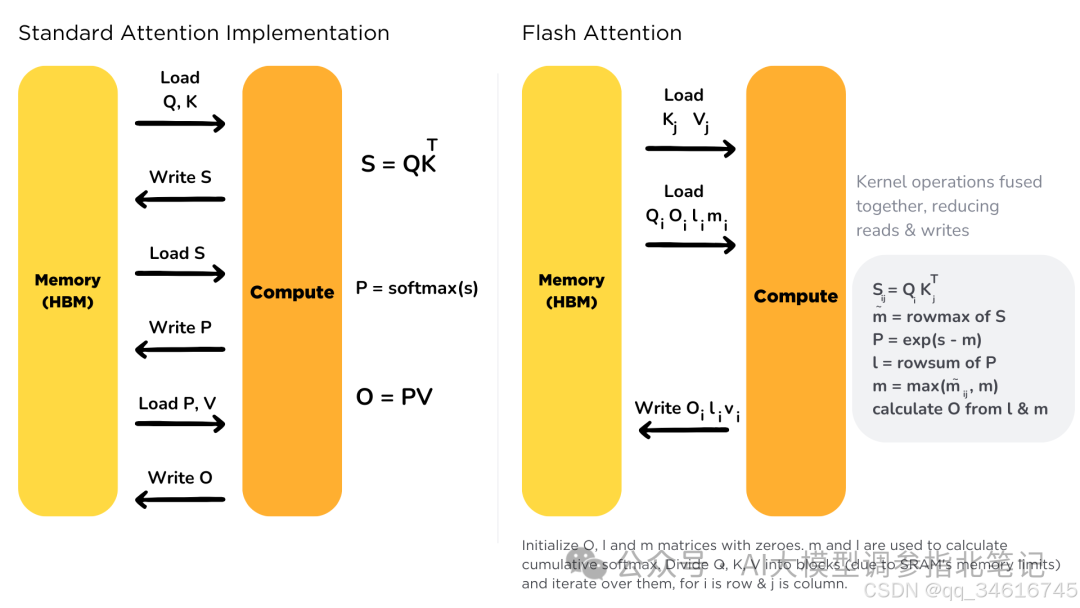
self-attention 机制具有二次方的时间和内存复杂度,严重阻碍了transformer体系结构的扩展。加速器硬件的最新发展主要集中在提高计算能力,而不是内存和硬件之间的数据传输。这导致注意力操作有一个内存瓶颈。Flash Attention是一种注意力算法,用于减少这一问题,并更有效地缩放基于transformer的模型,从而实现更快的训练和推理。
标准的注意力机制使用高带宽内存(HBM)来存储、读取和写入keys、queries和values。HBM内存大,但处理速度慢;SRAM内存小,但操作速度快。在标准的注意力实现中,从HBM加载和写入keys、queries和values的成本很高。它将keys、querys和values从HBM加载到GPU片上SRAM,执行注意力机制的单个步骤,将其写回HBM,并为每个注意力step重复此操作。相反,Flash Attention只加载一次keys、queries和values,融合注意机制的操作,并将它们写回来。
在这里插入图片描述
它是为支持的模型实现的。你可以在这里查看支持Flash注意的模型的完整列表,对于带有Flash前缀的模型。
Streaming
What is Streaming?
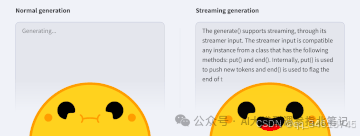
Token streaming 是服务器在模型生成token时逐一返回token的模式。这允许向用户显示渐进生成,而不是等待整个生成结束。Streaming是终端用户体验的一个重要方面,因为它减少了延迟,这是流畅体验的最关键方面之一。
在这里插入图片描述
使用令牌流,服务器可以在生成整个响应之前一个接一个地返回令牌。用户可以在一个生成结束之前对生成的质量有一个感觉。这有不同的积极影响:
-
• 对于非常长的查询,用户可以提前几个数量级得到结果。
-
• 看到正在进行的事情,如果它没有朝着他们期望的方向发展,用户就可以停止生成。
-
• 当结果在早期阶段显示时,感知延迟较低。
-
• 当在会话ui中使用时,体验感觉更自然。
例如,一个系统每秒可以生成100个令牌。如果系统在 non-streaming 设置下生成1000个令牌,用户需要等待10秒才能获得结果。另一方面,使用streaming设置,用户立即获得初始结果,尽管端到端延迟是相同的,但他们可以在5秒后看到一半的生成。
How to use Streaming?
Streaming with Python
要使用InferenceClient传输令牌,只需传递stream=True并遍历响应即可。
from huggingface_hub import InferenceClient

client = InferenceClient(base_url="http://127.0.0.1:8080")
output = client.chat.completions.create(
    messages=[
        {"role": "system", "content": "You are a helpful assistant."},
        {"role": "user", "content": "Count to 10"},
    ],
    stream=True,
    max_tokens=1024,
)

for chunk in output:
    print(chunk.choices[0].delta.content)

# 1
# 2
# 3
# 4
# 5
# 6
# 7
# 8
# 9
# 10
huggingface_hub库还附带了一个AsyncInferenceClient,以防您需要并发处理请求。
from huggingface_hub import AsyncInferenceClient

client = AsyncInferenceClient(base_url="http://127.0.0.1:8080")
asyncdefmain():
    stream = await client.chat.completions.create(
        messages=[{"role": "user", "content": "Say this is a test"}],
        stream=True,
    )
    asyncfor chunk in stream:
        print(chunk.choices[0].delta.content or"", end="")

asyncio.run(main())

# This
# is
# a
# test
#.
Streaming with cURL
要使用OpenAI Chat Completions 兼容 Messages API v1/chat/completions 端点与curl,你可以添加-N标志,禁用curl默认缓冲,并显示数据从服务器到达
curl localhost:8080/v1/chat/completions \
    -X POST \
    -d '{
  "model": "tgi",
  "messages": [
    {
      "role": "system",
      "content": "You are a helpful assistant."
    },
    {
      "role": "user",
      "content": "What is deep learning?"
    }
  ],
  "stream": true,
  "max_tokens": 20
}' \
    -H 'Content-Type: application/json'
How does Streaming work under the hood?
在底层,TGI 使用 Server-Sent Events (SSE)。在SSE设置中,客户端发送带有数据的请求,打开HTTP连接并订阅更新。然后,服务器向客户端发送数据。没有必要再发送请求;服务器将继续发送数据。SSEs是单向的,这意味着客户端不向服务器发送其他请求。SSE通过HTTP发送数据,使其易于使用。
SSEs不同于:
-
• Polling: 客户端不断调用服务器以获取数据。这意味着服务器可能返回空响应并导致开销。
-
• Webhooks: 有双向连接的地方。服务器可以向客户端发送信息,但客户端也可以在第一次请求后向服务器发送数据。Webhooks操作起来更复杂,因为它们不仅仅使用HTTP。
如果同时有太多请求,TGI返回一个带有overloaded错误类型的HTTP错误(huggingface_hub返回OverloadedError)。这允许客户端管理过载的服务器(例如,它可以向用户显示一个繁忙的错误,或者用一个新的请求重试)。要配置并发请求的最大数量,可以指定--max_concurrent_requests,允许客户端处理回压。
如何学习AI大模型?
我在一线互联网企业工作十余年里,指导过不少同行后辈。帮助很多人得到了学习和成长。
我意识到有很多经验和知识值得分享给大家,也可以通过我们的能力和经验解答大家在人工智能学习中的很多困惑,所以在工作繁忙的情况下还是坚持各种整理和分享。但苦于知识传播途径有限,很多互联网行业朋友无法获得正确的资料得到学习提升,故此将并将重要的AI大模型资料包括AI大模型入门学习思维导图、精品AI大模型学习书籍手册、视频教程、实战学习等录播视频免费分享出来。
这份完整版的大模型 AI 学习资料已经上传CSDN,朋友们如果需要可以微信扫描下方CSDN官方认证二维码免费领取【保证100%免费】

第一阶段: 从大模型系统设计入手,讲解大模型的主要方法;
第二阶段: 在通过大模型提示词工程从Prompts角度入手更好发挥模型的作用;
第三阶段: 大模型平台应用开发借助阿里云PAI平台构建电商领域虚拟试衣系统;
第四阶段: 大模型知识库应用开发以LangChain框架为例,构建物流行业咨询智能问答系统;
第五阶段: 大模型微调开发借助以大健康、新零售、新媒体领域构建适合当前领域大模型;
第六阶段: 以SD多模态大模型为主,搭建了文生图小程序案例;
第七阶段: 以大模型平台应用与开发为主,通过星火大模型,文心大模型等成熟大模型构建大模型行业应用。

👉学会后的收获:👈
• 基于大模型全栈工程实现(前端、后端、产品经理、设计、数据分析等),通过这门课可获得不同能力;
• 能够利用大模型解决相关实际项目需求: 大数据时代,越来越多的企业和机构需要处理海量数据,利用大模型技术可以更好地处理这些数据,提高数据分析和决策的准确性。因此,掌握大模型应用开发技能,可以让程序员更好地应对实际项目需求;
• 基于大模型和企业数据AI应用开发,实现大模型理论、掌握GPU算力、硬件、LangChain开发框架和项目实战技能, 学会Fine-tuning垂直训练大模型(数据准备、数据蒸馏、大模型部署)一站式掌握;
• 能够完成时下热门大模型垂直领域模型训练能力,提高程序员的编码能力: 大模型应用开发需要掌握机器学习算法、深度学习框架等技术,这些技术的掌握可以提高程序员的编码能力和分析能力,让程序员更加熟练地编写高质量的代码。

1.AI大模型学习路线图
2.100套AI大模型商业化落地方案
3.100集大模型视频教程
4.200本大模型PDF书籍
5.LLM面试题合集
6.AI产品经理资源合集
👉获取方式:
😝有需要的小伙伴,可以保存图片到wx扫描二v码免费领取【保证100%免费】🆓


北京人形旗下天工造物具身智能开源社区,聚焦具身天工与慧思开物两大平台
更多推荐
 11
11 0
0- 0


 已为社区贡献37条内容

所有评论(0)