uniapp app端使用renderjs 实现高德地图线路规划
·
使用高德地图的sdk实现线路规划
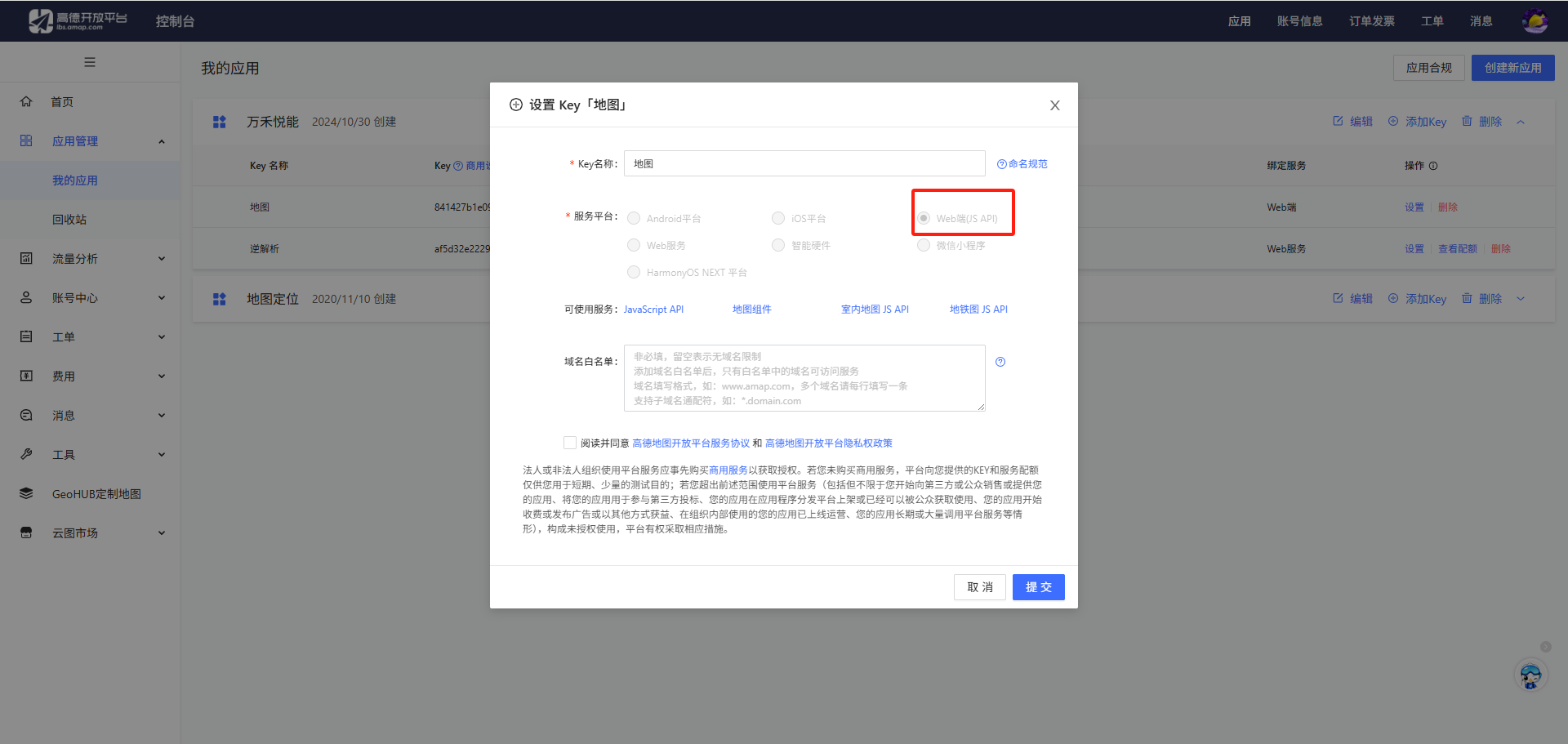
首先去高德的开放平台去申请key和密钥路径规划-参考手册-地图 JS API 1.4 | 高德地图API
勾选web服务
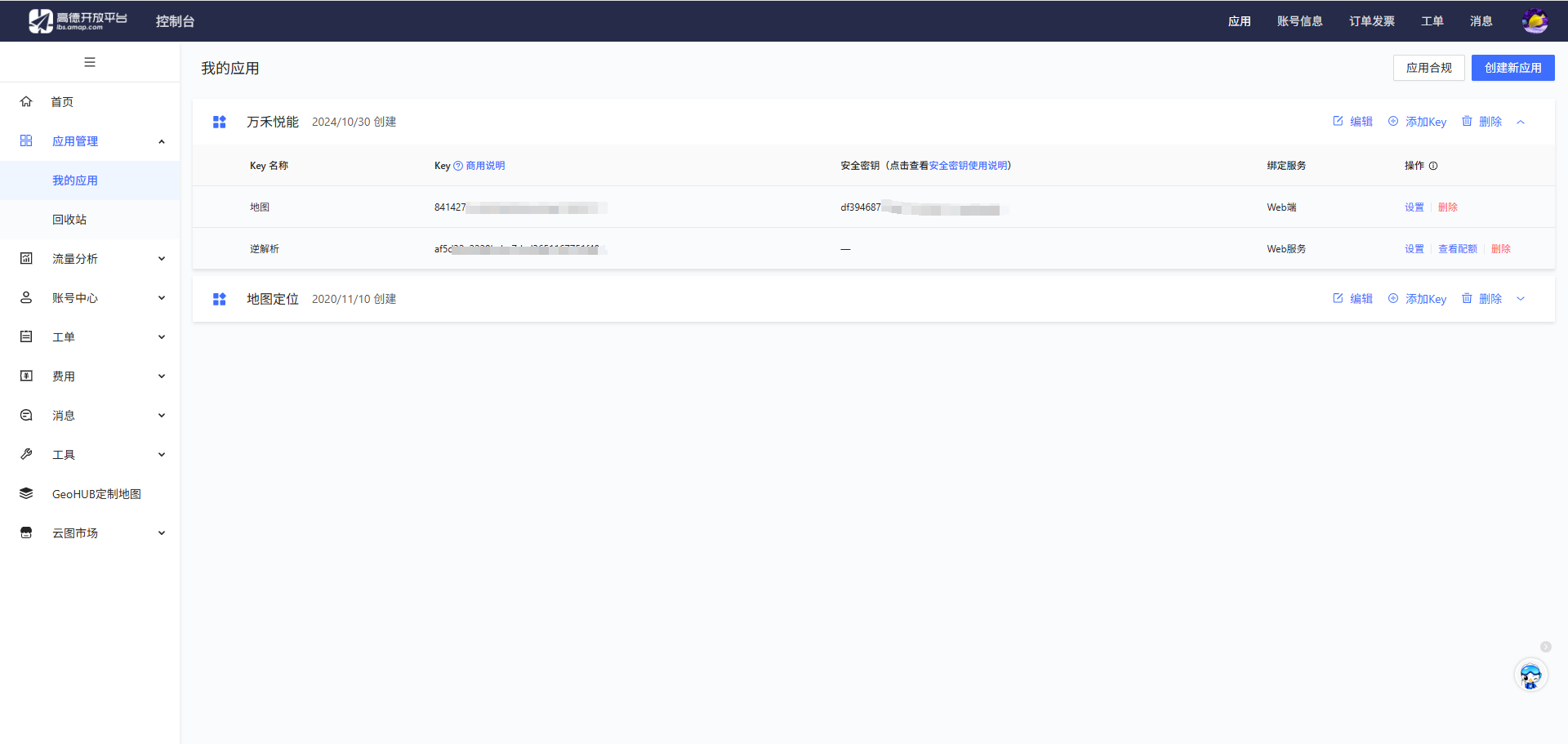
 创建完成就会有key和密钥
然后在页面创建节点去给renderjs传参
:change:prop="map.updateMap"里面的map是<script module="map" lang="renderjs">里面module的名称
<view class="w-vh-100" :class="[classs]">
    <view class="w-vh-100 h-vh-100" id="container"></view>
    <!-- 监听marker数据变化 -->
    <view :prop="markList" :change:prop="map.updateMap"></view>
  </view>
使用函数去给markList赋值触发runderjs里面的方法updateMap
setMarkList(){

        this.markList = this.mapData

}
renderjs里面的updateMap方法
updateMap(obj, oldValue, ownerInstance, instance) {
          console.log(obj, 123);
          this.list = [...obj];
          this.initJS();
          this.mapOwnerInstance = ownerInstance;
      },
完整代码
里面的密钥和key 就是上面我们在高德地图里面申请的密钥和key
<template>
  <view class="w-vh-100" :class="[classs]">
    <view class="w-vh-100 h-vh-100" id="container"></view>
    <!-- 监听marker数据变化 -->
    <view :prop="markList" :change:prop="map.updateMap"></view>
  </view>
</template>

<script>
export default {
  data() {
    return {
      markList: []
    };
  },
  props: {
    classs: {
      type: String,
      default: 'h-720'
    },
    mapData: {
      type: Array,
      default: () => []
    }
  },
  mounted() {
    setTimeout(() => {
      this.markList = this.mapData
    }, 500)
  },
  methods: {
    markerLoad(obj) {
      console.log('接收到地图信息', obj);
    }
  }
}
</script>

<script module="map" lang="renderjs">
let map;
 window._AMapSecurityConfig = {
    securityJsCode: your-code, //安全密钥
 };
export default {
  data() {
      return {
          list: [],
          mapOwnerInstance: null
      }
  },
  methods: {
      updateMap(obj, oldValue, ownerInstance, instance) {
          console.log(obj, 123);
          this.list = [...obj];
          this.initJS();
          this.mapOwnerInstance = ownerInstance;
      },
      // 初始化js
      initJS() {
          const script = document.createElement('script');
          script.src = 'https://webapi.amap.com/maps?v=1.4.15&key=your-key&plugin=AMap.Driving';
          script.onload = this.initMap.bind(this);
          document.head.appendChild(script);
      },
      // 初始化地图
      initMap() {
         map = new AMap.Map('container', {
              zoom: 16,
              resizeEnable: true,
              center: [104.088981, 30.623699],
              viewMode: '2D',
              lang: 'lang',
              zoomControl: true,
              zoomControlOpts: {
                  position: 'RT'
              }
          });
          this.addMarkers();
          this.addRoute();
      },
      // 添加标记点
      addMarkers() {
          const markers = [];
          this.list.forEach((markerData, index) => {
              let icon = new AMap.Icon({
                  image: markerData.iconPath,  // Icon的图像
                  imageSize: new AMap.Size(40, 40)   // 根据所设置的大小拉伸或压缩图片
              });
              // 添加标记点
              const marker = new AMap.Marker({
                  position: new AMap.LngLat(markerData.longitude, markerData.latitude),
                  icon: icon,
                  offset: new AMap.Pixel(-13, -30),
              });
              // 创建信息窗口
              const infoWindow = new AMap.InfoWindow({
                  content: markerData.content,
                  offset: new AMap.Pixel(5, -30)
              });
              // 绑定信息窗口到标记点
              marker.on('click', () => {
                  infoWindow.open(map, marker.getPosition());
              });
              markers.push(marker);
              map.add(marker);
              if (index === 0) {
                  infoWindow.open(map, marker.getPosition());
              }
          });
          if (markers.length > 0) {
              // 自适应显示多个标记点
              map.setFitView(markers);
          }
      },
      // 添加行驶路线
      addRoute() {
          if (this.list.length < 2) {
              return;
          }
          const driving = new AMap.Driving({
              map: map,
              autoFitView: true,
              hideMarkers: true
          });
          const start = new AMap.LngLat(this.list[0].longitude, this.list[0].latitude);
          const end = new AMap.LngLat(this.list[1].longitude, this.list[1].latitude);

          driving.search(start, end, (status, result) => {
              if (status === 'complete') {
                  console.log('驾车路线规划成功', result);
              } else {
                  console.error('驾车路线规划失败', result);
              }
          });
      }
  }
}
</script>

<style>
::v-deep .amap-logo {
  opacity: 0;
}

::v-deep .amap-copyright {
  opacity: 0;
}

#container {
  width: 100%;
  height: 100%;
}
</style>

北京人形旗下天工造物具身智能开源社区,聚焦具身天工与慧思开物两大平台
更多推荐
 9
9 0
0- 0


 已为社区贡献11条内容

所有评论(0)