python 连接 hive 遇到的问题 building ‘sasl.saslwrapper‘ extension error: Microsoft Visual C++ 14.0 is
·
1.报错 pip install pyhive[hive]
C:\Users\Administrator>pip install pyhive[hive]
Requirement already satisfied: pyhive[hive] in c:\users\administrator\appdata\local\programs\python\python37\lib\site-packages (0.7.0)
Requirement already satisfied: future in c:\users\administrator\appdata\local\programs\python\python37\lib\site-packages (from pyhive[hive]) (1.0.0)
Requirement already satisfied: python-dateutil in c:\users\administrator\appdata\local\programs\python\python37\lib\site-packages (from pyhive[hive]) (2.9.0.post0)
Collecting sasl>=0.2.1 (from pyhive[hive])
  Using cached https://files.pythonhosted.org/packages/df/ae/d8dda9ef1636f548935c271910d3b35afbf1782df582fda88a13ea48de53/sasl-0.3.1.tar.gz
Requirement already satisfied: thrift>=0.10.0 in c:\users\administrator\appdata\local\programs\python\python37\lib\site-packages (from pyhive[hive]) (0.21.0)
Requirement already satisfied: thrift_sasl>=0.1.0 in c:\users\administrator\appdata\local\programs\python\python37\lib\site-packages (from pyhive[hive]) (0.4.3)
Requirement already satisfied: six>=1.5 in c:\users\administrator\appdata\local\programs\python\python37\lib\site-packages (from python-dateutil->pyhive[hive]) (1.17.0)
Requirement already satisfied: pure-sasl>=0.6.2 in c:\users\administrator\appdata\local\programs\python\python37\lib\site-packages (from thrift_sasl>=0.1.0->pyhive[hive]) (0.6.2)
Installing collected packages: sasl
  Running setup.py install for sasl ... error
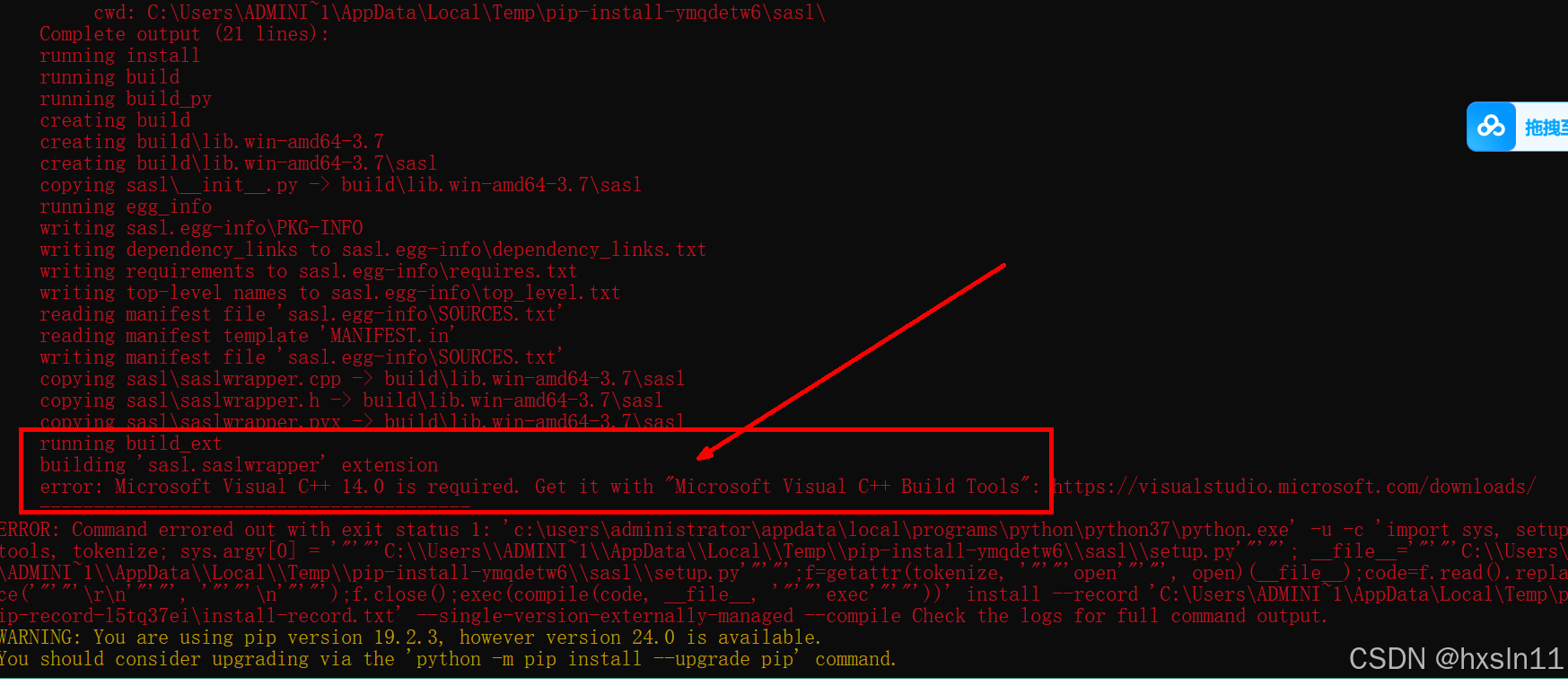
    ERROR: Command errored out with exit status 1:
     command: 'c:\users\administrator\appdata\local\programs\python\python37\python.exe' -u -c 'import sys, setuptools, tokenize; sys.argv[0] = '"'"'C:\\Users\\ADMINI~1\\AppData\\Local\\Temp\\pip-install-ymqdetw6\\sasl\\setup.py'"'"'; __file__='"'"'C:\\Users\\ADMINI~1\\AppData\\Local\\Temp\\pip-install-ymqdetw6\\sasl\\setup.py'"'"';f=getattr(tokenize, '"'"'open'"'"', open)(__file__);code=f.read().replace('"'"'\r\n'"'"', '"'"'\n'"'"');f.close();exec(compile(code, __file__, '"'"'exec'"'"'))' install --record 'C:\Users\ADMINI~1\AppData\Local\Temp\pip-record-l5tq37ei\install-record.txt' --single-version-externally-managed --compile
         cwd: C:\Users\ADMINI~1\AppData\Local\Temp\pip-install-ymqdetw6\sasl\
    Complete output (21 lines):
    running install
    running build
    running build_py
    creating build
    creating build\lib.win-amd64-3.7
    creating build\lib.win-amd64-3.7\sasl
    copying sasl\__init__.py -> build\lib.win-amd64-3.7\sasl
    running egg_info
    writing sasl.egg-info\PKG-INFO
    writing dependency_links to sasl.egg-info\dependency_links.txt
    writing requirements to sasl.egg-info\requires.txt
    writing top-level names to sasl.egg-info\top_level.txt
    reading manifest file 'sasl.egg-info\SOURCES.txt'
    reading manifest template 'MANIFEST.in'
    writing manifest file 'sasl.egg-info\SOURCES.txt'
    copying sasl\saslwrapper.cpp -> build\lib.win-amd64-3.7\sasl
    copying sasl\saslwrapper.h -> build\lib.win-amd64-3.7\sasl
    copying sasl\saslwrapper.pyx -> build\lib.win-amd64-3.7\sasl
    running build_ext
    building 'sasl.saslwrapper' extension
    error: Microsoft Visual C++ 14.0 is required. Get it with "Microsoft Visual C++ Build Tools": https://visualstudio.microsoft.com/downloads/
    ----------------------------------------
ERROR: Command errored out with exit status 1: 'c:\users\administrator\appdata\local\programs\python\python37\python.exe' -u -c 'import sys, setuptools, tokenize; sys.argv[0] = '"'"'C:\\Users\\ADMINI~1\\AppData\\Local\\Temp\\pip-install-ymqdetw6\\sasl\\setup.py'"'"'; __file__='"'"'C:\\Users\\ADMINI~1\\AppData\\Local\\Temp\\pip-install-ymqdetw6\\sasl\\setup.py'"'"';f=getattr(tokenize, '"'"'open'"'"', open)(__file__);code=f.read().replace('"'"'\r\n'"'"', '"'"'\n'"'"');f.close();exec(compile(code, __file__, '"'"'exec'"'"'))' install --record 'C:\Users\ADMINI~1\AppData\Local\Temp\pip-record-l5tq37ei\install-record.txt' --single-version-externally-managed --compile Check the logs for full command output.
WARNING: You are using pip version 19.2.3, however version 24.0 is available.
You should consider upgrading via the 'python -m pip install --upgrade pip' command.

C:\Users\Administrator>
2.
building 'sasl.saslwrapper' extension
error: Microsoft Visual C++ 14.0 is required.
这里可以直接安装 sasl-0.2.1-cp37-cp37m-win_amd64.whl
C:\Users\Administrator>pip install C:\Users\Administrator\Downloads\sasl-0.2.1-cp37-cp37m-win_amd64.whl
Processing c:\users\administrator\downloads\sasl-0.2.1-cp37-cp37m-win_amd64.whl
Requirement already satisfied: six in c:\users\administrator\appdata\local\programs\python\python37\lib\site-packages (from sasl==0.2.1) (1.17.0)
Installing collected packages: sasl
Successfully installed sasl-0.2.1
WARNING: You are using pip version 19.2.3, however version 24.0 is available.
You should consider upgrading via the 'python -m pip install --upgrade pip' command.
3.重新安装
pip install pyhive[hive]
C:\Users\Administrator>pip install pyhive[hive]
Collecting pyhive[hive]
  Using cached https://files.pythonhosted.org/packages/f6/ec/5c658b3a4d99a6d9145030cc8e003c3f7efc668d866e88544812ab0af310/PyHive-0.7.0.tar.gz
Requirement already satisfied: future in c:\users\administrator\appdata\local\programs\python\python37\lib\site-packages (from pyhive[hive]) (1.0.0)
Requirement already satisfied: python-dateutil in c:\users\administrator\appdata\local\programs\python\python37\lib\site-packages (from pyhive[hive]) (2.9.0.post0)
Requirement already satisfied: sasl>=0.2.1 in c:\users\administrator\appdata\local\programs\python\python37\lib\site-packages (from pyhive[hive]) (0.2.1)
Requirement already satisfied: thrift>=0.10.0 in c:\users\administrator\appdata\local\programs\python\python37\lib\site-packages (from pyhive[hive]) (0.21.0)
Requirement already satisfied: thrift_sasl>=0.1.0 in c:\users\administrator\appdata\local\programs\python\python37\lib\site-packages (from pyhive[hive]) (0.4.3)
Requirement already satisfied: six>=1.5 in c:\users\administrator\appdata\local\programs\python\python37\lib\site-packages (from python-dateutil->pyhive[hive]) (1.17.0)
Requirement already satisfied: pure-sasl>=0.6.2 in c:\users\administrator\appdata\local\programs\python\python37\lib\site-packages (from thrift_sasl>=0.1.0->pyhive[hive]) (0.6.2)
Installing collected packages: pyhive
  Running setup.py install for pyhive ... done
Successfully installed pyhive-0.7.0
WARNING: You are using pip version 19.2.3, however version 24.0 is available.
You should consider upgrading via the 'python -m pip install --upgrade pip' command.
4.遇到的问题截图
C:\Users\Administrator>pip install pyhive[hive]
Requirement already satisfied: pyhive[hive] in c:\users\administrator\appdata\local\programs\python\python37\lib\site-packages (0.7.0)
Requirement already satisfied: future in c:\users\administrator\appdata\local\programs\python\python37\lib\site-packages (from pyhive[hive]) (1.0.0)
Requirement already satisfied: python-dateutil in c:\users\administrator\appdata\local\programs\python\python37\lib\site-packages (from pyhive[hive]) (2.9.0.post0)
Collecting sasl>=0.2.1 (from pyhive[hive])
  Using cached https://files.pythonhosted.org/packages/df/ae/d8dda9ef1636f548935c271910d3b35afbf1782df582fda88a13ea48de53/sasl-0.3.1.tar.gz
Requirement already satisfied: thrift>=0.10.0 in c:\users\administrator\appdata\local\programs\python\python37\lib\site-packages (from pyhive[hive]) (0.21.0)
Requirement already satisfied: thrift_sasl>=0.1.0 in c:\users\administrator\appdata\local\programs\python\python37\lib\site-packages (from pyhive[hive]) (0.4.3)
Requirement already satisfied: six>=1.5 in c:\users\administrator\appdata\local\programs\python\python37\lib\site-packages (from python-dateutil->pyhive[hive]) (1.17.0)
Requirement already satisfied: pure-sasl>=0.6.2 in c:\users\administrator\appdata\local\programs\python\python37\lib\site-packages (from thrift_sasl>=0.1.0->pyhive[hive]) (0.6.2)
Installing collected packages: sasl
  Running setup.py install for sasl ... error
    ERROR: Command errored out with exit status 1:
     command: 'c:\users\administrator\appdata\local\programs\python\python37\python.exe' -u -c 'import sys, setuptools, tokenize; sys.argv[0] = '"'"'C:\\Users\\ADMINI~1\\AppData\\Local\\Temp\\pip-install-ymqdetw6\\sasl\\setup.py'"'"'; __file__='"'"'C:\\Users\\ADMINI~1\\AppData\\Local\\Temp\\pip-install-ymqdetw6\\sasl\\setup.py'"'"';f=getattr(tokenize, '"'"'open'"'"', open)(__file__);code=f.read().replace('"'"'\r\n'"'"', '"'"'\n'"'"');f.close();exec(compile(code, __file__, '"'"'exec'"'"'))' install --record 'C:\Users\ADMINI~1\AppData\Local\Temp\pip-record-l5tq37ei\install-record.txt' --single-version-externally-managed --compile
         cwd: C:\Users\ADMINI~1\AppData\Local\Temp\pip-install-ymqdetw6\sasl\
    Complete output (21 lines):
    running install
    running build
    running build_py
    creating build
    creating build\lib.win-amd64-3.7
    creating build\lib.win-amd64-3.7\sasl
    copying sasl\__init__.py -> build\lib.win-amd64-3.7\sasl
    running egg_info
    writing sasl.egg-info\PKG-INFO
    writing dependency_links to sasl.egg-info\dependency_links.txt
    writing requirements to sasl.egg-info\requires.txt
    writing top-level names to sasl.egg-info\top_level.txt
    reading manifest file 'sasl.egg-info\SOURCES.txt'
    reading manifest template 'MANIFEST.in'
    writing manifest file 'sasl.egg-info\SOURCES.txt'
    copying sasl\saslwrapper.cpp -> build\lib.win-amd64-3.7\sasl
    copying sasl\saslwrapper.h -> build\lib.win-amd64-3.7\sasl
    copying sasl\saslwrapper.pyx -> build\lib.win-amd64-3.7\sasl
    running build_ext
    building 'sasl.saslwrapper' extension
    error: Microsoft Visual C++ 14.0 is required. Get it with "Microsoft Visual C++ Build Tools": https://visualstudio.microsoft.com/downloads/
    ----------------------------------------
ERROR: Command errored out with exit status 1: 'c:\users\administrator\appdata\local\programs\python\python37\python.exe' -u -c 'import sys, setuptools, tokenize; sys.argv[0] = '"'"'C:\\Users\\ADMINI~1\\AppData\\Local\\Temp\\pip-install-ymqdetw6\\sasl\\setup.py'"'"'; __file__='"'"'C:\\Users\\ADMINI~1\\AppData\\Local\\Temp\\pip-install-ymqdetw6\\sasl\\setup.py'"'"';f=getattr(tokenize, '"'"'open'"'"', open)(__file__);code=f.read().replace('"'"'\r\n'"'"', '"'"'\n'"'"');f.close();exec(compile(code, __file__, '"'"'exec'"'"'))' install --record 'C:\Users\ADMINI~1\AppData\Local\Temp\pip-record-l5tq37ei\install-record.txt' --single-version-externally-managed --compile Check the logs for full command output.
WARNING: You are using pip version 19.2.3, however version 24.0 is available.
You should consider upgrading via the 'python -m pip install --upgrade pip' command.
截图相关的信息
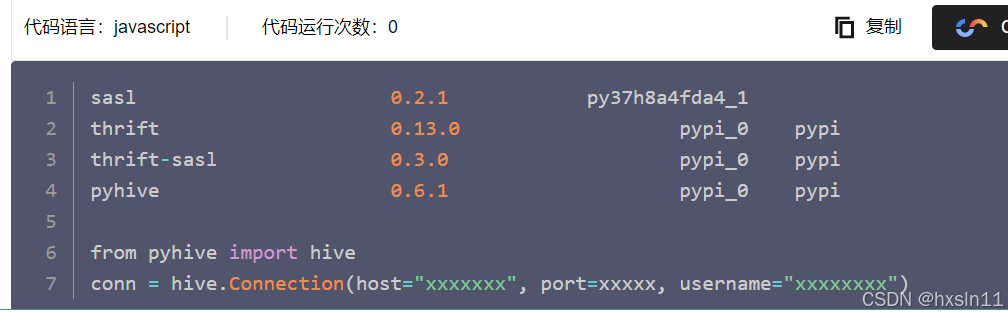
4.2相关的解决方法如下
错误-b‘sasl_client_start (-4)中的错误(-4):没有可用的机制:找不到回调: 2’-腾讯云开发者社区-腾讯云
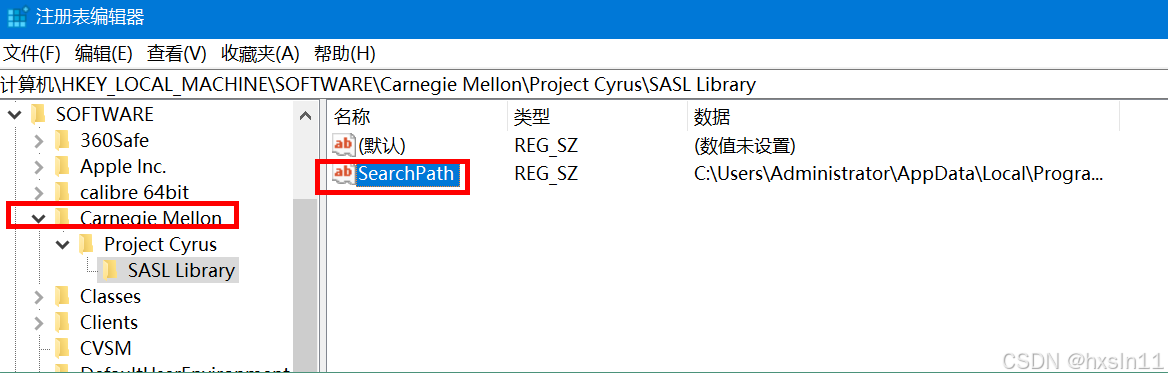
4.3
参考 https://www.cnblogs.com/stroking-maple/p/16653913.html
https://www.cnblogs.com/stroking-maple/p/16653913.html
FOR /F "usebackq delims=" %A IN (`python -c "from importlib import util;import os;print(os.path.join(os.path.dirname(util.find_spec('sasl').origin),'sasl2'))"`) DO (
REG ADD "HKEY_LOCAL_MACHINE\SOFTWARE\Carnegie Mellon\Project Cyrus\SASL Library" /v SearchPath /t REG_SZ /d "%A"
)
win+R里面输入regedit
regedit里点开路径:HKEY_LOCAL_MACHINE\SOFTWARE\Carnegie Mellon\Project Cyrus\SASL Library
把SearchPath的值改为E:\YingYongRJ\Anaconda\Library\bin\sasl2就好了
4.4 结果现象
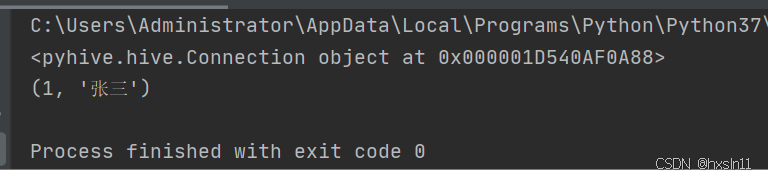
测试的具体代码
from pyhive import hive
conn = hive.Connection(host='hadoop02', port=10000, username='root', database='test')

print(conn); #hadoop02 是在 hadoop02进行计算的   192.168.52.151

# 创建游标对象
cursor = conn.cursor()

# 执行 HiveQL 查询
# cursor.execute('SELECT 1+2')  #测试通过

cursor.execute('SELECT * FROM test_table ')

# 获取查询结果
for result in cursor.fetchall():
    print(result)

# 关闭连接
cursor.close()
conn.close()
北京人形旗下天工造物具身智能开源社区,聚焦具身天工与慧思开物两大平台
更多推荐
 3
3 0
0- 0


 已为社区贡献20条内容

所有评论(0)