大众点评项目测试用例+自动化测试代码
·
大众点评项目测试用例+自动化测试代码
项目描述
基于 Redis+SpringBoot 的生活服务类 App,实现了短信验证码登录查找店铺,秒杀优惠券,发表点评,关注推送的完整业务流程
1.测试用例
1.功能测试
1.登录模块
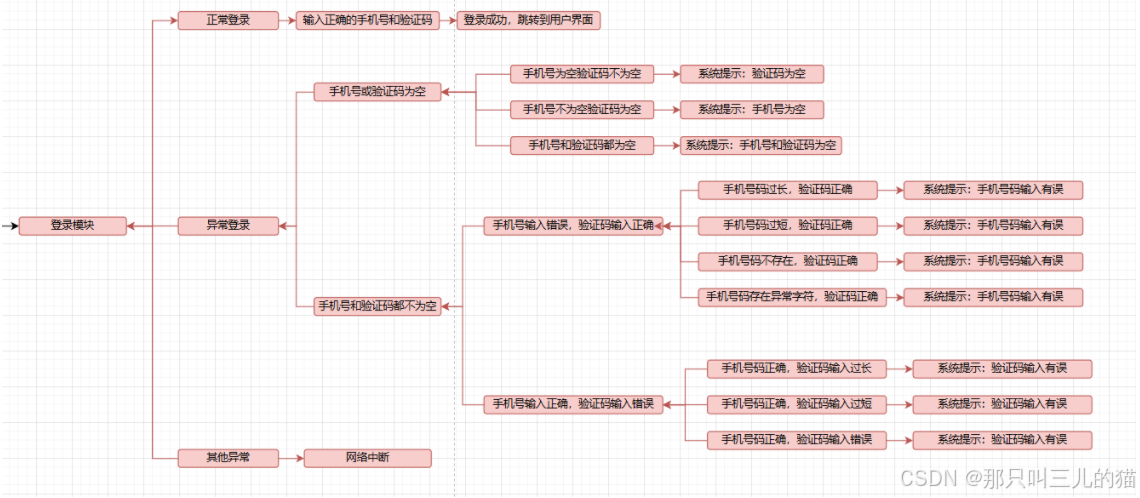
2.店铺模块
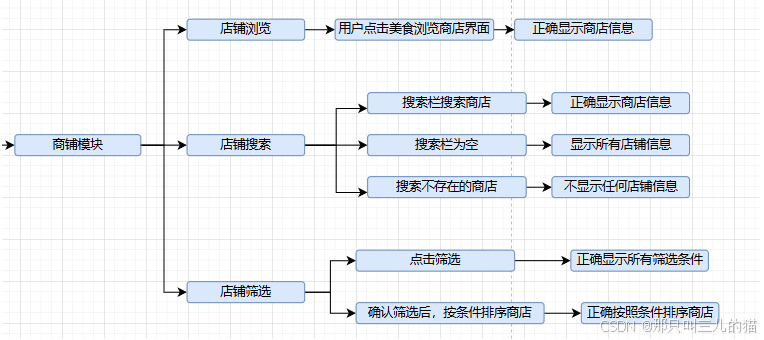
3.优惠券模块
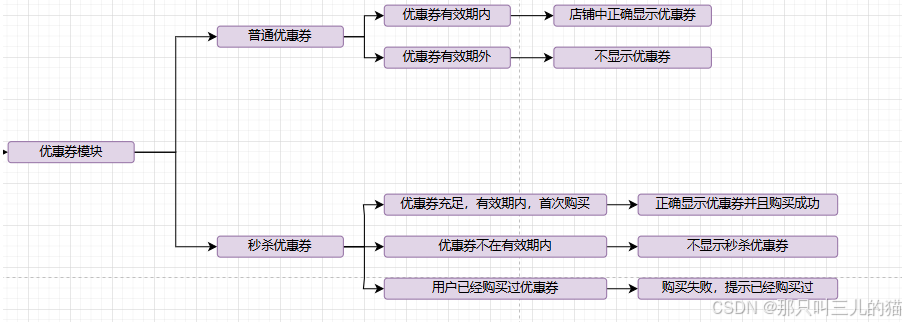
4.点评模块
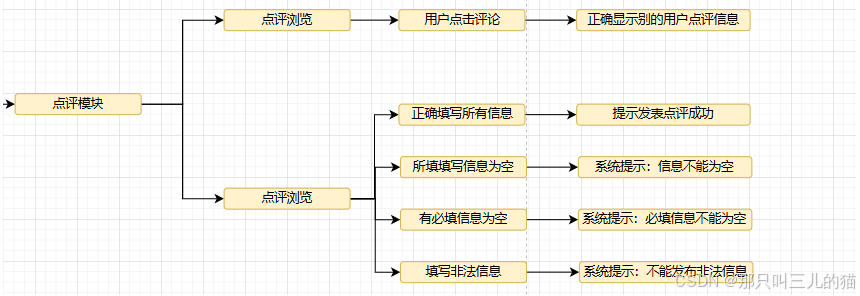
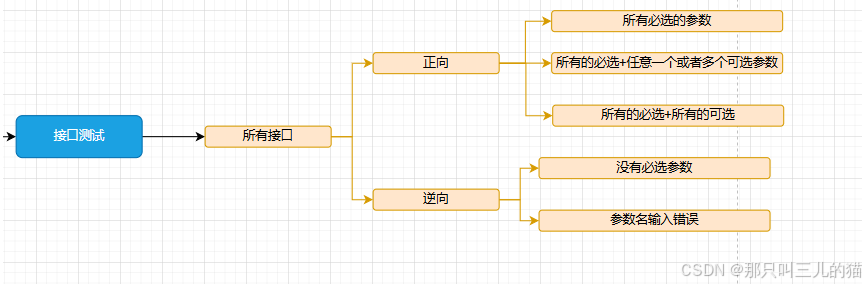
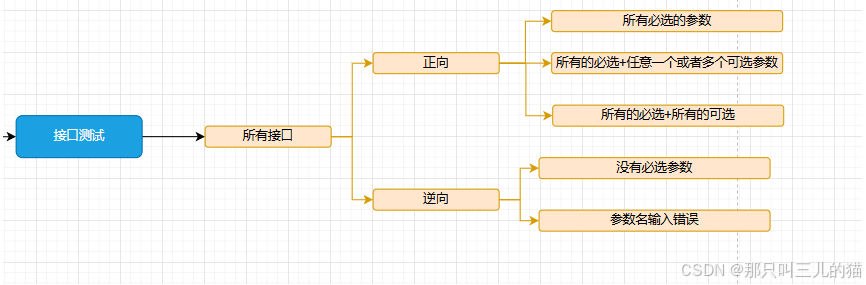
2.接口测试
3.UI测试
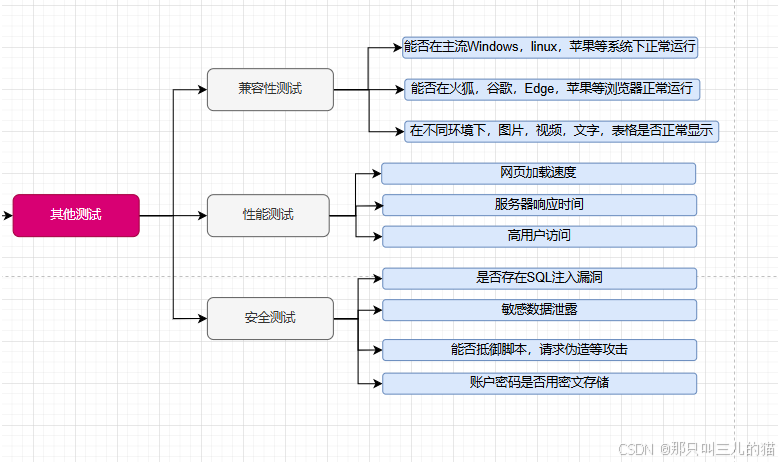
4.其他测试
2.自动化测试代码(Java+selenium+TestNG)
1.登录模块
import org.openqa.selenium.By;
import org.openqa.selenium.WebDriver;
import org.openqa.selenium.WebElement;
import org.openqa.selenium.chrome.ChromeDriver;
import org.testng.Assert;
import org.testng.annotations.BeforeMethod;
import org.testng.annotations.Test;
public class LoginTest {
WebDriver driver;
@BeforeMethod
public void setUp() {
// 配置WebDriver
System.setProperty("webdriver.chrome.driver", "src/main/resources/chromedriver.exe"); // Chrome驱动路径
driver = new ChromeDriver();
driver.get("localhost:8080/login.html"); // 登录页面URL
}
@Test
public void testLoginWithValidCredentials() {
// 输入正确的手机号码和验证码
WebElement phoneField = driver.findElement(By.xpath("//*[@id="app"]/div/div[2]/div[1]/div[1]/div/input"));
WebElement captchaField = driver.findElement(By.xpath("//*[@id="app"]/div/div[2]/div[1]/div[3]/input"));
WebElement submitButton = driver.findElement(By.className("el-button el-button--default"));
phoneField.sendKeys("13800000000");
captchaField.sendKeys("123456");
submitButton.click();
}
@Test
public void testLoginWithInvalidPhone() {
// 输入无效的手机号码和验证码
WebElement phoneField = driver.findElement(By.xpath("//*[@id="app"]/div/div[2]/div[1]/div[1]/div/input"));
WebElement captchaField = driver.findElement(By.xpath("//*[@id="app"]/div/div[2]/div[1]/div[3]/input"));
WebElement submitButton = driver.findElement(By.className("el-button el-button--default"));
phoneField.sendKeys("13800000001");
captchaField.sendKeys("123456");
submitButton.click();
}
@Test
public void testLoginWithEmptyPhoneAndCaptcha() {
// 输入为空的手机号码和验证码
WebElement phoneField = driver.findElement(By.xpath("//*[@id="app"]/div/div[2]/div[1]/div[1]/div/input"));
WebElement captchaField = driver.findElement(By.xpath("//*[@id="app"]/div/div[2]/div[1]/div[3]/input"));
WebElement submitButton = driver.findElement(By.className("el-button el-button--default"));
phoneField.sendKeys("");
captchaField.sendKeys("");
submitButton.click();
}
@AfterMethod
public void tearDown() {
// 退出浏览器
driver.quit();
}
}
2.店铺模块
import org.openqa.selenium.By;
import org.openqa.selenium.WebDriver;
import org.openqa.selenium.WebElement;
import org.openqa.selenium.chrome.ChromeDriver;
import org.testng.Assert;
import org.testng.annotations.AfterMethod;
import org.testng.annotations.BeforeMethod;
import org.testng.annotations.Test;
public class StoreTest {
WebDriver driver;
@BeforeMethod
public void setUp() {
// 配置WebDriver
System.setProperty("webdriver.chrome.driver", "src/main/resources/chromedriver.exe"); // Chrome驱动路径
driver = new ChromeDriver();
driver.get("http://localhost:8080/index.html"); // 商铺页面的URL
}
@Test
public void testBrowseStore() {
// 测试商铺浏览功能
WebElement browseButton = driver.findElement(By.xpath("//*[@id="app"]/div[2]/div[1]/div[1]/img"));
browseButton.click(); // 用户点击浏览商铺
}
@Test
public void testSearchStoreFound() {
// 测试搜索商铺,找到商铺
WebElement searchBox = driver.findElement(By.xpath("//*[@id="app"]/div[1]/div[2]/div/input"));
searchBox.sendKeys("美食店"); // 输入搜索内容
WebElement searchButton = driver.findElement(By.id("searchButton"));
searchButton.click(); // 点击搜索
}
@Test
public void testSearchStoreEmpty() {
// 测试搜索商铺,搜索为空
WebElement searchBox = driver.findElement(By.xpath("//*[@id="app"]/div[1]/div[2]/div/input"));
searchBox.sendKeys(""); // 输入为空的搜索内容
WebElement searchButton = driver.findElement(By.id("searchButton"));
searchButton.click(); // 点击搜索
}
@Test
public void testSearchStoreNotFound() {
// 测试搜索商铺,搜索不到商铺
WebElement searchBox = driver.findElement(By.xpath("//*[@id="app"]/div[1]/div[2]/div/input"));
searchBox.sendKeys("不存在的商铺"); // 输入不存在的商铺
WebElement searchButton = driver.findElement(By.id("searchButton"));
searchButton.click(); // 点击搜索
}
@AfterMethod
public void tearDown() {
// 退出浏览器
driver.quit();
}
}
3.点评模块
import org.openqa.selenium.By;
import org.openqa.selenium.WebDriver;
import org.openqa.selenium.WebElement;
import org.openqa.selenium.chrome.ChromeDriver;
import org.testng.Assert;
import org.testng.annotations.AfterMethod;
import org.testng.annotations.BeforeMethod;
import org.testng.annotations.Test;
public class ReviewTest {
WebDriver driver;
@BeforeMethod
public void setUp() {
// 配置WebDriver
System.setProperty("webdriver.chrome.driver", "src/main/resources/chromedriver.exe"); // Chrome驱动路径
driver = new ChromeDriver();
driver.get("http://localhost:8080/index.html"); // 点评模块页面URL
}
@Test
public void testViewReviews() {
// 测试查看点评功能
WebElement viewReviewsButton = driver.findElement(By.id("viewReviews"));
viewReviewsButton.click(); // 用户点击查看点评
}
@Test
public void testSubmitValidReview() {
// 测试提交有效的点评
WebElement reviewTextField = driver.findElement(By.id("reviewText"));
WebElement submitButton = driver.findElement(By.id("submitReview"));
reviewTextField.sendKeys("非常满意,服务很好!"); // 输入有效的评论
submitButton.click(); // 提交评论
}
@Test
public void testSubmitEmptyReview() {
// 测试提交空的点评
WebElement reviewTextField = driver.findElement(By.id("reviewText"));
WebElement submitButton = driver.findElement(By.id("submitReview"));
reviewTextField.sendKeys(""); // 留空评论内容
submitButton.click(); // 提交评论
}
@Test
public void testSubmitInvalidReview() {
// 测试提交无效字符的点评
WebElement reviewTextField = driver.findElement(By.id("reviewText"));
WebElement submitButton = driver.findElement(By.id("submitReview"));
reviewTextField.sendKeys("!@#$%^&*()"); // 输入无效字符
submitButton.click(); // 提交评论
}
@AfterMethod
public void tearDown() {
// 退出浏览器
driver.quit();
}
}

北京人形旗下天工造物具身智能开源社区,聚焦具身天工与慧思开物两大平台
更多推荐
 22
22 0
0- 0


 已为社区贡献2条内容

所有评论(0)