three.js 入门五:buffergeometry的color属性
·
环境:
- three.js 0.159.0
完整的代码示例见上方下载。
一、简单的 color 使用示例:
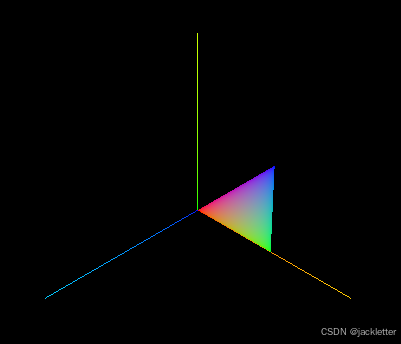
在使用 buffergeometry 创建几何体的时候可以为每个顶点定义一个color属性, 然后材质就可以启用使用此顶点渐变着色。
示例如下:
const position = [
   0, 0, 0,
    100, 0, 0,
    100, 100, 0,
]
const color = [
    1, 0, 0,
    0, 1, 0,
    0, 0, 1,
]

const geometry = new THREE.BufferGeometry();
geometry.setAttribute('position', new THREE.Float32BufferAttribute(position, 3));
geometry.setAttribute('color', new THREE.Float32BufferAttribute(color, 3));

const material = new THREE.MeshBasicMaterial({
    vertexColors: true, // 启用几何顶点的color属性渐变着色
    side: THREE.DoubleSide,
});

const mesh = new THREE.Mesh(geometry, material);
scene.add(mesh);
效果如图:
二、复杂的几何体
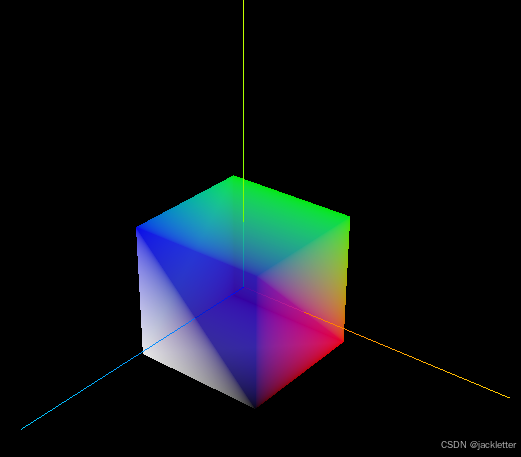
当我们把几何体变成一个立方体的时候,可能的效果如下:
三、在shader中访问color属性
示例代码:
const position = [
    0, 0, 0,
    100, 0, 0,
    100, 100, 0,
]
const geometry = new THREE.BufferGeometry();
geometry.setAttribute('position', new THREE.Float32BufferAttribute(position, 3));

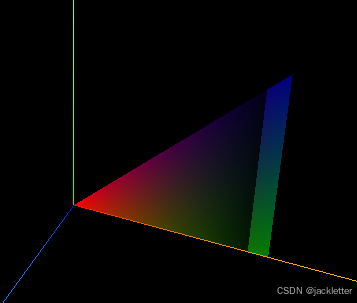
const color = [
    1, 0, 0, 1,//最后一个1是透明度
    0, 1, 0, 0,
    0, 0, 1, 0,
]
const material = new THREE.ShaderMaterial({
    side: THREE.DoubleSide,
    vertexColors: true,
    transparent: true,
    vertexShader: `
        varying vec4 vColor;
        void main() {
            vColor = color;
            gl_Position = projectionMatrix * modelViewMatrix * vec4(position, 1.0);
        }
    `,
    fragmentShader: `
        varying vec4 vColor;
        void main() {
            gl_FragColor = vec4(vColor.rgb, vColor.a < 0.1 ? 0.5 : vColor.a);
            // gl_FragColor = vColor;
        }
    `
});
效果如图:

北京人形旗下天工造物具身智能开源社区,聚焦具身天工与慧思开物两大平台
更多推荐
 3
3 0
0- 0


 已为社区贡献15条内容

所有评论(0)