探索 uniapp 的四种轮播图特效:打造炫酷界面交互
·
在 uniapp 开发中,轮播图是提升界面视觉效果和用户体验的常用组件。本文将详细介绍六种轮播图特效的实现方法,包括淡入淡出、缩放、旋转和模糊效果,助力开发者打造更具吸引力的 UI 界面。
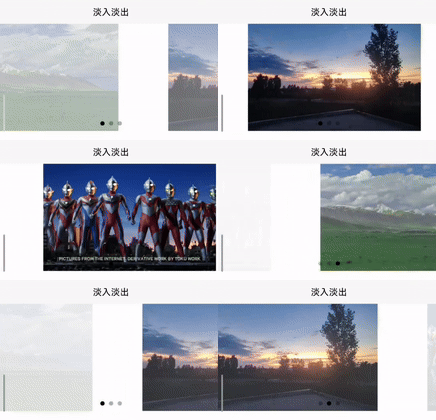
一、淡入淡出特效
淡入淡出效果使轮播图切换时图片渐现渐隐,过渡自然。
<template>
  <view class="custom-swiper">
    <swiper
      :indicator-dots="true"
      :autoplay="true"
      :interval="1000"
      :duration="1000"
      :circular="true"
      :current="current"
      @change="onSwiperChange"
      class="swiper-container"
    >
      <swiper-item v-for="(item, index) in swiperList" :key="index">
        <view class="swiper-item" :style="{ opacity: index === current? 1 : 0 }">
          <image :src="item.imageUrl" mode="aspectFill"></image>
        </view>
      </swiper-item>
    </swiper>
  </view>
</template>

<script>
export default {
  data() {
    return {
      swiperList: [
        { imageUrl: '图片1链接' },
        { imageUrl: '图片2链接' },
        { imageUrl: '图片3链接' }
      ],
      current: 0
    };
  },
  methods: {
    onSwiperChange(e) {
      this.current = e.detail.current;
    }
  }
};
</script>

<style scoped>
.custom-swiper {
  width: 100%;
  overflow: hidden;
}
.swiper-container {
  width: 100%;
  height: 200px;
}
.swiper-item {
  width: 100%;
  height: 100%;
  transition: opacity 0.5s ease;
  display: flex;
  justify-content: center;
  align-items: center;
}
.swiper-item image {
  max-width: 100%;
  max-height: 100%;
}
</style>
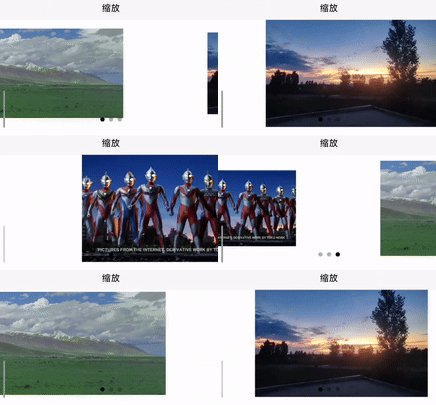
二、缩放特效
缩放特效在轮播图切换时,当前图片放大显示,其他图片缩小,增强视觉层次感。
<template>
  <view class="custom-swiper">
    <swiper
      :indicator-dots="true"
      :autoplay="true"
      :interval="1000"
      :duration="1000"
      :circular="true"
      :current="current"
      @change="onSwiperChange"
      class="swiper-container"
    >
      <swiper-item v-for="(item, index) in swiperList" :key="index">
        <view class="swiper-item" :style="{ transform: index === current? 'scale(1)' : 'scale(0.6)' }">
          <image :src="item.imageUrl" mode="aspectFill"></image>
        </view>
      </swiper-item>
    </swiper>
  </view>
</template>

<script>
export default {
  data() {
    return {
      swiperList: [
        { imageUrl: '图片1链接' },
        { imageUrl: '图片2链接' },
        { imageUrl: '图片3链接' }
      ],
      current: 0
    };
  },
  methods: {
    onSwiperChange(e) {
      this.current = e.detail.current;
    }
  }
};
</script>

<style scoped>
.custom-swiper {
  width: 100%;
  overflow: hidden;
}
.swiper-container {
  width: 100%;
  height: 200px;
}
.swiper-item {
  width: 100%;
  height: 100%;
  transition: transform 0.5s ease;
  display: flex;
  justify-content: center;
  align-items: center;
}
.swiper-item image {
  max-width: 100%;
  max-height: 100%;
}
</style>
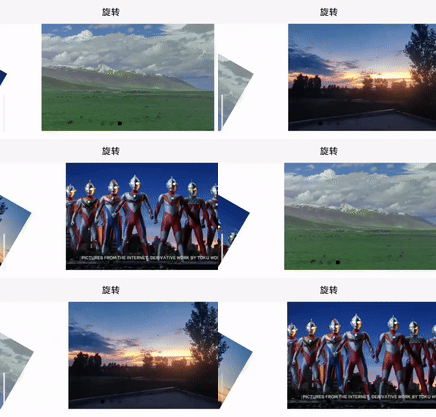
三、旋转特效
旋转特效让轮播图切换时,当前图片保持正常角度,其他图片旋转一定角度,增加动感。
<template>
  <view class="custom-swiper">
    <swiper
      :indicator-dots="true"
      :autoplay="true"
      :interval="1000"
      :duration="1000"
      :circular="true"
      :current="current"
      @change="onSwiperChange"
      class="swiper-container"
    >
      <swiper-item v-for="(item, index) in swiperList" :key="index">
        <view class="swiper-item" :style="{ transform: `rotate(${index === current? 0 : 30}deg)` }">
          <image :src="item.imageUrl" mode="aspectFill"></image>
        </view>
      </swiper-item>
    </swiper>
  </view>
</template>

<script>
export default {
  data() {
    return {
      swiperList: [
        { imageUrl: '图片1链接' },
        { imageUrl: '图片2链接' },
        { imageUrl: '图片3链接' }
      ],
      current: 0
    };
  },
  methods: {
    onSwiperChange(e) {
      this.current = e.detail.current;
    }
  }
};
</script>

<style scoped>
.custom-swiper {
  width: 100%;
  overflow: hidden;
}
.swiper-container {
  width: 100%;
  height: 200px;
}
.swiper-item {
  width: 100%;
  height: 100%;
  transition: transform 0.5s ease;
  display: flex;
  justify-content: center;
  align-items: center;
}
.swiper-item image {
  max-width: 100%;
  max-height: 100%;
}
</style>
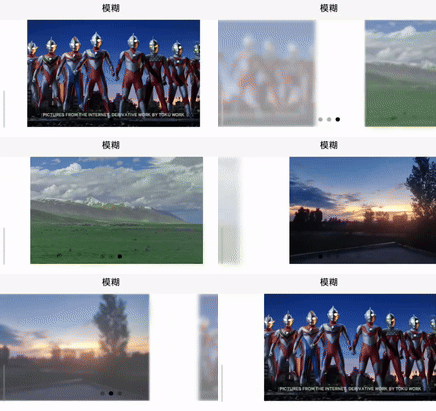
四、模糊特效
模糊特效在轮播图切换时,当前图片清晰显示,其他图片模糊,突出当前图片。
<template>
  <view class="custom-swiper">
    <swiper
      :indicator-dots="true"
      :autoplay="true"
      :interval="1000"
      :duration="1000"
      :circular="true"
      :current="current"
      @change="onSwiperChange"
      class="swiper-container"
    >
      <swiper-item v-for="(item, index) in swiperList" :key="index">
        <view
          class="swiper-item"
          :style="{
            filter: index === current? 'blur(0px)' : 'blur(5px)',
            opacity: index === current? 1 : 0.3,
            transition: 'all 0.5s ease'
          }"
        >
          <image :src="item.imageUrl" mode="aspectFill"></image>
        </view>
      </swiper-item>
    </swiper>
  </view>
</template>

<script>
export default {
  data() {
    return {
      swiperList: [
        { imageUrl: '图片1链接' },
        { imageUrl: '图片2链接' },
        { imageUrl: '图片3链接' }
      ],
      current: 0
    };
  },
  methods: {
    onSwiperChange(e) {
      this.current = e.detail.current;
    }
  }
};
</script>

<style scoped>
.custom-swiper {
  width: 100%;
  overflow: hidden;
}
.swiper-container {
  width: 100%;
  height: 200px;
}
.swiper-item {
  width: 100%;
  height: 100%;
  display: flex;
  justify-content: center;
  align-items: center;
  position: absolute;
}
.swiper-item image {
  max-width: 100%;
  max-height: 100%;
}
</style>
本文介绍的四种 uniapp 轮播图特效,丰富了界面的展示形式。开发者可根据项目需求选择合适的特效,提升应用的视觉效果和用户体验。在实际应用中,还可进一步优化代码,如动态加载图片、添加交互事件等,使轮播图功能更强大。希望这些特效代码能为你的 uniapp 开发带来灵感,打造出更精彩的应用界面。

北京人形旗下天工造物具身智能开源社区,聚焦具身天工与慧思开物两大平台
更多推荐
 24
24 0
0- 0


 已为社区贡献2条内容

所有评论(0)