DS1302 时钟模块 arduino
·
目录
RtcDateTime RtcDateTime(__DATE__, __TIME__);
RtcDateTime RtcDateTime(__DATE__, __TIME__);
RtcDateTime Rtc.GetDateTime();
printDateTime(RtcDateTime now);//打印时间
0.引言
本文使用RtcDS1302.h库文件进行操作,实现对DS1302时钟模块的读时间,写时间操作,满足对常用时钟模块的基础操作,以及对库文件函数的介绍.
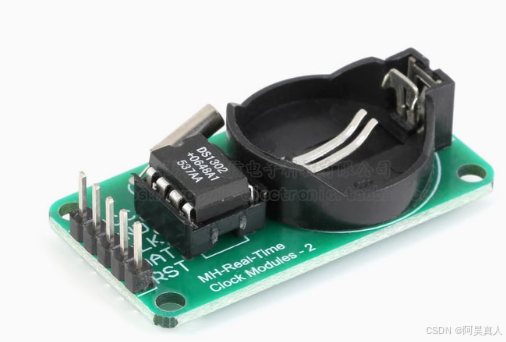
本文使用的是5针脚的ds1302,来此抛砖引玉.
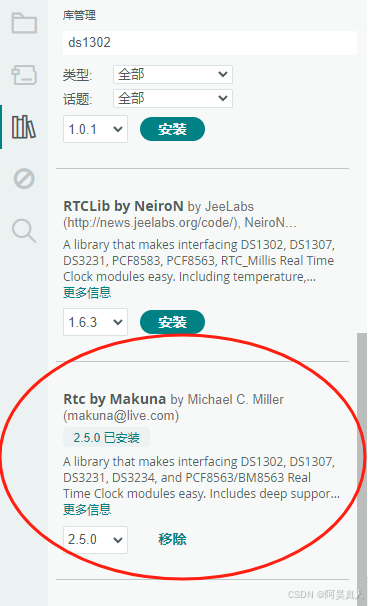
1.安装库函数
关键词搜索 : rtc by makuna
2.文章使用函数的介绍(代码内部也有相关注释)
Rtc.Begin();//Rtc初始化
RtcDateTime RtcDateTime(__DATE__, __TIME__);
//将系统编译时的时间存入RtcDateTime类型变量中
__DATE__:代码编译时的日期
__TIME__:代码编译时的时间
RtcDateTime RtcDateTime(__DATE__, __TIME__);
//将系统编译时的时间存入RtcDateTime 变量中
RtcDateTime Rtc.GetDateTime();
//获取时钟模块现在的时间
printDateTime(RtcDateTime now);//打印时间
3.实验
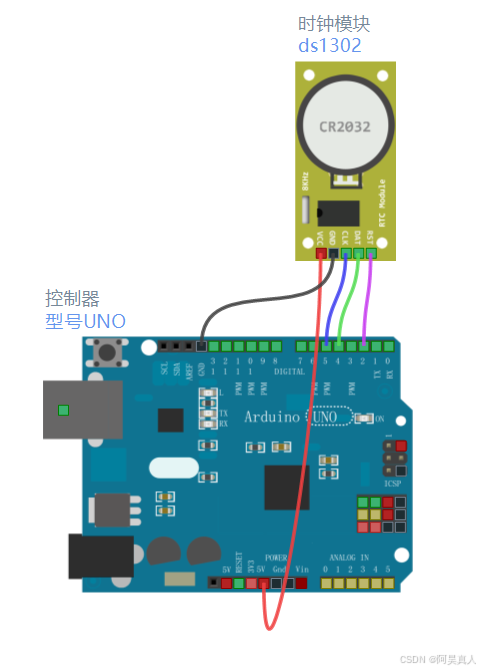
3.1连线图
| 名称 | arduino引脚 |
| CLK/SCLK | 5 |
| DAT/IO | 4 |
| RST/CE | 2 |
| VCC | 3.3v - 5v |
| GND | GND |
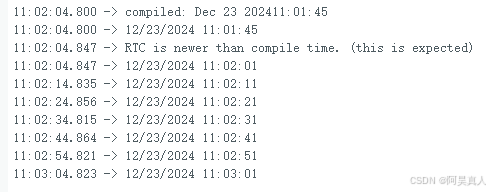
3.2实现现象
程序的代码loop中加入了10s的delay延时,根据实际情况进行删除.可以参考我之前发的arduino 延时大全,写一个不阻塞延时.
3.3完整代码
// CONNECTIONS:
// DS1302 CLK/SCLK --> 5
// DS1302 DAT/IO --> 4
// DS1302 RST/CE --> 2
// DS1302 VCC --> 3.3v - 5v
// DS1302 GND --> GND

#include <RtcDS1302.h>

ThreeWire myWire(4,5,2); // DAT/IO, SCLK, CE
RtcDS1302<ThreeWire> Rtc(myWire);

void setup ()
{
    Serial.begin(115200);
  DS1302_init();

}

void loop ()
{
    ds1302_loop();
}

#define countof(a) (sizeof(a) / sizeof(a[0]))

void printDateTime(const RtcDateTime& dt)
{
    char datestring[26];

    snprintf_P(datestring,
            countof(datestring),
            PSTR("%02u/%02u/%04u %02u:%02u:%02u"),
            dt.Month(),
            dt.Day(),
            dt.Year(),
            dt.Hour(),
            dt.Minute(),
            dt.Second() );
    Serial.print(datestring);
}


void DS1302_init()
{
   Serial.print("compiled: ");
    Serial.print(__DATE__);
    Serial.println(__TIME__);//打印系统编译时候的时间

    Rtc.Begin();

    RtcDateTime compiled = RtcDateTime(__DATE__, __TIME__); //将系统编译时的时间存入ds1302中
    printDateTime(compiled);
    Serial.println();

    if (!Rtc.IsDateTimeValid())
    {
        //  常见原因:
        //    1) 第一次运行时设备尚未运行
        //    2) 设备上的电池电量低甚至没电

        Serial.println("RTC lost confidence in the DateTime!");
        Rtc.SetDateTime(compiled);
    }

    if (Rtc.GetIsWriteProtected())//检测是否开启了写保护,如果开启,就关掉写保护
    {
        Serial.println("RTC was write protected, enabling writing now");
        Rtc.SetIsWriteProtected(false);
    }

    if (!Rtc.GetIsRunning())//检测RTC是否运行,从现在开始
    {
        Serial.println("RTC was not actively running, starting now");
        Rtc.SetIsRunning(true);
    }

    RtcDateTime now = Rtc.GetDateTime(); //获取上次运行校准的正常时间 赋值给now
    if (now < compiled) //如果模块内部的时间比模块烧录的时间慢,证明需要时间更新了.
    {
        Serial.println("RTC is older than compile time!  (Updating DateTime)");
        Rtc.SetDateTime(compiled);//将烧录的时间校准为模块内部时间
    }
    else if (now > compiled)
    {
        Serial.println("RTC is newer than compile time. (this is expected)");//RTC比代码烧录时候对应时间快。(这是正常情况)
    }
    else if (now == compiled)
    {
        Serial.println("RTC is the same as compile time! (not expected but all is fine)");//这是最好的情况
    }
}

void ds1302_loop()
{
  RtcDateTime now = Rtc.GetDateTime();//获取现在的时间
  printDateTime(now);//打印时间
  Serial.println();//回车换行

  if (!now.IsValid())//检测设备是否在线
  {
      // 常见原因:
      //    1) 设备上的电池电量不足甚至丢失,电源线断开
      Serial.println("RTC lost confidence in the DateTime!");
  }

  delay(10000); // 延时10s
}
北京人形旗下天工造物具身智能开源社区,聚焦具身天工与慧思开物两大平台
更多推荐
 9
9 0
0- 0


 已为社区贡献5条内容

所有评论(0)