基于数字签名的简易伪加密狗实现
首先是朴实的设计思路:
1、确保项目只能在特定电脑上运行: 使用硬件信息(这里采用MAC 地址)作为授权标识。
2、激活机制: 运行时需要输入授权码或加载授权文件。
目录
数字签名验证实现
生成密钥对
使用公钥-私钥加密系统(如 RSA)生成一个密钥对:
私钥:用于签署授权文件。
公钥:用于验证授权文件的签名。
这里使用 Python 的 cryptography 库来实现签名和验证。
首先安装 cryptography:
pip install cryptography
生成 RSA 密钥对:
from cryptography.hazmat.primitives.asymmetric import rsa
from cryptography.hazmat.primitives import serialization

def generate_key_pair():
    private_key = rsa.generate_private_key(
        public_exponent=65537,
        key_size=2048
    )
    with open("private_key.pem", "wb") as f:
        f.write(
            private_key.private_bytes(
                encoding=serialization.Encoding.PEM,
                format=serialization.PrivateFormat.TraditionalOpenSSL,
                encryption_algorithm=serialization.NoEncryption()
            )
        )
    public_key = private_key.public_key()
    with open("public_key.pem", "wb") as f:
        f.write(
            public_key.public_bytes(
                encoding=serialization.Encoding.PEM,
                format=serialization.PublicFormat.SubjectPublicKeyInfo
            )
        )
    print("密钥对已生成:private_key.pem 和 public_key.pem")

generate_key_pair()
代码输出:
private_key.pem:私钥文件。
public_key.pem:公钥文件。
rsa.generate_private_key参数解释:
public_exponent=65537是 RSA 算法中常用的公钥指数(e),一般选择为 65537。它是一个较大的素数,确保了加密效率和安全性之间的平衡。此值通常固定为 65537,无需修改。
key_size=2048指定生成的密钥长度(单位:位)。推荐使用至少 2048 位,因为它已被认为足够安全。如果需要更高的安全性,可以使用 3072 位 或 4096 位。更大的密钥会提高安全性,但也会增加签名和验证的时间开销。
签署授权文件
私钥对授权文件的内容生成一个数字签名,并将签名附加到文件中。
使用私钥对授权文件签名:
from cryptography.hazmat.primitives.asymmetric import padding
from cryptography.hazmat.primitives import hashes
import base64

def sign_license_file(private_key_path="private_key.pem", license_file_path="license.key"):
    """
    使用私钥签署授权文件
    """
    license_content = "--LICENSE-FILE--".encode()

    # 加载私钥
    with open(private_key_path, "rb") as f:
        private_key = serialization.load_pem_private_key(f.read(), password=None)

    # 签署文件内容
    signature = private_key.sign(
        license_content,
        padding.PKCS1v15(),
        hashes.SHA256()
    )

    # 写入授权文件
    with open(license_file_path, "wb") as f:
        f.write(license_content + b"\n--SIGNATURE--\n" + base64.b64encode(signature))

    print("授权文件已生成并签名:", license_file_path)

sign_license_file()
这里license.key 文件只包含一个签名信息,用于标记该文件是否由可信方生成。没有其他信息
授权文件 license.key 在签名后包含以下内容:
--LICENSE-FILE--
--SIGNATURE--
base64_encoded_signature
验证签名
程序运行时,通过公钥验证授权文件的签名是否匹配文件内容。
新建一个authorization.py文件,我放在了flask的project目录下。将公钥文件public_key.pem也放在了project目录下。
验证签名代码
# 获取公钥文件地址
public_key_path = os.path.join(os.path.dirname(__file__), "public_key.pem")

def verify_license_file(license_file_path, public_key_path=public_key_path):
    """
    验证授权文件的签名
    """
    try:
        # 读取授权文件内容
        with open(license_file_path, "rb") as f:
            content = f.read()

        # 分离内容和签名
        license_content, signature_encoded = content.split(b"\n--SIGNATURE--\n")
        signature = base64.b64decode(signature_encoded)

        # 加载公钥
        with open(public_key_path, "rb") as f:
            public_key = serialization.load_pem_public_key(f.read())

        # 验证签名
        public_key.verify(
            signature,
            license_content,
            padding.PKCS1v15(),
            hashes.SHA256()
        )
        return True
    except Exception as e:
        return False
验证软件使用权限
设计思路:软件在移植到一台新机器上首次运行时,验证插入的 U 盘是否包含有效的 license.key 文件,如果验证通过,则将本机的 MAC 地址加入软件授权使用列表,后续启动时无需验证。
获取硬件唯一标识
运行项目时,获取该机硬件唯一标识用于授权验证,这里用mac地址代替硬件唯一标识。
获取当前电脑的 MAC 地址代码如下:
def get_mac_addresses():
    mac = uuid.getnode()
    mac_address = ':'.join(['{:02x}'.format((mac >> ele) & 0xff) for ele in range(0, 8 * 6, 8)][::-1])
    return [mac_address]
验证mac地址是否有效
在项目的project目录下新建authorized_macs.json文件,内容如下
{
    "authorized_macs": [
    ]
}
检查当前电脑的 MAC 地址是否已授权,代码如下:
def is_authorized():
    """
    检查当前电脑的 MAC 地址是否已授权
    """
    try:
        with open(AUTHORIZED_MAC_FILE, "r") as f:
            authorized_data = json.load(f)
            authorized_macs = authorized_data.get("authorized_macs", [])
        mac_addresses = get_mac_addresses()
        for mac in mac_addresses:
            if mac in authorized_macs:
                return True
        return False
    except FileNotFoundError:
        print("失败")
        return False
u盘检测和验证
自动检测插入的 U 盘,并检查是否包含文件license.key,这里的license.key需放在u盘根目录下。代码如下:
def find_usb_with_license_file(filename="license.key"):
    for partition in psutil.disk_partitions():
        if "removable" in partition.opts.lower():
            usb_path = partition.mountpoint
            file_path = os.path.join(usb_path, filename)
            if os.path.exists(file_path):
                return file_path
    return None
验证插入的 U 盘是否包含有效的 license.key 文件,如果验证通过,则将本机的 MAC 地址加入授权列表,代码如下:
def authorize_from_usb():
    usb_path = find_usb_with_license_file()
    if not usb_path:
#        print("未检测到密钥")
        return False
    # 验证授权文件签名
    if not verify_license_file(usb_path):
#        print("密钥无效")
        return False
    # 获取本机的 MAC 地址
    mac_addresses = get_mac_addresses()
    # 读取本地授权文件
    try:
        with open(AUTHORIZED_MAC_FILE, "r") as f:
            authorized_data = json.load(f)
    except FileNotFoundError:
        authorized_data = {"authorized_macs": []}
    authorized_macs = set(authorized_data.get("authorized_macs", []))
    authorized_macs.update(mac_addresses)
    # 保存更新后的授权文件
    with open(AUTHORIZED_MAC_FILE, "w") as f:
        json.dump({"authorized_macs": list(authorized_macs)}, f, indent=4)
    return True
完整代码结构
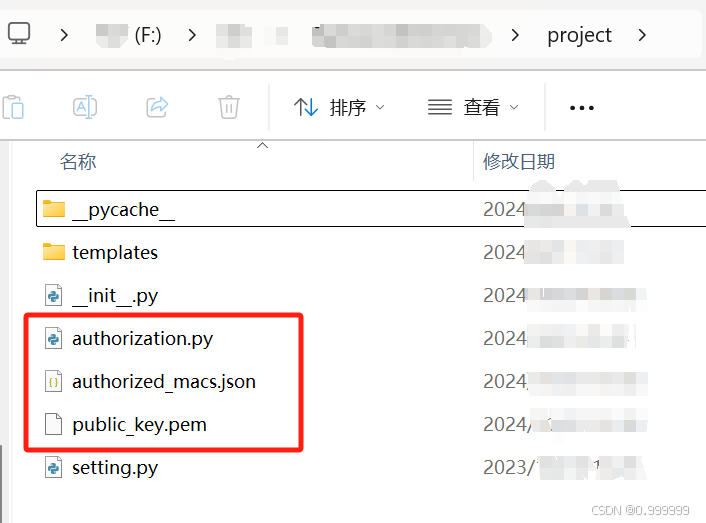
authorization.py文件内容
import json
import uuid
import os
import psutil
from cryptography.hazmat.primitives.asymmetric import padding
from cryptography.hazmat.primitives import hashes
from cryptography.hazmat.primitives import serialization
import base64

AUTHORIZED_MAC_FILE = os.path.join(os.path.dirname(__file__), "authorized_macs.json")

public_key_path = os.path.join(os.path.dirname(__file__), "public_key.pem")
def get_mac_addresses():
    """
    获取当前电脑的 MAC 地址
    """
    mac = uuid.getnode()
    mac_address = ':'.join(['{:02x}'.format((mac >> ele) & 0xff) for ele in range(0, 8 * 6, 8)][::-1])
    return [mac_address]
def is_authorized():
    """
    检查当前电脑的 MAC 地址是否已授权
    """
    try:
        with open(AUTHORIZED_MAC_FILE, "r") as f:
            authorized_data = json.load(f)
            authorized_macs = authorized_data.get("authorized_macs", [])
        mac_addresses = get_mac_addresses()
        for mac in mac_addresses:
            if mac in authorized_macs:
#                print("本机已授权")
                return True
#        print("本机未授权")
        return False
    except FileNotFoundError:
        print("失败")
        return False
def find_usb_with_license_file(filename="license.key"):
    """
    自动检测插入的 U 盘,并检查是否包含指定文件
    """
    for partition in psutil.disk_partitions():
        if "removable" in partition.opts.lower():
            usb_path = partition.mountpoint
            file_path = os.path.join(usb_path, filename)
            if os.path.exists(file_path):
                return file_path
    return None

def verify_license_file(license_file_path, public_key_path=public_key_path):
    """
    验证授权文件的签名
    """
    try:
        # 读取授权文件内容
        with open(license_file_path, "rb") as f:
            content = f.read()

        # 分离内容和签名
        license_content, signature_encoded = content.split(b"\n--SIGNATURE--\n")
        signature = base64.b64decode(signature_encoded)

        # 加载公钥
        with open(public_key_path, "rb") as f:
            public_key = serialization.load_pem_public_key(f.read())

        # 验证签名
        public_key.verify(
            signature,
            license_content,
            padding.PKCS1v15(),
            hashes.SHA256()
        )
#        print("授权有效")
        return True
    except Exception as e:
#        print("授权失败:", e)
        return False


def authorize_from_usb():
    """
    验证插入的 U 盘是否包含有效的 license.key 文件
    如果验证通过,则将本机的 MAC 地址加入授权列表
    """
    usb_path = find_usb_with_license_file()
    if not usb_path:
#        print("未检测到密钥")
        return False

    # 验证授权文件签名
    if not verify_license_file(usb_path):
#        print("密钥无效")
        return False

    # 获取本机的 MAC 地址
    mac_addresses = get_mac_addresses()

    # 读取本地授权文件
    try:
        with open(AUTHORIZED_MAC_FILE, "r") as f:
            authorized_data = json.load(f)
    except FileNotFoundError:
        authorized_data = {"authorized_macs": []}

    authorized_macs = set(authorized_data.get("authorized_macs", []))
    authorized_macs.update(mac_addresses)

    # 保存更新后的授权文件
    with open(AUTHORIZED_MAC_FILE, "w") as f:
        json.dump({"authorized_macs": list(authorized_macs)}, f, indent=4)

#    print("本机已成功授权:", mac_addresses)
    return True
manage.py文件内容
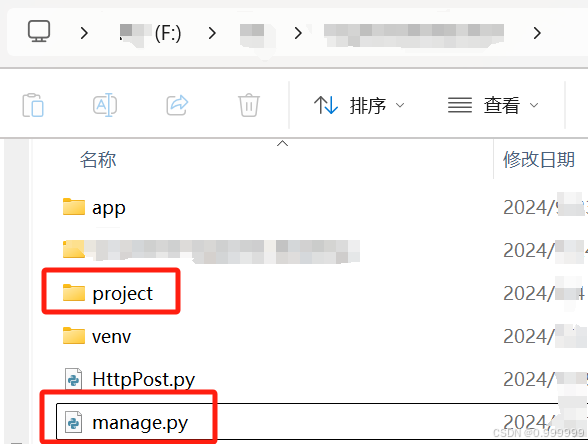
import sys
import os
import pymysql
# 手动添加项目根目录到 Python 搜索路径
sys.path.insert(0, os.path.abspath(os.path.dirname(__file__)))
pymysql.install_as_MySQLdb()
from project import create_app

from project.authorization import is_authorized, authorize_from_usb

app = create_app()

if __name__ == '__main__':
    # 检查授权
    if not is_authorized():
        print("本机未授权")
        if authorize_from_usb():
            print("授权成功")
            app.run(port=8000, debug=True)
        else:
            print("无权限访问")
        exit(1)

    # 启动 Flask 应用
    app.run(port=8000, debug=True)

北京人形旗下天工造物具身智能开源社区,聚焦具身天工与慧思开物两大平台
更多推荐
 46
46 0
0- 0


 已为社区贡献1条内容

所有评论(0)