【解决 node】 ---- TypeError [ERR_INVALID_PROTOCOL]: Protocol “https:“ not supported. Expected “http:“
·

1. 需求场景
由于公司图片服务器换了,包括域名都换了,那么之前开发和维护的微信小程序项目里边的图标就需要跟着切换,熟悉我的小伙伴都知道,在这个时候,我一般都会写一个 python 的脚本,将原来的图片下载,然后替换上传到新的服务器上去,最后将文件中的图片地址切换为新的服务器图片地址。实际开始,的确使用 python 实现了这个脚本,但是问题来了,项目不止有我一个人维护,项目组的其他小伙伴怎么解决项目中的图标问题呢?要知道少的几百个,多的几千个,还分布在不同文件中,加班复制,估计搞死都还不完,所以考虑了其他小伙伴的环境,决定使用 node 来开发这个小的脚本,但是第一步就报错了。
2. 报错截图
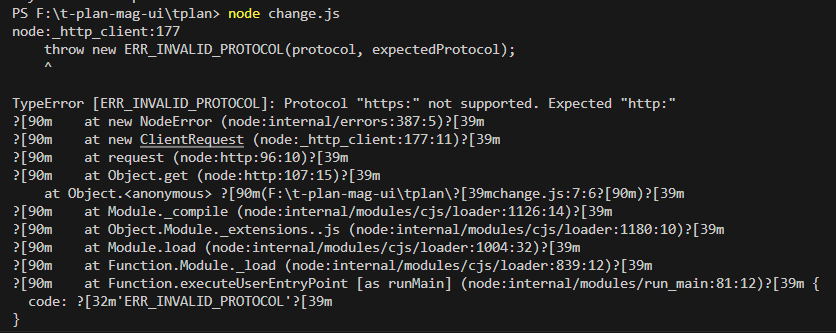
3. 报错
node:_http_client:177
    throw new ERR_INVALID_PROTOCOL(protocol, expectedProtocol);
    ^

TypeError [ERR_INVALID_PROTOCOL]: Protocol "https:" not supported. Expected "http:"
?[90m    at new NodeError (node:internal/errors:387:5)?[39m
?[90m    at new ClientRequest (node:_http_client:177:11)?[39m
?[90m    at request (node:http:96:10)?[39m
?[90m    at Object.get (node:http:107:15)?[39m
    at Object.<anonymous> ?[90m(F:\t-plan-mag-ui\tplan\?[39mchange.js:7:6?[90m)?[39m
?[90m    at Module._compile (node:internal/modules/cjs/loader:1126:14)?[39m
?[90m    at Object.Module._extensions..js (node:internal/modules/cjs/loader:1180:10)?[39m
?[90m    at Module.load (node:internal/modules/cjs/loader:1004:32)?[39m
?[90m    at Function.Module._load (node:internal/modules/cjs/loader:839:12)?[39m
?[90m    at Function.executeUserEntryPoint [as runMain] (node:internal/modules/run_main:81:12)?[39m {
  code: ?[32m'ERR_INVALID_PROTOCOL'?[39m
}
4. 报错代码
const http = require('http');
const fs = require('fs');

const imageUrl = 'https://xxx'; // 网络图片的URL
const imageName = './static/image.jpg'; // 保存到本地的文件名

http.get(imageUrl, (response) => {
  const fileStream = fs.createWriteStream(imageName);

  response.pipe(fileStream);

  fileStream.on('finish', () => {
    fileStream.close();
    console.log('Image downloaded successfully!');
  });
}).on('error', (err) => {
  console.error('Error downloading image:', err);
});
5. 报错分析
图像URL中使用的协议是https:,但Node.js中的http模块默认不支持https。要解决此问题,您需要使用https模块而不是http模块。
6. 解决问题代码
const https = require('https');
const fs = require('fs');

const imageUrl = 'https://xxx'; // 网络图片的URL
const imageName = './static/image.jpg'; // 保存到本地的文件名

https.get(imageUrl, (response) => {
  const fileStream = fs.createWriteStream(imageName);

  response.pipe(fileStream);

  fileStream.on('finish', () => {
    fileStream.close();
    console.log('Image downloaded successfully!');
  });
}).on('error', (err) => {
  console.error('Error downloading image:', err);
});
7. 解决后执行结果


8. 总结
- 报错就是因为没有根据实际的开发引入对应的模块,还是写 node 脚本太少导致的不熟悉。

北京人形旗下天工造物具身智能开源社区,聚焦具身天工与慧思开物两大平台
更多推荐
 0
0 0
0- 0


 已为社区贡献11条内容

所有评论(0)