Vue用vanta.js和three.js实现3D动态背景的登录页面
·
效果
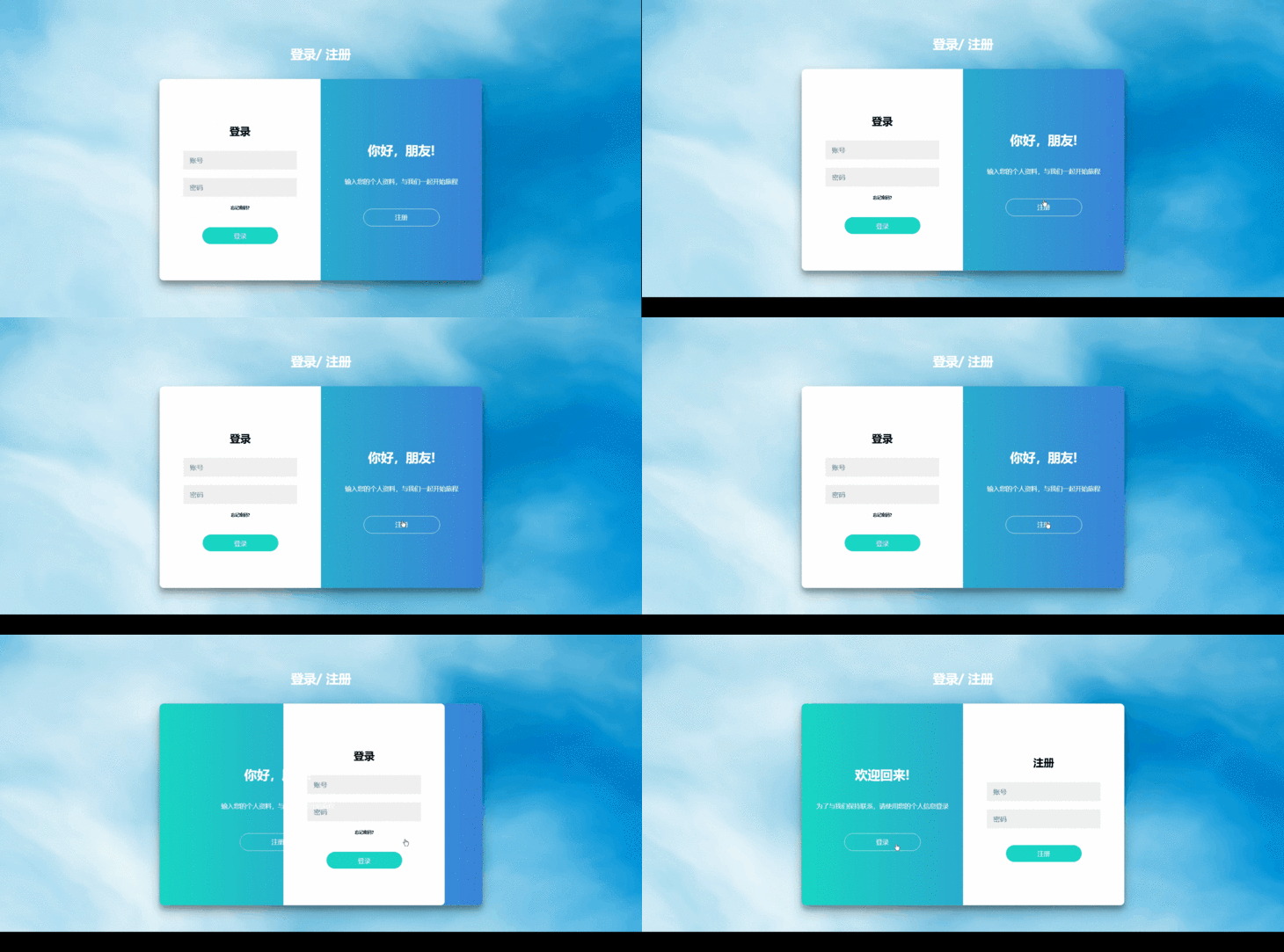
1.引入依赖
vantajs官网:https://www.vantajs.com
Vue版本:vue: "^2.7.5"
注意依赖的版本
npm install vanta@0.5.24npm install three@0.121.02.创建渲染的盒子
<div ref="vantaRef"></div>3.在页面依赖
import * as THREE from "three";
import FOG from "vanta/src/vanta.fog";
// 这里的"FOG"对应官网上的名字,vanta.fog和前面FOG需保持一致
4.JS部分
mounted(){
  this.vantaEffect = FOG({
    el: this.$refs.vantaRef,
    THREE: THREE
  })
  // 这里的FOG和引入的FOG和mounted中的FOG须保持一致
  VANTA.FOG({
  el: this.$refs.vantaRef,
  // 以下为样式配置
  mouseControls: true, // 鼠标控制
  touchControls: true, //触摸控制
  gyroControls: false, //陀螺仪控制
  minHeight: 200.0, // 最小高度
  minWidth: 200.0, //最小宽度
  highlightColor: 0x008cba, // 突出色调
  midtoneColor: 0x0094d9, // 中间色调
  lowlightColor: 0x00b4f4, // 暗色调
  baseColor: 0xffffff, // 低色调
  blurFactor: 0.52, // 模糊因素
  speed: 1.2, // 速度
  zoom: 0.3, // 变焦
},
beforeDestroy() {
  if (this.vantaEffect) {
    this.vantaEffect.destroy()
  }
}
5.使用
下载依赖的前提,复制代码即可直接使用
上代码!
<template>
    <div class="center" ref="vantaRef">
      <h1 class="DL">登录/ 注册</h1>
      <div class="logon">
        <div :class="overlaylong">
          <div class="overlaylong-Signin" v-if="disfiex == 0">
            <h2 class="overlaylongH2">登录</h2>
            <input type="text" placeholder="账号" />
            <input type="text" placeholder="密码" />
            <h3>忘记密码?</h3>
            <button class="inupbutton" @click="enter()">登录</button>
          </div>
          <div class="overlaylong-Signup" v-if="disfiex == 1">
            <h2 class="overlaylongH2">注册</h2>
            <input type="text" placeholder="账号" />
            <input type="text" placeholder="密码" />
            <button class="inupbutton">注册</button>
          </div>
        </div>
        <div :class="overlaytitle">
          <div class="overlaytitle-Signin" v-if="disfiex == 0">
            <h2 class="overlaytitleH2">你好,朋友!</h2>
            <p class="overlaytitleP">输入您的个人资料,与我们一起开始旅程</p>
            <div class="buttongohs" @click="Signin">注册</div>
          </div>
          <div class="overlaytitle-Signup" v-if="disfiex == 1">
            <h2 class="overlaytitleH2">欢迎回来!</h2>
            <p class="overlaytitleP">
              为了与我们保持联系,请使用您的个人信息登录
            </p>
            <div class="buttongohs" @click="Signup">登录</div>
          </div>
        </div>
      </div>
    </div>
  </template>

  <script>
  import * as THREE from "three"
  import FOG from "vanta/src/vanta.fog"
  export default {
    data() {
      return {}
    },
    created() {},
    mounted() {
      this.vantaEffect = FOG({
        el: this.$refs.vantaRef,
        THREE: THREE,
      })
      // 这里的FOG和引入的FOG和mounted中的FOG须保持一致
      VANTA.FOG({
        el: this.$refs.vantaRef,
        // 以下为样式配置
        mouseControls: true, // 鼠标控制
        touchControls: true, //触摸控制
        gyroControls: false, //陀螺仪控制
        minHeight: 200.0, // 最小高度
        minWidth: 200.0, //最小宽度
        highlightColor: 0x008cba, // 突出色调
        midtoneColor: 0x0094d9, // 中间色调
        lowlightColor: 0x00b4f4, // 暗色调
        baseColor: 0xffffff, // 低色调
        blurFactor: 0.52, // 模糊因素
        speed: 1.2, // 速度
        zoom: 0.3, // 变焦
      })
    },
    beforeDestroy() {
      if (this.vantaEffect) {
        this.vantaEffect.destroy()
      }
    },
    methods: {
      Signin() {
        this.overlaylong = "overlaylongleft"
        this.overlaytitle = "overlaytitleright"
        setTimeout(() => {
          this.disfiex = 1
        }, 200)
      },
      Signup() {
        this.overlaylong = "overlaylongright"
        this.overlaytitle = "overlaytitleleft"

        setTimeout(() => {
          this.disfiex = 0
        }, 200)
      },
      enter() {
        this.$router.push({ path: "/answer" })
      }
    }
  }
  </script>

  <style lang="scss" scoped>
  .center {
    width: 100%;
    height: 100vh;
    background: #4284db;
    background-size: 100% 100%;
    background-repeat: no-repeat;
    display: flex;
    align-items: center;
    justify-content: center;
    flex-direction: column;
    overflow: hidden;
  }
  .DL {
    font-size: 30px;
    color: white;
  }
  canvas {
    width: 100%;
  }
  .logon {
    background-color: #fff;
    border-radius: 10px;
    box-shadow: 0 14px 28px rgba(0, 0, 0, 0.25), 0 10px 10px rgba(0, 0, 0, 0.22);
    /* position: relative;
          overflow: hidden; */
    width: 768px;
    max-width: 100%;
    min-height: 480px;
    margin-top: 20px;
    display: flex;
    background: -webkit-linear-gradient(right, #4284db, #29eac4);
  }

  .overlaylong {
    border-radius: 10px 0 0 10px;
    width: 50%;
    height: 100%;
    background-color: #fff;
    display: flex;
    align-items: center;
    justify-content: center;
  }

  .overlaylongleft {
    border-radius: 0px 10px 10px 0px;
    width: 50%;
    height: 100%;
    background-color: #fff;
    transform: translateX(100%);
    transition: transform 0.6s ease-in-out;
    display: flex;
    align-items: center;
    justify-content: center;
  }

  .overlaylongright {
    border-radius: 10px 0 0 10px;
    width: 50%;
    height: 100%;
    background-color: #fff;
    transform: translateX(0%);
    transition: transform 0.6s ease-in-out;
    display: flex;
    align-items: center;
    justify-content: center;
  }

  .overlaytitle {
    border-radius: 0px 10px 10px 0px;
    width: 50%;
    height: 100%;
    background-color: rgba(0, 0, 0, 0);
    display: flex;
    align-items: center;
    justify-content: center;
  }

  .overlaytitleH2 {
    font-size: 30px;
    color: #fff;
    margin-top: 20px;
  }

  .overlaytitleP {
    font-size: 15px;
    color: #fff;
    margin-top: 20px;
  }

  .overlaytitleleft {
    border-radius: 0px 10px 10px 0px;
    width: 50%;
    height: 100%;
    background-color: rgba(0, 0, 0, 0);
    display: flex;
    align-items: center;
    justify-content: center;
    transform: translateX(0%);
    transition: transform 0.6s ease-in-out;
  }

  .overlaytitleright {
    border-radius: 0px 10px 10px 0px;
    width: 50%;
    height: 100%;
    background-color: rgba(0, 0, 0, 0);
    display: flex;
    align-items: center;
    justify-content: center;
    transform: translateX(-100%);
    transition: transform 0.6s ease-in-out;
  }

  .overlaytitle-Signin {
    display: flex;
    align-items: center;
    justify-content: center;
    flex-direction: column;
  }

  .overlaytitle-Signup {
    display: flex;
    align-items: center;
    justify-content: center;
    flex-direction: column;
  }

  .buttongohs {
    width: 180px;
    height: 40px;
    border-radius: 50px;
    border: 1px solid #fff;
    color: #fff;
    font-size: 15px;
    text-align: center;
    line-height: 40px;
    margin-top: 40px;
    cursor: pointer;
  }

  .overlaylongH2 {
    font-size: 25px;
    color: black;
    /* width: 250px; */
  }

  .overlaylong-Signin {
    display: flex;
    align-items: center;
    justify-content: center;
    flex-direction: column;
  }

  .overlaylong-Signup {
    display: flex;
    align-items: center;
    justify-content: center;
    flex-direction: column;
  }

  input {
    background-color: #eee;
    border: none;
    padding: 12px 15px;
    margin: 10px 0;
    width: 240px;
  }
  h3 {
    font-size: 10px;
    margin-top: 10px;
    cursor: pointer;
  }
  .inupbutton {
    background-color: #29eac4;
    border: none;
    width: 180px;
    height: 40px;
    border-radius: 50px;
    font-size: 15px;
    color: #fff;
    text-align: center;
    line-height: 40px;
    margin-top: 30px;
  }
  </style>
vantajs参考案例:https://blog.csdn.net/weixin_48337566/article/details/128818881

北京人形旗下天工造物具身智能开源社区,聚焦具身天工与慧思开物两大平台
更多推荐
 11
11 0
0- 0


 已为社区贡献1条内容

所有评论(0)