react native中使用@react-navigation/native进行自定义头部
·
效果示例图
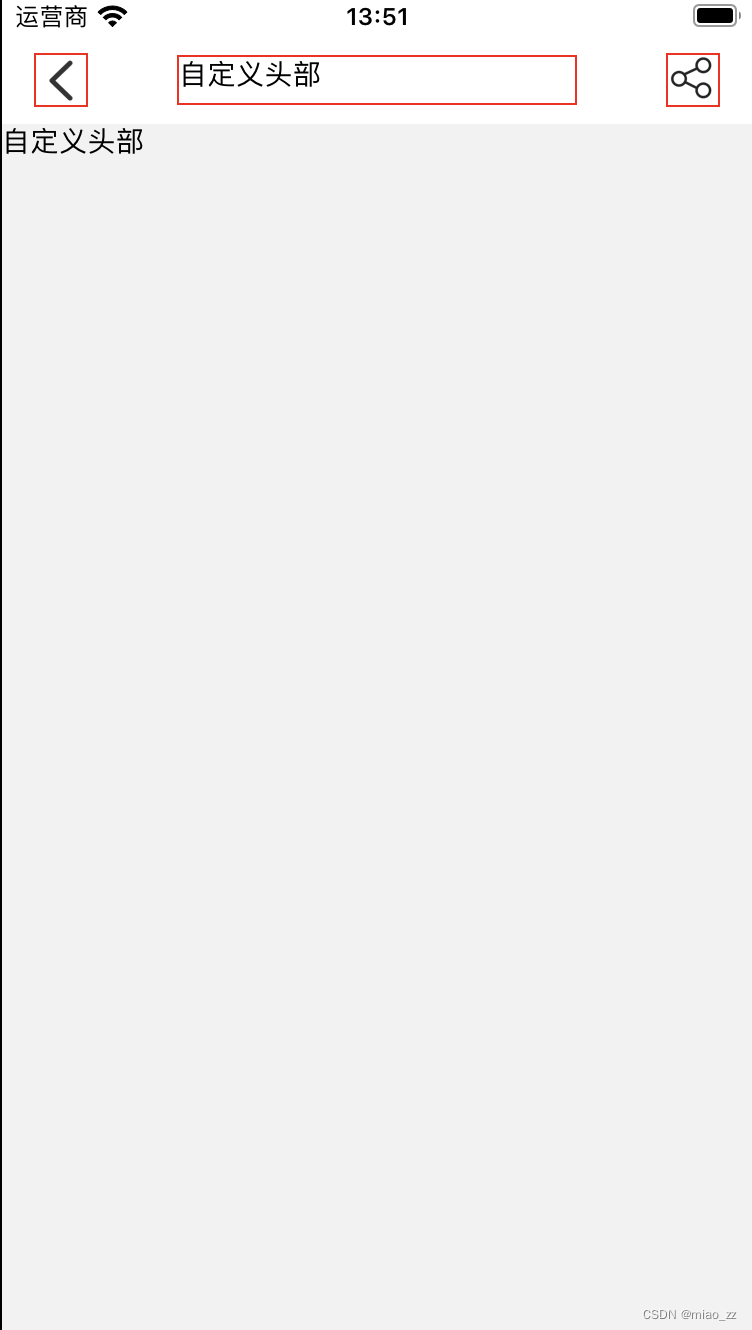
实例代码
/* eslint-disable react-native/no-inline-styles */
/* eslint-disable react/no-unstable-nested-components */
import React, { useLayoutEffect } from 'react';
import { Image, Text, TouchableOpacity, View,NativeModules,Platform,StatusBar } from 'react-native';
import { useNavigation } from '@react-navigation/native';
import { pxToPd } from '../../common/js/device';

const { StatusBarManager } = NativeModules;
// 状态栏高度
const StatusBarHeight = Platform.select({
  ios: StatusBarManager.HEIGHT,
  android: StatusBar.currentHeight + 10,
});
// 自定义导航栏高度
const NavigationBarHeight = 50;

const HeaderHeight = StatusBarHeight + NavigationBarHeight;

const TestNavigation = ({}) => {
  const navigation = useNavigation();

  useLayoutEffect(() => {
    navigation.setOptions({
      headerTransparent: true, // 开启透明模式,布局可以从顶部开始
      headerStyle: {
        backgroundColor: '#fff', // 设置头部背景颜色
      },
      headerTintColor: '#fff', // 设置头部文字和按钮颜色
      headerTitleStyle: {
        fontWeight: 'bold', // 设置头部标题的样式
      },
      headerBackVisible: false, // 隐藏返回按钮
      headerShadowVisible: false, // 隐藏头部阴影
      headerLeft: () => {
        return (
          <>
            <TouchableOpacity
              style={{
                borderWidth: 1,
                borderColor: 'red',
                borderStyle: 'solid',
              }}
              onPress={() => navigation.goBack()}>
              <Image
                style={{ width: pxToPd(50), height: pxToPd(50) }}
                source={require('../../common/images/back.png')}
              />
            </TouchableOpacity>
          </>
        );
      },
      headerTitle: () => {
        return (
          <>
            <View
              style={{
                borderWidth: 1,
                borderColor: 'red',
                borderStyle: 'solid',
                width: pxToPd(400),
                height: pxToPd(50),
              }}>
              <Text>自定义头部</Text>
            </View>
          </>
        );
      },
      headerRight: () => {
        return (
          <>
            <TouchableOpacity
              style={{
                borderWidth: 1,
                borderColor: 'red',
                borderStyle: 'solid',
              }}>
              <Image
                style={{ width: pxToPd(50), height: pxToPd(50) }}
                source={require('../../common/images/share.png')}
              />
            </TouchableOpacity>
          </>
        );
      },
    });
  }, [navigation]);

  return (
    <>
      <View>
        <Text>自定义头部</Text>
      </View>
    </>
  );
};

export default TestNavigation;

北京人形旗下天工造物具身智能开源社区,聚焦具身天工与慧思开物两大平台
更多推荐
 2
2 0
0- 0


 已为社区贡献13条内容

所有评论(0)