Open Harmony开发之分布式账本,2024年最新大厂面试机会
.tabBar(“收入”)
}
.height(450)
}.width(500)
.height(500)
Flex({
direction: FlexDirection.Row,alignItems: ItemAlign.Center, justifyContent: FlexAlign.Center
}){
Text(“输入金额”)
.fontColor(Color.Black)
.fontSize(20)
.margin({
right:15
})
.width(100)
TextInput({ placeholder: ‘100’, text:this.strMoney })
.type(InputType.Normal)
.placeholderColor(Color.Gray)
.placeholderFont({ size: 20, weight: 2})
.enterKeyType(EnterKeyType.Search)
.caretColor(Color.Green)
.width(250)
.height(40)
.borderRadius(‘20px’)
}
.width(400)
.height(50)
Text(‘保存’)
.fontColor(Color.White)
.fontSize(20)
.margin({
top:20
})
.textAlign(TextAlign.Center)
.width(380)
.height(80)
.backgroundColor(“#FE4F16”)
.onClick(() =>{
TestData.push({image:“/picture/icon1.png”,title:‘canyin’,des:‘ceshi’,time:‘2021’,money:‘50’})
if (AppStorage.Get(“key1”) == null) {
AppStorage.SetAndLink(“key1”, TestData)
this.remoteDataManager.dataChange(“key2”, JSON.stringify(TestData))
}else{
this.TestStorageData = AppStorage.Get(“key1”)
//
// this.TestStorageData.push({image:“/picture/icon1.png”,title:‘canyin’,des:‘beizhu’,time:‘2021’,money:‘50’})
//具体代码
this.TestStorageData.push({image:“/picture/icon1.png”,title:this.strType,des:this.strRemark,time:this.strTime,money:this.strMoney})
AppStorage.SetAndLink(“key1”, this.TestStorageData)
let str = JSON.stringify(this.TestStorageData)
this.TestKvData = JSON.parse(str)
this.remoteDataManager.dataChange(“key2”, JSON.stringify(this.TestKvData))
}
router.push({
uri: “pages/index”,
})
})
}
.width(‘100%’)
.height(‘100%’)
}
add页面支出模块
@Component
struct pay{
@Link payTime:string
@Link payRemark:string
@Link payType:string
@State private index:number = 0
@State strType:string = “canyin”
@State AccountData: Array = [
{ previewUrl: “/picture/icon1.png”, title: “canyin” ,number:0},
{ previewUrl: “/picture/icon2_2.png”, title: “gouwu” ,number:1},
{ previewUrl: “/picture/icon3_3.png”, title: “jiaotong” ,number:2},
{ previewUrl: “/picture/icon4_4.png”, title: “fuwu” ,number:3},
{ previewUrl: “/picture/icon5_5.png”, title: “jiaoyu” ,number:4},
{ previewUrl: “/picture/icon6_6.png”, title: “yundong” ,number:5},
{ previewUrl: “/picture/icon7_7.png”, title: “luxing” ,number:6},
{ previewUrl: “/picture/icon8_8.png”, title: “yiliao” ,number:7},
// { previewUrl: “/picture/icon9_9.png”, title: “生活” ,number:9},
// { previewUrl: “/picture/icon10_10.png”, title: “宠物” ,number:10},
]
@Builder ProItem(previewUrl, title,number) {
Stack() {
Flex({
direction: FlexDirection.Column
}) {
if (this.index == number) {
if (number == 0) {
Image(“/picture/icon1.png”)
.width(60)
.height(60)
}else if (number == 1) {
Image(“/picture/icon2.png”)
.width(60)
.height(60)
}else if (number == 2) {
Image(“/picture/icon3.png”)
.width(60)
.height(60)
}else if (number == 3) {
Image(“/picture/icon4.png”)
.width(60)
.height(60)
}else if (number == 4) {
Image(“/picture/icon5.png”)
.width(60)
.height(60)
}else if (number == 5) {
Image(“/picture/icon6.png”)
.width(60)
.height(60)
}else if (number == 6) {
Image(“/picture/icon7.png”)
.width(60)
.height(60)
}else if (number == 7) {
Image(“/picture/icon8.png”)
.width(60)
.height(60)
}else if (number == 8) {
Image(“/picture/icon9.png”)
.width(60)
.height(60)
}else if (number == 9) {
Image(“/picture/icon10.png”)
.width(60)
.height(60)
}
}else{
if (number == 0) {
Image(“/picture/icon1_1.png”)
.width(60)
.height(60)
}else{
Image(previewUrl)
.width(60)
.height(60)
}
}
Column() {
Text(title)
.fontSize(16)
.fontColor(Color.Black)
}
.alignItems(HorizontalAlign.Center)
}
}
.height(100)
.width(100)
.margin({
bottom: 16
})
}
build(){
Flex({direction: FlexDirection.Column}){
Grid(){
ForEach(this.AccountData, (item) => {
GridItem() {
this.ProItem(item.previewUrl, item.title,item.number)
}
.onClick(() => {
console.info(“点击我”)
this.index = item.number
this.payType = this.AccountData[this.index].title
})
}, (item) => JSON.stringify(item)) {
}
}
.rowsTemplate(‘1fr 1fr’)
.columnsTemplate(‘1fr 1fr 1fr 1fr’)
.columnsGap(8)
.rowsGap(8)
.height(200)
// Time()
// Remark()
// 时间****
Flex({
direction: FlexDirection.Row,alignItems: ItemAlign.Center
}){
Text(“时间”)
.fontColor(Color.Black)
.fontSize(20)
.margin({
right:15
})
.width(70)
TextInput({ placeholder: ‘输入收支时间’, text: this.payTime })
.type(InputType.Normal)
.placeholderColor(Color.Gray)
.placeholderFont({ size: 20, weight: 2})
.enterKeyType(EnterKeyType.Search)
.caretColor(Color.Green)
.width(300)
.height(40)
.borderRadius(‘20px’)
.backgroundColor(Color.White)
.onChange((value: string) => {
this.payTime = value
})
}
.margin({
top:20,left:15
})
.width(200)
//备注*
Flex({
direction: FlexDirection.Row,alignItems: ItemAlign.Center
}){
Text(“备注”)
.fontColor(Color.Black)
.fontSize(20)
.margin({
right:15
})
.width(70)
TextInput({ placeholder: ‘输入说明’, text: this.payRemark })
.type(InputType.Normal)
.placeholderColor(Color.Gray)
.placeholderFont({ size: 20, weight: 2})
.enterKeyType(EnterKeyType.Search)
.caretColor(Color.Green)
// .layoutWeight(8)
.height(40)
.width(300)
.borderRadius(‘20px’)
.backgroundColor(Color.White)
.onChange((value: string) => {
this.payRemark = value
})
}
.margin({
top:20,left:15
})
.width(50)
.height(50)
}
.height(‘100%’)
.layoutWeight(1)
}
}
收入模块代码
@Component
struct Income{
build(){
Flex({direction: FlexDirection.Column}){
Time()
Remark()
}
}
}
时间模块
@Component
struct Time{
@State inputTime:string = ‘’
build(){
Flex({
direction: FlexDirection.Row,alignItems: ItemAlign.Center
}){
Text(“时间”)
.fontColor(Color.Black)
.fontSize(20)
.margin({
right:15
})
.width(70)
TextInput({ placeholder: ‘2021’, text: this.inputTime })
.type(InputType.Normal)
.placeholderColor(Color.Gray)
.placeholderFont({ size: 20, weight: 2})
.enterKeyType(EnterKeyType.Search)
.caretColor(Color.Green)
.width(300)
.height(40)
.borderRadius(‘20px’)
.backgroundColor(Color.White)
}
.margin({
top:20,left:15
})
.width(200)
}
}
备注模块
@Component
struct Remark{
@State inputRemark:string = ‘’
build(){
Flex({
direction: FlexDirection.Row,alignItems: ItemAlign.Center
}){
Text(“备注”)
.fontColor(Color.Black)
.fontSize(20)
.margin({
right:15
})
.width(70)
TextInput({ placeholder: ‘ceshe’, text: this.inputRemark })
.type(InputType.Normal)
.placeholderColor(Color.Gray)
.placeholderFont({ size: 20, weight: 2})
.enterKeyType(EnterKeyType.Search)
.caretColor(Color.Green)
// .layoutWeight(8)
.height(40)
.width(300)
.borderRadius(‘20px’)
.backgroundColor(Color.White)
}
.margin({
top:20,left:15
})
.width(50)
.height(50)
}
}
3.设备认证
设备认证是依赖 DeviceManager 组件来实现的,详细代码参考源码RemoteDeviceModel.ets
1.创建DeviceManager实例
registerDeviceListCallback(callback) {
if (typeof (this.#deviceManager) === ‘undefined’) {
deviceManager.createDeviceManager(‘com.example.tictactoegame’, (error, value) => {
if (error) return
this.#deviceManager = value;
this.registerDeviceListCallback_(callback);
});
} else {
this.registerDeviceListCallback_(callback);
}
}
2.查询可信设备列表
var list = this.#deviceManager.getTrustedDeviceListSync();
if (typeof (list) != ‘undefined’ && typeof (list.length) != ‘undefined’) {
this.deviceList = list;
}
3.注册设备上下线监听
this.#deviceManager.on(‘deviceStateChange’, (data) => {
switch (data.action) {
case 0:
this.deviceList[this.deviceList.length] = data.device;
this.callback();
if (this.authCallback != null) {
this.authCallback();
this.authCallback = null;
}
break;
case 2:
if (this.deviceList.length > 0) {
for (var i = 0; i < this.deviceList.length; i++) {
if (this.deviceList[i].deviceId === data.device.deviceId) {
this.deviceList[i] = data.device;
break;
}
}
}
this.callback();
break;
case 1:
if (this.deviceList.length > 0) {
var list = [];
for (var i = 0; i < this.deviceList.length; i++) {
if (this.deviceList[i].deviceId != data.device.deviceId) {
list[i] = data.device;
}
}
this.deviceList = list;
}
this.callback();
break;
default:
break;
}
});
4.设备发现
this.#deviceManager.on(‘deviceFound’, (data) => {
for (let i = 0; i < this.discoverList.length; i++) {
if (that.discoverList[i].deviceId === data.device.deviceId) {
return;
}
}
this.discoverList[this.discoverList.length] = data.device;
this.callback();
});
5.设备认证
authDevice(deviceInfo, callback){
let extraInfo = {
“targetPkgName”: ‘com.example.tictactoegame’,
“appName”: ‘com.example.tictactoegame’,
“appDescription”: ‘com.example.tictactoegame’,
“business”: ‘0’
};
let authParam = {
“authType”: 1,
“appIcon”: ‘’,
“appThumbnail”: ‘’,
“extraInfo”: extraInfo
};
this.#deviceManager.authenticateDevice(deviceInfo, authParam, (err, data) => {
if (err) {
this.authCallback = null;
} else {
this.authCallback = callback;
}
});
}
4.数据管理
分布式数据管理 依赖@ohos.data.distributedData模块实现,详细参考源码RemoteDataManager.ets
1.导入该模块
import factory from ‘@ohos.data.distributedData’;
2.创建KVManager实例,用于管理数据库对象
registerDataListCallback(callback) {
let that = this
if (this.kvManager == null) {
try {
const config = {
userInfo: {
userId: ‘0’,
userType: 0
},
bundleName: ‘com.example.tictactoegame’
}
factory.createKVManager(config).then((manager) => {
that.kvManager = manager
that.registerDataListCallback_(callback)
}).catch((err) => {
})
} catch (e) {
}
} else {
this.registerDataListCallback_(callback)
}
}
3.创建并获取KVStore数据库
registerDataListCallback_(callback) {
let that = this
if (that.kvManager == null) {
callback()
return
}
if (that.kvStore == null) {
try {
let options =
{
createIfMissing: true,
encrypt: false,
backup: false,
autoSync: true,
kvStoreType: 1,
securityLevel: 3
}
this.kvManager.getKVStore(this.STORE_ID, options).then((store) => {
that.kvStore = store
that.registerDataListCallback(callback)
}).catch((err) => {
})
} catch (e) {
}
} else {
this.registerDataListCallback(callback)
}
}
自我介绍一下,小编13年上海交大毕业,曾经在小公司待过,也去过华为、OPPO等大厂,18年进入阿里一直到现在。
深知大多数HarmonyOS鸿蒙开发工程师,想要提升技能,往往是自己摸索成长或者是报班学习,但对于培训机构动则几千的学费,着实压力不小。自己不成体系的自学效果低效又漫长,而且极易碰到天花板技术停滞不前!
因此收集整理了一份《2024年HarmonyOS鸿蒙开发全套学习资料》,初衷也很简单,就是希望能够帮助到想自学提升又不知道该从何学起的朋友,同时减轻大家的负担。
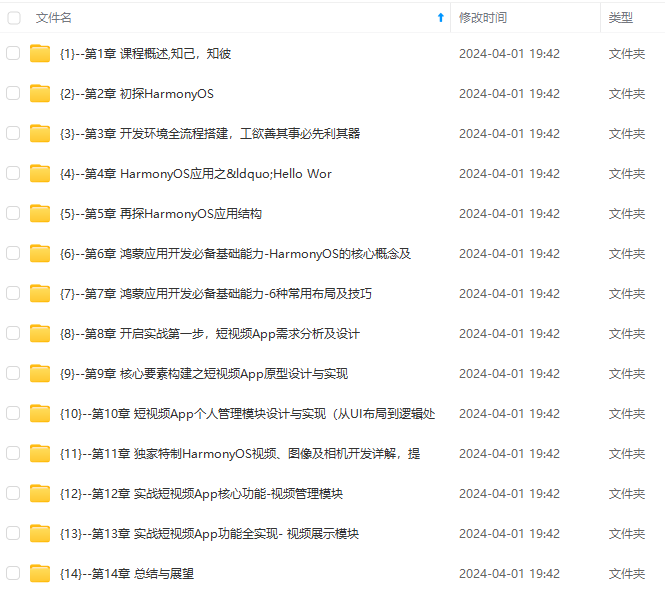
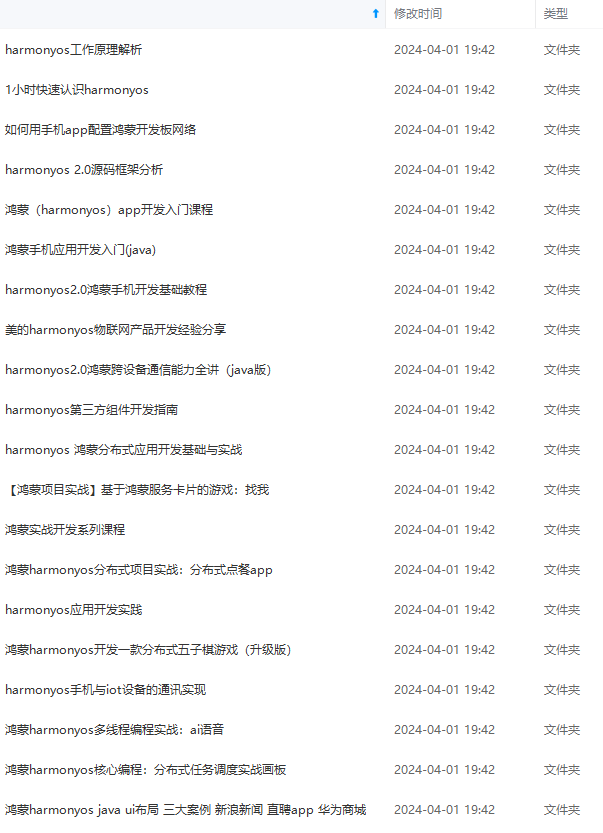
既有适合小白学习的零基础资料,也有适合3年以上经验的小伙伴深入学习提升的进阶课程,基本涵盖了95%以上HarmonyOS鸿蒙开发知识点,真正体系化!
由于文件比较大,这里只是将部分目录大纲截图出来,每个节点里面都包含大厂面经、学习笔记、源码讲义、实战项目、讲解视频,并且会持续更新
如果你觉得这些内容对你有帮助,可以添加VX:vip204888 (备注鸿蒙获取)

一个人可以走的很快,但一群人才能走的更远。不论你是正从事IT行业的老鸟或是对IT行业感兴趣的新人,都欢迎扫码加入我们的的圈子(技术交流、学习资源、职场吐槽、大厂内推、面试辅导),让我们一起学习成长!
系的自学效果低效又漫长,而且极易碰到天花板技术停滞不前!**
因此收集整理了一份《2024年HarmonyOS鸿蒙开发全套学习资料》,初衷也很简单,就是希望能够帮助到想自学提升又不知道该从何学起的朋友,同时减轻大家的负担。
[外链图片转存中…(img-NhVtB4qU-1712690079419)]
[外链图片转存中…(img-kauL7SM8-1712690079420)]
[外链图片转存中…(img-Aka03Vb8-1712690079420)]
既有适合小白学习的零基础资料,也有适合3年以上经验的小伙伴深入学习提升的进阶课程,基本涵盖了95%以上HarmonyOS鸿蒙开发知识点,真正体系化!
由于文件比较大,这里只是将部分目录大纲截图出来,每个节点里面都包含大厂面经、学习笔记、源码讲义、实战项目、讲解视频,并且会持续更新
如果你觉得这些内容对你有帮助,可以添加VX:vip204888 (备注鸿蒙获取)
[外链图片转存中…(img-lOdPzGUz-1712690079421)]
一个人可以走的很快,但一群人才能走的更远。不论你是正从事IT行业的老鸟或是对IT行业感兴趣的新人,都欢迎扫码加入我们的的圈子(技术交流、学习资源、职场吐槽、大厂内推、面试辅导),让我们一起学习成长!

北京人形旗下天工造物具身智能开源社区,聚焦具身天工与慧思开物两大平台
更多推荐
 18
18 0
0- 0


 已为社区贡献12条内容

所有评论(0)