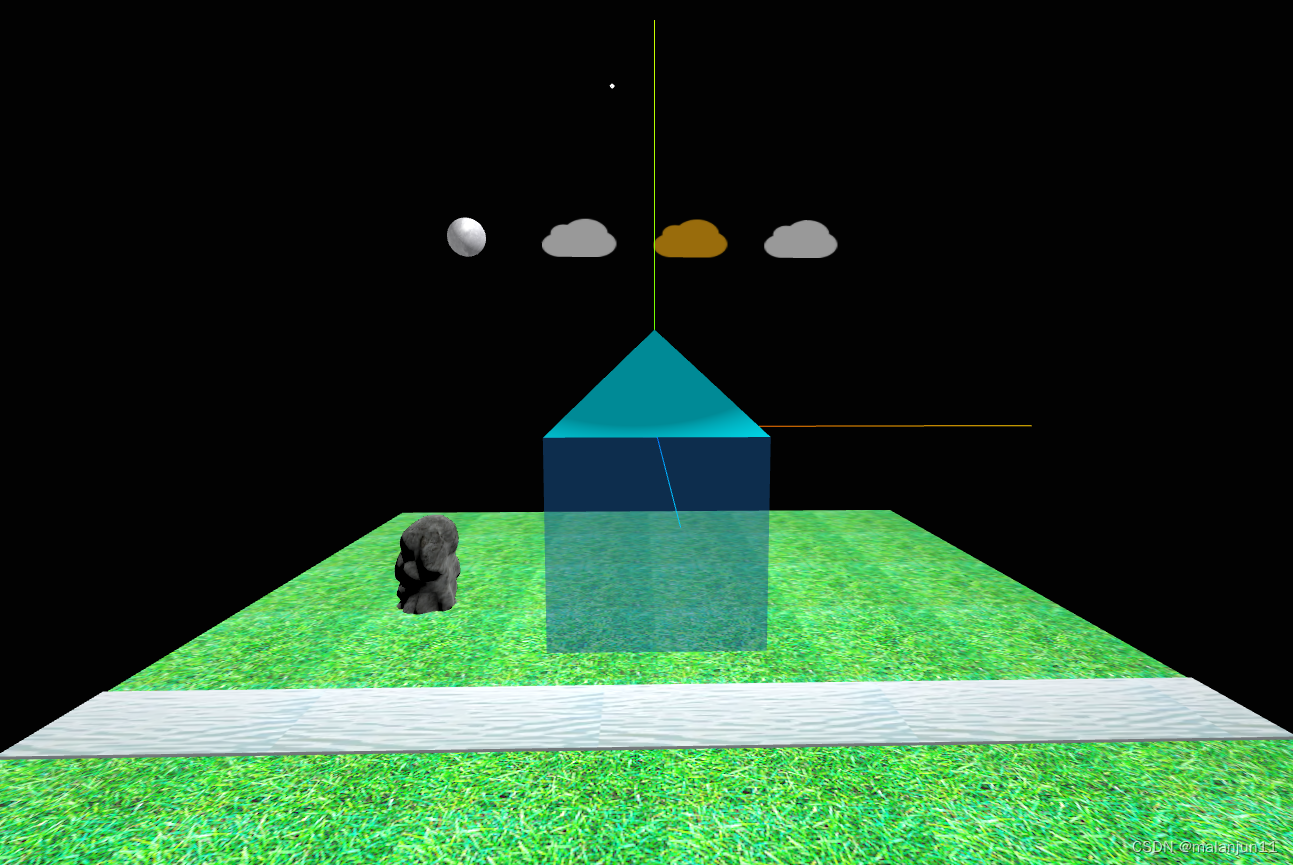
three.js绘制简单房子
·
<template>
    <div ref="containerRef" class="container"></div>
</template>
<script lang="ts" name="绘制房子" setup>
import * as THREE from 'three';
import { OrbitControls } from 'three/examples/jsm/controls/OrbitControls';  //引入扩展库
// 引入gltf模型加载库GLTFLoader.js
import { GLTFLoader } from 'three/addons/loaders/GLTFLoader.js';
let width = window.innerWidth;
let height = window.innerHeight;
//初始化场景
const scene = new THREE.Scene();
//初始化相机
const camera = new THREE.PerspectiveCamera(75, width / height, 0.1, 10000);
camera.position.set(-1000, 0, 1200);
camera.lookAt(0, 100, 0);
//初始化渲染器
const renderer = new THREE.WebGLRenderer({
    antialias: true//开启抗锯齿
});
renderer.setPixelRatio(window.devicePixelRatio);
renderer.setClearColor('#020202', 1); //设置背景颜色
renderer.setSize(width, height);
//添加相机轨道
const controls = new OrbitControls(camera, renderer.domElement);
//实例化
const containerRef = ref();
//环境光
const ambient = new THREE.AmbientLight(0xffffff, 1);
scene.add(ambient);
//点光源
const pointLight = new THREE.PointLight(0xffffff, 4.0);
pointLight.decay = 0;  //随着距离光源强度衰减
pointLight.position.set(-100, 800, 100);  //光源位置
scene.add(pointLight);
// 平行光
const directionalLight = new THREE.DirectionalLight(0xffffff, 1.0);
// 设置光源的方向:通过光源position属性和目标指向对象的position属性计算
directionalLight.position.set(0, 0, 0);
scene.add(directionalLight);
const helper = new THREE.PointLightHelper(pointLight, 5);
scene.add(helper);
//辅助坐标轴
const axesHelper = new THREE.AxesHelper(1000);
scene.add(axesHelper);
//----添加渲染,动画循环-----
const animate = () => {
    requestAnimationFrame(animate);
    hePng.offset.x +=0.1;//设置纹理动画:偏移量根据纹理和动画需要,设置合适的值
    monthMesh.rotateY(Math.PI / 4);
    renderer.render(scene, camera);
    // 如果OrbitControls改变了相机参数,重新调用渲染器渲染三维场景
    controls.addEventListener('change', function () {
    });//监听鼠标、键盘事件
};

//纹理贴图加载器TextureLoader
//加载图片
const texLoader = new THREE.TextureLoader();
const floorPng = texLoader.load('/img/floor.png');
const monthPng = texLoader.load('/img/month.png');
const cloudPng = texLoader.load('/img/cloud.png');
const hePng = texLoader.load('/img/he.png');
//开启阵列
floorPng.wrapS = THREE.RepeatWrapping;
floorPng.wrapT = THREE.RepeatWrapping;
hePng.wrapS = THREE.RepeatWrapping;
// uv两个方向纹理重复数量
floorPng.repeat.set(6,6);//注意选择合适的阵列数量
hePng.repeat.x=4
//-----添加地面
const bottom = new THREE.Group()
const floor = new THREE.BoxGeometry(2200, 20, 2200);
const floorMater = new THREE.MeshLambertMaterial({
    // color: '#087300',
    map:floorPng
});

const floorMesh = new THREE.Mesh(floor, floorMater);
// 创建GLTF加载器对象
const loader = new GLTFLoader();
//加载假山模型
loader.load( '/js.gltf', function ( gltf ) {
    gltf.scene.scale.set(100, 100, 100);
   let jsMesh=gltf.scene
    jsMesh.position.copy(floorMesh.position)
    jsMesh.position.y+=30
    jsMesh.position.x=-600
    bottom.add(jsMesh)
})
//写一条河流
const he = new THREE.BoxGeometry(2200, 10, 200);
const heMater = new THREE.MeshLambertMaterial({
    // color: '#087300',
    map:hePng
});

const heMesh = new THREE.Mesh(he, heMater);
heMesh.position.set(0,10,500)
// jsMesh.position.copy(floorMesh.position)
// jsMesh.position.y+=50
bottom.add(heMesh,floorMesh)
bottom.position.set(0, -500, 0);
//------添加天空----建组
const sky = new THREE.Group();
sky.name = '天空';
//月球
const month = new THREE.SphereGeometry(50);
const monthMater = new THREE.MeshLambertMaterial({
    // color: '#fdfd57',
    map:monthPng
});
const monthMesh = new THREE.Mesh(month, monthMater);
monthMesh.name = '月球';
// 云朵
const cloudGroup = new THREE.Group();
cloudGroup.name = '云朵';
// ---循环---  建组
for (let i = 0; i < 3; i++) {
    const geometry = new THREE.BoxGeometry(200, 100, 0);
    const material = new THREE.MeshLambertMaterial({
        // color: '#ffffff'
        map:cloudPng,
        transparent: true,
    });
    const cloudMesh = new THREE.Mesh(geometry, material);
    cloudMesh.position.x = i * 300; // 网格模型mesh沿着x轴方向阵列
    cloudGroup.add(cloudMesh); //添加到组对象group1
    cloudMesh.name = i + 1 + '号云朵';
}
cloudGroup.position.set(300, 0, 0);
sky.add(monthMesh, cloudGroup);
sky.position.set(-500, 500, -100);
//-----添加房子
const hourse = new THREE.Group();
hourse.name = '房子';
//墙体
const wall = new THREE.BoxGeometry(500, 500, 500);
const wallMater = new THREE.MeshLambertMaterial({
    color: '#3096fc',
    transparent: true,
    opacity: 0.5
});
const wallMesh = new THREE.Mesh(wall, wallMater);
//使用------copy位置
hourse.position.copy(bottom.position);//1. 第1步位置重合
hourse.position.y += 250;//1. 第2步mesh在原来y的基础上增加100
//屋顶----建立缓冲几何体
const roof = new THREE.BufferGeometry();
//类型化数组创建顶点数据
const vertices = new Float32Array([
    0, 500, 0, //屋顶0
    250, 250, 250,//1
    -250, 250, 250,//2
    -250, 250, -250,//3
    250, 250, -250,//4
]);
// 创建属性缓冲区对象
//3个为一组,表示一个顶点的xyz坐标
const attribue = new THREE.BufferAttribute(vertices, 3);
roof.attributes.position = attribue;
//顶点索引
const indexes = new Uint16Array([
    // 下面索引值对应顶点位置数据中的顶点坐标
    0, 1, 2, 0, 2, 3, 0, 3, 4, 0, 4, 1, 2, 4, 1, 2, 3, 4
]);
roof.index = new THREE.BufferAttribute(indexes, 1); //1个为一组
//---模拟点模型
// const roofMaterial = new THREE.PointsMaterial({
//     color: '#ffffff',
//     size: 10.0 //点对象像素尺寸
// });
// const roofMesh=new THREE.Points(roof, roofMaterial);
//---模拟线模型
// const roofMaterial = new THREE.LineBasicMaterial({
//     color: '#ffffff',
// });
// const roofMesh = new THREE.LineLoop(roof, roofMaterial);
//----添加法向量-----
const normals = new Float32Array([
    0, 1, 0,
    1, 0, 1,
    -1, 0, 1,
    -1, 0, -1,
    1, 0, -1
]);
// 设置几何体的顶点法线属性.attributes.normal
roof.attributes.normal = new THREE.BufferAttribute(normals, 3);
//面模型
const roofMaterial = new THREE.MeshLambertMaterial({
    color: '#00e7fa',
    transparent: false,
    side: THREE.DoubleSide
});
const roofMesh = new THREE.Mesh(roof, roofMaterial);
roofMesh.name = '屋顶';
const hourseaxesHelper = new THREE.AxesHelper(1000);
hourse.add(roofMesh, wallMesh);
scene.add(sky, bottom, hourse); //场景中添加
// scene.add(bottom); //场景中添加
// 获取某个模块
const getCould = () => {
    sky.traverse((obj) => {
        if (obj.isMesh) {
            if (obj.name == '2号云朵') {
                obj.material.color.set('#ffb71c');
            }
        }
    });
};
onMounted(() => {
    containerRef.value.appendChild(renderer.domElement);
    animate();
    getCould();
});
</script>
<style>
* {
    margin: 0;
    padding: 0;
}
.container {
    width: 100vw;
    height: 100vh;
    margin: auto;
}
</style>

北京人形旗下天工造物具身智能开源社区,聚焦具身天工与慧思开物两大平台
更多推荐
 9
9 0
0- 0


 已为社区贡献1条内容

所有评论(0)