Pandas系列学习教程——08 pandas字符串处理
系列文章目录
第一章 Pandas 学习入门之pandas数据读取
第二章 Pandas 学习入门之pandas数据结构
第三章 Pandas 学习入门之pandas数据查询
第四章 Pandas 学习入门之pandas新增数据列
第五章 Pandas 学习入门之pandas数据统计函数
第六章 Pandas 学习入门之pandas处理缺失值
第七章 Pandas 学习入门之pandas数据排序
第八章 Pandas 学习入门之pandas字符串处理
随着人工智能的不断发展,数据分析这门技术也越来越重要,很多人都开启了学习数据分析,本文就介绍了pandas学习的基础内容。本章简单介绍了pandas处理字符串的步骤,具体如下。
四、 使用str的startswith、contains等得到bool的Series可以做条件查询
前言
本章简单介绍了pandas处理字符串的步骤,具体如下。
提示:以下是本篇文章正文内容,下面案例可供参考
一、pandas字符串操作
前面我们已经使用了字符串的处理函数:
df["气温(度)"].str.replace("℃","").astype("float")
Pandas的字符串处理:
- 使用方法: 先获取Series的str属性,然后再属性上调用函数;
- 只能在字符串列上使用,不能在数字列上使用;
- DataFrame上没有str属性和处理方法;
- Series.str并不是Python原生字符串,而是自己的一套方法,不过大部分和原生str很相似;
Series.str字符串方法列表参考文档:
https://pandas.pydata.org/docs/reference/series.html
二、引入库 & 数据准备
1.引入库
代码如下(示例):
import pandas as pd2.数据读取
fpath = "./beijing_tianqi_2018.csv"
df = pd.read_csv(fpath)

# 替换掉温度的后缀℃
df.loc[:, "bWendu"] = df["bWendu"].str.replace("℃", "").astype('int32')
df.loc[:, "yWendu"] = df["yWendu"].str.replace("℃", "").astype('int32')

df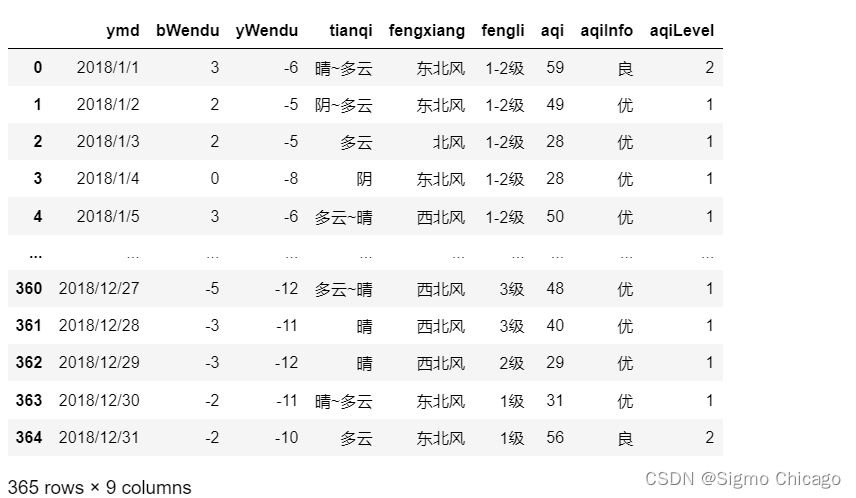
df.dtypesymd object bWendu object yWendu object tianqi object fengxiang object fengli object aqi int64 aqiInfo object aqiLevel int64 dtype: object
三、 获取Series的str属性,使用各种字符串处理函数
# 字符串替换函数
df["bWendu"].str.replace("℃", "")
0 3
1 2
2 2
3 0
4 3
..
360 -5
361 -3
362 -3
363 -2
364 -2
Name: bWendu, Length: 365, dtype: object
df["aqi"].str.len()AttributeError: Can only use .str accessor with string values!
在
pandas中,.str属性提供了一系列的字符串操作方法,这使得你可以在DataFrame或Series的字符串列上执行向量化的字符串操作。然而,这些操作只能应用于字符串类型的数据。如果你尝试在非字符串类型的列上使用.str,比如数值类型的列(例如"气温(度)"列),你需要先确保该列的数据类型是字符串。
四、 使用str的startswith、contains等得到bool的Series可以做条件查询
condition = df["ymd"].str.startswith("2018-03")

condition.head()
0 False 1 False 2 False 3 False 4 False Name: ymd, dtype: bool
df[condition].head()详细解释一下上述代码过程:
步骤 1: 创建条件
首先,使用
.str.startswith("2015-11")方法创建一个布尔索引。这个方法会检查"日期"列中的每个字符串是否以"2015-11"开头,对于每行,如果条件为真,则对应的布尔索引值为True,否则为False。df["日期"]返回的是Series。
condition = df["日期"].str.startswith("2015/11")
步骤 2: 使用条件筛选DataFrame
然后,使用这个布尔索引作为条件来筛选DataFrame。只有当条件为True的行才会被选中。
filtered_df = df[condition]
步骤 3: 查看结果
最后,使用
.head()方法查看筛选后DataFrame的前几行,以验证筛选结果。
filtered_df.head()
五、需要多次str处理的链式操作
怎么提取201811这样的数字月份?
1.现将日期2018-11-20替换成20181120的形式
2.提取月份字符串201811
df["ymd"].str.replace("/", " ")0 201811
1 201812
2 201813
3 201814
4 201815
...
360 20181227
361 20181228
362 20181229
363 20181230
364 20181231
Name: ymd, Length: 365, dtype: object
# 每次调用函数,都返回一个新的Series
df["日期"].str.replace("/","").slice(0,6).head()
AttributeError: 'Series' object has no attribute 'slice'
Series.str没有slice方法
# slice就是切片语法,可以直接用
df["ymd"].str.replace("/", "").str[0:6]
0 2018/1
1 2018/1
2 2018/1
3 2018/1
4 2018/1
...
360 2018/1
361 2018/1
362 2018/1
363 2018/1
364 2018/1
Name: ymd, Length: 365, dtype: object
六、使用正则表达式处理
# 添加新列
def get_nianyueri(x):
    year,month,day = x["日期"].split("/")
    return f"{year}年{month}月{day}日"
df["中文日期"] = df.apply(get_nianyueri,axis=1)

df["中文日期"].head()
0 2018年1月1日
1 2018年1月2日
2 2018年1月3日
3 2018年1月4日
4 2018年1月5日
...
360 2018年12月27日
361 2018年12月28日
362 2018年12月29日
363 2018年12月30日
364 2018年12月31日
Name: 中文日期, Length: 365, dtype: object
axis=1指定按行应用函数,即将get_nianyueri函数应用到df的每一行上 。
split()方法介绍:
split()方法仅适用于字符串类型;split()方法用于将字符串拆分成一个列表,其中每个元素都是原字符串的一部分,基于指定的分隔符进行分割。
# 不带参数调用
text = "hello world"
result = text.split()
# 输出: ['hello', 'world']

# 指定分隔符
text = "apple,banana,cherry"
result = text.split(",")
# 输出: ['apple', 'banana', 'cherry']

# 使用maxsplit参数
text = "one:two:three:four"
result = text.split(":", 2)
# 输出: ['one', 'two', 'three:four']

# 注意:如果字符串以分隔符开头或结尾,或者分隔符连续出现,结果中会包含空字符串。
text = ",apple,,banana,"
result = text.split(",")
# 输出: ['', 'apple', '', 'banana', '']

# split()方法仅适用于字符串类型。对于非字符串类型使用split()会导致AttributeError。
# split()是处理和分析文本数据时经常用到的方法,能够根据特定的分隔符来有效地将字符串切分为多个部分,以便进一步处理。
问题:
怎么将"2015年11月20日"中的年、月、日三个中文字符去除?
# 方法1:链式replace
df["中文日期"].str.replace("年","").str.replace("月","").str.replace("日","").head()
0 201811
1 201812
2 201813
3 201814
4 201815
...
360 20181227
361 20181228
362 20181229
363 20181230
364 20181231
Name: 中文日期, Length: 365, dtype: object
- 这种链式调用方法虽然简洁易读,但如果要替换的字符很多,可能会使代码变得较长。
- 对于复杂的字符串处理任务,考虑使用正则表达式与
.replace()结合,可能更为高效。例如,使用正则表达式一次性替换多个不同的字符:
# 方法二:正则表达式替换。Series.str默认就开启了正则表达式模式
df["中文日期"].str.replace("年月日","",regex=True).head()
0 201811
1 201812
2 201813
3 201814
4 201815
...
360 20181227
361 20181228
362 20181229
363 20181230
364 20181231
Name: 中文日期, Length: 365, dtype: object
这行代码使用正则表达式
"[年月日]"匹配任何一个括号内的字符,并将其替换为空字符串,达到一次性移除"年"、"月"、"日"字符的目的。使用regex=True参数启用正则表达式匹配。
一般Series.str默认就开启了正则表达式模式,故regex = True可以省略,还是不要省略,我的环境下不能省略!!
总结
提示:这里对文章进行总结:
随着人工智能的不断发展,数据分析这门技术也越来越重要,很多人都开启了学习数据分析,本文就介绍了pandas学习的基础内容。本章简单介绍了pandas处理字符串的步骤,具体如下。

北京人形旗下天工造物具身智能开源社区,聚焦具身天工与慧思开物两大平台
更多推荐
 19
19 0
0- 0


 已为社区贡献8条内容

所有评论(0)