骑砍战团MOD开发(14)-module_animations.py骨骼动画
·
一.创建骨架
在OpenBrf中导入新骨架skel_new.
通过在module_skins.py添加新物种(巨人/怪兽),第14个参数填写骨架名称.
  #第十四个参数为新骨架
  ("man", 0,
    "man_body", "man_calf_l", "m_handL",
    "male_head", man_face_keys,
    ["man_hair_s","man_hair_m","man_hair_n","man_hair_o", "man_hair_y10", "man_hair_y12","man_hair_p","man_hair_r","man_hair_q","man_hair_v","man_hair_t","man_hair_y6","man_hair_y3","man_hair_y7","man_hair_y9","man_hair_y11","man_hair_u","man_hair_y","man_hair_y2","man_hair_y4"], #man_hair_meshes ,"man_hair_y5","man_hair_y8",
    ["beard_e","beard_d","beard_k","beard_l","beard_i","beard_j","beard_z","beard_m","beard_n","beard_y","beard_p","beard_o",   "beard_v", "beard_f", "beard_b", "beard_c","beard_t","beard_u","beard_r","beard_s","beard_a","beard_h","beard_g",], #beard meshes ,"beard_q"
    ["hair_blonde", "hair_red", "hair_brunette", "hair_black", "hair_white"], #hair textures
    ["beard_blonde","beard_red","beard_brunette","beard_black","beard_white"], #beard_materials
    [("manface_young_2",0xffcbe0e0,["hair_blonde"],[0xffffffff, 0xffb04717, 0xff502a19]),
     ("manface_midage",0xffdfefe1,["hair_blonde"],[0xffffffff, 0xffb04717, 0xff632e18, 0xff502a19, 0xff19100c]),
     ("manface_young",0xffd0e0e0,["hair_blonde"],[0xff83301a, 0xff502a19, 0xff19100c, 0xff0c0d19]),
#     ("manface_old",0xffd0d0d0,["hair_white","hair_brunette","hair_red","hair_blonde"],[0xffffcded, 0xffbbcded, 0xff99eebb]),
     ("manface_young_3",0xffdceded,["hair_blonde"],[0xff2f180e, 0xff171313, 0xff007080c]),
     ("manface_7",0xffc0c8c8,["hair_blonde"],[0xff171313, 0xff007080c]),
     ("manface_midage_2",0xfde4c8d8,["hair_blonde"],[0xff502a19, 0xff19100c, 0xff0c0d19]),
     ("manface_rugged",0xffb0aab5,["hair_blonde"],[0xff171313, 0xff007080c]),
#     ("manface_young_4",0xffe0e8e8,["hair_blonde"],[0xff2f180e, 0xff171313, 0xff007080c]),
     ("manface_african",0xff807c8a,["hair_blonde"],[0xff120808, 0xff007080c]),
#     ("manface_old_2",0xffd5d5c5,["hair_white"],[0xffffcded, 0xffbbcded, 0xff99eebb]),
     ], #man_face_textures,
    [(voice_die,"snd_man_die"),(voice_hit,"snd_man_hit"),(voice_grunt,"snd_man_grunt"),(voice_grunt_long,"snd_man_grunt_long"),(voice_yell,"snd_man_yell"),(voice_stun,"snd_man_stun"),(voice_victory,"snd_man_victory")], #voice sounds
    "skel_human", 1.0,
二.绑定骨骼
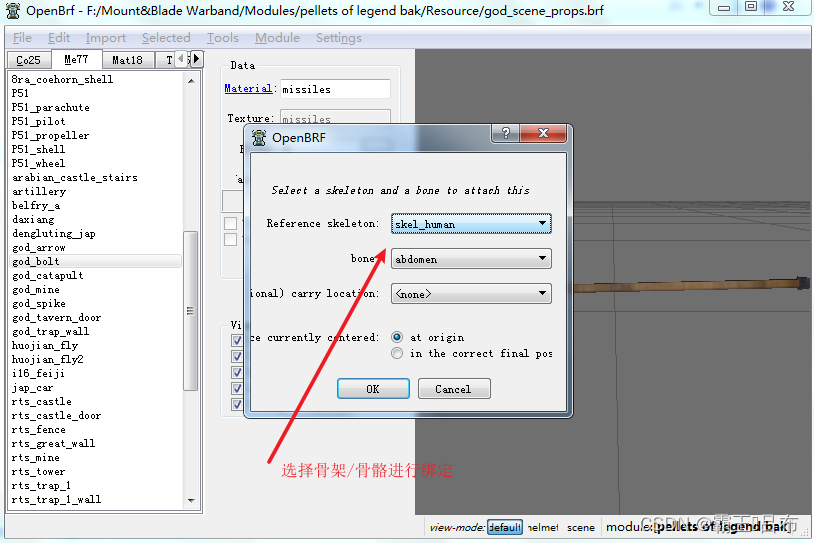
OpenBrf导入绑定骨骼的静态模型,或直接选中未被绑定的模型,seleted->mount on one bone
三.创建骨骼动画
骨骼动画 = 动作1 + 动作2 + 动作3
module_animations.py创建自定义动画
####################################################################################################################
# There are two animation arrays (one for human and one for horse). Each animation in these arrays contains the following fields:
# 1) Animation id (string): used for referencing animations in other files. The prefix anim_ is automatically added before each animation-id
# 2) Animation flags: could be anything beginning with acf_ defined in header_animations.py
# 3) Animation master flags: could be anything beginning with amf_ defined in header_animations.py
# 4) Animation sequences (list).
# 4.1) Duration of the sequence. Basically the speed of the animation, the higher the number, the slower the animation will progress.
# 4.2) Name of the animation resource.
# 4.3) Beginning frame of the sequence within the animation resource.
# 4.4) Ending frame of the sequence within the animation resource.
# 4.5) Sequence flags: could be anything beginning with arf_ defined in header_animations.py
# 4.6) Sound Timing (float): Optional. Used to play sounds in animations with arf_make_walk_sound and arf_make_custom_sound.
#        Can be used in conjunction with pack2f or pack4f to make the animation play the sound multiple times.
#        Timing assumed to be percentages ofanimation completion. For example a timing of 0.0 will play at the start while 1.0 will play at the end.
# 4.7) Offset Position (float, float, float): Optional. Used to move the animating agent's position at the end of the animation. Requires acf_displace_position flag.
# 4.8) Ragdoll Delay (float). Optional. Time, in seconds, for death animations to switch to ragdoll physics. Note, setting this for longer than 2.0 will cause the animation to hang instead of transitioning as the engine only tracks "dead" agents for this long before freezing them to free up resources.


#循环动画
amf_cyclic

amf_client_prediction

#调用agent_set_animation可触发动画
amf_play


#锁定摄像机
acf_lock_camera

#动作执行完毕后会位置发生变化
acf_displace_position

#人物或马匹动画混合播放,例如马上挥砍和视角四向有关
arf_blend_in_x
 ["god_horse_man_sit_down", acf_enforce_lowerbody,
   amf_priority_die|amf_play|amf_client_prediction|amf_use_cycle_period,
   [10, "anim_human_02", 50, 69, arf_cyclic],
 ],

 acf_enforce_lowerbody 引擎控制骨骼动画执行时下半身骨骼不受影响
 amf_play 可以通过脚本调用该动画
 arf_cyclic 动画是循环播放的
四.播放动画时获取人物位置
#获取骨骼所在本地坐标系/世界坐标系坐标, 动画播放时人物骨骼位置和人物position不同步
agent_get_bone_position  = 2076  # (agent_get_bone_position, <position_no>, <agent_no>, <bone_no>, [<local_or_global>]),
五.blender中编辑自己的动画
<1.Blender下载SMD插件
 https://blog.csdn.net/qq_35829452/article/details/133995304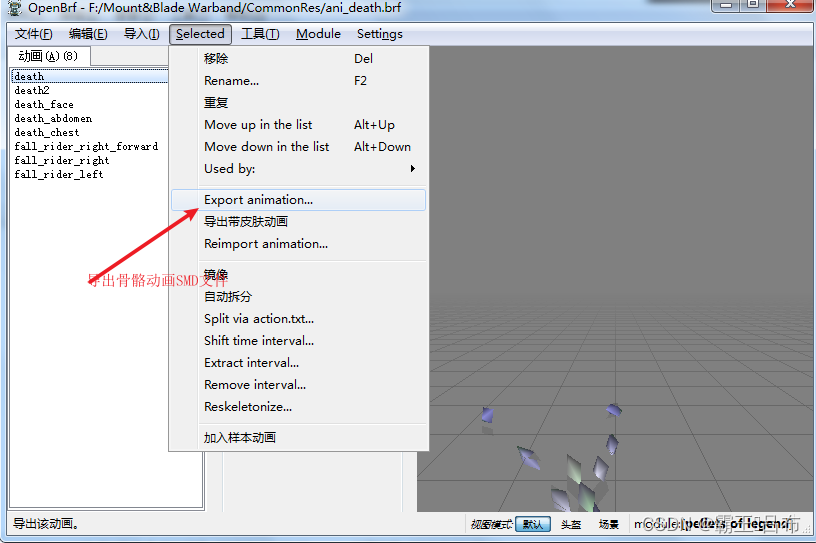
<3.Blender导入SMD文件进行骨骼动画编辑

北京人形旗下天工造物具身智能开源社区,聚焦具身天工与慧思开物两大平台
更多推荐
 8
8 0
0- 0


 已为社区贡献1条内容

所有评论(0)