C++基于MFC的通讯录系统(链表)
小型通讯录管理程序设计
实验目的
- 深入理解面向对象技术的封装性、继承性和多态性,掌握面向对象程序设计方法。
- 综合应用C++基础知识实现小型应用程序开发。
- 掌握使用C++流类库实现数据文件访问的操作方法。
- 熟悉基于对话框的MFC应用程序创建过程,掌握ClassWizard工具和常
实验环境
windows 11, visual studio 2022
实验内容与要求
设计一个小型通讯录管理程序,实现通讯录文件的新建、保存、以及通讯录的增、删、改、查功能。要求系统用户界面良好,功能完善,性能稳定。
通讯录功能分析
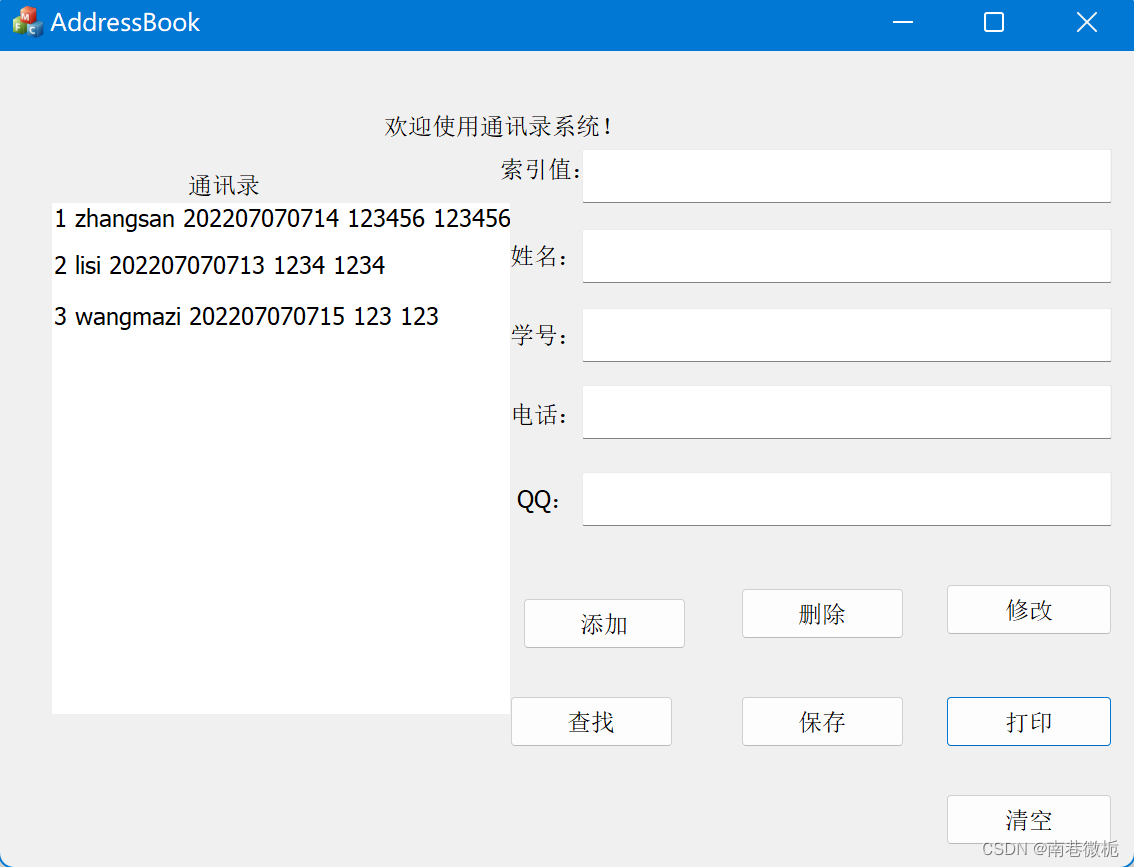
用户界面分为右半部分的用户输入区和左半部分的通讯录打印区。
1.添加联系人信息:用户在左边输入联系人的详细信息并点击添加,如果右边的所有信息输入框有空的话会出现联系人信息不能为空的警告。用户成功输入信息后点击添加按钮该联系人的信息就会被添加到链表内,并出现联系人信息添加成功的弹窗。功能执行完毕后系统会自动清空用户输入的信息方便继续使用。
2.删除联系人信息:用户输入联系人的索引值后,会出现联系人信息删除成功。若当前链表内没有结点的索引值与用户的输入相同就会出现未找到该信息的警告。功能执行完毕后系统会自动清空用户输入的信息方便继续使用。
3.修改联系人信息:将该联系人的正确信息输入在对应的框内点击修改按钮,系统会根据联系人的索引值从链表的头结点开始挨个匹配如果有链表内有该联系人的信息系统会进行修改并出现联系人信息修改成功的弹窗。如果直到链表的结尾依然没有就会弹出未找到该信息的警告。功能执行完毕后系统会自动清空用户输入的信息方便继续使用。
4.查找联系人信息:用户输入该联系人的索引值后点击查找,系统会在链表内根据索引值进行查找。如果找到该联系人她的详细信息会出现在对应的框内,如果需要进行下一步的操作用户需要点击清空按钮以清空框内的信息。如果没有该联系人信息会有未找到该信息的警告。
5.保存信息:将链表的信息保存进入文件
6.打印信息:将文件内的信息读入链表后打印在左侧的通讯录内。
代码实现
结点类
class StuNode			//结点类
{
	friend class AddressBook;
private:
	int index;             //人员索引值
	CString name;			//人员姓名
	CString num;			//人员学号/工号
	CString phone;			//人员电话号码
	CString qq;				//人员QQ号
public:
	StuNode* next;			//指向下一个结点
	StuNode(int i, CString na, CString nu, CString p, CString q);
	StuNode(StuNode& x);
	StuNode();
	int GetIndex();
	CString GetName();
	CString GetNum();
	CString GetPhone();
	CString GetQQ();
};
int StuNode::GetIndex()
{
	return index;
}
CString StuNode::GetName()
{
	return name;
}
CString StuNode::GetNum()
{
	return num;
}
CString StuNode::GetPhone()
{
	return phone;
}
CString StuNode::GetQQ()
{
	return qq;
}
StuNode::StuNode(int i, CString na, CString nu, CString p, CString q)
{
	index = i;
	name = na;
	num = nu;
	phone = p;
	qq = q;
	next = NULL;
}
StuNode::StuNode(StuNode& x) :index(x.index)
{
	name = x.name;
	num = x.num;
	phone = x.phone;
	qq = x.qq;
	next = x.next;
}
StuNode::StuNode()
{
	memset((LPSTR)(LPCTSTR)name, 0, sizeof(name));
	memset((LPSTR)(LPCTSTR)num, 0, sizeof(num));
	memset((LPSTR)(LPCTSTR)phone, 0, sizeof(phone));
	memset((LPSTR)(LPCTSTR)qq, 0, sizeof(qq));
	index = 0;
	next = NULL;
}
链表类
class AddressBook         //链表类
{
public:
	StuNode* head;       //链表的头结点
	AddressBook()
	{
		head = new StuNode;
	}
	~AddressBook();       //链表的销毁
	void AddStu(StuNode& x);
	void CutStu(int x);
	void ChangeStu(int x, CString na, CString nu, CString p, CString q);
	StuNode* FindStu(int x);
	void ReadStu();
	void SaveStu();
	void Show();
};
AddressBook::~AddressBook()
{
	StuNode* ptr = head->next;
	if (ptr != NULL)
	{
		StuNode* tmp = ptr->next;
		delete ptr;
		ptr = tmp;
	}
}
void AddressBook::AddStu(StuNode& x)
{
	StuNode* cur = new StuNode(x);
	if (head == NULL)
		head->next = cur;
	else
	{
		StuNode* pre = head;
		while (pre->next != NULL)
			pre = pre->next;
		pre->next = cur;
	}
}
void AddressBook::CutStu(int x)
{
	int j = 0;
	StuNode* pre = NULL;
	StuNode* cur = head;
	for (j = 0; cur != NULL; j++)
	{
		if (j == x)
		{
			StuNode* tmp = cur->next;
			delete cur;
			pre->next = tmp;
			break;
		}
		pre = cur;
		cur = cur->next;
	}
	if (j != x)  MessageBox(NULL, _T("未找到该信息!"),_T("警告"), MB_ICONERROR);
}
void AddressBook::ChangeStu(int x, CString na, CString nu, CString p, CString q)
{
	int i;
	StuNode* ptr = head;
	for (i = 0; ptr != NULL; i++)
	{
		if (i == x) {
			ptr->name = na;
			ptr->num = nu;
			ptr->phone = p;
			ptr->qq = q;
			ptr->index = x;
			break;
		}
		ptr = ptr->next;
	}
	if (i != x) MessageBox(NULL, _T("未找到该信息!"),_T("警告"), MB_ICONERROR);
}
StuNode* AddressBook::FindStu(int x)
{
	int i;
	StuNode* ptr = head;
	for (i = 0; ptr != NULL; i++)
	{
		if (i == x)
		{
			return ptr;
		}
		ptr = ptr->next;
	}
	if (i != x) MessageBox(NULL, _T("未找到该信息!"),_T("警告"), MB_ICONERROR);
}
void AddressBook::ReadStu()
{
	StuNode* p = head->next;
	while (p != NULL)
	{
		StuNode* tmp = p->next;
		delete p;
		p = tmp;
	}
	ifstream ifs("Data.txt", ios::in);
	if (!ifs.is_open()) MessageBox(NULL, _T("文件打开失败!"), _T("警告"), MB_ICONERROR);
	while (!ifs.eof())
	{
		StuNode* ptr = new StuNode;
		ifs >> ptr->index >> (LPSTR)(LPCTSTR)ptr->name >> (LPSTR)(LPCTSTR)ptr->num >> (LPSTR)(LPCTSTR)ptr->phone >>
			(LPSTR)(LPCTSTR)ptr->qq;
		if (head == NULL) MessageBox(NULL, _T("文件为空!"), _T("警告"), MB_ICONERROR);
		AddStu(*ptr);
	}

	ifs.close();
}
void AddressBook::SaveStu()
{
	int size;
	if (head->next == NULL) exit(0);
	StuNode* ptr = head->next;
	ofstream ofs;
	ofs.open("Data.txt", ios::app);
	if (!ofs.is_open()) MessageBox(NULL, _T("文件打开失败!"), _T("警告"), MB_ICONERROR);
	ofs << " 索引值 " << " 姓名 " << " 学号/职工号 " << " 电话 " << " QQ " << std::endl;
	while (ptr != NULL)
	{
		ofs << ptr->index;
		CString str = ptr->name + " " + ptr->num + " " + ptr->phone + " " + ptr->qq + '\n';
		char* p = (LPSTR)(LPCTSTR)str;
		ofs.write(p, strlen(p));
		ptr = ptr->next;
		ofs << std::endl;
	}
	ofs.close();
	MessageBox(NULL, _T("保存成功!"),_T("提示"), MB_OK);
}
void AddressBook::Show()
{
	StuNode* ptr = head->next;
	while (ptr->next != NULL)
	{
		cout << ptr->index << " " << (LPSTR)(LPCTSTR)ptr->name << " " << (LPSTR)(LPCTSTR)ptr->num << " "
			<< (LPSTR)(LPCTSTR)ptr->phone << " " << (LPSTR)(LPCTSTR)ptr->qq << endl;
		ptr = ptr->next;
	}
}
示例编辑框变量及函数
    CString StuIndex;
	CString StuName;
	CString StuNum;
	CString StuTel;
	CString StuQQ;
	afx_msg void OnBnClickedButton1();
	afx_msg void OnBnClickedButton2();
	afx_msg void OnBnClickedButton4();
	afx_msg void OnBnClickedButton3();
	afx_msg void OnBnClickedButton5();
	afx_msg void OnBnClickedButton6();
	afx_msg void OnBnClickedButton7();
StuIndex,StuName,StuNum,StuTel, StuQQ是为示例编辑框创建的变量方便与对话框建立联系。用户在示例编辑框中输入信息然后通过UpdataData(TRUE)将信息分别读入创建的变量中。在函数中对信息进行处理然后通过UpdateData(FALSE)将各变量的信息分别显示在各示例编辑框内。
基于MFC的功能实现
清空示例编辑框
void CMFCAddressSystemBookDlg::OnBnClickedButton1()
{
	// TODO: 在此添加控件通知处理程序代码
	//清空示例编辑框
	UpdateData(TRUE);      //(LPSTR)(LPCTSTR)强制类型转换,将CString类转化为char*
	memset((LPSTR)(LPCTSTR)StuIndex, 0, sizeof((LPSTR)(LPCTSTR)StuIndex));
	memset((LPSTR)(LPCTSTR)StuName, 0, sizeof((LPSTR)(LPCTSTR)StuIndex));
	memset((LPSTR)(LPCTSTR)StuNum, 0, sizeof((LPSTR)(LPCTSTR)StuIndex));
	memset((LPSTR)(LPCTSTR)StuTel, 0, sizeof((LPSTR)(LPCTSTR)StuIndex));
	memset((LPSTR)(LPCTSTR)StuQQ, 0, sizeof((LPSTR)(LPCTSTR)StuIndex));
	UpdateData(FALSE);
}
删除联系人信息
void CMFCAddressSystemBookDlg::OnBnClickedButton2()
{
	// TODO: 在此添加控件通知处理程序代码
	//删除结点
	UpdateData(TRUE);
	int  index = _ttoi(StuIndex);
	book.CutStu(index);
	MessageBox(TEXT("联系人信息删除成功!"));
	memset((LPSTR)(LPCTSTR)StuIndex, 0, sizeof((LPSTR)(LPCTSTR)StuIndex));
}
修改联系人信息
void CMFCAddressSystemBookDlg::OnBnClickedButton4()
{
	// TODO: 在此添加控件通知处理程序代码
	//修改信息
	UpdateData(TRUE);
	int  index = _ttoi(StuIndex);
	book.ChangeStu(index, StuName, StuNum, StuTel, StuQQ);
	MessageBox(TEXT("联系人信息修改成功!"));
	//将输入在示例编辑框的信息清空
	memset((LPSTR)(LPCTSTR)StuIndex, 0, sizeof((LPSTR)(LPCTSTR)StuIndex));
	memset((LPSTR)(LPCTSTR)StuName, 0, sizeof((LPSTR)(LPCTSTR)StuIndex));
	memset((LPSTR)(LPCTSTR)StuNum, 0, sizeof((LPSTR)(LPCTSTR)StuIndex));
	memset((LPSTR)(LPCTSTR)StuTel, 0, sizeof((LPSTR)(LPCTSTR)StuIndex));
	memset((LPSTR)(LPCTSTR)StuQQ, 0, sizeof((LPSTR)(LPCTSTR)StuIndex));
	UpdateData(FALSE);
}
查找联系人信息
void CMFCAddressSystemBookDlg::OnBnClickedButton3()
{
	// TODO: 在此添加控件通知处理程序代码
	//查找联系人信息
	UpdateData(TRUE);
	int  index = _ttoi(StuIndex);
	StuNode* stu;
	stu = book.FindStu(index);
	StuName = (LPCTSTR)stu->GetName();
	StuNum = (LPCTSTR)stu->GetNum();
	StuTel = (LPCTSTR)stu->GetPhone();
	StuQQ = (LPCTSTR)stu->GetQQ();
	UpdateData(FALSE);
}
保存信息
void CMFCAddressSystemBookDlg::OnBnClickedButton5()
{
	// TODO: 在此添加控件通知处理程序代码
	//将链表的信息存入文件
	book.SaveStu();
}
打印信息
void CMFCAddressSystemBookDlg::OnBnClickedButton6()
{
	// TODO: 在此添加控件通知处理程序代码
	//从文件中读入信息到链表并打印在左侧通讯录
	char Stu[50];
	StuNode* ptr = book.head->next;
	for (int i = 0; ptr != NULL; i++)
	{
		int j;
		switch (i)
		{
		case(0):
			j = IDC_EDIT2;   //示例编辑框的句柄(ID)
			break;
		case(1):
			j = IDC_EDIT1;
			break;
		case(2):
			j = IDC_EDIT3;
			break;
		case(3):
			j = IDC_EDIT4;
			break;
		case(4):
			j = IDC_EDIT5;
			break;
		case(5):
			j = IDC_EDIT6;
			break;
		case(6):
			j = IDC_EDIT7;
			break;
		case(7):
			j = IDC_EDIT8;
			break;
		case(8):
			j = IDC_EDIT9;
			break;
		case(9):
			j = IDC_EDIT10;
			break;
		}
		CString str;
		str.Format(_T("%d %s %s %s %s"), ptr->GetIndex(), ptr->GetName(), ptr->GetNum(), ptr->GetPhone(), ptr->GetQQ());
		// 获取编辑框控件指针
		CEdit* pEdit = (CEdit*)GetDlgItem(j);
		// 将文本写入编辑框
		pEdit->SetWindowText(str);
		ptr = ptr->next;
	}
}
添加信息
void CMFCAddressSystemBookDlg::OnBnClickedButton7()
{
	// TODO: 在此添加控件通知处理程序代码
	//增添新的结点
	UpdateData(TRUE);
	int  index = _ttoi(StuIndex);
	if (StuIndex.IsEmpty() || StuName.IsEmpty() || StuNum.IsEmpty() || StuTel.IsEmpty() || StuQQ.IsEmpty())
	{
		MessageBox(TEXT("联系人的信息不能为空!"));
		return;
	}
	else
	{
		StuNode stu(index, StuName, StuNum, StuTel, StuQQ);
		book.AddStu(stu);
		MessageBox(TEXT("联系人信息添加成功!"));
	}
	UpdateData(TRUE);
	//将用户输入
	memset((LPSTR)(LPCTSTR)StuIndex, 0, sizeof((LPSTR)(LPCTSTR)StuIndex));
	memset((LPSTR)(LPCTSTR)StuName, 0, sizeof((LPSTR)(LPCTSTR)StuName));
	memset((LPSTR)(LPCTSTR)StuNum, 0, sizeof((LPSTR)(LPCTSTR)StuNum));
	memset((LPSTR)(LPCTSTR)StuTel, 0, sizeof((LPSTR)(LPCTSTR)StuTel));
	memset((LPSTR)(LPCTSTR)StuQQ, 0, sizeof((LPSTR)(LPCTSTR)StuQQ));
	UpdateData(FALSE);
}

北京人形旗下天工造物具身智能开源社区,聚焦具身天工与慧思开物两大平台
更多推荐
 26
26 0
0- 0


 已为社区贡献1条内容

所有评论(0)