go实现图片和视频的上传以及跨域问题的解决
·
跨域问题的解决
添加第6行和第25行行代码
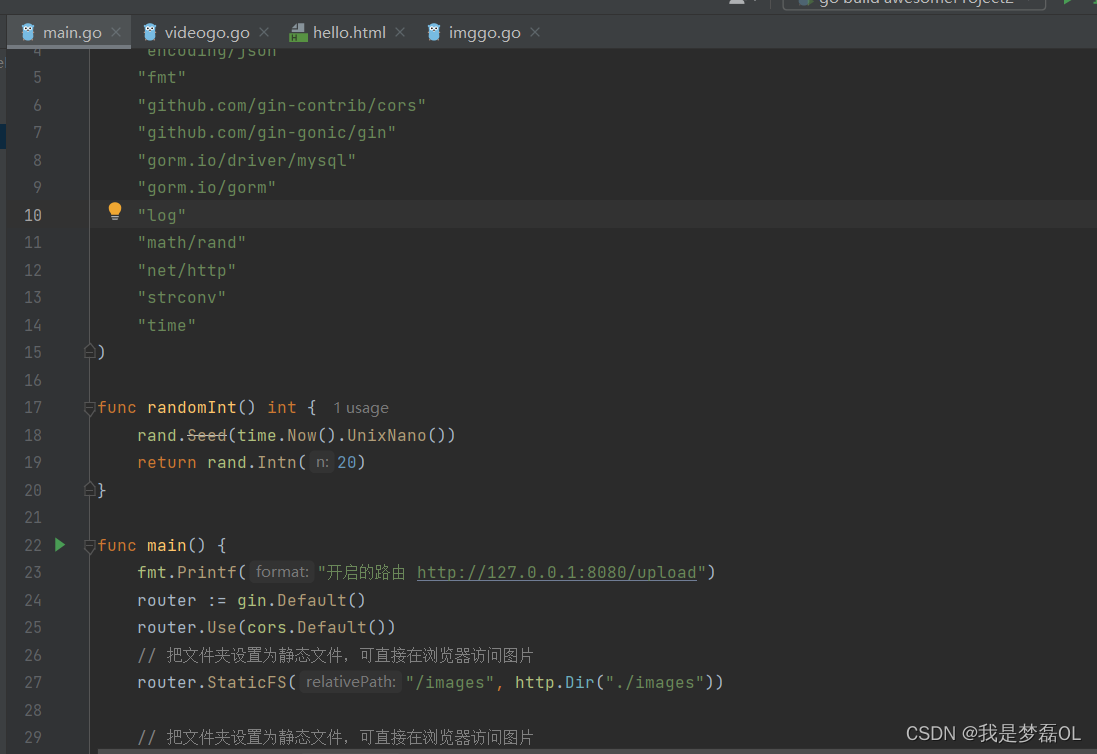
go实现图片和视频的上传
1,前端
<template>
<div>
  <div class="videoCls">
    <div class="videofont">
      上传封面
    </div>
    <div class="videoIcon">
      <el-upload
          :on-success="getRes"
          class="upload-demo"
          drag
          action="http://127.0.0.1:8088/index"
          multiple>
        <i class="el-icon-upload"></i>
        <div class="el-upload__text">将文件拖到此处,或<em>点击上传</em></div>
      </el-upload>
    </div>

    <div class="videofont">
      上传视频
    </div>
    <div class="videoIcon">
      <el-upload
          ref="upload"

          :http-request="uploadFiles"

          class="upload-demo"
          drag
          :action=videourl
          multiple>
        <i class="el-icon-upload"></i>
        <div class="el-upload__text">将文件拖到此处,或<em>点击上传</em></div>
      </el-upload>
    </div>

    <div>
      简介
    </div>
    <div class="inputTest">
      <el-input
          type="textarea"

          :autosize="{ minRows: 7, maxRows: 40}"
          placeholder="请输入内容"
          v-model="textarea">
      </el-input>
    </div>
    <div></div>
    <div>
      <el-button type="primary" plain>主要按钮</el-button>
    </div>
  </div>
<!--  下面放置其他组件-->

</div>
</template>

<script>
export default {
  name: "uploadVideo",
  data(){
    return{
      // 视频上传的时候附带的额外参数
      videojs:'',
      // 视频请求
      videourl:"http://127.0.0.1:8088/indexvideo",
      // 标识,发送请求时,要带上
      symbol:'6666',
      textarea: ''
    }
  },
  methods:{
    // 确认上传
    submitUpload() {
      this.$refs.upload.submit();
    },
    uploadFiles(params){
      const _file = params.file;
      console.log('我是params',params.file)
      // 通过 FormData 对象上传文件
      var formData = new FormData();
      formData.append("file", _file);

      this.$axios({
        url: "http://127.0.0.1:8088/indexvideo"+"/"+this.symbol,
        method: "post",
        data: formData,
      })
          .then(res => {
            console.log("视频的symbol",res.data);
          })
          .catch(err => {
            console.log(err);
          });

  },

  getRes(response){
      console.log("封面上传成功回调",response)
    this.symbol = response.symbol
  }


    },
    getRes(response){
      console.log("我是封面上传成功的返回值",response)
      this.symbol = response.symbol
      console.log("我是symbol--->",this.symbol)
      this.videojs = {"symbol":this.symbol}
    },

    //上传视频成功的回调
    videoGetRes(response){
      console.log("我是视频上传成功的返回值",response)

    },
    // 测试发送symbol
    test(){
      this.$axios.get("http://127.0.0.1:8000/polls/test?"+"symbol="+this.symbol).then(
          (res)=>{
            this.$message({
              message: "获取symbol成功",
              type: "success",
            });

            console.log("我获得了symbol",res.data)
          },
          (error)=>{
            console.log("更改页面报错",error)
          }
      )

    }
  }

</script>

<style scoped>
.videoCls{
  margin: 1px;
  /* 声明一个容器 */
  display: grid;
  /*  声明列的宽度  */
  grid-template-columns: repeat(2, 90px);
  /*  声明行间距和列间距  */
  grid-gap: 20px;
  /*  声明行的高度  */
  grid-template-rows:250px;

}
 .videofont{
  background-color: #42b983;


}
 .videoIcon{
background-color: #42b983;

}
.test{
  background-color: #42b983;

}
.inputTest{
  width: 350px;
}
</style>
效果
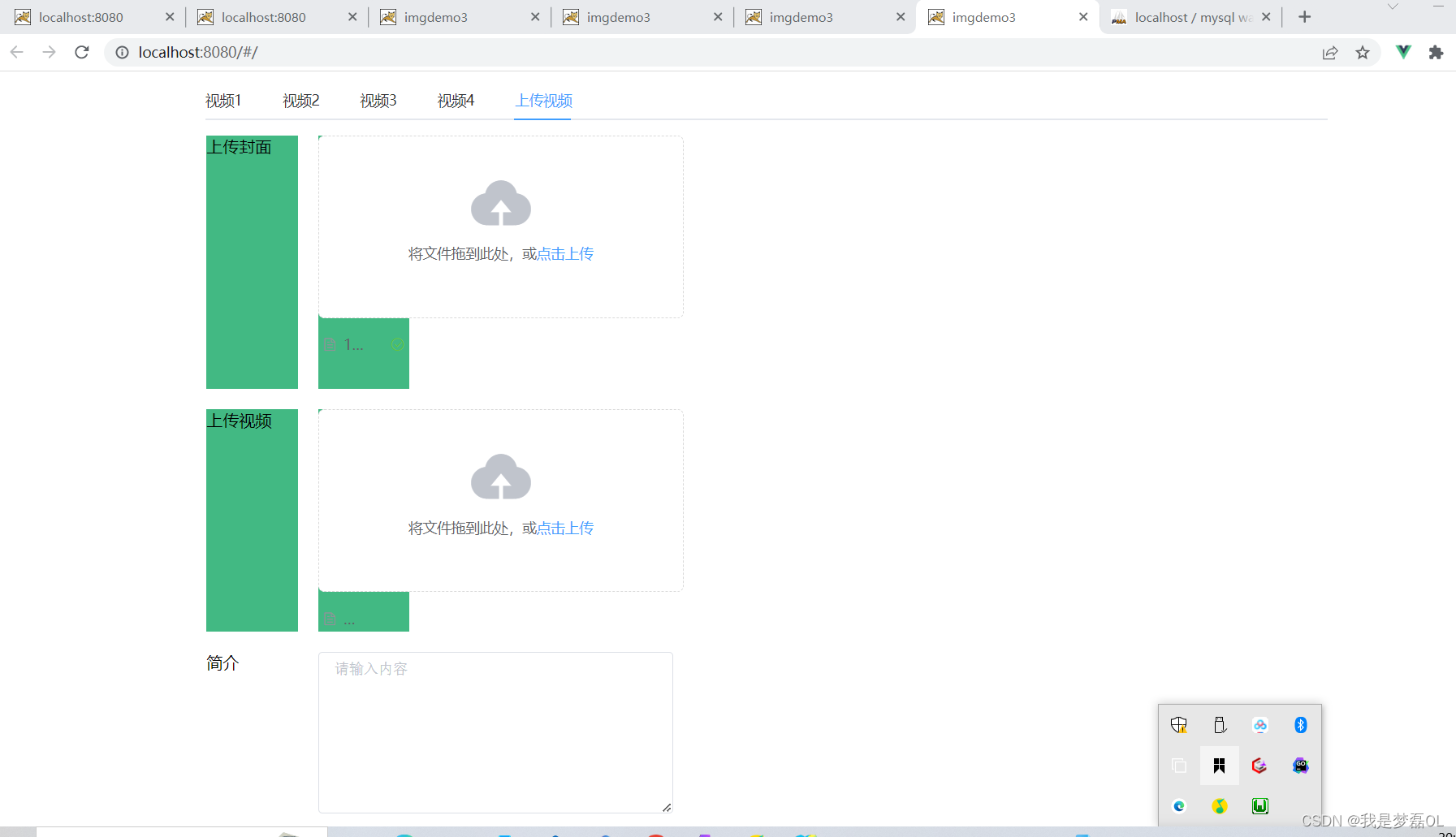
2,后端目录
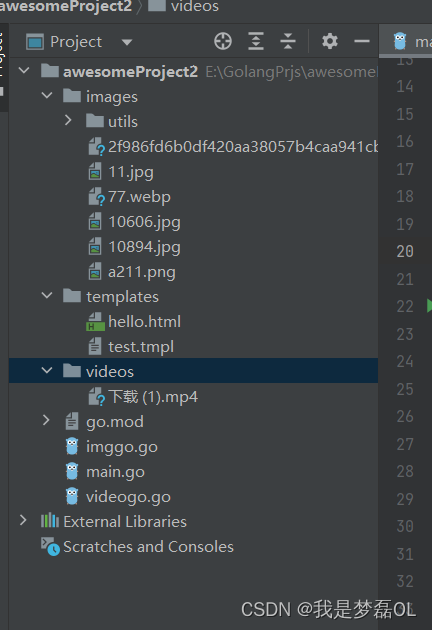
imggo.go
package main

import (
	"encoding/json"
	"fmt"
	"gorm.io/driver/mysql"
	"gorm.io/gorm"
)

func img(Symbol string, Name string, Imageurl string) (res string) {
	db, err := gorm.Open(mysql.New(mysql.Config{
		DSN: "root:@tcp(127.0.0.1:3306)/test3?charset=utf8mb4&parseTime=True&loc=Local", // 账号密码地址端口 // 根据当前 MySQL 版本自动配置
	}), &gorm.Config{
		// ...gorm配置
	})
	if err != nil {
		panic("failed to connect database")
	}

	fmt.Println("连接数据库成功")

	var image []Image

	image = []Image{
		{Symbol: Symbol, Name: Name, Imageurl: Imageurl},
	}
	// 迁移 schema
	db.AutoMigrate(&Image{})
	//一般项目中我们会类似下面的写法,通过Error对象检测,插入数据有没有成功,如果没有错误那就是数据写入成功了。
	if err := db.Create(&image).Error; err != nil {
		fmt.Println("插入失败", err)
		return
	}

	// 打印查询的结果
	fmt.Println("result: ", image)
	Info_of_Zhang3, err := json.Marshal(image)
	if err == nil {
		fmt.Println("我是json格式", string(Info_of_Zhang3))
		res = "1"
	} else {
		fmt.Println(err)
		return
	}

	return res
}

// 定义图片数据表的结构体
type Image struct {
	gorm.Model
	Symbol   string
	Name     string
	Imageurl string
}

type Video struct {
	gorm.Model
	Imageurl string //图片地址
	Videourl string //视频地址
	Des      string //描述
}
videogo.go
package main

import (
	"encoding/json"
	"fmt"
	"gorm.io/driver/mysql"
	"gorm.io/gorm"
)

type Videotest struct {
	gorm.Model
	Symbol   string
	Videourl string //视频地址
}

func video(Symbol string, Videourl string) (res string) {
	db, err := gorm.Open(mysql.New(mysql.Config{
		DSN: "root:@tcp(127.0.0.1:3306)/test3?charset=utf8mb4&parseTime=True&loc=Local", // 账号密码地址端口 // 根据当前 MySQL 版本自动配置
	}), &gorm.Config{
		// ...gorm配置
	})
	if err != nil {
		panic("failed to connect database")
	}

	fmt.Println("连接数据库成功")

	var video []Videotest

	video = []Videotest{
		{Symbol: Symbol, Videourl: Videourl},
	}
	// 迁移 schema
	db.AutoMigrate(&Videotest{})
	//一般项目中我们会类似下面的写法,通过Error对象检测,插入数据有没有成功,如果没有错误那就是数据写入成功了。
	if err := db.Create(&video).Error; err != nil {
		fmt.Println("插入失败", err)
		return
	}

	// 打印查询的结果
	fmt.Println("result: ", video)
	Info_of_Zhang3, err := json.Marshal(video)
	if err == nil {
		fmt.Println("我是json格式", string(Info_of_Zhang3))
		res = "1"
	} else {
		fmt.Println(err)
		return
	}

	return res
}
main.go
package main

import (
	"encoding/json"
	"fmt"
	"github.com/gin-contrib/cors"
	"github.com/gin-gonic/gin"
	"gorm.io/driver/mysql"
	"gorm.io/gorm"
	"log"
	"math/rand"
	"net/http"
	"strconv"
	"time"
)

func randomInt() int {
	rand.Seed(time.Now().UnixNano())
	return rand.Intn(20)
}

func main() {
	fmt.Printf("开启的路由 http://127.0.0.1:8080/upload")
	router := gin.Default()
	router.Use(cors.Default())
	// 把文件夹设置为静态文件,可直接在浏览器访问图片
	router.StaticFS("/images", http.Dir("./images"))

	// 把文件夹设置为静态文件,可直接在浏览器访问图片
	router.StaticFS("/videos", http.Dir("./videos"))
	// 为 multipart forms 设置较低的内存限制 (默认是 32 MiB)
	// 处理上传图片的请求
	router.POST("/index", func(c *gin.Context) {

		symbol := randomInt()
		// 单文件
		file, _ := c.FormFile("file")
		log.Println(file.Filename)
		log.Println("我是文件的名字", file.Filename)
		dst := "./" + "images/" + file.Filename
		log.Println("我是文件的路径------》", dst)
		// 图片静态文件base地址
		baseurl := "http://127.0.0.1:8080/images/" + file.Filename
		// 上传文件至指定的完整文件路径
		c.SaveUploadedFile(file, dst)
		num := img(strconv.Itoa(symbol), file.Filename, baseurl)

		// 用随机生成的整数做symbol

		c.JSON(200, gin.H{
			"symbol":   symbol,
			"num":      num,
			"imageurl": baseurl,
		})
	})

	// 处理上传视频的请求
	router.POST("/indexvideo/:symbol", func(c *gin.Context) {
		symbol := c.Param("symbol")
		file, err := c.FormFile("file")
		fmt.Println("我是symbol", symbol)
		fmt.Println("我是文件", file.Filename)
		fmt.Println(c)
		if err != nil {
			c.JSON(http.StatusBadRequest, gin.H{"error": err.Error()})
			return
		}

		dst := "./" + "videos/" + file.Filename
		// 图片静态文件base地址
		baseurl := "http://127.0.0.1:8088/videos/" + file.Filename
		// 上传文件至指定的完整文件路径
		c.SaveUploadedFile(file, dst)
		video(symbol, baseurl)
		c.JSON(200, gin.H{
			"symbol": symbol,
		})

	})

	router.LoadHTMLGlob("templates/*")
	//router.LoadHTMLFiles("templates/template1.html", "templates/template2.html")
	router.GET("/upload", func(c *gin.Context) {
		c.HTML(http.StatusOK, "hello.html", gin.H{
			"title": "Main website",
		})
	})

	//
	router.POST("/uploadvideo", func(c *gin.Context) {
		// 单文件
		file, _ := c.FormFile("file")
		log.Println(file.Filename)
		log.Println("我是文件的名字", file.Filename)
		dst := "./" + "images/" + file.Filename
		log.Println("我是文件的路径------》", dst)

		// 上传文件至指定的完整文件路径
		c.SaveUploadedFile(file, dst)

		c.String(http.StatusOK, fmt.Sprintf("'%s' uploaded!", file.Filename))
	})

	router.Run(":8088")
}

// 定义一个结构体
type User struct {
	gorm.Model
	Name string
	Age  string
}

func db(Name string, Age string) (res string) {
	db, err := gorm.Open(mysql.New(mysql.Config{
		DSN: "root:@tcp(127.0.0.1:3306)/test3?charset=utf8mb4&parseTime=True&loc=Local", // 账号密码地址端口 // 根据当前 MySQL 版本自动配置
	}), &gorm.Config{
		// ...gorm配置
	})
	if err != nil {
		panic("failed to connect database")
	}

	fmt.Println("连接数据库成功")

	var user []User

	user = []User{
		{Name: Name, Age: Age},
	}
	// 迁移 schema
	db.AutoMigrate(&User{})
	//一般项目中我们会类似下面的写法,通过Error对象检测,插入数据有没有成功,如果没有错误那就是数据写入成功了。
	if err := db.Create(&user).Error; err != nil {
		fmt.Println("插入失败", err)
		return
	}

	// 打印查询的结果
	fmt.Println("result: ", user)
	Info_of_Zhang3, err := json.Marshal(user)
	if err == nil {
		fmt.Println("我是json格式", string(Info_of_Zhang3))
		res = "1"
	} else {
		fmt.Println(err)
		return
	}

	return res

}

北京人形旗下天工造物具身智能开源社区,聚焦具身天工与慧思开物两大平台
更多推荐
 0
0 0
0- 0


 已为社区贡献4条内容

所有评论(0)