自动化测试框架Pytest介绍(9)——解决传入参数中文编码问题
·
我们利用参数化,当传入的参数有中文的时候,展示的是\u6d4b 这样的编码,而不是显示我们要的中文,allure里面展示的也是编码。
如下代码为测试用例,ids=test_expend_data.test_smokecase_titles 传入的是中文
import pytest
import allure
from common.ComLog import LOGGER
from testdata import test_expend_data

@allure.epic("记账模块测试")
@allure.feature("支出功能的测试")
class TestExpendClass:
    """
    支出测试用例类
    """
    @pytest.mark.parametrize('test_somke_data',test_expend_data.test_somke_datas,ids=test_expend_data.test_smokecase_titles)
    @pytest.mark.smoke
    def test_expend_smoke(self,test_somke_data):
        """记账冒烟测试用例
        """
        print(test_somke_data)
        with allure.step("步骤1.1 记账前记录初始值,流水初始值"):
            pass
        with allure.step("步骤1.2 记账前记录初始值,账户初始值"):
            pass
        with allure.step("步骤1.3 记账前记录初始值,图表初始值"):
            pass
        with allure.step("步骤2 记账"):
            pass
        with allure.step("步骤3.1 记账后记录最终值,流水"):
            pass
        with allure.step("步骤3.1 记账后记录最终值,账户"):
            pass
        with allure.step("步骤3.1 记账后记录最终值,图表"):
            pass
        with allure.step("步骤4 计算预期值"):
            pass
        with allure.step("步骤5 预期值和实际值断言"):
            pass
        pass
我们在mani里面执行
if __name__ == '__main__':
    LOGGER.info("测试开始!")

    if config.IsGenerateData:
        # 生成数据
        LOGGER.info("测试前生成测试数据")
        #TODO
        GenerateDataClass_l = GenerateDataClass()
        GenerateDataClass_l.set_test_data()

    now = datetime.datetime.now()
    time_str = now.strftime("%Y-%m-%d-%H%M%S")

    #此处命令 --alluredir 生成了报告的原始文件
    #执行冒烟测试用例
    pytest.main(["-vs","testcase","-m smoke","--alluredir","./report/{}xml".format(time_str)])


    #此处命令 allure generate 将起那么生成的json文件转换为html的报告
    os.system("allure generate ./Report/{}xml -o ./Report/{}html --clean".format(time_str,time_str))
    # 生成的报告index.html不能直接用Chrome打开,打开后看不到内容,需要用allure open打开才能渲染出样式和显示内容
    os.system("allure open ./Report/{}html".format(time_str))
执行结果如下,我们先展示的参数别名没有展示中文
[Running] python -u "d:\Test\AutoTest\main.py"

[Running] python -u "d:\Test\AutoTest\main.py"
2023-03-21 23:35:58,254-main.py-18-INFO: 测试开始!
============================= test session starts =============================
platform win32 -- Python 3.10.9, pytest-7.2.1, pluggy-1.0.0 -- D:\Python310\python.exe
cachedir: .pytest_cache
metadata: {'Python': '3.10.9', 'Platform': 'Windows-10-10.0.18363-SP0', 'Packages': {'pytest': '7.2.1', 'pluggy': '1.0.0'}, 'Plugins': {'allure-pytest': '2.13.0', 'html': '3.2.0', 'metadata': '2.0.4', 'rerunfailures': '11.1.1', 'xdist': '3.2.0'}, 'JAVA_HOME': 'C:\\Program Files\\Java\\jre1.8.0_351'}
rootdir: d:\Test\AutoTest
plugins: allure-pytest-2.13.0, html-3.2.0, metadata-2.0.4, rerunfailures-11.1.1, xdist-3.2.0
collecting ... collected 7 items / 4 deselected / 3 selected

testcase/test_charge.py::TestExpendClass::test_expend_smoke[\u6d4b\u8bd5\u5206\u7c7b\u4e3a\u8863\u670d\u9970\u54c1\u662f\u652f\u51fa\u529f\u80fd\u662f\u5426\u6b63\u786e]
{'用例标题': '测试分类为衣服饰品是支出功能是否正确', '是否测试': '是', '冒烟用例': '是', '一级分类': '衣服饰品', '二级分类': '衣服裤子', '一级账号': '金融账户', '二级账号': '招商银行', '时间': '', '成员': '本人', '商家': '商场', '备注': '买衣服', '项目': '衣服', '金额': 200.0}
PASSED
testcase/test_charge.py::TestExpendClass::test_expend_smoke[\u6d4b\u8bd5\u652f\u51fa\u91d1\u989d\u6709\u5c0f\u6570\u7684\u60c5\u51b5] {'用例标题': '测试支出金额有小数的情况', '是否测试': '是', '冒烟用例': '是', '一级分类': '衣服饰品', '二级分类': '衣服裤子', '一级账号': '信用卡', '二级账号': '信用卡', '时间': '', '成员': '本人', '商家': '商场', '备注': '买衣服', '项目': '衣服', '金额': 150.45}
PASSED
testcase/test_charge.py::TestIncomeClass::test_income_smoke PASSED2023-03-21 23:36:04,939-conftest.py-51-INFO: 测试结束


================= 3 passeds in 6.32s =================
Report successfully generated to .\Report\2023-03-21-233558html
Starting web server...
2023-03-21 23:36:09.740:INFO::main: Logging initialized @496ms to org.eclipse.jetty.util.log.StdErrLog
Server started at <http://2.0.0.1:58835/>. Press <Ctrl+C> to exit
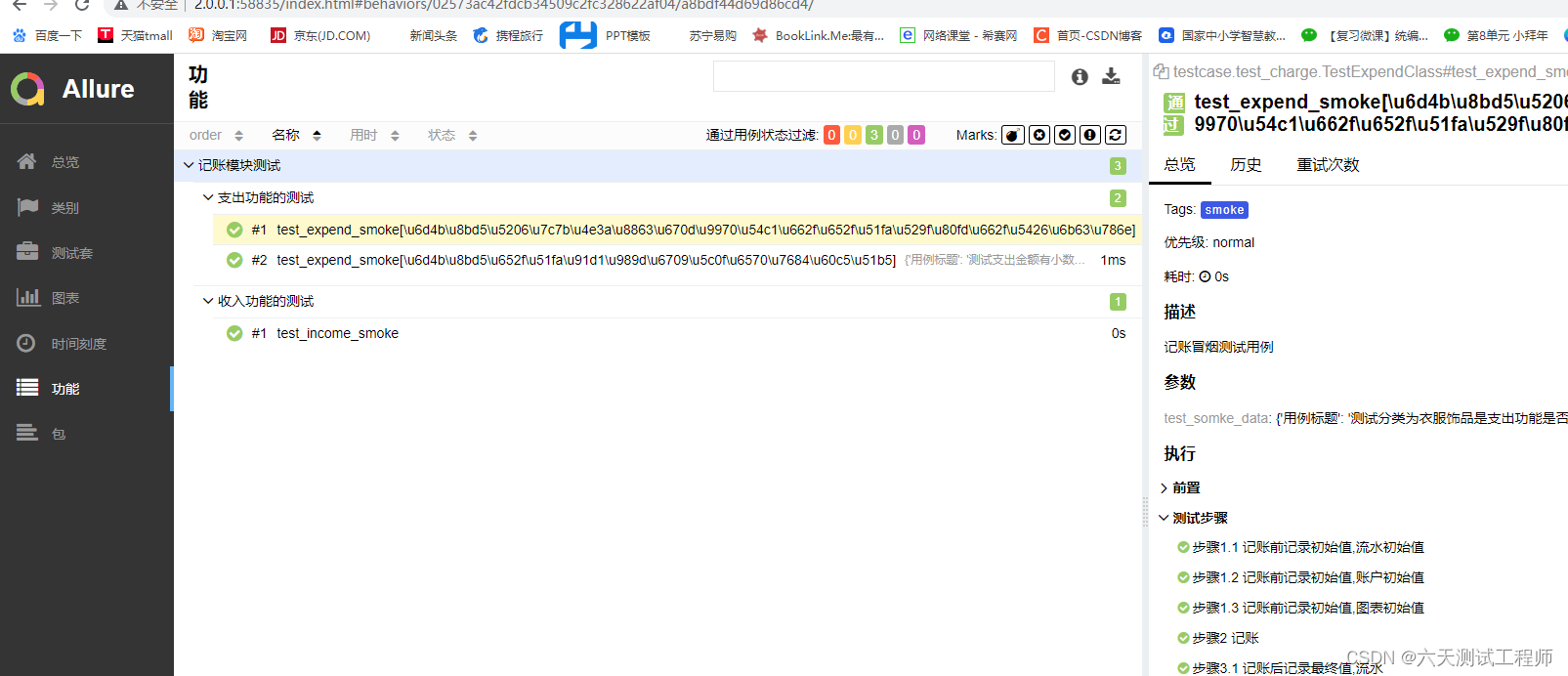
allure报告中的用例展示也没有中文
那么该如何解决呢,在目录根目录新建conftest.py文件,加上如下代码即可
#解决用例参数化中文编码问题
def pytest_collection_modifyitems(items) -> None:
    # item表示每个测试用例,解决用例名称中文显示问题
    for item in items:
        item.name = item.name.encode("utf-8").decode("unicode-escape")
        item._nodeid = item._nodeid.encode("utf-8").decode("unicode-escape")
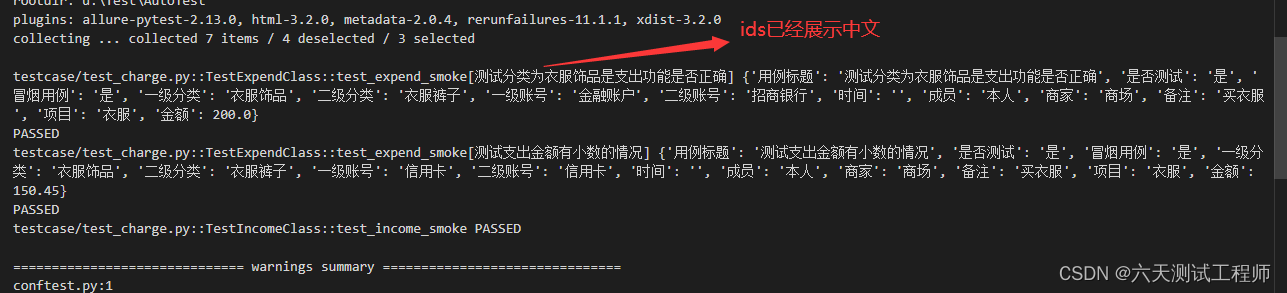
再次执行后,我们可以看到可以正常显示中文了
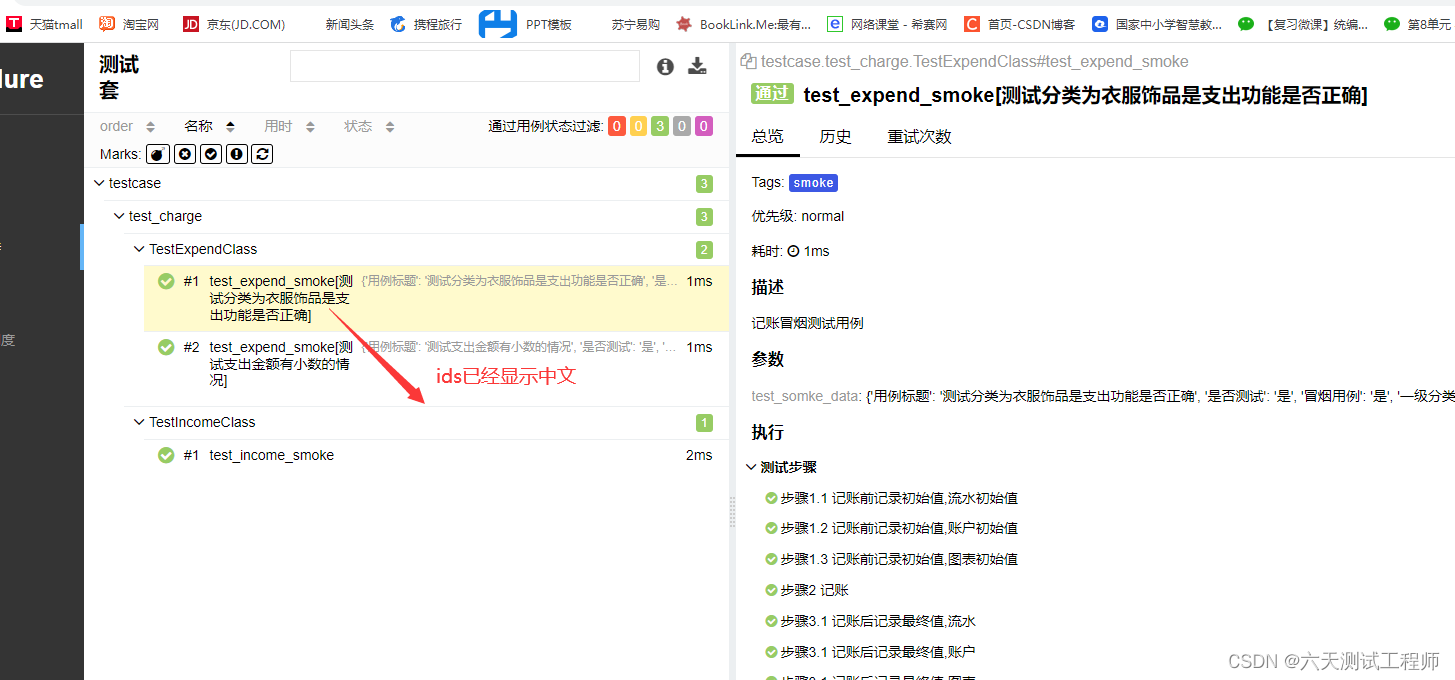
allure报告也一样

北京人形旗下天工造物具身智能开源社区,聚焦具身天工与慧思开物两大平台
更多推荐
 1
1 0
0- 0


 已为社区贡献6条内容

所有评论(0)