uniapp-购物车功能实现案例
·
图片效果
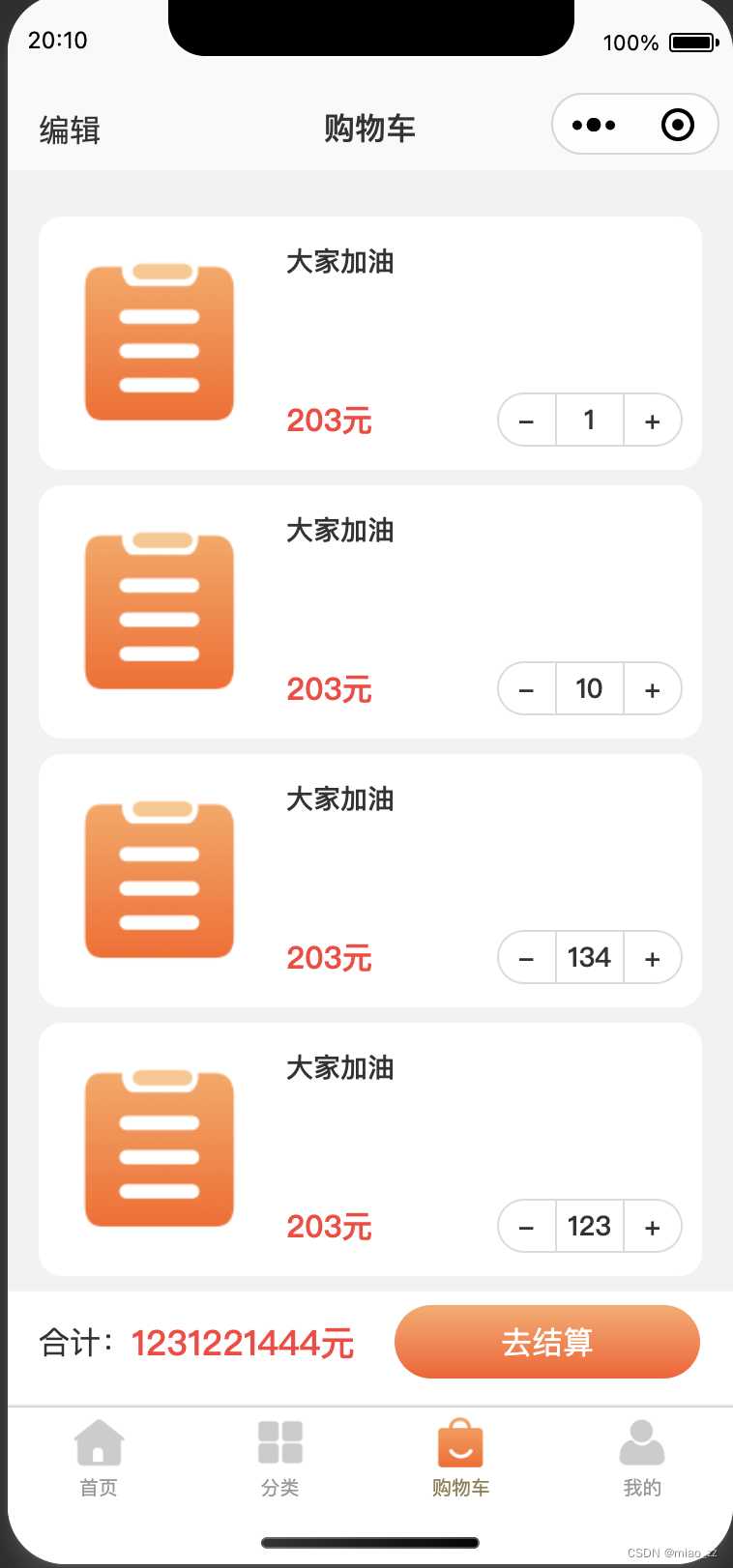
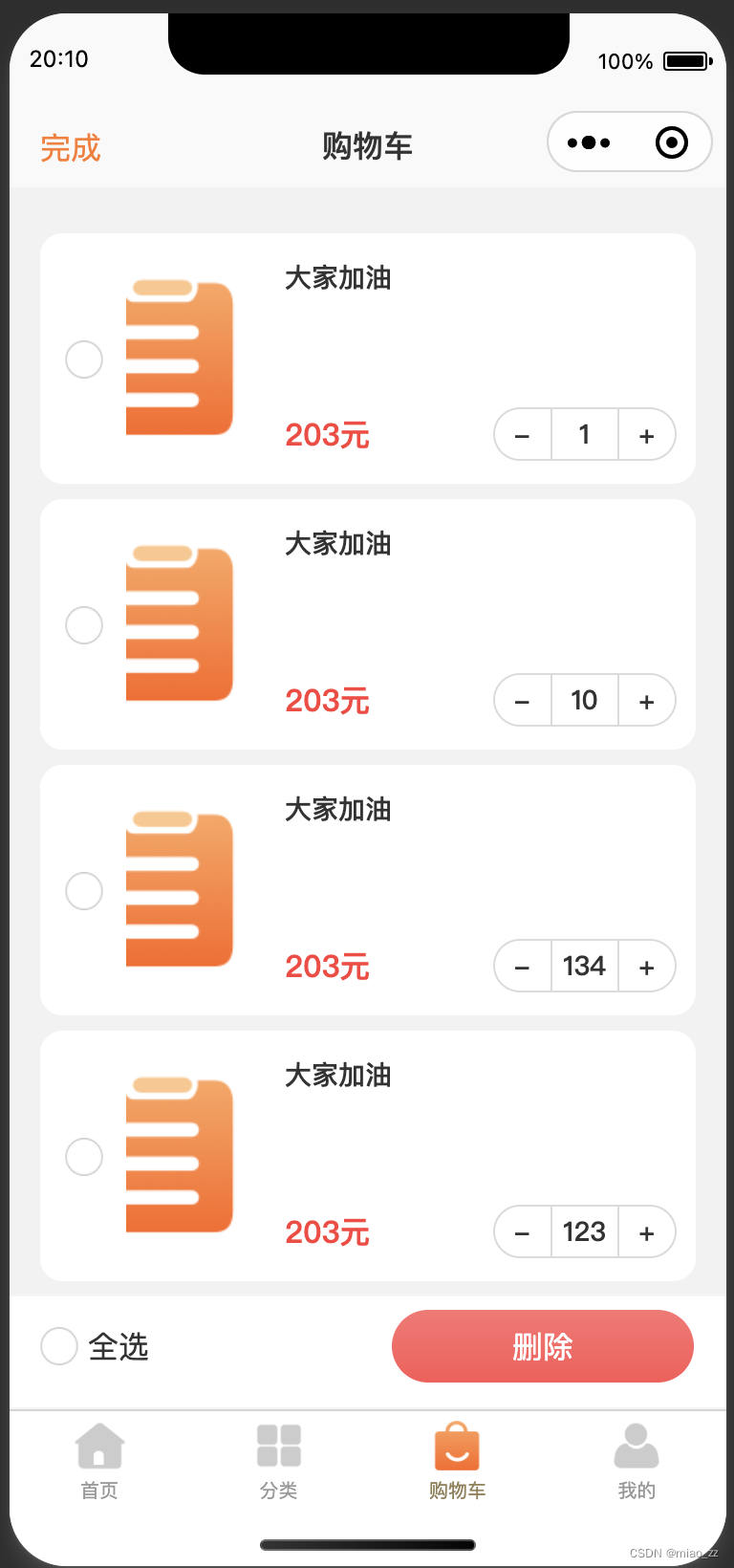
代码实例
<template>
	<view class="shoppingCart-wrap">
		<!-- 自定义头部 -->
		<mz-navBar isFixed="true">
			<template v-slot:left>
				<view v-if="!isEdit" class="shoppingCart-edit" @click="editHandle">编辑</view>
				<view v-else class="shoppingCart-finsh" @click="finshHandle">完成</view>
			</template>
			<template v-slot:title>
				<text>购物车</text>
			</template>
		</mz-navBar>
		<!-- 商品列表-start -->
		<view class="shoppingCart-list">
			<template v-for="(item,index) in dataList">
				<view class="shoppingCart-item" :key="index">
					<view class="shoppingCart-item-lf">
						<image class="shoppingCart-lf-image" mode="widthFix" src="../../static/icon_order.png"></image>
					</view>
					<view class="shoppingCart-item-cn"></view>
					<view class="shoppingCart-item-rg">
						<view class="shoppingCart-rg-name twoLine">大家加油</view>
						<view class="shoppingCart-rg-footer">
							<view class="shoppingCart-rg-money">203元</view>
							<mz-quantity-operate :value="item.count" :subscript="index" @change="quantityChangeHandle">
							</mz-quantity-operate>
						</view>
					</view>
					<!-- 选中按钮 -->
					<view class="shoppingCart-radio-wrap" v-if="isEdit" @click="checkedShoppingHandle(item,index)">
						<image class="radio-icon" v-if="item.isChecked" src="@/static/icon_radiotrue.png"></image>
						<image class="radio-icon" v-else src="@/static/icon_radiofalse.png"></image>
					</view>
				</view>
			</template>
		</view>
		<!-- 商品列表-end -->
		<!-- footer -->
		<view style="height: 60px;"></view>
		<mz-footer isJudgeOsName="true">
			<view class="footer-single">
				<template v-if="isEdit">
					<view class="footer-single-lf">
						<view class="shoppingCart-footer" @click="allCheckedHandle">
							<image class="radio-icon" v-if="isAllChecked" src="@/static/icon_radiotrue.png"></image>
							<image class="radio-icon" v-else src="@/static/icon_radiofalse.png"></image>
							<text class="radio-text">全选</text>
						</view>
					</view>
					<view class="footer-single-rg">
						<mz-confirm-button backgroundColor="linear-gradient(360deg, #FF5555 0%, #FF7272 100%)"
							@click="deleteHandle">删除</mz-confirm-button>
					</view>
				</template>
				<template v-else>
					<view class="footer-single-lf">
						<view class="shoppingCart-footer">
							<view class="shoppingCart-footer-name">合计:</view>
							<view class="shoppingCart-footer-money">1231221444元</view>
						</view>
					</view>
					<view class="footer-single-rg">
						<mz-confirm-button @click="goSettlementHandle">去结算</mz-confirm-button>
					</view>
				</template>
			</view>
		</mz-footer>
	</view>
</template>

<script>
	export default {
		data() {
			return {
				isEdit: false, //是否编辑购物车数据
				isAllChecked: false, //是否全选
				checkedList: [], //选中的列表数据
				dataList: [{
					id: 1,
					count: 1,
					isChecked: false
				}, {
					id: 2,
					count: 10,
					isChecked: false
				}, {
					id: 3,
					count: 134,
					isChecked: false
				}, {
					id: 4,
					count: 123,
					isChecked: false
				}, {
					id: 5,
					count: 11,
					isChecked: false
				}, {
					id: 6,
					count: 4,
					isChecked: false
				}], //列表数据
			};
		},
		onLoad() {

		},
		onShow() {
			this.initStatus();
		},
		methods: {
			/**
			 * 初始化购物车全部状态值
			 * **/
			initStatus() {
				this.isEdit = false;
				this.isAllChecked = false;
				this.checkedList = [];
			},
			/**
			 * 把列表中所有数据全部置为不选中
			 * **/
			changeListCheckedStatus() {
				let dataList = this.dataList;
				for (let i = 0; i < dataList.length; i++) {
					dataList[i].isChecked = false;
				}
				this.dataList = dataList;
			},
			/**
			 * 点击编辑
			 * **/
			editHandle() {
				this.initStatus();
				this.changeListCheckedStatus();
				this.isEdit = true;
			},
			/**
			 * 点击完成
			 * **/
			finshHandle() {
				this.initStatus();
				this.changeListCheckedStatus();
				this.isEdit = false;
			},
			/**
			 * 操作列表中是否选中
			 * **/
			checkedShoppingHandle(row, subscript) {
				let checkedList = this.checkedList;
				//indexof():可返回数组中某个指定的元素位置,如果在数组中没有找到指定元素则返回-1
				if (checkedList.indexOf(row.id) <= -1) {
					//如果不存在,则插入数组
					checkedList.push(row.id)
				} else {
					//如果存在,则删除该数据
					checkedList.splice(checkedList.indexOf(row.id), 1);
				}
				this.dataList[subscript].isChecked = !this.dataList[subscript].isChecked;
				//如果删除的数据和列表的数据相等,则全部选中
				if (this.dataList.length == checkedList.length) {
					this.isAllChecked = true;
				} else {
					this.isAllChecked = false;
				}
			},
			/**
			 * 点击全选
			 * **/
			allCheckedHandle() {
				this.isAllChecked = !this.isAllChecked;
				//把删除列表数组置为空,重新全部赋值
				this.checkedList = [];
				if (this.isAllChecked) {
					let checkedList = this.checkedList;
					let dataList = this.dataList;
					for (let i = 0; i < dataList.length; i++) {
						checkedList.push(dataList[i].id);
						dataList[i].isChecked = true;
					}
					this.checkedList = checkedList;
					this.dataList = dataList;
				} else {
					let dataList = this.dataList;
					for (let i = 0; i < dataList.length; i++) {
						dataList[i].isChecked = false;
					}
					this.dataList = dataList;
				}

			},
			/**
			 * 删除选中的商品
			 * **/
			deleteHandle() {
				console.log(this.checkedList)
			},
			/**
			 * 操作商品数量按钮
			 * **/
			quantityChangeHandle(params, subscript) {
				this.dataList[subscript].count = params;
			},
			/**
			 * 点击去结算
			 * **/
			goSettlementHandle() {
				uni.navigateTo({
					url: "/pagesC/settlement/settlement"
				})
			}
		}
	}
</script>

<style lang="scss" scoped>
	.shoppingCart-wrap {
		width: $mzWidth;
		margin: 12px auto;
		display: flex;
		flex-direction: column;
	}

	.shoppingCart-edit {
		font-size: 16px;
		font-family: SourceHanSansCN-Regular, SourceHanSansCN;
		font-weight: 400;
		color: #333333;
		position: absolute;
		top: 12px;
		left: 0px;
	}

	.shoppingCart-finsh {
		font-size: 16px;
		font-family: SourceHanSansCN-Regular, SourceHanSansCN;
		font-weight: 400;
		color: #FF792A;
		position: absolute;
		top: 12px;
		left: 0px;
	}

	//商品列表
	.shoppingCart-list {
		width: 100%;
		margin: 12px auto;
		display: flex;
		flex-direction: column;

		.shoppingCart-item {
			min-height: 130px;
			background: #FFFFFF;
			border-radius: 12px;
			display: flex;
			flex-direction: row;
			padding: 12.5px 10px;
			position: relative;
			margin-bottom: 8px;

			.shoppingCart-item-lf {
				width: 106px;
				height: 106px;
				position: relative;
				display: flex;
				justify-content: center;
				align-items: center;
				overflow: hidden;

				.shoppingCart-lf-image {
					width: 90%;
					height: auto;
				}
			}

			.shoppingCart-item-cn {
				width: 12px;
				height: 100%;
			}

			.shoppingCart-item-rg {
				flex: 1;
				height: 106px;
				display: flex;
				flex-direction: column;
				position: relative;

				.shoppingCart-rg-name {
					font-size: 14px;
					font-family: SourceHanSansCN-Medium, SourceHanSansCN;
					font-weight: 500;
					color: #333333;
				}

				.shoppingCart-rg-footer {
					width: 100%;
					position: absolute;
					bottom: 0px;
					left: 0px;
					right: 0px;
					display: flex;
					flex-direction: row;
					justify-content: space-between;
					align-items: center;

					.shoppingCart-rg-money {
						font-size: 16px;
						font-family: SourceHanSansCN-Bold, SourceHanSansCN;
						font-weight: bold;
						color: #FF3B3B;
					}
				}
			}

			//单选按钮
			.shoppingCart-radio-wrap {
				border-top-left-radius: 12px;
				border-bottom-left-radius: 12px;
				width: 45px;
				background-color: #FFFFFF;
				z-index: 1;
				position: absolute;
				top: 0px;
				left: 0px;
				bottom: 0px;
				display: flex;
				justify-content: center;
				align-items: center;
			}
		}
	}

	//footer
	.footer-single {
		width: $mzWidth;
		margin: 0px auto;
		display: flex;
		flex-direction: row;
		justify-content: space-between;
		margin-top: 6px;

		.footer-single-lf {
			display: flex;
			align-items: center;
		}

		.footer-single-rg {}
	}

	.shoppingCart-footer {
		display: flex;
		flex-direction: row;
		align-items: center;

		.shoppingCart-footer-name {
			font-size: 16px;
			font-family: PingFangSC-Regular, PingFang SC;
			font-weight: 400;
			color: #333333;
		}

		.shoppingCart-footer-money {
			font-size: 18px;
			font-family: SourceHanSansCN-Medium, SourceHanSansCN;
			font-weight: 500;
			color: #FF3B3B;
		}
	}

	.radio-icon {
		width: 20px;
		height: 20px;
	}

	.radio-text {
		font-size: 16px;
		font-family: PingFangSC-Regular, PingFang SC;
		font-weight: 400;
		color: #333333;
		margin-left: 5px;
	}
</style>
关于页面中自定义公共组件
mz-navBar
<template>
	<view class="navbar">
		<view class="navbar-box" :class="{'isFixedStyle':isFixed=='true'}"
			:style="{'background-color':backgroundColor}">
			<view class="navbar-wrap">
				<!-- 状态栏高度 -->
				<view class="status_bar" :style="{height:statusBarHeight+'px'}"></view>
				<!-- 头部菜单 -->
				<view class="navbar-header" :style="{height:navBarHeight+'px'}">
					<slot></slot>
					<slot name="left"></slot>
					<view class="navbar-header-title">
						<slot name="title"></slot>
					</view>
				</view>
			</view>
		</view>
		<template v-if="isFixed=='true'">
			<view class="statusbar-height" :style="{height:statusBarHeight+'px'}"></view>
			<view :style="{height:navBarHeight+'px'}"></view>
		</template>
	</view>
</template>

<script>
	export default {
		name: "mz-navBar",
		props: {
			isFixed: {
				type: String,
				default: () => {
					return false
				}
			},
			backgroundColor: {
				type: String,
				default: () => {
					return '#F9F9F9'
				}
			}
		},
		data() {
			return {
				statusBarHeight: '20',
				navBarHeight: "30",
			};
		},
		mounted() {
			const systemInfo = uni.getSystemInfoSync();
			console.log("[systemInfo]", systemInfo)
			this.statusBarHeight = systemInfo.statusBarHeight;
			//获取胶囊信息:uni.getMenuButtonBoundingClientRect-->App | H5 | 支付宝小程序不支持
			const menuButtonBoundingInfo = uni.getMenuButtonBoundingClientRect();
			// (胶囊底部高度-状态栏的高度)+(胶囊顶部高度-状态栏的高度)*2=导航栏的高度
			this.navBarHeight = (menuButtonBoundingInfo.top - systemInfo.statusBarHeight) * 2 + (menuButtonBoundingInfo
				.bottom - systemInfo.statusBarHeight);
			console.log("[sysinfo]", this.navBarHeight)
			let FixedHeight = this.navBarHeight + this.statusBarHeight;
			uni.setStorageSync("FixedHeight", FixedHeight)
			const windowHeight = systemInfo.windowHeight;
			uni.setStorageSync("windowHeight", windowHeight)
			const screenWidth = systemInfo.screenWidth;
			uni.setStorageSync("screenWidth", screenWidth)
		},
		methods: {

		}
	}
</script>

<style lang="scss" scoped>
	.navbar {
		width: 100%;
	}

	.isFixedStyle {
		position: fixed;
		top: 0;
		left: 0px;
		right: 0px;
	}

	.navbar-box {
		z-index: 10;

		.navbar-wrap {
			width: 91.47%;
			margin: auto;

			.status_bar {
				height: var(--status-bar-height);
				width: 100%;
			}

			.navbar-header {
				width: 100%;
				height: 30px;
				display: flex;
				flex-direction: row;
				position: relative;
				margin: 0px auto;

				.navbar-header-title {
					width: 100%;
					display: flex;
					justify-content: center;
					align-items: center;
					font-family: Source Han Sans CN;
					font-weight: 500;
					color: #333;
					font-size: 16px;
				}
			}
		}
	}


	.statusbar-height {
		height: var(--status-bar-height);
		width: 100%;
	}
</style>
mz-quantity-operate
<template>
	<view class="quantity-operate">
		<view class="quantity-operate-subtract" @click="quantityOperateHandle('subtract',value,subscript)">-</view>
		<view class="quantity-operate-li-lf"></view>
		<input type="number" class="quantity-operate-amount" :placeholder="value" :disabled="disabled" :value="value"
			@input="amountInputHandle($event)" />
		<view class="quantity-operate-li-rg"></view>
		<view class="quantity-operate-plus" @click="quantityOperateHandle('plus',value,subscript)">+</view>
	</view>
</template>

<script>
	export default {
		name: "mz-quantity-operate",
		props: {
			subscript: {
				type: [String, Number],
				default: () => {
					return 0
				}
			},
			value: {
				type: Number,
				default: () => {
					return 1
				}
			},
			disabled: {
				type: Boolean,
				default: () => {
					return true
				}
			},
			maxValue: {
				type: Number,
				default: () => {
					return 100000
				}
			},
			minValue: {
				type: Number,
				default: () => {
					return 1
				}
			}
		},
		data() {
			return {

			};
		},
		mounted() {

		},
		methods: {
			/**
			 * 输入框数量操作
			 * **/
			amountInputHandle(e) {
				let tempValue = e.detail.value;
				tempValue <= 1 ? tempValue = 1 : tempValue = tempValue;
				this.$emit("change", tempValue, this.subscript)
			},
			/**
			 * 按钮数量操作
			 * **/
			quantityOperateHandle(type, value, subscript) {
				if (type == 'plus') {
					//加
					value >= this.maxValue ? value = this.maxValue : value++;
					this.$emit("change", value, subscript)
				} else {
					//减
					value <= this.minValue ? value = this.minValue : value--;
					this.$emit("change", value, subscript)
				}
			}
		}
	}
</script>

<style lang="scss" scoped>
	.quantity-operate {
		width: 96.5px;
		height: 28px;
		background: #FFFFFF;
		border-radius: 14px;
		border: 1px solid #DBDBDB;
		display: flex;
		flex-direction: row;
		font-size: 14px;
		color: #333;
		font-weight: 500;

		.quantity-operate-subtract {
			flex: 1;
			display: flex;
			justify-content: center;
			align-items: center;
		}

		.quantity-operate-amount {
			border: 0px;
			width: 30px;
			height: 100%;
			text-align: center;
		}

		.quantity-operate-plus {
			flex: 1;
			display: flex;
			justify-content: center;
			align-items: center;
		}

		.quantity-operate-li-lf {
			border: 1px solid #DBDBDB;
			border-top: 0px;
			border-bottom: 0px;
			border-right: 0px;
			width: 3px;
			height: 100%;
		}

		.quantity-operate-li-rg {
			border: 1px solid #DBDBDB;
			border-top: 0px;
			border-bottom: 0px;
			border-left: 0px;
			width: 3px;
			height: 100%;
		}
	}
</style>
mz-footer
<template>
	<view class="footer-wrap" :style="{'min-height':isJudgeOsName=='false'?(osName=='ios'?'94px':'60px'):'60px'}">
		<slot></slot>
	</view>
</template>

<script>
	export default {
		name: "mz-footer",
		props: {
			isJudgeOsName: {
				type: String,
				default: () => {
					return 'false'
				}
			}
		},
		data() {
			return {
				osName: ""
			};
		},
		mounted() {
			console.log("footer", uni.getSystemInfoSync())
			this.osName = uni.getSystemInfoSync().osName;
		},
		methods: {

		}
	}
</script>

<style lang="scss" scoped>
	//footer
	.footer-wrap {
		border-top: 1px solid rgba(196, 198, 207, 0.17);
		border-bottom: 1px solid rgba(196, 198, 207, 0.17);
		width: 100%;
		background-color: #fff;
		position: fixed;
		bottom: 0px;
		left: 0px;
		right: 0px;
		z-index: 2;
	}
</style>
mz-confirm-button
<template>
	<view class="mzButton-wrap" @click="eventTriggerHandle" :style="{
		'width':width,
		'height':height,
		'borderRadius':borderRadius,
		'borderColor':borderColor,
		'background':backgroundColor,
		'color':color
		}">
		<slot></slot>
	</view>
</template>

<script>
	export default {
		name: "mz-confirm-button",
		props: {
			width: {
				type: String,
				default: () => {
					return '160px'
				}
			},
			height: {
				type: String,
				default: () => {
					return '40px'
				}
			},
			borderRadius: {
				type: String,
				default: () => {
					return '20px'
				}
			},
			borderColor: {
				type: String,
				default: () => {
					return 'none'
				}
			},
			backgroundColor: {
				type: String,
				default: () => {
					return 'linear-gradient(180deg, #FFAA6B 0%, #FF5B23 100%)'
				}
			},
			color: {
				type: String,
				default: () => {
					return '#FFFFFF'
				}
			},
		},
		data() {
			return {

			};
		},
		methods: {
			/**
			 * 时间触发
			 * **/
			eventTriggerHandle() {
				this.$emit("click")
			}
		}
	}
</script>

<style lang="scss" scoped>
	.mzButton-wrap {
		border: 1px solid;
		font-size: 16px;
		font-family: PingFangSC-Regular, PingFang SC;
		font-weight: 400;
		display: flex;
		justify-content: center;
		align-items: center;
	}
</style>

北京人形旗下天工造物具身智能开源社区,聚焦具身天工与慧思开物两大平台
更多推荐
 2
2 0
0- 0


 已为社区贡献13条内容

所有评论(0)