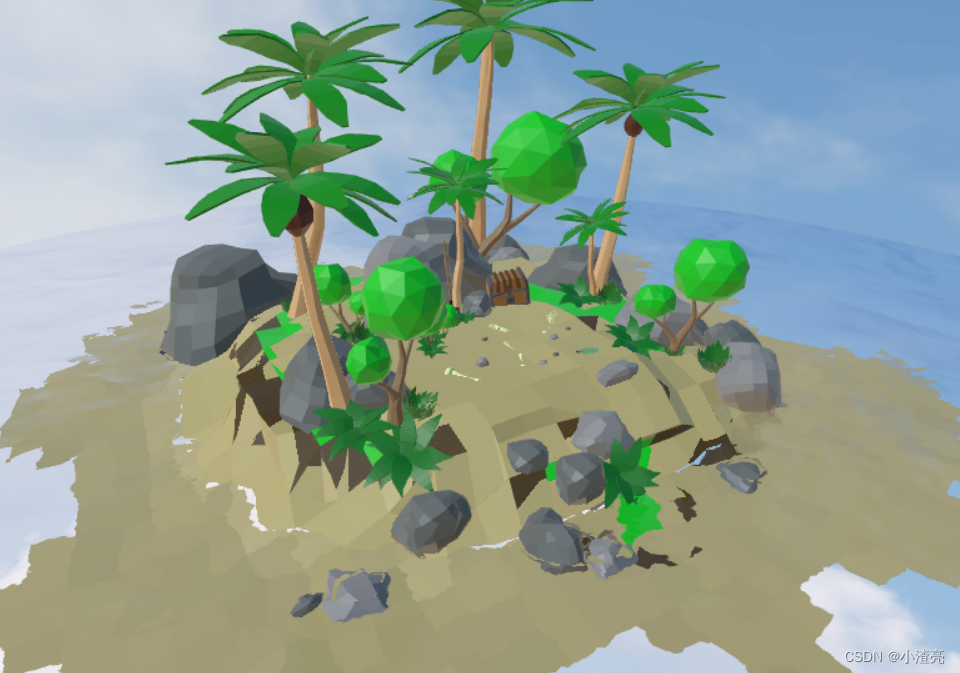
three.js入门篇9 之 水天一色的小岛
·
three.js入门篇9 之 水天一色的小岛
code App.vue
<template>
  <div class="container" ref="container"></div>
</template>

<script setup>
import { ref, onMounted } from 'vue'
import * as THREE from "three"
// 导入轨道控制器 - 控制物体的左右上下移动( 可以设置xyz轴 )
import { OrbitControls } from "three/examples/jsm/controls/OrbitControls"
// 导入水面
import { Water } from "three/examples/jsm/objects/Water2";
// 导入gltf载入库 - 用于创出小岛模型
import { GLTFLoader } from "three/examples/jsm/loaders/GLTFLoader";
import { DRACOLoader } from "three/examples/jsm/loaders/DRACOLoader";
import { RGBELoader } from "three/examples/jsm/loaders/RGBELoader";

// 初始化场景
const scene = new THREE.Scene()
// 初始化相机 - 透视相机
const camera = new THREE.PerspectiveCamera(75,window.innerWidth / window.innerHeight,0.1,2000)
// 设置相机位置 x y z
camera.position.set(-50,50,130)
// 设置宽高比例
camera.aspect = window.innerWidth / window.innerHeight
// 更新相机矩阵
camera.updateProjectionMatrix()
// 把相机添加到场景之中
scene.add( camera );

// 设置渲染器
const renderer = new THREE.WebGL1Renderer({
  // 设置抗锯齿 - 更理想的渲染
  antialias:true,
  // 对数深度缓冲区 - 水面不闪烁
  logarithmicDepthBuffer: true,
})
renderer.outputEncoding = THREE.sRGBEncoding; // 设置编码
// 设置渲染的尺寸大小
renderer.setSize(window.innerWidth,window.innerHeight)
// 创建轨道控制器
const controls = new OrbitControls(camera,renderer.domElement)

// 监听画面变化,更新渲染画面
window.addEventListener('resize',()=>{
  // 更新摄像头
  camera.aspect = window.innerWidth / window.innerHeight
  // 更新摄像头的头部矩阵
  camera.updateProjectionMatrix()
  // 更新渲染器
  renderer.setSize(window.innerWidth, window.innerHeight)
})

// 将webgl渲染的canvas内容添加到body上
document.body.appendChild(renderer.domElement)

// 渲染函数 - 每一帧渲染一次
function animate() {
  // 渲染下一帧 的时候 会调用 animate 函数
	requestAnimationFrame( animate );
	controls.update();
	renderer.render( scene, camera );
}
animate()

// 设置巨大的球
const skyGeometry = new THREE.SphereGeometry(1000,60,60)
const skyMaterials = new THREE.MeshBasicMaterial({
    map: new THREE.TextureLoader().load("./img/water/sky.jpg"),
  })
skyGeometry.scale(1,1,-1) // 进入内部 反过来
const sky = new THREE.Mesh(skyGeometry,skyMaterials)
// sky.geometry.scale(1,1,-1) // 进入内部 反过来
scene.add(sky)

// 创建视频的纹理
const video = document.createElement("video")
video.src  = './img/water/sky.mp4'
video.loop = true // 自动播放

window.addEventListener("click",()=>{
  // 鼠标移动的时候播放,先判断是否为暂停状态
  if ( video.paused ) {
    video.play()
    skyMaterials.map = new THREE.VideoTexture(video) // 天空材质
    skyMaterials.map.needsUpdate = true // 自动更新
  }
})

// 创建水面 - 圆形的水面
const waterGeometry = new THREE.CircleBufferGeometry(300,64)
const water = new Water(waterGeometry,{
  textureWidth:1024, // 宽
  textureHeight:1024, // 高
  color:0xeeeeff,
  flowDirection:new THREE.Vector2(1,1), // 水的流动方向
  scale:1,//水面的波纹大小
})
// 水面比石头高一点点
water.position.y = 3;
// 水面旋转至水平
water.rotation.x = -Math.PI / 2;
scene.add(water)

// 载入环境纹理hdr
const hdrLoader = new RGBELoader();
hdrLoader.loadAsync("./assets/050.hdr").then((texture) => {
  texture.mapping = THREE.EquirectangularReflectionMapping; // 纹理-球面的映射
  scene.background = texture; // 背景
  scene.environment = texture; // 环境
});

// 添加平行光
const light = new THREE.DirectionalLight(0xffffff, 1);
light.position.set(-100, 100, 10);
scene.add(light);

// 添加小岛模型
// 实例化gltf载入库
const loader = new GLTFLoader();
// 实例化draco载入库
const dracoLoader = new DRACOLoader();
// 添加draco载入库
dracoLoader.setDecoderPath("./draco/");
// 添加draco载入库
loader.setDRACOLoader(dracoLoader);
// 加载模型
loader.load("./model/island2.glb", (gltf) => {
  scene.add(gltf.scene)
  // scene.add(gltf.scene);
});


// 渲染函数 - 每一帧渲染一次
function render() {
  // 渲染下一帧 的时候 会调用 animate 函数
	requestAnimationFrame( render );
	renderer.render( scene, camera );
}

// 将webgl渲染的canvas内容添加到div上
const container = ref(null)
// dom节点挂载之后 渲染dom节点
onMounted(()=>{
  container.value.appendChild(renderer.domElement)
  // 设置控制器阻尼,让控制器更具有真是效果
  // controls.enableDamping = true
  render()
})
</script>

<style lang="scss" scoped>
* {
  padding:0;
  margin: 0;
}
.container {
  height:100;
  width:100%;
  background:'#f0f0f0'
}
</style>
效果

北京人形旗下天工造物具身智能开源社区,聚焦具身天工与慧思开物两大平台
更多推荐
 1
1 0
0- 0


 已为社区贡献8条内容

所有评论(0)